Software Utilities
Software utilities are used on a computer system to
clear up unwanted files that may slow your system
down, or even protect your system from unwanted
hackers or viruses when you access the web so its all
about keeping your computer safe and running
smoothly
Windows Task Manager
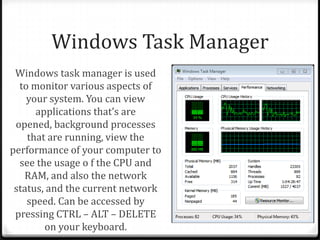
Windows task manager is used
to monitor various aspects of
your system. You can view
applications that’s are
opened, background processes
that are running, view the
performance of your computer to
see the usage o f the CPU and
RAM, and also the network
status, and the current network
speed. Can be accessed by
pressing CTRL – ALT – DELETE
on your keyboard.
Performance and Resource
Monitor
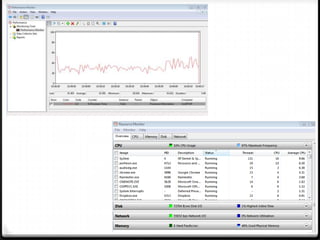
Performance Monitor is used to view performance data
either in real time or from a log file. You can also
schedule the program to log the data at any time which
can then be put into a report, and also your able to
monitor it in real time in the form of a graph show on
the next slide.
Resource monitor is very similar but it shows all of the
processes that are being run in the CPU, RAM and also
measures disk usage, and network usage also.
Backup and Restore Points
Backing up your computer is extremely important if you don’t
want to lose any of your data through corruption or viruses etc.
You can back up your system through a partition on your hard
drive or you can backup through the web or even to another
flash drive, portable hard drive etc. This will save all of your
system files and configuration settings therefore when its
restored, you will gain all of your data back exactly how it was.
A restore point is when you save an ‘image’ of your system so
that when and update is installed, and if it doesn’t work and
causes errors within your system, you can revert back to the
system settings you had before the update.
Virus Protection
Virus protection is used to protect your computer from
viruses, worms and Trojans that could be gained by
simple surfing the internet, so Anti-Virus software is
required. This type of software contains its own
databases of viruses and codes in which it is able to
search your own files to check for viruses of any
sort, which can then be dealt with if any are found.
Having the most up-to-date software is crucial to keep
your computer safe whilst browsing.
Firewalls
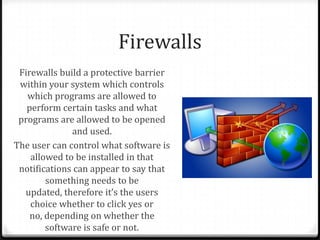
Firewalls build a protective barrier
within your system which controls
which programs are allowed to
perform certain tasks and what
programs are allowed to be opened
and used.
The user can control what software is
allowed to be installed in that
notifications can appear to say that
something needs to be
updated, therefore it’s the users
choice whether to click yes or
no, depending on whether the
software is safe or not.
Clean-up Tools
- Disk Defragmenter -
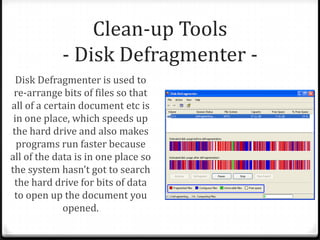
Disk Defragmenter is used to
re-arrange bits of files so that
all of a certain document etc is
in one place, which speeds up
the hard drive and also makes
programs run faster because
all of the data is in one place so
the system hasn’t got to search
the hard drive for bits of data
to open up the document you
opened.
Clean-up Tools
- Disk Cleanup -
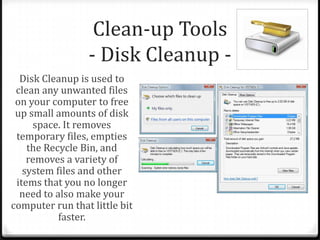
Disk Cleanup is used to
clean any unwanted files
on your computer to free
up small amounts of disk
space. It removes
temporary files, empties
the Recycle Bin, and
removes a variety of
system files and other
items that you no longer
need to also make your
computer run that little bit
faster.
Clean-up Tools
-Removal of Cookies -
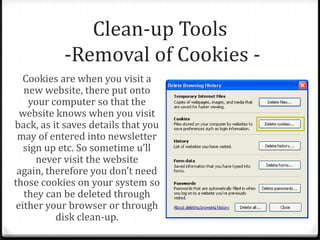
Cookies are when you visit a
new website, there put onto
your computer so that the
website knows when you visit
back, as it saves details that you
may of entered into newsletter
sign up etc. So sometime u’ll
never visit the website
again, therefore you don’t need
those cookies on your system so
they can be deleted through
either your browser or through
disk clean-up.
Drive Formatting
- Physical -
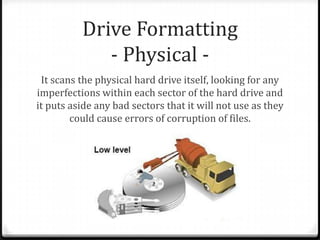
It scans the physical hard drive itself, looking for any
imperfections within each sector of the hard drive and
it puts aside any bad sectors that it will not use as they
could cause errors of corruption of files.
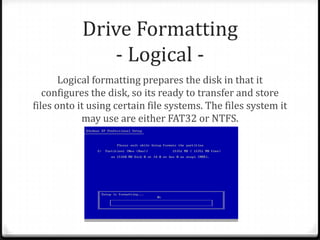
Drive Formatting
- Logical -
Logical formatting prepares the disk in that it
configures the disk, so its ready to transfer and store
files onto it using certain file systems. The files system it
may use are either FAT32 or NTFS.

Software utilities p3 - unit 2

  • 2.
    Software Utilities Software utilitiesare used on a computer system to clear up unwanted files that may slow your system down, or even protect your system from unwanted hackers or viruses when you access the web so its all about keeping your computer safe and running smoothly
  • 3.
    Windows Task Manager Windowstask manager is used to monitor various aspects of your system. You can view applications that’s are opened, background processes that are running, view the performance of your computer to see the usage o f the CPU and RAM, and also the network status, and the current network speed. Can be accessed by pressing CTRL – ALT – DELETE on your keyboard.
  • 4.
    Performance and Resource Monitor PerformanceMonitor is used to view performance data either in real time or from a log file. You can also schedule the program to log the data at any time which can then be put into a report, and also your able to monitor it in real time in the form of a graph show on the next slide. Resource monitor is very similar but it shows all of the processes that are being run in the CPU, RAM and also measures disk usage, and network usage also.
  • 6.
    Backup and RestorePoints Backing up your computer is extremely important if you don’t want to lose any of your data through corruption or viruses etc. You can back up your system through a partition on your hard drive or you can backup through the web or even to another flash drive, portable hard drive etc. This will save all of your system files and configuration settings therefore when its restored, you will gain all of your data back exactly how it was. A restore point is when you save an ‘image’ of your system so that when and update is installed, and if it doesn’t work and causes errors within your system, you can revert back to the system settings you had before the update.
  • 7.
    Virus Protection Virus protectionis used to protect your computer from viruses, worms and Trojans that could be gained by simple surfing the internet, so Anti-Virus software is required. This type of software contains its own databases of viruses and codes in which it is able to search your own files to check for viruses of any sort, which can then be dealt with if any are found. Having the most up-to-date software is crucial to keep your computer safe whilst browsing.
  • 8.
    Firewalls Firewalls build aprotective barrier within your system which controls which programs are allowed to perform certain tasks and what programs are allowed to be opened and used. The user can control what software is allowed to be installed in that notifications can appear to say that something needs to be updated, therefore it’s the users choice whether to click yes or no, depending on whether the software is safe or not.
  • 9.
    Clean-up Tools - DiskDefragmenter - Disk Defragmenter is used to re-arrange bits of files so that all of a certain document etc is in one place, which speeds up the hard drive and also makes programs run faster because all of the data is in one place so the system hasn’t got to search the hard drive for bits of data to open up the document you opened.
  • 10.
    Clean-up Tools - DiskCleanup - Disk Cleanup is used to clean any unwanted files on your computer to free up small amounts of disk space. It removes temporary files, empties the Recycle Bin, and removes a variety of system files and other items that you no longer need to also make your computer run that little bit faster.
  • 11.
    Clean-up Tools -Removal ofCookies - Cookies are when you visit a new website, there put onto your computer so that the website knows when you visit back, as it saves details that you may of entered into newsletter sign up etc. So sometime u’ll never visit the website again, therefore you don’t need those cookies on your system so they can be deleted through either your browser or through disk clean-up.
  • 12.
    Drive Formatting - Physical- It scans the physical hard drive itself, looking for any imperfections within each sector of the hard drive and it puts aside any bad sectors that it will not use as they could cause errors of corruption of files.
  • 13.
    Drive Formatting - Logical- Logical formatting prepares the disk in that it configures the disk, so its ready to transfer and store files onto it using certain file systems. The files system it may use are either FAT32 or NTFS.