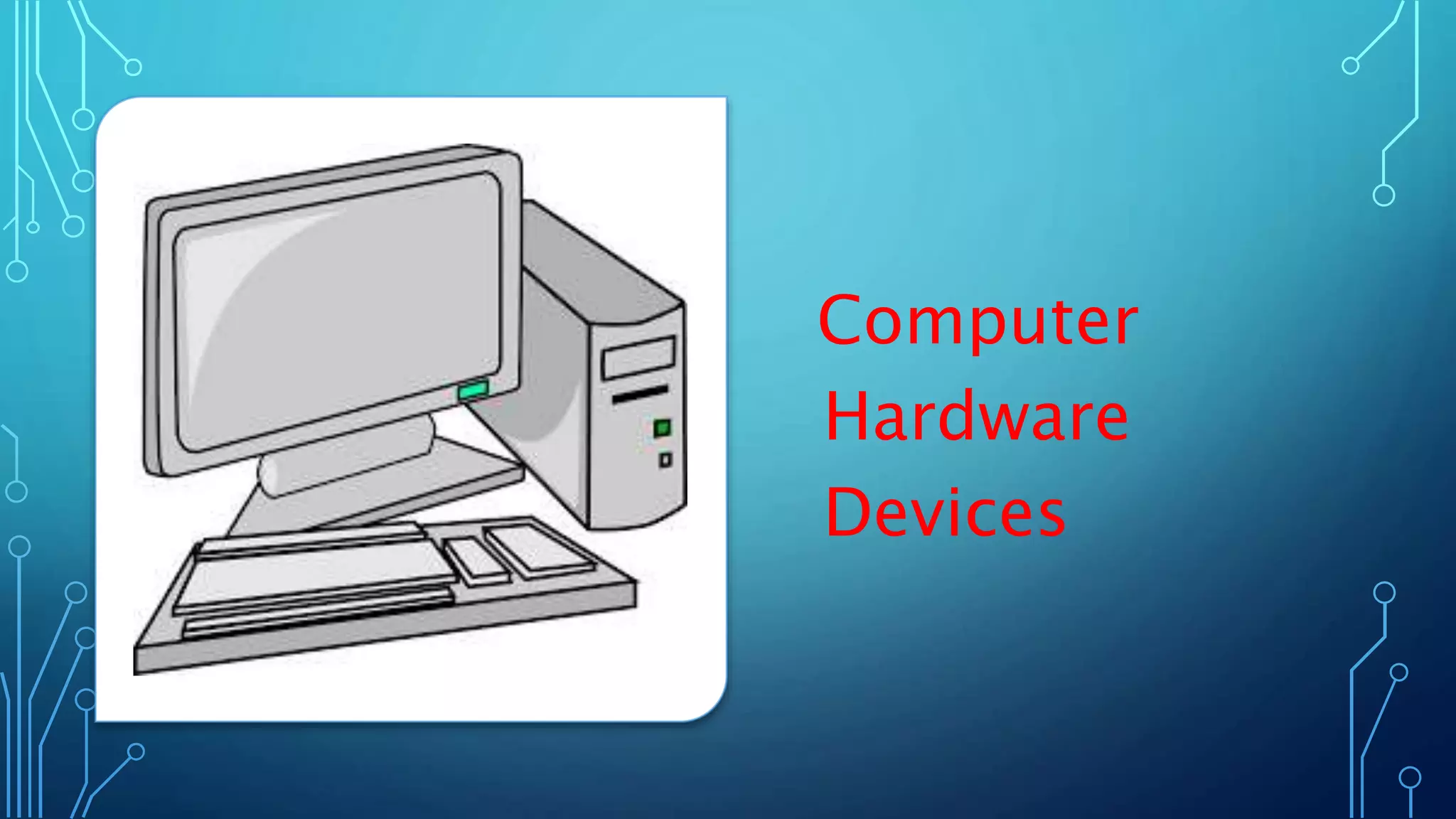
Computer
Hardware
Devices
•Computer
• A programmable electronic device that can
input, process, output, and store data.
• Component of the computer system
• Hardware
• Software
• User
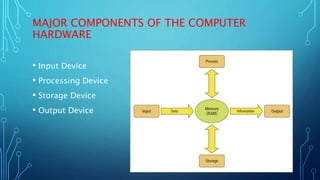
MAJOR COMPONENTS OF THE COMPUTER
HARDWARE
• Input Device
• Processing Device
• Storage Device
• Output Device
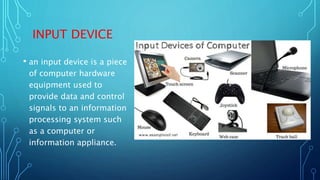
INPUT DEVICE
• an input device is a piece
of computer hardware
equipment used to
provide data and control
signals to an information
processing system such
as a computer or
information appliance.
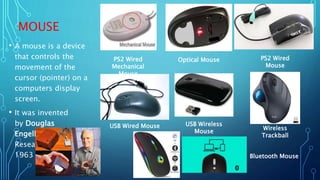
MOUSE
• A mouse is a device
that controls the
movement of the
cursor (pointer) on a
computers display
screen.
• It was invented
by Douglas
Engelbart of Stanford
Research Center in
1963
USB Wireless
Mouse
PS2 Wired
Mechanical
Mouse
Wireless
Trackball
Optical Mouse PS2 Wired
Mouse
USB Wired Mouse
Bluetooth Mouse
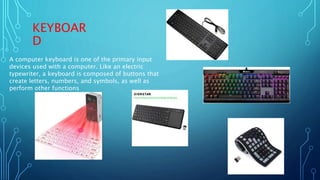
KEYBOAR
D
A computer keyboard is one of the primary input
devices used with a computer. Like an electric
typewriter, a keyboard is composed of buttons that
create letters, numbers, and symbols, as well as
perform other functions
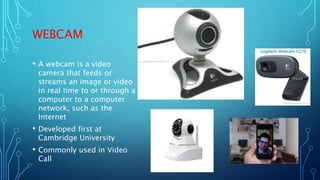
WEBCAM
• A webcam is a video
camera that feeds or
streams an image or video
in real time to or through a
computer to a computer
network, such as the
Internet
• Developed first at
Cambridge University
• Commonly used in Video
Call
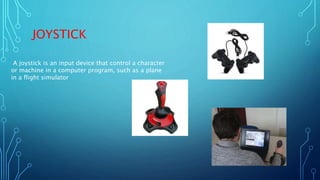
JOYSTICK
A joystick is an input device that control a character
or machine in a computer program, such as a plane
in a flight simulator
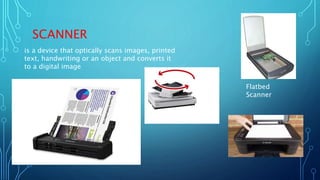
SCANNER
is a device that optically scans images, printed
text, handwriting or an object and converts it
to a digital image
Flatbed
Scanner
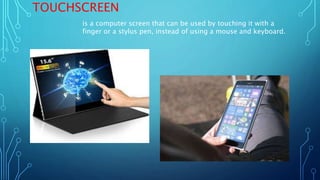
TOUCHSCREEN
is a computer screen that can be used by touching it with a
finger or a stylus pen, instead of using a mouse and keyboard.
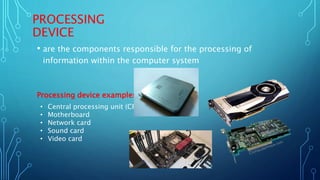
PROCESSING
DEVICE
• are the components responsible for the processing of
information within the computer system
Processing device examples
• Central processing unit (CPU)
• Motherboard
• Network card
• Sound card
• Video card
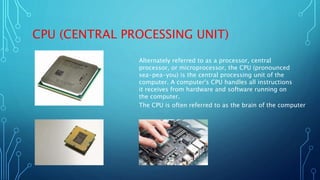
CPU (CENTRAL PROCESSING UNIT)
Alternately referred to as a processor, central
processor, or microprocessor, the CPU (pronounced
sea-pea-you) is the central processing unit of the
computer. A computer's CPU handles all instructions
it receives from hardware and software running on
the computer.
The CPU is often referred to as the brain of the computer
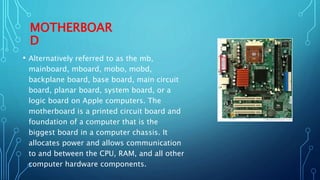
MOTHERBOAR
D
• Alternatively referred to as the mb,
mainboard, mboard, mobo, mobd,
backplane board, base board, main circuit
board, planar board, system board, or a
logic board on Apple computers. The
motherboard is a printed circuit board and
foundation of a computer that is the
biggest board in a computer chassis. It
allocates power and allows communication
to and between the CPU, RAM, and all other
computer hardware components.
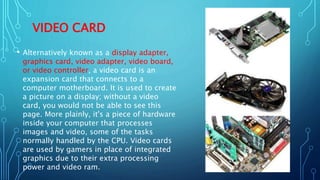
VIDEO CARD
• Alternatively known as a display adapter,
graphics card, video adapter, video board,
or video controller, a video card is an
expansion card that connects to a
computer motherboard. It is used to create
a picture on a display; without a video
card, you would not be able to see this
page. More plainly, it's a piece of hardware
inside your computer that processes
images and video, some of the tasks
normally handled by the CPU. Video cards
are used by gamers in place of integrated
graphics due to their extra processing
power and video ram.
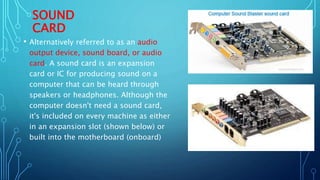
SOUND
CARD
• Alternatively referred to as an audio
output device, sound board, or audio
card. A sound card is an expansion
card or IC for producing sound on a
computer that can be heard through
speakers or headphones. Although the
computer doesn't need a sound card,
it's included on every machine as either
in an expansion slot (shown below) or
built into the motherboard (onboard)
Uses of a computer sound card
Below are all the different areas of a computer a sound card can be
used.
• Games.
• Audio CDs and listening to music.
• Watch movies.
• Audio and video conferencing.
• Creating and playing MIDI.
• Educational software.
• Business presentations.
• Record dictations.
• Voice recognition
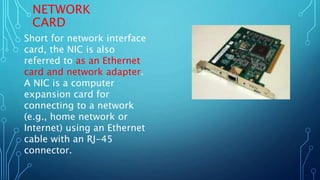
NETWORK
CARD
Short for network interface
card, the NIC is also
referred to as an Ethernet
card and network adapter.
A NIC is a computer
expansion card for
connecting to a network
(e.g., home network or
Internet) using an Ethernet
cable with an RJ-45
connector.
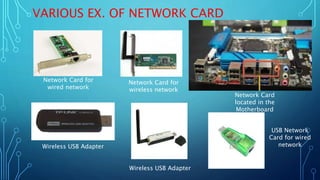
VARIOUS EX. OF NETWORK CARD
Network Card for
wired network
Network Card for
wireless network
Network Card
located in the
Motherboard
Wireless USB Adapter
USB Network
Card for wired
network
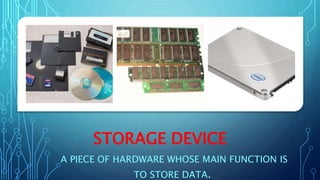
STORAGE DEVICE
A PIECE OF HARDWARE WHOSE MAIN FUNCTION IS
TO STORE DATA.
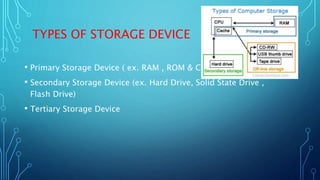
TYPES OF STORAGE DEVICE
• Primary Storage Device ( ex. RAM , ROM & Cache)
• Secondary Storage Device (ex. Hard Drive, Solid State Drive ,
Flash Drive)
• Tertiary Storage Device
PRIMARY
STORAGE
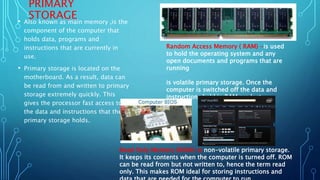
• Also known as main memory ,is the
component of the computer that
holds data, programs and
instructions that are currently in
use.
• Primary storage is located on the
motherboard. As a result, data can
be read from and written to primary
storage extremely quickly. This
gives the processor fast access to
the data and instructions that the
primary storage holds.
Random Access Memory ( RAM) -is used
to hold the operating system and any
open documents and programs that are
running
is volatile primary storage. Once the
computer is switched off the data and
instructions held in RAM are lost.
Read Only Memory (ROM)-is non-volatile primary storage.
It keeps its contents when the computer is turned off. ROM
can be read from but not written to, hence the term read
only. This makes ROM ideal for storing instructions and
CACHE
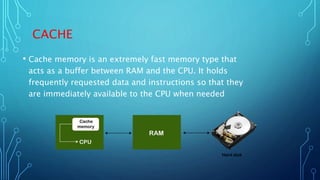
• Cache memory is an extremely fast memory type that
acts as a buffer between RAM and the CPU. It holds
frequently requested data and instructions so that they
are immediately available to the CPU when needed
SECONDARY STORAGE
DEVICE
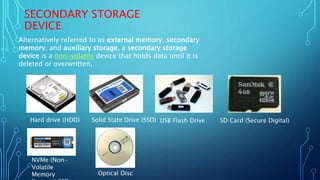
Alternatively referred to as external memory, secondary
memory, and auxiliary storage, a secondary storage
device is a non-volatile device that holds data until it is
deleted or overwritten.
Hard drive (HDD) Solid State Drive (SSD) USB Flash Drive SD Card (Secure Digital)
NVMe (Non-
Volatile
Memory Optical Disc
TERTIARY STORAGE DEVICE
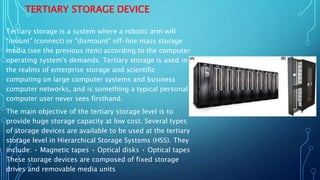
Tertiary storage is a system where a robotic arm will
"mount" (connect) or "dismount" off-line mass storage
media (see the previous item) according to the computer
operating system's demands. Tertiary storage is used in
the realms of enterprise storage and scientific
computing on large computer systems and business
computer networks, and is something a typical personal
computer user never sees firsthand.
The main objective of the tertiary storage level is to
provide huge storage capacity at low cost. Several types
of storage devices are available to be used at the tertiary
storage level in Hierarchical Storage Systems (HSS). They
include: • Magnetic tapes • Optical disks • Optical tapes
These storage devices are composed of fixed storage
drives and removable media units
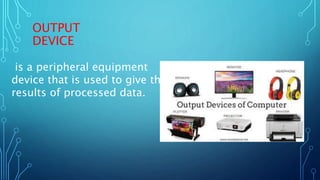
OUTPUT
DEVICE
is a peripheral equipment
device that is used to give the
results of processed data.
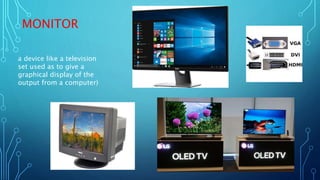
MONITOR
a device like a television
set used as to give a
graphical display of the
output from a computer)
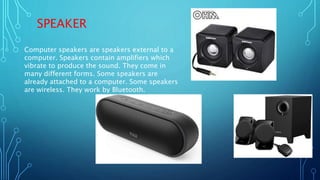
SPEAKER
Computer speakers are speakers external to a
computer. Speakers contain amplifiers which
vibrate to produce the sound. They come in
many different forms. Some speakers are
already attached to a computer. Some speakers
are wireless. They work by Bluetooth.
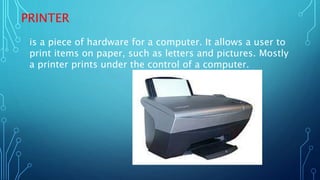
PRINTER
is a piece of hardware for a computer. It allows a user to
print items on paper, such as letters and pictures. Mostly
a printer prints under the control of a computer.
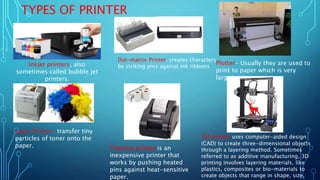
TYPES OF PRINTER
Inkjet printers, also
sometimes called bubble jet
printers.
Dot-matrix Printer. creates characters
by striking pins against ink ribbons
Plotter- Usually they are used to
print to paper which is very
large in size
Laser Printer- transfer tiny
particles of toner onto the
paper. Thermal printer is an
inexpensive printer that
works by pushing heated
pins against heat-sensitive
paper.
3D printer-uses computer-aided design
(CAD) to create three-dimensional objects
through a layering method. Sometimes
referred to as additive manufacturing, 3D
printing involves layering materials, like
plastics, composites or bio-materials to
create objects that range in shape, size,
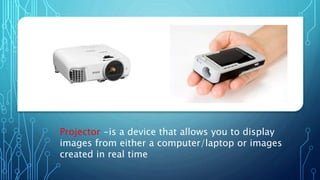
Projector -is a device that allows you to display
images from either a computer/laptop or images
created in real time
END

Topic 5

  • 1.
  • 2.
    •Computer • A programmableelectronic device that can input, process, output, and store data. • Component of the computer system • Hardware • Software • User
  • 3.
    MAJOR COMPONENTS OFTHE COMPUTER HARDWARE • Input Device • Processing Device • Storage Device • Output Device
  • 4.
    INPUT DEVICE • aninput device is a piece of computer hardware equipment used to provide data and control signals to an information processing system such as a computer or information appliance.
  • 5.
    MOUSE • A mouseis a device that controls the movement of the cursor (pointer) on a computers display screen. • It was invented by Douglas Engelbart of Stanford Research Center in 1963 USB Wireless Mouse PS2 Wired Mechanical Mouse Wireless Trackball Optical Mouse PS2 Wired Mouse USB Wired Mouse Bluetooth Mouse
  • 6.
    KEYBOAR D A computer keyboardis one of the primary input devices used with a computer. Like an electric typewriter, a keyboard is composed of buttons that create letters, numbers, and symbols, as well as perform other functions
  • 7.
    WEBCAM • A webcamis a video camera that feeds or streams an image or video in real time to or through a computer to a computer network, such as the Internet • Developed first at Cambridge University • Commonly used in Video Call
  • 8.
    JOYSTICK A joystick isan input device that control a character or machine in a computer program, such as a plane in a flight simulator
  • 9.
    SCANNER is a devicethat optically scans images, printed text, handwriting or an object and converts it to a digital image Flatbed Scanner
  • 10.
    TOUCHSCREEN is a computerscreen that can be used by touching it with a finger or a stylus pen, instead of using a mouse and keyboard.
  • 11.
    PROCESSING DEVICE • are thecomponents responsible for the processing of information within the computer system Processing device examples • Central processing unit (CPU) • Motherboard • Network card • Sound card • Video card
  • 12.
    CPU (CENTRAL PROCESSINGUNIT) Alternately referred to as a processor, central processor, or microprocessor, the CPU (pronounced sea-pea-you) is the central processing unit of the computer. A computer's CPU handles all instructions it receives from hardware and software running on the computer. The CPU is often referred to as the brain of the computer
  • 13.
    MOTHERBOAR D • Alternatively referredto as the mb, mainboard, mboard, mobo, mobd, backplane board, base board, main circuit board, planar board, system board, or a logic board on Apple computers. The motherboard is a printed circuit board and foundation of a computer that is the biggest board in a computer chassis. It allocates power and allows communication to and between the CPU, RAM, and all other computer hardware components.
  • 14.
    VIDEO CARD • Alternativelyknown as a display adapter, graphics card, video adapter, video board, or video controller, a video card is an expansion card that connects to a computer motherboard. It is used to create a picture on a display; without a video card, you would not be able to see this page. More plainly, it's a piece of hardware inside your computer that processes images and video, some of the tasks normally handled by the CPU. Video cards are used by gamers in place of integrated graphics due to their extra processing power and video ram.
  • 15.
    SOUND CARD • Alternatively referredto as an audio output device, sound board, or audio card. A sound card is an expansion card or IC for producing sound on a computer that can be heard through speakers or headphones. Although the computer doesn't need a sound card, it's included on every machine as either in an expansion slot (shown below) or built into the motherboard (onboard)
  • 16.
    Uses of acomputer sound card Below are all the different areas of a computer a sound card can be used. • Games. • Audio CDs and listening to music. • Watch movies. • Audio and video conferencing. • Creating and playing MIDI. • Educational software. • Business presentations. • Record dictations. • Voice recognition
  • 17.
    NETWORK CARD Short for networkinterface card, the NIC is also referred to as an Ethernet card and network adapter. A NIC is a computer expansion card for connecting to a network (e.g., home network or Internet) using an Ethernet cable with an RJ-45 connector.
  • 18.
    VARIOUS EX. OFNETWORK CARD Network Card for wired network Network Card for wireless network Network Card located in the Motherboard Wireless USB Adapter Wireless USB Adapter USB Network Card for wired network
  • 19.
    STORAGE DEVICE A PIECEOF HARDWARE WHOSE MAIN FUNCTION IS TO STORE DATA.
  • 20.
    TYPES OF STORAGEDEVICE • Primary Storage Device ( ex. RAM , ROM & Cache) • Secondary Storage Device (ex. Hard Drive, Solid State Drive , Flash Drive) • Tertiary Storage Device
  • 21.
    PRIMARY STORAGE • Also knownas main memory ,is the component of the computer that holds data, programs and instructions that are currently in use. • Primary storage is located on the motherboard. As a result, data can be read from and written to primary storage extremely quickly. This gives the processor fast access to the data and instructions that the primary storage holds. Random Access Memory ( RAM) -is used to hold the operating system and any open documents and programs that are running is volatile primary storage. Once the computer is switched off the data and instructions held in RAM are lost. Read Only Memory (ROM)-is non-volatile primary storage. It keeps its contents when the computer is turned off. ROM can be read from but not written to, hence the term read only. This makes ROM ideal for storing instructions and
  • 22.
    CACHE • Cache memoryis an extremely fast memory type that acts as a buffer between RAM and the CPU. It holds frequently requested data and instructions so that they are immediately available to the CPU when needed
  • 23.
    SECONDARY STORAGE DEVICE Alternatively referredto as external memory, secondary memory, and auxiliary storage, a secondary storage device is a non-volatile device that holds data until it is deleted or overwritten. Hard drive (HDD) Solid State Drive (SSD) USB Flash Drive SD Card (Secure Digital) NVMe (Non- Volatile Memory Optical Disc
  • 24.
    TERTIARY STORAGE DEVICE Tertiarystorage is a system where a robotic arm will "mount" (connect) or "dismount" off-line mass storage media (see the previous item) according to the computer operating system's demands. Tertiary storage is used in the realms of enterprise storage and scientific computing on large computer systems and business computer networks, and is something a typical personal computer user never sees firsthand. The main objective of the tertiary storage level is to provide huge storage capacity at low cost. Several types of storage devices are available to be used at the tertiary storage level in Hierarchical Storage Systems (HSS). They include: • Magnetic tapes • Optical disks • Optical tapes These storage devices are composed of fixed storage drives and removable media units
  • 25.
    OUTPUT DEVICE is a peripheralequipment device that is used to give the results of processed data.
  • 26.
    MONITOR a device likea television set used as to give a graphical display of the output from a computer)
  • 27.
    SPEAKER Computer speakers arespeakers external to a computer. Speakers contain amplifiers which vibrate to produce the sound. They come in many different forms. Some speakers are already attached to a computer. Some speakers are wireless. They work by Bluetooth.
  • 28.
    PRINTER is a pieceof hardware for a computer. It allows a user to print items on paper, such as letters and pictures. Mostly a printer prints under the control of a computer.
  • 29.
    TYPES OF PRINTER Inkjetprinters, also sometimes called bubble jet printers. Dot-matrix Printer. creates characters by striking pins against ink ribbons Plotter- Usually they are used to print to paper which is very large in size Laser Printer- transfer tiny particles of toner onto the paper. Thermal printer is an inexpensive printer that works by pushing heated pins against heat-sensitive paper. 3D printer-uses computer-aided design (CAD) to create three-dimensional objects through a layering method. Sometimes referred to as additive manufacturing, 3D printing involves layering materials, like plastics, composites or bio-materials to create objects that range in shape, size,
  • 30.
    Projector -is adevice that allows you to display images from either a computer/laptop or images created in real time
  • 31.

Editor's Notes

  • #2 1
  • #3 Replace this image with image 1 from the book