Welcome  – CBAA Intr oductions Training delivery Your Learners Experience with eLearning eLearning to me is  ”……….”
This is not me –  I think   – CBAA
Training methods haven't changed much in 2000 years but ways of delivering education change constantly – CBAA
How does my relationship to my learners change? You cannot see them You need to explain all aspects of your e learning environment Need to be contactable if there are problems Need a back up plan if the technology fails You have to go beyond text provision
How does my relationship to my learners change? You will have to help your learners understand how to work together  You will have to help when people have trouble with technology or with accessing your materials on their computer You have to work with them to become visible online
Environments  – CBAA Moodle (Learner Management System) http://www.yum.vic.edu.au/moodle Elluminate Live! (Virtual Classroom) World Wide Web (Personal Learning Network)  Webinar (GoToWebinar)
Environments - Elluminate   – CBAA Real Time (Synchronous) Conferencing Text and Voice Chat Breakout Rooms Whiteboard PowerPoint Application Sharing WebTours
Environments - Elluminate   – CBAA Communicating
Environments - Elluminate   – CBAA Communicating with Emoticons
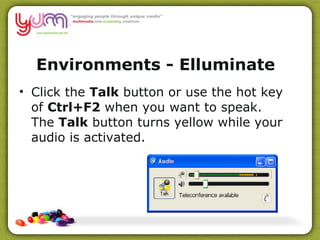
Environments - Elluminate   – CBAA Click the  Talk  button or use the hot key of  Ctrl+F2  when you want to speak.  The  Talk  button turns yellow while your audio is activated.
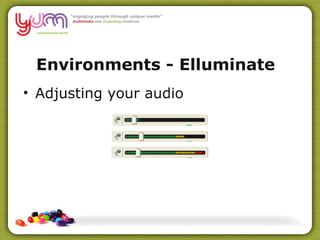
Environments - Elluminate   – CBAA Adjusting your audio
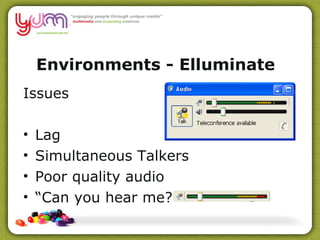
Environments - Elluminate   – CBAA Issues Lag Simultaneous Talkers Poor quality audio “ Can you hear me?”
Environments - Elluminate   – CBAA Take the mic and introduce yourself! Rest of us type in questions in the text box!
Environments - Elluminate   – CBAA Who  is  Talking?
Environments - Elluminate   – CBAA Using Chat
CBAA Using Directed Chat
CBAA Chat  Exercise Get the ? Type for 1 minute (timer) Push Enter Read the rest
Environments - Elluminate   – CBAA Use the Chat as another channel to communicate to support the main conversation, challenge it, add extra information, ask questions, chat with others
Environments - Elluminate   – CBAA
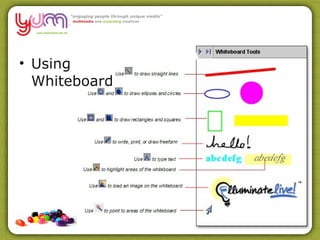
–  CBAA Using Whiteboard
 
eLearning to me is  ”………. Use the Whiteboard text tool to write your response
eLearning Questions What can I deliver? (Course Content) What methods can I use? (Tools) How can I deliver? (Distribution) How can I teach? (Facilitation)
What is your eLearning Question?
Save the Whiteboard
Elluminate Times   – CBAA Induction Session  Tuesday August 24 th  2010 6.30-7.30pm Tuesday 31st August 6.30-7.30pm Tuesday 7th September 6.30-7.30pm Tuesday 14th September 6.30-7.30pm Tuesday 21st September 6.30-7.30pm Tuesday 28th 7th September 6.30-7.30pm Tuesday 5th October 6.30-7.30pm Tuesday 12th October 6.30-7.30pm Tuesday 19th October 6.30-7.30pm Tuesday 26th October 6.30-7.30pm Tuesday 2nd November 6.30-7.30pm Tuesday 9th November 6.30-7.30pm (Assessment Task 6 Presentations) Tuesday 16th November 6.30-7.30 (Assessment Task 6 Presentations  if required ) Tuesday 23rd November 6.30-7.30pm 2 X  1 hour online sessions will be negotiated with each of you (1:1) to assist you with Assessment Task 4 and Assessment Task 6
Assessments  – CBAA Assessment Task 1 Organisational opportunities for eLearning (Due September 7th 2010) Assessment Task 2 Map Learning Styles against eLearning Strategies and Tools (Due September 14th 2010) Assessment Task 3 eLearning Tools Presentation (Blog and Elluminate Session)   (Due September 28th 2010)
Assessments   – CBAA Assessment Task 4 Generate Options for an eLearning Resource Individual 1:1 Meeting #1 (to support your response to Assessment Task 4)   (Due October 12th 2010) Assessment Task 5 Develop a design for a learning object (Due Friday November 5th 2010 and delivered on Tuesday November 9th or Tuesday November 16th –if required) Individual 1:1 Meeting #2  (to support your response to Assessment Task 6)   Assessment Task 6 Deliver and evaluate eLearning (Due November 30th 2010)
Assessments   – CBAA Weekly Activities in Moodle to support underpinning knowledge and to work with co learners Induction – Set up a range of tools Undertake some brief readings Share eLearning ideas, knowledge, trends Evaluate design perspectives Explore and apply teaching tools Get to know and follow the e learning community Build your Personal Learning Environment/Network
Environments - Moodle   – CBAA Web Tour
What is eLearning? Computer technology to deliver education or training courses to learners.  Study can be online, offline, by any mixture of these modes may also involve blended modes where there is interaction with a live or virtual teacher or trainer.  gives the learner choice of what, when and where they study. That is, it is flexible learning.
What is eLearning? E­learning  uses electronic media to deliver flexible  vocational education and training.  It includes:   access to, downloading & use of web, CD­ROM or computer­based  learning resources in the  classroom, workplace or home   online access to and participation in course activities  (e.g. online simulations, online group discussions)   directed use of the internet, mobile and voice technologies for  learning and research purposes   structured learning based email communication   online assessment activities. 
What is eLearning? - Synchronous Any learning event where interaction happens simultaneously in real-time.  Virtual Classrooms Shared Whiteboards Application Sharing Teleconferencing Videoconferencing  Virtual Worlds  Face to Face Workshops
What is eLearning? - Asynchronous Any learning event where interaction is delayed over time. This allows learners to participate according to their schedule, and be  remote  from the trainer Email Discussion Forums CD ROMS Textbooks Video/Audio resources Web searches/Social Networking sites
Models Self Paced , Fully online Preparation for F2F Workshop Blended  –  F2F and online workshops Collaborative online learning with peers
Model needs to be fit with Your ability as a trainer/designer Your learners abilities with technology An analysis of your course delivery Your ability to apply it to other training
What can I do to break down the isolation? Start with getting learners to introduce themselves online  (email or discussion forum) Get learners to send you a pic of themselves that you add to their profile online Create activities that promote learner collaboration or encourage them to share resources and research findings
Totally online courses Blended solutions with a mix of face-to-face and online elements  Learning management systems that manage students' learning web conferencing systems, which support the delivery of scheduled online sessions  State of Play
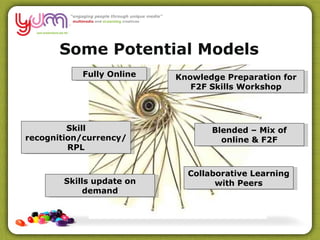
Fully Online Knowledge Preparation for F2F Skills Workshop Blended – Mix of online & F2F Skill recognition/currency/RPL Skills update on demand Collaborative Learning with Peers Some Potential Models
Knowledge/Skills Industry Knowledge Staff Capacity Compliance eLearning Training Tools Collaboration Authentic Tasks Trainer/Learner Communication Model Self Paced eLearning Platform Structured Models of eLearning
This week coming up Then visit  http ://www.ipadio.com/phlogs/MichaelGwyther / To hear your broadcast Get your own account at http://ipadio.com CALL: 1800-031439 Registered Number 1161409317625 PIN: 5676
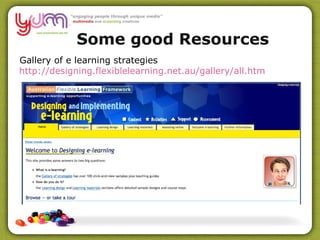
Gallery of e learning strategies http://designing.flexiblelearning.net.au/gallery/all. htm Some good Resources
Australian Flexible Learning Framework http://www.flexiblelearning.net.au/ Some good Resources
Jane Hart http://www.c4lpt.co.uk/jane.html   Some good Resources
eCapability Forum  http://ecapability.com.au/   Some good Resources
eLearning Guild  http://www.elearningguild.com/   Some good Resources
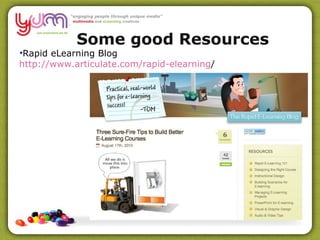
Rapid eLearning Blog http://www.articulate.com/rapid-elearning /   Some good Resources
Thank you for playing

Orientation

  • 1.
    Welcome –CBAA Intr oductions Training delivery Your Learners Experience with eLearning eLearning to me is ”……….”
  • 2.
    This is notme – I think – CBAA
  • 3.
    Training methods haven'tchanged much in 2000 years but ways of delivering education change constantly – CBAA
  • 4.
    How does myrelationship to my learners change? You cannot see them You need to explain all aspects of your e learning environment Need to be contactable if there are problems Need a back up plan if the technology fails You have to go beyond text provision
  • 5.
    How does myrelationship to my learners change? You will have to help your learners understand how to work together You will have to help when people have trouble with technology or with accessing your materials on their computer You have to work with them to become visible online
  • 6.
    Environments –CBAA Moodle (Learner Management System) http://www.yum.vic.edu.au/moodle Elluminate Live! (Virtual Classroom) World Wide Web (Personal Learning Network) Webinar (GoToWebinar)
  • 7.
    Environments - Elluminate – CBAA Real Time (Synchronous) Conferencing Text and Voice Chat Breakout Rooms Whiteboard PowerPoint Application Sharing WebTours
  • 8.
    Environments - Elluminate – CBAA Communicating
  • 9.
    Environments - Elluminate – CBAA Communicating with Emoticons
  • 10.
    Environments - Elluminate – CBAA Click the Talk button or use the hot key of Ctrl+F2 when you want to speak. The Talk button turns yellow while your audio is activated.
  • 11.
    Environments - Elluminate – CBAA Adjusting your audio
  • 12.
    Environments - Elluminate – CBAA Issues Lag Simultaneous Talkers Poor quality audio “ Can you hear me?”
  • 13.
    Environments - Elluminate – CBAA Take the mic and introduce yourself! Rest of us type in questions in the text box!
  • 14.
    Environments - Elluminate – CBAA Who is Talking?
  • 15.
    Environments - Elluminate – CBAA Using Chat
  • 16.
  • 17.
    CBAA Chat Exercise Get the ? Type for 1 minute (timer) Push Enter Read the rest
  • 18.
    Environments - Elluminate – CBAA Use the Chat as another channel to communicate to support the main conversation, challenge it, add extra information, ask questions, chat with others
  • 19.
  • 20.
    – CBAAUsing Whiteboard
  • 21.
  • 22.
    eLearning to meis ”………. Use the Whiteboard text tool to write your response
  • 23.
    eLearning Questions Whatcan I deliver? (Course Content) What methods can I use? (Tools) How can I deliver? (Distribution) How can I teach? (Facilitation)
  • 24.
    What is youreLearning Question?
  • 25.
  • 26.
    Elluminate Times – CBAA Induction Session Tuesday August 24 th 2010 6.30-7.30pm Tuesday 31st August 6.30-7.30pm Tuesday 7th September 6.30-7.30pm Tuesday 14th September 6.30-7.30pm Tuesday 21st September 6.30-7.30pm Tuesday 28th 7th September 6.30-7.30pm Tuesday 5th October 6.30-7.30pm Tuesday 12th October 6.30-7.30pm Tuesday 19th October 6.30-7.30pm Tuesday 26th October 6.30-7.30pm Tuesday 2nd November 6.30-7.30pm Tuesday 9th November 6.30-7.30pm (Assessment Task 6 Presentations) Tuesday 16th November 6.30-7.30 (Assessment Task 6 Presentations if required ) Tuesday 23rd November 6.30-7.30pm 2 X 1 hour online sessions will be negotiated with each of you (1:1) to assist you with Assessment Task 4 and Assessment Task 6
  • 27.
    Assessments –CBAA Assessment Task 1 Organisational opportunities for eLearning (Due September 7th 2010) Assessment Task 2 Map Learning Styles against eLearning Strategies and Tools (Due September 14th 2010) Assessment Task 3 eLearning Tools Presentation (Blog and Elluminate Session) (Due September 28th 2010)
  • 28.
    Assessments – CBAA Assessment Task 4 Generate Options for an eLearning Resource Individual 1:1 Meeting #1 (to support your response to Assessment Task 4) (Due October 12th 2010) Assessment Task 5 Develop a design for a learning object (Due Friday November 5th 2010 and delivered on Tuesday November 9th or Tuesday November 16th –if required) Individual 1:1 Meeting #2 (to support your response to Assessment Task 6) Assessment Task 6 Deliver and evaluate eLearning (Due November 30th 2010)
  • 29.
    Assessments – CBAA Weekly Activities in Moodle to support underpinning knowledge and to work with co learners Induction – Set up a range of tools Undertake some brief readings Share eLearning ideas, knowledge, trends Evaluate design perspectives Explore and apply teaching tools Get to know and follow the e learning community Build your Personal Learning Environment/Network
  • 30.
    Environments - Moodle – CBAA Web Tour
  • 31.
    What is eLearning?Computer technology to deliver education or training courses to learners. Study can be online, offline, by any mixture of these modes may also involve blended modes where there is interaction with a live or virtual teacher or trainer. gives the learner choice of what, when and where they study. That is, it is flexible learning.
  • 32.
    What is eLearning?E­learning  uses electronic media to deliver flexible  vocational education and training.  It includes:   access to, downloading & use of web, CD­ROM or computer­based  learning resources in the  classroom, workplace or home   online access to and participation in course activities  (e.g. online simulations, online group discussions)   directed use of the internet, mobile and voice technologies for  learning and research purposes   structured learning based email communication   online assessment activities. 
  • 33.
    What is eLearning?- Synchronous Any learning event where interaction happens simultaneously in real-time. Virtual Classrooms Shared Whiteboards Application Sharing Teleconferencing Videoconferencing Virtual Worlds Face to Face Workshops
  • 34.
    What is eLearning?- Asynchronous Any learning event where interaction is delayed over time. This allows learners to participate according to their schedule, and be remote from the trainer Email Discussion Forums CD ROMS Textbooks Video/Audio resources Web searches/Social Networking sites
  • 35.
    Models Self Paced, Fully online Preparation for F2F Workshop Blended – F2F and online workshops Collaborative online learning with peers
  • 36.
    Model needs tobe fit with Your ability as a trainer/designer Your learners abilities with technology An analysis of your course delivery Your ability to apply it to other training
  • 37.
    What can Ido to break down the isolation? Start with getting learners to introduce themselves online (email or discussion forum) Get learners to send you a pic of themselves that you add to their profile online Create activities that promote learner collaboration or encourage them to share resources and research findings
  • 38.
    Totally online coursesBlended solutions with a mix of face-to-face and online elements Learning management systems that manage students' learning web conferencing systems, which support the delivery of scheduled online sessions State of Play
  • 39.
    Fully Online KnowledgePreparation for F2F Skills Workshop Blended – Mix of online & F2F Skill recognition/currency/RPL Skills update on demand Collaborative Learning with Peers Some Potential Models
  • 40.
    Knowledge/Skills Industry KnowledgeStaff Capacity Compliance eLearning Training Tools Collaboration Authentic Tasks Trainer/Learner Communication Model Self Paced eLearning Platform Structured Models of eLearning
  • 41.
    This week comingup Then visit http ://www.ipadio.com/phlogs/MichaelGwyther / To hear your broadcast Get your own account at http://ipadio.com CALL: 1800-031439 Registered Number 1161409317625 PIN: 5676
  • 42.
    Gallery of elearning strategies http://designing.flexiblelearning.net.au/gallery/all. htm Some good Resources
  • 43.
    Australian Flexible LearningFramework http://www.flexiblelearning.net.au/ Some good Resources
  • 44.
  • 45.
    eCapability Forum http://ecapability.com.au/ Some good Resources
  • 46.
    eLearning Guild http://www.elearningguild.com/ Some good Resources
  • 47.
    Rapid eLearning Bloghttp://www.articulate.com/rapid-elearning / Some good Resources
  • 48.

Editor's Notes

  • #43 Instead of creating an outline of content, start by asking, “How do we get the learners to pull this information?” Doesn’t have to be overly complicated. Well designed case studies or scenarios can create a need for the learners to pull the information You don’t even need to have big case studies. You can present some simple questions or problem-solving activities that require a solution. Essentially, you want to create a need for the information. Once the learner has a need, then they’re motivated to fulfill it. And that’s how you get the information to them.
  • #44 Instead of creating an outline of content, start by asking, “How do we get the learners to pull this information?” Doesn’t have to be overly complicated. Well designed case studies or scenarios can create a need for the learners to pull the information You don’t even need to have big case studies. You can present some simple questions or problem-solving activities that require a solution. Essentially, you want to create a need for the information. Once the learner has a need, then they’re motivated to fulfill it. And that’s how you get the information to them.
  • #45 Instead of creating an outline of content, start by asking, “How do we get the learners to pull this information?” Doesn’t have to be overly complicated. Well designed case studies or scenarios can create a need for the learners to pull the information You don’t even need to have big case studies. You can present some simple questions or problem-solving activities that require a solution. Essentially, you want to create a need for the information. Once the learner has a need, then they’re motivated to fulfill it. And that’s how you get the information to them.
  • #46 Instead of creating an outline of content, start by asking, “How do we get the learners to pull this information?” Doesn’t have to be overly complicated. Well designed case studies or scenarios can create a need for the learners to pull the information You don’t even need to have big case studies. You can present some simple questions or problem-solving activities that require a solution. Essentially, you want to create a need for the information. Once the learner has a need, then they’re motivated to fulfill it. And that’s how you get the information to them.
  • #47 Instead of creating an outline of content, start by asking, “How do we get the learners to pull this information?” Doesn’t have to be overly complicated. Well designed case studies or scenarios can create a need for the learners to pull the information You don’t even need to have big case studies. You can present some simple questions or problem-solving activities that require a solution. Essentially, you want to create a need for the information. Once the learner has a need, then they’re motivated to fulfill it. And that’s how you get the information to them.
  • #48 Instead of creating an outline of content, start by asking, “How do we get the learners to pull this information?” Doesn’t have to be overly complicated. Well designed case studies or scenarios can create a need for the learners to pull the information You don’t even need to have big case studies. You can present some simple questions or problem-solving activities that require a solution. Essentially, you want to create a need for the information. Once the learner has a need, then they’re motivated to fulfill it. And that’s how you get the information to them.