Making the most out of your online tools for
teaching and in learning VET?
ACPET not Government
God - Vic
e-learning Program 2011
these ol’
stories
again….
Agenda

eLearning is about
collaboration, communication
and community
Questions of content,
assessment and facilitation
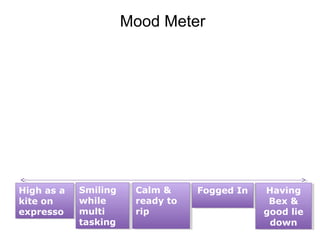
Mood Meter

High as a
High as a
kite on
kite on
expresso
expresso

Smiling
Smiling
while
while
multi
multi
tasking
tasking

Calm &
Calm &
ready to
ready to
rip
rip

Fogged In
Fogged In

Having
Having
Bex &
Bex &
good lie
good lie
down
down
Content V Facilitation V Evidence
Why go down the elearning road?
•
•
•
•
•
•
•

Learner Demand
Competitive Edge
More time for skills assessment in F2F
Respond to Industry demand
Reduce reliance on paper from enrolment
to assessment to certification
Meet time and distance pressures
Extend your community of learners
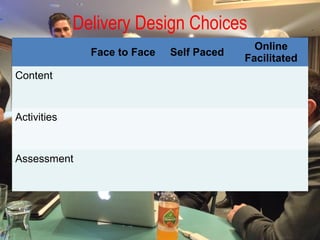
Delivery Design Choices
Face to Face
Content

Activities

Assessment

Self Paced

Online
Facilitated
Course Content
Tools to create self paced learning content,
create and share audio and video and
Interactive PDF’s and PowerPoint’s
Types of Content “Context”
• Textbook or “Reference” style
(job aids, online support or help)
Static – Just in Time
• Courseware
(Content & simple assessment)
• Workplace /Interactive
(case study/scenario/
decision making tree)
Interactive
• Demonstration
(simulation/screencast)
Self Paced Content issues
Give learners something to do with the content. Even if
your course is info heavy, provide opportunities to apply
learning to workplace context in the role they will occupy.
When presenting a problem, “content” can be provided in a
variety of forms using video, audio and some text.
This gives more depth to typical “quiz” based assessment
which test memory rather than understanding, problem
solving and consequences of on the job of decision making.
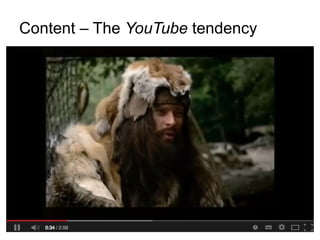
Content – The YouTube tendency
Claps!

I am using online
content of some sort
with learners – videos,
websites, cd-roms,
apps, purpose built or
off the shelf content
Claps!

I am running webinars
to run tutorials or class
get together’s with my
learners
Claps!

I encourage my
learners to
demonstrate their skills
using smart phone
video or photographs
Claps!

I use discussion
forums to ask
questions, post
problems and develop
interaction between
learners
Claps!

I sign up learners to
our social media to
maintain connection
with them during,
before and after their
training
2 minutes

Share one really good idea you’ve had
for using technology with learners….
Some trends…
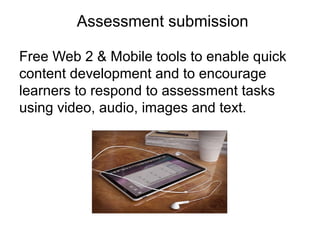
Assessment submission
Free Web 2 & Mobile tools to enable quick
content development and to encourage
learners to respond to assessment tasks
using video, audio, images and text.
Decision making trees
• Knowledge retrieval and
application
• Problem Solving
• Scenario driven
• Quiz based but can track
users interaction with a
process
• Applying appropriate
resources
• Self paced or Group
Discussion and social learning
•
•
•
•
•

Knowledge and Skills
Group problems
Application to workplace
Learner’s stories
Contributes to formative
assessment
• Assessment carrot to
ensure involvement
Student placement
•
•
•
•
•
•
•
•

Share experiences
Wiki/LMS/Social Media
Industry Knowledge
Common issues
Variety in the sector
Private V Shared
Ethics & Confidentiality
“Case Study” style assessment creates
learning for subsequent learners
Peer Review
• Develop a rubric with learners
• Check for mapping
• Distribute back to learners as
marking guide
• Rehearse the marking guide
• Conduct presentations
(summative)
• Collect peer review
• Redraft and resubmit
• Share and assess
Mobile evidence
• Evidence Capture
• Voice – Text – Video –
Images
• Student, 3rd Party,
Assessor
• How much evidence is
enough?
• Skills & Knowledge
• Supplementary
evidence
Demonstration as content
• Film learners/third party/supervisor
demonstrations
• Ensure learner speaks to camera to
describe what they have done, job
requirements, conditions and
special aspects of job
• Add to LMS as content
• Learners view same job in variety of
conditions and settings
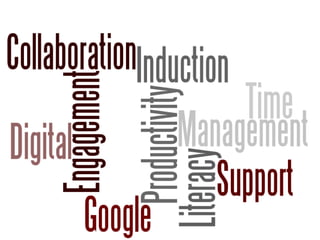
Student productivity/digital literacy &
Educational/Workforce Futures
Free Web 2 & Mobile tools to enable quick
content development and to encourage
learners to respond to assessment tasks
using video, audio, images and text.
Digital Literacy
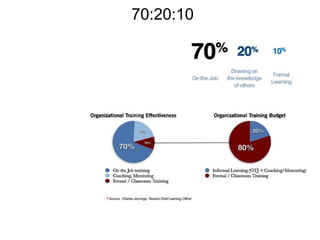
70:20:10
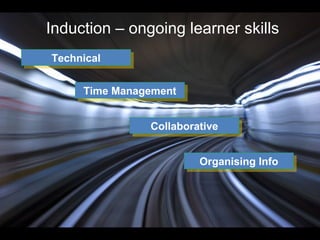
Induction – ongoing learner skills
Technical
Technical
Time Management
Time Management
Collaborative
Collaborative
Organising Info
Organising Info
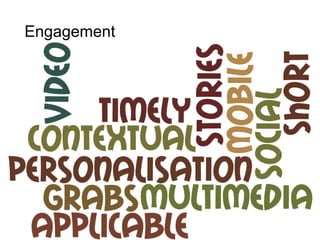
Engagement –
Engagement
2 minutes

Share one really good way you
have generated discussions with
your learners during training
Communicating/Facilitating
Communicating with learners online using
discussion forums and webinars.
Webinar facilitation
Keep lecturing to a minimum. Use the group
to work through scenarios and problems.
Promote discussion and the sharing of
perspectives.
Provide peer review opportunities for
learners to feed back on each others
assessments
Multiple ways of participating – voice,
discussions, white board, brainstorming,
Discussion facilitation
•Link to assessment
•Participants sharing experiences & prior
knowledge – “learners stories”
•Application to workplace or experience
•Make pre readings short
•Mix of problems, case studies, reflections
•Peer Review
•Voice or Text
Yammer
Google Hangouts

www.google.com/+/learnmore/hangouts
Any Questions?
Presenter – Michael Gwyther
mick@yumstudio.com.au
@mickgwyther
http://www.facebook.com/michael.gwyther
http://www.linkedin.com/profile/view?
id=20201325

CCA eLearning Conference Presentation -

  • 1.
    Making the mostout of your online tools for teaching and in learning VET?
  • 2.
    ACPET not Government God- Vic e-learning Program 2011 these ol’ stories again….
  • 3.
    Agenda eLearning is about collaboration,communication and community Questions of content, assessment and facilitation
  • 4.
    Mood Meter High asa High as a kite on kite on expresso expresso Smiling Smiling while while multi multi tasking tasking Calm & Calm & ready to ready to rip rip Fogged In Fogged In Having Having Bex & Bex & good lie good lie down down
  • 5.
  • 6.
    Why go downthe elearning road? • • • • • • • Learner Demand Competitive Edge More time for skills assessment in F2F Respond to Industry demand Reduce reliance on paper from enrolment to assessment to certification Meet time and distance pressures Extend your community of learners
  • 7.
    Delivery Design Choices Faceto Face Content Activities Assessment Self Paced Online Facilitated
  • 8.
    Course Content Tools tocreate self paced learning content, create and share audio and video and Interactive PDF’s and PowerPoint’s
  • 9.
    Types of Content“Context” • Textbook or “Reference” style (job aids, online support or help) Static – Just in Time • Courseware (Content & simple assessment) • Workplace /Interactive (case study/scenario/ decision making tree) Interactive • Demonstration (simulation/screencast)
  • 10.
    Self Paced Contentissues Give learners something to do with the content. Even if your course is info heavy, provide opportunities to apply learning to workplace context in the role they will occupy. When presenting a problem, “content” can be provided in a variety of forms using video, audio and some text. This gives more depth to typical “quiz” based assessment which test memory rather than understanding, problem solving and consequences of on the job of decision making.
  • 11.
    Content – TheYouTube tendency
  • 13.
    Claps! I am usingonline content of some sort with learners – videos, websites, cd-roms, apps, purpose built or off the shelf content
  • 14.
    Claps! I am runningwebinars to run tutorials or class get together’s with my learners
  • 15.
    Claps! I encourage my learnersto demonstrate their skills using smart phone video or photographs
  • 16.
    Claps! I use discussion forumsto ask questions, post problems and develop interaction between learners
  • 17.
    Claps! I sign uplearners to our social media to maintain connection with them during, before and after their training
  • 18.
    2 minutes Share onereally good idea you’ve had for using technology with learners….
  • 19.
  • 20.
    Assessment submission Free Web2 & Mobile tools to enable quick content development and to encourage learners to respond to assessment tasks using video, audio, images and text.
  • 21.
    Decision making trees •Knowledge retrieval and application • Problem Solving • Scenario driven • Quiz based but can track users interaction with a process • Applying appropriate resources • Self paced or Group
  • 22.
    Discussion and sociallearning • • • • • Knowledge and Skills Group problems Application to workplace Learner’s stories Contributes to formative assessment • Assessment carrot to ensure involvement
  • 23.
    Student placement • • • • • • • • Share experiences Wiki/LMS/SocialMedia Industry Knowledge Common issues Variety in the sector Private V Shared Ethics & Confidentiality “Case Study” style assessment creates learning for subsequent learners
  • 24.
    Peer Review • Developa rubric with learners • Check for mapping • Distribute back to learners as marking guide • Rehearse the marking guide • Conduct presentations (summative) • Collect peer review • Redraft and resubmit • Share and assess
  • 25.
    Mobile evidence • EvidenceCapture • Voice – Text – Video – Images • Student, 3rd Party, Assessor • How much evidence is enough? • Skills & Knowledge • Supplementary evidence
  • 26.
    Demonstration as content •Film learners/third party/supervisor demonstrations • Ensure learner speaks to camera to describe what they have done, job requirements, conditions and special aspects of job • Add to LMS as content • Learners view same job in variety of conditions and settings
  • 27.
    Student productivity/digital literacy& Educational/Workforce Futures
  • 28.
    Free Web 2& Mobile tools to enable quick content development and to encourage learners to respond to assessment tasks using video, audio, images and text.
  • 29.
  • 30.
  • 31.
    Induction – ongoinglearner skills Technical Technical Time Management Time Management Collaborative Collaborative Organising Info Organising Info
  • 32.
  • 33.
    2 minutes Share onereally good way you have generated discussions with your learners during training
  • 34.
    Communicating/Facilitating Communicating with learnersonline using discussion forums and webinars.
  • 35.
    Webinar facilitation Keep lecturingto a minimum. Use the group to work through scenarios and problems. Promote discussion and the sharing of perspectives. Provide peer review opportunities for learners to feed back on each others assessments Multiple ways of participating – voice, discussions, white board, brainstorming,
  • 36.
    Discussion facilitation •Link toassessment •Participants sharing experiences & prior knowledge – “learners stories” •Application to workplace or experience •Make pre readings short •Mix of problems, case studies, reflections •Peer Review •Voice or Text
  • 37.
  • 38.
  • 39.
  • 40.
    Presenter – MichaelGwyther mick@yumstudio.com.au @mickgwyther http://www.facebook.com/michael.gwyther http://www.linkedin.com/profile/view? id=20201325

Editor's Notes

  • #2 Photo Credit: http://www.flickr.com/photos/12905355@N05/4293966039/
  • #3 Literacy PowerPoint story – Peer Review Basketball referee
  • #4 We’ll Explore a range of commercial and free tools to create self paced learning content, create and share audio and video and Interactive PDF’s and PowerPoint’s, led and teach learners online, conduct assessments and to facilitate group work.We’ll understand how to communicate with learner’s online using discussion forums and webinars. We will explore free Web 2 & Mobile tools to enable quick content development and to encourage learners to respond to assessment tasks using video, audio, images and text. We’ll also take a look at emerging trends including the flipped classroom, augmented reality and gamification.
  • #5 We’ll Explore a range of commercial and free tools to create self paced learning content, create and share audio and video and Interactive PDF’s and PowerPoint’s, led and teach learners online, conduct assessments and to facilitate group work.We’ll understand how to communicate with learner’s online using discussion forums and webinars. We will explore free Web 2 & Mobile tools to enable quick content development and to encourage learners to respond to assessment tasks using video, audio, images and text. We’ll also take a look at emerging trends including the flipped classroom, augmented reality and gamification.
  • #10 "Reference" is static content - meaning no interaction other than allowing the user to link from page-to-page and to search. It is asynchronous. It is normally a series of web pages, but can be PDF or other document types. It can be created using Wiki software, a content management system, web editing software or even Microsoft Word stored as HTML. It's designed to provide either real-time support for work tasks or near real-time support for look up. Often they are designed based around particular job functions and tasks to provide good on-the-job support. Reference includes "job aids" or "online support" or "online help" or various other things. Each of these other terms in slightly more specific than "reference" as they generally imply a bit more about the specific structure of the content. Thus, "reference" to me is a good umbrella term. Courseware implies pages of course content (information, multimedia) broken up with quizzes, case studies or scenarios. Usually takes a neutral tone."Rapid Content Creation" or "Just-in-Time.” Workplace – we are either given a role in a workplace scenario and led through case studies by a workplace mentor or supervisor either passively or actively engaged in workplace scenarios or decision making trees.) http://elearningtech.blogspot.com.au/2006/05/shift-in-eLearning-from-pure.html Information Demonstration Case Study Scenario Decision Making Tree Knowledge checking Problem based Learning
  • #11 "Reference" is static content - meaning no interaction other than allowing the user to link from page-to-page and to search. It is asynchronous. It is normally a series of web pages, but can be PDF or other document types. It can be created using Wiki software, a content management system, web editing software or even Microsoft Word stored as HTML. It's designed to provide either real-time support for work tasks or near real-time support for look up. Often they are designed based around particular job functions and tasks to provide good on-the-job support. Reference includes "job aids" or "online support" or "online help" or various other things. Each of these other terms in slightly more specific than "reference" as they generally imply a bit more about the specific structure of the content. Thus, "reference" to me is a good umbrella term. Courseware implies pages of course content (information, multimedia) broken up with quizzes, case studies or scenarios. Usually takes a neutral tone."Rapid Content Creation" or "Just-in-Time.” Workplace – we are either given a role in a workplace scenario and led through case studies by a workplace mentor or supervisor either passively or actively engaged in workplace scenarios or decision making trees.) http://elearningtech.blogspot.com.au/2006/05/shift-in-eLearning-from-pure.html Information Demonstration Case Study Scenario Decision Making Tree Knowledge checking Problem based Learning
  • #12 http://www.youtube.com/watch?v=EZ15vUjgqvw
  • #13 http://www.youtube.com/watch?v=EZ15vUjgqvw
  • #19 We’ll Explore a range of commercial and free tools to create self paced learning content, create and share audio and video and Interactive PDF’s and PowerPoint’s, led and teach learners online, conduct assessments and to facilitate group work.We’ll understand how to communicate with learner’s online using discussion forums and webinars. We will explore free Web 2 & Mobile tools to enable quick content development and to encourage learners to respond to assessment tasks using video, audio, images and text. We’ll also take a look at emerging trends including the flipped classroom, augmented reality and gamification.
  • #20 We’ll Explore a range of commercial and free tools to create self paced learning content, create and share audio and video and Interactive PDF’s and PowerPoint’s, led and teach learners online, conduct assessments and to facilitate group work.We’ll understand how to communicate with learner’s online using discussion forums and webinars. We will explore free Web 2 & Mobile tools to enable quick content development and to encourage learners to respond to assessment tasks using video, audio, images and text. We’ll also take a look at emerging trends including the flipped classroom, augmented reality and gamification.
  • #30 Digital literacy is the ability to effectively and critically navigate, evaluate and create information using a range of digital technologies. It requires one "to recognize and use that power, to manipulate and transform digital media, to distribute pervasively, and to easily adapt them to new forms".[1] Digital literacy does not replace traditional forms of literacy, it builds upon the foundation of traditional forms of literacy.[1] Digital literacy is the marrying of the two terms digital and literacy, however, it is much more than a combination of the two terms. Digital information is a symbolic representation of data, and literacy refers to the ability to read for knowledge, write coherently, and think critically about the written word. http://en.wikipedia.org/wiki/Digital_literacy
  • #31 How will learners learn on the job in the next 10 years? 70%—informal, on the job, experience based, stretch projects and practice 20%—coaching, mentoring, developing through others 10%—formal learning interventions and structured courses.
  • #32 We often think of sign ups to courses as Induction, the enrolment process, government paper work, facilities tours etc. With online learning we have to consider a wider induction, made up of 4 distinct introductions Technology – Each learning technology you are using should be introduced in an activity that isnt directly connected to assessment or learning activities. Use these are getting to know you opportunities while the learners get to know the technology: Post an introduction to your forum Upload an image of themselves to the LMS Discuss their job role and overall personal aims Comment and build on insights shared by others Time Management – suggested strategies for taking responsibility for understanding deadlines. Made more critical is some learning is to be self paced. Consider regular email reminders, directed personal emails to stragglers or those clearly not coping/participating.  Collaborative – will your students being working together in some form of group project? Many learners struggle to work in teams in face to face situations. The weight of sifting ideas, reflecting, adjusting information and opinions, fighting to get their point included can be very difficult once these activities move online. Peer Review activities are the perfect way to introduce learners to collaborative learning. Group work has to be carefully supported by the trainer to be successful. Organising Information – most eLearning courses still contain access to handout material – be it powerpoint, word documents, PDFs, sound files etc. We’ve all seem learners whose face to face folders are a shambles of unorganised paper and handouts. Same goes for digital learners. Support learners to build their digital literacy skills by modelling the organisation of information particularly for: -storing files Saving URLs and web address Following Industry blogs Creating and building networks
  • #33 We talk a lot about student engagement. What does it mean to you? Mobile Short Grabs Video
  • #40 Questions from the Floor Provide Links to ACPET PD Program http://www.acpet.edu.au/services/professional-development/ Victorian Providers remind of ementor program