

TODAY’S LEARNING AND
TECHNOLOGY
HOW TECHNOLOGY IS CHANGING THE WAY PEOPLE TRAIN, LEARN AND
COLLABORATE….
ED STENGEL
BROOKWOOD MEDIA ART’S, INC.
ESTENGEL@BROOKWOOD.COM
TODAYS AGENDA
• About Brookwood
• What is eLearning?
• Technology Platform Basics
• Content
• Online collaboration
• Classroom moves to VILT
• Education portals becoming portals, virtual libraries, universities for
training
ABOUT BROOKWOOD
• Local (Lower Gwynedd, PA)
• 17+ years using technology to/for training and eLearning
• Developers as well educators
• Learning applications, extensions, portals
• Content developers
• Certified training center
THINKING ABOUT USING E-LEARNING
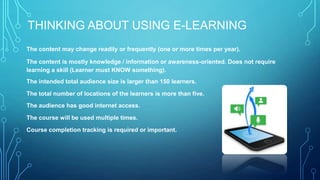
The content may change readily or frequently (one or more times per year).
The content is mostly knowledge / information or awareness-oriented. Does not require
learning a skill (Learner must KNOW something).
The intended total audience size is larger than 150 learners.
The total number of locations of the learners is more than five.
The audience has good internet access.
The course will be used multiple times.
Course completion tracking is required or important.
WHAT IS ELEARNING?
• eLearning is the use of technology to provide learning content
anywhere, anytime…
• Predominately internet based
• Can be Asynchronous or Live On-line training
• Future of all corporate, government, and educational
institution learning
• It is here today….
LEARNING MODELS WILL BEGIN TO
CHANGE
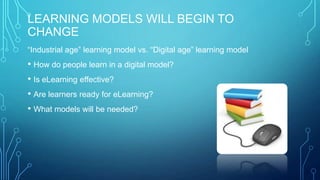
“Industrial age” learning model vs. “Digital age” learning model
• How do people learn in a digital model?
• Is eLearning effective?
• Are learners ready for eLearning?
• What models will be needed?
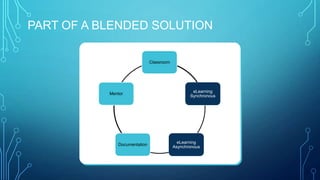
PART OF A BLENDED SOLUTION
Classroom
eLearning
Synchronous
eLearning
Asynchronous
Documentation
Mentor
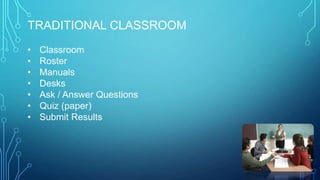
TRADITIONAL CLASSROOM
• Classroom
• Roster
• Manuals
• Desks
• Ask / Answer Questions
• Quiz (paper)
• Submit Results
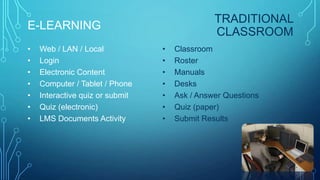
E-LEARNING
• Web / LAN / Local
• Login
• Electronic Content
• Computer / Tablet / Phone
• Interactive quiz or submit
• Quiz (electronic)
• LMS Documents Activity
• Classroom
• Roster
• Manuals
• Desks
• Ask / Answer Questions
• Quiz (paper)
• Submit Results
TRADITIONAL
CLASSROOM
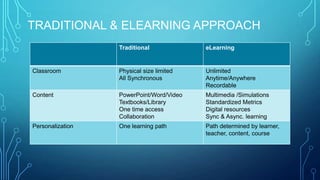
TRADITIONAL & ELEARNING APPROACH
Traditional eLearning
Classroom Physical size limited
All Synchronous
Unlimited
Anytime/Anywhere
Recordable
Content PowerPoint/Word/Video
Textbooks/Library
One time access
Collaboration
Multimedia /Simulations
Standardized Metrics
Digital resources
Sync & Async. learning
Personalization One learning path Path determined by learner,
teacher, content, course
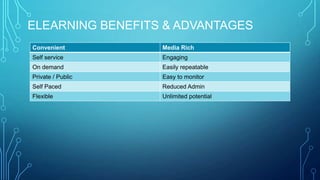
ELEARNING BENEFITS & ADVANTAGES
Convenient Media Rich
Self service Engaging
On demand Easily repeatable
Private / Public Easy to monitor
Self Paced Reduced Admin
Flexible Unlimited potential
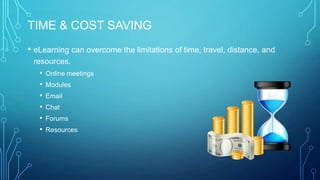
TIME & COST SAVING
• eLearning can overcome the limitations of time, travel, distance, and
resources.
• Online meetings
• Modules
• Email
• Chat
• Forums
• Resources
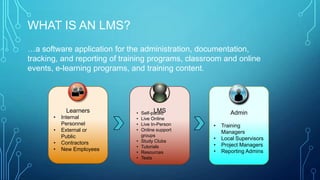
WHAT IS AN LMS?
• Training
Managers
• Local Supervisors
• Project Managers
• Reporting Admins
• Internal
Personnel
• External or
Public
• Contractors
• New Employees
…a software application for the administration, documentation,
tracking, and reporting of training programs, classroom and online
events, e-learning programs, and training content.
• Self-paced
• Live Online
• Live In-Person
• Online support
groups
• Study Clubs
• Tutorials
• Resources
• Tests
LMSLearners Admin
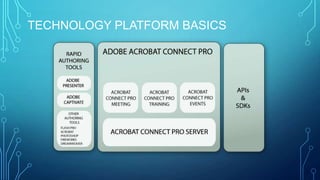
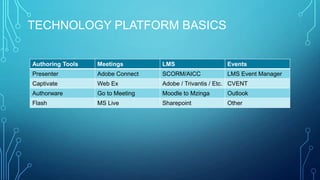
TECHNOLOGY PLATFORM BASICS
Authoring Tools Meetings LMS Events
Presenter Adobe Connect SCORM/AICC LMS Event Manager
Captivate Web Ex Adobe / Trivantis / Etc. CVENT
Authorware Go to Meeting Moodle to Mzinga Outlook
Flash MS Live Sharepoint Other
BUT WHY? (USE TECHNOLOGY)
1. Use of eLearning by Application Service Providers (ASP) and Cloud Based
Information
2. Using eLearning to support a blended learning environment
3. eLearning for increased skill demand and new systems training
4. Reducing costs of ILT by off setting travel expenses.
BUT WHY? (USE TECHNOLOGY)
5. Specialized training going global
6. Gaming for learning
7. Full government buy in
8. As a collaboration tool
9. Increased Internet accessibility
10. Organizational Training Standardization
11. Mobile learning
BE PREPARED TO DEVELOP CONTENT
Having these items in place before you start your first courses will ensure a more efficient
development process. Also, if you have a number of developers these items will help your
organization provide a clear and consistent eLearning presence.
• Style Guide and/or Developers Guide
• Course Templates
• Photo or Image Source (Centralized Library)
• Appropriate Software
• Development software such as Adobe Captivate
• Photo manipulation software such as Adobe Photoshop
• Video editing tools such as Adobe Premiere
• Appropriate Developers Hardware
• Communications Document or Platform
ELEARNING CONTENT?
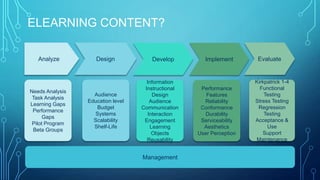
Management
Needs Analysis
Task Analysis
Learning Gaps
Performance
Gaps
Pilot Program
Beta Groups
Audience
Education level
Budget
Systems
Scalability
Shelf-Life
Analyze Design
Information
Instructional
Design
Audience
Communication
Interaction
Engagement
Learning
Objects
Reusability
Develop
Performance
Features
Reliability
Conformance
Durability
Serviceability
Aesthetics
User Perception
Implement
Kirkpatrick 1-4
Functional
Testing
Stress Testing
Regression
Testing
Acceptance &
Use
Support
Maintenance
Evaluate
STYLE GUIDES
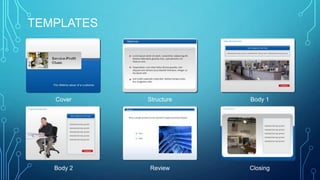
TEMPLATES
Cover Structure Body 1
Body 2 Review Closing
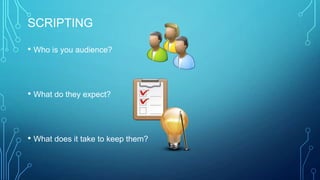
SCRIPTING
• Who is you audience?
• What do they expect?
• What does it take to keep them?
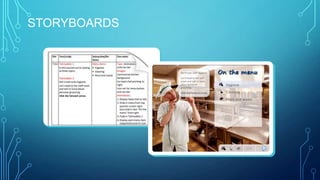
STORYBOARDS
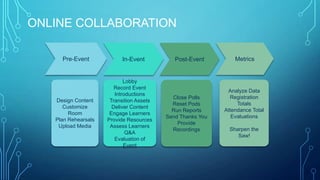
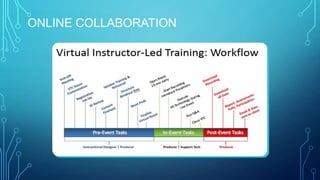
ONLINE COLLABORATION
Design Content
Customize
Room
Plan Rehearsals
Upload Media
Pre-Event
Lobby
Record Event
Introductions
Transition Assets
Deliver Content
Engage Learners
Provide Resources
Assess Learners
Q&A
Evaluation of
Event
In-Event
Close Polls
Reset Pods
Run Reports
Send Thanks You
Provide
Recordings
Post-Event
Analyze Data
Registration
Totals
Attendance Total
Evaluations
Sharpen the
Saw!
Metrics
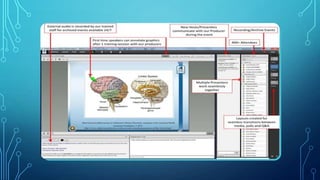
ONLINE COLLABORATION
DEFINING E-LEARNING
When information is delivered, received and processed by a user
via an electronic device.
What is the most popular eLearning tool in the world?
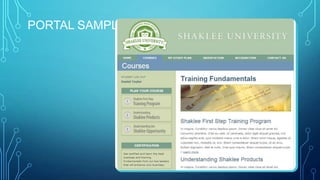
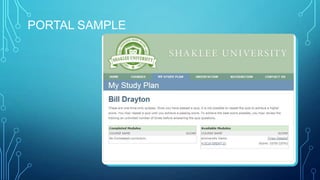
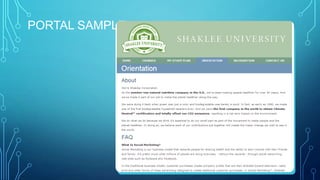
LEARNING PORTALS
• Google #1 learning portal
• University / Education
• Corporate
• Government
• Sales
• Non-Profit
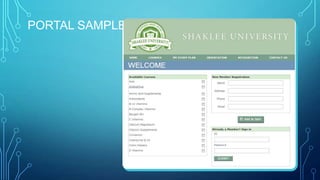
PORTAL SAMPLE
PORTAL SAMPLE
PORTAL SAMPLE
PORTAL SAMPLE
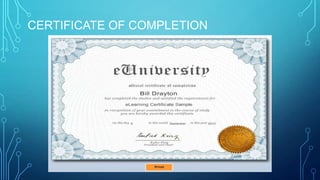
CERTIFICATE OF COMPLETION

Today's Learning and Technology – How Technology is changing the way people train, learn, and collaborate

  • 1.
    TODAY’S LEARNING AND TECHNOLOGY HOWTECHNOLOGY IS CHANGING THE WAY PEOPLE TRAIN, LEARN AND COLLABORATE…. ED STENGEL BROOKWOOD MEDIA ART’S, INC. ESTENGEL@BROOKWOOD.COM
  • 2.
    TODAYS AGENDA • AboutBrookwood • What is eLearning? • Technology Platform Basics • Content • Online collaboration • Classroom moves to VILT • Education portals becoming portals, virtual libraries, universities for training
  • 3.
    ABOUT BROOKWOOD • Local(Lower Gwynedd, PA) • 17+ years using technology to/for training and eLearning • Developers as well educators • Learning applications, extensions, portals • Content developers • Certified training center
  • 4.
    THINKING ABOUT USINGE-LEARNING The content may change readily or frequently (one or more times per year). The content is mostly knowledge / information or awareness-oriented. Does not require learning a skill (Learner must KNOW something). The intended total audience size is larger than 150 learners. The total number of locations of the learners is more than five. The audience has good internet access. The course will be used multiple times. Course completion tracking is required or important.
  • 5.
    WHAT IS ELEARNING? •eLearning is the use of technology to provide learning content anywhere, anytime… • Predominately internet based • Can be Asynchronous or Live On-line training • Future of all corporate, government, and educational institution learning • It is here today….
  • 6.
    LEARNING MODELS WILLBEGIN TO CHANGE “Industrial age” learning model vs. “Digital age” learning model • How do people learn in a digital model? • Is eLearning effective? • Are learners ready for eLearning? • What models will be needed?
  • 7.
    PART OF ABLENDED SOLUTION Classroom eLearning Synchronous eLearning Asynchronous Documentation Mentor
  • 8.
    TRADITIONAL CLASSROOM • Classroom •Roster • Manuals • Desks • Ask / Answer Questions • Quiz (paper) • Submit Results
  • 9.
    E-LEARNING • Web /LAN / Local • Login • Electronic Content • Computer / Tablet / Phone • Interactive quiz or submit • Quiz (electronic) • LMS Documents Activity • Classroom • Roster • Manuals • Desks • Ask / Answer Questions • Quiz (paper) • Submit Results TRADITIONAL CLASSROOM
  • 10.
    TRADITIONAL & ELEARNINGAPPROACH Traditional eLearning Classroom Physical size limited All Synchronous Unlimited Anytime/Anywhere Recordable Content PowerPoint/Word/Video Textbooks/Library One time access Collaboration Multimedia /Simulations Standardized Metrics Digital resources Sync & Async. learning Personalization One learning path Path determined by learner, teacher, content, course
  • 11.
    ELEARNING BENEFITS &ADVANTAGES Convenient Media Rich Self service Engaging On demand Easily repeatable Private / Public Easy to monitor Self Paced Reduced Admin Flexible Unlimited potential
  • 12.
    TIME & COSTSAVING • eLearning can overcome the limitations of time, travel, distance, and resources. • Online meetings • Modules • Email • Chat • Forums • Resources
  • 13.
    WHAT IS ANLMS? • Training Managers • Local Supervisors • Project Managers • Reporting Admins • Internal Personnel • External or Public • Contractors • New Employees …a software application for the administration, documentation, tracking, and reporting of training programs, classroom and online events, e-learning programs, and training content. • Self-paced • Live Online • Live In-Person • Online support groups • Study Clubs • Tutorials • Resources • Tests LMSLearners Admin
  • 14.
  • 15.
    TECHNOLOGY PLATFORM BASICS AuthoringTools Meetings LMS Events Presenter Adobe Connect SCORM/AICC LMS Event Manager Captivate Web Ex Adobe / Trivantis / Etc. CVENT Authorware Go to Meeting Moodle to Mzinga Outlook Flash MS Live Sharepoint Other
  • 16.
    BUT WHY? (USETECHNOLOGY) 1. Use of eLearning by Application Service Providers (ASP) and Cloud Based Information 2. Using eLearning to support a blended learning environment 3. eLearning for increased skill demand and new systems training 4. Reducing costs of ILT by off setting travel expenses.
  • 17.
    BUT WHY? (USETECHNOLOGY) 5. Specialized training going global 6. Gaming for learning 7. Full government buy in 8. As a collaboration tool 9. Increased Internet accessibility 10. Organizational Training Standardization 11. Mobile learning
  • 18.
    BE PREPARED TODEVELOP CONTENT Having these items in place before you start your first courses will ensure a more efficient development process. Also, if you have a number of developers these items will help your organization provide a clear and consistent eLearning presence. • Style Guide and/or Developers Guide • Course Templates • Photo or Image Source (Centralized Library) • Appropriate Software • Development software such as Adobe Captivate • Photo manipulation software such as Adobe Photoshop • Video editing tools such as Adobe Premiere • Appropriate Developers Hardware • Communications Document or Platform
  • 19.
    ELEARNING CONTENT? Management Needs Analysis TaskAnalysis Learning Gaps Performance Gaps Pilot Program Beta Groups Audience Education level Budget Systems Scalability Shelf-Life Analyze Design Information Instructional Design Audience Communication Interaction Engagement Learning Objects Reusability Develop Performance Features Reliability Conformance Durability Serviceability Aesthetics User Perception Implement Kirkpatrick 1-4 Functional Testing Stress Testing Regression Testing Acceptance & Use Support Maintenance Evaluate
  • 20.
  • 21.
    TEMPLATES Cover Structure Body1 Body 2 Review Closing
  • 22.
    SCRIPTING • Who isyou audience? • What do they expect? • What does it take to keep them?
  • 23.
  • 24.
    ONLINE COLLABORATION Design Content Customize Room PlanRehearsals Upload Media Pre-Event Lobby Record Event Introductions Transition Assets Deliver Content Engage Learners Provide Resources Assess Learners Q&A Evaluation of Event In-Event Close Polls Reset Pods Run Reports Send Thanks You Provide Recordings Post-Event Analyze Data Registration Totals Attendance Total Evaluations Sharpen the Saw! Metrics
  • 25.
  • 27.
    DEFINING E-LEARNING When informationis delivered, received and processed by a user via an electronic device. What is the most popular eLearning tool in the world?
  • 28.
    LEARNING PORTALS • Google#1 learning portal • University / Education • Corporate • Government • Sales • Non-Profit
  • 29.
  • 30.
  • 31.
  • 32.
  • 33.