Principles and Techniques for creating
engaging video content
ACPET - Vic Government
e-learning Program 2011
Thanks to ACPET
now only
Kryptonite can stop
me from using
Social Media at will
at my RTO!!!
Presenter – Michael Gwyther
mick@yumstudio.com.au
@mickgwyther
http://www.facebook.com/michael.gwyther
http://www.linkedin.com/profile/view?id=20201325
Straw Poll
A I have a personal YouTube account
B Our RTO has a YouTube
account/channel
C Both B & C
D I am not using YouTube at all!
Video in Education
You can use Video to support
learners to think out and present
workplace processes and work
flows using video.
Video in Training
• Videos are good for
illustration purposes.
• They are supported
by text and
interactions.
• 20 second video can
replace a full page of
text when trying to
explain a detailed
process
Video in Training
• Using video to depict
real scenario can make
whole situation so
much more engaging
Video in Training
• Scaffolding activities using video
ensures active learning – quizzes,
decision making trees, scenarios, case
studies and demonstrations can be
enhanced by integrating video into the
decision making and problem solving
resources and examples available to
the learner.
Video in Training
• Promote identification
with job roles, contexts
and workplace
processes
• Can be story driven
(narrative)
• Support a range of
learner preferences
(visual, reflective
learners)
Video in Training
What purpose can video meet?
Using Video in Training
Face to
Face
Self
Paced
Online
Facilitated
Video for Training
Face to Face Self Paced
Online
Facilitated
Content
Activities
Assessment
Training – Video Demonstrations
Training – Video Assessment
•Assessment Capture
•Evidence of competency
Training – Video Assessment
Training – Industry Knowledge
Training – Live Learning Events
Training – Group Projects
Guidelines for learners
Photo Credit: http://www.flickr.com/photos/21665288@N00/2505599152
•YouTube
•Vimeo
•Teacher Tube
•Capture tools
•NetVideoHunter
•TubeChop
Existing Video sources
• Promote identification
with job roles, contexts
and workplace
processes
• Can be story driven
(narrative)
• Support a range of
learner preferences
(visual, reflective
learners)
Video in Training
Screencasting app – Screen Chomp
Stop Motion
•Assessment Capture
•Evidence of competency
•Creating & Editing Videos
iPhones iPads Android Tablets
•Embed
Codes
•HTML
•Blog
•Wiki
Embedding
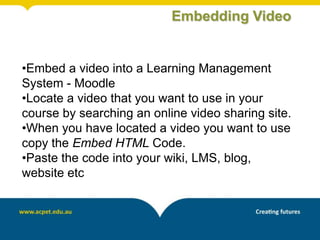
•Embed a video into a Learning Management
System - Moodle
•Locate a video that you want to use in your
course by searching an online video sharing site.
•When you have located a video you want to use
copy the Embed HTML Code.
•Paste the code into your wiki, LMS, blog,
website etc
Embedding Video
Video Editing
http://www.adobe.com/support/premiereelements/gettingstarted/index.html
Video Editing
http://www.adobe.com/support/premiereelements/gettingstarted/index.html
Video Editing - Interface
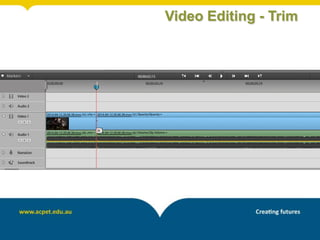
Video Editing - Trim
Video Editing - Split
Video Editing - Transition
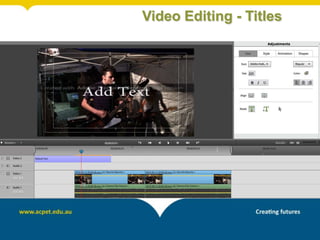
Video Editing - Titles
Video Editing - Export
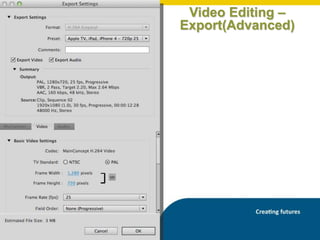
Video Editing –
Export(Advanced)
Video Editing - Export
Mobile app – tour iMovie
Photo Credi thttp://www.flickr.com/photos/57567419@N00/7496669132/
Mobile apps tour
Photo Credi thttp://www.flickr.com/photos/57567419@N00/7496669132/
•The AVI Format
•The Windows Media Format
•The MPEG Format – MP4!
•The MOV Format
•The RealVideo Format
•The Shockwave (Flash) Format
•The Flash Video Format
•The Mobile Video Format 3gp
Video Formats
•Video files, which,
uncompressed, are HUGE
•Codec's can take a very large
video file that can’t be
downloaded and make it into a
file that can be “streamed”
online
•MOV
•Flash Video (FLV)
•h.264
•AVI
Video Codecs
Video Codecs
http://e-standards.flexiblelearning.net.au/technical_standards/content_formats.php
Video Captions
http://accessibility.psu.edu/video
Mix up Shooting
Camera Interviewer
Subject
Mix up Shooting
Camera
InterviewerSubject
Subject
Mix up Shooting
Camera
Interviewer
Interviewer
Mix up Shooting
Camera
Subject
Mix up Shooting
Camera Camera
•How will we deliver to our learners?
•CD/DVD
•Intranet/Internet – LMS/Blog/Wiki
etc
•Will the viewer need a plug in on
their browser/iphone to watch the
video?
•These decisions influence the codec
we will use to export the final video
Delivering video to our learners
Shoot Video
Edit and
Convert
File (if
necessary)
Add
Transitions
Titles
Audio
Voice Over
Export
(Convert)
Compress
Test
Publish to
LMS, Blog,
Website,
Web 2
Storyboard
& Script
Video Work Flow
• Aspect Ratio
• Standard Definition
• High Definition
(High-definition video or HD video
refers to any video system of higher
resolution than standard-definition
(SD) video, and most commonly
involves display resolutions of
1,280×720 pixels (720p) or
1,920×1,080 pixels (1080i/1080p)
16:9
4:3
Hardware
• Zoom
• Pan
• Focus
• Lighting
• Storage System
(DV Tape, HD, Disk)
• Computer Capture
(USB, Firewire, Bluetoooth)
Camera Concepts
Funky Accessories
• Headroom & Looking Space
• Interview position
Framing
Framing
• Camera glasses and video cameras,
are an emerging technical
innovation in the VET system
• allows trainers to create re-usable
cost effective learning resources as
well as enable skills assessments
Point Of View
Flipped Classroom
Training – Video Demonstrations
Training – Video Assessment
•Assessment Capture
•Evidence of competency
Training – Video Assessment
Training – Industry Knowledge
Training – Live Learning Events
Training – Group Projects
Guidelines for learners
Photo Credit: http://www.flickr.com/photos/21665288@N00/2505599152
Share a new idea for using video
with your learners?
What is YouTube?
Video hosting & sharing platform
Photo Credi thttp://www.flickr.com/photos/57567419@N00/7496669132/
YouTube tour
Photo Credi thttp://www.flickr.com/photos/57567419@N00/7496669132/
YouTube accounts
Photo Credi thttp://www.flickr.com/photos/57567419@N00/7496669132/
YouTube enhancements
Photo Credi thttp://www.flickr.com/photos/57567419@N00/7496669132/
Why YouTube?
Photo Credi thttp://www.flickr.com/photos/57567419@N00/7496669132/
What’s your use for YouTube?
Any Questions?

Video