Order-Independent
  transparency

   Daosheng Mu
Outline
• Introduction
• Methodology
• Conclusion
Introduction
• Translucent objects
  render by blending with
  the background
• Opaque objects just
  cover the background
• Translucent objects must be rendered
  from far to near
• It’s very complex and complicated to
  render pixels from far to near
  – Object-center sorting is common
  – Object sorting doesn’t guarantee pixel sorting
• C0: foreground RGB color
• A0: alpha representing foreground’s
  translucency
• D0: background RGB color
• FinalColor = A0 * C0 + (1 – A0) * D0
  – as A0 varies between 0 and 1, FinalColor
    varies between D0 and C0
Methodology
• Numerical approach Sort-Independent
    Alpha Blending, GDC 2007, Houman Meshkin
•   Interactive Order-Independent Transparency, NVIDIA OpenGL Applications
    Engineering 2004 , Cass Everitt
Numerical approach
• Cn: RGB from nth layer
• An: Alpha from nth layer
• D0: background
• D1 = A0*C0 + (1 -          A0)*D0
• D2 = A1*C1 + (1 -          A1)*D1
• D3 = A2*C2 + (1 -          A2)*D2
• D4 = A3*C3 + (1 -          A3)*D3
• D4 = A3*C3
    + A2*C2*(1 - A3)
    + A1*C1*(1 - A3)*(1 - A2)
    + A0*C0*(1 - A3)*(1 - A2)*(1 -
  A1)
    + D0*(1 - A3)*(1 - A2)*(1 -
  A1)*(1 - A0)
• D4 = D0
•    + A0*C0 + A1*C1 + A2*C2 + A3*C3
•    - A0*D0 - A1*D0 - A2*D0 - A3*D0
•    - A0*A1*A2*D0 - A0*A1*A3*D0 - A0*A2*A3*D0 -
  A1*A2*A3*D0                           order independent part
•    + A0*A1*A2*A3*D0
•    - A0*A3*C0 - A0*A2*C0 - A0*A1*C0
•    - A1*A3*C1 - A1*A2*C1 - A2*A3*C2
•    + A0*A3*D0 + A0*A2*D0 + A0*A1*D0     order dependent part
•    + A1*A3*D0 + A1*A2*D0 + A2*A3*D0
•    + A0*A1*A2*C0 + A0*A1*A3*C0 + A0*A2*A3*C0 +
  A1*A2*A3*C1
•    - A0*A1*A2*A3*C0

• Independent: selfColor*selfAlpha, Alpha*backColor
• Dependent: selfColor*otherAlpha + PartialAlpha*backColor
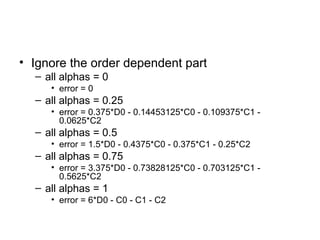
• Ignore the order dependent part
  – all alphas = 0
     • error = 0
  – all alphas = 0.25
     • error = 0.375*D0 - 0.14453125*C0 - 0.109375*C1 -
       0.0625*C2
  – all alphas = 0.5
     • error = 1.5*D0 - 0.4375*C0 - 0.375*C1 - 0.25*C2
  – all alphas = 0.75
     • error = 3.375*D0 - 0.73828125*C0 - 0.703125*C1 -
       0.5625*C2
  – all alphas = 1
     • error = 6*D0 - C0 - C1 - C2
• A smaller part of the formula works much
  better in practice
  – = D0
  – + A0*C0 + A1*C1 + A2*C2 + A3*C3
  – - A0*D0 - A1*D0 - A2*D0 - A3*D0
• This is much simpler and requires only 2
  passes and a single render target
  – 1 less pass and 2 less render targets
•   Let’s analyze the simpler formula in some easy scenarios
    – all alphas = 0
        • errorsimple = 0
        • errorprev = 0
    – all alphas = 0.25
        • errorsimple = 0.31640625*D0 - 0.14453125*C0 - 0.109375*C1 - 0.0625*C2
        • errorprev = 0.375*D0 - 0.14453125*C0 - 0.109375*C1 - 0.0625*C2
    – all alphas = 0.5
        • errorsimple = 1.0625*D0 - 0.4375*C0 - 0.375*C1 - 0.25*C2
        • errorprev = 1.5*D0 - 0.4375*C0 - 0.375*C1 - 0.25*C2
    – all alphas = 0.75
        • errorsimple = 2.00390625*D0 - 0.73828125*C0 - 0.703125*C1 - 0.5625*C2
        • errorprev = 3.375*D0 - 0.73828125*C0 - 0.703125*C1 - 0.5625*C2
    – all alphas = 1
        • errorsimple = 3*D0 - C0 - C1 - C2
        • errorprev = 6*D0 - C0 - C1 - C2
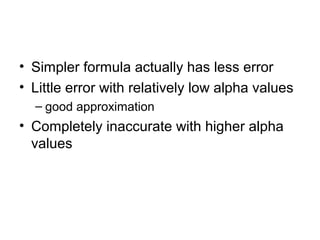
• Simpler formula actually has less error
• Little error with relatively low alpha values
  – good approximation
• Completely inaccurate with higher alpha
  values
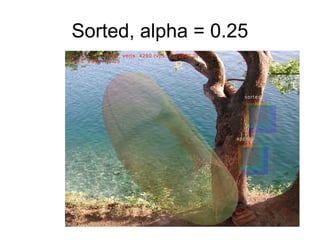
Sorted, alpha = 0.25
Approx, alpha = 0.25
Sorted, alpha = 0.5
Approx, alpha = 0.5
• Implement the order independent part and
  just ignore the order dependent part
• D4 = D0
     + A0*C0 + A1*C1 + A2*C2 + A3*C3
     - A0*D0 - A1*D0 - A2*D0 - A3*D0
     - A0*A1*A2*D0 - A0*A1*A3*D0 -
  A0*A2*A3*D0 - A1*A2*A3*D0
     + A0*A1*A2*A3*D0
• Use multiple render targets to compute
  multiple parts of the equation
  simultaneously
1 pass
               st


• Use additive blending
  – SrcAlphaBlend = 1
  – DstAlphaBlend = 1
  – FinalRGBA = SrcRGBA + DstRGBA
• render target #1, nth layer
  – RGB = An * Cn
  – Alpha = An
• render target #2, nth layer
  – RGB = 1 / An
  – Alpha = An
1 pass results
                st


• After n translucent layers have been
  blended we get:
  – render target #1:
     • RGB1 = A0 * C0 + A1 * C1 + … + An * Cn
     • Alpha1 = A0 + A1 + … + An
  – render target #2:
     • RGB2 = 1 / A0 + 1 / A1 + … + 1 / An
     • Alpha2 = A0 + A1 + … + An
2 pass
                   nd


• Use multiplicative blending
  – SrcAlphaBlend = 0
  – DstAlphaBlend = SrcRGBA
  – FinalRGBA = SrcRGBA * DstRGBA
• render target #3, nth layer
  – RGB = Cn
  – Alpha = An
2 pass results
               nd


• After n translucent layers have been
  blended we get:
  – render target #3:
     • RGB3 = C0 * C1 * … * Cn
     • Alpha3 = A0 * A1 * … * An
• This pass isn’t really necessary for the
  better and simpler formula
  – just for completeness
Results
• We now have the following
   – background
       • D0
   – render target #1:
       • RGB1 = A0 * C0 + A1 * C1 + … + An * Cn
       • Alpha1 = A0 + A1 + … + An
   – render target #2:
       • RGB2 = 1 / A0 + 1 / A1 + … + 1 / An
       • Alpha2 = A0 + A1 + … + An
   – render target #3:
       • RGB3 = C0 * C1 * … * Cn
       • Alpha3 = A0 * A1 * … * An
Final pass

•   Blend results in a pixel shader
•   RGB1 - D0 * Alpha1
     – = A0*C0 + A1*C1 + A2*C2 + A3*C3
     – - D0 * (A0 + A1 + A2 + A3)
•   D0 * Alpha3
     – = D0 * (A0*A1*A2*A3)
•   D0 * RGB2 * Alpha3
     – = D0 * (1/A0 + 1/A1 + 1/A2 + 1/A3) * (A0*A1*A2*A3)
     – = D0 * (A1*A2*A3 + A0*A2*A3 + A0*A1*A3 + A0*A1*A2)
•   Sum results with background color (D0) and we get:
     –   =   D0
     –   +   A0*C0 + A1*C1 + A2*C2 + A3*C3
     –   -   D0 * (A0 + A1 + A2 + A3)
     –   +   D0 * (A0*A1*A2*A3)
     –   -   D0 * (A1*A2*A3 + A0*A2*A3 + A0*A1*A3 + A0*A1*A2)
•   That’s the whole sort independent part of the blend formula
• This technique is best suited for particles
  – too many to sort
  – slight inaccuracy in their color shouldn’t
    matter too much
• Not so good for very general case, with all
  ranges of alpha values
• For general case, works best with highly
  translucent objects
  – i.e. low alpha values
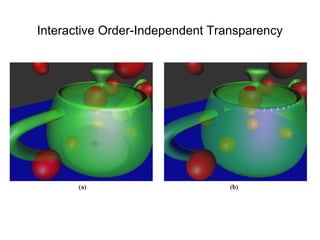
Interactive Order-Independent Transparency
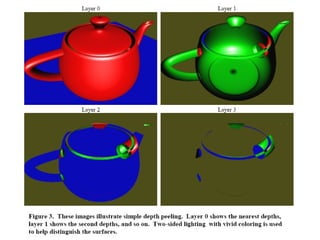
• Depth peeling for order independent
  transparency possible
• Standard depth testing gives us the
  nearest fragment without imposing any
  ordering restrictions
• with n passes over a scene, we can get n
  layers deeper into the scene
• Depths vary within each layer, and the
  number of samples is decreasing.
• Peeling process at the fragment level
• The process of depth peeling is actually a
  straightforward multi-pass algorithm
• Two depth tests per fragment

Order independent transparency

  • 1.
  • 2.
  • 3.
    Introduction • Translucent objects render by blending with the background • Opaque objects just cover the background
  • 4.
    • Translucent objectsmust be rendered from far to near • It’s very complex and complicated to render pixels from far to near – Object-center sorting is common – Object sorting doesn’t guarantee pixel sorting
  • 5.
    • C0: foregroundRGB color • A0: alpha representing foreground’s translucency • D0: background RGB color • FinalColor = A0 * C0 + (1 – A0) * D0 – as A0 varies between 0 and 1, FinalColor varies between D0 and C0
  • 7.
    Methodology • Numerical approachSort-Independent Alpha Blending, GDC 2007, Houman Meshkin • Interactive Order-Independent Transparency, NVIDIA OpenGL Applications Engineering 2004 , Cass Everitt
  • 8.
    Numerical approach • Cn:RGB from nth layer • An: Alpha from nth layer • D0: background • D1 = A0*C0 + (1 - A0)*D0 • D2 = A1*C1 + (1 - A1)*D1 • D3 = A2*C2 + (1 - A2)*D2 • D4 = A3*C3 + (1 - A3)*D3
  • 9.
    • D4 =A3*C3 + A2*C2*(1 - A3) + A1*C1*(1 - A3)*(1 - A2) + A0*C0*(1 - A3)*(1 - A2)*(1 - A1) + D0*(1 - A3)*(1 - A2)*(1 - A1)*(1 - A0)
  • 10.
    • D4 =D0 • + A0*C0 + A1*C1 + A2*C2 + A3*C3 • - A0*D0 - A1*D0 - A2*D0 - A3*D0 • - A0*A1*A2*D0 - A0*A1*A3*D0 - A0*A2*A3*D0 - A1*A2*A3*D0  order independent part • + A0*A1*A2*A3*D0 • - A0*A3*C0 - A0*A2*C0 - A0*A1*C0 • - A1*A3*C1 - A1*A2*C1 - A2*A3*C2 • + A0*A3*D0 + A0*A2*D0 + A0*A1*D0  order dependent part • + A1*A3*D0 + A1*A2*D0 + A2*A3*D0 • + A0*A1*A2*C0 + A0*A1*A3*C0 + A0*A2*A3*C0 + A1*A2*A3*C1 • - A0*A1*A2*A3*C0 • Independent: selfColor*selfAlpha, Alpha*backColor • Dependent: selfColor*otherAlpha + PartialAlpha*backColor
  • 11.
    • Ignore theorder dependent part – all alphas = 0 • error = 0 – all alphas = 0.25 • error = 0.375*D0 - 0.14453125*C0 - 0.109375*C1 - 0.0625*C2 – all alphas = 0.5 • error = 1.5*D0 - 0.4375*C0 - 0.375*C1 - 0.25*C2 – all alphas = 0.75 • error = 3.375*D0 - 0.73828125*C0 - 0.703125*C1 - 0.5625*C2 – all alphas = 1 • error = 6*D0 - C0 - C1 - C2
  • 12.
    • A smallerpart of the formula works much better in practice – = D0 – + A0*C0 + A1*C1 + A2*C2 + A3*C3 – - A0*D0 - A1*D0 - A2*D0 - A3*D0 • This is much simpler and requires only 2 passes and a single render target – 1 less pass and 2 less render targets
  • 13.
    Let’s analyze the simpler formula in some easy scenarios – all alphas = 0 • errorsimple = 0 • errorprev = 0 – all alphas = 0.25 • errorsimple = 0.31640625*D0 - 0.14453125*C0 - 0.109375*C1 - 0.0625*C2 • errorprev = 0.375*D0 - 0.14453125*C0 - 0.109375*C1 - 0.0625*C2 – all alphas = 0.5 • errorsimple = 1.0625*D0 - 0.4375*C0 - 0.375*C1 - 0.25*C2 • errorprev = 1.5*D0 - 0.4375*C0 - 0.375*C1 - 0.25*C2 – all alphas = 0.75 • errorsimple = 2.00390625*D0 - 0.73828125*C0 - 0.703125*C1 - 0.5625*C2 • errorprev = 3.375*D0 - 0.73828125*C0 - 0.703125*C1 - 0.5625*C2 – all alphas = 1 • errorsimple = 3*D0 - C0 - C1 - C2 • errorprev = 6*D0 - C0 - C1 - C2
  • 14.
    • Simpler formulaactually has less error • Little error with relatively low alpha values – good approximation • Completely inaccurate with higher alpha values
  • 15.
  • 16.
  • 17.
  • 18.
  • 19.
    • Implement theorder independent part and just ignore the order dependent part • D4 = D0 + A0*C0 + A1*C1 + A2*C2 + A3*C3 - A0*D0 - A1*D0 - A2*D0 - A3*D0 - A0*A1*A2*D0 - A0*A1*A3*D0 - A0*A2*A3*D0 - A1*A2*A3*D0 + A0*A1*A2*A3*D0
  • 20.
    • Use multiplerender targets to compute multiple parts of the equation simultaneously
  • 21.
    1 pass st • Use additive blending – SrcAlphaBlend = 1 – DstAlphaBlend = 1 – FinalRGBA = SrcRGBA + DstRGBA • render target #1, nth layer – RGB = An * Cn – Alpha = An • render target #2, nth layer – RGB = 1 / An – Alpha = An
  • 22.
    1 pass results st • After n translucent layers have been blended we get: – render target #1: • RGB1 = A0 * C0 + A1 * C1 + … + An * Cn • Alpha1 = A0 + A1 + … + An – render target #2: • RGB2 = 1 / A0 + 1 / A1 + … + 1 / An • Alpha2 = A0 + A1 + … + An
  • 23.
    2 pass nd • Use multiplicative blending – SrcAlphaBlend = 0 – DstAlphaBlend = SrcRGBA – FinalRGBA = SrcRGBA * DstRGBA • render target #3, nth layer – RGB = Cn – Alpha = An
  • 24.
    2 pass results nd • After n translucent layers have been blended we get: – render target #3: • RGB3 = C0 * C1 * … * Cn • Alpha3 = A0 * A1 * … * An • This pass isn’t really necessary for the better and simpler formula – just for completeness
  • 25.
    Results • We nowhave the following – background • D0 – render target #1: • RGB1 = A0 * C0 + A1 * C1 + … + An * Cn • Alpha1 = A0 + A1 + … + An – render target #2: • RGB2 = 1 / A0 + 1 / A1 + … + 1 / An • Alpha2 = A0 + A1 + … + An – render target #3: • RGB3 = C0 * C1 * … * Cn • Alpha3 = A0 * A1 * … * An
  • 26.
    Final pass • Blend results in a pixel shader • RGB1 - D0 * Alpha1 – = A0*C0 + A1*C1 + A2*C2 + A3*C3 – - D0 * (A0 + A1 + A2 + A3) • D0 * Alpha3 – = D0 * (A0*A1*A2*A3) • D0 * RGB2 * Alpha3 – = D0 * (1/A0 + 1/A1 + 1/A2 + 1/A3) * (A0*A1*A2*A3) – = D0 * (A1*A2*A3 + A0*A2*A3 + A0*A1*A3 + A0*A1*A2) • Sum results with background color (D0) and we get: – = D0 – + A0*C0 + A1*C1 + A2*C2 + A3*C3 – - D0 * (A0 + A1 + A2 + A3) – + D0 * (A0*A1*A2*A3) – - D0 * (A1*A2*A3 + A0*A2*A3 + A0*A1*A3 + A0*A1*A2) • That’s the whole sort independent part of the blend formula
  • 27.
    • This techniqueis best suited for particles – too many to sort – slight inaccuracy in their color shouldn’t matter too much • Not so good for very general case, with all ranges of alpha values • For general case, works best with highly translucent objects – i.e. low alpha values
  • 28.
  • 29.
  • 30.
    • Depth peelingfor order independent transparency possible • Standard depth testing gives us the nearest fragment without imposing any ordering restrictions • with n passes over a scene, we can get n layers deeper into the scene
  • 32.
    • Depths varywithin each layer, and the number of samples is decreasing. • Peeling process at the fragment level
  • 33.
    • The processof depth peeling is actually a straightforward multi-pass algorithm • Two depth tests per fragment