International 5-days Graphics
Programming Workshop
using Cocos-2d-x
DAY 5
Trident College of Information Technology
Takao WADA
1. Review
2. Toon Shading
3. Alpha blending
4. Play with shader program
5. Final work
6. Presentation
Agenda
Review
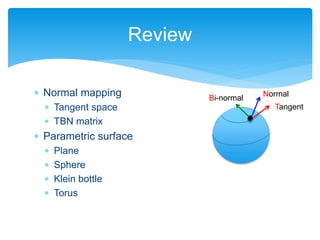
Normal
Tangent
Bi-normal
 Normal mapping
 Tangent space
 TBN matrix
 Parametric surface
 Plane
 Sphere
 Klein bottle
 Torus
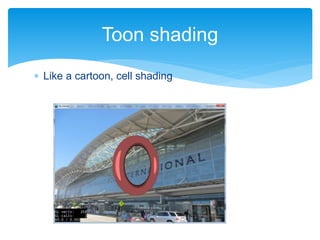
 Like a cartoon, cell shading
Toon shading
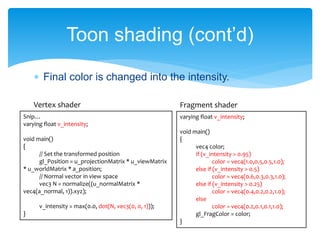
 Final color is changed into the intensity.
Toon shading (cont’d)
varying float v_intensity;
void main()
{
vec4 color;
if (v_intensity > 0.95)
color = vec4(1.0,0.5,0.5,1.0);
else if (v_intensity > 0.5)
color = vec4(0.6,0.3,0.3,1.0);
else if (v_intensity > 0.25)
color = vec4(0.4,0.2,0.2,1.0);
else
color = vec4(0.2,0.1,0.1,1.0);
gl_FragColor = color;
}
Snip…
varying float v_intensity;
void main()
{
// Set the transformed position
gl_Position = u_projectionMatrix * u_viewMatrix
* u_worldMatrix * a_position;
// Normal vector in view space
vec3 N = normalize((u_normalMatrix *
vec4(a_normal, 1)).xyz);
v_intensity = max(0.0, dot(N, vec3(0, 0, 1)));
}
Vertex shader Fragment shader
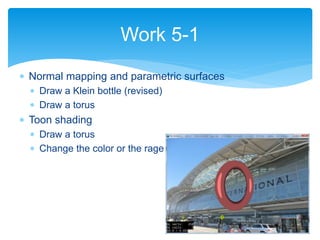
 Normal mapping and parametric surfaces
 Draw a Klein bottle (revised)
 Draw a torus
 Toon shading
 Draw a torus
 Change the color or the rage
Work 5-1
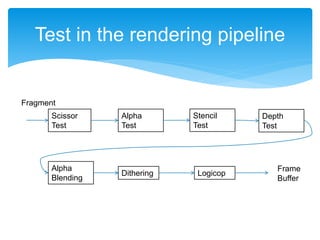
Test in the rendering pipeline
Scissor
Test
Alpha
Test
Stencil
Test
Depth
Test
Alpha
Blending
Fragment
Frame
Buffer
Dithering Logicop
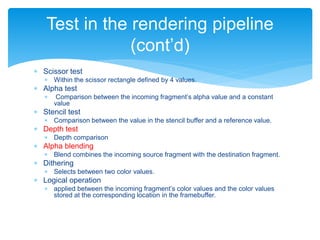
 Scissor test
 Within the scissor rectangle defined by 4 values.
 Alpha test
 Comparison between the incoming fragment’s alpha value and a constant
value
 Stencil test
 Comparison between the value in the stencil buffer and a reference value.
 Depth test
 Depth comparison
 Alpha blending
 Blend combines the incoming source fragment with the destination fragment.
 Dithering
 Selects between two color values.
 Logical operation
 applied between the incoming fragment’s color values and the color values
stored at the corresponding location in the framebuffer.
Test in the rendering pipeline
(cont’d)
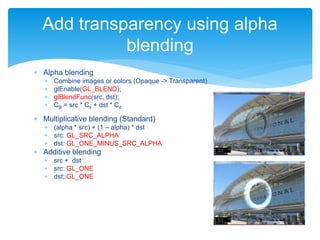
 Alpha blending
 Combine images or colors (Opaque -> Transparent)
 glEnable(GL_BLEND);
 glBlendFunc(src, dst);
 CB = src * Cs + dst * Cd
 Multiplicative blending (Standard)
 (alpha * src) + (1 – alpha) * dst
 src: GL_SRC_ALPHA
 dst: GL_ONE_MINUS_SRC_ALPHA
 Additive blending
 src + dst
 src: GL_ONE
 dst: GL_ONE
Add transparency using alpha
blending
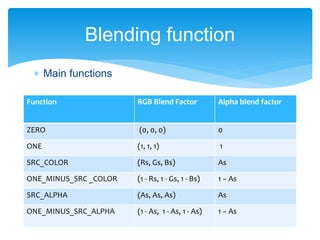
 Main functions
Blending function
Function RGB Blend Factor Alpha blend factor
ZERO (0, 0, 0) 0
ONE (1, 1, 1) 1
SRC_COLOR (Rs, Gs, Bs) As
ONE_MINUS_SRC _COLOR (1 - Rs, 1 - Gs, 1 - Bs) 1 − As
SRC_ALPHA (As, As, As) As
ONE_MINUS_SRC_ALPHA (1 - As, 1 - As, 1 - As) 1 − As
 Pass the time parameter to the shader
 Pass a float value as an uniform variable
 getGLProgramState()->setUniformFloat("u_time", _time);
 Vertex shader
 uniform float u_time;
 Dynamic controls
 Change the color in a shader
 Change the form by transforming vertices
 Change the texture coordinates
Dynamic controls in shaders
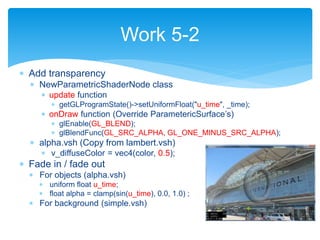
 Add transparency
 NewParametricShaderNode class
 update function
 getGLProgramState()->setUniformFloat("u_time", _time);
 onDraw function (Override ParametericSurface’s)
 glEnable(GL_BLEND);
 glBlendFunc(GL_SRC_ALPHA, GL_ONE_MINUS_SRC_ALPHA);
 alpha.vsh (Copy from lambert.vsh)
 v_diffuseColor = vec4(color, 0.5);
 Fade in / fade out
 For objects (alpha.vsh)
 uniform float u_time;
 float alpha = clamp(sin(u_time), 0.0, 1.0) ;
 For background (simple.vsh)
Work 5-2
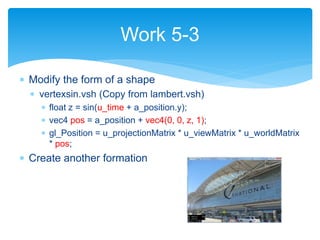
 Modify the form of a shape
 vertexsin.vsh (Copy from lambert.vsh)
 float z = sin(u_time + a_position.y);
 vec4 pos = a_position + vec4(0, 0, z, 1);
 gl_Position = u_projectionMatrix * u_viewMatrix * u_worldMatrix
* pos;
 Create another formation
Work 5-3
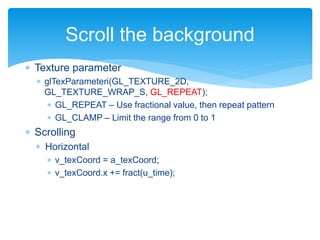
 Texture parameter
 glTexParameteri(GL_TEXTURE_2D,
GL_TEXTURE_WRAP_S, GL_REPEAT);
 GL_REPEAT – Use fractional value, then repeat pattern
 GL_CLAMP – Limit the range from 0 to 1
 Scrolling
 Horizontal
 v_texCoord = a_texCoord;
 v_texCoord.x += fract(u_time);
Scroll the background
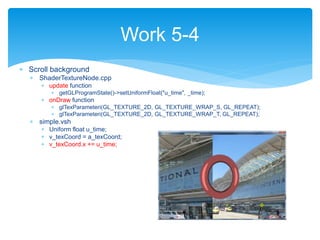
 Scroll background
 ShaderTextureNode.cpp
 update function
 getGLProgramState()->setUniformFloat("u_time", _time);
 onDraw function
 glTexParameteri(GL_TEXTURE_2D, GL_TEXTURE_WRAP_S, GL_REPEAT);
 glTexParameteri(GL_TEXTURE_2D, GL_TEXTURE_WRAP_T, GL_REPEAT);
 simple.vsh
 Uniform float u_time;
 v_texCoord = a_texCoord;
 v_texCoord.x += u_time;
Work 5-4
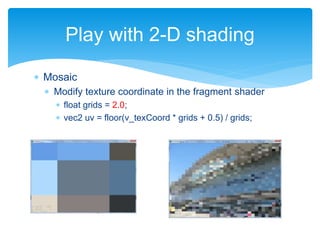
 Mosaic
 Modify texture coordinate in the fragment shader
 float grids = 2.0;
 vec2 uv = floor(v_texCoord * grids + 0.5) / grids;
Play with 2-D shading
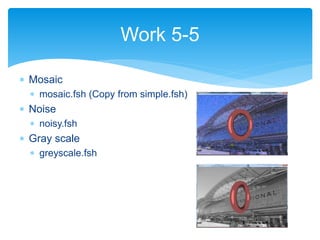
 Mosaic
 mosaic.fsh (Copy from simple.fsh)
 Noise
 noisy.fsh
 Gray scale
 greyscale.fsh
Work 5-5
 Create a graphics demo using some shapes and
shaders.
 Add some objects in the scene
 Move, rotate, scale shapes
 Dynamically, change the scene
 Present each other
Final work
 OpenGL ES Shader program requires a precision
qualifier
 lowp vec4 v_color; // for colors
 mediump vec2 v_texCoords; // for positions and texture
coordinates
 highp vec4 pos; // for some positions and
time
 Reference page
 http://www.khronos.org/opengles/2_X/
For OpenGL ES
 Sample source code
 https://github.com/drjiro/WSSample
Resources

Trident International Graphics Workshop 2014 5/5

  • 1.
    International 5-days Graphics ProgrammingWorkshop using Cocos-2d-x DAY 5 Trident College of Information Technology Takao WADA
  • 2.
    1. Review 2. ToonShading 3. Alpha blending 4. Play with shader program 5. Final work 6. Presentation Agenda
  • 3.
    Review Normal Tangent Bi-normal  Normal mapping Tangent space  TBN matrix  Parametric surface  Plane  Sphere  Klein bottle  Torus
  • 4.
     Like acartoon, cell shading Toon shading
  • 5.
     Final coloris changed into the intensity. Toon shading (cont’d) varying float v_intensity; void main() { vec4 color; if (v_intensity > 0.95) color = vec4(1.0,0.5,0.5,1.0); else if (v_intensity > 0.5) color = vec4(0.6,0.3,0.3,1.0); else if (v_intensity > 0.25) color = vec4(0.4,0.2,0.2,1.0); else color = vec4(0.2,0.1,0.1,1.0); gl_FragColor = color; } Snip… varying float v_intensity; void main() { // Set the transformed position gl_Position = u_projectionMatrix * u_viewMatrix * u_worldMatrix * a_position; // Normal vector in view space vec3 N = normalize((u_normalMatrix * vec4(a_normal, 1)).xyz); v_intensity = max(0.0, dot(N, vec3(0, 0, 1))); } Vertex shader Fragment shader
  • 6.
     Normal mappingand parametric surfaces  Draw a Klein bottle (revised)  Draw a torus  Toon shading  Draw a torus  Change the color or the rage Work 5-1
  • 7.
    Test in therendering pipeline Scissor Test Alpha Test Stencil Test Depth Test Alpha Blending Fragment Frame Buffer Dithering Logicop
  • 8.
     Scissor test Within the scissor rectangle defined by 4 values.  Alpha test  Comparison between the incoming fragment’s alpha value and a constant value  Stencil test  Comparison between the value in the stencil buffer and a reference value.  Depth test  Depth comparison  Alpha blending  Blend combines the incoming source fragment with the destination fragment.  Dithering  Selects between two color values.  Logical operation  applied between the incoming fragment’s color values and the color values stored at the corresponding location in the framebuffer. Test in the rendering pipeline (cont’d)
  • 9.
     Alpha blending Combine images or colors (Opaque -> Transparent)  glEnable(GL_BLEND);  glBlendFunc(src, dst);  CB = src * Cs + dst * Cd  Multiplicative blending (Standard)  (alpha * src) + (1 – alpha) * dst  src: GL_SRC_ALPHA  dst: GL_ONE_MINUS_SRC_ALPHA  Additive blending  src + dst  src: GL_ONE  dst: GL_ONE Add transparency using alpha blending
  • 10.
     Main functions Blendingfunction Function RGB Blend Factor Alpha blend factor ZERO (0, 0, 0) 0 ONE (1, 1, 1) 1 SRC_COLOR (Rs, Gs, Bs) As ONE_MINUS_SRC _COLOR (1 - Rs, 1 - Gs, 1 - Bs) 1 − As SRC_ALPHA (As, As, As) As ONE_MINUS_SRC_ALPHA (1 - As, 1 - As, 1 - As) 1 − As
  • 11.
     Pass thetime parameter to the shader  Pass a float value as an uniform variable  getGLProgramState()->setUniformFloat("u_time", _time);  Vertex shader  uniform float u_time;  Dynamic controls  Change the color in a shader  Change the form by transforming vertices  Change the texture coordinates Dynamic controls in shaders
  • 12.
     Add transparency NewParametricShaderNode class  update function  getGLProgramState()->setUniformFloat("u_time", _time);  onDraw function (Override ParametericSurface’s)  glEnable(GL_BLEND);  glBlendFunc(GL_SRC_ALPHA, GL_ONE_MINUS_SRC_ALPHA);  alpha.vsh (Copy from lambert.vsh)  v_diffuseColor = vec4(color, 0.5);  Fade in / fade out  For objects (alpha.vsh)  uniform float u_time;  float alpha = clamp(sin(u_time), 0.0, 1.0) ;  For background (simple.vsh) Work 5-2
  • 13.
     Modify theform of a shape  vertexsin.vsh (Copy from lambert.vsh)  float z = sin(u_time + a_position.y);  vec4 pos = a_position + vec4(0, 0, z, 1);  gl_Position = u_projectionMatrix * u_viewMatrix * u_worldMatrix * pos;  Create another formation Work 5-3
  • 14.
     Texture parameter glTexParameteri(GL_TEXTURE_2D, GL_TEXTURE_WRAP_S, GL_REPEAT);  GL_REPEAT – Use fractional value, then repeat pattern  GL_CLAMP – Limit the range from 0 to 1  Scrolling  Horizontal  v_texCoord = a_texCoord;  v_texCoord.x += fract(u_time); Scroll the background
  • 15.
     Scroll background ShaderTextureNode.cpp  update function  getGLProgramState()->setUniformFloat("u_time", _time);  onDraw function  glTexParameteri(GL_TEXTURE_2D, GL_TEXTURE_WRAP_S, GL_REPEAT);  glTexParameteri(GL_TEXTURE_2D, GL_TEXTURE_WRAP_T, GL_REPEAT);  simple.vsh  Uniform float u_time;  v_texCoord = a_texCoord;  v_texCoord.x += u_time; Work 5-4
  • 16.
     Mosaic  Modifytexture coordinate in the fragment shader  float grids = 2.0;  vec2 uv = floor(v_texCoord * grids + 0.5) / grids; Play with 2-D shading
  • 17.
     Mosaic  mosaic.fsh(Copy from simple.fsh)  Noise  noisy.fsh  Gray scale  greyscale.fsh Work 5-5
  • 18.
     Create agraphics demo using some shapes and shaders.  Add some objects in the scene  Move, rotate, scale shapes  Dynamically, change the scene  Present each other Final work
  • 19.
     OpenGL ESShader program requires a precision qualifier  lowp vec4 v_color; // for colors  mediump vec2 v_texCoords; // for positions and texture coordinates  highp vec4 pos; // for some positions and time  Reference page  http://www.khronos.org/opengles/2_X/ For OpenGL ES
  • 20.
     Sample sourcecode  https://github.com/drjiro/WSSample Resources