Mobile WebVR game
https://github.com/daoshengmu/aframe-lesson
Daosheng Mu
05/25/2016
What is a mobile VR game?
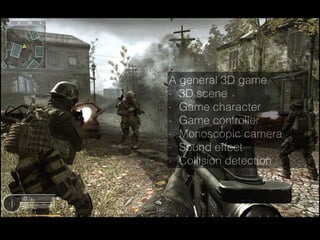
A general 3D game
- 3D scene
- Game character
- Game controller
- Monoscopic camera
- Sound effect
- Collision detection
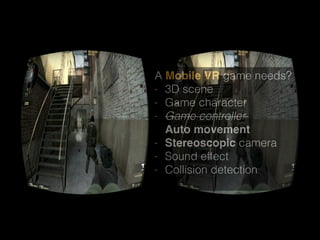
A Mobile VR game needs?
- 3D scene
- Game character
- Game controller 

Auto movement
- Stereoscopic camera
- Sound effect
- Collision detection

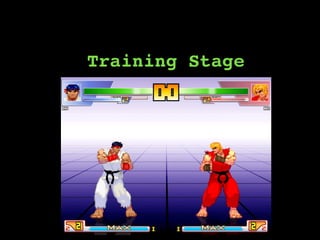
Training Stage
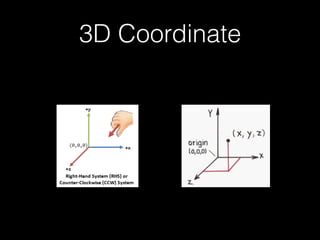
3D Coordinate
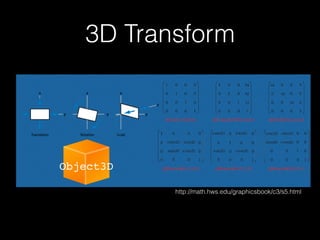
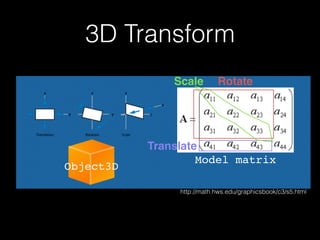
3D Transform
Object3D
http://math.hws.edu/graphicsbook/c3/s5.html
3D Transform
Object3D
http://math.hws.edu/graphicsbook/c3/s5.html
Model matrix
Rotate
Translate
Scale
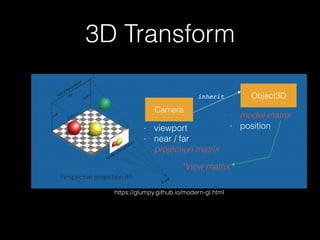
3D Transform
https://glumpy.github.io/modern-gl.html
Camera
Object3D
- model matrix
- position- viewport
- near / far
- projection matrix
*View matrix
inherit
3D Transform
https://glumpy.github.io/modern-gl.html
x M[]projx M[]view
Object3D
M[]model
Camera space Screen spaceWorld space
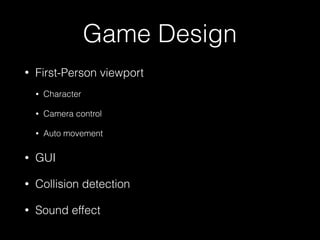
Game Design
• First-Person viewport
• Character
• Camera control
• Auto movement
• GUI
• Collision detection
• Sound effect
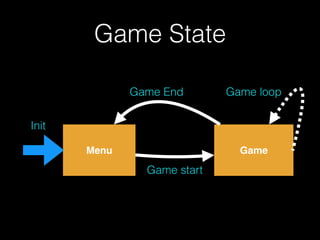
Game State
Menu Game
Game start
Game End Game loop
Init
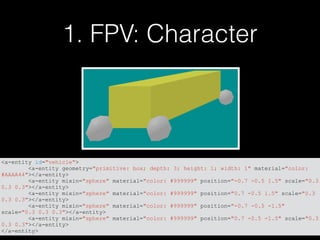
1. FPV: Character
<a-entity id="vehicle">
<a-entity geometry="primitive: box; depth: 3; height: 1; width: 1" material="color:
#AAAA44"></a-entity>
<a-entity mixin="sphere" material="color: #999999" position="-0.7 -0.5 1.5" scale="0.3
0.3 0.3"></a-entity>
<a-entity mixin="sphere" material="color: #999999" position="0.7 -0.5 1.5" scale="0.3
0.3 0.3"></a-entity>
<a-entity mixin="sphere" material="color: #999999" position="-0.7 -0.5 -1.5"
scale="0.3 0.3 0.3"></a-entity>
<a-entity mixin="sphere" material="color: #999999" position="0.7 -0.5 -1.5" scale="0.3
0.3 0.3"></a-entity>
</a-entity>
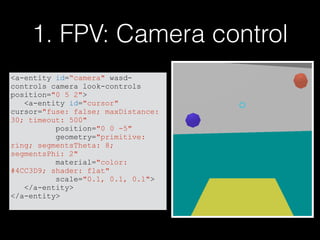
1. FPV: Camera control
<a-entity id=“camera" wasd-
controls camera look-controls
position="0 5 2">
<a-entity id="cursor"
cursor="fuse: false; maxDistance:
30; timeout: 500"
position="0 0 -5"
geometry="primitive:
ring; segmentsTheta: 8;
segmentsPhi: 2"
material="color:
#4CC3D9; shader: flat"
scale="0.1, 0.1, 0.1">
</a-entity>
</a-entity>
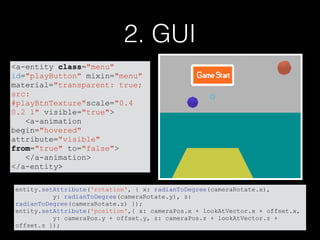
2. GUI
entity.setAttribute('rotation', { x: radianToDegree(cameraRotate.x),
y: radianToDegree(cameraRotate.y), z:
radianToDegree(cameraRotate.z) });
entity.setAttribute('position',{ x: cameraPos.x + lookAtVector.x + offset.x,
y: cameraPos.y + offset.y, z: cameraPos.z + lookAtVector.z +
offset.z });
<a-entity class="menu"
id="playButton" mixin="menu"
material="transparent: true;
src:
#playBtnTexture"scale="0.4
0.2 1" visible="true">
<a-animation
begin="hovered"
attribute="visible"
from="true" to="false">
</a-animation>
</a-entity>
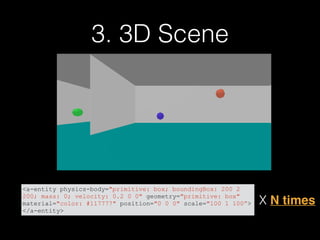
3. 3D Scene
<a-entity physics-body="primitive: box; boundingBox: 200 2
200; mass: 0; velocity: 0.2 0 0" geometry="primitive: box"
material="color: #117777" position="0 0 0" scale="100 1 100”>
</a-entity>
X N times
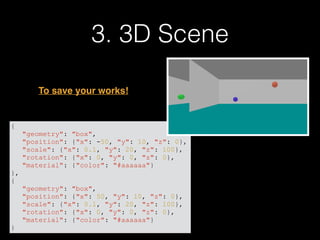
3. 3D Scene
{
"geometry": "box",
"position": {"x": -50, "y": 10, "z": 0},
"scale": {"x": 0.1, "y": 20, "z": 100},
"rotation": {"x": 0, "y": 0, "z": 0},
"material": {"color": "#aaaaaa"}
},
{
"geometry": "box",
"position": {"x": 50, "y": 10, "z": 0},
"scale": {"x": 0.1, "y": 20, "z": 100},
"rotation": {"x": 0, "y": 0, "z": 0},
"material": {"color": "#aaaaaa"}
}
To save your works!
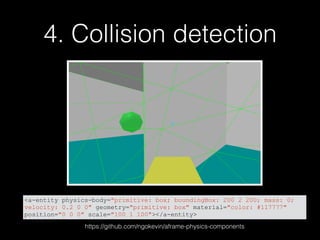
4. Collision detection
<a-entity physics-body="primitive: box; boundingBox: 200 2 200; mass: 0;
velocity: 0.2 0 0" geometry="primitive: box" material="color: #117777"
position="0 0 0" scale="100 1 100"></a-entity>
https://github.com/ngokevin/aframe-physics-components
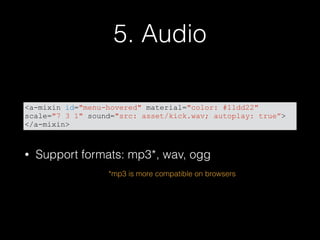
5. Audio
• Support formats: mp3*, wav, ogg
<a-mixin id="menu-hovered" material="color: #11dd22"
scale="7 3 1" sound="src: asset/kick.wav; autoplay: true”>
</a-mixin>
*mp3 is more compatible on browsers
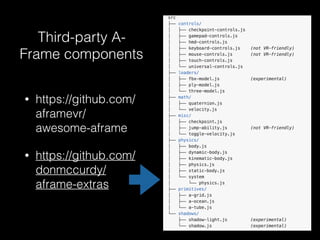
Third-party A-
Frame components
• https://github.com/
aframevr/
awesome-aframe
• https://github.com/
donmccurdy/
aframe-extras
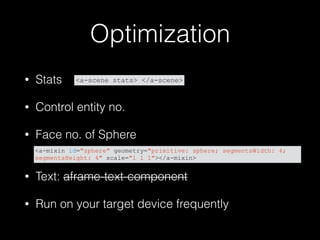
Optimization
• Stats
• Control entity no.
• Face no. of Sphere

• Text: aframe-text-component
• Run on your target device frequently
<a-mixin id="sphere" geometry="primitive: sphere; segmentsWidth: 4;
segmentsHeight: 4" scale="1 1 1"></a-mixin>
<a-scene stats> </a-scene>
Thanks for your attention
https://github.com/daoshengmu/aframe-lesson
• Build from BasicScene
1.Modify map
2.Making GUI
3.Implement hitting function

Maze VR

  • 1.
  • 2.
    What is amobile VR game?
  • 3.
    A general 3Dgame - 3D scene - Game character - Game controller - Monoscopic camera - Sound effect - Collision detection
  • 4.
    A Mobile VRgame needs? - 3D scene - Game character - Game controller 
 Auto movement - Stereoscopic camera - Sound effect - Collision detection

  • 5.
  • 6.
  • 7.
  • 8.
  • 9.
    3D Transform https://glumpy.github.io/modern-gl.html Camera Object3D - modelmatrix - position- viewport - near / far - projection matrix *View matrix inherit
  • 10.
    3D Transform https://glumpy.github.io/modern-gl.html x M[]projxM[]view Object3D M[]model Camera space Screen spaceWorld space
  • 12.
    Game Design • First-Personviewport • Character • Camera control • Auto movement • GUI • Collision detection • Sound effect
  • 13.
    Game State Menu Game Gamestart Game End Game loop Init
  • 14.
    1. FPV: Character <a-entityid="vehicle"> <a-entity geometry="primitive: box; depth: 3; height: 1; width: 1" material="color: #AAAA44"></a-entity> <a-entity mixin="sphere" material="color: #999999" position="-0.7 -0.5 1.5" scale="0.3 0.3 0.3"></a-entity> <a-entity mixin="sphere" material="color: #999999" position="0.7 -0.5 1.5" scale="0.3 0.3 0.3"></a-entity> <a-entity mixin="sphere" material="color: #999999" position="-0.7 -0.5 -1.5" scale="0.3 0.3 0.3"></a-entity> <a-entity mixin="sphere" material="color: #999999" position="0.7 -0.5 -1.5" scale="0.3 0.3 0.3"></a-entity> </a-entity>
  • 15.
    1. FPV: Cameracontrol <a-entity id=“camera" wasd- controls camera look-controls position="0 5 2"> <a-entity id="cursor" cursor="fuse: false; maxDistance: 30; timeout: 500" position="0 0 -5" geometry="primitive: ring; segmentsTheta: 8; segmentsPhi: 2" material="color: #4CC3D9; shader: flat" scale="0.1, 0.1, 0.1"> </a-entity> </a-entity>
  • 16.
    2. GUI entity.setAttribute('rotation', {x: radianToDegree(cameraRotate.x), y: radianToDegree(cameraRotate.y), z: radianToDegree(cameraRotate.z) }); entity.setAttribute('position',{ x: cameraPos.x + lookAtVector.x + offset.x, y: cameraPos.y + offset.y, z: cameraPos.z + lookAtVector.z + offset.z }); <a-entity class="menu" id="playButton" mixin="menu" material="transparent: true; src: #playBtnTexture"scale="0.4 0.2 1" visible="true"> <a-animation begin="hovered" attribute="visible" from="true" to="false"> </a-animation> </a-entity>
  • 17.
    3. 3D Scene <a-entityphysics-body="primitive: box; boundingBox: 200 2 200; mass: 0; velocity: 0.2 0 0" geometry="primitive: box" material="color: #117777" position="0 0 0" scale="100 1 100”> </a-entity> X N times
  • 18.
    3. 3D Scene { "geometry":"box", "position": {"x": -50, "y": 10, "z": 0}, "scale": {"x": 0.1, "y": 20, "z": 100}, "rotation": {"x": 0, "y": 0, "z": 0}, "material": {"color": "#aaaaaa"} }, { "geometry": "box", "position": {"x": 50, "y": 10, "z": 0}, "scale": {"x": 0.1, "y": 20, "z": 100}, "rotation": {"x": 0, "y": 0, "z": 0}, "material": {"color": "#aaaaaa"} } To save your works!
  • 19.
    4. Collision detection <a-entityphysics-body="primitive: box; boundingBox: 200 2 200; mass: 0; velocity: 0.2 0 0" geometry="primitive: box" material="color: #117777" position="0 0 0" scale="100 1 100"></a-entity> https://github.com/ngokevin/aframe-physics-components
  • 20.
    5. Audio • Supportformats: mp3*, wav, ogg <a-mixin id="menu-hovered" material="color: #11dd22" scale="7 3 1" sound="src: asset/kick.wav; autoplay: true”> </a-mixin> *mp3 is more compatible on browsers
  • 21.
    Third-party A- Frame components •https://github.com/ aframevr/ awesome-aframe • https://github.com/ donmccurdy/ aframe-extras
  • 22.
    Optimization • Stats • Controlentity no. • Face no. of Sphere
 • Text: aframe-text-component • Run on your target device frequently <a-mixin id="sphere" geometry="primitive: sphere; segmentsWidth: 4; segmentsHeight: 4" scale="1 1 1"></a-mixin> <a-scene stats> </a-scene>
  • 23.
    Thanks for yourattention https://github.com/daoshengmu/aframe-lesson • Build from BasicScene 1.Modify map 2.Making GUI 3.Implement hitting function