 System software consists of programes that
control the operations of the computer and
its devices. System software serves as the
interface between the user, the application
software and the computer hardware.
 There are two types of system software:
a. Operating System
b. Utility Programmes
• An operating system is the program that is
loaded into the computer and coordinates all
the activities among computer hardware
devices.
• It controls the hardware in the computer ,
peripherals, manages memory and files.
• It enables the user to communicate with the
computer and other software
• Some examples of operating system are
Microsoft Windows, Macintosh OS X, Linux ,
Unix and also DOS
• Utility programe allows user to perform
maintenance-type tasks.
• It has been integrated into most major
operating systems such as format, check and
defragment disks
• Other examples of utility programe are and
file compression programe
1. Starting a computer
The first function of an operating system is to
start the computer. When we start a
computer, it loads the operating system into
the computer's memory. This process is
called booting. Booting means to load and
initialize the operating system on a computer
machine. It can happen in two ways: warm
boot or cold boot.
2. Providing a user interface
 From the user's perspective, the most
important function of an operating system, is
providing the user interface. This function
controls how the user enters data and
instruction and how information is
displayed.
 The user interface typically enables users:
• to start an application program
• to manage disks and files such as
formatting, copying and renaming
• to shut down the computer safely by
following the correct procedures
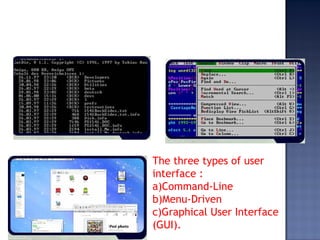
The three types of user
interface :
a)Command-Line
b)Menu-Driven
c)Graphical User Interface
(GUI).
3. Managing data and programs
 The next function of an operating system is
to manage data and programs. When we
start an application, the CPU loads the
application from storage into memory.
 In the early days of personal computing,
single-tasking operating systems could run
only one application at a time.
 Multitasking operating systems enable users
to work with two or more application
programs at the same time.
4. Managing memory
 Operating system is also responsible for
managing memory such as:
• optimizing the use of Random Access Memory
(RAM)
• allocating data and instruction to an area of
memory while being processed
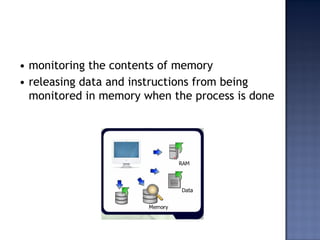
• monitoring the contents of memory
• releasing data and instructions from being
monitored in memory when the process is done
5. Configuring Devices
 Another function of an operating system is
handling input and output, as well as enabling
communication with input and output devices.
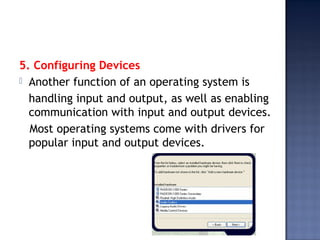
Most operating systems come with drivers for
popular input and output devices.
NO Disk operating System Windows
1 Command-line Icon based
2 difficult to use because it requires
exact spelling, syntax or a set of
rules of entering commands and
punctuation.
Easy to interact with
buttons, icons and
other graphical
objects to issue
commands.
3 Single tasking Multi- tasking
Characteristics Of Os Environment Based
Graphical User Interface (Gui).
• Graphical User Interface is an interface that
combines text, graphic and icons to make
software easier to be used. It I s also called
‘user-friendly’.
• It allows you to interact with the software
using menus and visual images such as
buttons, icons and other graphical objects to
issue commands
• It controls how you enter data and how the
screen displays information
• The icons that are used represent computer
resources such as files, programs and
network communication

Operating system (os)

  • 2.
     System softwareconsists of programes that control the operations of the computer and its devices. System software serves as the interface between the user, the application software and the computer hardware.  There are two types of system software: a. Operating System b. Utility Programmes
  • 3.
    • An operatingsystem is the program that is loaded into the computer and coordinates all the activities among computer hardware devices. • It controls the hardware in the computer , peripherals, manages memory and files. • It enables the user to communicate with the computer and other software • Some examples of operating system are Microsoft Windows, Macintosh OS X, Linux , Unix and also DOS
  • 4.
    • Utility programeallows user to perform maintenance-type tasks. • It has been integrated into most major operating systems such as format, check and defragment disks • Other examples of utility programe are and file compression programe
  • 5.
    1. Starting acomputer The first function of an operating system is to start the computer. When we start a computer, it loads the operating system into the computer's memory. This process is called booting. Booting means to load and initialize the operating system on a computer machine. It can happen in two ways: warm boot or cold boot.
  • 6.
    2. Providing auser interface  From the user's perspective, the most important function of an operating system, is providing the user interface. This function controls how the user enters data and instruction and how information is displayed.
  • 7.
     The userinterface typically enables users: • to start an application program • to manage disks and files such as formatting, copying and renaming • to shut down the computer safely by following the correct procedures
  • 8.
    The three typesof user interface : a)Command-Line b)Menu-Driven c)Graphical User Interface (GUI).
  • 9.
    3. Managing dataand programs  The next function of an operating system is to manage data and programs. When we start an application, the CPU loads the application from storage into memory.  In the early days of personal computing, single-tasking operating systems could run only one application at a time.  Multitasking operating systems enable users to work with two or more application programs at the same time.
  • 10.
    4. Managing memory Operating system is also responsible for managing memory such as: • optimizing the use of Random Access Memory (RAM) • allocating data and instruction to an area of memory while being processed
  • 11.
    • monitoring thecontents of memory • releasing data and instructions from being monitored in memory when the process is done
  • 12.
    5. Configuring Devices Another function of an operating system is handling input and output, as well as enabling communication with input and output devices. Most operating systems come with drivers for popular input and output devices.
  • 13.
    NO Disk operatingSystem Windows 1 Command-line Icon based 2 difficult to use because it requires exact spelling, syntax or a set of rules of entering commands and punctuation. Easy to interact with buttons, icons and other graphical objects to issue commands. 3 Single tasking Multi- tasking
  • 14.
    Characteristics Of OsEnvironment Based Graphical User Interface (Gui). • Graphical User Interface is an interface that combines text, graphic and icons to make software easier to be used. It I s also called ‘user-friendly’. • It allows you to interact with the software using menus and visual images such as buttons, icons and other graphical objects to issue commands
  • 15.
    • It controlshow you enter data and how the screen displays information • The icons that are used represent computer resources such as files, programs and network communication