PROJECT ON :
OPERATING SYSTEM,DIFFERENT
TYPES OF OPERATING SYSTEM ,
DIFFERENCE BETWEEN THEM
NAME : RADHIKA GUPTA
ROLL NO: 32 – MBA 14
ARCHITECTURE OF COMPUTER
SYSTEM
Hardware
Operating System (OS)
Programming Language (e.g. PASCAL)
Application Programs (e.g. WORD, EXCEL)
WHAT IS OPERATING SYSTEMS?
• Operating System is a software, which makes a computer to actually
work.
• It is the software the enables all the programs we use.
• The OS organizes and controls the hardware.
• OS acts as an interface between the application programs and the
machine hardware.
• When the computer is on, OS will first load into the main memory
• Examples: Windows, Linux, Unix and Mac OS, etc.
WHAT OPERATING SYSTEMS
DOES?
An operating system performs basic tasks such as,
• controlling and allocating memory
• prioritizing system requests
• controlling input and output devices
• facilitating networking
• managing file systems.
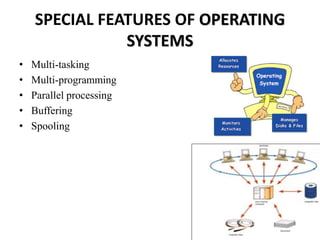
SPECIAL FEATURES OF OPERATING
SYSTEMS
• Multi-tasking
• Multi-programming
• Parallel processing
• Buffering
• Spooling
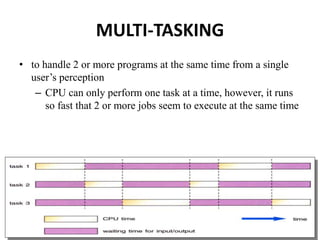
MULTI-TASKING
• to handle 2 or more programs at the same time from a single
user’s perception
– CPU can only perform one task at a time, however, it runs
so fast that 2 or more jobs seem to execute at the same time
MULTI-PROGRAMMING
• 2 or more programs store in the main memory at the same time
• when one job reeds to wait (e.g. I/O operation), CPU switch to
another job to execute
• when the first job finishes waiting, CPU will get back the first
job to execute
PARALLEL PROCESSING
• Use 2 or more CPU’s to handle jobs
• Computer networking
Job 1 Job 2
Job 3
Job 4
Job 1
Job 2
Job 3
Job 4
CPU 1 CPU 2 CPU 1
time time
without multiprocessingwith multiprocessing
BUFFERING
• A temporary storage area (buffers) to read data from input
device or send data to the output device
• Keep CPU busy
– Because I/O operation is slow
SPOOLING
• A larger buffer from hard disk
• Buffer store the data through I/O operation
– Because I/O operation is slow and CPU operation is fast
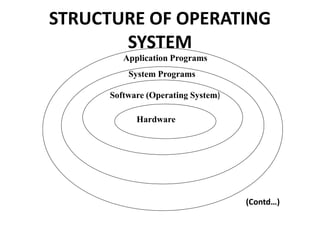
STRUCTURE OF OPERATING
SYSTEM
Application Programs
System Programs
Software (Operating System)
Hardware
(Contd…)
STRUCTURE OF OPERATING
SYSTEM
The structure of OS consists of 4 layers:
• Hardware - It consists of CPU, Main memory, I/O Devices, etc,
• Software (Operating System ) -It includes process management
routines, memory management routines, I/O control routines, file
management routines.
• System programs - This layer consists of compilers, Assemblers,
linker etc.
• Application programs -This is dependent on users need. Ex.
Railway reservation system, Bank database management etc.,
Operating
System
Device configuration
Controls peripheral devices connected to the computer
File management
Transfers files between main memory and secondary
storage, manages file folders, allocates the secondary
storage space, and provides file protection and
recovery
Memory management
Allocates the use of random access memory (RAM) to
requesting processes
Interface platform
Allows the computer to run other applications
BASIC FUNCTIONS OF THE OPERATING
SYSTEM
TYPES OF OPERATING SYSTEM
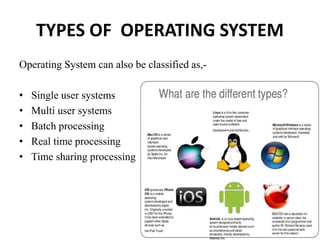
Operating System can also be classified as,-
• Single user systems
• Multi user systems
• Batch processing
• Real time processing
• Time sharing processing
SINGLE USER SYSTEMS
• Provides a platform for only one user at a time.
• They are popularly associated with Desk Top operating system
which run on stand alone systems where no user accounts are
required.
• Example: DOS
MULTI-USER SYSTEMS
• Provides regulated access for a number of users by
maintaining a database of known users.
• Refers to computer systems that support two or more
simultaneous users.
• Another term for multi-user is time sharing.
• Ex: All mainframes and are multi-user systems.
• Example: UNIX
BATCH PROCESSING
• Jobs, together with input data, are fed into the system in a
batch.
• The jobs are then run one after another.
• No job can be started until previous job is completed
REAL TIME PROCESSING
• It is an operating system that guaranties to process events or
data within a certain short amount of time.
• It may be single- or multi-tasking, but when multitasking, it
uses specialized scheduling algorithms so that a deterministic
nature of behavior is achieved.
• Immediate response is needed.
• For example
– anti-missile defense system
– airplane landing control system
– interrupt error in computer system
TIME SHARING PROCESSING
• Each user is given a time slice to interact with the CPU.
• The size of the time slice will depend on the system.
• Each user is served in sequence.
COMMON OPERATING SYSTEMS
AND THEIR DIFFERENCES
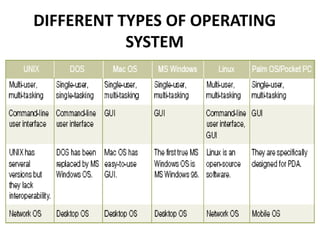
• Network Operating System
– UNIX / Linux / MS Windows2000 Server
• Desktop Operating System
– MS Windows 9X/Me / Mac OS / DOS
• Mobile Operating System
– Palm OS and Pocket PC
EXAMPLES
• Common operating systems
– WINDOW
• used in IBM compatible microcomputers
– UNIX
• multi-user, multi-tasking OS used in minicomputers and
microcomputers
– VAX/VMS
• used in DEC’s VAX series of minicomputers
DIFFERENT TYPES OF OPERATING
SYSTEM
GOOD OPERATING SYSTEM
• Efficient
– Time spent to execute its programs should be short
• Small in size
– Memory occupied should be as small as possible
• Reliable

Operating system

  • 1.
    PROJECT ON : OPERATINGSYSTEM,DIFFERENT TYPES OF OPERATING SYSTEM , DIFFERENCE BETWEEN THEM NAME : RADHIKA GUPTA ROLL NO: 32 – MBA 14
  • 2.
    ARCHITECTURE OF COMPUTER SYSTEM Hardware OperatingSystem (OS) Programming Language (e.g. PASCAL) Application Programs (e.g. WORD, EXCEL)
  • 3.
    WHAT IS OPERATINGSYSTEMS? • Operating System is a software, which makes a computer to actually work. • It is the software the enables all the programs we use. • The OS organizes and controls the hardware. • OS acts as an interface between the application programs and the machine hardware. • When the computer is on, OS will first load into the main memory • Examples: Windows, Linux, Unix and Mac OS, etc.
  • 4.
    WHAT OPERATING SYSTEMS DOES? Anoperating system performs basic tasks such as, • controlling and allocating memory • prioritizing system requests • controlling input and output devices • facilitating networking • managing file systems.
  • 5.
    SPECIAL FEATURES OFOPERATING SYSTEMS • Multi-tasking • Multi-programming • Parallel processing • Buffering • Spooling
  • 6.
    MULTI-TASKING • to handle2 or more programs at the same time from a single user’s perception – CPU can only perform one task at a time, however, it runs so fast that 2 or more jobs seem to execute at the same time
  • 7.
    MULTI-PROGRAMMING • 2 ormore programs store in the main memory at the same time • when one job reeds to wait (e.g. I/O operation), CPU switch to another job to execute • when the first job finishes waiting, CPU will get back the first job to execute
  • 8.
    PARALLEL PROCESSING • Use2 or more CPU’s to handle jobs • Computer networking Job 1 Job 2 Job 3 Job 4 Job 1 Job 2 Job 3 Job 4 CPU 1 CPU 2 CPU 1 time time without multiprocessingwith multiprocessing
  • 9.
    BUFFERING • A temporarystorage area (buffers) to read data from input device or send data to the output device • Keep CPU busy – Because I/O operation is slow
  • 10.
    SPOOLING • A largerbuffer from hard disk • Buffer store the data through I/O operation – Because I/O operation is slow and CPU operation is fast
  • 11.
    STRUCTURE OF OPERATING SYSTEM ApplicationPrograms System Programs Software (Operating System) Hardware (Contd…)
  • 12.
    STRUCTURE OF OPERATING SYSTEM Thestructure of OS consists of 4 layers: • Hardware - It consists of CPU, Main memory, I/O Devices, etc, • Software (Operating System ) -It includes process management routines, memory management routines, I/O control routines, file management routines. • System programs - This layer consists of compilers, Assemblers, linker etc. • Application programs -This is dependent on users need. Ex. Railway reservation system, Bank database management etc.,
  • 13.
    Operating System Device configuration Controls peripheraldevices connected to the computer File management Transfers files between main memory and secondary storage, manages file folders, allocates the secondary storage space, and provides file protection and recovery Memory management Allocates the use of random access memory (RAM) to requesting processes Interface platform Allows the computer to run other applications BASIC FUNCTIONS OF THE OPERATING SYSTEM
  • 14.
    TYPES OF OPERATINGSYSTEM Operating System can also be classified as,- • Single user systems • Multi user systems • Batch processing • Real time processing • Time sharing processing
  • 15.
    SINGLE USER SYSTEMS •Provides a platform for only one user at a time. • They are popularly associated with Desk Top operating system which run on stand alone systems where no user accounts are required. • Example: DOS
  • 16.
    MULTI-USER SYSTEMS • Providesregulated access for a number of users by maintaining a database of known users. • Refers to computer systems that support two or more simultaneous users. • Another term for multi-user is time sharing. • Ex: All mainframes and are multi-user systems. • Example: UNIX
  • 17.
    BATCH PROCESSING • Jobs,together with input data, are fed into the system in a batch. • The jobs are then run one after another. • No job can be started until previous job is completed
  • 18.
    REAL TIME PROCESSING •It is an operating system that guaranties to process events or data within a certain short amount of time. • It may be single- or multi-tasking, but when multitasking, it uses specialized scheduling algorithms so that a deterministic nature of behavior is achieved. • Immediate response is needed. • For example – anti-missile defense system – airplane landing control system – interrupt error in computer system
  • 19.
    TIME SHARING PROCESSING •Each user is given a time slice to interact with the CPU. • The size of the time slice will depend on the system. • Each user is served in sequence.
  • 20.
    COMMON OPERATING SYSTEMS ANDTHEIR DIFFERENCES • Network Operating System – UNIX / Linux / MS Windows2000 Server • Desktop Operating System – MS Windows 9X/Me / Mac OS / DOS • Mobile Operating System – Palm OS and Pocket PC
  • 21.
    EXAMPLES • Common operatingsystems – WINDOW • used in IBM compatible microcomputers – UNIX • multi-user, multi-tasking OS used in minicomputers and microcomputers – VAX/VMS • used in DEC’s VAX series of minicomputers
  • 22.
    DIFFERENT TYPES OFOPERATING SYSTEM
  • 23.
    GOOD OPERATING SYSTEM •Efficient – Time spent to execute its programs should be short • Small in size – Memory occupied should be as small as possible • Reliable