Prof. B. I. Khodanpur
     HOD – Dept. of CSE
 R. V. College of Engineering.
EmailID:  bi.khodanpur@gmail.com


 Subject: Operating Systems (For EDUSAT)
   Common Paper for BA / B.Com / B.Sc
              Code: CS-54
Application Software
(contd…):
 Spreadsheets:        The spreadsheet packages are
 designed to use numbers and formulas to do calculations
 with ease. Examples of spreadsheets include:
         Budgets
         Payrolls
         Grade Calculations
         Address Lists

 The most commonly used spreadsheet programs are
 Microsoft Excel and Lotus 123.
Application Software
(contd…):
 Graphic Presentations:           The presentation
 programs can be easier using overhead
 projectors. Other uses include:
         Slide Shows
         Repeating Computer Presentations on a
           computer monitor
         Using Sound and animation in slide shows


 The most recognized graphic presentation programs are
 Microsoft PowerPoint and Harvard Graphics.
Application Software
(contd…):
    Database Management System (DBMS):
   A DBMS is a software tool that allows multiple users to
    store, access, and process data into useful information.
   Database programs are designed for these types of
    applications:
              Membership lists
              Student lists
              Grade reports
              Instructor schedules
    All of these have to be maintained so you can find what
    you need quickly and accurately.

   Example:Microsoft Access, dBASE, Oracle.
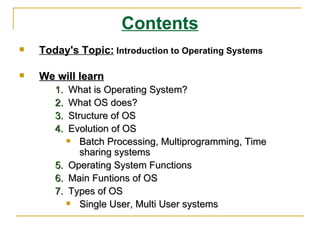
Contents
   Today's Topic: Introduction to Operating Systems

   We will learn
       1.  What is Operating System?
       2.  What OS does?
       3.  Structure of OS
       4.  Evolution of OS
             Batch Processing, Multiprogramming, Time
              sharing systems
       5. Operating System Functions
       6. Main Funtions of OS
       7. Types of OS
             Single User, Multi User systems
Operating Systems
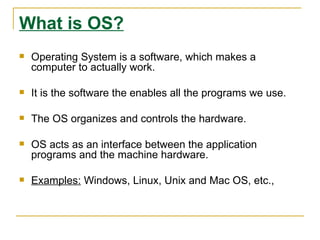
What is OS?
   Operating System is a software, which makes a
    computer to actually work.

   It is the software the enables all the programs we use.

   The OS organizes and controls the hardware.

   OS acts as an interface between the application
    programs and the machine hardware.

   Examples: Windows, Linux, Unix and Mac OS, etc.,
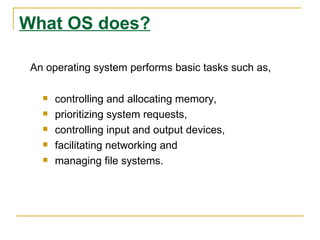
What OS does?

 An operating system performs basic tasks such as,

      controlling and allocating memory,
      prioritizing system requests,
      controlling input and output devices,
      facilitating networking and
      managing file systems.
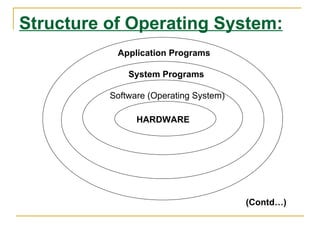
Structure of Operating System:
           Application Programs

              System Programs

          Software (Operating System)

                HARDWARE


                                        (Contd…)
Structure of Operating System
(Contd…):
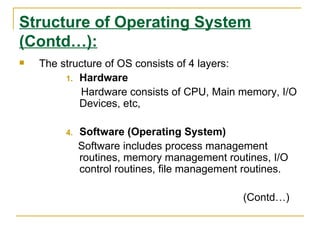
   The structure of OS consists of 4 layers:
         1. Hardware
             Hardware consists of CPU, Main memory, I/O
            Devices, etc,

         4.   Software (Operating System)
              Software includes process management
              routines, memory management routines, I/O
              control routines, file management routines.

                                               (Contd…)
Structure of Operating System
(Contd…):

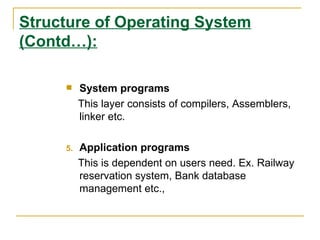
         System programs
          This layer consists of compilers, Assemblers,
          linker etc.

     5.   Application programs
          This is dependent on users need. Ex. Railway
          reservation system, Bank database
          management etc.,
Evolution of OS:

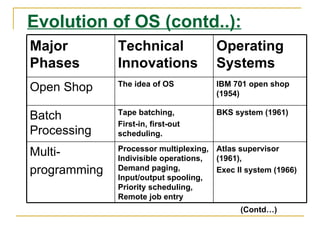
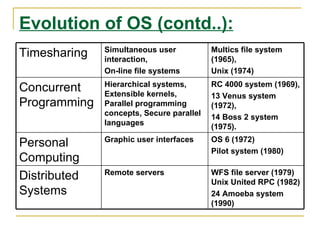
   The evolution of operating systems went through seven
    major phases.

   Six of them significantly changed the ways in which
    users accessed computers through the open shop, batch
    processing, multiprogramming, timesharing, personal
    computing, and distributed systems.

   In the seventh phase the foundations of concurrent
    programming were developed and demonstrated in
    model operating systems.
                                         (Contd…)
Evolution of OS (contd..):
Major         Technical               Operating
Phases        Innovations             Systems
              The idea of OS          IBM 701 open shop
Open Shop                             (1954)

              Tape batching,          BKS system (1961)
Batch
              First-in, first-out
Processing    scheduling.
              Processor multiplexing, Atlas supervisor
Multi-        Indivisible operations, (1961),
programming   Demand paging,          Exec II system (1966)
              Input/output spooling,
              Priority scheduling,
              Remote job entry
                                            (Contd…)
Evolution of OS (contd..):
              Simultaneous user           Multics file system
Timesharing   interaction,                (1965),
              On-line file systems        Unix (1974)
              Hierarchical systems,       RC 4000 system (1969),
Concurrent    Extensible kernels,         13 Venus system
Programming   Parallel programming        (1972),
              concepts, Secure parallel   14 Boss 2 system
              languages                   (1975).
              Graphic user interfaces     OS 6 (1972)
Personal
                                          Pilot system (1980)
Computing
              Remote servers              WFS file server (1979)
Distributed                               Unix United RPC (1982)
Systems                                   24 Amoeba system
                                          (1990)
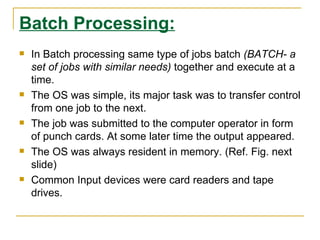
Batch Processing:
   In Batch processing same type of jobs batch (BATCH- a
    set of jobs with similar needs) together and execute at a
    time.
   The OS was simple, its major task was to transfer control
    from one job to the next.
   The job was submitted to the computer operator in form
    of punch cards. At some later time the output appeared.
   The OS was always resident in memory. (Ref. Fig. next
    slide)
   Common Input devices were card readers and tape
    drives.
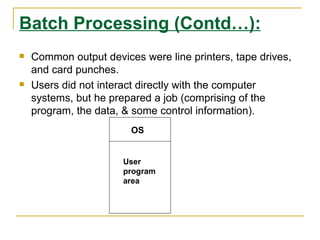
Batch Processing (Contd…):
   Common output devices were line printers, tape drives,
    and card punches.
   Users did not interact directly with the computer
    systems, but he prepared a job (comprising of the
    program, the data, & some control information).
                        OS


                       User
                       program
                       area
Multiprogramming:

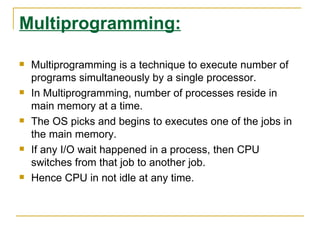
   Multiprogramming is a technique to execute number of
    programs simultaneously by a single processor.
   In Multiprogramming, number of processes reside in
    main memory at a time.
   The OS picks and begins to executes one of the jobs in
    the main memory.
   If any I/O wait happened in a process, then CPU
    switches from that job to another job.
   Hence CPU in not idle at any time.
Multiprogramming (Contd…):
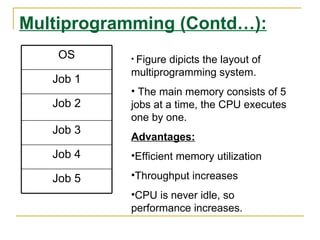
    OS     • Figuredipicts the layout of
           multiprogramming system.
   Job 1
           • The main memory consists of 5
   Job 2   jobs at a time, the CPU executes
           one by one.
   Job 3
           Advantages:
   Job 4   •Efficient memory utilization

   Job 5   •Throughput increases
           •CPU is never idle, so
           performance increases.
Time Sharing Systems:

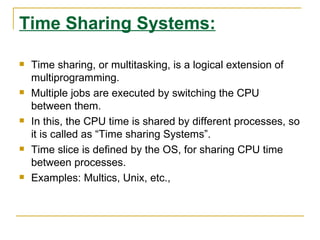
   Time sharing, or multitasking, is a logical extension of
    multiprogramming.
   Multiple jobs are executed by switching the CPU
    between them.
   In this, the CPU time is shared by different processes, so
    it is called as “Time sharing Systems”.
   Time slice is defined by the OS, for sharing CPU time
    between processes.
   Examples: Multics, Unix, etc.,
Operating Systems functions:

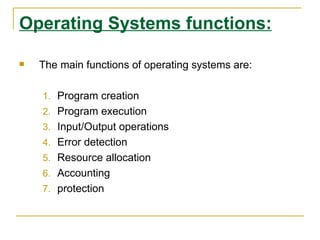
   The main functions of operating systems are:

    1. Program creation
    2. Program execution
    3. Input/Output operations
    4. Error detection
    5. Resource allocation
    6. Accounting
    7. protection
Types of OS:

Operating System can also be classified as,-

   Single User Systems

   Multi User Systems
Single User Systems:

   Provides a platform for only one user at a
    time.

   They are popularly associated with Desk Top
    operating system which run on standalone
    systems where no user accounts are
    required.
   Example: DOS
Multi-User Systems:

   Provides regulated access for a number of users by
    maintaining a database of known users.

   Refers to computer systems that support two or more
    simultaneous users.

   Another term for multi-user is time sharing.

   Ex: All mainframes and are multi-user systems.
   Example: Unix

Operating systems11 9-07

  • 1.
    Prof. B. I.Khodanpur HOD – Dept. of CSE R. V. College of Engineering. EmailID:  bi.khodanpur@gmail.com Subject: Operating Systems (For EDUSAT) Common Paper for BA / B.Com / B.Sc Code: CS-54
  • 2.
    Application Software (contd…): Spreadsheets: The spreadsheet packages are designed to use numbers and formulas to do calculations with ease. Examples of spreadsheets include:  Budgets  Payrolls  Grade Calculations  Address Lists The most commonly used spreadsheet programs are Microsoft Excel and Lotus 123.
  • 3.
    Application Software (contd…): GraphicPresentations: The presentation programs can be easier using overhead projectors. Other uses include:  Slide Shows  Repeating Computer Presentations on a computer monitor  Using Sound and animation in slide shows The most recognized graphic presentation programs are Microsoft PowerPoint and Harvard Graphics.
  • 4.
    Application Software (contd…): Database Management System (DBMS):  A DBMS is a software tool that allows multiple users to store, access, and process data into useful information.  Database programs are designed for these types of applications:  Membership lists  Student lists  Grade reports  Instructor schedules All of these have to be maintained so you can find what you need quickly and accurately.  Example:Microsoft Access, dBASE, Oracle.
  • 5.
    Contents  Today's Topic: Introduction to Operating Systems  We will learn 1. What is Operating System? 2. What OS does? 3. Structure of OS 4. Evolution of OS  Batch Processing, Multiprogramming, Time sharing systems 5. Operating System Functions 6. Main Funtions of OS 7. Types of OS  Single User, Multi User systems
  • 6.
  • 7.
    What is OS?  Operating System is a software, which makes a computer to actually work.  It is the software the enables all the programs we use.  The OS organizes and controls the hardware.  OS acts as an interface between the application programs and the machine hardware.  Examples: Windows, Linux, Unix and Mac OS, etc.,
  • 8.
    What OS does? An operating system performs basic tasks such as,  controlling and allocating memory,  prioritizing system requests,  controlling input and output devices,  facilitating networking and  managing file systems.
  • 9.
    Structure of OperatingSystem: Application Programs System Programs Software (Operating System) HARDWARE (Contd…)
  • 10.
    Structure of OperatingSystem (Contd…):  The structure of OS consists of 4 layers: 1. Hardware Hardware consists of CPU, Main memory, I/O Devices, etc, 4. Software (Operating System) Software includes process management routines, memory management routines, I/O control routines, file management routines. (Contd…)
  • 11.
    Structure of OperatingSystem (Contd…):  System programs This layer consists of compilers, Assemblers, linker etc. 5. Application programs This is dependent on users need. Ex. Railway reservation system, Bank database management etc.,
  • 12.
    Evolution of OS:  The evolution of operating systems went through seven major phases.  Six of them significantly changed the ways in which users accessed computers through the open shop, batch processing, multiprogramming, timesharing, personal computing, and distributed systems.  In the seventh phase the foundations of concurrent programming were developed and demonstrated in model operating systems. (Contd…)
  • 13.
    Evolution of OS(contd..): Major Technical Operating Phases Innovations Systems The idea of OS IBM 701 open shop Open Shop (1954) Tape batching, BKS system (1961) Batch First-in, first-out Processing scheduling. Processor multiplexing, Atlas supervisor Multi- Indivisible operations, (1961), programming Demand paging, Exec II system (1966) Input/output spooling, Priority scheduling, Remote job entry (Contd…)
  • 14.
    Evolution of OS(contd..): Simultaneous user Multics file system Timesharing interaction, (1965), On-line file systems Unix (1974) Hierarchical systems, RC 4000 system (1969), Concurrent Extensible kernels, 13 Venus system Programming Parallel programming (1972), concepts, Secure parallel 14 Boss 2 system languages (1975). Graphic user interfaces OS 6 (1972) Personal Pilot system (1980) Computing Remote servers WFS file server (1979) Distributed Unix United RPC (1982) Systems 24 Amoeba system (1990)
  • 15.
    Batch Processing:  In Batch processing same type of jobs batch (BATCH- a set of jobs with similar needs) together and execute at a time.  The OS was simple, its major task was to transfer control from one job to the next.  The job was submitted to the computer operator in form of punch cards. At some later time the output appeared.  The OS was always resident in memory. (Ref. Fig. next slide)  Common Input devices were card readers and tape drives.
  • 16.
    Batch Processing (Contd…):  Common output devices were line printers, tape drives, and card punches.  Users did not interact directly with the computer systems, but he prepared a job (comprising of the program, the data, & some control information). OS User program area
  • 17.
    Multiprogramming:  Multiprogramming is a technique to execute number of programs simultaneously by a single processor.  In Multiprogramming, number of processes reside in main memory at a time.  The OS picks and begins to executes one of the jobs in the main memory.  If any I/O wait happened in a process, then CPU switches from that job to another job.  Hence CPU in not idle at any time.
  • 18.
    Multiprogramming (Contd…): OS • Figuredipicts the layout of multiprogramming system. Job 1 • The main memory consists of 5 Job 2 jobs at a time, the CPU executes one by one. Job 3 Advantages: Job 4 •Efficient memory utilization Job 5 •Throughput increases •CPU is never idle, so performance increases.
  • 19.
    Time Sharing Systems:  Time sharing, or multitasking, is a logical extension of multiprogramming.  Multiple jobs are executed by switching the CPU between them.  In this, the CPU time is shared by different processes, so it is called as “Time sharing Systems”.  Time slice is defined by the OS, for sharing CPU time between processes.  Examples: Multics, Unix, etc.,
  • 20.
    Operating Systems functions:  The main functions of operating systems are: 1. Program creation 2. Program execution 3. Input/Output operations 4. Error detection 5. Resource allocation 6. Accounting 7. protection
  • 21.
    Types of OS: OperatingSystem can also be classified as,-  Single User Systems  Multi User Systems
  • 22.
    Single User Systems:  Provides a platform for only one user at a time.  They are popularly associated with Desk Top operating system which run on standalone systems where no user accounts are required.  Example: DOS
  • 23.
    Multi-User Systems:  Provides regulated access for a number of users by maintaining a database of known users.  Refers to computer systems that support two or more simultaneous users.  Another term for multi-user is time sharing.  Ex: All mainframes and are multi-user systems.  Example: Unix