OpenShift
A DevOps Platform
DevOpsDays India’16
$ whoami
● Name: Lalatendu Mohanty
● Occupation: software engineer
● Company: Red Hat
● Interests: Free software, open source, distributed systems, containers,
● Blog: lalatendu.org
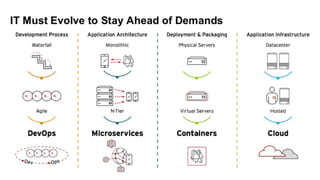
Modern Application Development
Modern applications
● Commonly delivered as services i.e. software-as-a-service
● Web applications, Mobile application software
● Designed for continuous delivery
● Designed to scale-up and down
● Can utilize modern cloud platforms
Modern application development
● Need to match speed of growing business
● Microservices
● Continuous delivery
○ Blue green deployment
○ Canary deployment
● The twelve-factor application for cloud native applications
○ Refer : https://12factor.net/
● A container platform to create, modify, deploy containerized applications.
● Platform to deploy microservices
● Choose programming languages you want
● Continuous deployment
● Self service platform
● Platform as a service
● Can run on physical, virtual infrastructure
● Can run on private and public clouds
OpenShift under the hood
● Uses Kubernetes orchestration, management and Docker as the container
technology.
● Features for managing complete application lifecycle
○ Automated image builds and promotion.
○ Deployments integrated with builds, pipeline and CI.
○ Fully integrated Docker registry.
○ Networking (SDN, DNS, routing) for container networking.
○ Integration with Docker Hub and other 3rd party enterprises registries.
○ Integrated enterprise features e.g authentication (LDAP etc), quota etc.
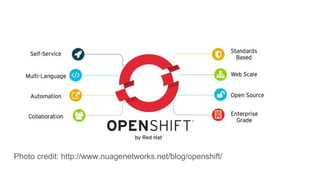
Photo credit: http://www.nuagenetworks.net/blog/openshift/
Applications in OpenShift
We can use both web console of the OC command line.
Create applications:
● From source code
○ Local or remote git repository
○ Auto detect changes to the applications and trigger the build process.
● Using OpenShift template
● Using docker images
○ E.g. $ oc new-app kubernetes/guestbook
Building docker images
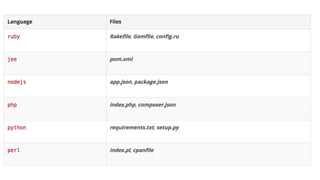
● Auto detects the programming language from the source code and converts it
as a runnable docker image.
● End users do not need to write Dockerfile
● Enable existing source build tools e.g. maven, rake
● Project : https://github.com/openshift/source-to-image
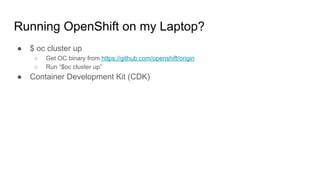
Running OpenShift on my Laptop?
● $ oc cluster up
○ Get OC binary from https://github.com/openshift/origin
○ Run “$oc cluster up”
● Container Development Kit (CDK)
Demo
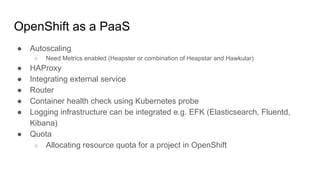
OpenShift as a PaaS
● Autoscaling
○ Need Metrics enabled (Heapster or combination of Heapstar and Hawkular)
● HAProxy
● Integrating external service
● Router
● Container health check using Kubernetes probe
● Logging infrastructure can be integrated e.g. EFK (Elasticsearch, Fluentd,
Kibana)
● Quota
○ Allocating resource quota for a project in OpenShift
For Developers
● Eclipse IDE integration.
● Developers do not need to know much about Docker and Kubernetes.
● Integration with Jenkins running in OpenShift
● Ability to move from QA -> Stage -> Production
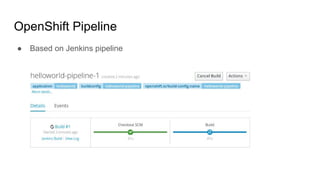
OpenShift Pipeline
● Based on Jenkins pipeline
OpenShift offerings
● OpenShift Origin
○ Community edition
● OpenShift Online
○ Hosted solution
○ Tryout: https://www.openshift.com/devpreview/register.html
● OpenShift Dedicated
○ Deployed on cloud e.g. AWS, Google cloud platform.
● OpenShift Container Platform
○ Product for on-premise cloud
Red Hat container development kit
● Development environment same as the production environment.
● Setup OpenShift container platform on top of RHEL Vagrant guest.
○ One command to set up/destroy i.e. “vagrant up” roy" and “vagrant destroy”
○ There are templates of sample applications.
● Get single node Kubernetes setup or Docker run time Windows, OS X,
Linux/GNU.
● Overview: http://developers.redhat.com/products/cdk/overview/
● Get started: http://developers.redhat.com/products/cdk/get-started
Competitive Edge
● Built with proven open source technologies from established communities.
References
● http://www.slideshare.net/greghoelzer7/red-hat-openshift-v3-overview-and-de
ep-dive
● https://access.redhat.com/documentation/en/openshift-enterprise/3.0/single/ar
chitecture/
Questions?

OpenShift As A DevOps Platform

  • 1.
  • 2.
    $ whoami ● Name:Lalatendu Mohanty ● Occupation: software engineer ● Company: Red Hat ● Interests: Free software, open source, distributed systems, containers, ● Blog: lalatendu.org
  • 4.
  • 5.
    Modern applications ● Commonlydelivered as services i.e. software-as-a-service ● Web applications, Mobile application software ● Designed for continuous delivery ● Designed to scale-up and down ● Can utilize modern cloud platforms
  • 6.
    Modern application development ●Need to match speed of growing business ● Microservices ● Continuous delivery ○ Blue green deployment ○ Canary deployment ● The twelve-factor application for cloud native applications ○ Refer : https://12factor.net/
  • 7.
    ● A containerplatform to create, modify, deploy containerized applications. ● Platform to deploy microservices ● Choose programming languages you want ● Continuous deployment ● Self service platform ● Platform as a service ● Can run on physical, virtual infrastructure ● Can run on private and public clouds
  • 8.
    OpenShift under thehood ● Uses Kubernetes orchestration, management and Docker as the container technology. ● Features for managing complete application lifecycle ○ Automated image builds and promotion. ○ Deployments integrated with builds, pipeline and CI. ○ Fully integrated Docker registry. ○ Networking (SDN, DNS, routing) for container networking. ○ Integration with Docker Hub and other 3rd party enterprises registries. ○ Integrated enterprise features e.g authentication (LDAP etc), quota etc.
  • 9.
  • 10.
    Applications in OpenShift Wecan use both web console of the OC command line. Create applications: ● From source code ○ Local or remote git repository ○ Auto detect changes to the applications and trigger the build process. ● Using OpenShift template ● Using docker images ○ E.g. $ oc new-app kubernetes/guestbook
  • 11.
    Building docker images ●Auto detects the programming language from the source code and converts it as a runnable docker image. ● End users do not need to write Dockerfile ● Enable existing source build tools e.g. maven, rake ● Project : https://github.com/openshift/source-to-image
  • 13.
    Running OpenShift onmy Laptop? ● $ oc cluster up ○ Get OC binary from https://github.com/openshift/origin ○ Run “$oc cluster up” ● Container Development Kit (CDK)
  • 14.
  • 15.
    OpenShift as aPaaS ● Autoscaling ○ Need Metrics enabled (Heapster or combination of Heapstar and Hawkular) ● HAProxy ● Integrating external service ● Router ● Container health check using Kubernetes probe ● Logging infrastructure can be integrated e.g. EFK (Elasticsearch, Fluentd, Kibana) ● Quota ○ Allocating resource quota for a project in OpenShift
  • 16.
    For Developers ● EclipseIDE integration. ● Developers do not need to know much about Docker and Kubernetes. ● Integration with Jenkins running in OpenShift ● Ability to move from QA -> Stage -> Production
  • 17.
    OpenShift Pipeline ● Basedon Jenkins pipeline
  • 18.
    OpenShift offerings ● OpenShiftOrigin ○ Community edition ● OpenShift Online ○ Hosted solution ○ Tryout: https://www.openshift.com/devpreview/register.html ● OpenShift Dedicated ○ Deployed on cloud e.g. AWS, Google cloud platform. ● OpenShift Container Platform ○ Product for on-premise cloud
  • 19.
    Red Hat containerdevelopment kit ● Development environment same as the production environment. ● Setup OpenShift container platform on top of RHEL Vagrant guest. ○ One command to set up/destroy i.e. “vagrant up” roy" and “vagrant destroy” ○ There are templates of sample applications. ● Get single node Kubernetes setup or Docker run time Windows, OS X, Linux/GNU. ● Overview: http://developers.redhat.com/products/cdk/overview/ ● Get started: http://developers.redhat.com/products/cdk/get-started
  • 20.
    Competitive Edge ● Builtwith proven open source technologies from established communities.
  • 21.
  • 22.