OpenShift Enterprise
a Containerized Application Platform
@LinhDo
AxonVibe Devops
April 16, 2017
Agenda
Docker
Kubernetes added-value
OpenShift added-value
Demo
Q & A
Container Technology
- Docker
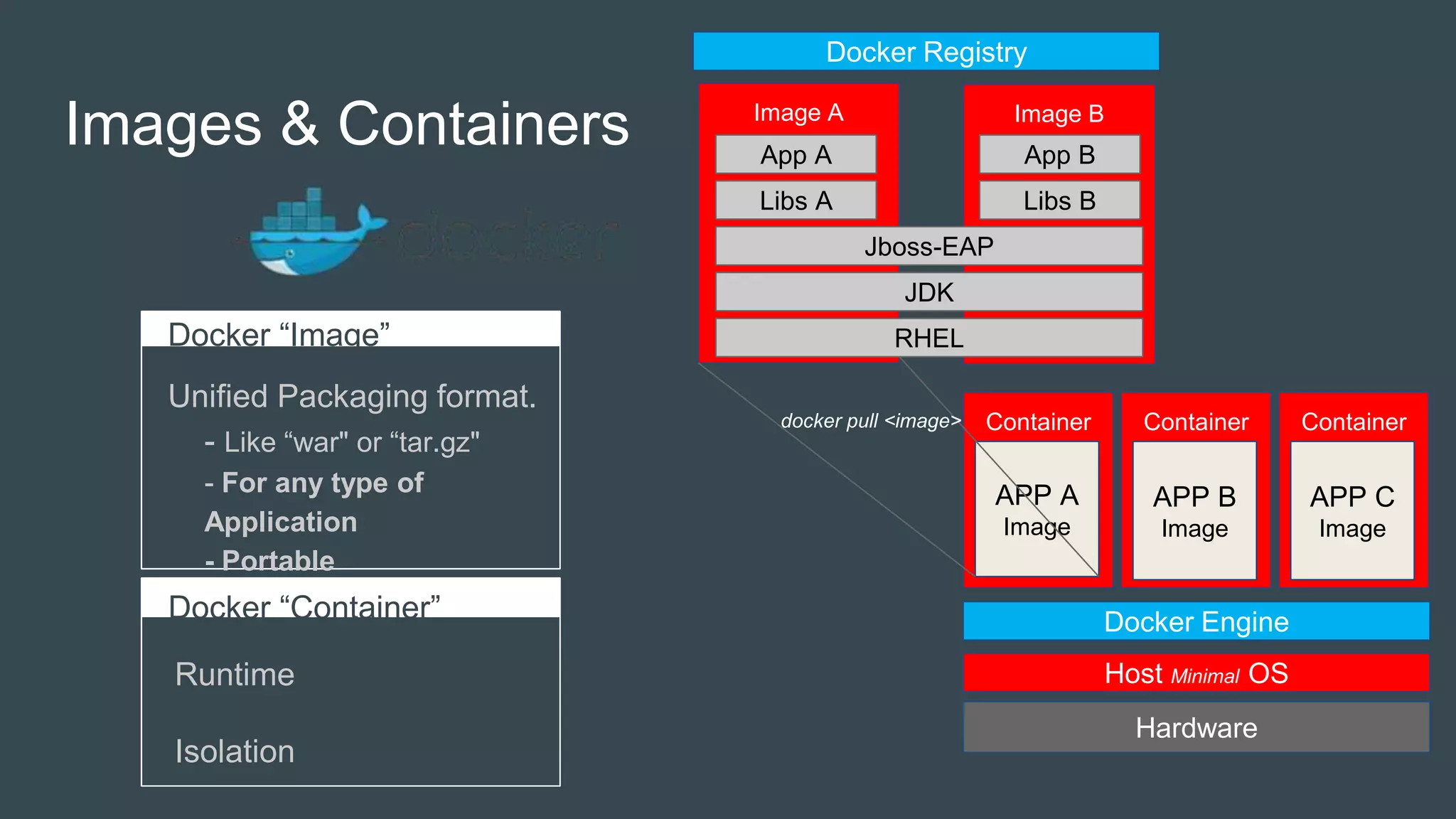
Images & Containers
Docker “Image”
Unified Packaging format.
- Like “war" or “tar.gz"
- For any type of
Application
- Portable
Docker “Container”
Runtime
Isolation
Image BImage A
Hardware
Container
APP A
Image
Host Minimal OS
Container
APP B
Image
Container
APP C
Image
Docker Engine
Docker Registry
RHEL
JDK
Jboss-EAP
Libs A Libs B
App A App B
docker pull <image>
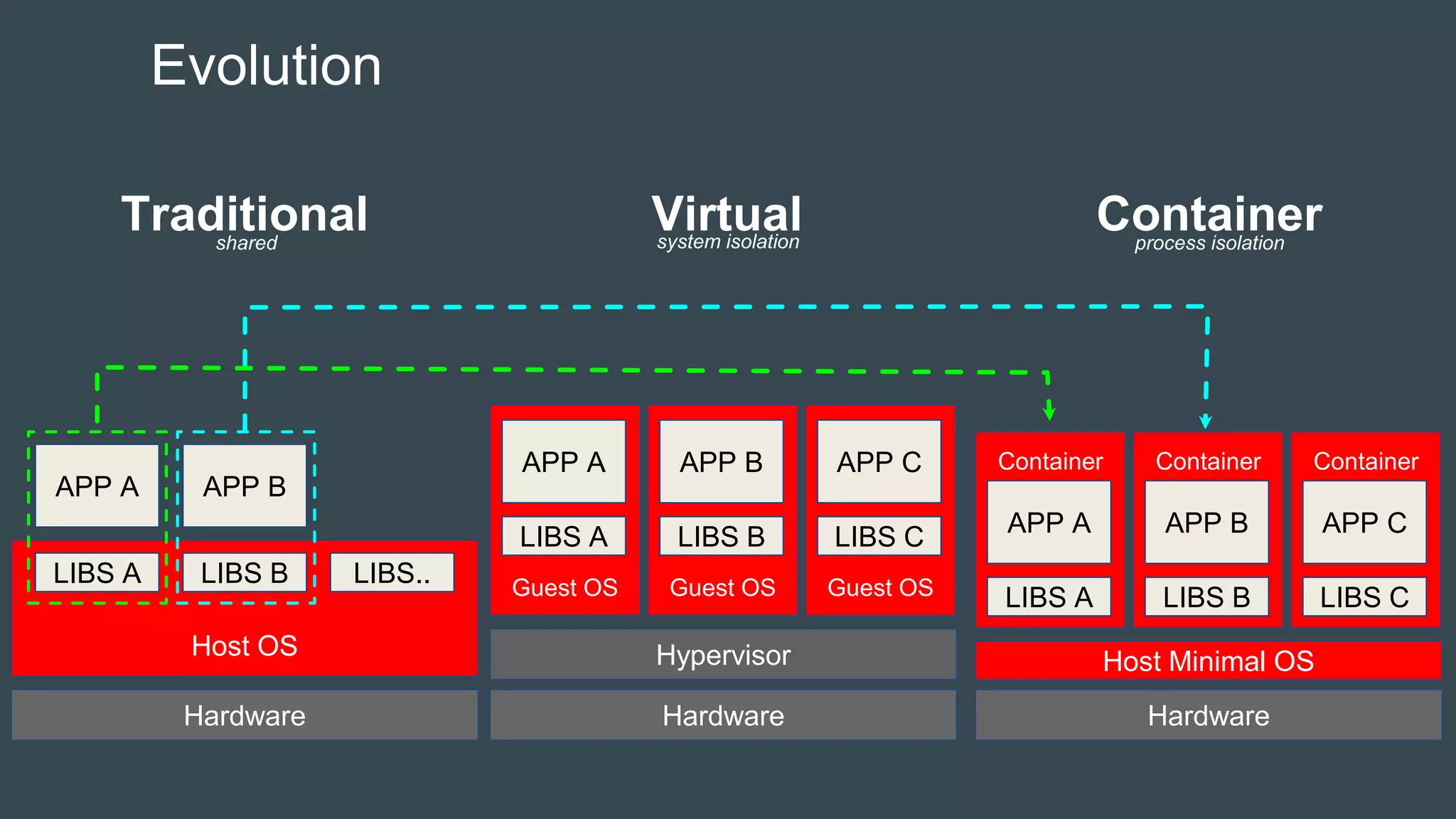
Evolution
Hardware
Host OS
LIBS A LIBS B LIBS..
APP A APP B
Hardware
Guest OS
LIBS A
APP A
Hypervisor
Guest OS
LIBS B
APP B
Guest OS
LIBS C
APP C
Hardware
Container
LIBS A
APP A
Host Minimal OS
Container
LIBS B
APP B
Container
LIBS C
APP C
Traditional Virtual Containershared system isolation process isolation
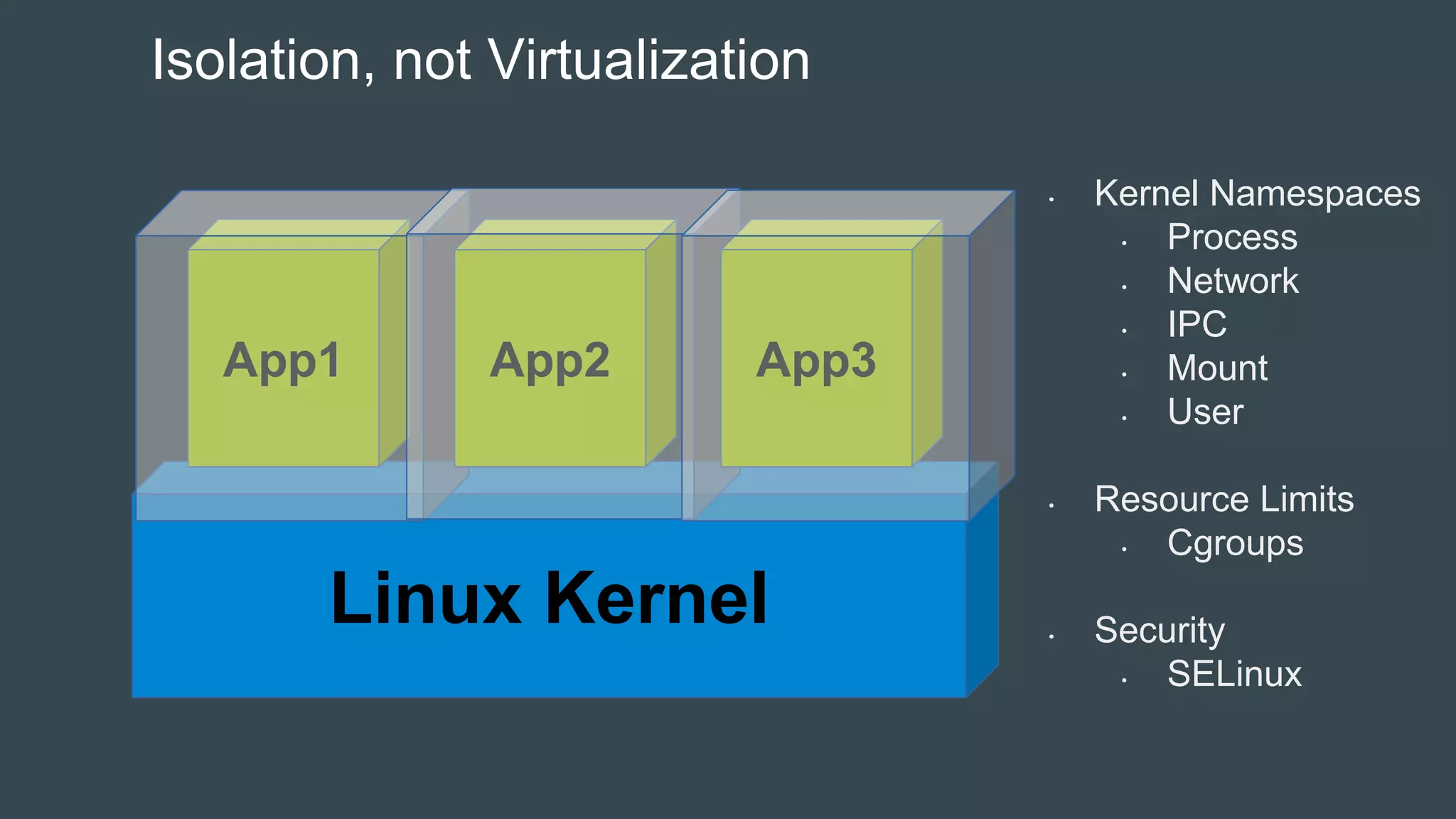
Linux Kernel
App1 App2 App3
Isolation, not Virtualization
• Kernel Namespaces
• Process
• Network
• IPC
• Mount
• User
• Resource Limits
• Cgroups
• Security
• SELinux
Container Orchestration
- Kubernetes
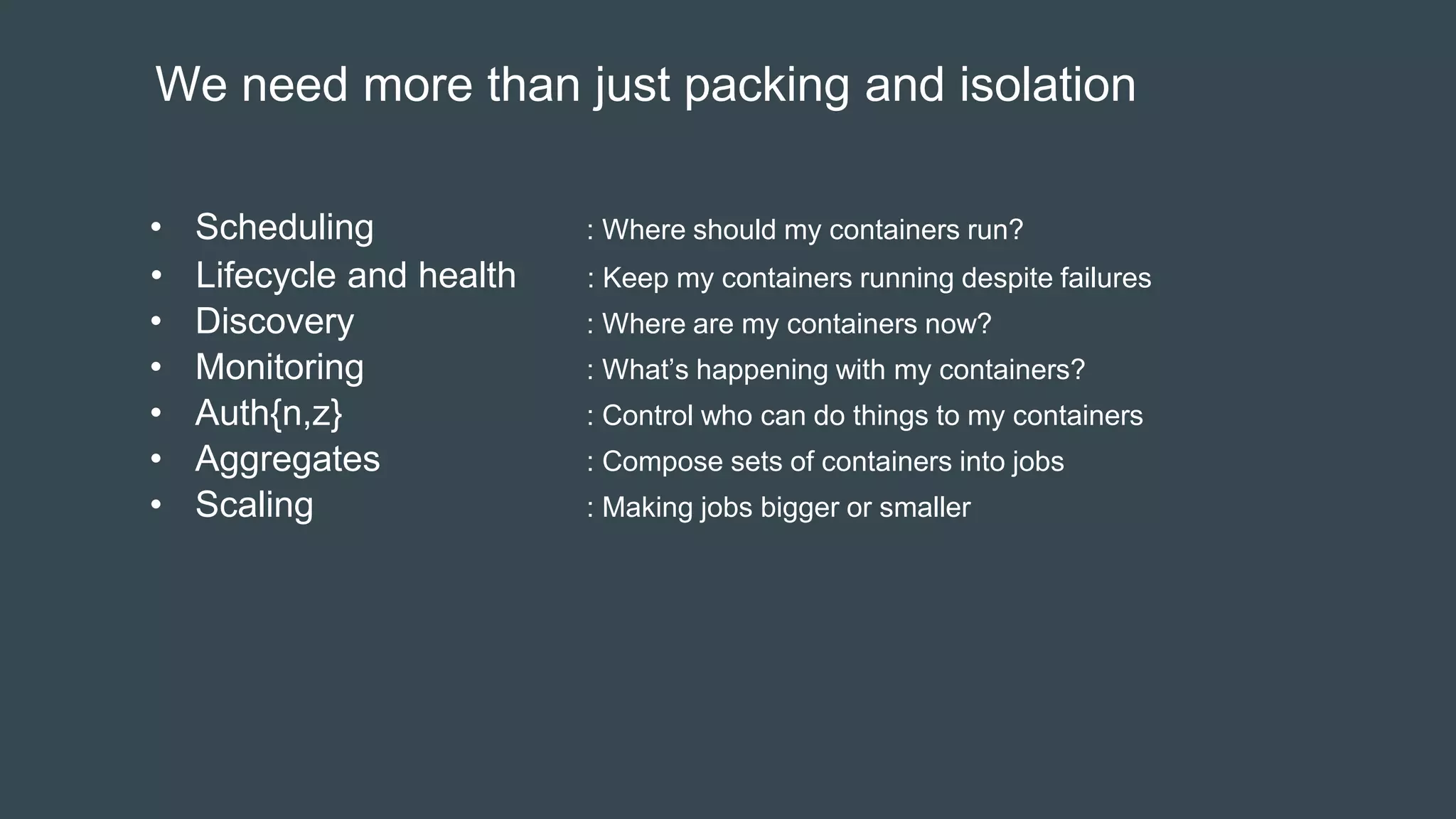
We need more than just packing and isolation
• Scheduling : Where should my containers run?
• Lifecycle and health : Keep my containers running despite failures
• Discovery : Where are my containers now?
• Monitoring : What’s happening with my containers?
• Auth{n,z} : Control who can do things to my containers
• Aggregates : Compose sets of containers into jobs
• Scaling : Making jobs bigger or smaller
Kubernetes – Container Orchestration at Scale
Greek for “Helmsman”; also the root of the word “Governor” and “cybernetic”
• Container Cluster Manager
- Inspired by the technology that runs Google
• Runs anywhere
- Public cloud
- Private cloud
- Bare metal
• Strong ecosystem
- Partners: Red Hat, VMware, CoreOS..
- Community: clients, integration
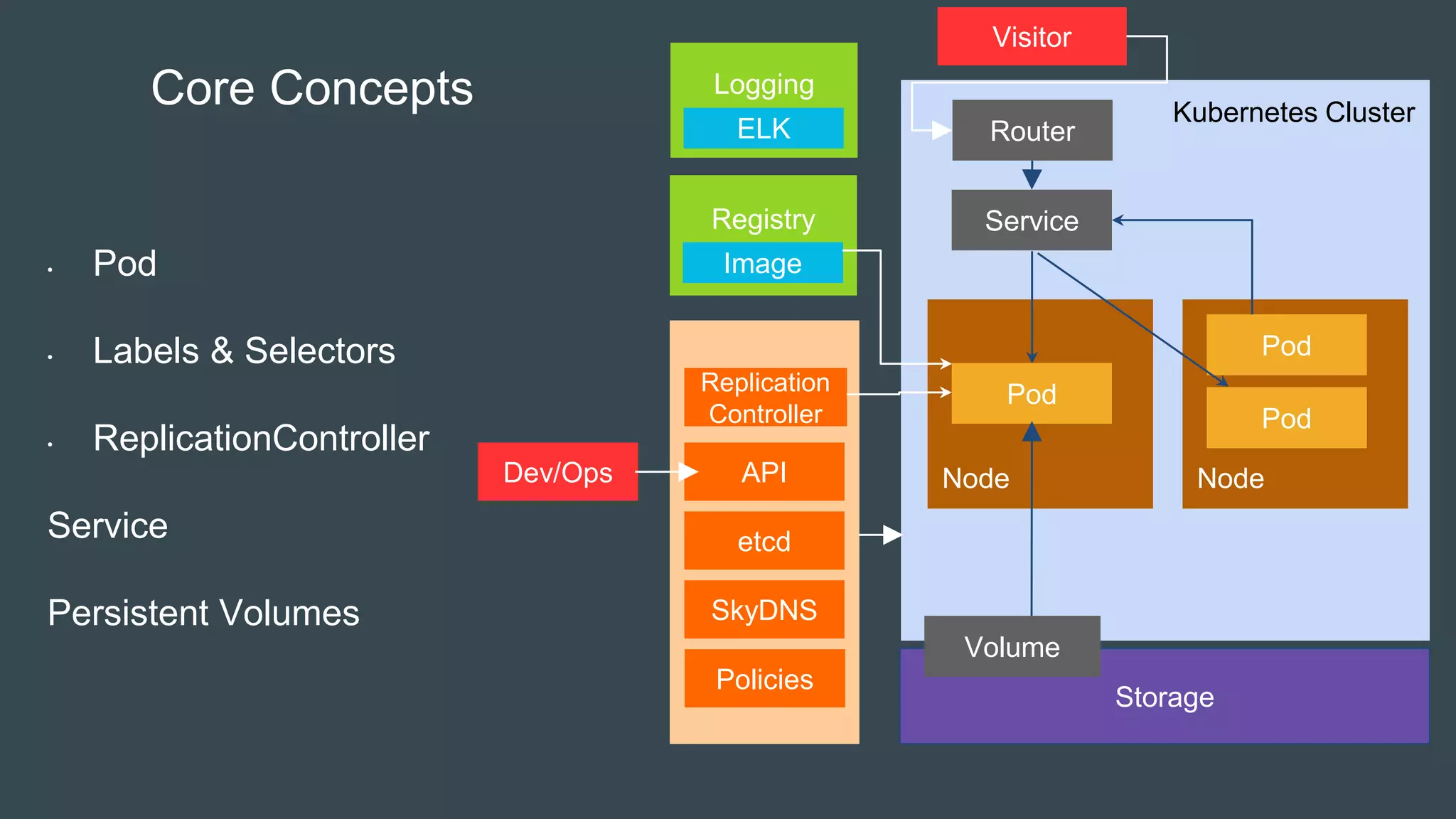
Kubernetes Cluster
Registry
Master
Node
Node
Storage
Pod
Volume
Node
Service
Pod
Pod
Image
Core Concepts
• Pod
• Labels & Selectors
• ReplicationController
Service
Persistent Volumes
etcd
SkyDNS
Replication
Controller
APIDev/Ops
Visitor
Router
Policies
Logging
ELK
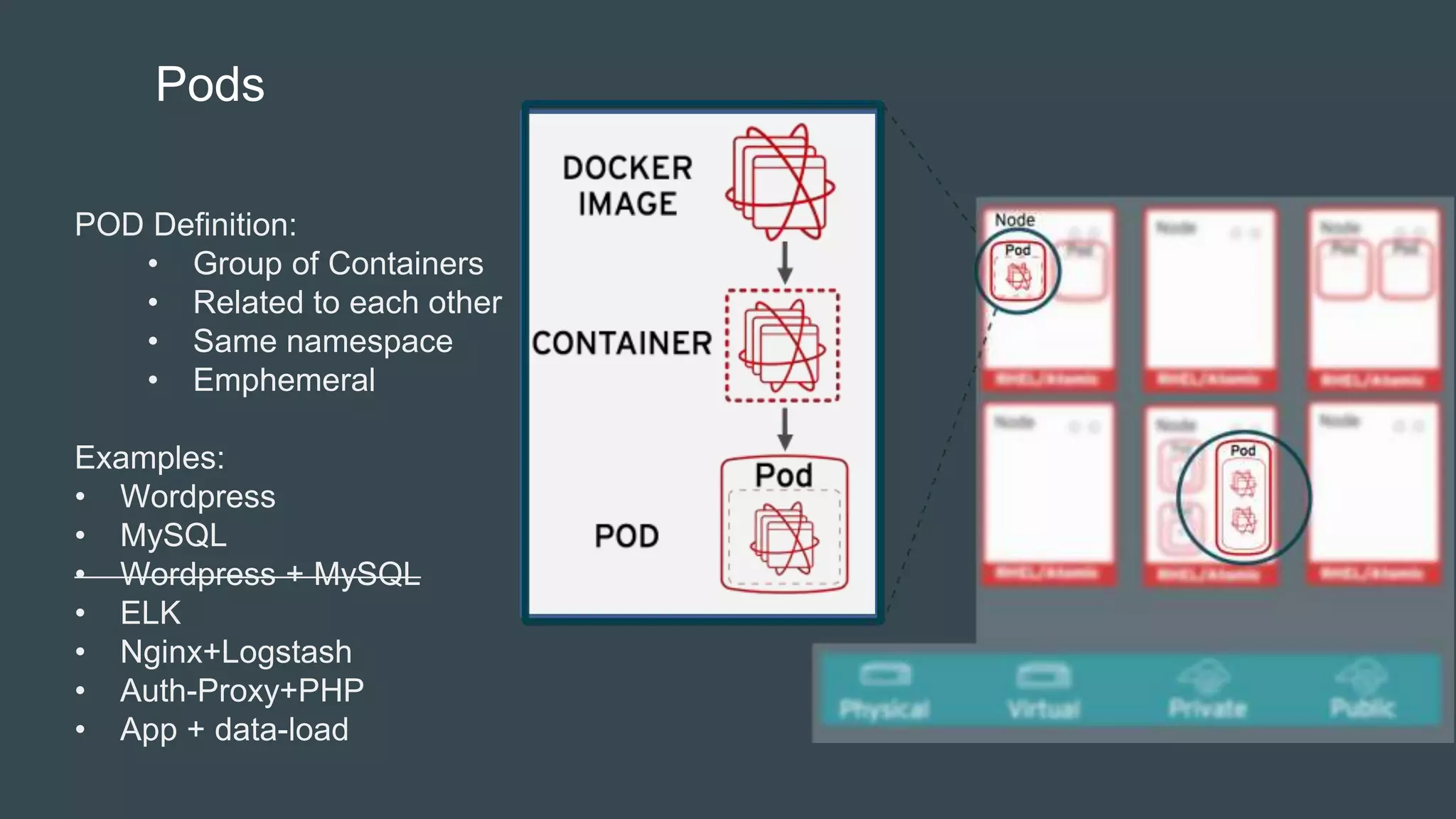
Pods
POD Definition:
• Group of Containers
• Related to each other
• Same namespace
• Emphemeral
Examples:
• Wordpress
• MySQL
• Wordpress + MySQL
• ELK
• Nginx+Logstash
• Auth-Proxy+PHP
• App + data-load
Kubernetes Cluster
Master
Node
Node
Pod
Node
Pod
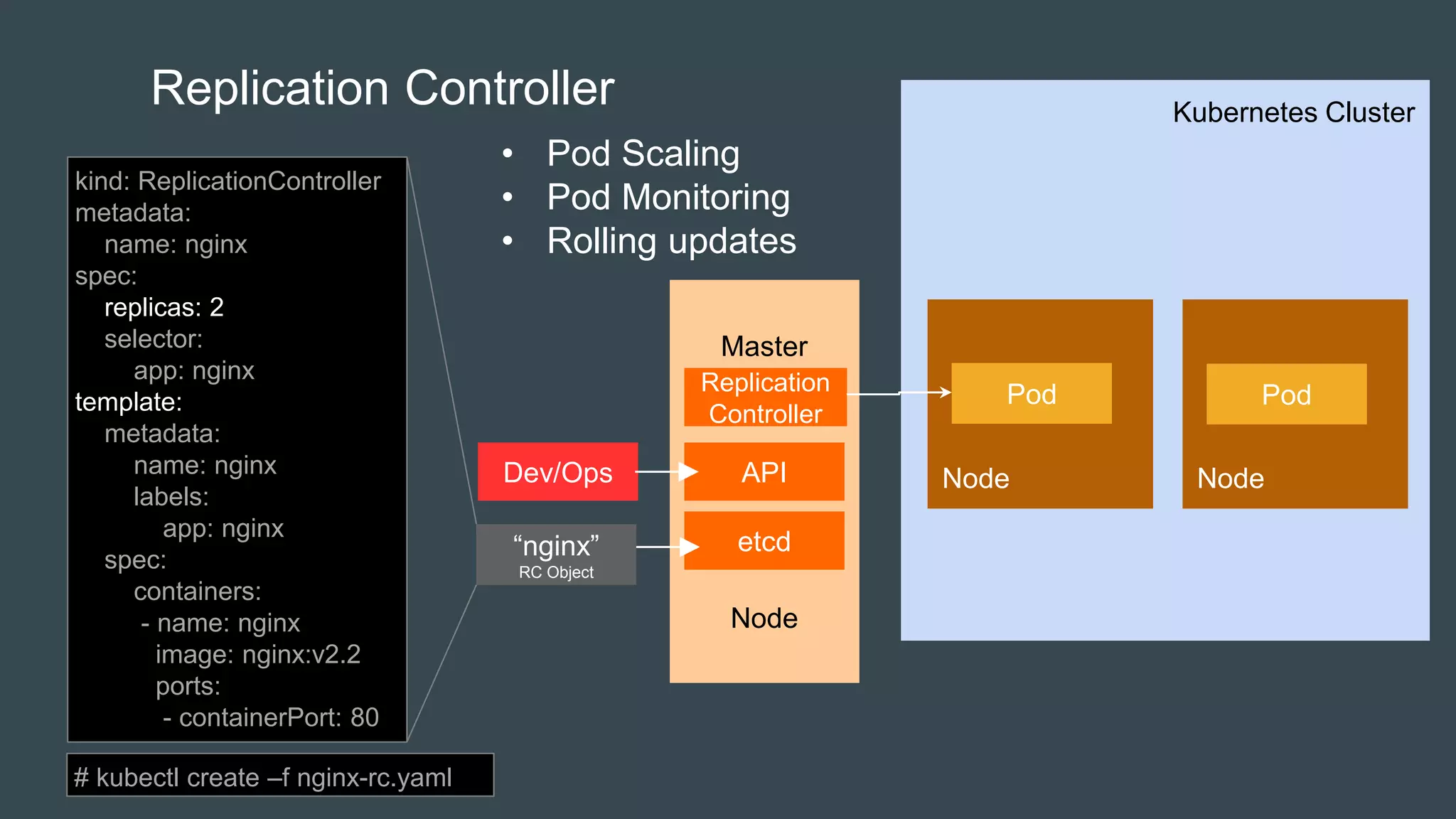
Replication Controller
etcd
Replication
Controller
APIDev/Ops
kind: ReplicationController
metadata:
name: nginx
spec:
replicas: 2
selector:
app: nginx
template:
metadata:
name: nginx
labels:
app: nginx
spec:
containers:
- name: nginx
image: nginx:v2.2
ports:
- containerPort: 80
“nginx”
RC Object
• Pod Scaling
• Pod Monitoring
• Rolling updates
# kubectl create –f nginx-rc.yaml
Kubernetes Cluster
MySQL
DB
MySQL
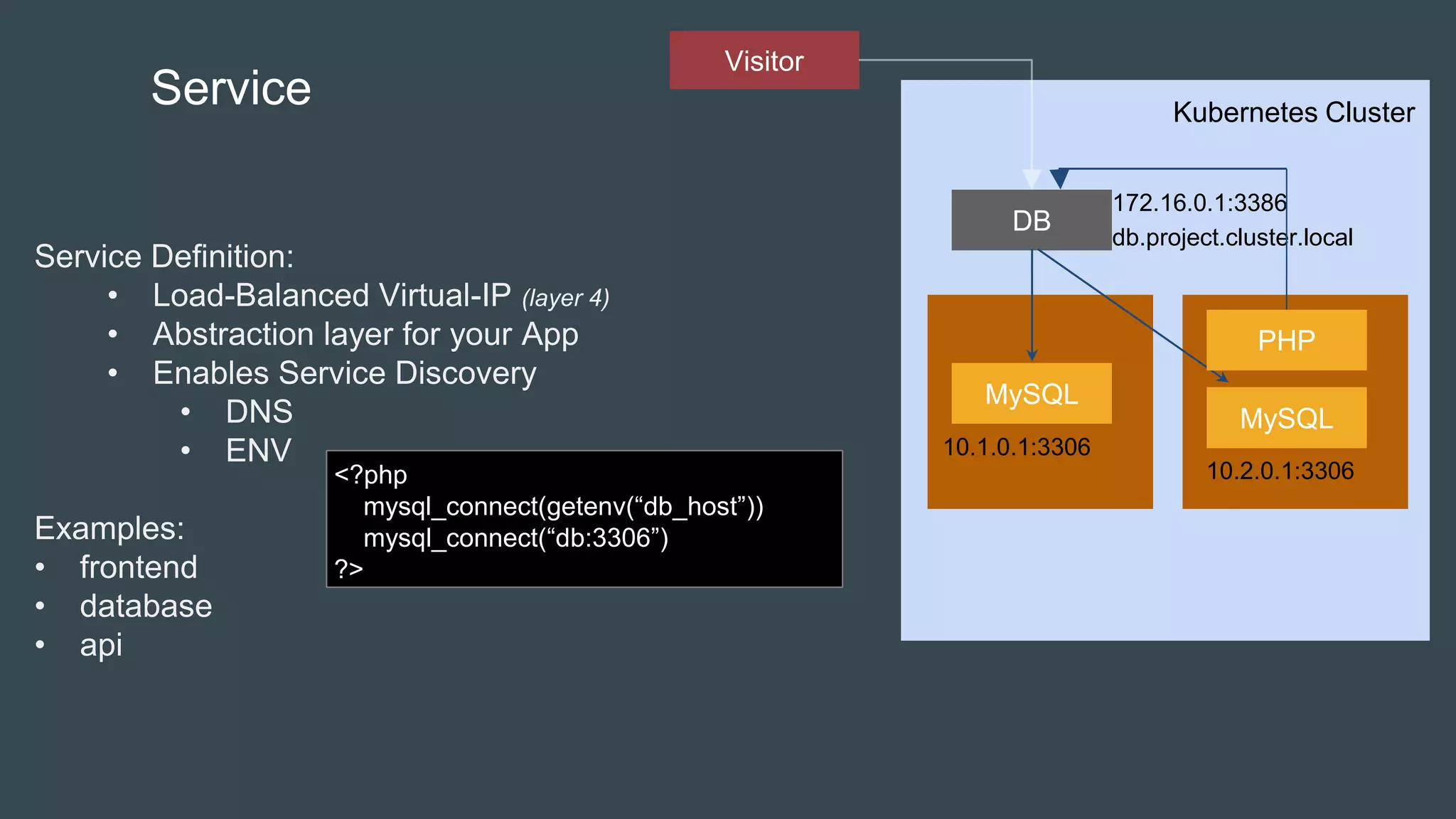
Service
Service Definition:
• Load-Balanced Virtual-IP (layer 4)
• Abstraction layer for your App
• Enables Service Discovery
• DNS
• ENV
Examples:
• frontend
• database
• api
172.16.0.1:3386
PHP
10.1.0.1:3306
10.2.0.1:3306
db.project.cluster.local
Visitor
<?php
mysql_connect(getenv(“db_host”))
mysql_connect(“db:3306”)
?>
MySQL
MySQL
Service
PHP
10.1.0.1:3306
10.2.0.1:3306
Master
Node
etcd
SkyDNS
APIDev/Ops
“DB”
Service Object
Kube
Proxy
IPTables
Kube
Proxy
IPTables
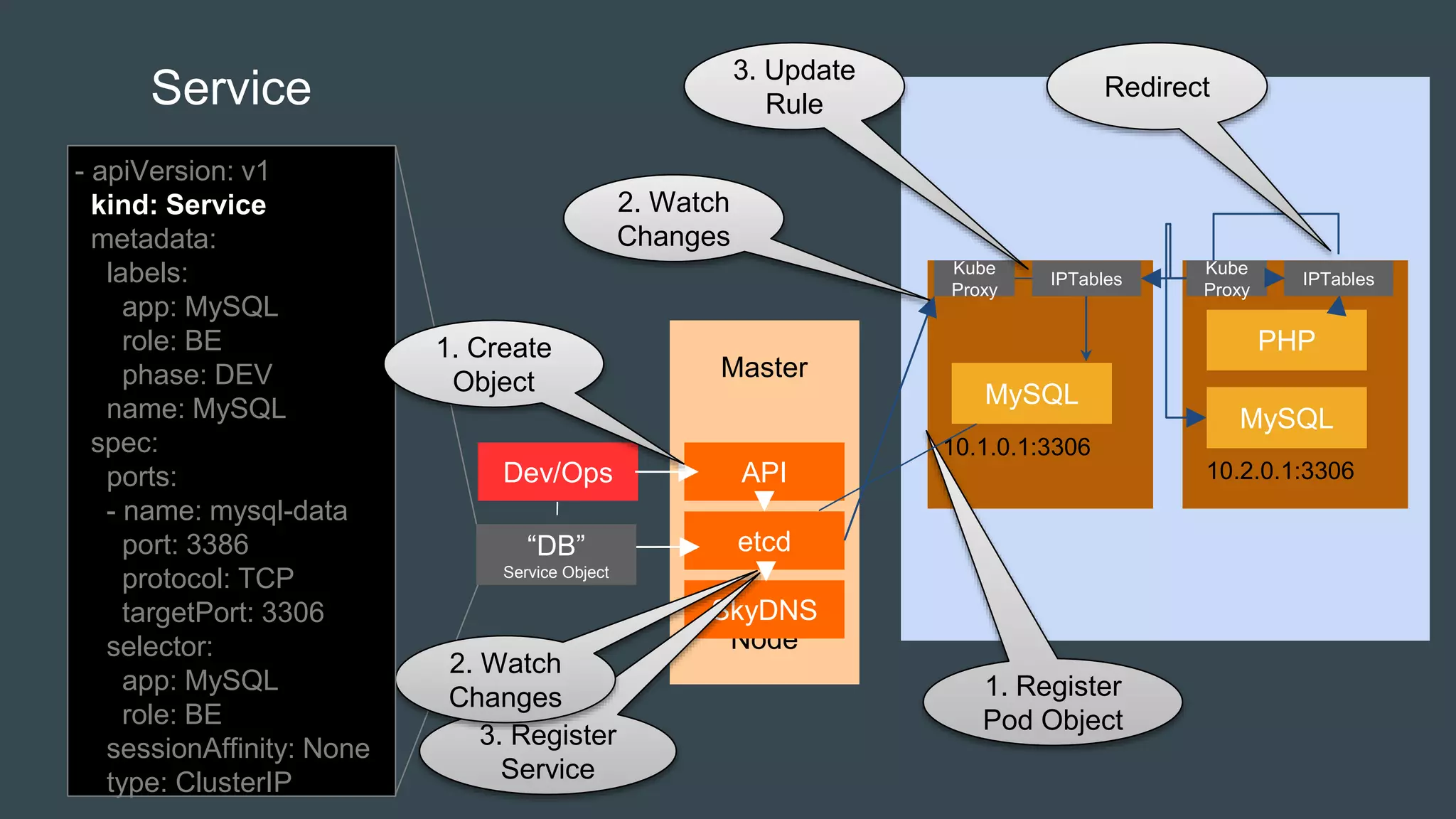
3. Register
Service
2. Watch
Changes
Redirect
3. Update
Rule
2. Watch
Changes
- apiVersion: v1
kind: Service
metadata:
labels:
app: MySQL
role: BE
phase: DEV
name: MySQL
spec:
ports:
- name: mysql-data
port: 3386
protocol: TCP
targetPort: 3306
selector:
app: MySQL
role: BE
sessionAffinity: None
type: ClusterIP
1. Create
Object
1. Register
Pod Object
Pod
Service
Pod
Pod
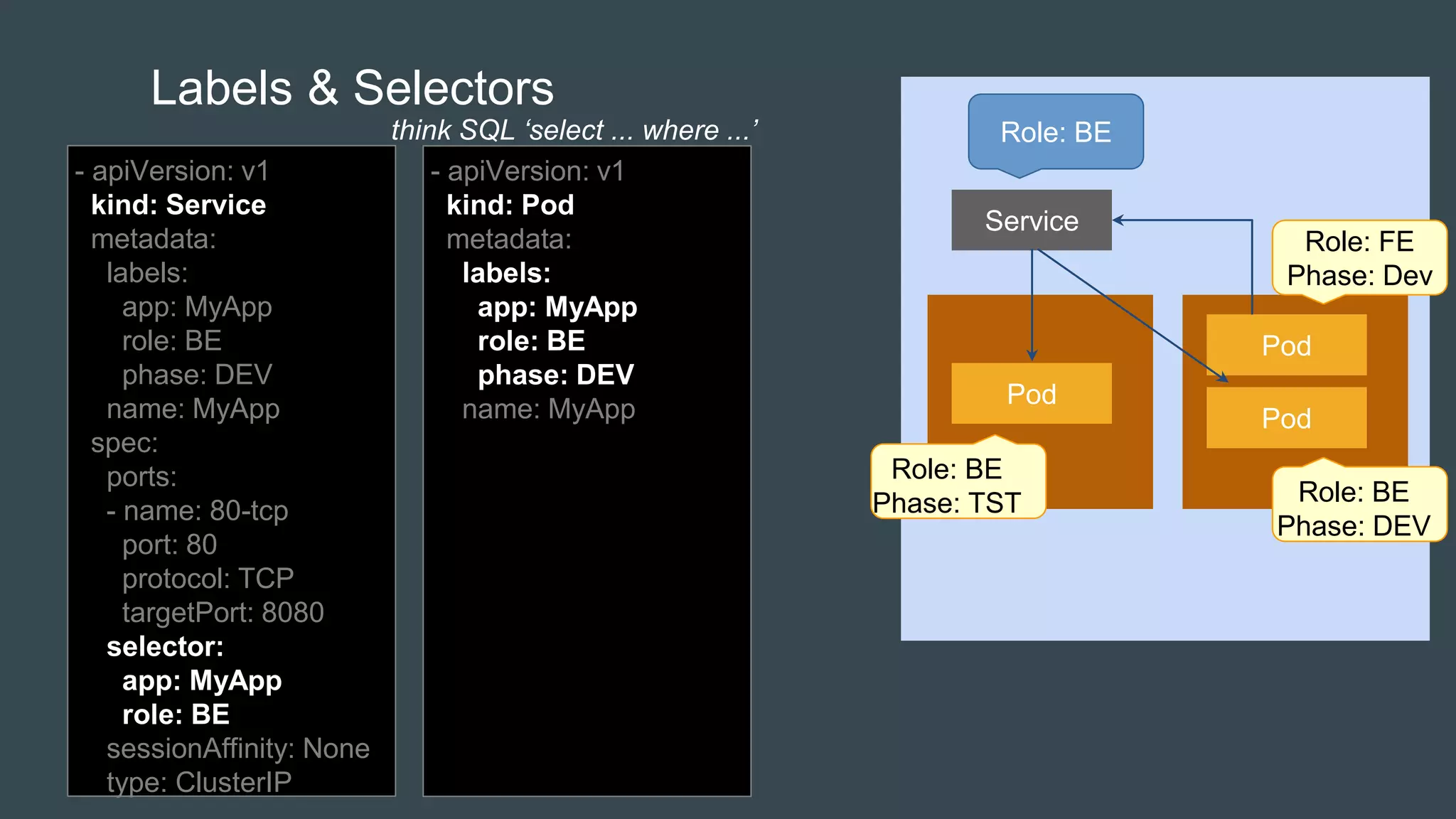
Labels & Selectors
- apiVersion: v1
kind: Service
metadata:
labels:
app: MyApp
role: BE
phase: DEV
name: MyApp
spec:
ports:
- name: 80-tcp
port: 80
protocol: TCP
targetPort: 8080
selector:
app: MyApp
role: BE
sessionAffinity: None
type: ClusterIP
Role: FE
Phase: Dev
Role: BE
Phase: DEV
Role: BE
Phase: TST
Role: BEthink SQL ‘select ... where ...’
- apiVersion: v1
kind: Pod
metadata:
labels:
app: MyApp
role: BE
phase: DEV
name: MyApp
MySQL
Service
MySQL
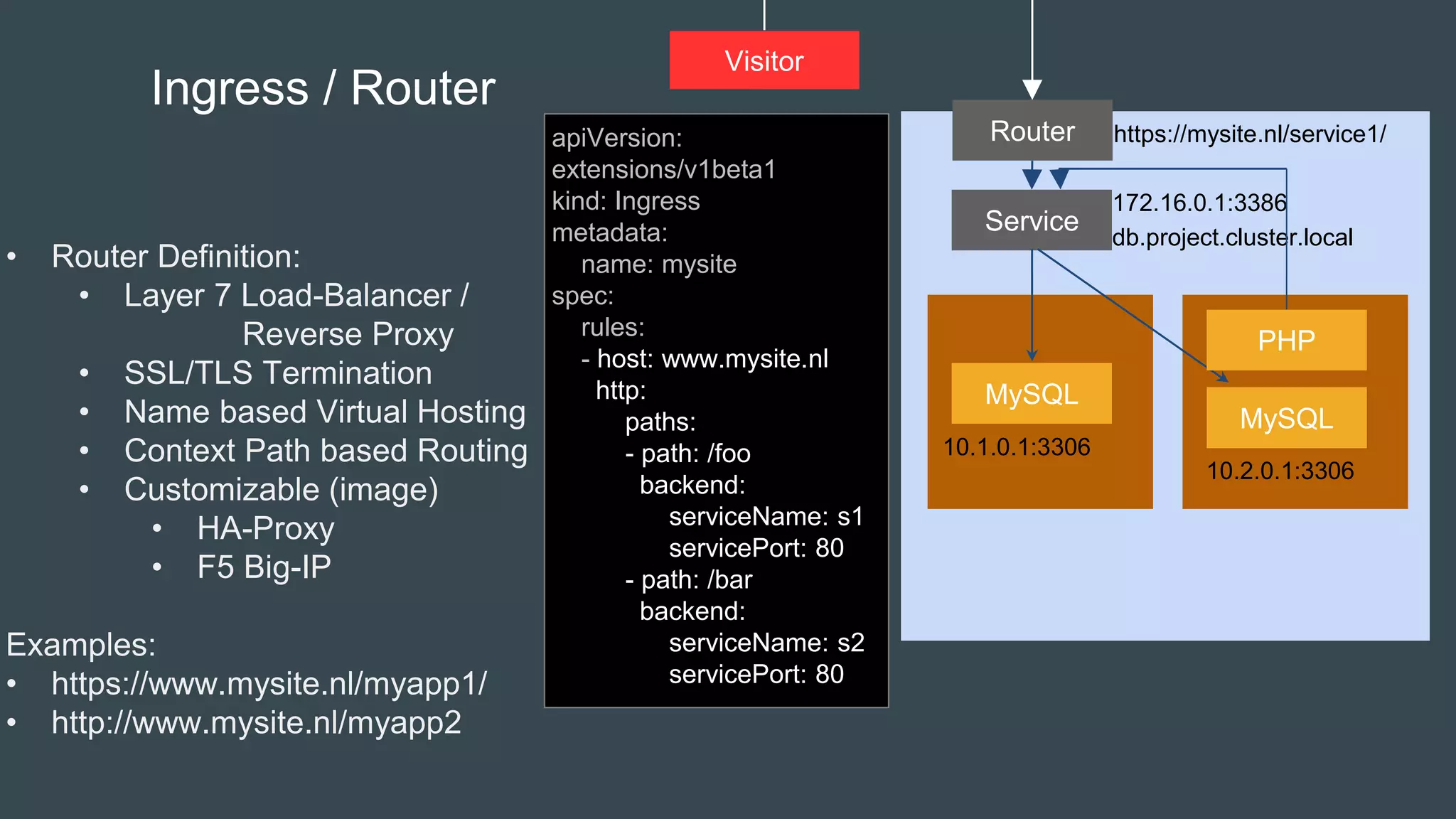
Ingress / Router
• Router Definition:
• Layer 7 Load-Balancer /
Reverse Proxy
• SSL/TLS Termination
• Name based Virtual Hosting
• Context Path based Routing
• Customizable (image)
• HA-Proxy
• F5 Big-IP
Examples:
• https://www.mysite.nl/myapp1/
• http://www.mysite.nl/myapp2
172.16.0.1:3386
PHP
10.1.0.1:3306
10.2.0.1:3306
db.project.cluster.local
Visitor
Router https://mysite.nl/service1/apiVersion:
extensions/v1beta1
kind: Ingress
metadata:
name: mysite
spec:
rules:
- host: www.mysite.nl
http:
paths:
- path: /foo
backend:
serviceName: s1
servicePort: 80
- path: /bar
backend:
serviceName: s2
servicePort: 80
Kubernetes Cluster
Node
Storage
Pod
Volume
Node
Pod
Pod
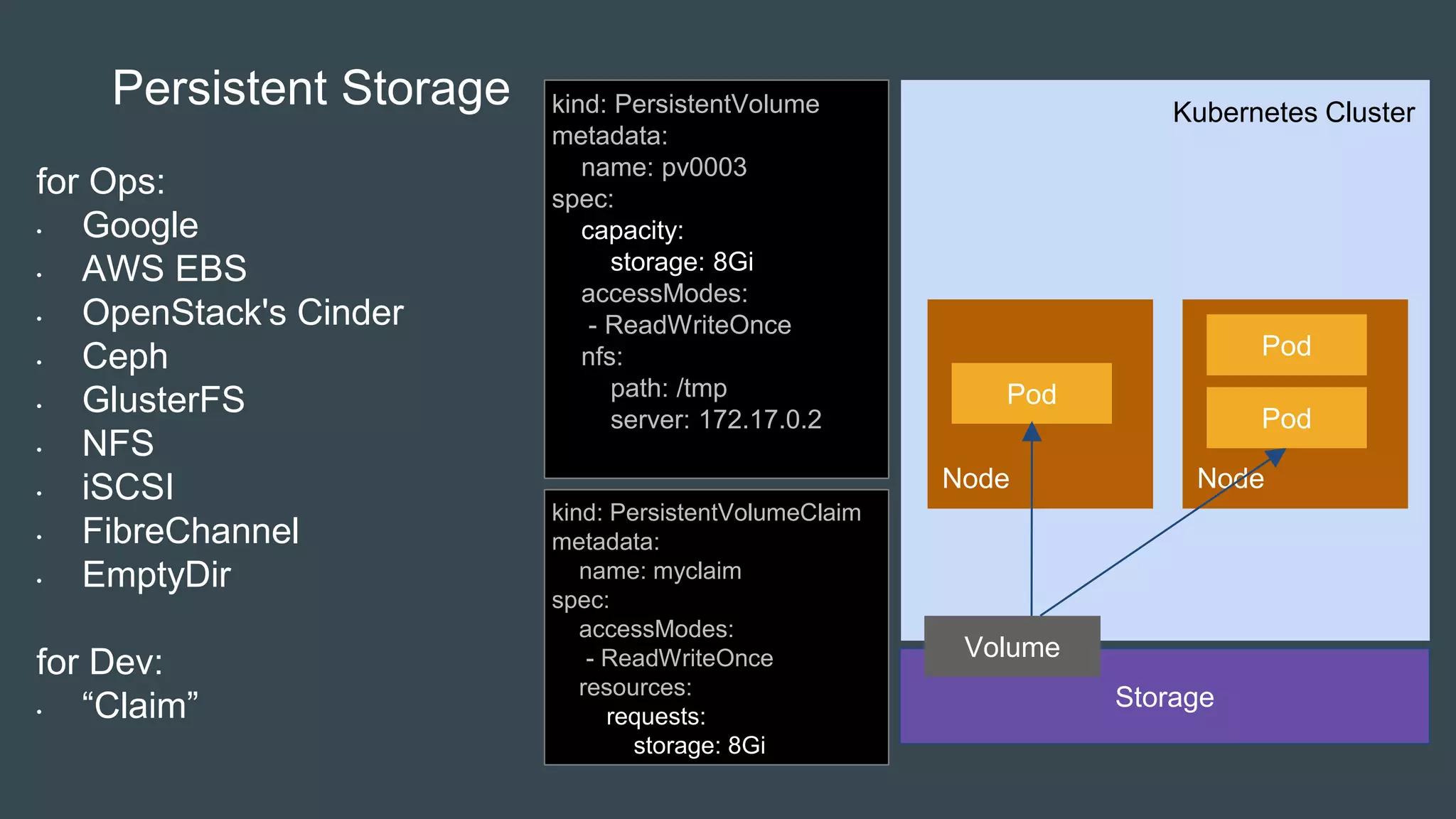
Persistent Storage
for Ops:
• Google
• AWS EBS
• OpenStack's Cinder
• Ceph
• GlusterFS
• NFS
• iSCSI
• FibreChannel
• EmptyDir
for Dev:
• “Claim”
kind: PersistentVolume
metadata:
name: pv0003
spec:
capacity:
storage: 8Gi
accessModes:
- ReadWriteOnce
nfs:
path: /tmp
server: 172.17.0.2
kind: PersistentVolumeClaim
metadata:
name: myclaim
spec:
accessModes:
- ReadWriteOnce
resources:
requests:
storage: 8Gi
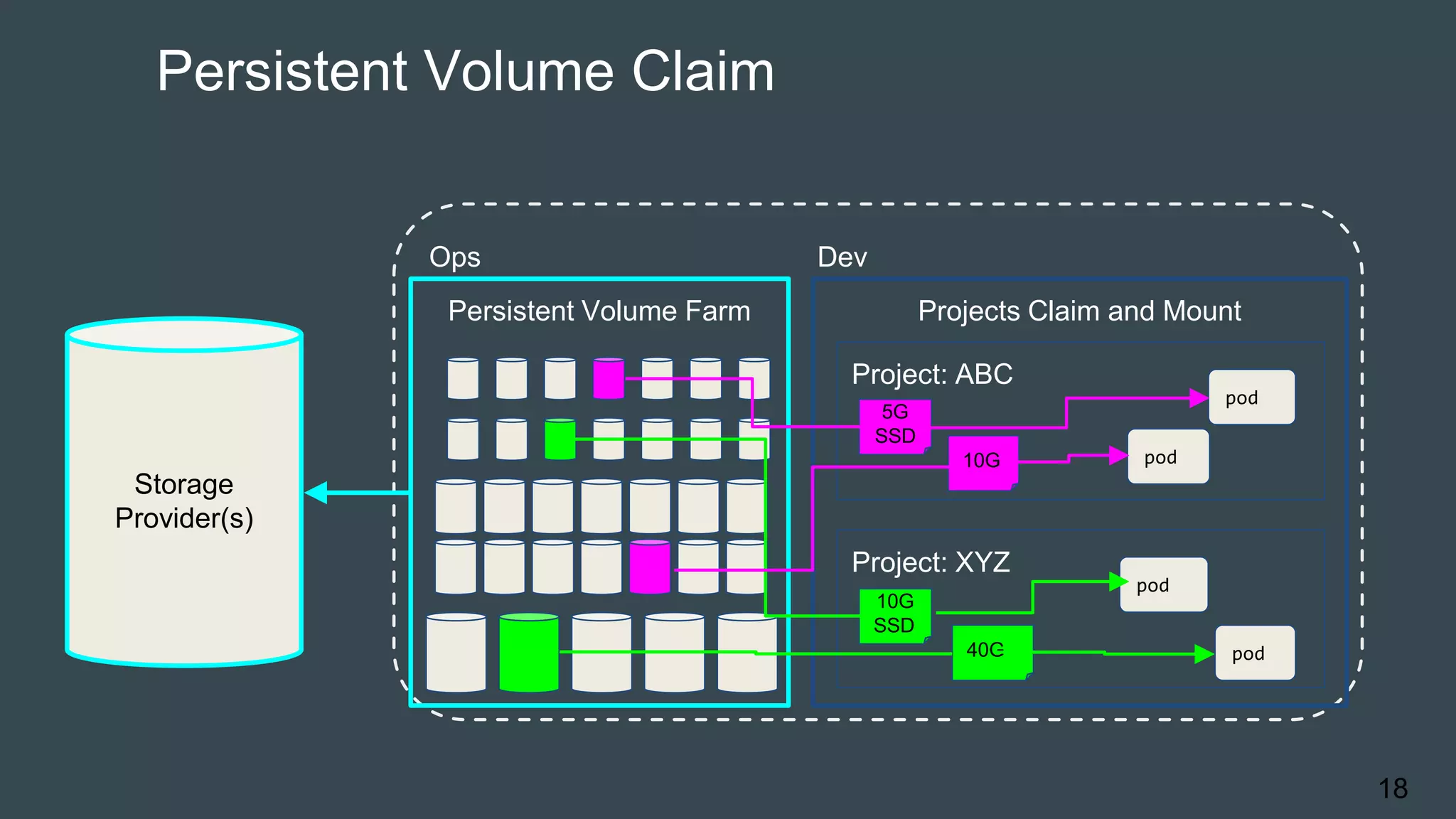
Persistent Volume Claim
18
Storage
Provider(s)
Ops Dev
Persistent Volume Farm Projects Claim and Mount
Project: ABC
Project: XYZ
10G
SSD
40G
pod
pod
5G
SSD
10G pod
pod
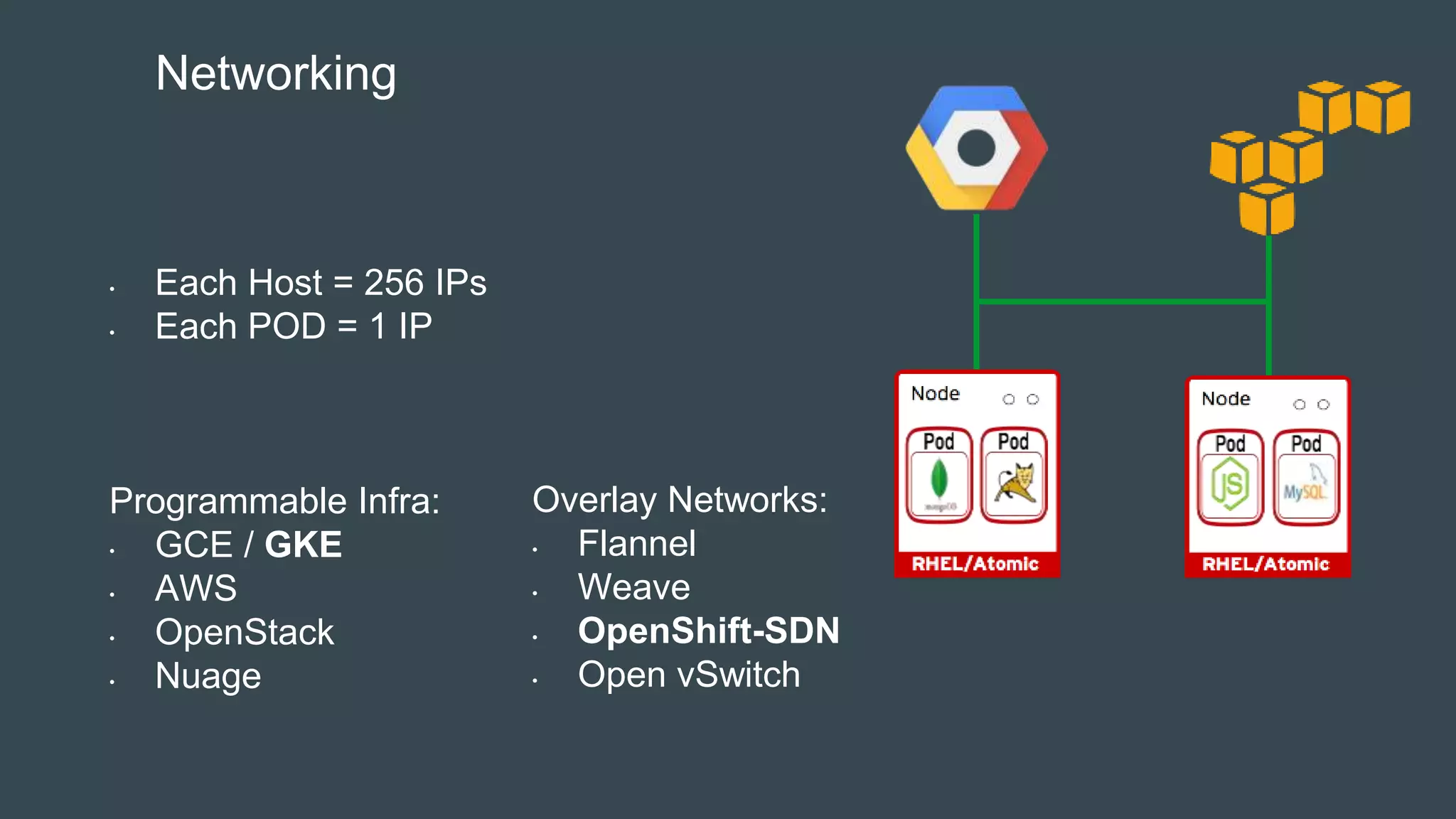
• Each Host = 256 IPs
• Each POD = 1 IP
Programmable Infra:
• GCE / GKE
• AWS
• OpenStack
• Nuage
Networking
Overlay Networks:
• Flannel
• Weave
• OpenShift-SDN
• Open vSwitch
Kubernetes Cluster
Master
Node
Node
Storage
Pod
Volume
Node
Service
Pod
Pod
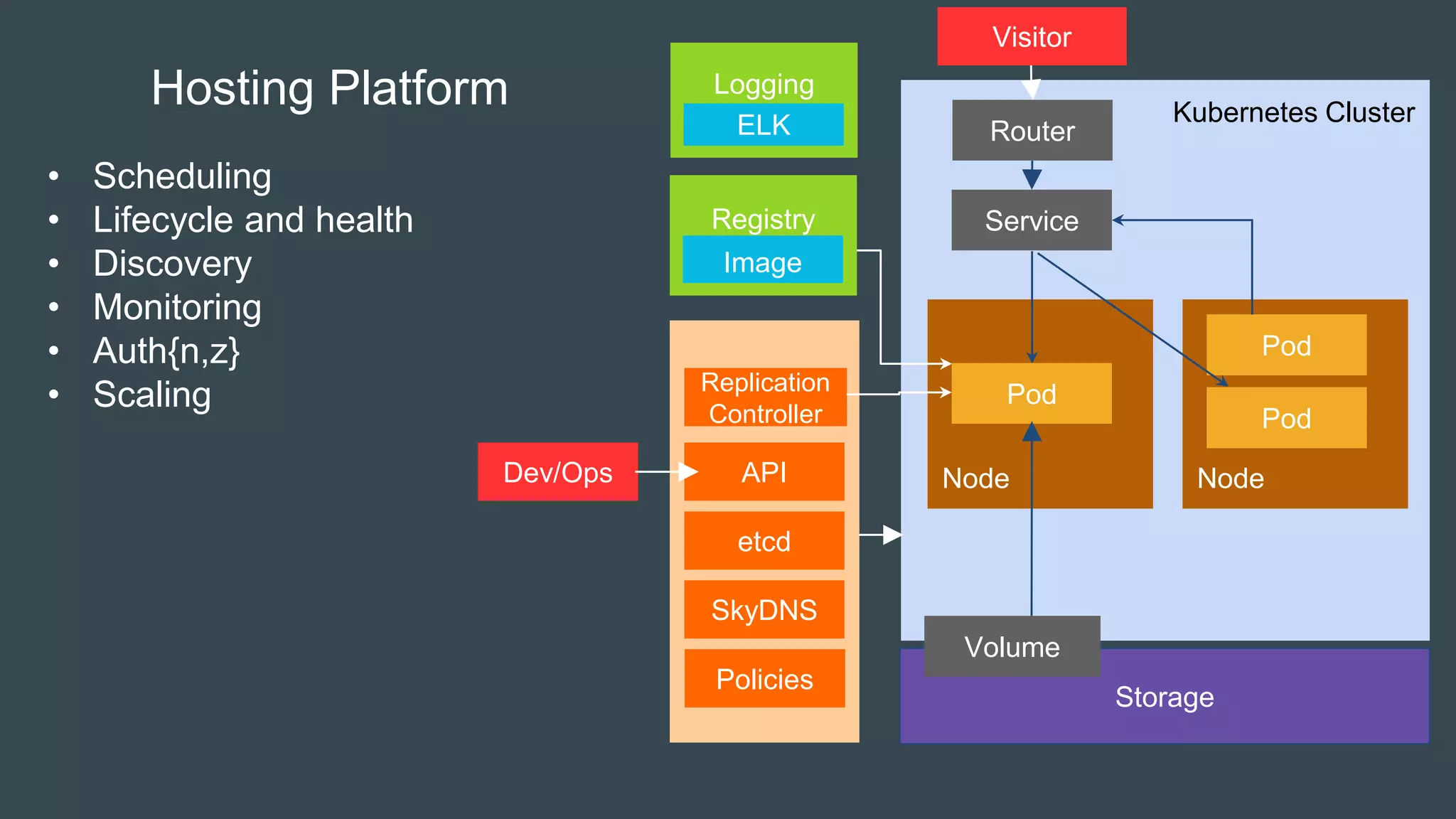
Hosting Platform
• Scheduling
• Lifecycle and health
• Discovery
• Monitoring
• Auth{n,z}
• Scaling
etcd
SkyDNS
Replication
Controller
APIDev/Ops
Router
Policies
Registry
Image
Visitor
Logging
ELK
OpenShift as a Development Platform
• Project spaces
• Build tools
• Integration with your IDE
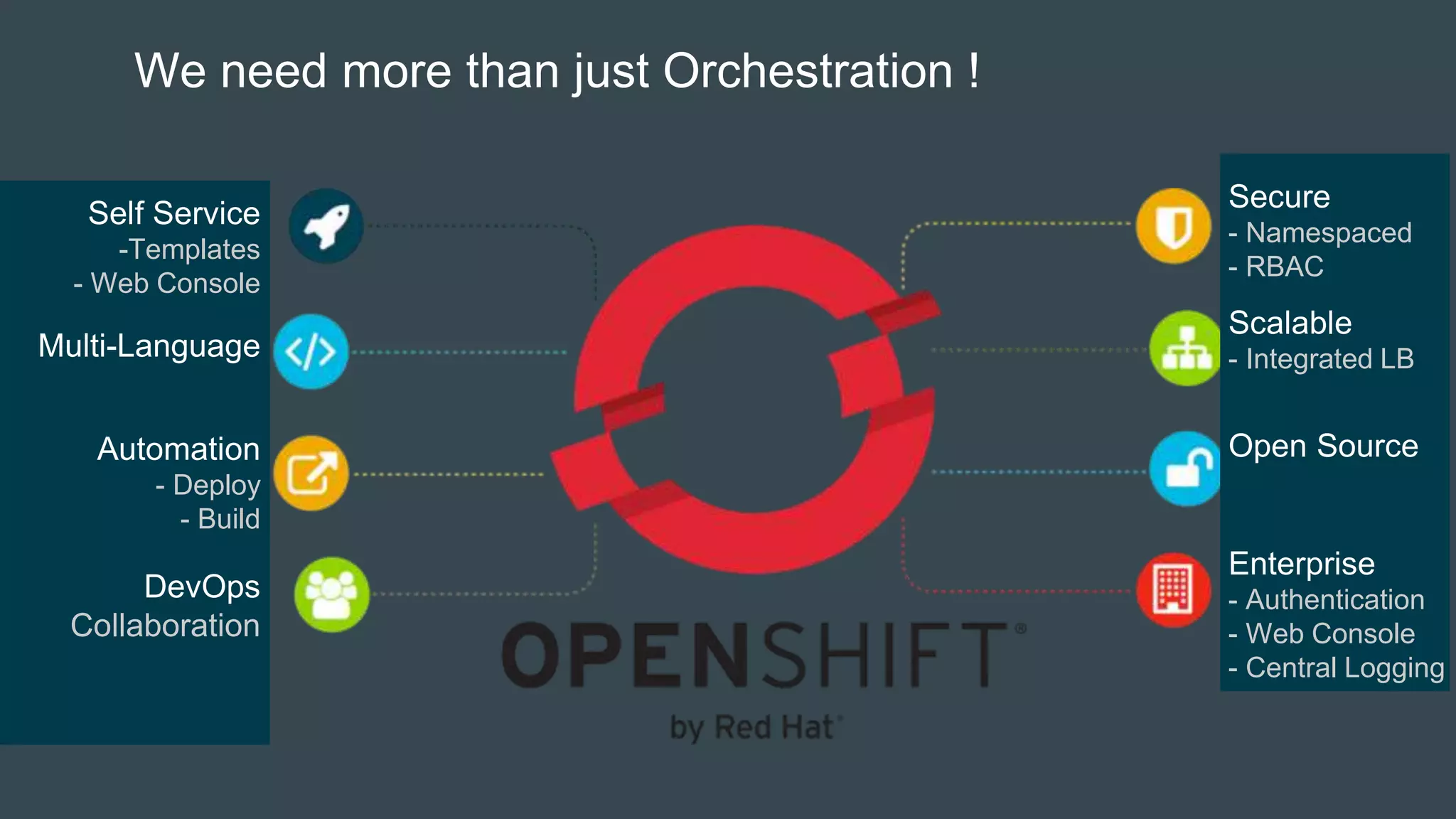
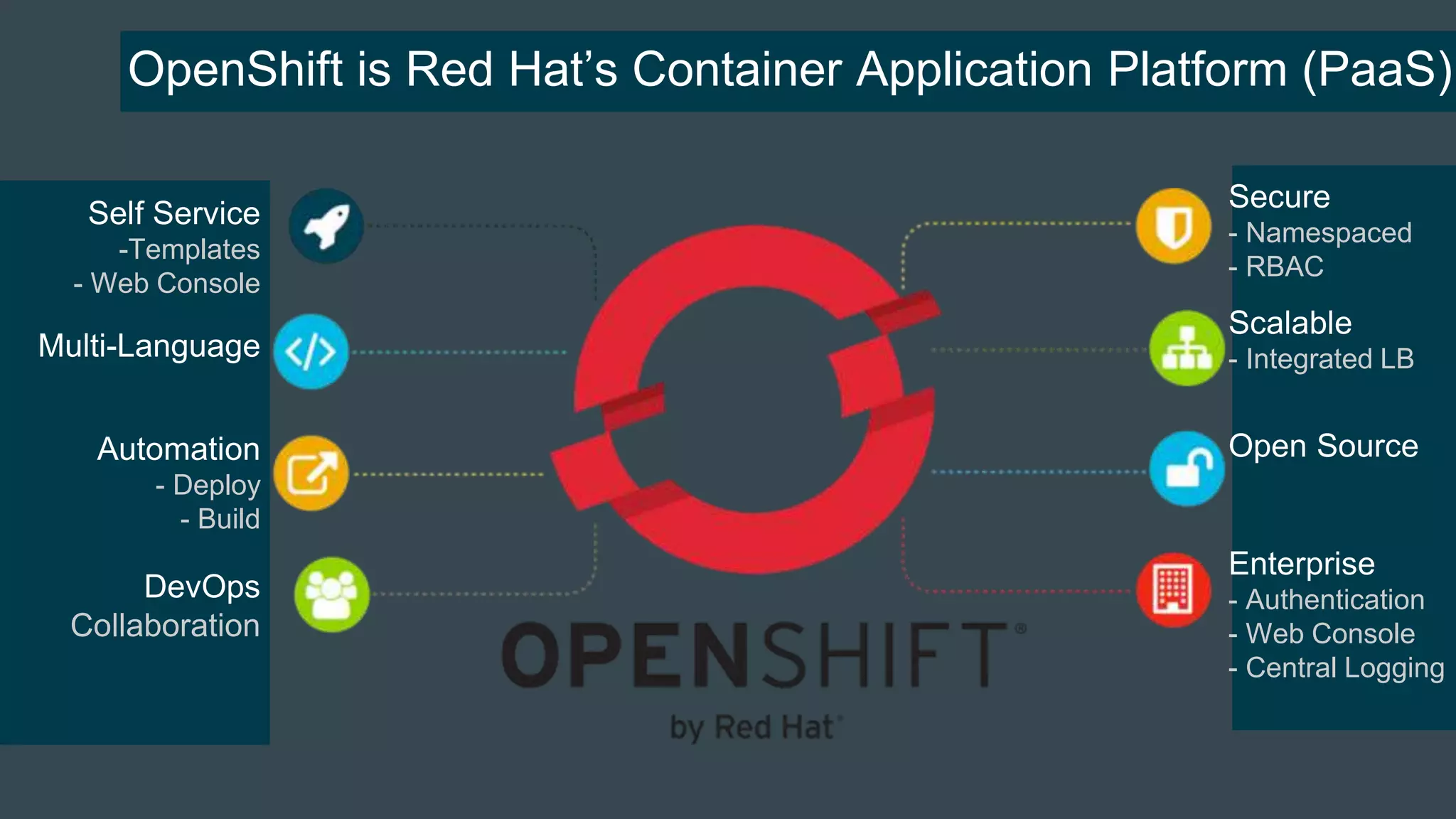
We need more than just Orchestration !
Self Service
-Templates
- Web Console
Multi-Language
Automation
- Deploy
- Build
DevOps
Collaboration
Secure
- Namespaced
- RBAC
Scalable
- Integrated LB
Open Source
Enterprise
- Authentication
- Web Console
- Central Logging
We need more than just Orchestration
Self Service
-Templates
- Web Console
Multi-Language
Automation
- Deploy
- Build
DevOps
Collaboration
Secure
- Namespaced
- RBAC
Scalable
- Integrated LB
Open Source
Enterprise
- Authentication
- Web Console
- Central Logging
OpenShift is Red Hat’s Container Application Platform (PaaS)
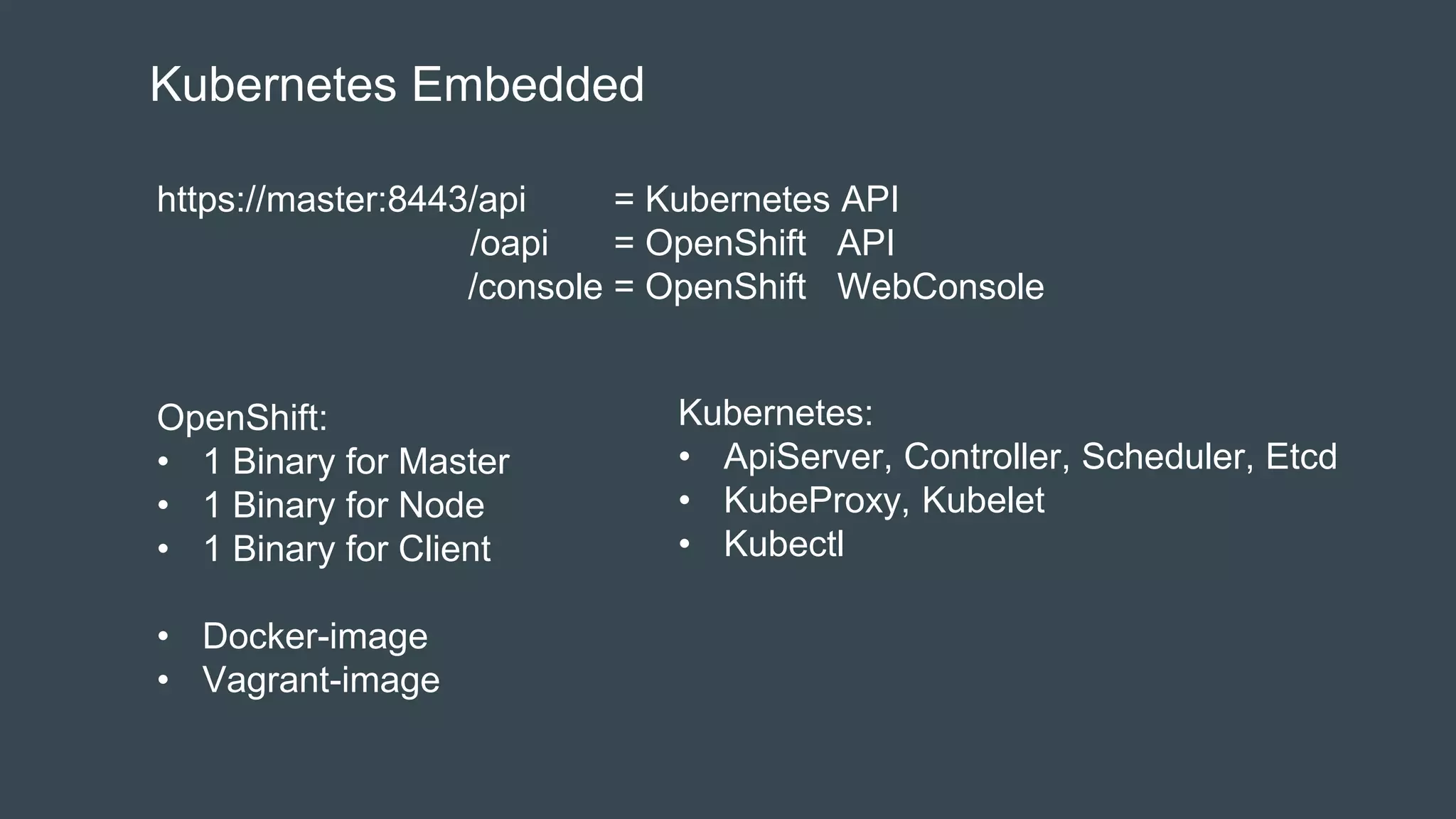
Kubernetes Embedded
https://master:8443/api = Kubernetes API
/oapi = OpenShift API
/console = OpenShift WebConsole
OpenShift:
• 1 Binary for Master
• 1 Binary for Node
• 1 Binary for Client
• Docker-image
• Vagrant-image
Kubernetes:
• ApiServer, Controller, Scheduler, Etcd
• KubeProxy, Kubelet
• Kubectl
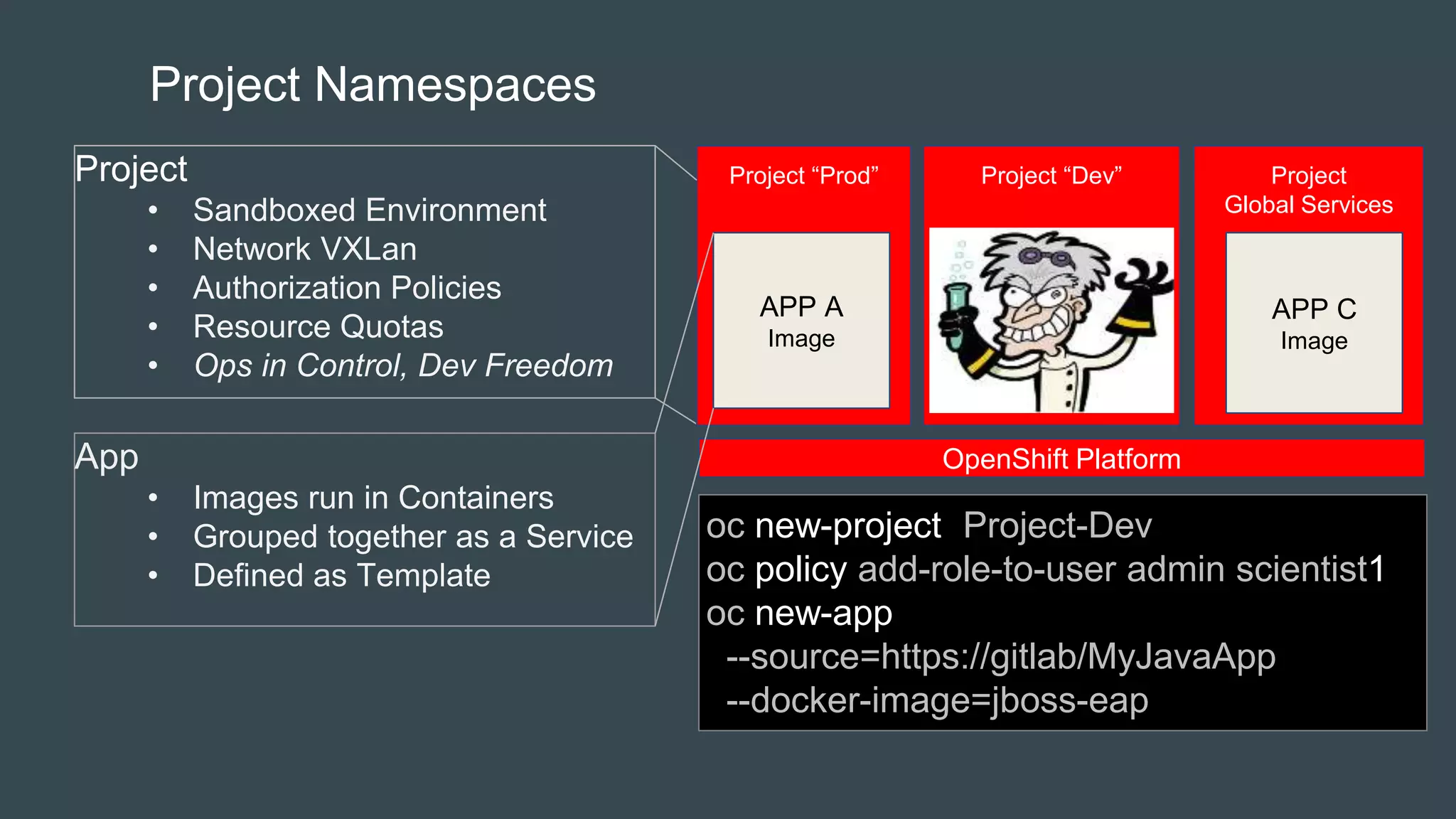
Project Namespaces
Project
• Sandboxed Environment
• Network VXLan
• Authorization Policies
• Resource Quotas
• Ops in Control, Dev Freedom
oc new-project Project-Dev
oc policy add-role-to-user admin scientist1
oc new-app
--source=https://gitlab/MyJavaApp
--docker-image=jboss-eap
Project “Prod” Project “Dev” Project
Global Services
OpenShift Platform
APP A
Image
APP C
Image
App
• Images run in Containers
• Grouped together as a Service
• Defined as Template
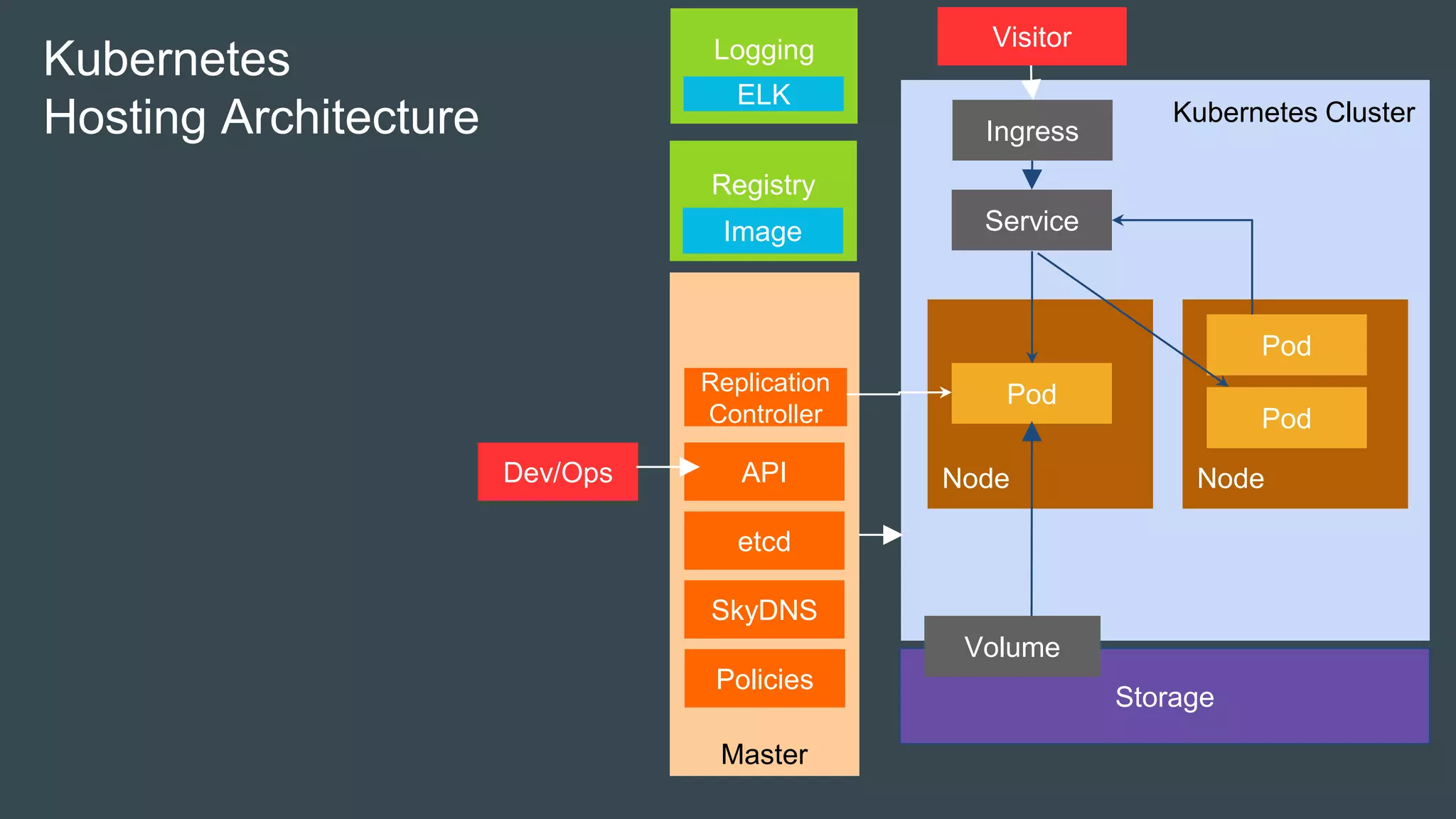
Kubernetes Cluster
Master
Node
Storage
Pod
Volume
Node
Service
Pod
Pod
Kubernetes
Hosting Architecture
etcd
SkyDNS
Replication
Controller
APIDev/Ops
Ingress
Policies
Registry
Image
VisitorLogging
ELK
OpenShift Cluster
Master
Node
Storage
Pod
Volume
Node
Service
Pod
Pod
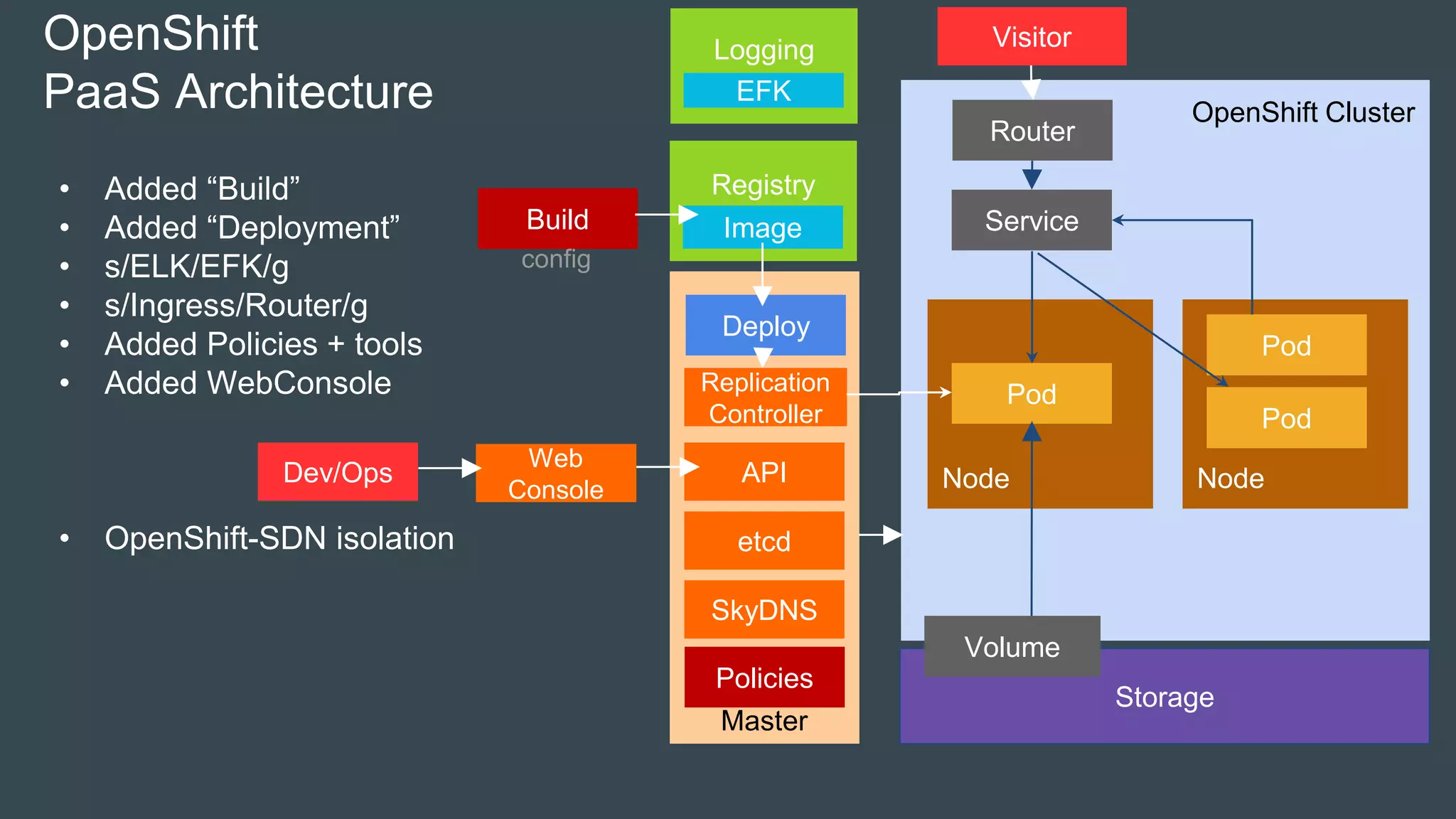
OpenShift
PaaS Architecture
etcd
SkyDNS
Replication
Controller
APIDev/Ops
Router
Deploy
Build
Policies
config
Registry
Image
VisitorLogging
EFK
• Added “Build”
• Added “Deployment”
• s/ELK/EFK/g
• s/Ingress/Router/g
• Added Policies + tools
• Added WebConsole
• OpenShift-SDN isolation
Web
Console
OpenShift Cluster
Master
Node
Storage
Pod
Volume
Node
Service
Pod
Pod
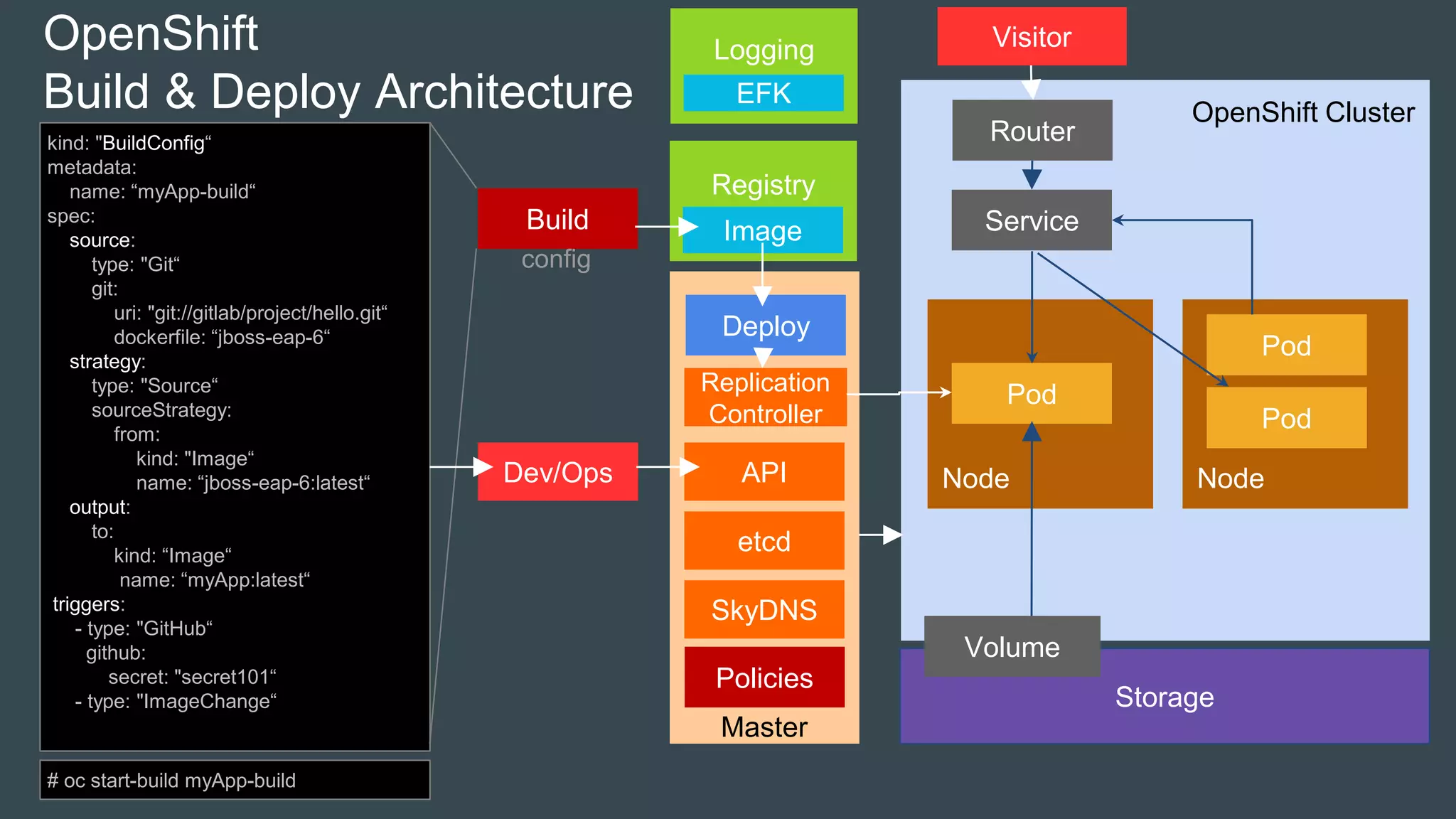
OpenShift
Build & Deploy Architecture
etcd
SkyDNS
Replication
Controller
APIDev/Ops
Router
Deploy
Build
Policies
config
kind: "BuildConfig“
metadata:
name: “myApp-build“
spec:
source:
type: "Git“
git:
uri: "git://gitlab/project/hello.git“
dockerfile: “jboss-eap-6“
strategy:
type: "Source“
sourceStrategy:
from:
kind: "Image“
name: “jboss-eap-6:latest“
output:
to:
kind: “Image“
name: “myApp:latest“
triggers:
- type: "GitHub“
github:
secret: "secret101“
- type: "ImageChange“
# oc start-build myApp-build
Registry
Image
VisitorLogging
EFK
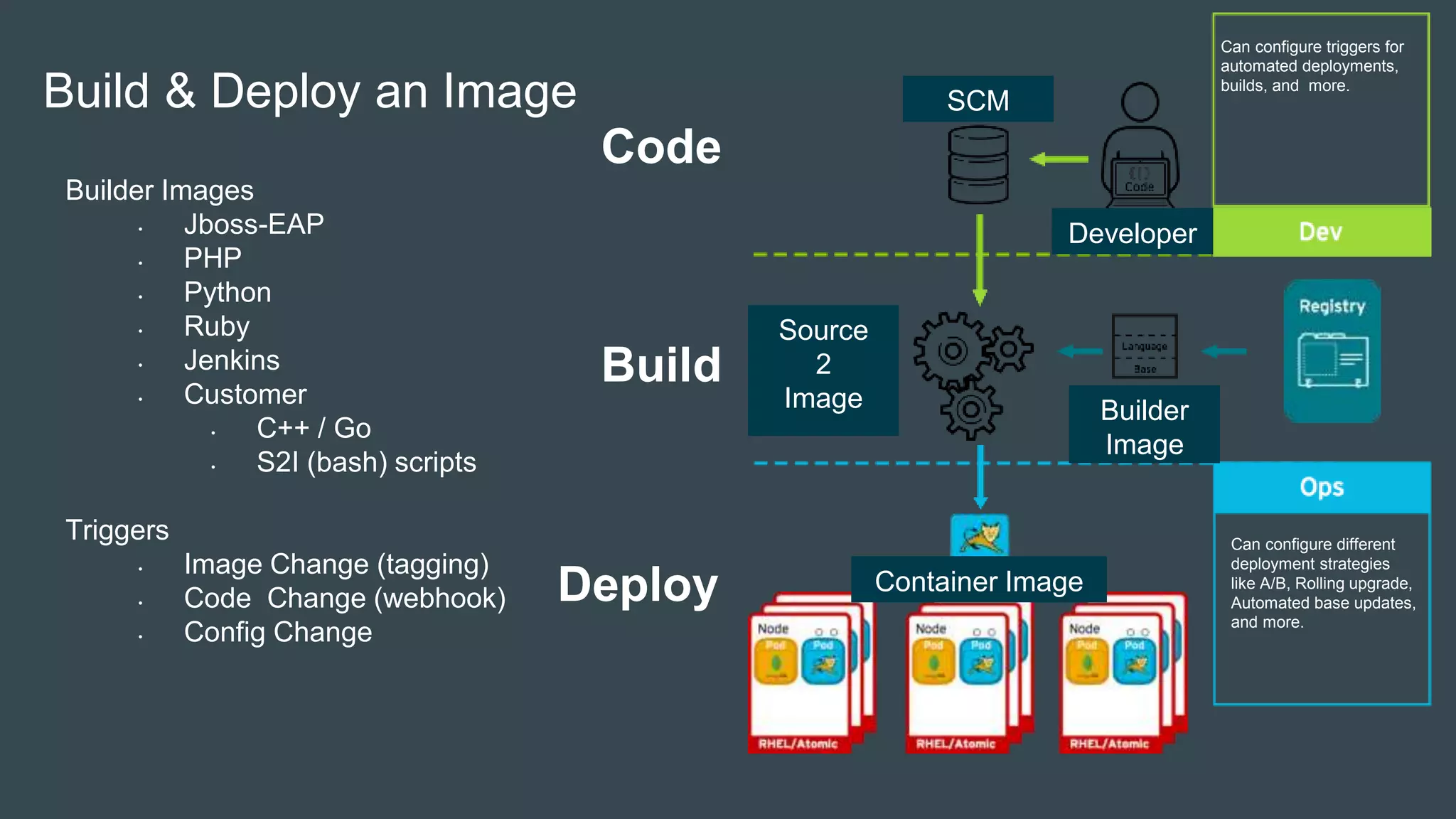
Code
Deploy
Build
Can configure different
deployment strategies
like A/B, Rolling upgrade,
Automated base updates,
and more.
Can configure triggers for
automated deployments,
builds, and more.
Build & Deploy an Image
Source
2
Image Builder
Image
Developer
SCM
Container Image
Builder Images
• Jboss-EAP
• PHP
• Python
• Ruby
• Jenkins
• Customer
• C++ / Go
• S2I (bash) scripts
Triggers
• Image Change (tagging)
• Code Change (webhook)
• Config Change
OpenShift Cluster
Master
Node
Storage
Pod
Volume
Node
Service
Pod
Pod
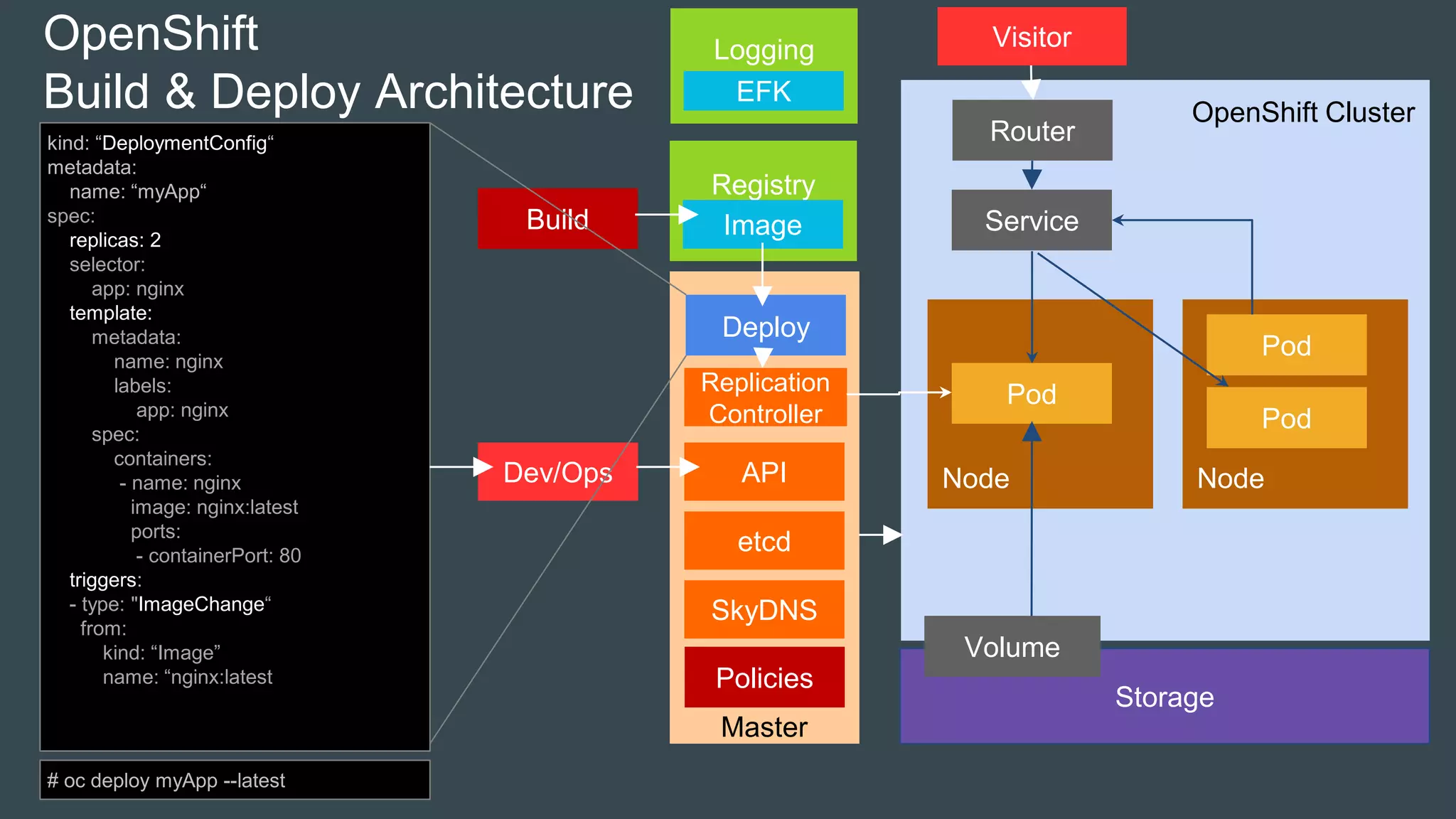
OpenShift
Build & Deploy Architecture
etcd
SkyDNS
Replication
Controller
APIDev/Ops
Router
Deploy
Build
Policies
kind: “DeploymentConfig“
metadata:
name: “myApp“
spec:
replicas: 2
selector:
app: nginx
template:
metadata:
name: nginx
labels:
app: nginx
spec:
containers:
- name: nginx
image: nginx:latest
ports:
- containerPort: 80
triggers:
- type: "ImageChange“
from:
kind: “Image”
name: “nginx:latest
# oc deploy myApp --latest
Registry
Image
VisitorLogging
EFK
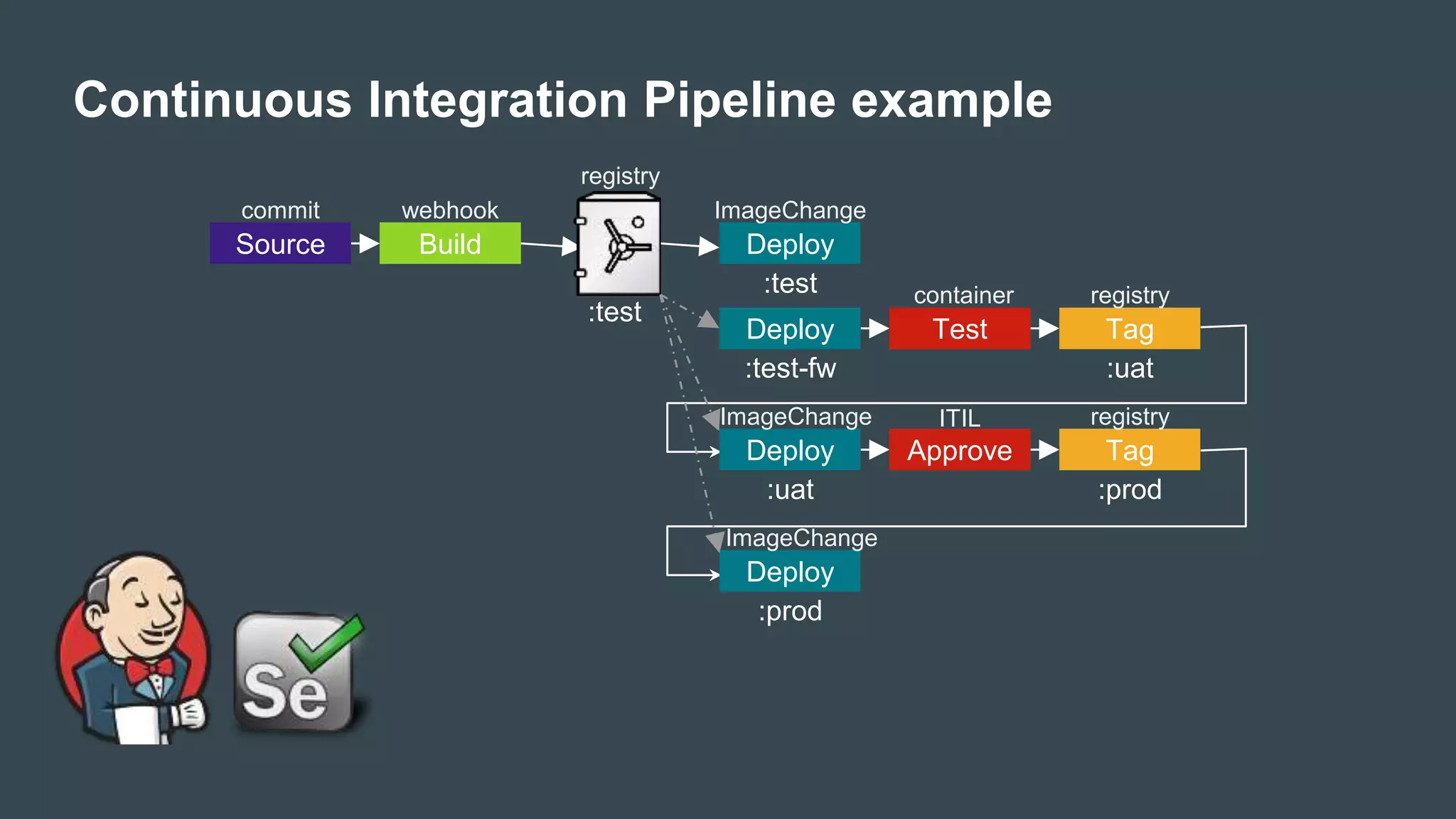
Continuous Integration Pipeline example
Source Build Deploy
:test
:test
Deploy
:test-fw
Test Tag
:uat
Deploy
:uat
commit webhook
registry
ImageChange
registry
ImageChange
Approve Tag
:prod
Deploy
:prod
registry
ImageChange
ITIL
container
Template
OpenShift
MySQL
Service
MySQL
PHP
RouterapiVersion: v1
kind: Template
metadata:
name: redis-template
annotations:
description: "Description“
iconClass: "icon-redis“
tags: "database,nosql“
objects:
- apiVersion: v1
kind: Pod
…
parameters:
- description: Password
from: '[A-Z0-9]{8}‘
generate: expression
name: REDIS_PASSWORD
labels:
redis: master
apiVersion: v1
kind: List
Items:
- apiVersion: v1
kind: Pod
…
- apiVersion: v1
kind: Service
…
Kubernetes
curl –s https://get.helm.sh | bash
helm update
helm search redis
helm install redis
Deis Helm
Demo
https://github.com/thachphongphong/os-demo.git
Questions?
docs.openshift.org
www.youtube.com/user/rhopenshift
www.facebook.com/thachphongph
ong
linh.do@axonactive.com

[DevDay 2017] OpenShift Enterprise - Speaker: Linh Do - DevOps Engineer at Axon Active Vietnam

  • 1.
    OpenShift Enterprise a ContainerizedApplication Platform @LinhDo AxonVibe Devops April 16, 2017
  • 2.
  • 3.
  • 4.
    Images & Containers Docker“Image” Unified Packaging format. - Like “war" or “tar.gz" - For any type of Application - Portable Docker “Container” Runtime Isolation Image BImage A Hardware Container APP A Image Host Minimal OS Container APP B Image Container APP C Image Docker Engine Docker Registry RHEL JDK Jboss-EAP Libs A Libs B App A App B docker pull <image>
  • 5.
    Evolution Hardware Host OS LIBS ALIBS B LIBS.. APP A APP B Hardware Guest OS LIBS A APP A Hypervisor Guest OS LIBS B APP B Guest OS LIBS C APP C Hardware Container LIBS A APP A Host Minimal OS Container LIBS B APP B Container LIBS C APP C Traditional Virtual Containershared system isolation process isolation
  • 6.
    Linux Kernel App1 App2App3 Isolation, not Virtualization • Kernel Namespaces • Process • Network • IPC • Mount • User • Resource Limits • Cgroups • Security • SELinux
  • 7.
  • 8.
    We need morethan just packing and isolation • Scheduling : Where should my containers run? • Lifecycle and health : Keep my containers running despite failures • Discovery : Where are my containers now? • Monitoring : What’s happening with my containers? • Auth{n,z} : Control who can do things to my containers • Aggregates : Compose sets of containers into jobs • Scaling : Making jobs bigger or smaller
  • 9.
    Kubernetes – ContainerOrchestration at Scale Greek for “Helmsman”; also the root of the word “Governor” and “cybernetic” • Container Cluster Manager - Inspired by the technology that runs Google • Runs anywhere - Public cloud - Private cloud - Bare metal • Strong ecosystem - Partners: Red Hat, VMware, CoreOS.. - Community: clients, integration
  • 10.
    Kubernetes Cluster Registry Master Node Node Storage Pod Volume Node Service Pod Pod Image Core Concepts •Pod • Labels & Selectors • ReplicationController Service Persistent Volumes etcd SkyDNS Replication Controller APIDev/Ops Visitor Router Policies Logging ELK
  • 11.
    Pods POD Definition: • Groupof Containers • Related to each other • Same namespace • Emphemeral Examples: • Wordpress • MySQL • Wordpress + MySQL • ELK • Nginx+Logstash • Auth-Proxy+PHP • App + data-load
  • 12.
    Kubernetes Cluster Master Node Node Pod Node Pod Replication Controller etcd Replication Controller APIDev/Ops kind:ReplicationController metadata: name: nginx spec: replicas: 2 selector: app: nginx template: metadata: name: nginx labels: app: nginx spec: containers: - name: nginx image: nginx:v2.2 ports: - containerPort: 80 “nginx” RC Object • Pod Scaling • Pod Monitoring • Rolling updates # kubectl create –f nginx-rc.yaml
  • 13.
    Kubernetes Cluster MySQL DB MySQL Service Service Definition: •Load-Balanced Virtual-IP (layer 4) • Abstraction layer for your App • Enables Service Discovery • DNS • ENV Examples: • frontend • database • api 172.16.0.1:3386 PHP 10.1.0.1:3306 10.2.0.1:3306 db.project.cluster.local Visitor <?php mysql_connect(getenv(“db_host”)) mysql_connect(“db:3306”) ?>
  • 14.
    MySQL MySQL Service PHP 10.1.0.1:3306 10.2.0.1:3306 Master Node etcd SkyDNS APIDev/Ops “DB” Service Object Kube Proxy IPTables Kube Proxy IPTables 3. Register Service 2.Watch Changes Redirect 3. Update Rule 2. Watch Changes - apiVersion: v1 kind: Service metadata: labels: app: MySQL role: BE phase: DEV name: MySQL spec: ports: - name: mysql-data port: 3386 protocol: TCP targetPort: 3306 selector: app: MySQL role: BE sessionAffinity: None type: ClusterIP 1. Create Object 1. Register Pod Object
  • 15.
    Pod Service Pod Pod Labels & Selectors -apiVersion: v1 kind: Service metadata: labels: app: MyApp role: BE phase: DEV name: MyApp spec: ports: - name: 80-tcp port: 80 protocol: TCP targetPort: 8080 selector: app: MyApp role: BE sessionAffinity: None type: ClusterIP Role: FE Phase: Dev Role: BE Phase: DEV Role: BE Phase: TST Role: BEthink SQL ‘select ... where ...’ - apiVersion: v1 kind: Pod metadata: labels: app: MyApp role: BE phase: DEV name: MyApp
  • 16.
    MySQL Service MySQL Ingress / Router •Router Definition: • Layer 7 Load-Balancer / Reverse Proxy • SSL/TLS Termination • Name based Virtual Hosting • Context Path based Routing • Customizable (image) • HA-Proxy • F5 Big-IP Examples: • https://www.mysite.nl/myapp1/ • http://www.mysite.nl/myapp2 172.16.0.1:3386 PHP 10.1.0.1:3306 10.2.0.1:3306 db.project.cluster.local Visitor Router https://mysite.nl/service1/apiVersion: extensions/v1beta1 kind: Ingress metadata: name: mysite spec: rules: - host: www.mysite.nl http: paths: - path: /foo backend: serviceName: s1 servicePort: 80 - path: /bar backend: serviceName: s2 servicePort: 80
  • 17.
    Kubernetes Cluster Node Storage Pod Volume Node Pod Pod Persistent Storage forOps: • Google • AWS EBS • OpenStack's Cinder • Ceph • GlusterFS • NFS • iSCSI • FibreChannel • EmptyDir for Dev: • “Claim” kind: PersistentVolume metadata: name: pv0003 spec: capacity: storage: 8Gi accessModes: - ReadWriteOnce nfs: path: /tmp server: 172.17.0.2 kind: PersistentVolumeClaim metadata: name: myclaim spec: accessModes: - ReadWriteOnce resources: requests: storage: 8Gi
  • 18.
    Persistent Volume Claim 18 Storage Provider(s) OpsDev Persistent Volume Farm Projects Claim and Mount Project: ABC Project: XYZ 10G SSD 40G pod pod 5G SSD 10G pod pod
  • 19.
    • Each Host= 256 IPs • Each POD = 1 IP Programmable Infra: • GCE / GKE • AWS • OpenStack • Nuage Networking Overlay Networks: • Flannel • Weave • OpenShift-SDN • Open vSwitch
  • 20.
    Kubernetes Cluster Master Node Node Storage Pod Volume Node Service Pod Pod Hosting Platform •Scheduling • Lifecycle and health • Discovery • Monitoring • Auth{n,z} • Scaling etcd SkyDNS Replication Controller APIDev/Ops Router Policies Registry Image Visitor Logging ELK
  • 21.
    OpenShift as aDevelopment Platform • Project spaces • Build tools • Integration with your IDE
  • 22.
    We need morethan just Orchestration ! Self Service -Templates - Web Console Multi-Language Automation - Deploy - Build DevOps Collaboration Secure - Namespaced - RBAC Scalable - Integrated LB Open Source Enterprise - Authentication - Web Console - Central Logging
  • 23.
    We need morethan just Orchestration Self Service -Templates - Web Console Multi-Language Automation - Deploy - Build DevOps Collaboration Secure - Namespaced - RBAC Scalable - Integrated LB Open Source Enterprise - Authentication - Web Console - Central Logging OpenShift is Red Hat’s Container Application Platform (PaaS)
  • 24.
    Kubernetes Embedded https://master:8443/api =Kubernetes API /oapi = OpenShift API /console = OpenShift WebConsole OpenShift: • 1 Binary for Master • 1 Binary for Node • 1 Binary for Client • Docker-image • Vagrant-image Kubernetes: • ApiServer, Controller, Scheduler, Etcd • KubeProxy, Kubelet • Kubectl
  • 25.
    Project Namespaces Project • SandboxedEnvironment • Network VXLan • Authorization Policies • Resource Quotas • Ops in Control, Dev Freedom oc new-project Project-Dev oc policy add-role-to-user admin scientist1 oc new-app --source=https://gitlab/MyJavaApp --docker-image=jboss-eap Project “Prod” Project “Dev” Project Global Services OpenShift Platform APP A Image APP C Image App • Images run in Containers • Grouped together as a Service • Defined as Template
  • 26.
  • 27.
    OpenShift Cluster Master Node Storage Pod Volume Node Service Pod Pod OpenShift PaaS Architecture etcd SkyDNS Replication Controller APIDev/Ops Router Deploy Build Policies config Registry Image VisitorLogging EFK •Added “Build” • Added “Deployment” • s/ELK/EFK/g • s/Ingress/Router/g • Added Policies + tools • Added WebConsole • OpenShift-SDN isolation Web Console
  • 28.
    OpenShift Cluster Master Node Storage Pod Volume Node Service Pod Pod OpenShift Build &Deploy Architecture etcd SkyDNS Replication Controller APIDev/Ops Router Deploy Build Policies config kind: "BuildConfig“ metadata: name: “myApp-build“ spec: source: type: "Git“ git: uri: "git://gitlab/project/hello.git“ dockerfile: “jboss-eap-6“ strategy: type: "Source“ sourceStrategy: from: kind: "Image“ name: “jboss-eap-6:latest“ output: to: kind: “Image“ name: “myApp:latest“ triggers: - type: "GitHub“ github: secret: "secret101“ - type: "ImageChange“ # oc start-build myApp-build Registry Image VisitorLogging EFK
  • 29.
    Code Deploy Build Can configure different deploymentstrategies like A/B, Rolling upgrade, Automated base updates, and more. Can configure triggers for automated deployments, builds, and more. Build & Deploy an Image Source 2 Image Builder Image Developer SCM Container Image Builder Images • Jboss-EAP • PHP • Python • Ruby • Jenkins • Customer • C++ / Go • S2I (bash) scripts Triggers • Image Change (tagging) • Code Change (webhook) • Config Change
  • 30.
    OpenShift Cluster Master Node Storage Pod Volume Node Service Pod Pod OpenShift Build &Deploy Architecture etcd SkyDNS Replication Controller APIDev/Ops Router Deploy Build Policies kind: “DeploymentConfig“ metadata: name: “myApp“ spec: replicas: 2 selector: app: nginx template: metadata: name: nginx labels: app: nginx spec: containers: - name: nginx image: nginx:latest ports: - containerPort: 80 triggers: - type: "ImageChange“ from: kind: “Image” name: “nginx:latest # oc deploy myApp --latest Registry Image VisitorLogging EFK
  • 31.
    Continuous Integration Pipelineexample Source Build Deploy :test :test Deploy :test-fw Test Tag :uat Deploy :uat commit webhook registry ImageChange registry ImageChange Approve Tag :prod Deploy :prod registry ImageChange ITIL container
  • 32.
    Template OpenShift MySQL Service MySQL PHP RouterapiVersion: v1 kind: Template metadata: name:redis-template annotations: description: "Description“ iconClass: "icon-redis“ tags: "database,nosql“ objects: - apiVersion: v1 kind: Pod … parameters: - description: Password from: '[A-Z0-9]{8}‘ generate: expression name: REDIS_PASSWORD labels: redis: master apiVersion: v1 kind: List Items: - apiVersion: v1 kind: Pod … - apiVersion: v1 kind: Service … Kubernetes curl –s https://get.helm.sh | bash helm update helm search redis helm install redis Deis Helm
  • 33.
  • 34.

Editor's Notes

  • #34 JAR: S2i https://github.com/openshift/origin/tree/master/examples WAR: 1. <packaging>war</packaging> 2. <profiles> <profile> <id>openshift</id> <build> <plugins> <plugin> <groupId>org.apache.maven.plugins</groupId> <artifactId>maven-war-plugin</artifactId> <version>2.6</version> <configuration> <outputDirectory>deployments</outputDirectory> <warName>ROOT</warName> </configuration> </plugin> </plugins> </build> </profile> </profiles>