Reproducible development to
live applications
With Java and Red Hat CDK
Andrew Lee Rubinger
Middleware Developer Experience
Lalatendu Mohanty
Red Hat CDK Team
2nd May 2017
“It Works On My Machine”
Environment Differences Have Got to Go
It ain’t 2007 anymore
● Containers have brought the promise of easily deployable standard
runtimes
● But we’re application developers; we don’t *want* to deal with more
layers!
The Challenge
Make the container abstractions transparent
● Focus on your business logic
● Use a known build and deployment environment
● Start with continuous delivery and evolve from there
Getting Started
Continuous Delivery in the cloud, from the start
● Pick a use case you’re looking to fulfill
● Select your runtime (from RHOAR - Vert.x, WildFly Swarm, Spring
Boot)
● Launch to GitHub and OpenShift Online
Red Hat Container Development Kit
(CDK)
Red Hat CDK
The value proposition
● Development environment similar to production environment
● Develop/build Microservices, containers
● Same user experience across different operating systems
○ Red Hat Enterprise Linux
○ Microsoft Windows
○ mac OS
Red Hat CDK
The objective
Enable application developers to develop container based applications
locally using OpenShift.
● OpenShift as the container platform
● RHEL for running containers
For the uninitiated
What is CDK?
CDK provides a local OpenShift Container Platform (OCP) instance on top of
RHEL 7
CDK Versions
Little bit of past and present
● CDK 2.4 (Generally available (GA))
● CDK 3 Beta
CDK Version 2.x
Components
● A RHEL 7 Vagrant Box for supported hypervisor
● Vagrant plugins
● Vagrant files
Provides
● Openshift container platform instance
● Single node Kubernetes setup
CDK Version 3
CDK 3 contains:
● Customized RHEL 7 ISO
● Minishift binary
● OC command line binary
Provides
● Openshift container platform instance
What’s New?
In CDK version 3
● Better user experience
● Easier installation steps
○ Just one binary for CDK
● Support for all native hypervisors
○ KVM, Hyper-V, Xhyve and Virtualbox
● Awesomenes!
Note: CDK 3 Beta is available for to use now.
Red Hat OpenShift Application
Runtime Demo
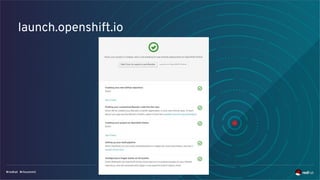
launch.openshift.io
Installing launch.openshift.io into Minishift
Launch new applications, built and deployed by OpenShift, in minutes
● http://appdev.openshift.io/docs/minishift-installation.html
Minishift
Upstream project for CDK
● Replaces All-in-one Origin vagrant and Atomic Developer Bundle
● Users have choice between CentOS 7 and Boot2Docker ISO
● Documentation :
https://docs.openshift.org/latest/minishift/index.html
*We released the version 1.0.0 today!*
Minishift Quick start
● Install a Minishift supported hypervisor on your operating system
● $ minishift start
Or
● $ minishift start --vm-driver virtualbox
Note: For Xhyve and KVM you need to install an additional driver
Minishift
Features
● User can choose OpenShift Origin version
● Addons (i.e. $ minishift addons --help)
○ Anyuid
○ admin-user
● oc-env
● openshift
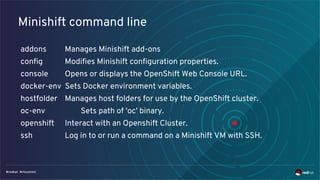
Minishift command line
addons Manages Minishift add-ons
config Modifies Minishift configuration properties.
console Opens or displays the OpenShift Web Console URL.
docker-env Sets Docker environment variables.
hostfolder Manages host folders for use by the OpenShift cluster.
oc-env Sets path of 'oc' binary.
openshift Interact with an Openshift Cluster.
ssh Log in to or run a command on a Minishift VM with SSH.
Minishift community
Upstream project for CDK
● In Github: Minishift
● IRC: #minishift (Freenode)
Under the hood
Of Minishift project
● Forked from Minikube project
● Uses “oc cluster up” to provision OpenShift
● Uses libmachine to provision the Virtual machine
How do I get access to Red Hat CDK?
It is part of no-Cost RHEL developer subscription
● Register in https://developers.redhat.com
● Download it for free.
Important links
● Slides for this presentation: http://bit.ly/2qpuTmL
● https://developers.redhat.com
● CDK 3 Beta blog:
https://developers.redhat.com/blog/2017/02/28/using-red-hat-cont
ainer-development-kit-3-beta/
THANK YOU
plus.google.com/+RedHat
linkedin.com/company/red-hat
youtube.com/user/RedHatVideos
facebook.com/redhatinc
twitter.com/RedHatNews
THANK YOU
plus.google.com/+RedHat
linkedin.com/company/red-hat
youtube.com/user/RedHatVideos
facebook.com/redhatinc
twitter.com/RedHatNews

Reproducible development to live applications with Red Hat CDK and Red Hat OpenShift Application Runtime

  • 1.
    Reproducible development to liveapplications With Java and Red Hat CDK Andrew Lee Rubinger Middleware Developer Experience Lalatendu Mohanty Red Hat CDK Team 2nd May 2017
  • 2.
    “It Works OnMy Machine”
  • 3.
    Environment Differences HaveGot to Go It ain’t 2007 anymore ● Containers have brought the promise of easily deployable standard runtimes ● But we’re application developers; we don’t *want* to deal with more layers!
  • 4.
    The Challenge Make thecontainer abstractions transparent ● Focus on your business logic ● Use a known build and deployment environment ● Start with continuous delivery and evolve from there
  • 5.
    Getting Started Continuous Deliveryin the cloud, from the start ● Pick a use case you’re looking to fulfill ● Select your runtime (from RHOAR - Vert.x, WildFly Swarm, Spring Boot) ● Launch to GitHub and OpenShift Online
  • 6.
    Red Hat ContainerDevelopment Kit (CDK)
  • 7.
    Red Hat CDK Thevalue proposition ● Development environment similar to production environment ● Develop/build Microservices, containers ● Same user experience across different operating systems ○ Red Hat Enterprise Linux ○ Microsoft Windows ○ mac OS
  • 8.
    Red Hat CDK Theobjective Enable application developers to develop container based applications locally using OpenShift. ● OpenShift as the container platform ● RHEL for running containers
  • 9.
    For the uninitiated Whatis CDK? CDK provides a local OpenShift Container Platform (OCP) instance on top of RHEL 7
  • 10.
    CDK Versions Little bitof past and present ● CDK 2.4 (Generally available (GA)) ● CDK 3 Beta
  • 11.
    CDK Version 2.x Components ●A RHEL 7 Vagrant Box for supported hypervisor ● Vagrant plugins ● Vagrant files Provides ● Openshift container platform instance ● Single node Kubernetes setup
  • 12.
    CDK Version 3 CDK3 contains: ● Customized RHEL 7 ISO ● Minishift binary ● OC command line binary Provides ● Openshift container platform instance
  • 13.
    What’s New? In CDKversion 3 ● Better user experience ● Easier installation steps ○ Just one binary for CDK ● Support for all native hypervisors ○ KVM, Hyper-V, Xhyve and Virtualbox ● Awesomenes! Note: CDK 3 Beta is available for to use now.
  • 14.
    Red Hat OpenShiftApplication Runtime Demo
  • 15.
  • 16.
    Installing launch.openshift.io intoMinishift Launch new applications, built and deployed by OpenShift, in minutes ● http://appdev.openshift.io/docs/minishift-installation.html
  • 17.
    Minishift Upstream project forCDK ● Replaces All-in-one Origin vagrant and Atomic Developer Bundle ● Users have choice between CentOS 7 and Boot2Docker ISO ● Documentation : https://docs.openshift.org/latest/minishift/index.html *We released the version 1.0.0 today!*
  • 18.
    Minishift Quick start ●Install a Minishift supported hypervisor on your operating system ● $ minishift start Or ● $ minishift start --vm-driver virtualbox Note: For Xhyve and KVM you need to install an additional driver
  • 19.
    Minishift Features ● User canchoose OpenShift Origin version ● Addons (i.e. $ minishift addons --help) ○ Anyuid ○ admin-user ● oc-env ● openshift
  • 20.
    Minishift command line addonsManages Minishift add-ons config Modifies Minishift configuration properties. console Opens or displays the OpenShift Web Console URL. docker-env Sets Docker environment variables. hostfolder Manages host folders for use by the OpenShift cluster. oc-env Sets path of 'oc' binary. openshift Interact with an Openshift Cluster. ssh Log in to or run a command on a Minishift VM with SSH.
  • 21.
    Minishift community Upstream projectfor CDK ● In Github: Minishift ● IRC: #minishift (Freenode)
  • 22.
    Under the hood OfMinishift project ● Forked from Minikube project ● Uses “oc cluster up” to provision OpenShift ● Uses libmachine to provision the Virtual machine
  • 23.
    How do Iget access to Red Hat CDK? It is part of no-Cost RHEL developer subscription ● Register in https://developers.redhat.com ● Download it for free.
  • 24.
    Important links ● Slidesfor this presentation: http://bit.ly/2qpuTmL ● https://developers.redhat.com ● CDK 3 Beta blog: https://developers.redhat.com/blog/2017/02/28/using-red-hat-cont ainer-development-kit-3-beta/
  • 25.