CONFIDENTIAL designator
V0000000
Confident OpenShift Upgrades
With The Update Graph
Lalatendu Mohanty , OTA Team Lead Pratik Mahajan, OTA Team
CONFIDENTIAL designator
V0000000
OpenShift Over The Air Update
● What we do differently?
○ Upgrade is automated which includes upgrading the nodes
○ Single click or single command upgrades
○ No workload disruption during upgrades
○ Availability takes precedence over everything else
CONFIDENTIAL designator
V0000000
OpenShift V4 Archichitecture
● All OpenShift Container Platform (OCP V4) components are Kubernetes Operators
● OCP is an opinionated Kubernetes distribution
○ We have extended Kubernetes to run OpenShift components
○ Two API servers i.e. Kube-API server and OpenShift-API servers
● Cluster-version-operator (CVO) is responsible for starting the upgrade
CONFIDENTIAL designator
V0000000
Availability During Upgrade
● Operators has status conditions which inform about the operator availability
○ Available = True Or False
■ Available indicates that the operator and all configured operands are functional and
available in the cluster.
○ Degraded = True Or False
■ Degraded indicates that the component (operator and all configured operands) does not
match its desired state over a period of time resulting in a lower quality of service.
○ Upgradeable = True Or False
CONFIDENTIAL designator
V0000000
Upgradeable Condition
● Upgradeable = True Or False
○ Only impacts the minor (4.y to 4.(y+1))update
○ Upgradeable indicates if it is safe to upgrade based on the current cluster state
○ Upgradeable is False, the cluster version operator (CVO) will prevent the upgrade unless forced
CONFIDENTIAL designator
V0000000
When Things Do Not Go As Planned
● Upgrade does not progress when an operator goes to degraded state
○ CVO waits for degraded status to go away
● Clusterversion status conditions will contain information on Upgrade progress
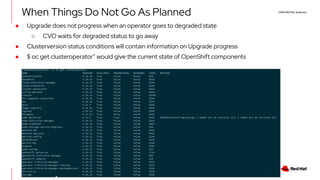
● $ oc get clusteroperator” would give the current state of OpenShift components
CONFIDENTIAL designator
V0000000
Upgrade graph and OpenShift
● OpenShift clusters talk to the OpenShift update service (OSUS) to get the upgrade graph
● Update graph is a directed acyclic graph (DAG)
● Red Hat runs a public instance of update service (OpenShift Update Service)
● Cluster version operator polls the OSUS and provides the available update options to the admin
CONFIDENTIAL designator
V0000000
OpenShift Update Service(OSUS)
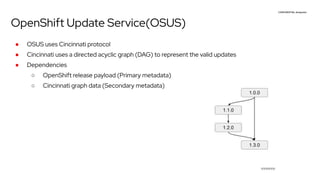
● OSUS uses Cincinnati protocol
● Cincinnati uses a directed acyclic graph (DAG) to represent the valid updates
● Dependencies
○ OpenShift release payload (Primary metadata)
○ Cincinnati graph data (Secondary metadata)
CONFIDENTIAL designator
V0000000
Cincinnati
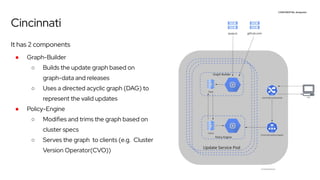
It has 2 components
● Graph-Builder
○ Builds the update graph based on
graph-data and releases
○ Uses a directed acyclic graph (DAG) to
represent the valid updates
● Policy-Engine
○ Modifies and trims the graph based on
cluster specs
○ Serves the graph to clients (e.g. Cluster
Version Operator(CVO))
CONFIDENTIAL designator
V0000000
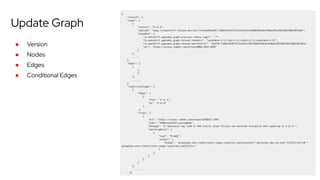
Update Graph
● Version
● Nodes
● Edges
● Conditional Edges
CONFIDENTIAL designator
V0000000
How we protect clusters with update graph
● We do Impact assessment on bugs that affecting upgrades
● For upgrade blockers we manipulate the graph to protect the clusters
○ we stop recommending the updates to clusters in order to protect them
● We stop recommending updates using
○ Conditional Updates
○ Tombstoning releases
CONFIDENTIAL designator
V0000000
Conditional Updates
● Before conditional update blocking an update recommendation affected all clusters which
had the target version as an available update
● With conditional update an update recommendation will show up as “supported but not
recommended” in the worst case scenario
● Upgrade targets will not be removed for any cluster
● Because conditional edges contain information about the risk with an update target, it will
help administrators to make informed decisions
CONFIDENTIAL designator
V0000000
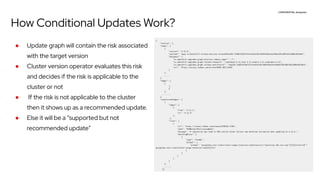
How Conditional Updates Work?
● Update graph will contain the risk associated
with the target version
● Cluster version operator evaluates this risk
and decides if the risk is applicable to the
cluster or not
● If the risk is not applicable to the cluster
then it shows up as a recommended update.
● Else it will be a “supported but not
recommended update”
CONFIDENTIAL designator
V0000000
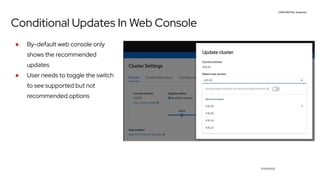
Conditional Updates In Web Console
● By-default web console only
shows the recommended
updates
● User needs to toggle the switch
to see supported but not
recommended options
CONFIDENTIAL designator
V0000000
●
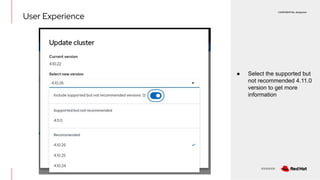
● Select the supported but
not recommended 4.11.0
version to get more
information
User Experience
CONFIDENTIAL designator
V0000000
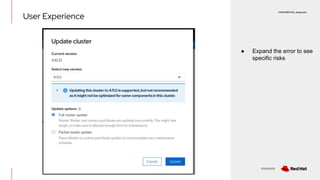
● Expand the error to see
specific risks
User Experience
CONFIDENTIAL designator
V0000000
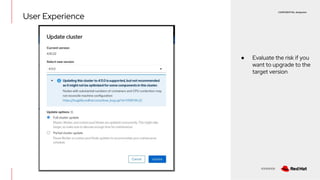
● Evaluate the risk if you
want to upgrade to the
target version
User Experience
CONFIDENTIAL designator
V0000000
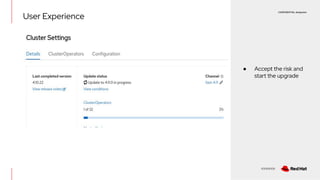
● Accept the risk and
start the upgrade
User Experience
CONFIDENTIAL designator
V0000000
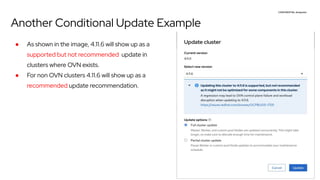
Another Conditional Update Example
● As shown in the image, 4.11.6 will show up as a
supported but not recommended update in
clusters where OVN exists.
● For non OVN clusters 4.11.6 will show up as a
recommended update recommendation.
CONFIDENTIAL designator
V0000000
Managing the graph data
● All releases are added to candidate channel before promoting to fast and stable.
○ We tombstone a candidate release if we find issues with it.
● Release is added to fast channel after errata is released.
● We let the release cook in fast channel for sometime before promoting it to stable channel.
○ The telemetry we collect from cluster is helpful decide the health of an edge
○ We do data analysis to find out if a version is good enough for stable channel
● We conditionally block releases from fast and stable channels for upgrade blockers
CONFIDENTIAL designator
V0000000
Upgrades In Disconnected Environments
What do you need to upgrade a cluster in a disconnected environment
● OpenShift Update Service operator
● Graph-data container
● Container repository to host release images
○ oc-mirror
CONFIDENTIAL designator
V0000000
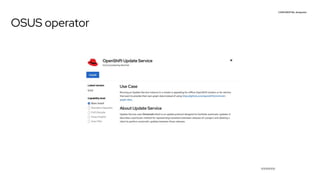
OSUS operator
CONFIDENTIAL designator
V0000000
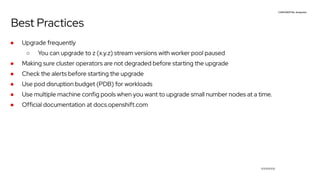
Best Practices
● Upgrade frequently
○ You can upgrade to z (x.y.z) stream versions with worker pool paused
● Making sure cluster operators are not degraded before starting the upgrade
● Check the alerts before starting the upgrade
● Use pod disruption budget (PDB) for workloads
● Use multiple machine config pools when you want to upgrade small number nodes at a time.
● Official documentation at docs.openshift.com
CONFIDENTIAL designator
V0000000
Demo
CONFIDENTIAL designator
V0000000
References
● Cincinnati Repo
● Cincinnati Graph Data
● OpenShift Upgrade Docs
● Cluster Version Operator
● Upstream OpenShift Update Server
○ https://api.openshift.com/api/upgrades_info/graph

Confident OpenShift Upgrades with the Update Graph.pdf

  • 1.
    CONFIDENTIAL designator V0000000 Confident OpenShiftUpgrades With The Update Graph Lalatendu Mohanty , OTA Team Lead Pratik Mahajan, OTA Team
  • 2.
    CONFIDENTIAL designator V0000000 OpenShift OverThe Air Update ● What we do differently? ○ Upgrade is automated which includes upgrading the nodes ○ Single click or single command upgrades ○ No workload disruption during upgrades ○ Availability takes precedence over everything else
  • 3.
    CONFIDENTIAL designator V0000000 OpenShift V4Archichitecture ● All OpenShift Container Platform (OCP V4) components are Kubernetes Operators ● OCP is an opinionated Kubernetes distribution ○ We have extended Kubernetes to run OpenShift components ○ Two API servers i.e. Kube-API server and OpenShift-API servers ● Cluster-version-operator (CVO) is responsible for starting the upgrade
  • 4.
    CONFIDENTIAL designator V0000000 Availability DuringUpgrade ● Operators has status conditions which inform about the operator availability ○ Available = True Or False ■ Available indicates that the operator and all configured operands are functional and available in the cluster. ○ Degraded = True Or False ■ Degraded indicates that the component (operator and all configured operands) does not match its desired state over a period of time resulting in a lower quality of service. ○ Upgradeable = True Or False
  • 5.
    CONFIDENTIAL designator V0000000 Upgradeable Condition ●Upgradeable = True Or False ○ Only impacts the minor (4.y to 4.(y+1))update ○ Upgradeable indicates if it is safe to upgrade based on the current cluster state ○ Upgradeable is False, the cluster version operator (CVO) will prevent the upgrade unless forced
  • 6.
    CONFIDENTIAL designator V0000000 When ThingsDo Not Go As Planned ● Upgrade does not progress when an operator goes to degraded state ○ CVO waits for degraded status to go away ● Clusterversion status conditions will contain information on Upgrade progress ● $ oc get clusteroperator” would give the current state of OpenShift components
  • 7.
    CONFIDENTIAL designator V0000000 Upgrade graphand OpenShift ● OpenShift clusters talk to the OpenShift update service (OSUS) to get the upgrade graph ● Update graph is a directed acyclic graph (DAG) ● Red Hat runs a public instance of update service (OpenShift Update Service) ● Cluster version operator polls the OSUS and provides the available update options to the admin
  • 8.
    CONFIDENTIAL designator V0000000 OpenShift UpdateService(OSUS) ● OSUS uses Cincinnati protocol ● Cincinnati uses a directed acyclic graph (DAG) to represent the valid updates ● Dependencies ○ OpenShift release payload (Primary metadata) ○ Cincinnati graph data (Secondary metadata)
  • 9.
    CONFIDENTIAL designator V0000000 Cincinnati It has2 components ● Graph-Builder ○ Builds the update graph based on graph-data and releases ○ Uses a directed acyclic graph (DAG) to represent the valid updates ● Policy-Engine ○ Modifies and trims the graph based on cluster specs ○ Serves the graph to clients (e.g. Cluster Version Operator(CVO))
  • 10.
    CONFIDENTIAL designator V0000000 Update Graph ●Version ● Nodes ● Edges ● Conditional Edges
  • 11.
    CONFIDENTIAL designator V0000000 How weprotect clusters with update graph ● We do Impact assessment on bugs that affecting upgrades ● For upgrade blockers we manipulate the graph to protect the clusters ○ we stop recommending the updates to clusters in order to protect them ● We stop recommending updates using ○ Conditional Updates ○ Tombstoning releases
  • 12.
    CONFIDENTIAL designator V0000000 Conditional Updates ●Before conditional update blocking an update recommendation affected all clusters which had the target version as an available update ● With conditional update an update recommendation will show up as “supported but not recommended” in the worst case scenario ● Upgrade targets will not be removed for any cluster ● Because conditional edges contain information about the risk with an update target, it will help administrators to make informed decisions
  • 13.
    CONFIDENTIAL designator V0000000 How ConditionalUpdates Work? ● Update graph will contain the risk associated with the target version ● Cluster version operator evaluates this risk and decides if the risk is applicable to the cluster or not ● If the risk is not applicable to the cluster then it shows up as a recommended update. ● Else it will be a “supported but not recommended update”
  • 14.
    CONFIDENTIAL designator V0000000 Conditional UpdatesIn Web Console ● By-default web console only shows the recommended updates ● User needs to toggle the switch to see supported but not recommended options
  • 15.
    CONFIDENTIAL designator V0000000 ● ● Selectthe supported but not recommended 4.11.0 version to get more information User Experience
  • 16.
    CONFIDENTIAL designator V0000000 ● Expandthe error to see specific risks User Experience
  • 17.
    CONFIDENTIAL designator V0000000 ● Evaluatethe risk if you want to upgrade to the target version User Experience
  • 18.
    CONFIDENTIAL designator V0000000 ● Acceptthe risk and start the upgrade User Experience
  • 19.
    CONFIDENTIAL designator V0000000 Another ConditionalUpdate Example ● As shown in the image, 4.11.6 will show up as a supported but not recommended update in clusters where OVN exists. ● For non OVN clusters 4.11.6 will show up as a recommended update recommendation.
  • 20.
    CONFIDENTIAL designator V0000000 Managing thegraph data ● All releases are added to candidate channel before promoting to fast and stable. ○ We tombstone a candidate release if we find issues with it. ● Release is added to fast channel after errata is released. ● We let the release cook in fast channel for sometime before promoting it to stable channel. ○ The telemetry we collect from cluster is helpful decide the health of an edge ○ We do data analysis to find out if a version is good enough for stable channel ● We conditionally block releases from fast and stable channels for upgrade blockers
  • 21.
    CONFIDENTIAL designator V0000000 Upgrades InDisconnected Environments What do you need to upgrade a cluster in a disconnected environment ● OpenShift Update Service operator ● Graph-data container ● Container repository to host release images ○ oc-mirror
  • 22.
  • 23.
    CONFIDENTIAL designator V0000000 Best Practices ●Upgrade frequently ○ You can upgrade to z (x.y.z) stream versions with worker pool paused ● Making sure cluster operators are not degraded before starting the upgrade ● Check the alerts before starting the upgrade ● Use pod disruption budget (PDB) for workloads ● Use multiple machine config pools when you want to upgrade small number nodes at a time. ● Official documentation at docs.openshift.com
  • 24.
  • 25.
    CONFIDENTIAL designator V0000000 References ● CincinnatiRepo ● Cincinnati Graph Data ● OpenShift Upgrade Docs ● Cluster Version Operator ● Upstream OpenShift Update Server ○ https://api.openshift.com/api/upgrades_info/graph