TRESOR
Building a domain specific PaaS
with OpenShift
OpenShift Community Day
Prague
22nd September 2013
About myself
Alexander
Grzesik
Head of Development
medisite Systemhaus
Working 15 years in
software
development
Java
Software Architecture
Medical Software
alexander.grzesik@medisite.de
22nd Sep 2013 Building a domain specific PaaS
with OpenShift
Topics
(1)TRESOR Project – the idea
(2)Why OpenShift
(3)TRESOR on OpenShift
(4)Customizing OpenShift
(5)Summary
22nd Sep 2013 Building a domain specific PaaS
with OpenShift
Chapter 1
TRESOR Project – the idea
22nd Sep 2013 Building a domain specific PaaS
with OpenShift
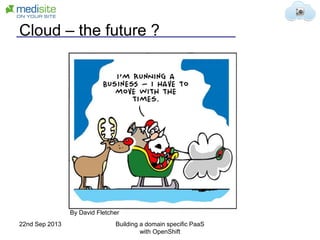
Cloud – the future ?
By David Fletcher
22nd Sep 2013 Building a domain specific PaaS
with OpenShift
The Cloud & Healthcare
• Patient‘s medical record is especially sensitive
data. Only people involved in patient care should
have access to the information.
• Doctor‘s liability: Control who can access „their“
data
• Fast access to life-critical information
• Medical record storage requirements (10-30
years)
• Low affinity of medical persons to IT
Objections to cloud usage in healthcare
22nd Sep 2013 Building a domain specific PaaS
with OpenShift
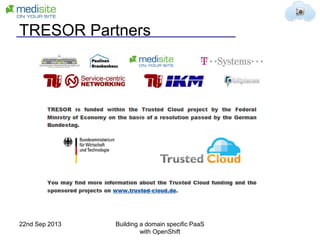
TRESOR Partners
22nd Sep 2013 Building a domain specific PaaS
with OpenShift
TRESOR Overview
Trusted Ecosystem for Standardized and Open
cloud-based Resources
• Cloud Ecosystem for secure cloud services
– Proxy for secure communication
– Broker for procurement
– Marketplace
– PaaS Platform
• Trusted Environment for handling sensitive data
• Open Platform for developing and providing
domain specific cloud applications
22nd Sep 2013 Building a domain specific PaaS
with OpenShift
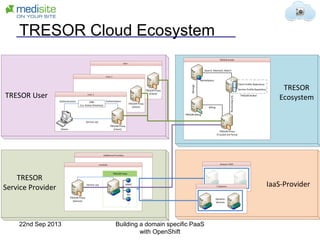
TRESOR Cloud Ecosystem
TRESOR PaaS
TRESOR User
TRESOR
Ecosystem
TRESOR
Service Provider IaaS-Provider
TRESOR Proxy
(Client)
TRESOR Proxy
(Client)
IDM
(i.e. Active Directory)
Clients
TRESOR Proxy
(Client)
Authentication
Service use
Authorization
Marketplace
TRESOR Proxy
(Trusted 3rd Party)
TRESOR Billing
TRESOR Broker
Service Profile Repository
Client Profile Repository
TRESOR Proxy
(Service)
Search, Maintain, Match
Billing
SLAMonitoring
MMV
PAI
...
Service use
Dynamic
Services
Manage
22nd Sep 2013 Building a domain specific PaaS
with OpenShift
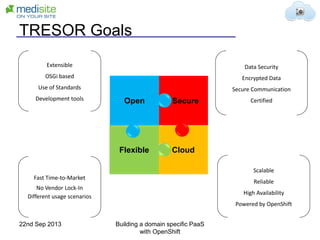
TRESOR Goals
CloudFlexible
SecureOpen
Extensible
OSGi based
Use of Standards
Development tools
Data Security
Encrypted Data
Secure Communication
Certified
Scalable
Reliable
High Availability
Powered by OpenShift
Fast Time-to-Market
No Vendor Lock-In
Different usage scenarios
22nd Sep 2013 Building a domain specific PaaS
with OpenShift
Chapter 2
Why OpenShift ?
22nd Sep 2013 Building a domain specific PaaS
with OpenShift
History of TRESOR
• Project Idea in 2010
• Project announced on CeBit 2011
• Project Start 03/2012
• Rapid developments in PaaS technology
• Make or Use ?
• Evaluation of available PaaS technologies
22nd Sep 2013 Building a domain specific PaaS
with OpenShift
PaaS Criteria
• Supported Technologies
• Open Source
• Vendor
• Community
• Scaling
• Extension
• Infrastructure (IaaS) Support
• Documentation
22nd Sep 2013 Building a domain specific PaaS
with OpenShift
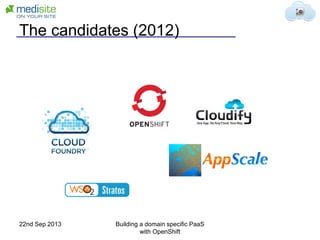
The candidates (2012)
22nd Sep 2013 Building a domain specific PaaS
with OpenShift
Why OpenShift
• Supported Technologies
• Fully Open Source
• Extensibility and flexibility
• IaaS support
• Growing documentation
• Great Community
• Red Hat
22nd Sep 2013 Building a domain specific PaaS
with OpenShift
Starting Problems (2012)
• Problems with installation
• Constant Changes on OpenShift
• No Stable Version of Open Source project
• Documentation not up to date
• No clear Roadmap
• Some missing features
22nd Sep 2013 Building a domain specific PaaS
with OpenShift
One year later
• 2 Releases of OpenShift Origin
• Regular builds
• Roadmap & development process
• Improved documentation
• Community manager
• New features
– Cartridge v2
– PostgreSQL 9.2
– Web Console
22nd Sep 2013 Building a domain specific PaaS
with OpenShift
Open Points
• Setup still complicated
 Installation Scripts are in Progress
• Better PaaS Monitoring
 On Roadmap
• Custom and Database Scaling
 We are working on a solution
• Documentation misses some details
 Everybody can help
22nd Sep 2013 Building a domain specific PaaS
with OpenShift
Chapter 3
TRESOR on OpenShift
22nd Sep 2013 Building a domain specific PaaS
with OpenShift
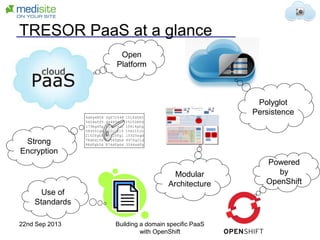
TRESOR PaaS at a glance
Strong
Encryption
Powered
by
OpenShift
Open
Platform
Polyglot
Persistence
Modular
Architecture
6dfg4854 fgf72548 151fd545
5454sff5 44485ddf 151538fd
179hg45g 658g54d1 15414gfg
584551gh 11fghf15 154215jh
2152fgh5 14925fg1 15325sgd
78dfd15d 7654fghd 897fg21d
98dfgh2d 874dfg6d 3544sdfg
Use of
Standards
22nd Sep 2013 Building a domain specific PaaS
with OpenShift
OpenShift Integration
• OpenShift Origin provides runtime for
application services
• Provisioning and scaling
• Development services (Git & Jenkins)
• Use and extend PostgreSQL and
MongoDB cartridges
• Custom cartridges and plugins
22nd Sep 2013 Building a domain specific PaaS
with OpenShift
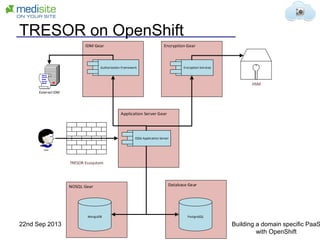
TRESOR on OpenShift
OSGi Application Server
Encryption ServicesAuthorization Framework
MongoDB
HSM
External IDM
PostgreSQL
User
TRESOR Ecosystem
22nd Sep 2013 Building a domain specific PaaS
with OpenShift
Chapter 4
Customizing OpenShift
22nd Sep 2013 Building a domain specific PaaS
with OpenShift
New Cartridges
• Glassfish 4
– OSGi / JavaEE Application Server
• Elastic Search
– Search and Index Engine
• OpenAM (openam.forgerock.org)
– Authentication and Authorization Services
• OSGi Bundle Repository
– Central bundle provisioning
22nd Sep 2013 Building a domain specific PaaS
with OpenShift
Extending OpenShift – How to start
• Use the VM Image to develop your
cartridge
– Make use of snapshots !!
• Test scripts without OpenShift
• Use DIY and CDK
• Check the documentation and logs:
/var/log/openshift
• Be patient
22nd Sep 2013 Building a domain specific PaaS
with OpenShift
New Cartridge – DIY
• First getting it up as DIY
• Glassfish already has a good quick start
example:
https://github.com/shekhargulati/glassfish4
-openshift-quickstart
• Cons:
– Needs to provide complete runtime
– No Scaling
– Only http port
22nd Sep 2013 Building a domain specific PaaS
with OpenShift
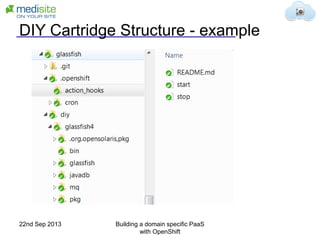
DIY Cartridge Structure - example
22nd Sep 2013 Building a domain specific PaaS
with OpenShift
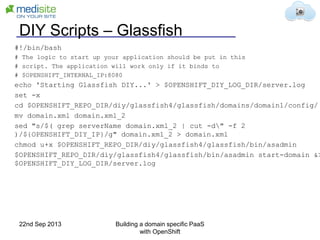
DIY Scripts – Glassfish
#!/bin/bash
# The logic to start up your application should be put in this
# script. The application will work only if it binds to
# $OPENSHIFT_INTERNAL_IP:8080
echo 'Starting Glassfish DIY...' > $OPENSHIFT_DIY_LOG_DIR/server.log
set -x
cd $OPENSHIFT_REPO_DIR/diy/glassfish4/glassfish/domains/domain1/config/
mv domain.xml domain.xml_2
sed "s/$( grep serverName domain.xml_2 | cut -d" -f 2
)/${OPENSHIFT_DIY_IP}/g" domain.xml_2 > domain.xml
chmod u+x $OPENSHIFT_REPO_DIR/diy/glassfish4/glassfish/bin/asadmin
$OPENSHIFT_REPO_DIR/diy/glassfish4/glassfish/bin/asadmin start-domain &>
$OPENSHIFT_DIY_LOG_DIR/server.log
22nd Sep 2013 Building a domain specific PaaS
with OpenShift
DIY Glassfish config
• Modify domain.xml:
– Remove non http-port listeners
– Replace all hostname references with
OPENSHIFT_DIY_IP
– Startup script will replace token
OPENSHIFT_DIY_IP token in domain.xml
22nd Sep 2013 Building a domain specific PaaS
with OpenShift
Glassfish Custom Cartridge
• Starting Point: Tomcat cartridge
• Modify to:
– Download and install Glassfish 4
– Setup Glassfish cartridge
– Deployment and startup of custom domain
– Graceful shutdown
22nd Sep 2013 Building a domain specific PaaS
with OpenShift
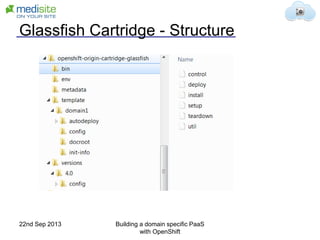
Glassfish Cartridge - Structure
22nd Sep 2013 Building a domain specific PaaS
with OpenShift
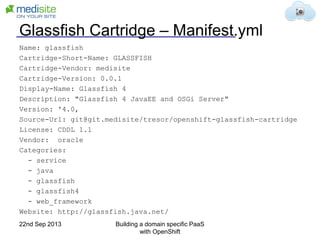
Glassfish Cartridge – Manifest.yml
Name: glassfish
Cartridge-Short-Name: GLASSFISH
Cartridge-Vendor: medisite
Cartridge-Version: 0.0.1
Display-Name: Glassfish 4
Description: "Glassfish 4 JavaEE and OSGi Server"
Version: '4.0‚
Source-Url: git@git.medisite/tresor/openshift-glassfish-cartridge
License: CDDL 1.1
Vendor: oracle
Categories:
- service
- java
- glassfish
- glassfish4
- web_framework
Website: http://glassfish.java.net/
22nd Sep 2013 Building a domain specific PaaS
with OpenShift
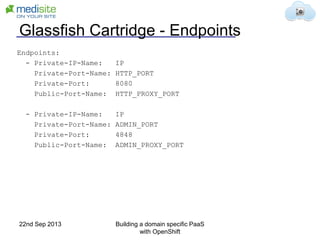
Glassfish Cartridge - Endpoints
Endpoints:
- Private-IP-Name: IP
Private-Port-Name: HTTP_PORT
Private-Port: 8080
Public-Port-Name: HTTP_PROXY_PORT
- Private-IP-Name: IP
Private-Port-Name: ADMIN_PORT
Private-Port: 4848
Public-Port-Name: ADMIN_PROXY_PORT
22nd Sep 2013 Building a domain specific PaaS
with OpenShift
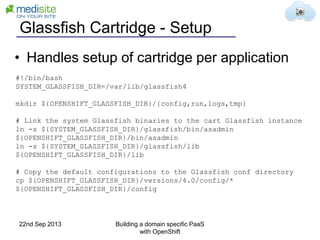
Glassfish Cartridge - Setup
#!/bin/bash
SYSTEM_GLASSFISH_DIR=/var/lib/glassfish4
mkdir ${OPENSHIFT_GLASSFISH_DIR}/{config,run,logs,tmp}
# Link the system Glassfish binaries to the cart Glassfish instance
ln -s ${SYSTEM_GLASSFISH_DIR}/glassfish/bin/asadmin
${OPENSHIFT_GLASSFISH_DIR}/bin/asadmin
ln -s ${SYSTEM_GLASSFISH_DIR}/glassfish/lib
${OPENSHIFT_GLASSFISH_DIR}/lib
# Copy the default configurations to the Glassfish conf directory
cp ${OPENSHIFT_GLASSFISH_DIR}/versions/4.0/config/*
${OPENSHIFT_GLASSFISH_DIR}/config
• Handles setup of cartridge per application
22nd Sep 2013 Building a domain specific PaaS
with OpenShift
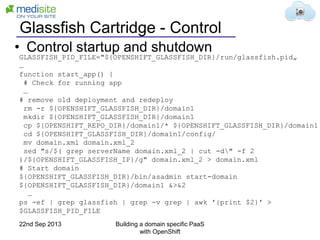
Glassfish Cartridge - Control
GLASSFISH_PID_FILE="${OPENSHIFT_GLASSFISH_DIR}/run/glassfish.pid„
…
function start_app() {
# Check for running app
…
# remove old deployment and redeploy
rm -r ${OPENSHIFT_GLASSFISH_DIR}/domain1
mkdir ${OPENSHIFT_GLASSFISH_DIR}/domain1
cp ${OPENSHIFT_REPO_DIR}/domain1/* ${OPENSHIFT_GLASSFISH_DIR}/domain1
cd ${OPENSHIFT_GLASSFISH_DIR}/domain1/config/
mv domain.xml domain.xml_2
sed "s/$( grep serverName domain.xml_2 | cut -d" -f 2
)/${OPENSHIFT_GLASSFISH_IP}/g" domain.xml_2 > domain.xml
# Start domain
${OPENSHIFT_GLASSFISH_DIR}/bin/asadmin start-domain
${OPENSHIFT_GLASSFISH_DIR}/domain1 &>&2
…
ps -ef | grep glassfish | grep -v grep | awk '{print $2}' >
$GLASSFISH_PID_FILE
• Control startup and shutdown
22nd Sep 2013 Building a domain specific PaaS
with OpenShift
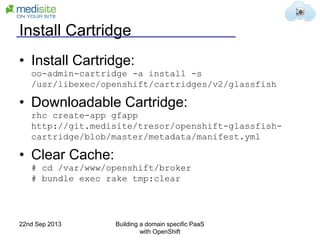
Install Cartridge
• Install Cartridge:
oo-admin-cartridge -a install -s
/usr/libexec/openshift/cartridges/v2/glassfish
• Downloadable Cartridge:
rhc create-app gfapp
http://git.medisite/tresor/openshift-glassfish-
cartridge/blob/master/metadata/manifest.yml
• Clear Cache:
# cd /var/www/openshift/broker
# bundle exec rake tmp:clear
22nd Sep 2013 Building a domain specific PaaS
with OpenShift
Open Things
• Scaling
• Add database support
• Integration with build server
• Automatic deployment of OSGi Bundles
• Documentation
• Public availability
22nd Sep 2013 Building a domain specific PaaS
with OpenShift
Custom Scaling
• Scaling not only via request count
– Response times
– Active Users
• Service Specific Scaling
– Some Services are more critical
• Customer Specific Scaling Rules
– Customer booking of scaling options
22nd Sep 2013 Building a domain specific PaaS
with OpenShift
DB Replication and Scaling
• MongoDB Shard Cluster on OpenShift
• PostgreSQL Replication Set
• Automatic setup during provisioning
• Evaluate dynamic scaling options
22nd Sep 2013 Building a domain specific PaaS
with OpenShift
Other Extensions to OpenShift
• Provisioning Interface
• Usage Reporting
• Application Monitoring
• Encryption
22nd Sep 2013 Building a domain specific PaaS
with OpenShift
Chapter 5
Summary
22nd Sep 2013 Building a domain specific PaaS
with OpenShift
Final Target (2015)
• TRESOR PaaS will be used in two
hospitals
• Hosted in a German Telekom datacenter
• Certified according German data security
regulations
• Available as an OSGi based development
platform for healthcare applications
22nd Sep 2013 Building a domain specific PaaS
with OpenShift
Summary
• OpenShift allows building of custom PaaS
implementations
• Powerful extension mechanism via
cartridges and plugins
• Active community and good support
• OpenShift will be one of the major players
in PaaS area in the future
• TRESOR extends OpenShift for domain
specific usage
22nd Sep 2013 Building a domain specific PaaS
with OpenShift
Extending OpenShift useful links
https://www.openshift.com/developers/downl
oad-cartridges
https://github.com/smarterclayton/openshift-
cdk-cart
https://www.openshift.com/blogs/new-
openshift-cartridge-format-part-1
http://openshift.github.io/documentation/oo_
cartridge_developers_guide.html
http://cloud-mechanic.blogspot.de
22nd Sep 2013 Building a domain specific PaaS
with OpenShift
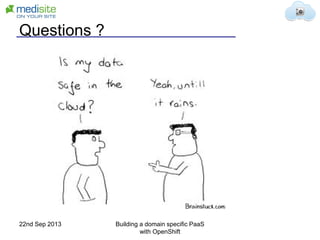
Questions ?
22nd Sep 2013 Building a domain specific PaaS
with OpenShift

Building Domain-specific PaaS with OpenShift Origin: The TRESOR Healthcare Project

  • 1.
    TRESOR Building a domainspecific PaaS with OpenShift OpenShift Community Day Prague 22nd September 2013
  • 2.
    About myself Alexander Grzesik Head ofDevelopment medisite Systemhaus Working 15 years in software development Java Software Architecture Medical Software alexander.grzesik@medisite.de 22nd Sep 2013 Building a domain specific PaaS with OpenShift
  • 3.
    Topics (1)TRESOR Project –the idea (2)Why OpenShift (3)TRESOR on OpenShift (4)Customizing OpenShift (5)Summary 22nd Sep 2013 Building a domain specific PaaS with OpenShift
  • 4.
    Chapter 1 TRESOR Project– the idea 22nd Sep 2013 Building a domain specific PaaS with OpenShift
  • 5.
    Cloud – thefuture ? By David Fletcher 22nd Sep 2013 Building a domain specific PaaS with OpenShift
  • 6.
    The Cloud &Healthcare • Patient‘s medical record is especially sensitive data. Only people involved in patient care should have access to the information. • Doctor‘s liability: Control who can access „their“ data • Fast access to life-critical information • Medical record storage requirements (10-30 years) • Low affinity of medical persons to IT Objections to cloud usage in healthcare 22nd Sep 2013 Building a domain specific PaaS with OpenShift
  • 7.
    TRESOR Partners 22nd Sep2013 Building a domain specific PaaS with OpenShift
  • 8.
    TRESOR Overview Trusted Ecosystemfor Standardized and Open cloud-based Resources • Cloud Ecosystem for secure cloud services – Proxy for secure communication – Broker for procurement – Marketplace – PaaS Platform • Trusted Environment for handling sensitive data • Open Platform for developing and providing domain specific cloud applications 22nd Sep 2013 Building a domain specific PaaS with OpenShift
  • 9.
    TRESOR Cloud Ecosystem TRESORPaaS TRESOR User TRESOR Ecosystem TRESOR Service Provider IaaS-Provider TRESOR Proxy (Client) TRESOR Proxy (Client) IDM (i.e. Active Directory) Clients TRESOR Proxy (Client) Authentication Service use Authorization Marketplace TRESOR Proxy (Trusted 3rd Party) TRESOR Billing TRESOR Broker Service Profile Repository Client Profile Repository TRESOR Proxy (Service) Search, Maintain, Match Billing SLAMonitoring MMV PAI ... Service use Dynamic Services Manage 22nd Sep 2013 Building a domain specific PaaS with OpenShift
  • 10.
    TRESOR Goals CloudFlexible SecureOpen Extensible OSGi based Useof Standards Development tools Data Security Encrypted Data Secure Communication Certified Scalable Reliable High Availability Powered by OpenShift Fast Time-to-Market No Vendor Lock-In Different usage scenarios 22nd Sep 2013 Building a domain specific PaaS with OpenShift
  • 11.
    Chapter 2 Why OpenShift? 22nd Sep 2013 Building a domain specific PaaS with OpenShift
  • 12.
    History of TRESOR •Project Idea in 2010 • Project announced on CeBit 2011 • Project Start 03/2012 • Rapid developments in PaaS technology • Make or Use ? • Evaluation of available PaaS technologies 22nd Sep 2013 Building a domain specific PaaS with OpenShift
  • 13.
    PaaS Criteria • SupportedTechnologies • Open Source • Vendor • Community • Scaling • Extension • Infrastructure (IaaS) Support • Documentation 22nd Sep 2013 Building a domain specific PaaS with OpenShift
  • 14.
    The candidates (2012) 22ndSep 2013 Building a domain specific PaaS with OpenShift
  • 15.
    Why OpenShift • SupportedTechnologies • Fully Open Source • Extensibility and flexibility • IaaS support • Growing documentation • Great Community • Red Hat 22nd Sep 2013 Building a domain specific PaaS with OpenShift
  • 16.
    Starting Problems (2012) •Problems with installation • Constant Changes on OpenShift • No Stable Version of Open Source project • Documentation not up to date • No clear Roadmap • Some missing features 22nd Sep 2013 Building a domain specific PaaS with OpenShift
  • 17.
    One year later •2 Releases of OpenShift Origin • Regular builds • Roadmap & development process • Improved documentation • Community manager • New features – Cartridge v2 – PostgreSQL 9.2 – Web Console 22nd Sep 2013 Building a domain specific PaaS with OpenShift
  • 18.
    Open Points • Setupstill complicated  Installation Scripts are in Progress • Better PaaS Monitoring  On Roadmap • Custom and Database Scaling  We are working on a solution • Documentation misses some details  Everybody can help 22nd Sep 2013 Building a domain specific PaaS with OpenShift
  • 19.
    Chapter 3 TRESOR onOpenShift 22nd Sep 2013 Building a domain specific PaaS with OpenShift
  • 20.
    TRESOR PaaS ata glance Strong Encryption Powered by OpenShift Open Platform Polyglot Persistence Modular Architecture 6dfg4854 fgf72548 151fd545 5454sff5 44485ddf 151538fd 179hg45g 658g54d1 15414gfg 584551gh 11fghf15 154215jh 2152fgh5 14925fg1 15325sgd 78dfd15d 7654fghd 897fg21d 98dfgh2d 874dfg6d 3544sdfg Use of Standards 22nd Sep 2013 Building a domain specific PaaS with OpenShift
  • 21.
    OpenShift Integration • OpenShiftOrigin provides runtime for application services • Provisioning and scaling • Development services (Git & Jenkins) • Use and extend PostgreSQL and MongoDB cartridges • Custom cartridges and plugins 22nd Sep 2013 Building a domain specific PaaS with OpenShift
  • 22.
    TRESOR on OpenShift OSGiApplication Server Encryption ServicesAuthorization Framework MongoDB HSM External IDM PostgreSQL User TRESOR Ecosystem 22nd Sep 2013 Building a domain specific PaaS with OpenShift
  • 23.
    Chapter 4 Customizing OpenShift 22ndSep 2013 Building a domain specific PaaS with OpenShift
  • 24.
    New Cartridges • Glassfish4 – OSGi / JavaEE Application Server • Elastic Search – Search and Index Engine • OpenAM (openam.forgerock.org) – Authentication and Authorization Services • OSGi Bundle Repository – Central bundle provisioning 22nd Sep 2013 Building a domain specific PaaS with OpenShift
  • 25.
    Extending OpenShift –How to start • Use the VM Image to develop your cartridge – Make use of snapshots !! • Test scripts without OpenShift • Use DIY and CDK • Check the documentation and logs: /var/log/openshift • Be patient 22nd Sep 2013 Building a domain specific PaaS with OpenShift
  • 26.
    New Cartridge –DIY • First getting it up as DIY • Glassfish already has a good quick start example: https://github.com/shekhargulati/glassfish4 -openshift-quickstart • Cons: – Needs to provide complete runtime – No Scaling – Only http port 22nd Sep 2013 Building a domain specific PaaS with OpenShift
  • 27.
    DIY Cartridge Structure- example 22nd Sep 2013 Building a domain specific PaaS with OpenShift
  • 28.
    DIY Scripts –Glassfish #!/bin/bash # The logic to start up your application should be put in this # script. The application will work only if it binds to # $OPENSHIFT_INTERNAL_IP:8080 echo 'Starting Glassfish DIY...' > $OPENSHIFT_DIY_LOG_DIR/server.log set -x cd $OPENSHIFT_REPO_DIR/diy/glassfish4/glassfish/domains/domain1/config/ mv domain.xml domain.xml_2 sed "s/$( grep serverName domain.xml_2 | cut -d" -f 2 )/${OPENSHIFT_DIY_IP}/g" domain.xml_2 > domain.xml chmod u+x $OPENSHIFT_REPO_DIR/diy/glassfish4/glassfish/bin/asadmin $OPENSHIFT_REPO_DIR/diy/glassfish4/glassfish/bin/asadmin start-domain &> $OPENSHIFT_DIY_LOG_DIR/server.log 22nd Sep 2013 Building a domain specific PaaS with OpenShift
  • 29.
    DIY Glassfish config •Modify domain.xml: – Remove non http-port listeners – Replace all hostname references with OPENSHIFT_DIY_IP – Startup script will replace token OPENSHIFT_DIY_IP token in domain.xml 22nd Sep 2013 Building a domain specific PaaS with OpenShift
  • 30.
    Glassfish Custom Cartridge •Starting Point: Tomcat cartridge • Modify to: – Download and install Glassfish 4 – Setup Glassfish cartridge – Deployment and startup of custom domain – Graceful shutdown 22nd Sep 2013 Building a domain specific PaaS with OpenShift
  • 31.
    Glassfish Cartridge -Structure 22nd Sep 2013 Building a domain specific PaaS with OpenShift
  • 32.
    Glassfish Cartridge –Manifest.yml Name: glassfish Cartridge-Short-Name: GLASSFISH Cartridge-Vendor: medisite Cartridge-Version: 0.0.1 Display-Name: Glassfish 4 Description: "Glassfish 4 JavaEE and OSGi Server" Version: '4.0‚ Source-Url: git@git.medisite/tresor/openshift-glassfish-cartridge License: CDDL 1.1 Vendor: oracle Categories: - service - java - glassfish - glassfish4 - web_framework Website: http://glassfish.java.net/ 22nd Sep 2013 Building a domain specific PaaS with OpenShift
  • 33.
    Glassfish Cartridge -Endpoints Endpoints: - Private-IP-Name: IP Private-Port-Name: HTTP_PORT Private-Port: 8080 Public-Port-Name: HTTP_PROXY_PORT - Private-IP-Name: IP Private-Port-Name: ADMIN_PORT Private-Port: 4848 Public-Port-Name: ADMIN_PROXY_PORT 22nd Sep 2013 Building a domain specific PaaS with OpenShift
  • 34.
    Glassfish Cartridge -Setup #!/bin/bash SYSTEM_GLASSFISH_DIR=/var/lib/glassfish4 mkdir ${OPENSHIFT_GLASSFISH_DIR}/{config,run,logs,tmp} # Link the system Glassfish binaries to the cart Glassfish instance ln -s ${SYSTEM_GLASSFISH_DIR}/glassfish/bin/asadmin ${OPENSHIFT_GLASSFISH_DIR}/bin/asadmin ln -s ${SYSTEM_GLASSFISH_DIR}/glassfish/lib ${OPENSHIFT_GLASSFISH_DIR}/lib # Copy the default configurations to the Glassfish conf directory cp ${OPENSHIFT_GLASSFISH_DIR}/versions/4.0/config/* ${OPENSHIFT_GLASSFISH_DIR}/config • Handles setup of cartridge per application 22nd Sep 2013 Building a domain specific PaaS with OpenShift
  • 35.
    Glassfish Cartridge -Control GLASSFISH_PID_FILE="${OPENSHIFT_GLASSFISH_DIR}/run/glassfish.pid„ … function start_app() { # Check for running app … # remove old deployment and redeploy rm -r ${OPENSHIFT_GLASSFISH_DIR}/domain1 mkdir ${OPENSHIFT_GLASSFISH_DIR}/domain1 cp ${OPENSHIFT_REPO_DIR}/domain1/* ${OPENSHIFT_GLASSFISH_DIR}/domain1 cd ${OPENSHIFT_GLASSFISH_DIR}/domain1/config/ mv domain.xml domain.xml_2 sed "s/$( grep serverName domain.xml_2 | cut -d" -f 2 )/${OPENSHIFT_GLASSFISH_IP}/g" domain.xml_2 > domain.xml # Start domain ${OPENSHIFT_GLASSFISH_DIR}/bin/asadmin start-domain ${OPENSHIFT_GLASSFISH_DIR}/domain1 &>&2 … ps -ef | grep glassfish | grep -v grep | awk '{print $2}' > $GLASSFISH_PID_FILE • Control startup and shutdown 22nd Sep 2013 Building a domain specific PaaS with OpenShift
  • 36.
    Install Cartridge • InstallCartridge: oo-admin-cartridge -a install -s /usr/libexec/openshift/cartridges/v2/glassfish • Downloadable Cartridge: rhc create-app gfapp http://git.medisite/tresor/openshift-glassfish- cartridge/blob/master/metadata/manifest.yml • Clear Cache: # cd /var/www/openshift/broker # bundle exec rake tmp:clear 22nd Sep 2013 Building a domain specific PaaS with OpenShift
  • 37.
    Open Things • Scaling •Add database support • Integration with build server • Automatic deployment of OSGi Bundles • Documentation • Public availability 22nd Sep 2013 Building a domain specific PaaS with OpenShift
  • 38.
    Custom Scaling • Scalingnot only via request count – Response times – Active Users • Service Specific Scaling – Some Services are more critical • Customer Specific Scaling Rules – Customer booking of scaling options 22nd Sep 2013 Building a domain specific PaaS with OpenShift
  • 39.
    DB Replication andScaling • MongoDB Shard Cluster on OpenShift • PostgreSQL Replication Set • Automatic setup during provisioning • Evaluate dynamic scaling options 22nd Sep 2013 Building a domain specific PaaS with OpenShift
  • 40.
    Other Extensions toOpenShift • Provisioning Interface • Usage Reporting • Application Monitoring • Encryption 22nd Sep 2013 Building a domain specific PaaS with OpenShift
  • 41.
    Chapter 5 Summary 22nd Sep2013 Building a domain specific PaaS with OpenShift
  • 42.
    Final Target (2015) •TRESOR PaaS will be used in two hospitals • Hosted in a German Telekom datacenter • Certified according German data security regulations • Available as an OSGi based development platform for healthcare applications 22nd Sep 2013 Building a domain specific PaaS with OpenShift
  • 43.
    Summary • OpenShift allowsbuilding of custom PaaS implementations • Powerful extension mechanism via cartridges and plugins • Active community and good support • OpenShift will be one of the major players in PaaS area in the future • TRESOR extends OpenShift for domain specific usage 22nd Sep 2013 Building a domain specific PaaS with OpenShift
  • 44.
    Extending OpenShift usefullinks https://www.openshift.com/developers/downl oad-cartridges https://github.com/smarterclayton/openshift- cdk-cart https://www.openshift.com/blogs/new- openshift-cartridge-format-part-1 http://openshift.github.io/documentation/oo_ cartridge_developers_guide.html http://cloud-mechanic.blogspot.de 22nd Sep 2013 Building a domain specific PaaS with OpenShift
  • 45.
    Questions ? 22nd Sep2013 Building a domain specific PaaS with OpenShift