Build a PaaS with OpenShift
               Origin
     Steven Citron-Pousty
     PaaS Dust Spreader, Red Hat
     @TheSteve0

     Bill DeCoste
     Principal Software Engineer
     wdecoste@redhat.com

1
Agenda
    •
        See a PaaS in action
    •
        See how we build it under the hoods
    •
        Look at how to get involved with the community


        SIGN UP CODE:
              SCaLE11

2
Assumptions
    1)   You know Linux
    2)   You are either a developer or a sysadmin
    3)   You will ask questions


3
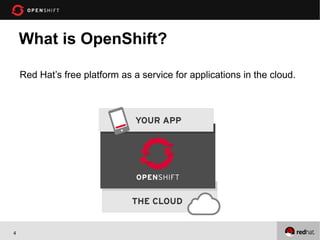
What is OpenShift?

    Red Hat’s free platform as a service for applications in the cloud.


4
5   Dalbera on Flickr
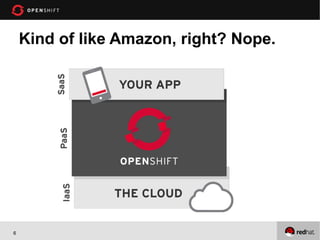
Kind of like Amazon, right? Nope.


6
Cook24v on Flickr
7
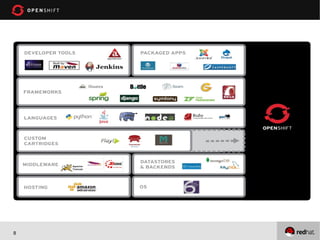
What’s supported?


8
•
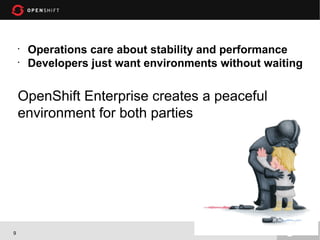
        Operations care about stability and performance
    •
        Developers just want environments without waiting

    OpenShift Enterprise creates a peaceful
    environment for both parties


9
Demo
 1.   Bring up a Python App
 2.   Push a code change
 3.   Add a MySQL database


10
OpenShift


OPENSHIFT OVERVIEW


11
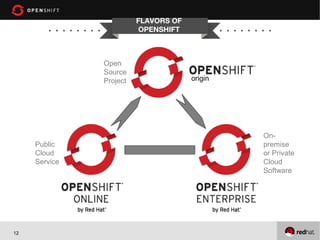
FLAVORS OF
                         OPENSHIFT


               Open
               Source
               Project                origin


                                               On-
     Public                                    premise
     Cloud                                     or Private
     Service                                   Cloud
                                               Software


12
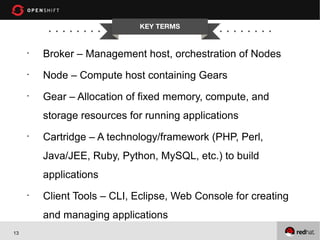
KEY TERMS


     •
         Broker – Management host, orchestration of Nodes
     •
         Node – Compute host containing Gears
     •
         Gear – Allocation of fixed memory, compute, and
         storage resources for running applications
     •
         Cartridge – A technology/framework (PHP, Perl,
         Java/JEE, Ruby, Python, MySQL, etc.) to build
         applications
     •
         Client Tools – CLI, Eclipse, Web Console for creating
         and managing applications
13
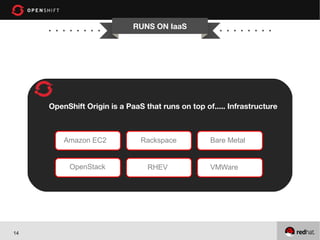
RUNS ON IaaS


     OpenShift Origin is a PaaS that runs on top of..... Infrastructure


         Amazon EC2            Rackspace           Bare Metal


          OpenStack              RHEV              VMWare


14
SERVER TYPES


 Each OpenShift Origin server will be one of the following
 types:
     • Broker Host
     • Node Host


15
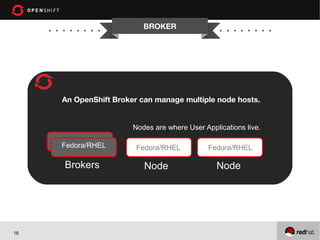
BROKER


     An OpenShift Broker can manage multiple node hosts.


                       Nodes are where User Applications live.

     Fedora/RHEL        Fedora/RHEL          Fedora/RHEL

     Brokers              Node                  Node


16
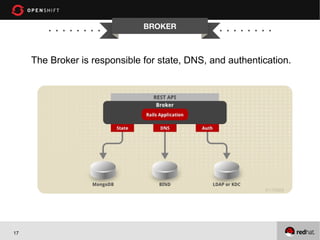
BROKER


     The Broker is responsible for state, DNS, and authentication.


17
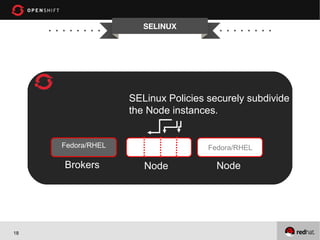
SELINUX


                   SELinux Policies securely subdivide
                   the Node instances.


     Fedora/RHEL                    Fedora/RHEL

     Brokers          Node            Node


18
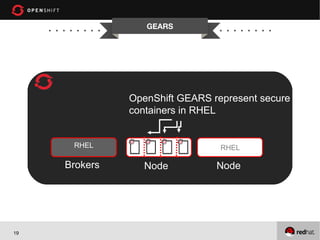
GEARS


               OpenShift GEARS represent secure
               containers in RHEL


      RHEL                       RHEL

     Brokers      Node          Node


19
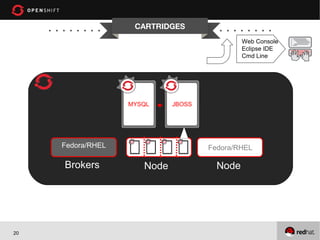
CARTRIDGES
                                              Web Console
                                              Eclipse IDE
                                              Cmd Line


                   MYSQL     JBOSS


     Fedora/RHEL                     Fedora/RHEL

     Brokers          Node             Node


20
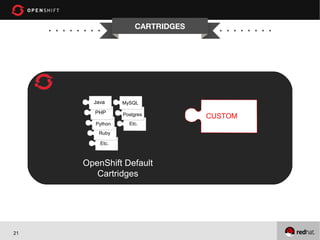
CARTRIDGES


       Java      MySQL

       PHP       Postgres         CUSTOM
        Python     Etc.
         Ruby

         Etc.


     OpenShift Default
        Cartridges


21
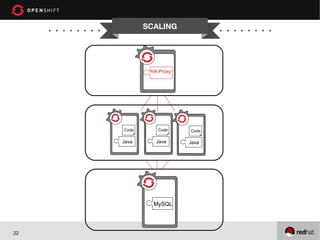
SCALING


                    HA-Proxy


            Code       Code    Code

            Java      Java     Java


     RHEL

                     MySQL


22
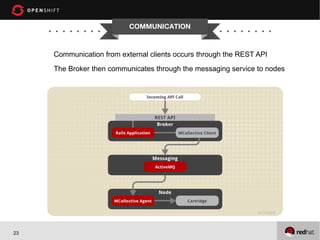
COMMUNICATION


     Communication from external clients occurs through the REST API
     The Broker then communicates through the messaging service to nodes


23
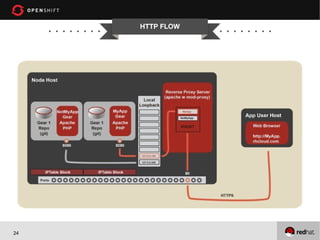
HTTP FLOW


24
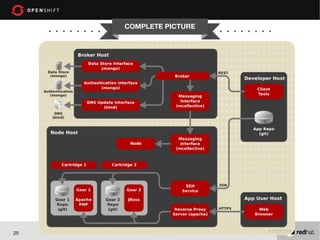
COMPLETE PICTURE


25
Easy to install on Fedora 18
●
     Using Vagrant and Puppet
     ●
         http://www.krishnaraman.net/installing-openshift-origin-using-vagrant-and-puppet/


     Also install on Fedora 17
     ●
         Using kickstart
         ●
             http://www.krishnaraman.net/building-a-multi-node-openshift-origin-paas-from-
             source/


26
GET INVOLVED!
                                      CHANNELS


     ●
             G+ Community
             https://plus.google.com/communities/114361859072744017486

     ●
             E-Mail
         ●
             OpenShift Users: users@lists.openshift.redhat.com
         ●
             Origin Developers: dev@lists.openshift.redhat.com

     ●
             IRC: irc.freenode.net
         ●
             OpenShift Users: #openshift
         ●
             Origin Developers: #openshift-dev


27
GET INVOLVED!
                                       CHANNELS


     ●
         Forums
         http://openshift.redhat.com/community/forums/openshift

     ●
         Blogs
         https://openshift.redhat.com/community/blogs/

         http://mattoncloud.org/

         http://www.billdecoste.net

         http://www.krishnaraman.net

         http://cloud-mechanic.blogspot.com


28
GET INVOLVED!
                                          OPENSOURCE


     ●
             GitHub: https://github.com/openshift
         ●
             Origin: origin-server
         ●
             Internal Extensions: li
         ●
             Community Cartridges: origin-community-cartridges
             ●
                 https://github.com/jwhonce/origin-server/tree/dev/cartridge_refactor
         ●
             Quickstarts, Examples
         ●
             Watch, Star, Contribute!!!


29
Conclusion
 1. PaaS is a Developers AND Sysadmins dream
 2. We are doing really cool things with Linux to make it

    happen
 3. Easy to get started on Fedora

 4. Fun and interesting place to spend your time – COME

    JOIN US!!!

      SIGN UP CODE:
                  SCaLE11

         http://openshift.redhat.com
30

Build a PaaS with OpenShift Origin

  • 1.
    Build a PaaSwith OpenShift Origin Steven Citron-Pousty PaaS Dust Spreader, Red Hat @TheSteve0 Bill DeCoste Principal Software Engineer wdecoste@redhat.com 1
  • 2.
    Agenda • See a PaaS in action • See how we build it under the hoods • Look at how to get involved with the community SIGN UP CODE: SCaLE11 2
  • 3.
    Assumptions 1) You know Linux 2) You are either a developer or a sysadmin 3) You will ask questions 3
  • 4.
    What is OpenShift? Red Hat’s free platform as a service for applications in the cloud. 4
  • 5.
    5 Dalbera on Flickr
  • 6.
    Kind of likeAmazon, right? Nope. 6
  • 7.
  • 8.
  • 9.
    Operations care about stability and performance • Developers just want environments without waiting OpenShift Enterprise creates a peaceful environment for both parties 9
  • 10.
    Demo 1. Bring up a Python App 2. Push a code change 3. Add a MySQL database 10
  • 11.
  • 12.
    FLAVORS OF OPENSHIFT Open Source Project origin On- Public premise Cloud or Private Service Cloud Software 12
  • 13.
    KEY TERMS • Broker – Management host, orchestration of Nodes • Node – Compute host containing Gears • Gear – Allocation of fixed memory, compute, and storage resources for running applications • Cartridge – A technology/framework (PHP, Perl, Java/JEE, Ruby, Python, MySQL, etc.) to build applications • Client Tools – CLI, Eclipse, Web Console for creating and managing applications 13
  • 14.
    RUNS ON IaaS OpenShift Origin is a PaaS that runs on top of..... Infrastructure Amazon EC2 Rackspace Bare Metal OpenStack RHEV VMWare 14
  • 15.
    SERVER TYPES EachOpenShift Origin server will be one of the following types: • Broker Host • Node Host 15
  • 16.
    BROKER An OpenShift Broker can manage multiple node hosts. Nodes are where User Applications live. Fedora/RHEL Fedora/RHEL Fedora/RHEL Brokers Node Node 16
  • 17.
    BROKER The Broker is responsible for state, DNS, and authentication. 17
  • 18.
    SELINUX SELinux Policies securely subdivide the Node instances. Fedora/RHEL Fedora/RHEL Brokers Node Node 18
  • 19.
    GEARS OpenShift GEARS represent secure containers in RHEL RHEL RHEL Brokers Node Node 19
  • 20.
    CARTRIDGES Web Console Eclipse IDE Cmd Line MYSQL JBOSS Fedora/RHEL Fedora/RHEL Brokers Node Node 20
  • 21.
    CARTRIDGES Java MySQL PHP Postgres CUSTOM Python Etc. Ruby Etc. OpenShift Default Cartridges 21
  • 22.
    SCALING HA-Proxy Code Code Code Java Java Java RHEL MySQL 22
  • 23.
    COMMUNICATION Communication from external clients occurs through the REST API The Broker then communicates through the messaging service to nodes 23
  • 24.
  • 25.
  • 26.
    Easy to installon Fedora 18 ● Using Vagrant and Puppet ● http://www.krishnaraman.net/installing-openshift-origin-using-vagrant-and-puppet/ Also install on Fedora 17 ● Using kickstart ● http://www.krishnaraman.net/building-a-multi-node-openshift-origin-paas-from- source/ 26
  • 27.
    GET INVOLVED! CHANNELS ● G+ Community https://plus.google.com/communities/114361859072744017486 ● E-Mail ● OpenShift Users: users@lists.openshift.redhat.com ● Origin Developers: dev@lists.openshift.redhat.com ● IRC: irc.freenode.net ● OpenShift Users: #openshift ● Origin Developers: #openshift-dev 27
  • 28.
    GET INVOLVED! CHANNELS ● Forums http://openshift.redhat.com/community/forums/openshift ● Blogs https://openshift.redhat.com/community/blogs/ http://mattoncloud.org/ http://www.billdecoste.net http://www.krishnaraman.net http://cloud-mechanic.blogspot.com 28
  • 29.
    GET INVOLVED! OPENSOURCE ● GitHub: https://github.com/openshift ● Origin: origin-server ● Internal Extensions: li ● Community Cartridges: origin-community-cartridges ● https://github.com/jwhonce/origin-server/tree/dev/cartridge_refactor ● Quickstarts, Examples ● Watch, Star, Contribute!!! 29
  • 30.
    Conclusion 1. PaaSis a Developers AND Sysadmins dream 2. We are doing really cool things with Linux to make it happen 3. Easy to get started on Fedora 4. Fun and interesting place to spend your time – COME JOIN US!!! SIGN UP CODE: SCaLE11 http://openshift.redhat.com 30

Editor's Notes

  • #3 So, what you need is the ease of use and access of a SaaS application, but you need it with your purpose-built, mission-critical, applications. PaaS gives you just that. It allows you to quickly and easily build the application that YOU need. Whether this is for your group, your enterprise, or your next BIG IDEA, you can build it and launch your specific code on a PaaS and not have to deal with the underlying infrastructure, middleware, and management headaches. Because of the built-in auto-scaling and elasticity provided by the PaaS infrastructure, PaaS's are ideal for modern data-hungry Big Data, Mobile, and Social applications. With a PaaS, you can focus on what you should be focused on... your application code. And let the Cloud provide what it is suppose to: Ease, Scale and Power
  • #23 And, once the application is launched within the OpenShift PaaS, OpenShift provides the elasticity expected in a Cloud Application Platform by automatically scaling the application as needed to meet demand. When created, applications can be flagged as “Scalable” (some apps may not want to be scaled). When OpenShift sees this flag, it creates an additional Gear and places an HA-Proxy software load-balancer in front of the application. The HA-Proxy then monitors the incoming traffic to the application. When the number of connections to the application crosses a certain pre-defined threshold, OpenShift will then horizontally scale the application by replicating the application code tier of the application across multiple Gears. For JBoss applications, OpenShift will scale the application using JBoss Clustering which allows stateful or stateless applications to be scaled gracefully. For Ruby, PHP, Python, and other script-oriented languages, the application will need to be designed for stateless scaling where the application container is replicated across multiple gears. The Database tier is not scaled in OpenShift today. Automatic application scaling is a feature that is unique to OpenShift among the popular PaaS offerings that are out there. Automatic scaling of production applications is another example of how OpenShift applies automation technologies and a cloud architecture to make life better for both IT Operations and Development. <next slide>
  • #25 OpenShift Origin - Port Proxy Linux handles the loopback interface's 127.0.0.0/8 address block specially: A request from an address in this block can only go to an address in the same block (put another way, a connection on the loopback interface is confined to the loopback interface). OpenShift uses this fact to contain hosted applications: a gear is prohibited by iptables from listening on an external network interface, and so a given gear can only respond to connections that come from processes on the same node. For the common case of Web connections, the system Apache instance acts as a reverse proxy, forwarding requests that come in on the external interface to the appropriate 127.x.y.z address; see the documentation on the node component. However, sometimes gears need to accept other types of connections. The two most common such scenarios are the following: A gear needs to connect to another gear (which may be on the same node or another node). A gear needs to listen for connections on a public interface besides HTTP connections to port 80. For example, a game server needs to expose a port to receive incoming connections from clients, and a database needs to expost a port so that other gears can connect to it. To meet these needs, OpenShift uses haproxy to proxy TCP connections between an external-facing network interface and the loopback interface. Each gear is assigned five exposable ports, and the gear may establish a forwarding rule for each of these ports to forward connections on the the port on the external interface to an arbitrary port on the gear's assigned loopback address. To provide haproxy with adequate ports, we shift the ephemeral port range down to 15000-35530, so that Linux will not use ports outside of this range for connections for which no port is given explicitly. This means that ports 35531-65535 will be available for haproxy's exclusive use. Note: Given that each gear is assigned 5 ports, this imposes a limit of 6000 gears per node. The interaction with haproxy is implemented on the cartridge side in cartridges/openshift-origin-cartridge-abstract/abstract/info/lib/network and: OpenShift Origin - Node Component Hosted applications are run in containers called "gears." These gears are run on hosts (which can be physical hosts or virtual machines) called "nodes." Each node runs a system Apache instance with mod_proxy that listens on port 80 on a public-facing network interface. Each gear is assigned an address in the 127.0.0.0/8 block, and a hosted Web application listens on port 8080 on its assigned private 127.x.y.z address. When a Web client requests a URL for a hosted Web application, the request goes to the node's system Apache instance. The system Apache instance examines the virtual-host header (the "Host:" HTTP header) and dispatches the request to the 127.x.y.z:8080 private address of the appropriate gear. For an explanation of how connections other than regular HTTP connections are handled, see the documentation on the port-proxy.