Vagrant For DevOps
Lalatendu Mohanty
@lalatenduM
DevOps
What is it?
• It is a culture.
• Filling the gap between developer and operations.
DevOps
It aims at establishing a culture and environment
where building, testing, and releasing software, can
happen rapidly, frequently, and more reliably.
-Wikipedia
It means:
• Use right tools for automation, continuous
integration and achieve continuous delivery.
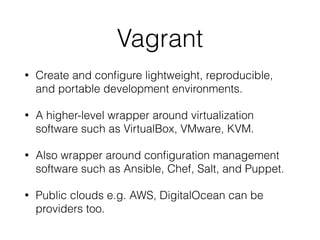
Vagrant
• Create and configure lightweight, reproducible,
and portable development environments.
• A higher-level wrapper around virtualization
software such as VirtualBox, VMware, KVM.
• Also wrapper around configuration management
software such as Ansible, Chef, Salt, and Puppet.
• Public clouds e.g. AWS, DigitalOcean can be
providers too.
Use Continuos Integration
Tools With Vagrant
• Machine provisioning
• Software provisioning
• Configuration Management
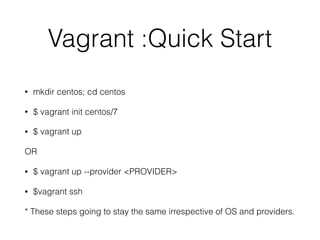
Vagrant :Quick Start
• mkdir centos; cd centos
• $ vagrant init centos/7
• $ vagrant up
OR
• $ vagrant up --provider <PROVIDER>
• $vagrant ssh
* These steps going to stay the same irrespective of OS and providers.
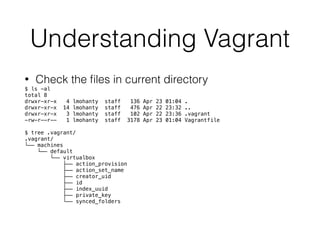
Understanding Vagrant
• Check the files in current directory
$ ls -al
total 8
drwxr-xr-x 4 lmohanty staff 136 Apr 23 01:04 .
drwxr-xr-x 14 lmohanty staff 476 Apr 22 23:32 ..
drwxr-xr-x 3 lmohanty staff 102 Apr 22 23:36 .vagrant
-rw-r--r-- 1 lmohanty staff 3178 Apr 23 01:04 Vagrantfile
$ tree .vagrant/
.vagrant/
└── machines
└── default
└── virtualbox
├── action_provision
├── action_set_name
├── creator_uid
├── id
├── index_uuid
├── private_key
└── synced_folders
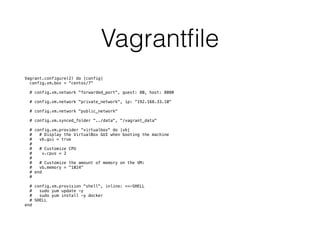
Vagrantfile
Vagrant.configure(2) do |config|
config.vm.box = “centos/7"
# config.vm.network "forwarded_port", guest: 80, host: 8080
# config.vm.network "private_network", ip: “192.168.33.10"
# config.vm.network "public_network"
# config.vm.synced_folder "../data", "/vagrant_data"
# config.vm.provider "virtualbox" do |vb|
# # Display the VirtualBox GUI when booting the machine
# vb.gui = true
#
# # Customize CPU
# v.cpus = 2
#
# # Customize the amount of memory on the VM:
# vb.memory = "1024"
# end
#
# config.vm.provision "shell", inline: <<-SHELL
# sudo yum update -y
# sudo yum install -y docker
# SHELL
end
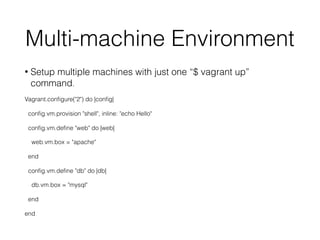
Multi-machine Environment
• Setup multiple machines with just one “$ vagrant up”
command.
Vagrant.configure("2") do |config|
config.vm.provision "shell", inline: "echo Hello"
config.vm.define "web" do |web|
web.vm.box = "apache"
end
config.vm.define "db" do |db|
db.vm.box = "mysql"
end
end
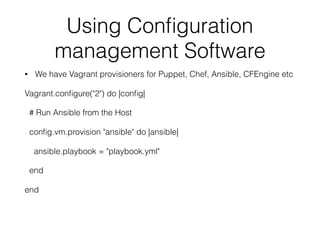
Using Configuration
management Software
• We have Vagrant provisioners for Puppet, Chef, Ansible, CFEngine etc
Vagrant.configure("2") do |config|
# Run Ansible from the Host
config.vm.provision "ansible" do |ansible|
ansible.playbook = "playbook.yml"
end
end
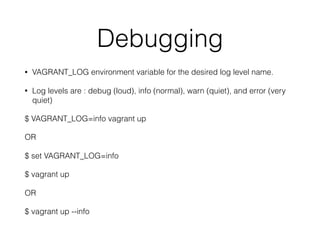
Debugging
• VAGRANT_LOG environment variable for the desired log level name.
• Log levels are : debug (loud), info (normal), warn (quiet), and error (very
quiet)
$ VAGRANT_LOG=info vagrant up
OR
$ set VAGRANT_LOG=info
$ vagrant up
OR
$ vagrant up --info
Vagrant Plugins
• Add additional features or change default
behaviour.
• It is a Ruby gem. Vagrant is written in Ruby.
• List : https://github.com/mitchellh/vagrant/wiki/
Available-Vagrant-Plugins
Using DigitalOcean as a
Provider
• Install Vagrant plugin vagrant-digitalocean
• https://github.com/devopsgroup-io/vagrant-
digitalocean
• Demo
Vagrantbox
A Vagrantbox is a tarred, gzip file containing the following:
• Vagrantfile
• The information from this will be merged into your Vagrantfile that is created
when you run vagrant init boxname in a folder.
• box-disk.vmd (For Virtualbox)
• The box-disk.vmdk is the virtual machine image.
• box.of
• The box.ovf defines the virtual hardware for the box.
• metadata.son
• The metadata.json tells vagrant what provider the box works with.
Tools To Create Vagrantbox
• You can use tools like packer.io, imagefactory etc.
• You can build a Vagrantbox manually
• Or use “vagrant package” command for Virtualbox.
• Modify base boxes and reuse them.
• Also there is vagrant-mutate
• https://github.com/sciurus/vagrant-mutate
DevOps Workflow
• Use same configuration management code as
operations team in Vagrantfile.
• More automation means, more chance of parity
between development, testing and operations.
• Create a environment where developers and QA
can contribute to the automation and configuration
management code.
Future
• Otto
• The next generation tool from Hashicorp which uses Vagrant
and other ecosystem tools.
• But It is specially designed for micro services.
• Knows how to install and configure service dependencies for
development and deployment.
• otto dev : will create the development environment.
• otto infra, otto build, and otto deploy : will launches a complete
infrastructure, builds your application, and deploys it
References
• http://www.slideshare.net/nemo-mulodo/devops2-
vagrant-mosg
• https://blog.engineyard.com/2014/building-a-vagrant-
box
• https://www.vagrantup.com/docs/boxes/format.html
• http://unix.stackexchange.com/questions/222427/how-
to-create-custom-vagrant-box-from-libvirt-kvm-instance
• https://www.hashicorp.com/blog/otto.html

Vagrant For DevOps

  • 1.
    Vagrant For DevOps LalatenduMohanty @lalatenduM
  • 2.
    DevOps What is it? •It is a culture. • Filling the gap between developer and operations.
  • 3.
    DevOps It aims atestablishing a culture and environment where building, testing, and releasing software, can happen rapidly, frequently, and more reliably. -Wikipedia It means: • Use right tools for automation, continuous integration and achieve continuous delivery.
  • 4.
    Vagrant • Create andconfigure lightweight, reproducible, and portable development environments. • A higher-level wrapper around virtualization software such as VirtualBox, VMware, KVM. • Also wrapper around configuration management software such as Ansible, Chef, Salt, and Puppet. • Public clouds e.g. AWS, DigitalOcean can be providers too.
  • 5.
    Use Continuos Integration ToolsWith Vagrant • Machine provisioning • Software provisioning • Configuration Management
  • 6.
    Vagrant :Quick Start •mkdir centos; cd centos • $ vagrant init centos/7 • $ vagrant up OR • $ vagrant up --provider <PROVIDER> • $vagrant ssh * These steps going to stay the same irrespective of OS and providers.
  • 7.
    Understanding Vagrant • Checkthe files in current directory $ ls -al total 8 drwxr-xr-x 4 lmohanty staff 136 Apr 23 01:04 . drwxr-xr-x 14 lmohanty staff 476 Apr 22 23:32 .. drwxr-xr-x 3 lmohanty staff 102 Apr 22 23:36 .vagrant -rw-r--r-- 1 lmohanty staff 3178 Apr 23 01:04 Vagrantfile $ tree .vagrant/ .vagrant/ └── machines └── default └── virtualbox ├── action_provision ├── action_set_name ├── creator_uid ├── id ├── index_uuid ├── private_key └── synced_folders
  • 8.
    Vagrantfile Vagrant.configure(2) do |config| config.vm.box= “centos/7" # config.vm.network "forwarded_port", guest: 80, host: 8080 # config.vm.network "private_network", ip: “192.168.33.10" # config.vm.network "public_network" # config.vm.synced_folder "../data", "/vagrant_data" # config.vm.provider "virtualbox" do |vb| # # Display the VirtualBox GUI when booting the machine # vb.gui = true # # # Customize CPU # v.cpus = 2 # # # Customize the amount of memory on the VM: # vb.memory = "1024" # end # # config.vm.provision "shell", inline: <<-SHELL # sudo yum update -y # sudo yum install -y docker # SHELL end
  • 9.
    Multi-machine Environment • Setupmultiple machines with just one “$ vagrant up” command. Vagrant.configure("2") do |config| config.vm.provision "shell", inline: "echo Hello" config.vm.define "web" do |web| web.vm.box = "apache" end config.vm.define "db" do |db| db.vm.box = "mysql" end end
  • 10.
    Using Configuration management Software •We have Vagrant provisioners for Puppet, Chef, Ansible, CFEngine etc Vagrant.configure("2") do |config| # Run Ansible from the Host config.vm.provision "ansible" do |ansible| ansible.playbook = "playbook.yml" end end
  • 11.
    Debugging • VAGRANT_LOG environmentvariable for the desired log level name. • Log levels are : debug (loud), info (normal), warn (quiet), and error (very quiet) $ VAGRANT_LOG=info vagrant up OR $ set VAGRANT_LOG=info $ vagrant up OR $ vagrant up --info
  • 12.
    Vagrant Plugins • Addadditional features or change default behaviour. • It is a Ruby gem. Vagrant is written in Ruby. • List : https://github.com/mitchellh/vagrant/wiki/ Available-Vagrant-Plugins
  • 13.
    Using DigitalOcean asa Provider • Install Vagrant plugin vagrant-digitalocean • https://github.com/devopsgroup-io/vagrant- digitalocean • Demo
  • 14.
    Vagrantbox A Vagrantbox isa tarred, gzip file containing the following: • Vagrantfile • The information from this will be merged into your Vagrantfile that is created when you run vagrant init boxname in a folder. • box-disk.vmd (For Virtualbox) • The box-disk.vmdk is the virtual machine image. • box.of • The box.ovf defines the virtual hardware for the box. • metadata.son • The metadata.json tells vagrant what provider the box works with.
  • 15.
    Tools To CreateVagrantbox • You can use tools like packer.io, imagefactory etc. • You can build a Vagrantbox manually • Or use “vagrant package” command for Virtualbox. • Modify base boxes and reuse them. • Also there is vagrant-mutate • https://github.com/sciurus/vagrant-mutate
  • 16.
    DevOps Workflow • Usesame configuration management code as operations team in Vagrantfile. • More automation means, more chance of parity between development, testing and operations. • Create a environment where developers and QA can contribute to the automation and configuration management code.
  • 17.
    Future • Otto • Thenext generation tool from Hashicorp which uses Vagrant and other ecosystem tools. • But It is specially designed for micro services. • Knows how to install and configure service dependencies for development and deployment. • otto dev : will create the development environment. • otto infra, otto build, and otto deploy : will launches a complete infrastructure, builds your application, and deploys it
  • 18.
    References • http://www.slideshare.net/nemo-mulodo/devops2- vagrant-mosg • https://blog.engineyard.com/2014/building-a-vagrant- box •https://www.vagrantup.com/docs/boxes/format.html • http://unix.stackexchange.com/questions/222427/how- to-create-custom-vagrant-box-from-libvirt-kvm-instance • https://www.hashicorp.com/blog/otto.html