OPENSHIFT
Build, deploy & manage open, standard containers
Jonh Wendell
Sr. Software Engineer
Nov 26, 2016
OPENSHIFT2
Hardware
Host OS
LIBS A LIBS B LIBS..
APP A APP B
Hardware
Guest OS
LIBS A
APP A
Hypervisor
Guest OS
LIBS B
APP B
Guest OS
LIBS C
APP C
Hardware
Container
LIBS A
APP A
Host Minimal OS
Container
LIBS B
APP B
Container
LIBS C
APP C
Traditional Virtual Containershared system isolation process isolation
OPENSHIFT3
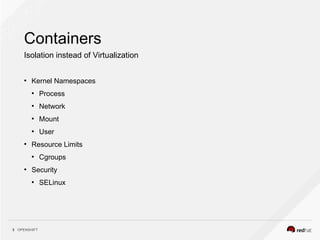
Containers
Isolation instead of Virtualization
●
Kernel Namespaces
●
Process
●
Network
●
Mount
●
User
●
Resource Limits
●
Cgroups
●
Security
●
SELinux
OPENSHIFT4
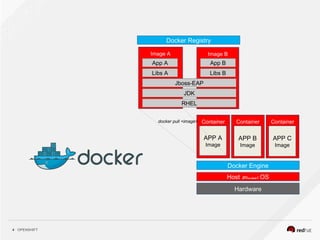
Image BImage A
Hardware
Container
APP A
Image
Host Minimal OS
Container
APP B
Image
Container
APP C
Image
Docker Engine
RHEL
JDK
Jboss-EAP
Libs A Libs B
App A App B
docker pull <image>
Docker Registry
OPENSHIFT5
Let’s talk about apps
Modern apps
●
Commonly delivered as services i.e.
software-as-a-service
●
Web applications, Mobile application
software
●
Designed for continuous delivery
●
Designed to scale-up and down
●
Can utilize modern cloud platforms
OPENSHIFT6
Let’s talk about apps
Modern apps development
●
Need to match speed of growing
business
●
Microservices
●
Continuous delivery
●
A/B, Canary
●
The twelve-factor application for cloud
native applications
●
Refer : https://12factor.net/
OPENSHIFT7
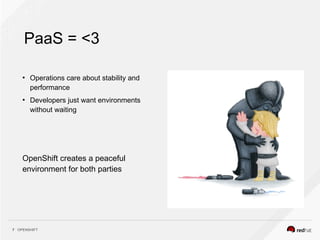
PaaS = <3
OpenShift creates a peaceful
environment for both parties
●
Operations care about stability and
performance
●
Developers just want environments
without waiting
OPENSHIFT8
PaaS? Kind of like Amazon, right?
Nope!
OPENSHIFT9
●
A container platform to create, modify, deploy containerized applications.
●
Platform to deploy microservices
●
Choose programming languages you want
●
Continuous deployment
●
Self service platform
●
Platform as a service
●
Can run on physical, virtual infrastructure
●
Can run on private and public clouds
OPENSHIFT10
●
Uses Kubernetes orchestration, management and Docker as the container technology.
●
Features for managing complete application lifecycle
●
Automated image builds and promotion.
●
Deployments integrated with builds, pipeline and CI.
●
Fully integrated Docker registry.
●
Networking (SDN, DNS, routing) for container networking.
●
Integration with Docker Hub and other 3rd party enterprises registries.
●
Integrated enterprise features e.g authentication (LDAP etc), quota etc.
OPENSHIFT11
Apps in OpenShift
You can use the Web Console or the OC Command Line tool
Create Applications:
●
From source code
●
Local or remote git repository
●
Auto detect changes to the applications and trigger the build process
●
Using OpenShift template
●
Using Docker images
●
E.g. $ oc new-app kubernetes/guestbook
OPENSHIFT12
Building Docker Images
●
Auto detects the programming language from the source code and converts it to a
runnable docker image.
●
End users do not need to write Dockerfile
●
Enable existing source build tools e.g. maven, rake
●
Project : https://github.com/openshift/source-to-image
OPENSHIFT13
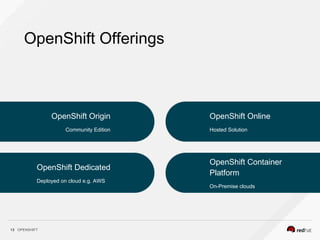
OpenShift Offerings
OpenShift Origin
Community Edition
OpenShift Dedicated
Deployed on cloud e.g. AWS
OpenShift Online
Hosted Solution
OpenShift Container
Platform
On-Premise clouds
OPENSHIFT14
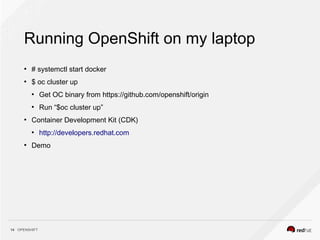
Running OpenShift on my laptop
●
# systemctl start docker
●
$ oc cluster up
●
Get OC binary from https://github.com/openshift/origin
●
Run “$oc cluster up”
●
Container Development Kit (CDK)
●
http://developers.redhat.com
●
Demo
OPENSHIFT15
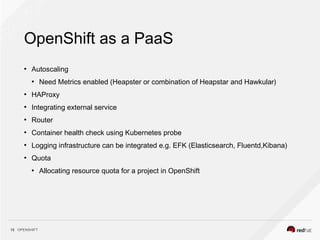
OpenShift as a PaaS
●
Autoscaling
●
Need Metrics enabled (Heapster or combination of Heapstar and Hawkular)
●
HAProxy
●
Integrating external service
●
Router
●
Container health check using Kubernetes probe
●
Logging infrastructure can be integrated e.g. EFK (Elasticsearch, Fluentd,Kibana)
●
Quota
●
Allocating resource quota for a project in OpenShift
OPENSHIFT16
For Developers
●
Eclipse IDE integration.
●
Developers do not need to know much about Docker and Kubernetes.
●
Integration with Jenkins running in OpenShift
●
Ability to move from QA -> Stage -> Production
THANK YOU
jonh.wendell@redhat.com
plus.google.com/+RedHat
linkedin.com/company/red-hat
youtube.com/user/RedHatVideos
facebook.com/redhatinc
twitter.com/RedHatNews

Openshift: Build, deploy & manage open, standard containers

  • 1.
    OPENSHIFT Build, deploy &manage open, standard containers Jonh Wendell Sr. Software Engineer Nov 26, 2016
  • 2.
    OPENSHIFT2 Hardware Host OS LIBS ALIBS B LIBS.. APP A APP B Hardware Guest OS LIBS A APP A Hypervisor Guest OS LIBS B APP B Guest OS LIBS C APP C Hardware Container LIBS A APP A Host Minimal OS Container LIBS B APP B Container LIBS C APP C Traditional Virtual Containershared system isolation process isolation
  • 3.
    OPENSHIFT3 Containers Isolation instead ofVirtualization ● Kernel Namespaces ● Process ● Network ● Mount ● User ● Resource Limits ● Cgroups ● Security ● SELinux
  • 4.
    OPENSHIFT4 Image BImage A Hardware Container APPA Image Host Minimal OS Container APP B Image Container APP C Image Docker Engine RHEL JDK Jboss-EAP Libs A Libs B App A App B docker pull <image> Docker Registry
  • 5.
    OPENSHIFT5 Let’s talk aboutapps Modern apps ● Commonly delivered as services i.e. software-as-a-service ● Web applications, Mobile application software ● Designed for continuous delivery ● Designed to scale-up and down ● Can utilize modern cloud platforms
  • 6.
    OPENSHIFT6 Let’s talk aboutapps Modern apps development ● Need to match speed of growing business ● Microservices ● Continuous delivery ● A/B, Canary ● The twelve-factor application for cloud native applications ● Refer : https://12factor.net/
  • 7.
    OPENSHIFT7 PaaS = <3 OpenShiftcreates a peaceful environment for both parties ● Operations care about stability and performance ● Developers just want environments without waiting
  • 8.
    OPENSHIFT8 PaaS? Kind oflike Amazon, right? Nope!
  • 9.
    OPENSHIFT9 ● A container platformto create, modify, deploy containerized applications. ● Platform to deploy microservices ● Choose programming languages you want ● Continuous deployment ● Self service platform ● Platform as a service ● Can run on physical, virtual infrastructure ● Can run on private and public clouds
  • 10.
    OPENSHIFT10 ● Uses Kubernetes orchestration,management and Docker as the container technology. ● Features for managing complete application lifecycle ● Automated image builds and promotion. ● Deployments integrated with builds, pipeline and CI. ● Fully integrated Docker registry. ● Networking (SDN, DNS, routing) for container networking. ● Integration with Docker Hub and other 3rd party enterprises registries. ● Integrated enterprise features e.g authentication (LDAP etc), quota etc.
  • 11.
    OPENSHIFT11 Apps in OpenShift Youcan use the Web Console or the OC Command Line tool Create Applications: ● From source code ● Local or remote git repository ● Auto detect changes to the applications and trigger the build process ● Using OpenShift template ● Using Docker images ● E.g. $ oc new-app kubernetes/guestbook
  • 12.
    OPENSHIFT12 Building Docker Images ● Autodetects the programming language from the source code and converts it to a runnable docker image. ● End users do not need to write Dockerfile ● Enable existing source build tools e.g. maven, rake ● Project : https://github.com/openshift/source-to-image
  • 13.
    OPENSHIFT13 OpenShift Offerings OpenShift Origin CommunityEdition OpenShift Dedicated Deployed on cloud e.g. AWS OpenShift Online Hosted Solution OpenShift Container Platform On-Premise clouds
  • 14.
    OPENSHIFT14 Running OpenShift onmy laptop ● # systemctl start docker ● $ oc cluster up ● Get OC binary from https://github.com/openshift/origin ● Run “$oc cluster up” ● Container Development Kit (CDK) ● http://developers.redhat.com ● Demo
  • 15.
    OPENSHIFT15 OpenShift as aPaaS ● Autoscaling ● Need Metrics enabled (Heapster or combination of Heapstar and Hawkular) ● HAProxy ● Integrating external service ● Router ● Container health check using Kubernetes probe ● Logging infrastructure can be integrated e.g. EFK (Elasticsearch, Fluentd,Kibana) ● Quota ● Allocating resource quota for a project in OpenShift
  • 16.
    OPENSHIFT16 For Developers ● Eclipse IDEintegration. ● Developers do not need to know much about Docker and Kubernetes. ● Integration with Jenkins running in OpenShift ● Ability to move from QA -> Stage -> Production
  • 17.