Introductory Tour of OneSearch
Features
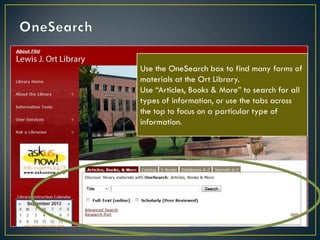
Use the OneSearch box to find many forms of
materials at the Ort Library.
Use “Articles, Books & More” to search for all
types of information, or use the tabs across
the top to focus on a particular type of
information.
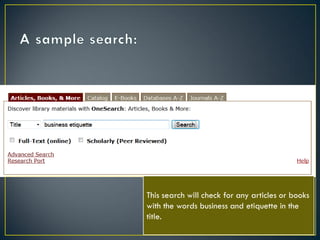
This search will check for any articles or books
with the words business and etiquette in the
title.
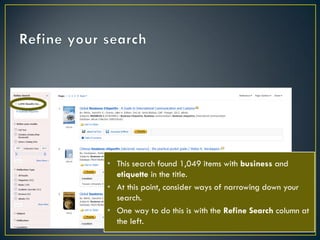
• This search found 1,049 items with business and
etiquette in the title.
• At this point, consider ways of narrowing down your
search.
• One way to do this is with the Refine Search column at
the left.


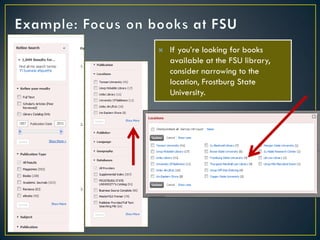
If you’re looking for books
available at the FSU library,
consider narrowing to the
location, Frostburg State
University.


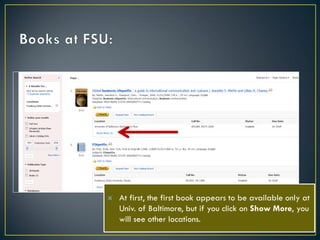
At first, the first book appears to be available only at
Univ. of Baltimore, but if you click on Show More, you
will see other locations.




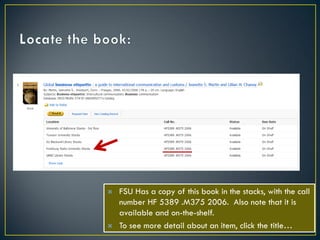
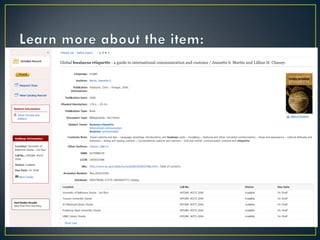
FSU Has a copy of this book in the stacks, with the call
number HF 5389 .M375 2006. Also note that it is
available and on-the-shelf.
To see more detail about an item, click the title…
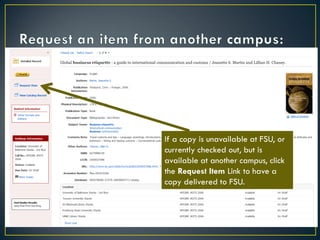
If a copy is unavailable at FSU, or
currently checked out, but is
available at another campus, click
the Request Item Link to have a
copy delivered to FSU.
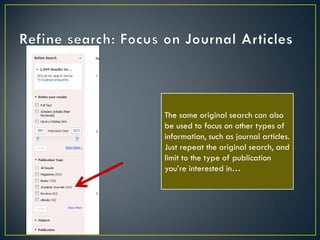
The same original search can also
be used to focus on other types of
information, such as journal articles.
Just repeat the original search, and
limit to the type of publication
you’re interested in…
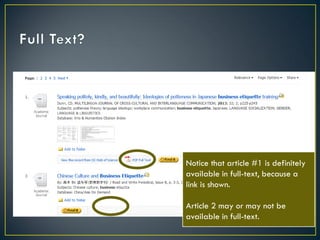
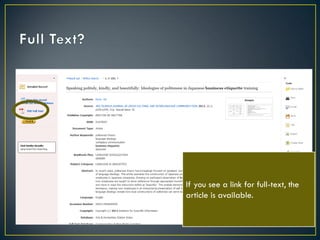
Notice that article #1 is definitely
available in full-text, because a
link is shown.
Article 2 may or may not be
available in full-text.
If you see a link for full-text, the
article is available.
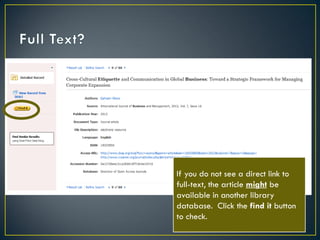
If you do not see a direct link to
full-text, the article might be
available in another library
database. Click the find it button
to check.
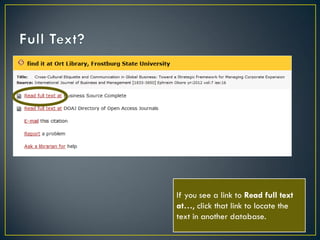
If you see a link to Read full text
at…, click that link to locate the
text in another database.
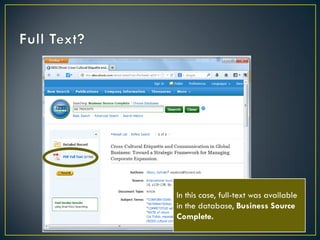
In this case, full-text was available
in the database, Business Source
Complete.
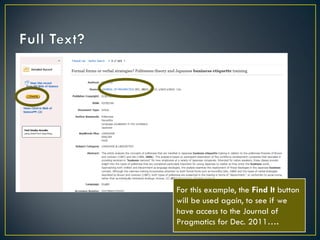
For this example, the Find It button
will be used again, to see if we
have access to the Journal of
Pragmatics for Dec. 2011….
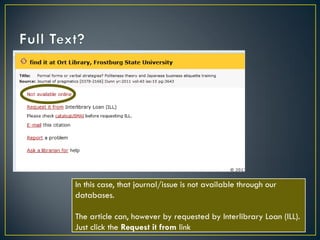
In this case, that journal/issue is not available through our
databases.
The article can, however by requested by Interlibrary Loan (ILL).
Just click the Request it from link
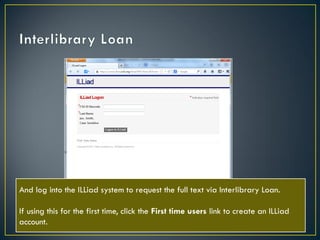
And log into the ILLiad system to request the full text via Interlibrary Loan.
If using this for the first time, click the First time users link to create an ILLiad
account.
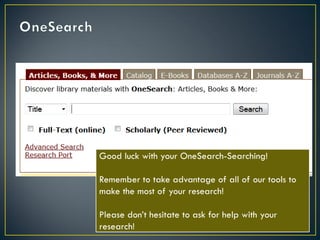
Good luck with your OneSearch-Searching!
Remember to take advantage of all of our tools to
make the most of your research!
Please don’t hesitate to ask for help with your
research!

One search basics

  • 1.
    Introductory Tour ofOneSearch Features
  • 2.
    Use the OneSearchbox to find many forms of materials at the Ort Library. Use “Articles, Books & More” to search for all types of information, or use the tabs across the top to focus on a particular type of information.
  • 3.
    This search willcheck for any articles or books with the words business and etiquette in the title.
  • 4.
    • This searchfound 1,049 items with business and etiquette in the title. • At this point, consider ways of narrowing down your search. • One way to do this is with the Refine Search column at the left.
  • 5.
     If you’re lookingfor books available at the FSU library, consider narrowing to the location, Frostburg State University.
  • 6.
     At first, thefirst book appears to be available only at Univ. of Baltimore, but if you click on Show More, you will see other locations.
  • 7.
      FSU Has acopy of this book in the stacks, with the call number HF 5389 .M375 2006. Also note that it is available and on-the-shelf. To see more detail about an item, click the title…
  • 9.
    If a copyis unavailable at FSU, or currently checked out, but is available at another campus, click the Request Item Link to have a copy delivered to FSU.
  • 10.
    The same originalsearch can also be used to focus on other types of information, such as journal articles. Just repeat the original search, and limit to the type of publication you’re interested in…
  • 11.
    Notice that article#1 is definitely available in full-text, because a link is shown. Article 2 may or may not be available in full-text.
  • 12.
    If you seea link for full-text, the article is available.
  • 13.
    If you donot see a direct link to full-text, the article might be available in another library database. Click the find it button to check.
  • 14.
    If you seea link to Read full text at…, click that link to locate the text in another database.
  • 15.
    In this case,full-text was available in the database, Business Source Complete.
  • 16.
    For this example,the Find It button will be used again, to see if we have access to the Journal of Pragmatics for Dec. 2011….
  • 17.
    In this case,that journal/issue is not available through our databases. The article can, however by requested by Interlibrary Loan (ILL). Just click the Request it from link
  • 18.
    And log intothe ILLiad system to request the full text via Interlibrary Loan. If using this for the first time, click the First time users link to create an ILLiad account.
  • 19.
    Good luck withyour OneSearch-Searching! Remember to take advantage of all of our tools to make the most of your research! Please don’t hesitate to ask for help with your research!