
Finding a Scientific Article
when you have the article citation
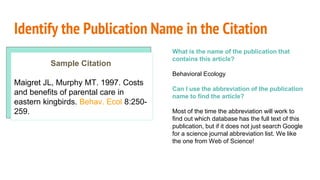
Identify the Publication Name in the Citation
Sample Citation
Maigret JL, Murphy MT. 1997. Costs
and benefits of parental care in
eastern kingbirds. Behav. Ecol 8:250-
259.
What is the name of the publication that
contains this article?
Behavioral Ecology
Can I use the abbreviation of the publication
name to find the article?
Most of the time the abbreviation will work to
find out which database has the full text of this
publication, but if it does not just search Google
for a science journal abbreviation list. We like
the one from Web of Science!
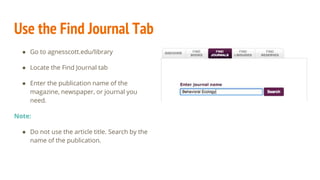
Use the Find Journal Tab
● Go to agnesscott.edu/library
● Locate the Find Journal tab
● Enter the publication name of the
magazine, newspaper, or journal you
need.
Note:
● Do not use the article title. Search by the
name of the publication.
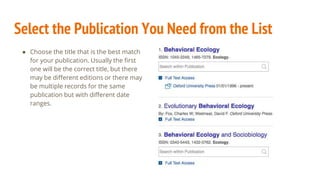
Select the Publication You Need from the List
● Choose the title that is the best match
for your publication. Usually the first
one will be the correct title, but there
may be different editions or there may
be multiple records for the same
publication but with different date
ranges.
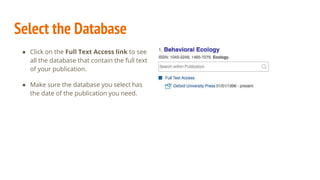
Select the Database
● Click on the Full Text Access link to see
all the database that contain the full text
of your publication.
● Make sure the database you select has
the date of the publication you need.
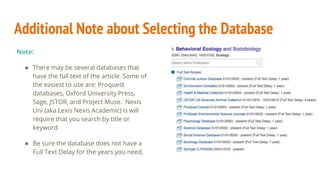
Additional Note about Selecting the Database
Note:
● There may be several databases that
have the full text of the article. Some of
the easiest to use are: Proquest
databases, Oxford University Press,
Sage, JSTOR, and Project Muse. Nexis
Uni (aka Lexis Nexis Academic) is will
require that you search by title or
keyword.
● Be sure the database does not have a
Full Text Delay for the years you need.
Need the GALILEO password?
Log into Moodle > enroll in Library 101 course >
password will be in the center of the screen.
(At this point in the process we thought you might need the GALILEO password so we interrupted this presentation with a brief commercial break!)
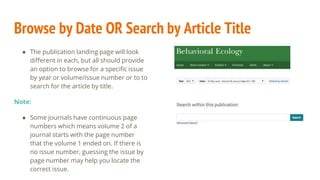
Browse by Date OR Search by Article Title
● The publication landing page will look
different in each, but all should provide
an option to browse for a specific issue
by year or volume/issue number or to to
search for the article by title.
Note:
● Some journals have continuous page
numbers which means volume 2 of a
journal starts with the page number
that the volume 1 ended on. If there is
no issue number, guessing the issue by
page number may help you locate the
correct issue.
That’s It! Need more help?
Email us: library@agnesscott.edu

Finding a Scientific Article

  • 1.
    Finding a ScientificArticle when you have the article citation
  • 2.
    Identify the PublicationName in the Citation Sample Citation Maigret JL, Murphy MT. 1997. Costs and benefits of parental care in eastern kingbirds. Behav. Ecol 8:250- 259. What is the name of the publication that contains this article? Behavioral Ecology Can I use the abbreviation of the publication name to find the article? Most of the time the abbreviation will work to find out which database has the full text of this publication, but if it does not just search Google for a science journal abbreviation list. We like the one from Web of Science!
  • 3.
    Use the FindJournal Tab ● Go to agnesscott.edu/library ● Locate the Find Journal tab ● Enter the publication name of the magazine, newspaper, or journal you need. Note: ● Do not use the article title. Search by the name of the publication.
  • 4.
    Select the PublicationYou Need from the List ● Choose the title that is the best match for your publication. Usually the first one will be the correct title, but there may be different editions or there may be multiple records for the same publication but with different date ranges.
  • 5.
    Select the Database ●Click on the Full Text Access link to see all the database that contain the full text of your publication. ● Make sure the database you select has the date of the publication you need.
  • 6.
    Additional Note aboutSelecting the Database Note: ● There may be several databases that have the full text of the article. Some of the easiest to use are: Proquest databases, Oxford University Press, Sage, JSTOR, and Project Muse. Nexis Uni (aka Lexis Nexis Academic) is will require that you search by title or keyword. ● Be sure the database does not have a Full Text Delay for the years you need.
  • 7.
    Need the GALILEOpassword? Log into Moodle > enroll in Library 101 course > password will be in the center of the screen. (At this point in the process we thought you might need the GALILEO password so we interrupted this presentation with a brief commercial break!)
  • 8.
    Browse by DateOR Search by Article Title ● The publication landing page will look different in each, but all should provide an option to browse for a specific issue by year or volume/issue number or to to search for the article by title. Note: ● Some journals have continuous page numbers which means volume 2 of a journal starts with the page number that the volume 1 ended on. If there is no issue number, guessing the issue by page number may help you locate the correct issue.
  • 9.
    That’s It! Needmore help? Email us: library@agnesscott.edu