Search Guide:

 Searching for an article
that is available from the
  library, but cannot be
       easily found
Introduction
Many articles can be found easily by searching for the article title in the
library’s search box. However, in some cases, the search does not work
as expected and a few more steps are needed to find the article.

These slides will help you find articles that require a few more steps to
access.
What to do when the Article Links to a
Journal Page
If the link to the article takes you to a journal’s page instead of the
article itself, you will need to search for it from the journal’s page.

Here are some tips for doing this type of search.

In this example, we will look for this article:
Moore, J. C. (2012). A Synthesis of Sloan-C Effective Practices. Journal
of Asynchronous Learning Networks, 16(1), 91-115.
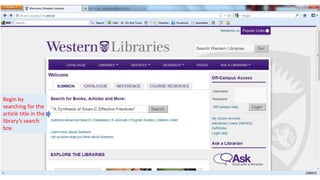
Begin by
searching for the
article title in the
library’s search
box
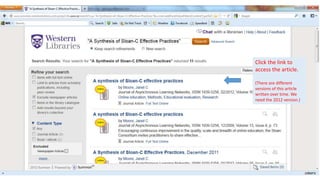
Click the link to
access the article.

(There are different
versions of this article
written over time. We
need the 2012 version.)
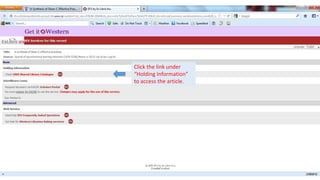
Click the link under
“Holding Information”
to access the article.
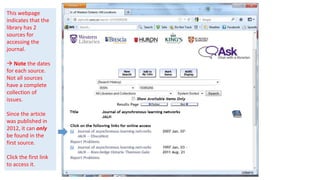
This webpage
indicates that the
library has 2
sources for
accessing the
journal.

 Note the dates
for each source.
Not all sources
have a complete
collection of
issues.

Since the article
was published in
2012, it can only
be found in the
first source.

Click the first link
to access it.
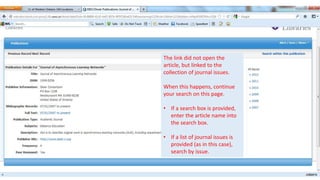
The link did not open the
article, but linked to the
collection of journal issues.

When this happens, continue
your search on this page.

• If a search box is provided,
  enter the article name into
  the search box.

• If a list of journal issues is
  provided (as in this case),
  search by issue.
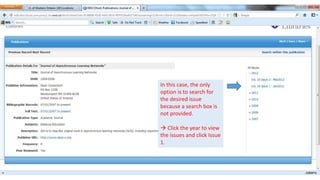
In this case, the only
option is to search for
the desired issue
because a search box is
not provided.

 Click the year to view
the issues and click Issue
1.
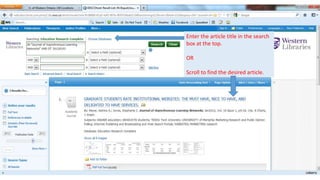
Enter the article title in the search
box at the top.

OR

Scroll to find the desired article.
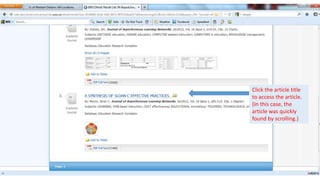
Click the article title
to access the article.
(In this case, the
article was quickly
found by scrolling.)
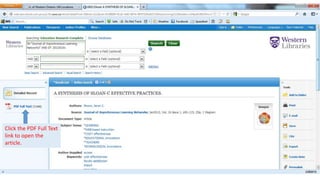
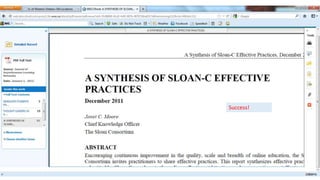
Click the PDF Full Text
link to open the
article.
Success!
Finding Articles Not Listed in the Search
Results
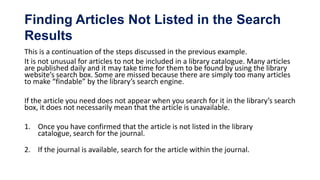
This is a continuation of the steps discussed in the previous example.
It is not unusual for articles to not be included in a library catalogue. Many articles
are published daily and it may take time for them to be found by using the library
website’s search box. Some are missed because there are simply too many articles
to make “findable” by the library’s search engine.

If the article you need does not appear when you search for it in the library’s search
box, it does not necessarily mean that the article is unavailable.

1. Once you have confirmed that the article is not listed in the library
   catalogue, search for the journal.

2. If the journal is available, search for the article within the journal.
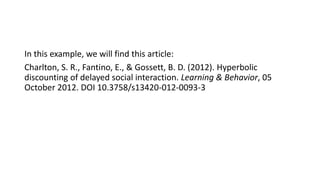
In this example, we will find this article:
Charlton, S. R., Fantino, E., & Gossett, B. D. (2012). Hyperbolic
discounting of delayed social interaction. Learning & Behavior, 05
October 2012. DOI 10.3758/s13420-012-0093-3
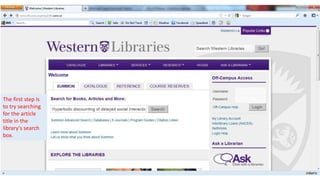
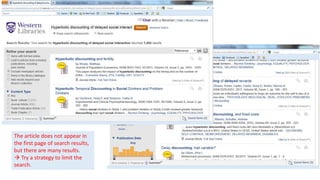
The first step is
to try searching
for the article
title in the
library’s search
box.
The article does not appear in
the first page of search results,
but there are many results.
 Try a strategy to limit the
search.
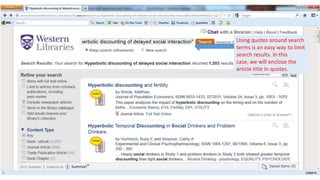
Using quotes around search
terms is an easy way to limit
search results. In this
case, we will enclose the
article title in quotes.
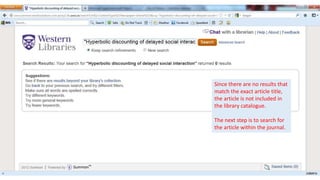
Since there are no results that
match the exact article title,
the article is not included in
the library catalogue.

The next step is to search for
the article within the journal.
Searching for a Journal
Journals that are part of the library’s collection can be found by
searching for the journal title in the same way as for other items.
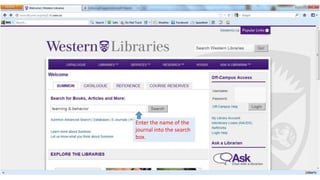
Enter the name of the
journal into the search
box.
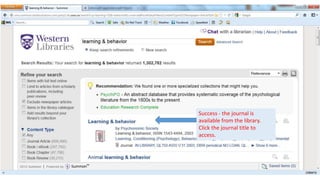
Success - the journal is
available from the library.
Click the journal title to
access.
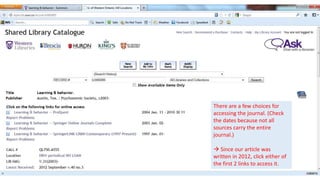
There are a few choices for
accessing the journal. (Check
the dates because not all
sources carry the entire
journal.)

 Since our article was
written in 2012, click either of
the first 2 links to access it.
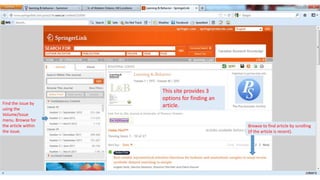
This site provides 3
                     options for finding an
Find the issue by
                     article.
using the
Volume/Issue
menu. Browse for
the article within                            Browse to find article by scrolling
the issue.                                    (if the article is recent).
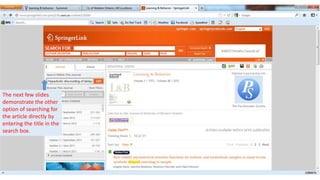
The next few slides
demonstrate the other
option of searching for
the article directly by
entering the title in the
search box.
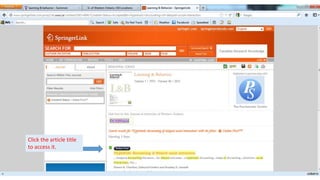
Click the article title
to access it.
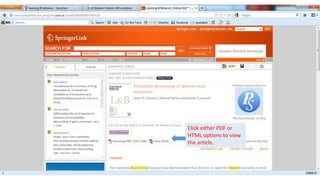
Click either PDF or
HTML options to view
the article.
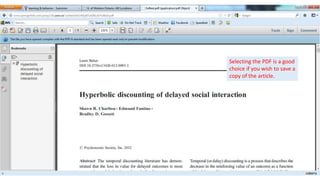
Selecting the PDF is a good
choice if you wish to save a
copy of the article.
Questions?
If you need help or have other questions, do not hesitate to contact the
library. We will be pleased to assist you!


This document was created by: Genny Jon, LIS9751 Fall 2012

Finding Unindexed Journal Articles from a Library Website

  • 1.
    Search Guide: Searchingfor an article that is available from the library, but cannot be easily found
  • 2.
    Introduction Many articles canbe found easily by searching for the article title in the library’s search box. However, in some cases, the search does not work as expected and a few more steps are needed to find the article. These slides will help you find articles that require a few more steps to access.
  • 3.
    What to dowhen the Article Links to a Journal Page If the link to the article takes you to a journal’s page instead of the article itself, you will need to search for it from the journal’s page. Here are some tips for doing this type of search. In this example, we will look for this article: Moore, J. C. (2012). A Synthesis of Sloan-C Effective Practices. Journal of Asynchronous Learning Networks, 16(1), 91-115.
  • 4.
    Begin by searching forthe article title in the library’s search box
  • 5.
    Click the linkto access the article. (There are different versions of this article written over time. We need the 2012 version.)
  • 6.
    Click the linkunder “Holding Information” to access the article.
  • 7.
    This webpage indicates thatthe library has 2 sources for accessing the journal.  Note the dates for each source. Not all sources have a complete collection of issues. Since the article was published in 2012, it can only be found in the first source. Click the first link to access it.
  • 8.
    The link didnot open the article, but linked to the collection of journal issues. When this happens, continue your search on this page. • If a search box is provided, enter the article name into the search box. • If a list of journal issues is provided (as in this case), search by issue.
  • 9.
    In this case,the only option is to search for the desired issue because a search box is not provided.  Click the year to view the issues and click Issue 1.
  • 10.
    Enter the articletitle in the search box at the top. OR Scroll to find the desired article.
  • 11.
    Click the articletitle to access the article. (In this case, the article was quickly found by scrolling.)
  • 12.
    Click the PDFFull Text link to open the article.
  • 13.
  • 14.
    Finding Articles NotListed in the Search Results This is a continuation of the steps discussed in the previous example. It is not unusual for articles to not be included in a library catalogue. Many articles are published daily and it may take time for them to be found by using the library website’s search box. Some are missed because there are simply too many articles to make “findable” by the library’s search engine. If the article you need does not appear when you search for it in the library’s search box, it does not necessarily mean that the article is unavailable. 1. Once you have confirmed that the article is not listed in the library catalogue, search for the journal. 2. If the journal is available, search for the article within the journal.
  • 15.
    In this example,we will find this article: Charlton, S. R., Fantino, E., & Gossett, B. D. (2012). Hyperbolic discounting of delayed social interaction. Learning & Behavior, 05 October 2012. DOI 10.3758/s13420-012-0093-3
  • 16.
    The first stepis to try searching for the article title in the library’s search box.
  • 17.
    The article doesnot appear in the first page of search results, but there are many results.  Try a strategy to limit the search.
  • 18.
    Using quotes aroundsearch terms is an easy way to limit search results. In this case, we will enclose the article title in quotes.
  • 19.
    Since there areno results that match the exact article title, the article is not included in the library catalogue. The next step is to search for the article within the journal.
  • 20.
    Searching for aJournal Journals that are part of the library’s collection can be found by searching for the journal title in the same way as for other items.
  • 21.
    Enter the nameof the journal into the search box.
  • 22.
    Success - thejournal is available from the library. Click the journal title to access.
  • 23.
    There are afew choices for accessing the journal. (Check the dates because not all sources carry the entire journal.)  Since our article was written in 2012, click either of the first 2 links to access it.
  • 24.
    This site provides3 options for finding an Find the issue by article. using the Volume/Issue menu. Browse for the article within Browse to find article by scrolling the issue. (if the article is recent).
  • 25.
    The next fewslides demonstrate the other option of searching for the article directly by entering the title in the search box.
  • 26.
    Click the articletitle to access it.
  • 27.
    Click either PDFor HTML options to view the article.
  • 28.
    Selecting the PDFis a good choice if you wish to save a copy of the article.
  • 29.
    Questions? If you needhelp or have other questions, do not hesitate to contact the library. We will be pleased to assist you! This document was created by: Genny Jon, LIS9751 Fall 2012