I found a great article, now how do I
          get the full text?
       Six Simple Steps
    to Answering This Question
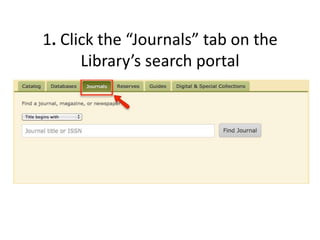
1. Click the “Journals” tab on the
      Library’s search portal
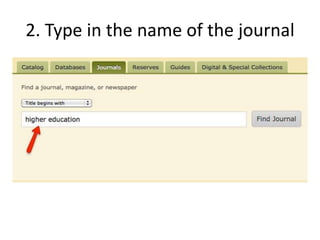
2. Type in the name of the journal
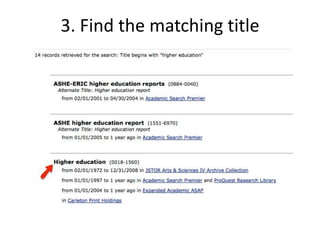
3. Find the matching title
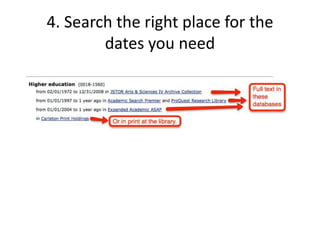
4. Search the right place for the
        dates you need
5. Or, use shortcuts.
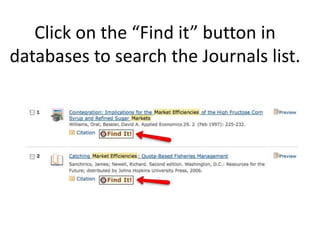
Click on the “Find it” button in
databases to search the Journals list.
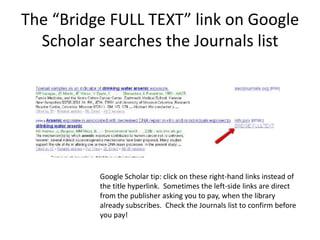
The “Bridge FULL TEXT” link on Google
  Scholar searches the Journals list


          Google Scholar tip: click on these right-hand links instead of
          the title hyperlink. Sometimes the left-side links are direct
          from the publisher asking you to pay, when the library
          already subscribes. Check the Journals list to confirm before
          you pay!
What if Carleton or St. Olaf doesn’t
           have a copy?
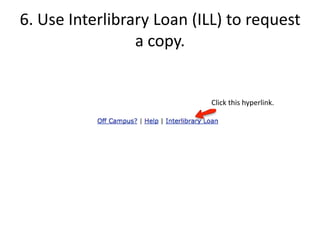
6. Use Interlibrary Loan (ILL) to request
                 a copy.


                           Click this hyperlink.
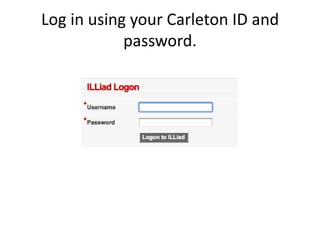
Log in using your Carleton ID and
            password.
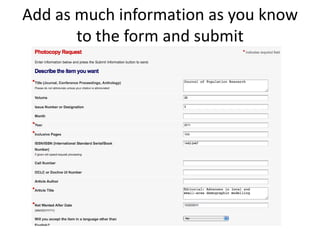
Add as much information as you know
       to the form and submit
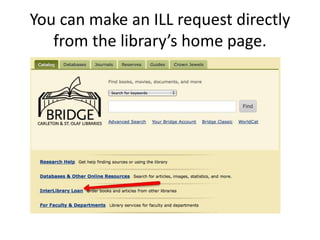
You can make an ILL request directly
   from the library’s home page.
ILL FAQs
• How do I request an article?
    – An article is called a photocopy (because it will be copied from a
      journal).
• How will I get it?
    – You’ll be emailed when your request arrives. Articles are usually
      photocopied and sent electronically as PDFs, and available in your ILL
      account. Books will be at the circulation desk.
• How long will it take?
    – We participate in a big network of libraries and we can often obtain
      items pretty quickly.
    – Sometimes within a few days for articles, within a week for books.
    – But unusual items can take a lot longer so leave yourself plenty of
      time, particularly for big projects.
Questions?
• Ask a reference librarian at the Research/IT Desk
• Ask your liaison librarian


                Happy researching!

Find a journal article

  • 1.
    I found agreat article, now how do I get the full text? Six Simple Steps to Answering This Question
  • 2.
    1. Click the“Journals” tab on the Library’s search portal
  • 3.
    2. Type inthe name of the journal
  • 4.
    3. Find thematching title
  • 5.
    4. Search theright place for the dates you need
  • 6.
    5. Or, useshortcuts.
  • 7.
    Click on the“Find it” button in databases to search the Journals list.
  • 8.
    The “Bridge FULLTEXT” link on Google Scholar searches the Journals list Google Scholar tip: click on these right-hand links instead of the title hyperlink. Sometimes the left-side links are direct from the publisher asking you to pay, when the library already subscribes. Check the Journals list to confirm before you pay!
  • 9.
    What if Carletonor St. Olaf doesn’t have a copy?
  • 10.
    6. Use InterlibraryLoan (ILL) to request a copy. Click this hyperlink.
  • 11.
    Log in usingyour Carleton ID and password.
  • 12.
    Add as muchinformation as you know to the form and submit
  • 13.
    You can makean ILL request directly from the library’s home page.
  • 14.
    ILL FAQs • Howdo I request an article? – An article is called a photocopy (because it will be copied from a journal). • How will I get it? – You’ll be emailed when your request arrives. Articles are usually photocopied and sent electronically as PDFs, and available in your ILL account. Books will be at the circulation desk. • How long will it take? – We participate in a big network of libraries and we can often obtain items pretty quickly. – Sometimes within a few days for articles, within a week for books. – But unusual items can take a lot longer so leave yourself plenty of time, particularly for big projects.
  • 15.
    Questions? • Ask areference librarian at the Research/IT Desk • Ask your liaison librarian Happy researching!