FINDING SCHOLARLY, 
FULL-TEXT NURSING 
ARTICLES IN LIBRARY 
DATABASES 
Forsyth Library, Fort Hays State University
How to focus your search 
Most databases 
have a way for 
you to limit your 
search so you 
only find articles 
of a certain 
type, such as 
Peer-Reviewed 
(also called 
Scholarly or 
Refereed) or 
Full-text (the 
complete article 
is available). 
 This presentation will show where to 
find and use these limits in various 
nursing and public databases.
How to access the Nursing databases 
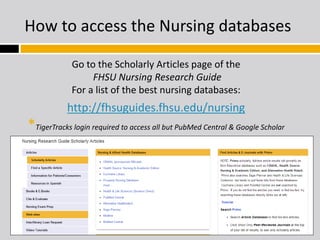
Go to the Scholarly Articles page of the 
FHSU Nursing Research Guide 
For a list of the best nursing databases: 
http://fhsuguides.fhsu.edu/nursing 
*TigerTracks login required to access all but PubMed Central & Google Scholar
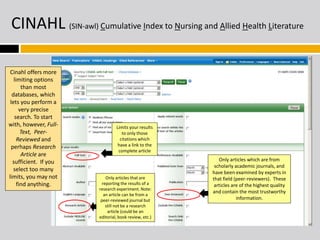
CINAHL (SIN-awl) Cumulative Index to Nursing and Allied Health Literature 
Cinahl offers more 
limiting options 
than most 
databases, which 
lets you perform a 
very precise 
search. To start 
with, however, Full- 
Text, Peer- 
Reviewed and 
perhaps Research 
Article are 
sufficient. If you 
select too many 
limits, you may not 
find anything. 
Limits your results 
to only those 
citations which 
have a link to the 
complete article 
Only articles that are 
reporting the results of a 
research experiment. Note: 
an article can be from a 
peer-reviewed journal but 
still not be a research 
article (could be an 
editorial, book review, etc.) 
Only articles which are from 
scholarly academic journals, and 
have been examined by experts in 
that field (peer-reviewers). These 
articles are of the highest quality 
and contain the most trustworthy 
information.
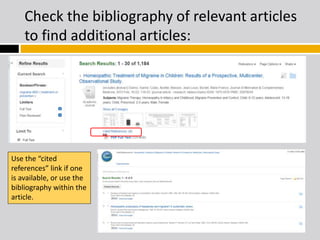
Check the bibliography of relevant articles 
to find additional articles: 
Use the “cited 
references” link if one 
is available, or use the 
bibliography within the 
article.
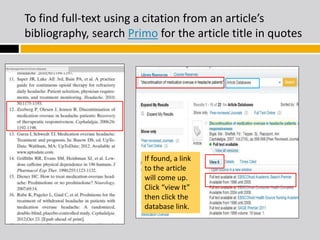
To find full-text using a citation from an article’s 
bibliography, search Primo for the article title in quotes 
If found, a link 
to the article 
will come up. 
Click “view It” 
then click the 
database link.
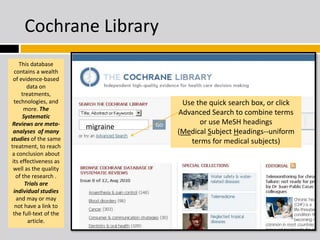
Cochrane Library 
This database 
contains a wealth 
of evidence-based 
data on 
treatments, 
technologies, and 
more. The 
Systematic 
Reviews are meta-analyses 
of many 
studies of the same 
treatment, to reach 
a conclusion about 
its effectiveness as 
well as the quality 
of the research . 
Trials are 
individual studies 
and may or may 
not have a link to 
the full-text of the 
article. 
Use the quick search box, or click 
Advanced Search to combine terms 
or use MeSH headings 
(Medical Subject Headings--uniform 
terms for medical subjects) 
migraine
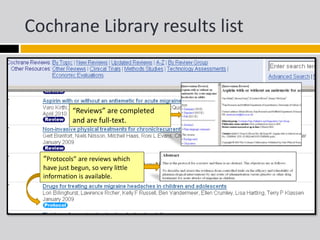
Cochrane Library results list 
“Reviews” are completed 
and are full-text. 
“Protocols” are reviews which 
have just begun, so very little 
information is available.
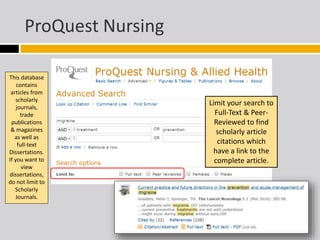
ProQuest Nursing 
This database 
contains 
articles from 
scholarly 
journals, 
trade 
publications 
& magazines 
as well as 
full-text 
Dissertations. 
If you want to 
view 
dissertations, 
do not limit to 
Scholarly 
Journals. 
Limit your search to 
Full-Text & Peer- 
Reviewed to find 
scholarly article 
citations which 
have a link to the 
complete article.
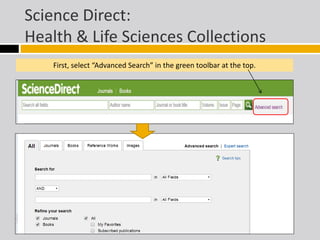
Science Direct: 
Health & Life Sciences Collections 
First, select “Advanced Search” in the green toolbar at the top.
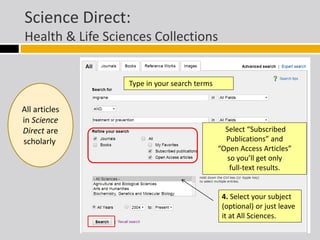
Science Direct: 
Health & Life Sciences Collections 
Type in your search terms 
Select “Subscribed 
Publications” and 
“Open Access Articles” 
so you’ll get only 
full-text results. 
4. Select your subject 
(optional) or just leave 
it at All Sciences. 
All articles 
in Science 
Direct are 
scholarly.
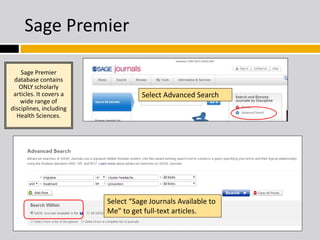
Sage Premier 
Select Advanced Search 
Sage Premier 
database contains 
ONLY scholarly 
articles. It covers a 
wide range of 
disciplines, including 
Health Sciences. 
Select “Sage Journals Available to 
Me” to get full-text articles. 
or
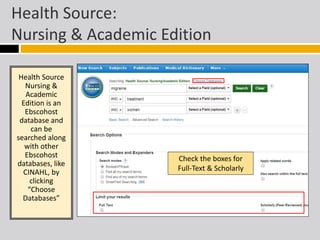
Health Source: 
Nursing & Academic Edition 
Health Source 
Nursing & 
Academic 
Edition is an 
Ebscohost 
database and 
can be 
searched along 
with other 
Ebscohost 
databases, like 
CINAHL, by 
clicking 
“Choose 
Databases” 
Check the boxes for 
Full-Text & Scholarly
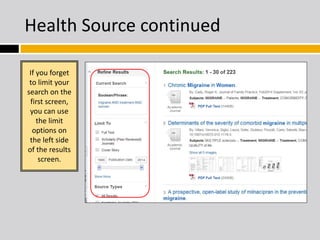
Health Source continued 
If you forget 
to limit your 
search on the 
first screen, 
you can use 
the limit 
options on 
the left side 
of the results 
screen.
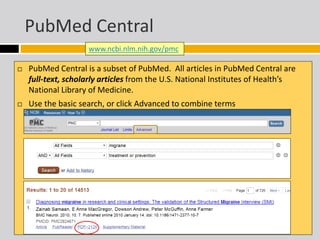
PubMed Central 
www.ncbi.nlm.nih.gov/pmc 
 PubMed Central is a subset of PubMed. All articles in PubMed Central are 
full-text, scholarly articles from the U.S. National Institutes of Health’s 
National Library of Medicine. 
 Use the basic search, or click Advanced to combine terms
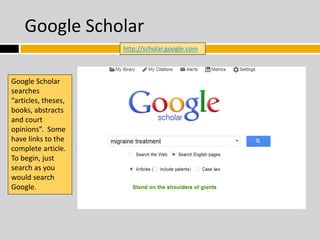
Google Scholar 
Google Scholar 
searches 
“articles, theses, 
books, abstracts 
and court 
opinions”. Some 
have links to the 
complete article. 
To begin, just 
search as you 
would search 
Google. 
http://scholar.google.com
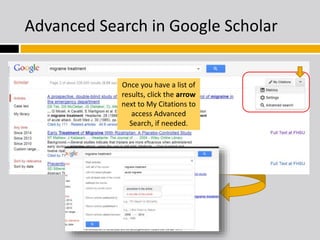
Advanced Search in Google Scholar 
Once you have a list of 
results, click the arrow 
next to My Citations to 
access Advanced 
Search, if needed.
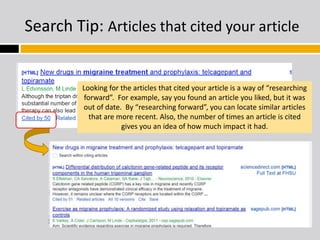
Search Tip: Articles that cited your article 
Looking for the articles that cited your article is a way of “researching 
forward”. For example, say you found an article you liked, but it was 
out of date. By “researching forward”, you can locate similar articles 
that are more recent. Also, the number of times an article is cited 
gives you an idea of how much impact it had.
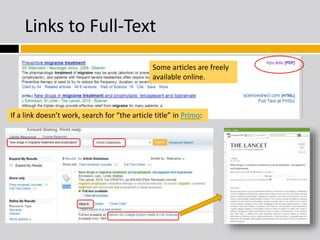
Links to Full-Text 
Some articles are freely 
available online. 
If a link doesn’t work, search for “the article title” in Primo:
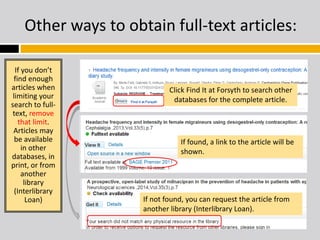
Other ways to obtain full-text articles: 
If you don’t 
find enough 
articles when 
limiting your 
search to full-text, 
remove 
that limit. 
Articles may 
be available 
in other 
databases, in 
print, or from 
another 
library 
(Interlibrary 
Loan) 
Click Find It at Forsyth to search other 
databases for the complete article. 
If found, a link to the article will be 
shown. 
If not found, you can request the article from 
another library (Interlibrary Loan).
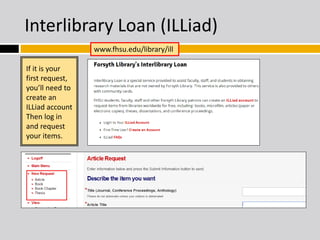
Interlibrary Loan (ILLiad) 
If it is your 
first request, 
you’ll need to 
create an 
ILLiad account 
Then log in 
and request 
your items. 
www.fhsu.edu/library/ill
Questions? Just ask! 
Forsyth Library 
Fort Hays State University 
785-628-4434 
refserv@fhsu.edu 
Presentation created by MaryAlice Wade, Teaching & Research Librarian, 
Forsyth Library, Fort Hays State University, Hays, KS 2014

Finding scholarly nursing articles

  • 1.
    FINDING SCHOLARLY, FULL-TEXTNURSING ARTICLES IN LIBRARY DATABASES Forsyth Library, Fort Hays State University
  • 2.
    How to focusyour search Most databases have a way for you to limit your search so you only find articles of a certain type, such as Peer-Reviewed (also called Scholarly or Refereed) or Full-text (the complete article is available).  This presentation will show where to find and use these limits in various nursing and public databases.
  • 3.
    How to accessthe Nursing databases Go to the Scholarly Articles page of the FHSU Nursing Research Guide For a list of the best nursing databases: http://fhsuguides.fhsu.edu/nursing *TigerTracks login required to access all but PubMed Central & Google Scholar
  • 4.
    CINAHL (SIN-awl) CumulativeIndex to Nursing and Allied Health Literature Cinahl offers more limiting options than most databases, which lets you perform a very precise search. To start with, however, Full- Text, Peer- Reviewed and perhaps Research Article are sufficient. If you select too many limits, you may not find anything. Limits your results to only those citations which have a link to the complete article Only articles that are reporting the results of a research experiment. Note: an article can be from a peer-reviewed journal but still not be a research article (could be an editorial, book review, etc.) Only articles which are from scholarly academic journals, and have been examined by experts in that field (peer-reviewers). These articles are of the highest quality and contain the most trustworthy information.
  • 5.
    Check the bibliographyof relevant articles to find additional articles: Use the “cited references” link if one is available, or use the bibliography within the article.
  • 6.
    To find full-textusing a citation from an article’s bibliography, search Primo for the article title in quotes If found, a link to the article will come up. Click “view It” then click the database link.
  • 7.
    Cochrane Library Thisdatabase contains a wealth of evidence-based data on treatments, technologies, and more. The Systematic Reviews are meta-analyses of many studies of the same treatment, to reach a conclusion about its effectiveness as well as the quality of the research . Trials are individual studies and may or may not have a link to the full-text of the article. Use the quick search box, or click Advanced Search to combine terms or use MeSH headings (Medical Subject Headings--uniform terms for medical subjects) migraine
  • 8.
    Cochrane Library resultslist “Reviews” are completed and are full-text. “Protocols” are reviews which have just begun, so very little information is available.
  • 9.
    ProQuest Nursing Thisdatabase contains articles from scholarly journals, trade publications & magazines as well as full-text Dissertations. If you want to view dissertations, do not limit to Scholarly Journals. Limit your search to Full-Text & Peer- Reviewed to find scholarly article citations which have a link to the complete article.
  • 10.
    Science Direct: Health& Life Sciences Collections First, select “Advanced Search” in the green toolbar at the top.
  • 11.
    Science Direct: Health& Life Sciences Collections Type in your search terms Select “Subscribed Publications” and “Open Access Articles” so you’ll get only full-text results. 4. Select your subject (optional) or just leave it at All Sciences. All articles in Science Direct are scholarly.
  • 12.
    Sage Premier SelectAdvanced Search Sage Premier database contains ONLY scholarly articles. It covers a wide range of disciplines, including Health Sciences. Select “Sage Journals Available to Me” to get full-text articles. or
  • 13.
    Health Source: Nursing& Academic Edition Health Source Nursing & Academic Edition is an Ebscohost database and can be searched along with other Ebscohost databases, like CINAHL, by clicking “Choose Databases” Check the boxes for Full-Text & Scholarly
  • 14.
    Health Source continued If you forget to limit your search on the first screen, you can use the limit options on the left side of the results screen.
  • 15.
    PubMed Central www.ncbi.nlm.nih.gov/pmc  PubMed Central is a subset of PubMed. All articles in PubMed Central are full-text, scholarly articles from the U.S. National Institutes of Health’s National Library of Medicine.  Use the basic search, or click Advanced to combine terms
  • 16.
    Google Scholar GoogleScholar searches “articles, theses, books, abstracts and court opinions”. Some have links to the complete article. To begin, just search as you would search Google. http://scholar.google.com
  • 17.
    Advanced Search inGoogle Scholar Once you have a list of results, click the arrow next to My Citations to access Advanced Search, if needed.
  • 18.
    Search Tip: Articlesthat cited your article Looking for the articles that cited your article is a way of “researching forward”. For example, say you found an article you liked, but it was out of date. By “researching forward”, you can locate similar articles that are more recent. Also, the number of times an article is cited gives you an idea of how much impact it had.
  • 19.
    Links to Full-Text Some articles are freely available online. If a link doesn’t work, search for “the article title” in Primo:
  • 20.
    Other ways toobtain full-text articles: If you don’t find enough articles when limiting your search to full-text, remove that limit. Articles may be available in other databases, in print, or from another library (Interlibrary Loan) Click Find It at Forsyth to search other databases for the complete article. If found, a link to the article will be shown. If not found, you can request the article from another library (Interlibrary Loan).
  • 21.
    Interlibrary Loan (ILLiad) If it is your first request, you’ll need to create an ILLiad account Then log in and request your items. www.fhsu.edu/library/ill
  • 22.
    Questions? Just ask! Forsyth Library Fort Hays State University 785-628-4434 refserv@fhsu.edu Presentation created by MaryAlice Wade, Teaching & Research Librarian, Forsyth Library, Fort Hays State University, Hays, KS 2014