Notepad
Notepad is a basic text editorNotepad is a basic text editor
you can use for creating simpleyou can use for creating simple
documents or for creating Webdocuments or for creating Web
pages and any kind of file withpages and any kind of file with
given extension.given extension.
File Edit Format View Help
A PROPERTY OF P.YAR.B COMPLEX
How to Open Notepad?
A PROPERTY OF P.YAR.B COMPLEX
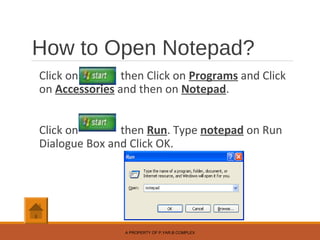
Click on then Click on Programs and Click
on Accessories and then on Notepad.
Click on then Run. Type notepad on Run
Dialogue Box and Click OK.
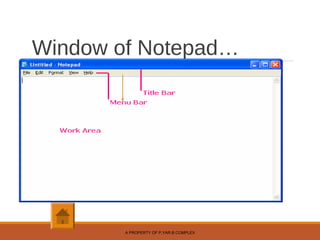
Window of Notepad…
A PROPERTY OF P.YAR.B COMPLEX
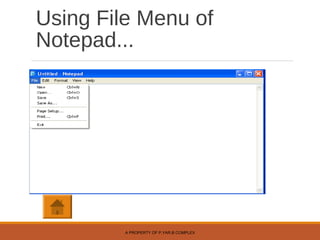
Using File Menu of
Notepad...
A PROPERTY OF P.YAR.B COMPLEX
File Menu….
i. New – This option is used to Create New File.
Shortcut for this option is CTRL+N.
A PROPERTY OF P.YAR.B COMPLEX
File Menu….
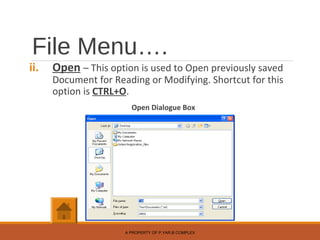
ii. Open – This option is used to Open previously saved
Document for Reading or Modifying. Shortcut for this
option is CTRL+O.
Open Dialogue Box
A PROPERTY OF P.YAR.B COMPLEX
File Menu….
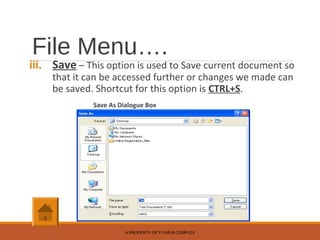
iii. Save – This option is used to Save current document so
that it can be accessed further or changes we made can
be saved. Shortcut for this option is CTRL+S.
Save As Dialogue Box
A PROPERTY OF P.YAR.B COMPLEX
File Menu….
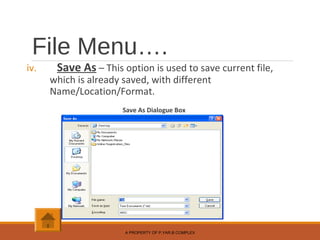
iv. Save As – This option is used to save current file,
which is already saved, with different
Name/Location/Format.
Save As Dialogue Box
A PROPERTY OF P.YAR.B COMPLEX
File Menu….
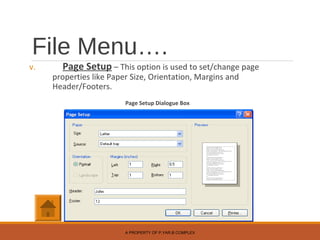
v. Page Setup – This option is used to set/change page
properties like Paper Size, Orientation, Margins and
Header/Footers.
Page Setup Dialogue Box
A PROPERTY OF P.YAR.B COMPLEX
File Menu….
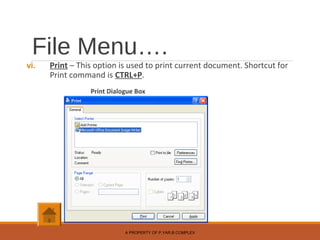
vi. Print – This option is used to print current document. Shortcut for
Print command is CTRL+P.
Print Dialogue Box
A PROPERTY OF P.YAR.B COMPLEX
File Menu….
vii. Exit – This command terminate Notepad.
Shortcut for This command is ALT+F4.
A PROPERTY OF P.YAR.B COMPLEX
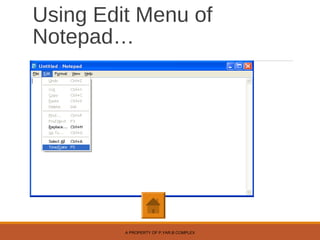
Using Edit Menu of
Notepad…
A PROPERTY OF P.YAR.B COMPLEX
Edit Menu….
1. Undo – This command is used to cancel your last action
within program. Shortcut for this command is CTRL+Z.
2. Cut-Paste – This command is used to move selected text
to cursor point. The information is removed from the
original place and is placed in its new location. Shortcut
for this command is CTRL+X.
3. Copy-Paste – This command is used to copy selected
text from one place to another place. While using Copy
original text remains at its place. Shortcut for this
command is CTRL+C.
A PROPERTY OF P.YAR.B COMPLEX
Edit Menu….
4. Paste – This command is used to insert previously
copied/cut text at cursor point. Shortcut for this
command is CTRL+V.
5. Delete – This command removes selected text from
document. Such action can be undo. Shortcut for Delete
command is Del Key of keyboard.
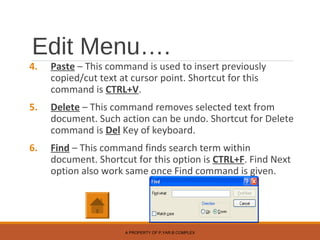
6. Find – This command finds search term within
document. Shortcut for this option is CTRL+F. Find Next
option also work same once Find command is given.
A PROPERTY OF P.YAR.B COMPLEX
Edit Menu….
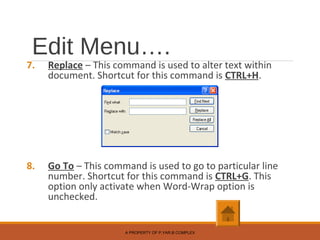
7. Replace – This command is used to alter text within
document. Shortcut for this command is CTRL+H.
8. Go To – This command is used to go to particular line
number. Shortcut for this command is CTRL+G. This
option only activate when Word-Wrap option is
unchecked.
A PROPERTY OF P.YAR.B COMPLEX
Edit Menu….
9. Select All – This command selects/high-lights
whole document. Shortcut for this option is
CTRL+A.
10. Time/Date – This option is for inserting current
date and time in document. Shortcut for this
option is F5 key. This is static value.
A PROPERTY OF P.YAR.B COMPLEX
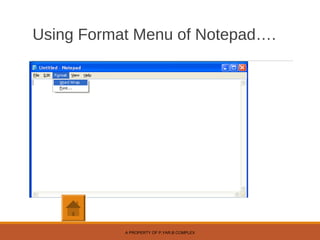
Using Format Menu of Notepad….
A PROPERTY OF P.YAR.B COMPLEX
Format Menu….
1. Word Wrap – This setting controls whether text is
wrapped onto the next line when the screen in full in
Notepad.
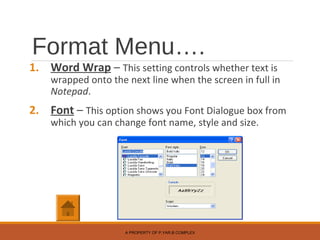
2. Font – This option shows you Font Dialogue box from
which you can change font name, style and size.
A PROPERTY OF P.YAR.B COMPLEX
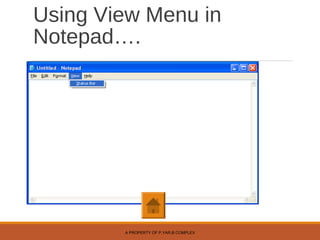
Using View Menu in
Notepad….
A PROPERTY OF P.YAR.B COMPLEX
View Menu….
1. Status Bar – This option is used to Show/Hide Status Bar. This
option is activated only when Word-Wrap option is unchecked.
A PROPERTY OF P.YAR.B COMPLEX
Using Help Menu of
Notepad….
1. Topic Help – When we click on this option Help Document for
Notepad opens. We can search topic and view indexed help topics.
2. About Notepad – This is information about software.
A PROPERTY OF P.YAR.B COMPLEX

Notepad

  • 1.
    Notepad Notepad is abasic text editorNotepad is a basic text editor you can use for creating simpleyou can use for creating simple documents or for creating Webdocuments or for creating Web pages and any kind of file withpages and any kind of file with given extension.given extension. File Edit Format View Help A PROPERTY OF P.YAR.B COMPLEX
  • 2.
    How to OpenNotepad? A PROPERTY OF P.YAR.B COMPLEX Click on then Click on Programs and Click on Accessories and then on Notepad. Click on then Run. Type notepad on Run Dialogue Box and Click OK.
  • 3.
    Window of Notepad… APROPERTY OF P.YAR.B COMPLEX
  • 4.
    Using File Menuof Notepad... A PROPERTY OF P.YAR.B COMPLEX
  • 5.
    File Menu…. i. New– This option is used to Create New File. Shortcut for this option is CTRL+N. A PROPERTY OF P.YAR.B COMPLEX
  • 6.
    File Menu…. ii. Open– This option is used to Open previously saved Document for Reading or Modifying. Shortcut for this option is CTRL+O. Open Dialogue Box A PROPERTY OF P.YAR.B COMPLEX
  • 7.
    File Menu…. iii. Save– This option is used to Save current document so that it can be accessed further or changes we made can be saved. Shortcut for this option is CTRL+S. Save As Dialogue Box A PROPERTY OF P.YAR.B COMPLEX
  • 8.
    File Menu…. iv. SaveAs – This option is used to save current file, which is already saved, with different Name/Location/Format. Save As Dialogue Box A PROPERTY OF P.YAR.B COMPLEX
  • 9.
    File Menu…. v. PageSetup – This option is used to set/change page properties like Paper Size, Orientation, Margins and Header/Footers. Page Setup Dialogue Box A PROPERTY OF P.YAR.B COMPLEX
  • 10.
    File Menu…. vi. Print– This option is used to print current document. Shortcut for Print command is CTRL+P. Print Dialogue Box A PROPERTY OF P.YAR.B COMPLEX
  • 11.
    File Menu…. vii. Exit– This command terminate Notepad. Shortcut for This command is ALT+F4. A PROPERTY OF P.YAR.B COMPLEX
  • 12.
    Using Edit Menuof Notepad… A PROPERTY OF P.YAR.B COMPLEX
  • 13.
    Edit Menu…. 1. Undo– This command is used to cancel your last action within program. Shortcut for this command is CTRL+Z. 2. Cut-Paste – This command is used to move selected text to cursor point. The information is removed from the original place and is placed in its new location. Shortcut for this command is CTRL+X. 3. Copy-Paste – This command is used to copy selected text from one place to another place. While using Copy original text remains at its place. Shortcut for this command is CTRL+C. A PROPERTY OF P.YAR.B COMPLEX
  • 14.
    Edit Menu…. 4. Paste– This command is used to insert previously copied/cut text at cursor point. Shortcut for this command is CTRL+V. 5. Delete – This command removes selected text from document. Such action can be undo. Shortcut for Delete command is Del Key of keyboard. 6. Find – This command finds search term within document. Shortcut for this option is CTRL+F. Find Next option also work same once Find command is given. A PROPERTY OF P.YAR.B COMPLEX
  • 15.
    Edit Menu…. 7. Replace– This command is used to alter text within document. Shortcut for this command is CTRL+H. 8. Go To – This command is used to go to particular line number. Shortcut for this command is CTRL+G. This option only activate when Word-Wrap option is unchecked. A PROPERTY OF P.YAR.B COMPLEX
  • 16.
    Edit Menu…. 9. SelectAll – This command selects/high-lights whole document. Shortcut for this option is CTRL+A. 10. Time/Date – This option is for inserting current date and time in document. Shortcut for this option is F5 key. This is static value. A PROPERTY OF P.YAR.B COMPLEX
  • 17.
    Using Format Menuof Notepad…. A PROPERTY OF P.YAR.B COMPLEX
  • 18.
    Format Menu…. 1. WordWrap – This setting controls whether text is wrapped onto the next line when the screen in full in Notepad. 2. Font – This option shows you Font Dialogue box from which you can change font name, style and size. A PROPERTY OF P.YAR.B COMPLEX
  • 19.
    Using View Menuin Notepad…. A PROPERTY OF P.YAR.B COMPLEX
  • 20.
    View Menu…. 1. StatusBar – This option is used to Show/Hide Status Bar. This option is activated only when Word-Wrap option is unchecked. A PROPERTY OF P.YAR.B COMPLEX
  • 21.
    Using Help Menuof Notepad…. 1. Topic Help – When we click on this option Help Document for Notepad opens. We can search topic and view indexed help topics. 2. About Notepad – This is information about software. A PROPERTY OF P.YAR.B COMPLEX