@PatrickMcFadin
Patrick McFadin

Chief Evangelist for Apache Spark at DataStax
Double Down with Apache Cassandra
and Spark
1
My Background
…ran into this problem
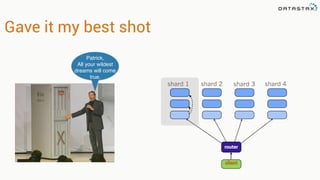
Gave it my best shot
shard 1 shard 2 shard 3 shard 4
router
client
Patrick,
All your wildest
dreams will come
true.
Just add complexity!
A new plan
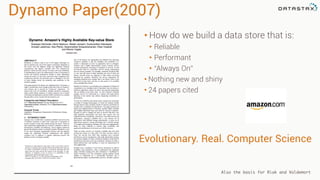
Dynamo Paper(2007)
• How do we build a data store that is:
• Reliable
• Performant
• “Always On”
• Nothing new and shiny
• 24 papers cited
Evolutionary. Real. Computer Science
Also the basis for Riak and Voldemort
BigTable(2006)
• Richer data model
• 1 key. Lots of values
• Fast sequential access
• 38 Papers cited
Cassandra(2008)
• Distributed features of Dynamo
• Data Model and storage from
BigTable
• February 17, 2010 it graduated to
a top-level Apache project
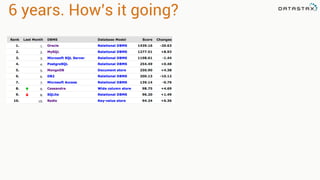
6 years. How’s it going?
Before you get too excited
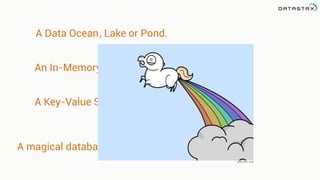
Cassandra is not…
A Data Ocean or Pond., Lake
An In-Memory Database
A Key-Value Store
A magical database unicorn that farts rainbows
When to use…
Loose data model (joins, sub-selects)
Absolute consistency (aka gotta have ACID)
No need to use anything else
You’ll miss the long, candle lit dinners with your
Oracle rep that always end with “what’s your
budget look like this year?”
Oracle, MySQL, Postgres or <RDBMS>
When to use…
Uptime is a top priority
Unpredictable or high scaling requirements
Workload is transactional
Willing to put the time or effort into understanding
how Cassandra works and ow to use it.
Use Oracle when you want to count your money.
Use Cassandra when you want to make money.
Learn to use it right
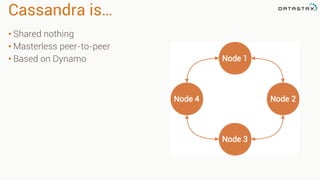
Cassandra is…
• Shared nothing
• Masterless peer-to-peer
• Based on Dynamo
Use Case Example
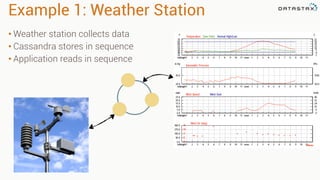
Example 1: Weather Station
• Weather station collects data
• Cassandra stores in sequence
• Application reads in sequence
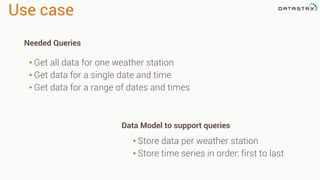
Use case
• Store data per weather station
• Store time series in order: first to last
• Get all data for one weather station
• Get data for a single date and time
• Get data for a range of dates and times
Needed Queries
Data Model to support queries
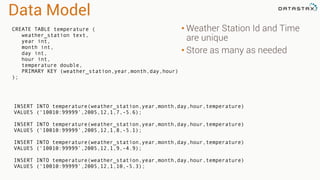
Data Model
• Weather Station Id and Time
are unique
• Store as many as needed
CREATE TABLE temperature (
weather_station text,
year int,
month int,
day int,
hour int,
temperature double,
PRIMARY KEY (weather_station,year,month,day,hour)
);
INSERT INTO temperature(weather_station,year,month,day,hour,temperature)
VALUES (‘10010:99999’,2005,12,1,7,-5.6);
INSERT INTO temperature(weather_station,year,month,day,hour,temperature)
VALUES (‘10010:99999’,2005,12,1,8,-5.1);
INSERT INTO temperature(weather_station,year,month,day,hour,temperature)
VALUES (‘10010:99999’,2005,12,1,9,-4.9);
INSERT INTO temperature(weather_station,year,month,day,hour,temperature)
VALUES (‘10010:99999’,2005,12,1,10,-5.3);
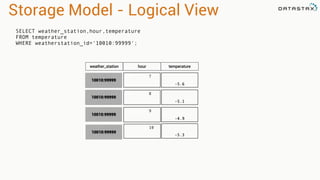
Storage Model - Logical View
2005:12:1:7
-5.6
2005:12:1:8
-5.1
2005:12:1:9
-4.9
SELECT weather_station,hour,temperature
FROM temperature
WHERE weatherstation_id='10010:99999';
10010:99999
10010:99999
10010:99999
weather_station hour temperature
2005:12:1:10
-5.3
10010:99999
2005:12:1:12
-5.4
2005:12:1:11
-4.9-5.3-4.9-5.1
2005:12:1:7
-5.6
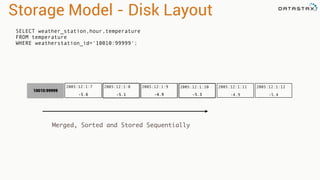
Storage Model - Disk Layout
2005:12:1:8 2005:12:1:9
10010:99999
2005:12:1:10
Merged, Sorted and Stored Sequentially
SELECT weather_station,hour,temperature
FROM temperature
WHERE weatherstation_id='10010:99999';
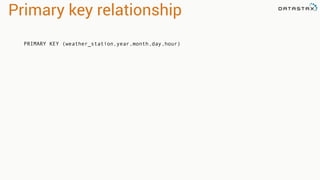
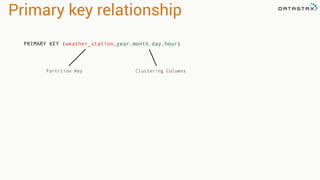
Primary key relationship
PRIMARY KEY (weather_station,year,month,day,hour)
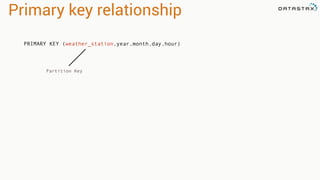
Primary key relationship
PRIMARY KEY (weather_station,year,month,day,hour)
Partition Key
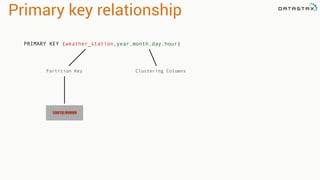
Primary key relationship
PRIMARY KEY (weather_station,year,month,day,hour)
Partition Key Clustering Columns
Primary key relationship
PRIMARY KEY (weather_station,year,month,day,hour)
Partition Key Clustering Columns
10010:99999
2005:12:1:7
-5.6
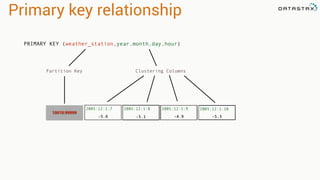
Primary key relationship
PRIMARY KEY (weather_station,year,month,day,hour)
Partition Key Clustering Columns
10010:99999
-5.3-4.9-5.1
2005:12:1:8 2005:12:1:9 2005:12:1:10
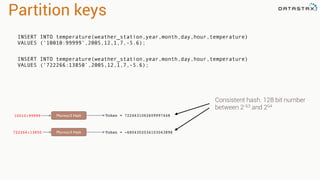
Partition keys
10010:99999 Murmur3 Hash Token = 7224631062609997448
722266:13850 Murmur3 Hash Token = -6804302034103043898
INSERT INTO temperature(weather_station,year,month,day,hour,temperature)
VALUES (‘10010:99999’,2005,12,1,7,-5.6);
INSERT INTO temperature(weather_station,year,month,day,hour,temperature)
VALUES (‘722266:13850’,2005,12,1,7,-5.6);
Consistent hash. 128 bit number
between 2-63 and 264
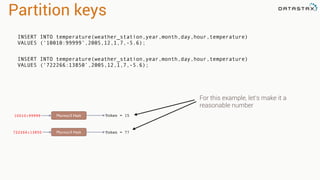
Partition keys
10010:99999 Murmur3 Hash Token = 15
722266:13850 Murmur3 Hash Token = 77
INSERT INTO temperature(weather_station,year,month,day,hour,temperature)
VALUES (‘10010:99999’,2005,12,1,7,-5.6);
INSERT INTO temperature(weather_station,year,month,day,hour,temperature)
VALUES (‘722266:13850’,2005,12,1,7,-5.6);
For this example, let’s make it a
reasonable number
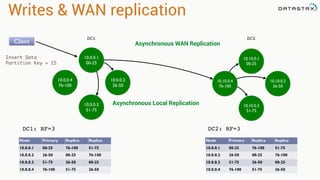
Writes & WAN replication
10.0.0.1
00-25
10.0.0.4
76-100
10.0.0.2
26-50
10.0.0.3
51-75
DC1
DC1: RF=3
Node Primary Replica Replica
10.0.0.1 00-25 76-100 51-75
10.0.0.2 26-50 00-25 76-100
10.0.0.3 51-75 26-50 00-25
10.0.0.4 76-100 51-75 26-50
10.10.0.1
00-25
10.10.0.4
76-100
10.10.0.2
26-50
10.10.0.3
51-75
DC2
Node Primary Replica Replica
10.0.0.1 00-25 76-100 51-75
10.0.0.2 26-50 00-25 76-100
10.0.0.3 51-75 26-50 00-25
10.0.0.4 76-100 51-75 26-50
DC2: RF=3
Client
Insert Data
Partition Key = 15
Asynchronous Local Replication
Asynchronous WAN Replication
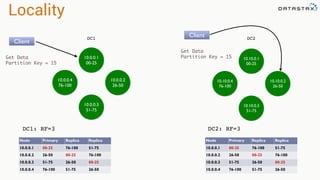
Locality
10.0.0.1
00-25
10.0.0.4
76-100
10.0.0.2
26-50
10.0.0.3
51-75
DC1
DC1: RF=3
Node Primary Replica Replica
10.0.0.1 00-25 76-100 51-75
10.0.0.2 26-50 00-25 76-100
10.0.0.3 51-75 26-50 00-25
10.0.0.4 76-100 51-75 26-50
10.10.0.1
00-25
10.10.0.4
76-100
10.10.0.2
26-50
10.10.0.3
51-75
DC2
Node Primary Replica Replica
10.0.0.1 00-25 76-100 51-75
10.0.0.2 26-50 00-25 76-100
10.0.0.3 51-75 26-50 00-25
10.0.0.4 76-100 51-75 26-50
DC2: RF=3
Client
Get Data
Partition Key = 15
Client
Get Data
Partition Key = 15
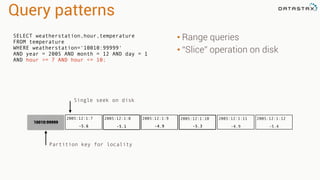
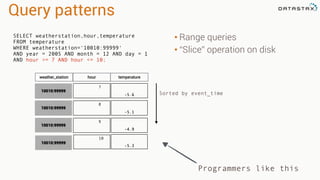
Query patterns
• Range queries
• “Slice” operation on disk
SELECT weatherstation,hour,temperature
FROM temperature
WHERE weatherstation=‘10010:99999'
AND year = 2005 AND month = 12 AND day = 1
AND hour >= 7 AND hour <= 10;
Single seek on disk
2005:12:1:12
-5.4
2005:12:1:11
-4.9-5.3-4.9-5.1
2005:12:1:7
-5.6
2005:12:1:8 2005:12:1:9
10010:99999
2005:12:1:10
Partition key for locality
Query patterns
• Range queries
• “Slice” operation on disk
Programmers like this
Sorted by event_time
2005:12:1:7
-5.6
2005:12:1:8
-5.1
2005:12:1:9
-4.9
10010:99999
10010:99999
10010:99999
weather_station hour temperature
2005:12:1:10
-5.3
10010:99999
SELECT weatherstation,hour,temperature
FROM temperature
WHERE weatherstation=‘10010:99999'
AND year = 2005 AND month = 12 AND day = 1
AND hour >= 7 AND hour <= 10;
Cassandra - Reads
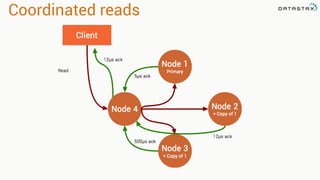
Coordinated reads
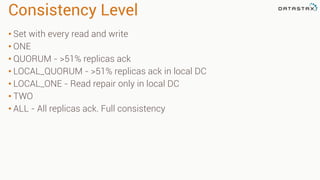
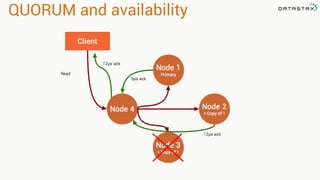
Consistency Level
• Set with every read and write
• ONE
• QUORUM - >51% replicas ack
• LOCAL_QUORUM - >51% replicas ack in local DC
• LOCAL_ONE - Read repair only in local DC
• TWO
• ALL - All replicas ack. Full consistency
QUORUM and availability
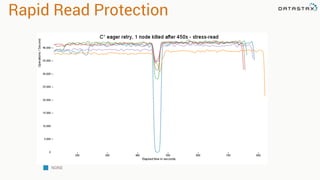
Rapid Read Protection
NONE
Cassandra and Spark
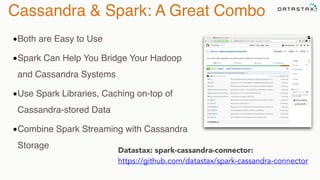
Cassandra & Spark: A Great Combo
Datastax: spark-cassandra-connector:

https://github.com/datastax/spark-cassandra-connector
•Both are Easy to Use
•Spark Can Help You Bridge Your Hadoop
and Cassandra Systems
•Use Spark Libraries, Caching on-top of
Cassandra-stored Data
•Combine Spark Streaming with Cassandra
Storage
Spark On Cassandra
•Server-Side filters (where clauses)
•Cross-table operations (JOIN, UNION, etc.)
•Data locality-aware (speed)
•Data transformation, aggregation, etc.
•Natural Time Series Integration
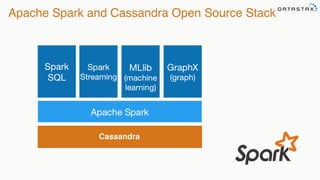
Apache Spark and Cassandra Open Source Stack
Cassandra
Spark Cassandra Connector
42
Spark Cassandra Connector
*Cassandra tables exposed as Spark RDDs
*Read from and write to Cassandra
*Mapping of C* tables and rows to Scala objects
*All Cassandra types supported and converted to Scala types
*Server side data selection
*Virtual Nodes support
*Use with Scala or Java
*Compatible with, Spark 1.1.0, Cassandra 2.1 & 2.0
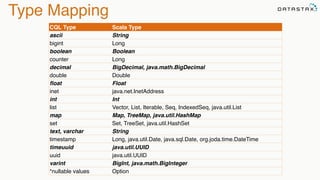
Type Mapping
CQL Type Scala Type
ascii String
bigint Long
boolean Boolean
counter Long
decimal BigDecimal, java.math.BigDecimal
double Double
float Float
inet java.net.InetAddress
int Int
list Vector, List, Iterable, Seq, IndexedSeq, java.util.List
map Map, TreeMap, java.util.HashMap
set Set, TreeSet, java.util.HashSet
text, varchar String
timestamp Long, java.util.Date, java.sql.Date, org.joda.time.DateTime
timeuuid java.util.UUID
uuid java.util.UUID
varint BigInt, java.math.BigInteger
*nullable values Option
Spark Cassandra Connector
https://github.com/datastax/spark-­‐cassandra-­‐connector
Keyspace Table
Cassandra Spark
RDD[CassandraRow]
RDD[Tuples]
Bundled	
  and	
  Supported	
  with	
  DSE	
  4.5!
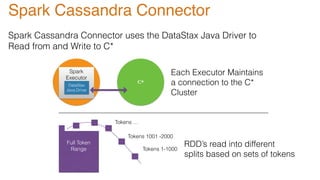
Spark Cassandra Connector uses the DataStax Java Driver to
Read from and Write to C*
Spark C*
Full Token
Range
Each Executor Maintains
a connection to the C*
Cluster
Spark
Executor
DataStax
Java Driver
Tokens 1-1000
Tokens 1001 -2000
Tokens …
RDD’s read into different
splits based on sets of tokens
Spark Cassandra Connector
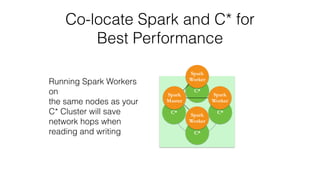
Co-locate Spark and C* for
Best Performance
C*
C*C*
C*
Spark

Worker
Spark

Worker
Spark
Master
Spark
Worker
Running Spark Workers
on
the same nodes as your
C* Cluster will save
network hops when
reading and writing
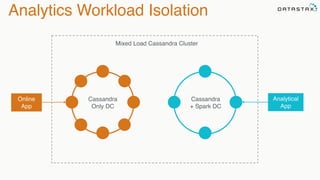
Analytics Workload Isolation
Cassandra
+ Spark DC
Cassandra
Only DC
Online
App
Analytical
App
Mixed Load Cassandra Cluster
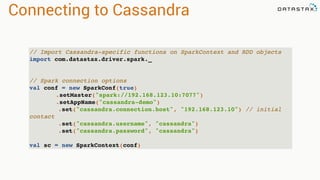
Connecting to Cassandra
// Import Cassandra-specific functions on SparkContext and RDD objects
import com.datastax.driver.spark._
// Spark connection options
val conf = new SparkConf(true)
.setMaster("spark://192.168.123.10:7077")
.setAppName("cassandra-demo")
.set("cassandra.connection.host", "192.168.123.10") // initial
contact
.set("cassandra.username", "cassandra")
.set("cassandra.password", "cassandra")
val sc = new SparkContext(conf)
Accessing Data
CREATE TABLE test.words (word text PRIMARY KEY, count int);
INSERT INTO test.words (word, count) VALUES ('bar', 30);
INSERT INTO test.words (word, count) VALUES ('foo', 20);
// Use table as RDD
val rdd = sc.cassandraTable("test", "words")
// rdd: CassandraRDD[CassandraRow] = CassandraRDD[0]
rdd.toArray.foreach(println)
// CassandraRow[word: bar, count: 30]
// CassandraRow[word: foo, count: 20]
rdd.columnNames // Stream(word, count)
rdd.size // 2
val firstRow = rdd.first // firstRow: CassandraRow = CassandraRow[word: bar,
count: 30]
firstRow.getInt("count") // Int = 30
*Accessing table above as RDD:
Saving Data
val newRdd = sc.parallelize(Seq(("cat", 40), ("fox", 50)))
// newRdd: org.apache.spark.rdd.RDD[(String, Int)] = ParallelCollectionRDD[2]
newRdd.saveToCassandra("test", "words", Seq("word", "count"))
SELECT * FROM test.words;
word | count
------+-------
bar | 30
foo | 20
cat | 40
fox | 50
(4 rows)
*RDD above saved to Cassandra:
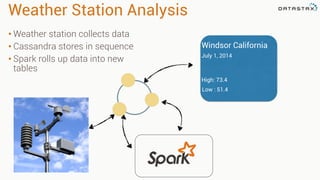
Weather Station Analysis
• Weather station collects data
• Cassandra stores in sequence
• Spark rolls up data into new
tables
Windsor California
July 1, 2014
High: 73.4
Low : 51.4
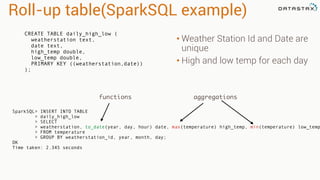
Roll-up table(SparkSQL example)
CREATE TABLE daily_high_low (
weatherstation text,
date text,
high_temp double,
low_temp double,
PRIMARY KEY ((weatherstation,date))
);
• Weather Station Id and Date are
unique
• High and low temp for each day
SparkSQL> INSERT INTO TABLE
> daily_high_low
> SELECT
> weatherstation, to_date(year, day, hour) date, max(temperature) high_temp, min(temperature) low_temp
> FROM temperature
> GROUP BY weatherstation_id, year, month, day;
OK
Time taken: 2.345 seconds
functions aggregations
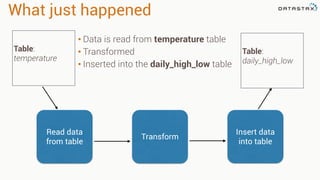
What just happened
• Data is read from temperature table
• Transformed
• Inserted into the daily_high_low table
Table:
temperature
Table:
daily_high_low
Read data
from table
Transform
Insert data
into table
Thank you!
Bring the questions
Follow me on twitter
@PatrickMcFadin

Nike Tech Talk: Double Down on Apache Cassandra and Spark

  • 1.
    @PatrickMcFadin Patrick McFadin
 Chief Evangelistfor Apache Spark at DataStax Double Down with Apache Cassandra and Spark 1
  • 2.
  • 3.
    Gave it mybest shot shard 1 shard 2 shard 3 shard 4 router client Patrick, All your wildest dreams will come true.
  • 4.
  • 5.
  • 6.
    Dynamo Paper(2007) • Howdo we build a data store that is: • Reliable • Performant • “Always On” • Nothing new and shiny • 24 papers cited Evolutionary. Real. Computer Science Also the basis for Riak and Voldemort
  • 7.
    BigTable(2006) • Richer datamodel • 1 key. Lots of values • Fast sequential access • 38 Papers cited
  • 8.
    Cassandra(2008) • Distributed featuresof Dynamo • Data Model and storage from BigTable • February 17, 2010 it graduated to a top-level Apache project
  • 9.
  • 10.
    Before you gettoo excited Cassandra is not…
  • 11.
    A Data Oceanor Pond., Lake An In-Memory Database A Key-Value Store A magical database unicorn that farts rainbows
  • 12.
    When to use… Loosedata model (joins, sub-selects) Absolute consistency (aka gotta have ACID) No need to use anything else You’ll miss the long, candle lit dinners with your Oracle rep that always end with “what’s your budget look like this year?” Oracle, MySQL, Postgres or <RDBMS>
  • 13.
    When to use… Uptimeis a top priority Unpredictable or high scaling requirements Workload is transactional Willing to put the time or effort into understanding how Cassandra works and ow to use it. Use Oracle when you want to count your money. Use Cassandra when you want to make money.
  • 14.
    Learn to useit right
  • 15.
    Cassandra is… • Sharednothing • Masterless peer-to-peer • Based on Dynamo
  • 16.
  • 17.
    Example 1: WeatherStation • Weather station collects data • Cassandra stores in sequence • Application reads in sequence
  • 18.
    Use case • Storedata per weather station • Store time series in order: first to last • Get all data for one weather station • Get data for a single date and time • Get data for a range of dates and times Needed Queries Data Model to support queries
  • 19.
    Data Model • WeatherStation Id and Time are unique • Store as many as needed CREATE TABLE temperature ( weather_station text, year int, month int, day int, hour int, temperature double, PRIMARY KEY (weather_station,year,month,day,hour) ); INSERT INTO temperature(weather_station,year,month,day,hour,temperature) VALUES (‘10010:99999’,2005,12,1,7,-5.6); INSERT INTO temperature(weather_station,year,month,day,hour,temperature) VALUES (‘10010:99999’,2005,12,1,8,-5.1); INSERT INTO temperature(weather_station,year,month,day,hour,temperature) VALUES (‘10010:99999’,2005,12,1,9,-4.9); INSERT INTO temperature(weather_station,year,month,day,hour,temperature) VALUES (‘10010:99999’,2005,12,1,10,-5.3);
  • 20.
    Storage Model -Logical View 2005:12:1:7 -5.6 2005:12:1:8 -5.1 2005:12:1:9 -4.9 SELECT weather_station,hour,temperature FROM temperature WHERE weatherstation_id='10010:99999'; 10010:99999 10010:99999 10010:99999 weather_station hour temperature 2005:12:1:10 -5.3 10010:99999
  • 21.
    2005:12:1:12 -5.4 2005:12:1:11 -4.9-5.3-4.9-5.1 2005:12:1:7 -5.6 Storage Model -Disk Layout 2005:12:1:8 2005:12:1:9 10010:99999 2005:12:1:10 Merged, Sorted and Stored Sequentially SELECT weather_station,hour,temperature FROM temperature WHERE weatherstation_id='10010:99999';
  • 22.
    Primary key relationship PRIMARYKEY (weather_station,year,month,day,hour)
  • 23.
    Primary key relationship PRIMARYKEY (weather_station,year,month,day,hour) Partition Key
  • 24.
    Primary key relationship PRIMARYKEY (weather_station,year,month,day,hour) Partition Key Clustering Columns
  • 25.
    Primary key relationship PRIMARYKEY (weather_station,year,month,day,hour) Partition Key Clustering Columns 10010:99999
  • 26.
    2005:12:1:7 -5.6 Primary key relationship PRIMARYKEY (weather_station,year,month,day,hour) Partition Key Clustering Columns 10010:99999 -5.3-4.9-5.1 2005:12:1:8 2005:12:1:9 2005:12:1:10
  • 27.
    Partition keys 10010:99999 Murmur3Hash Token = 7224631062609997448 722266:13850 Murmur3 Hash Token = -6804302034103043898 INSERT INTO temperature(weather_station,year,month,day,hour,temperature) VALUES (‘10010:99999’,2005,12,1,7,-5.6); INSERT INTO temperature(weather_station,year,month,day,hour,temperature) VALUES (‘722266:13850’,2005,12,1,7,-5.6); Consistent hash. 128 bit number between 2-63 and 264
  • 28.
    Partition keys 10010:99999 Murmur3Hash Token = 15 722266:13850 Murmur3 Hash Token = 77 INSERT INTO temperature(weather_station,year,month,day,hour,temperature) VALUES (‘10010:99999’,2005,12,1,7,-5.6); INSERT INTO temperature(weather_station,year,month,day,hour,temperature) VALUES (‘722266:13850’,2005,12,1,7,-5.6); For this example, let’s make it a reasonable number
  • 29.
    Writes & WANreplication 10.0.0.1 00-25 10.0.0.4 76-100 10.0.0.2 26-50 10.0.0.3 51-75 DC1 DC1: RF=3 Node Primary Replica Replica 10.0.0.1 00-25 76-100 51-75 10.0.0.2 26-50 00-25 76-100 10.0.0.3 51-75 26-50 00-25 10.0.0.4 76-100 51-75 26-50 10.10.0.1 00-25 10.10.0.4 76-100 10.10.0.2 26-50 10.10.0.3 51-75 DC2 Node Primary Replica Replica 10.0.0.1 00-25 76-100 51-75 10.0.0.2 26-50 00-25 76-100 10.0.0.3 51-75 26-50 00-25 10.0.0.4 76-100 51-75 26-50 DC2: RF=3 Client Insert Data Partition Key = 15 Asynchronous Local Replication Asynchronous WAN Replication
  • 30.
    Locality 10.0.0.1 00-25 10.0.0.4 76-100 10.0.0.2 26-50 10.0.0.3 51-75 DC1 DC1: RF=3 Node PrimaryReplica Replica 10.0.0.1 00-25 76-100 51-75 10.0.0.2 26-50 00-25 76-100 10.0.0.3 51-75 26-50 00-25 10.0.0.4 76-100 51-75 26-50 10.10.0.1 00-25 10.10.0.4 76-100 10.10.0.2 26-50 10.10.0.3 51-75 DC2 Node Primary Replica Replica 10.0.0.1 00-25 76-100 51-75 10.0.0.2 26-50 00-25 76-100 10.0.0.3 51-75 26-50 00-25 10.0.0.4 76-100 51-75 26-50 DC2: RF=3 Client Get Data Partition Key = 15 Client Get Data Partition Key = 15
  • 31.
    Query patterns • Rangequeries • “Slice” operation on disk SELECT weatherstation,hour,temperature FROM temperature WHERE weatherstation=‘10010:99999' AND year = 2005 AND month = 12 AND day = 1 AND hour >= 7 AND hour <= 10; Single seek on disk 2005:12:1:12 -5.4 2005:12:1:11 -4.9-5.3-4.9-5.1 2005:12:1:7 -5.6 2005:12:1:8 2005:12:1:9 10010:99999 2005:12:1:10 Partition key for locality
  • 32.
    Query patterns • Rangequeries • “Slice” operation on disk Programmers like this Sorted by event_time 2005:12:1:7 -5.6 2005:12:1:8 -5.1 2005:12:1:9 -4.9 10010:99999 10010:99999 10010:99999 weather_station hour temperature 2005:12:1:10 -5.3 10010:99999 SELECT weatherstation,hour,temperature FROM temperature WHERE weatherstation=‘10010:99999' AND year = 2005 AND month = 12 AND day = 1 AND hour >= 7 AND hour <= 10;
  • 33.
  • 34.
  • 35.
    Consistency Level • Setwith every read and write • ONE • QUORUM - >51% replicas ack • LOCAL_QUORUM - >51% replicas ack in local DC • LOCAL_ONE - Read repair only in local DC • TWO • ALL - All replicas ack. Full consistency
  • 36.
  • 37.
  • 38.
  • 39.
    Cassandra & Spark:A Great Combo Datastax: spark-cassandra-connector:
 https://github.com/datastax/spark-cassandra-connector •Both are Easy to Use •Spark Can Help You Bridge Your Hadoop and Cassandra Systems •Use Spark Libraries, Caching on-top of Cassandra-stored Data •Combine Spark Streaming with Cassandra Storage
  • 40.
    Spark On Cassandra •Server-Sidefilters (where clauses) •Cross-table operations (JOIN, UNION, etc.) •Data locality-aware (speed) •Data transformation, aggregation, etc. •Natural Time Series Integration
  • 41.
    Apache Spark andCassandra Open Source Stack Cassandra
  • 42.
  • 43.
    Spark Cassandra Connector *Cassandratables exposed as Spark RDDs *Read from and write to Cassandra *Mapping of C* tables and rows to Scala objects *All Cassandra types supported and converted to Scala types *Server side data selection *Virtual Nodes support *Use with Scala or Java *Compatible with, Spark 1.1.0, Cassandra 2.1 & 2.0
  • 44.
    Type Mapping CQL TypeScala Type ascii String bigint Long boolean Boolean counter Long decimal BigDecimal, java.math.BigDecimal double Double float Float inet java.net.InetAddress int Int list Vector, List, Iterable, Seq, IndexedSeq, java.util.List map Map, TreeMap, java.util.HashMap set Set, TreeSet, java.util.HashSet text, varchar String timestamp Long, java.util.Date, java.sql.Date, org.joda.time.DateTime timeuuid java.util.UUID uuid java.util.UUID varint BigInt, java.math.BigInteger *nullable values Option
  • 45.
    Spark Cassandra Connector https://github.com/datastax/spark-­‐cassandra-­‐connector KeyspaceTable Cassandra Spark RDD[CassandraRow] RDD[Tuples] Bundled  and  Supported  with  DSE  4.5!
  • 46.
    Spark Cassandra Connectoruses the DataStax Java Driver to Read from and Write to C* Spark C* Full Token Range Each Executor Maintains a connection to the C* Cluster Spark Executor DataStax Java Driver Tokens 1-1000 Tokens 1001 -2000 Tokens … RDD’s read into different splits based on sets of tokens Spark Cassandra Connector
  • 47.
    Co-locate Spark andC* for Best Performance C* C*C* C* Spark
 Worker Spark
 Worker Spark Master Spark Worker Running Spark Workers on the same nodes as your C* Cluster will save network hops when reading and writing
  • 48.
    Analytics Workload Isolation Cassandra +Spark DC Cassandra Only DC Online App Analytical App Mixed Load Cassandra Cluster
  • 49.
    Connecting to Cassandra //Import Cassandra-specific functions on SparkContext and RDD objects import com.datastax.driver.spark._ // Spark connection options val conf = new SparkConf(true) .setMaster("spark://192.168.123.10:7077") .setAppName("cassandra-demo") .set("cassandra.connection.host", "192.168.123.10") // initial contact .set("cassandra.username", "cassandra") .set("cassandra.password", "cassandra") val sc = new SparkContext(conf)
  • 50.
    Accessing Data CREATE TABLEtest.words (word text PRIMARY KEY, count int); INSERT INTO test.words (word, count) VALUES ('bar', 30); INSERT INTO test.words (word, count) VALUES ('foo', 20); // Use table as RDD val rdd = sc.cassandraTable("test", "words") // rdd: CassandraRDD[CassandraRow] = CassandraRDD[0] rdd.toArray.foreach(println) // CassandraRow[word: bar, count: 30] // CassandraRow[word: foo, count: 20] rdd.columnNames // Stream(word, count) rdd.size // 2 val firstRow = rdd.first // firstRow: CassandraRow = CassandraRow[word: bar, count: 30] firstRow.getInt("count") // Int = 30 *Accessing table above as RDD:
  • 51.
    Saving Data val newRdd= sc.parallelize(Seq(("cat", 40), ("fox", 50))) // newRdd: org.apache.spark.rdd.RDD[(String, Int)] = ParallelCollectionRDD[2] newRdd.saveToCassandra("test", "words", Seq("word", "count")) SELECT * FROM test.words; word | count ------+------- bar | 30 foo | 20 cat | 40 fox | 50 (4 rows) *RDD above saved to Cassandra:
  • 52.
    Weather Station Analysis •Weather station collects data • Cassandra stores in sequence • Spark rolls up data into new tables Windsor California July 1, 2014 High: 73.4 Low : 51.4
  • 53.
    Roll-up table(SparkSQL example) CREATETABLE daily_high_low ( weatherstation text, date text, high_temp double, low_temp double, PRIMARY KEY ((weatherstation,date)) ); • Weather Station Id and Date are unique • High and low temp for each day SparkSQL> INSERT INTO TABLE > daily_high_low > SELECT > weatherstation, to_date(year, day, hour) date, max(temperature) high_temp, min(temperature) low_temp > FROM temperature > GROUP BY weatherstation_id, year, month, day; OK Time taken: 2.345 seconds functions aggregations
  • 54.
    What just happened •Data is read from temperature table • Transformed • Inserted into the daily_high_low table Table: temperature Table: daily_high_low Read data from table Transform Insert data into table
  • 55.
    Thank you! Bring thequestions Follow me on twitter @PatrickMcFadin