@PatrickMcFadin
Patrick McFadin

Chief Evangelist for Apache Cassandra, DataStax
Process, store, and analyze like a boss with
Team Apache: Kafka, Spark, and Cassandra
1
Agenda
• Lecture
• Kafka
• Spark
• Cassandra
• Hands on
• Verify Cassandra up and running
• Load data into Cassandra
• Break 3:00 - 3:30
• Lecture
• Cassandra (continued)
• Spark and Cassandra
• PySpark
• Hands On
• Spark Shell
• Spark SQL
Section 1 Section 2
About me
• Chief Evangelist for Apache Cassandra
• Senior Solution Architect at DataStax
• Chief Architect, Hobsons
• Web applications and performance since 1996
What is time series data?
A sequence of data points, typically consisting of successive measurements
made over a time interval.
Source: https://en.wikipedia.org/wiki/Time_series
5
6
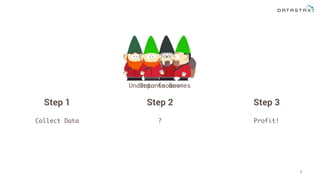
Underpants Gnomes
Step 1
Data Gnomes
Step 2 Step 3
Collect Data ? Profit!
What is time series analysis?
Methods for analyzing time series data in order to extract meaningful
statistics and other characteristics of the data.
Source: https://en.wikipedia.org/wiki/Time_series
V V V
Velocity
Volume
Variety
Internet of Things
June 29, 2007
11
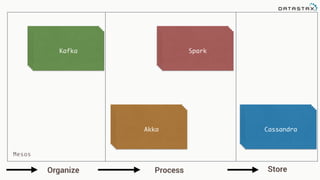
Bring in the team
Team Apache
Collect Process Store
CassandraAkka
SparkKafka
Organize Process Store
Mesos
KafkaKafkaKafka
SparkSparkSpark
AkkaAkkaAkka
CassandraCassandraCassandra
2.1 Kafka - Architecture and Deployment
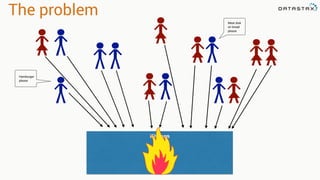
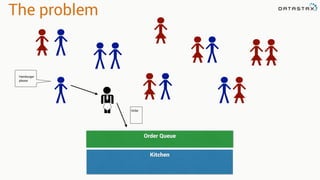
The problem
Kitchen
Hamburger
please
Meat disk
on bread
please
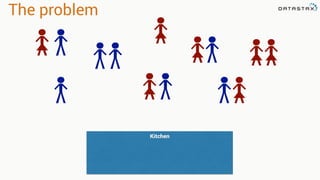
The problem
Kitchen
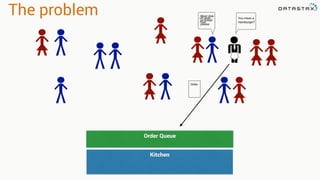
The problem
Kitchen
Order Queue
Hamburger
please
Order
The problem
Kitchen
Order Queue
The problem
Kitchen
Order Queue
Meat disk
on bread
please
You mean a
Hamburger?
Uh yeah.
That.
Order
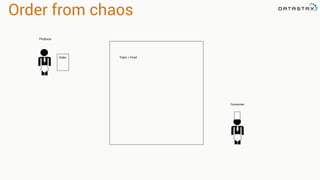
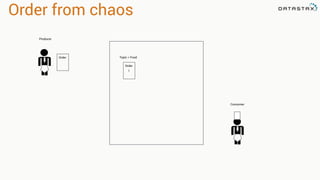
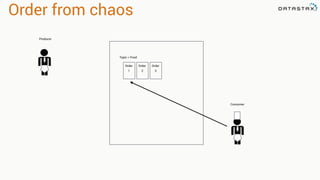
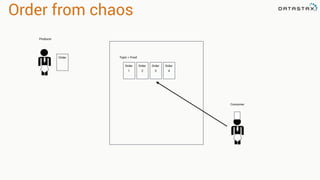
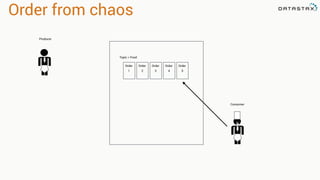
Order from chaos
Producer
Consumer
Topic = FoodOrder
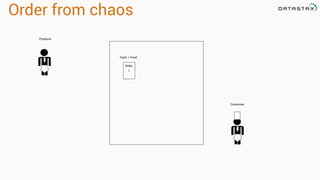
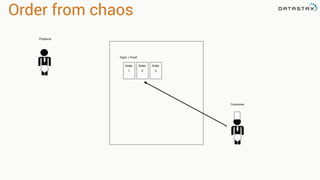
Order from chaos
Producer
Topic = Food
Order
1
Consumer
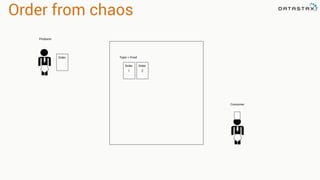
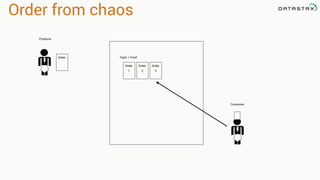
Order from chaos
Producer
Topic = Food
Order
1
Order
Consumer
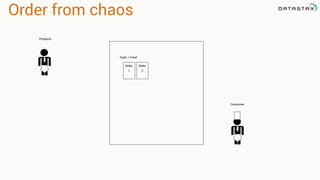
Order from chaos
Producer
Topic = Food
Order
1
Order
2
Consumer
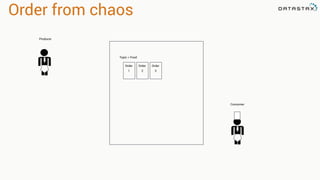
Order from chaos
Producer
Topic = Food
Order
1
Order
2
Consumer
Order
Order from chaos
Producer
Topic = Food
Order
1
Order
2
Consumer
Order
3
Order from chaos
Producer
Topic = Food
Order
1
Order
2
Consumer
Order
3
Order from chaos
Producer
Topic = Food
Order
1
Order
2
Consumer
Order
3
Order from chaos
Producer
Topic = Food
Order
1
Order
2
Consumer
Order
3
Order
Order from chaos
Producer
Topic = Food
Order
1
Order
2
Consumer
Order
3
Order
4
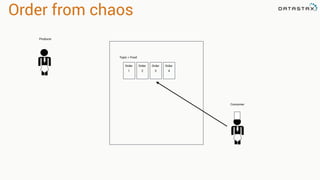
Order from chaos
Producer
Topic = Food
Order
1
Order
2
Consumer
Order
3
Order
4
Order
Order from chaos
Producer
Topic = Food
Order
1
Order
2
Consumer
Order
3
Order
4
Order
5
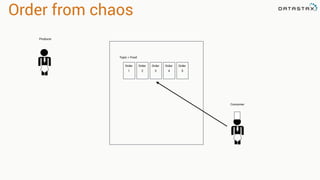
Order from chaos
Producer
Topic = Food
Order
1
Order
2
Consumer
Order
3
Order
4
Order
5
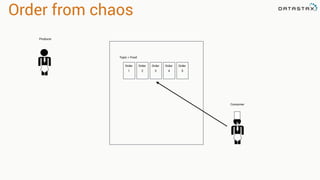
Order from chaos
Producer
Topic = Food
Order
1
Order
2
Consumer
Order
3
Order
4
Order
5
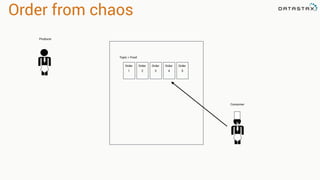
Order from chaos
Producer
Topic = Food
Order
1
Order
2
Consumer
Order
3
Order
4
Order
5
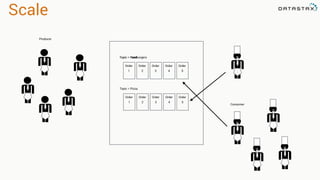
Scale
Producer
Topic = Hamburgers
Order
1
Order
2
Consumer
Order
3
Order
4
Order
5
Topic = Pizza
Order
1
Order
2
Order
3
Order
4
Order
5
Topic = Food
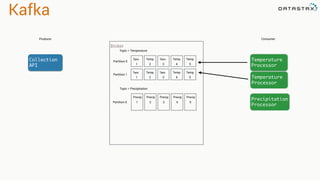
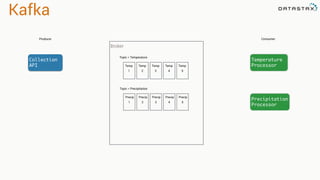
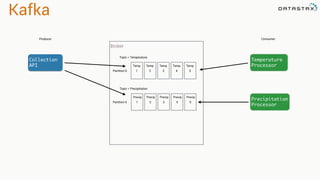
Kafka
Producer
Topic = Temperature
Temp
1
Temp
2
Consumer
Temp
3
Temp
4
Temp
5
Collection
API
Temperature
Processor
Topic = Precipitation
Precip
1
Precip
2
Precip
3
Precip
4
Precip
5
Precipitation
Processor
Broker
Kafka
Producer
Topic = Temperature
Temp
1
Temp
2
Consumer
Temp
3
Temp
4
Temp
5
Collection
API
Temperature
Processor
Topic = Precipitation
Precip
1
Precip
2
Precip
3
Precip
4
Precip
5
Precipitation
Processor
Broker
Partition 0
Partition 0
Kafka
Producer Consumer
Collection
API
Temperature
Processor
Precipitation
Processor
Topic = Temperature
Tem
1
Temp
2
Tem
3
Temp
4
Temp
5
Topic = Precipitation
Precip
1
Precip
2
Precip
3
Precip
4
Precip
5
Broker
Partition 0
Partition 0
Tem
1
Temp
2
Tem
3
Temp
4
Temp
5
Partition 1
Temperature
Processor
Kafka
Producer Consumer
Collection
API
Temperature
Processor
Precipitation
Processor
Topic = Temperature
Tem
1
Temp
2
Tem
3
Temp
4
Temp
5
Topic = Precipitation
Precip
1
Precip
2
Precip
3
Precip
4
Precip
5
Broker
Partition 0
Partition 0
Tem
1
Temp
2
Tem
3
Temp
4
Temp
5
Partition 1
Temperature
Processor
Topic = Temperature
Tem
1
Temp
2
Tem
3
Temp
4
Temp
5
Topic = Precipitation
Precip
1
Precip
2
Precip
3
Precip
4
Precip
5
Broker
Partition 0
Partition 0
Tem
1
Temp
2
Tem
3
Temp
4
Temp
5
Partition 1
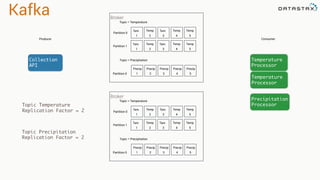
Topic Temperature
Replication Factor = 2
Topic Precipitation
Replication Factor = 2
Kafka
Producer
Consumer
Collection
API
Temperature
Processor
Precipitation
Processor
Topic = Temperature
Tem
1
Temp
2
Tem
3
Temp
4
Temp
5
Topic = Precipitation
Precip
1
Precip
2
Precip
3
Precip
4
Precip
5
Broker
Partition 0
Partition 0
Tem
1
Temp
2
Tem
3
Temp
4
Temp
5
Partition 1 Temperature
Processor
Topic = Temperature
Tem
1
Temp
2
Tem
3
Temp
4
Temp
5
Topic = Precipitation
Precip
1
Precip
2
Precip
3
Precip
4
Precip
5
Broker
Partition 0
Partition 0
Tem
1
Temp
2
Tem
3
Temp
4
Temp
5
Partition 1
Temperature
Processor
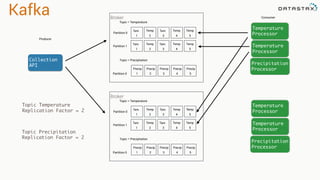
Temperature
Processor
Precipitation
Processor
Topic Temperature
Replication Factor = 2
Topic Precipitation
Replication Factor = 2
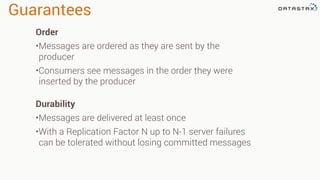
Guarantees
Order
•Messages are ordered as they are sent by the
producer
•Consumers see messages in the order they were
inserted by the producer
Durability
•Messages are delivered at least once
•With a Replication Factor N up to N-1 server failures
can be tolerated without losing committed messages
3.1 Spark - Introduction to Spark
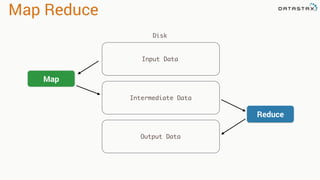
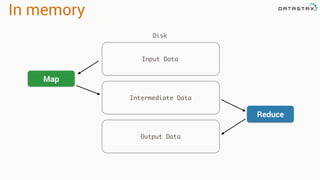
Map Reduce
Input Data
Map
Reduce
Intermediate Data
Output Data
Disk
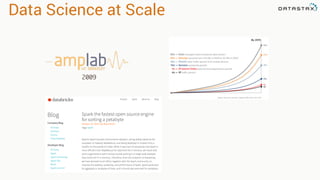
Data Science at Scale
2009
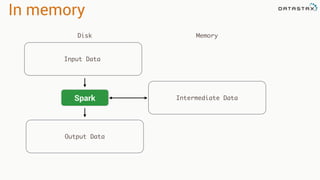
In memory
Input Data
Map
Reduce
Intermediate Data
Output Data
Disk
In memory
Input Data
Spark Intermediate Data
Output Data
Disk Memory
Resilient Distributed Dataset
RDD
Tranformations
•Produces new RDD
•Calls: filter, flatmap, map,
distinct, groupBy, union, zip,
reduceByKey, subtract
Are
•Immutable
•Partitioned
•Reusable
Actions
•Start cluster computing operations
•Calls: collect: Array[T], count,
fold, reduce..
and Have
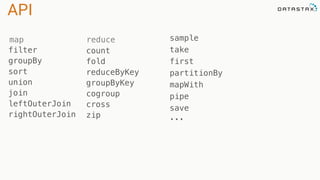
API
filter
groupBy
sort
union
join
leftOuterJoin
rightOuterJoin
count
fold
reduceByKey
groupByKey
cogroup
cross
zip
sample
take
first
partitionBy
mapWith
pipe
save 

...
reducemap
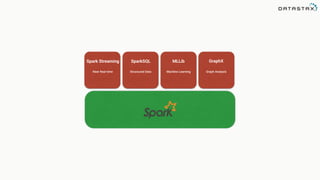
Spark Streaming
Near Real-time
SparkSQL
Structured Data
MLLib
Machine Learning
GraphX
Graph Analysis
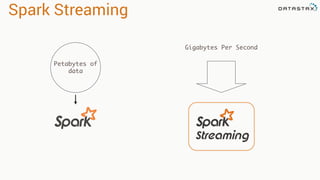
Spark Streaming
Petabytes of
data
Gigabytes Per Second
3.1.1 Spark - Architecture
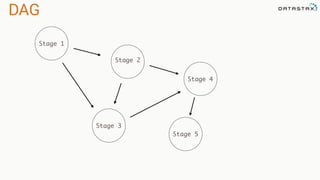
Directed Acyclic Graph
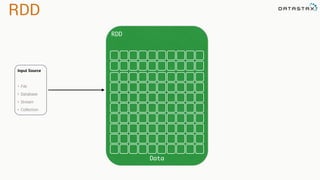
Resilient Distributed Dataset
DAG
RDD
DAG
Stage 1
Stage 2
Stage 3
Stage 4
Stage 5
RDD
RDD
Data
Input Source
• File
• Database
• Stream
• Collection
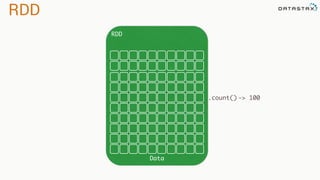
RDD
RDD
Data
.count() -> 100
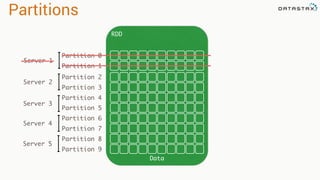
Partitions
RDD
Data
Partition 0
Partition 1
Partition 2
Partition 3
Partition 4
Partition 5
Partition 6
Partition 7
Partition 8
Partition 9
Server 1
Server 2
Server 3
Server 4
Server 5
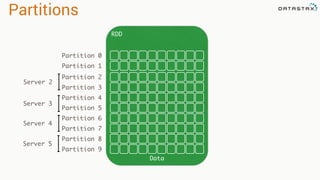
Partitions
RDD
Data
Partition 0
Partition 1
Partition 2
Partition 3
Partition 4
Partition 5
Partition 6
Partition 7
Partition 8
Partition 9
Server 2
Server 3
Server 4
Server 5
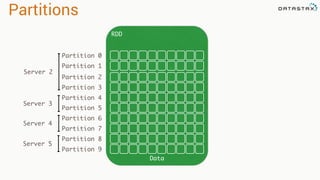
Partitions
RDD
Data
Partition 0
Partition 1
Partition 2
Partition 3
Partition 4
Partition 5
Partition 6
Partition 7
Partition 8
Partition 9
Server 2
Server 3
Server 4
Server 5
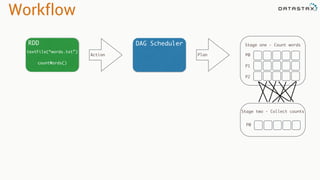
Workflow
RDD
textFile(“words.txt”)
countWords()
Action
DAG Scheduler
Plan
Stage one - Count words
P0
P1
P2
P0
Stage two - Collect counts
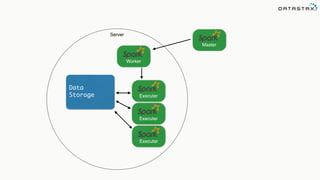
Executer
Master
Worker
Executer
Executer
Server
Data
Storage
Master
Worker
Worker
Worker Worker
Storage
Storage Storage
Storage
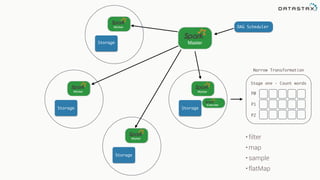
Stage one - Count words
P0
P1
P2
DAG Scheduler
Executer
Narrow Transformation
• filter
• map
• sample
• flatMap
Master
Worker
Worker
Worker Worker
Storage
Storage Storage
Storage
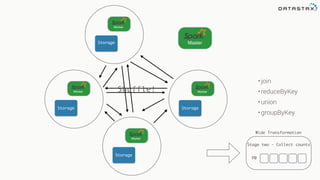
Wide Transformation
P0
Stage two - Collect counts
Shuffle!
•join
•reduceByKey
•union
•groupByKey
3.2 Spark - Spark Streaming
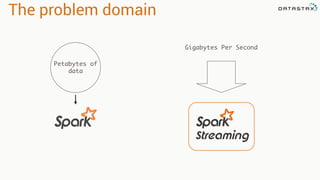
The problem domain
Petabytes of
data
Gigabytes Per Second
Input Sources
Input Sources
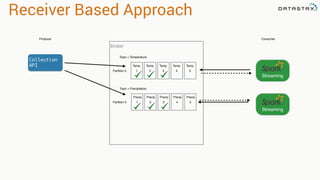
Receiver Based Approach
Producer
Topic = Temperature
Temp
1
Temp
2
Consumer
Temp
3
Temp
4
Temp
5
Collection
API
Topic = Precipitation
Precip
1
Precip
2
Precip
3
Precip
4
Precip
5
Broker
Partition 0
Partition 0
Streaming
Streaming
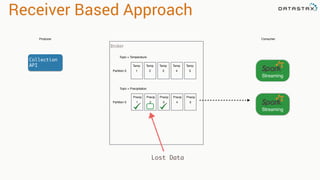
Receiver Based Approach
Producer
Topic = Temperature
Temp
1
Temp
2
Consumer
Temp
3
Temp
4
Temp
5
Collection
API
Topic = Precipitation
Precip
1
Precip
2
Precip
3
Precip
4
Precip
5
Broker
Partition 0
Partition 0
Streaming
Streaming
Streaming
Lost Data
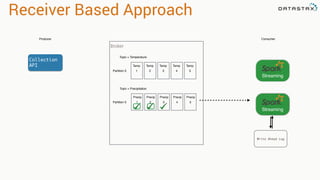
Receiver Based Approach
Producer
Topic = Temperature
Temp
1
Temp
2
Consumer
Temp
3
Temp
4
Temp
5
Collection
API
Topic = Precipitation
Precip
1
Precip
2
Precip
3
Precip
4
Precip
5
Broker
Partition 0
Partition 0
Streaming
Streaming
Streaming
Write Ahead Log
val kafkaStream = KafkaUtils.createStream(streamingContext,

[ZK quorum], [consumer group id], [per-topic number of Kafka partitions to consume])
Zookeeper
Server IP
Consumer
Group Created
In Kafka
List of Kafka topics
and number of threads per topic
Receiver Based Approach
Producer
Topic = Temperature
Temp
1
Temp
2
Consumer
Temp
3
Temp
4
Temp
5
Collection
API
Topic = Precipitation
Precip
1
Precip
2
Precip
3
Precip
4
Precip
5
Broker
Partition 0
Partition 0
Streaming
Streaming
Direct Based Approach
Producer
Topic = Temperature
Temp
1
Temp
2
Consumer
Temp
3
Temp
4
Temp
5
Collection
API
Topic = Precipitation
Precip
1
Precip
2
Precip
3
Precip
4
Precip
5
Broker
Partition 0
Partition 0
Streaming
Streaming
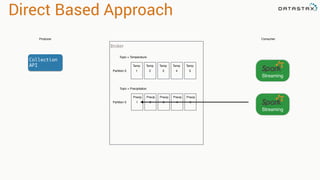
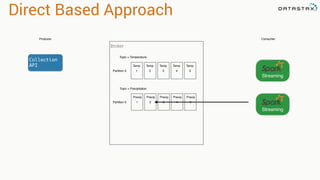
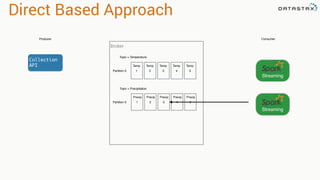
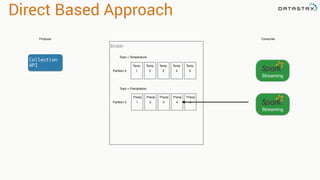
Direct Based Approach
Producer
Topic = Temperature
Temp
1
Temp
2
Consumer
Temp
3
Temp
4
Temp
5
Collection
API
Topic = Precipitation
Precip
1
Precip
2
Precip
3
Precip
4
Precip
5
Broker
Partition 0
Partition 0
Streaming
Streaming
Direct Based Approach
Streaming
Producer
Topic = Temperature
Temp
1
Temp
2
Consumer
Temp
3
Temp
4
Temp
5
Collection
API
Topic = Precipitation
Precip
1
Precip
2
Precip
3
Precip
4
Precip
5
Broker
Partition 0
Partition 0
Streaming
Streaming
Direct Based Approach
Streaming
Direct Based Approach
val directKafkaStream = KafkaUtils.createDirectStream[

[key class], [value class], [key decoder class], [value decoder class] ](

streamingContext, [map of Kafka parameters], [set of topics to consume])
List of Kafka brokers
(and any other params)
Kafka topics
3.2.2 Spark - Streaming Windows and Slides
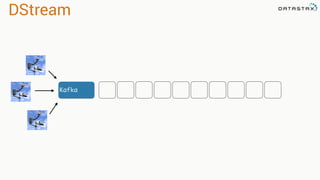
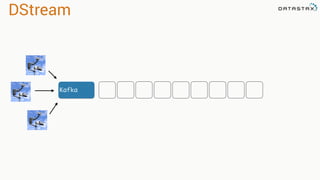
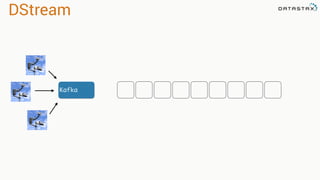
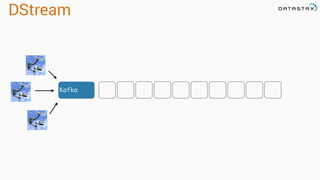
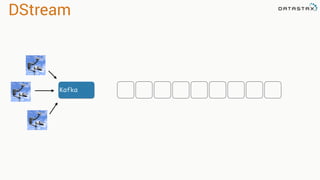
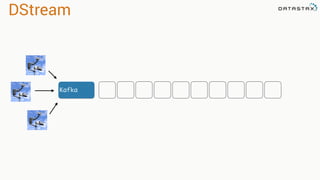
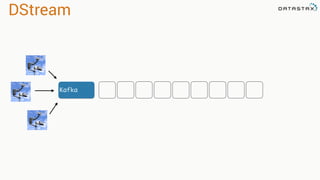
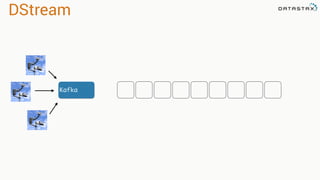
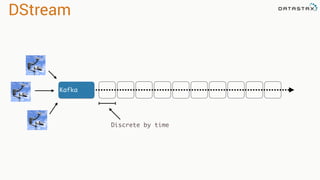
Discretized Stream
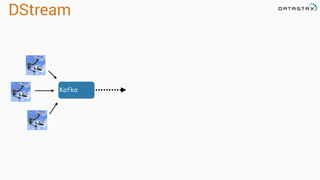
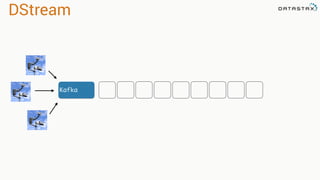
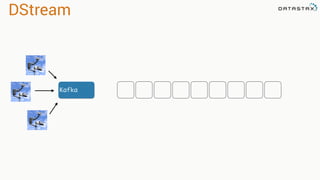
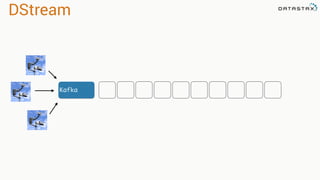
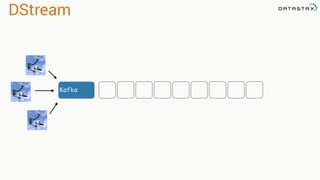
DStream
Kafka
DStream
Kafka
DStream
Kafka
DStream
Kafka
DStream
Kafka
DStream
Kafka
DStream
Kafka
DStream
Kafka
DStream
Kafka
DStream
Kafka
DStream
Kafka
DStream
Kafka
DStream
Kafka
DStream
Kafka
DStream
Kafka
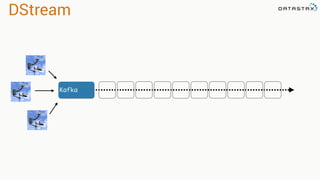
Discrete by time
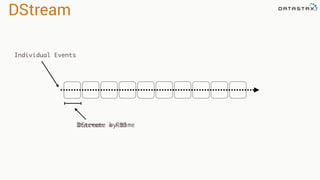
DStream
Individual Events
Discrete by timeDStream = RDD
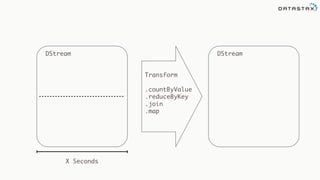
DStream
X Seconds
DStream
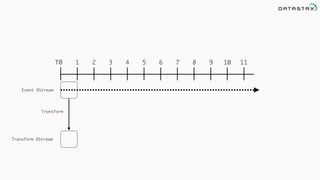
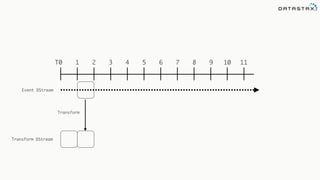
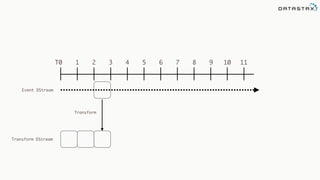
Transform
.countByValue
.reduceByKey
.join
.map
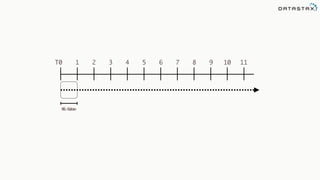
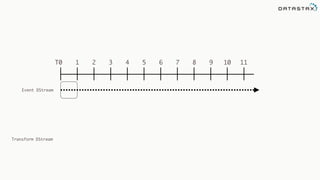
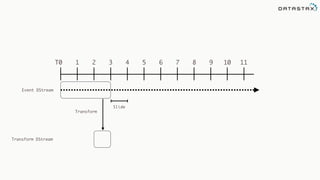
T0 1 2 3 4 5 6 7 8 9 10 11
1 SecWindow
T0 1 2 3 4 5 6 7 8 9 10 11
Event DStream
Transform DStream
Transform
T0 1 2 3 4 5 6 7 8 9 10 11
Event DStream
Transform DStream
Transform
T0 1 2 3 4 5 6 7 8 9 10 11
Event DStream
Transform DStream
Transform
T0 1 2 3 4 5 6 7 8 9 10 11
Event DStream
Transform DStream
T0 1 2 3 4 5 6 7 8 9 10 11
Event DStream
Transform DStream
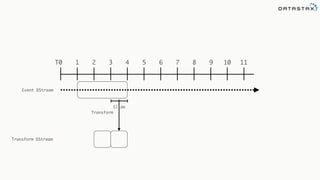
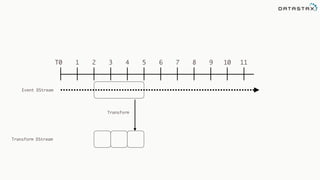
Slide
Transform
T0 1 2 3 4 5 6 7 8 9 10 11
Event DStream
Transform DStream
Slide
Transform
T0 1 2 3 4 5 6 7 8 9 10 11
Event DStream
Transform DStream
Transform
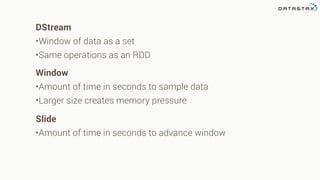
Window
•Amount of time in seconds to sample data
•Larger size creates memory pressure
Slide
•Amount of time in seconds to advance window
DStream
•Window of data as a set
•Same operations as an RDD
4.1 Cassandra - Introduction
My Background
…ran into this problem
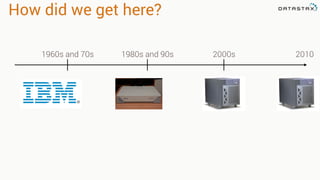
How did we get here?
1960s and 70s
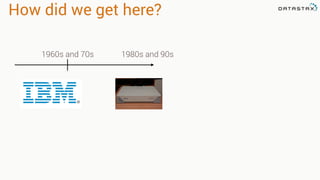
How did we get here?
1960s and 70s 1980s and 90s
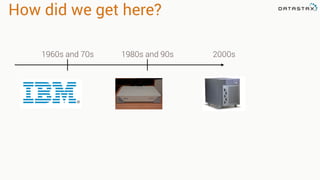
How did we get here?
1960s and 70s 1980s and 90s 2000s
How did we get here?
1960s and 70s 1980s and 90s 2000s 2010
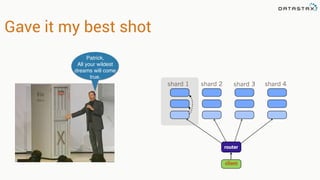
Gave it my best shot
shard 1 shard 2 shard 3 shard 4
router
client
Patrick,
All your wildest
dreams will come
true.
Just add complexity!
A new plan
Dynamo Paper(2007)
• How do we build a data store that is:
• Reliable
• Performant
• “Always On”
• Nothing new and shiny
Evolutionary. Real. Computer Science
Also the basis for Riak and Voldemort
BigTable(2006)
• Richer data model
• 1 key. Lots of values
• Fast sequential access
• 38 Papers cited
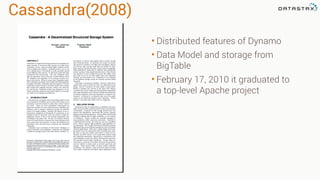
Cassandra(2008)
• Distributed features of Dynamo
• Data Model and storage from
BigTable
• February 17, 2010 it graduated to
a top-level Apache project
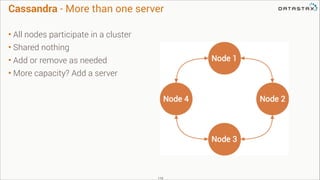
Cassandra - More than one server
• All nodes participate in a cluster
• Shared nothing
• Add or remove as needed
• More capacity? Add a server

119
120
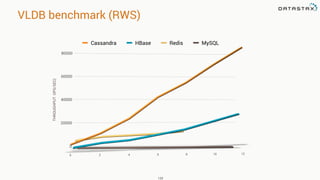
Cassandra HBase Redis MySQL
THROUGHPUTOPS/SEC)
VLDB benchmark (RWS)
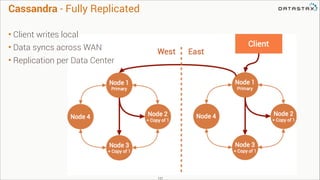
Cassandra - Fully Replicated
• Client writes local
• Data syncs across WAN
• Replication per Data Center
121
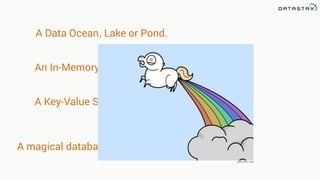
A Data Ocean or Pond., Lake
An In-Memory Database
A Key-Value Store
A magical database unicorn that farts rainbows
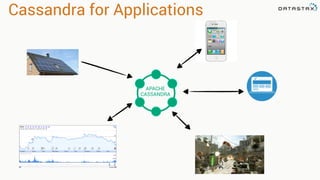
Cassandra for Applications
APACHE
CASSANDRA
Hands On!
https://github.com/killrweather/killrweather/wiki/6.-Cassandra-Exercises-on-Killrvideo-Data
KillrWeather Wiki
4.1.2 Cassandra - Basic Architecture
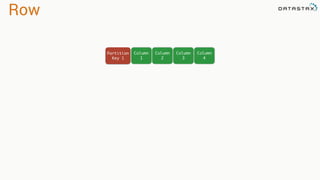
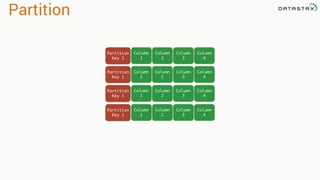
Row
Column
1
Partition
Key 1
Column
2
Column
3
Column
4
Partition
Column
1
Partition
Key 1
Column
2
Column
3
Column
4
Column
1
Partition
Key 1
Column
2
Column
3
Column
4
Column
1
Partition
Key 1
Column
2
Column
3
Column
4
Column
1
Partition
Key 1
Column
2
Column
3
Column
4
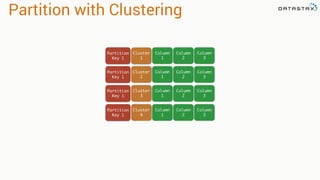
Partition with Clustering
Cluster
1
Partition
Key 1
Column
1
Column
2
Column
3
Cluster
2
Partition
Key 1
Column
1
Column
2
Column
3
Cluster
3
Partition
Key 1
Column
1
Column
2
Column
3
Cluster
4
Partition
Key 1
Column
1
Column
2
Column
3
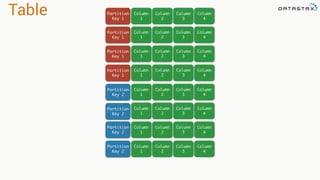
Table Column
1
Partition
Key 1
Column
2
Column
3
Column
4
Column
1
Partition
Key 1
Column
2
Column
3
Column
4
Column
1
Partition
Key 1
Column
2
Column
3
Column
4
Column
1
Partition
Key 1
Column
2
Column
3
Column
4
Column
1
Partition
Key 2
Column
2
Column
3
Column
4
Column
1
Column
2
Column
3
Column
4
Column
1
Column
2
Column
3
Column
4
Column
1
Column
2
Column
3
Column
4
Partition
Key 2
Partition
Key 2
Partition
Key 2
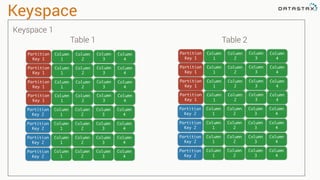
Keyspace
Column
1
Partition
Key 1
Column
2
Column
3
Column
4
Column
1
Partition
Key 2
Column
2
Column
3
Column
4
Column
1
Partition
Key 1
Column
2
Column
3
Column
4
Column
1
Partition
Key 1
Column
2
Column
3
Column
4
Column
1
Partition
Key 1
Column
2
Column
3
Column
4
Column
1
Partition
Key 2
Column
2
Column
3
Column
4
Column
1
Partition
Key 2
Column
2
Column
3
Column
4
Column
1
Partition
Key 2
Column
2
Column
3
Column
4
Column
1
Partition
Key 1
Column
2
Column
3
Column
4
Column
1
Partition
Key 2
Column
2
Column
3
Column
4
Column
1
Partition
Key 1
Column
2
Column
3
Column
4
Column
1
Partition
Key 1
Column
2
Column
3
Column
4
Column
1
Partition
Key 1
Column
2
Column
3
Column
4
Column
1
Partition
Key 2
Column
2
Column
3
Column
4
Column
1
Partition
Key 2
Column
2
Column
3
Column
4
Column
1
Partition
Key 2
Column
2
Column
3
Column
4
Table 1 Table 2
Keyspace 1
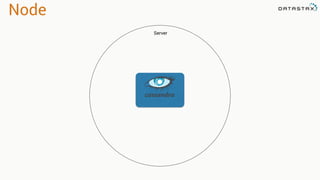
Node
Server
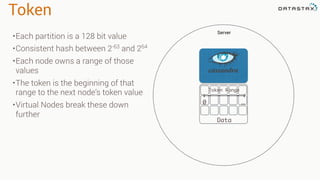
Token
Server
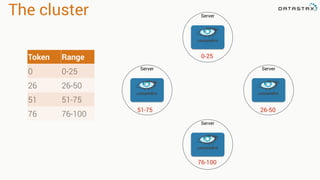
•Each partition is a 128 bit value
•Consistent hash between 2-63
and 264
•Each node owns a range of those
values
•The token is the beginning of that
range to the next node’s token value
•Virtual Nodes break these down
further
Data
Token Range
0 …
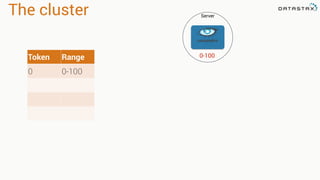
The cluster Server
Token Range
0 0-100
0-100
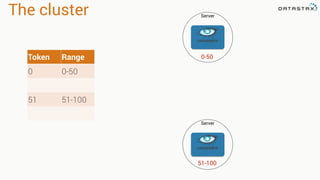
The cluster Server
Token Range
0 0-50
51 51-100
Server
0-50
51-100
The cluster Server
Token Range
0 0-25
26 26-50
51 51-75
76 76-100
Server
ServerServer
0-25
76-100
26-5051-75
4.1.3 Cassandra - Replication, High Availability and Multi-datacenter
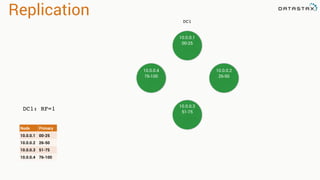
Replication
10.0.0.1
00-25
DC1
DC1: RF=1
Node Primary
10.0.0.1 00-25
10.0.0.2 26-50
10.0.0.3 51-75
10.0.0.4 76-100
10.0.0.1
00-25
10.0.0.4
76-100
10.0.0.2
26-50
10.0.0.3
51-75
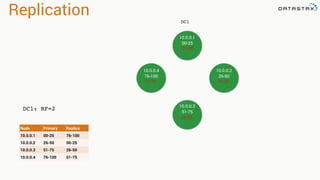
Replication
10.0.0.1
00-25
10.0.0.4
76-100
10.0.0.2
26-50
10.0.0.3
51-75
DC1
DC1: RF=2
Node Primary Replica
10.0.0.1 00-25 76-100
10.0.0.2 26-50 00-25
10.0.0.3 51-75 26-50
10.0.0.4 76-100 51-75
76-100
00-25
26-50
51-75
Replication
DC1
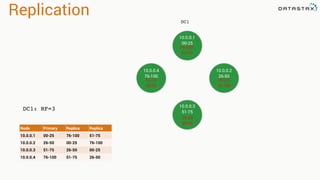
DC1: RF=3
Node Primary Replica Replica
10.0.0.1 00-25 76-100 51-75
10.0.0.2 26-50 00-25 76-100
10.0.0.3 51-75 26-50 00-25
10.0.0.4 76-100 51-75 26-50
10.0.0.1
00-25
10.0.0.4
76-100
10.0.0.2
26-50
10.0.0.3
51-75
76-100
51-75
00-25
76-100
26-50
00-25
51-75
26-50
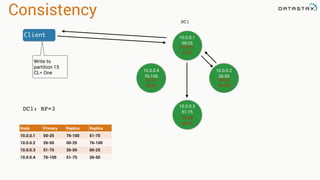
Consistency
DC1
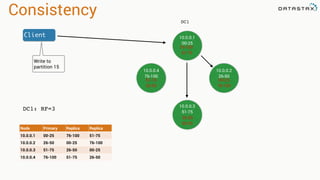
DC1: RF=3
Node Primary Replica Replica
10.0.0.1 00-25 76-100 51-75
10.0.0.2 26-50 00-25 76-100
10.0.0.3 51-75 26-50 00-25
10.0.0.4 76-100 51-75 26-50
10.0.0.1
00-25
10.0.0.4
76-100
10.0.0.2
26-50
10.0.0.3
51-75
76-100
51-75
00-25
76-100
26-50
00-25
51-75
26-50
Client
Write to
partition 15
Repair
DC1: RF=3
Node Primary Replica Replica
10.0.0.1 00-25 76-100 51-75
10.0.0.2 26-50 00-25 76-100
10.0.0.3 51-75 26-50 00-25
10.0.0.4 76-100 51-75 26-50
10.0.0.1
00-25
10.0.0.4
76-100
10.0.0.2
26-50
10.0.0.3
51-75
76-100
51-75
00-25
76-100
26-50
00-25
51-75
26-50
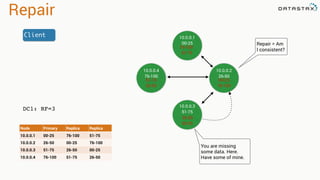
Client
Repair = Am
I consistent?
You are missing
some data. Here.
Have some of mine.
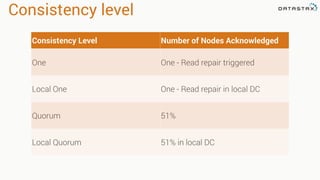
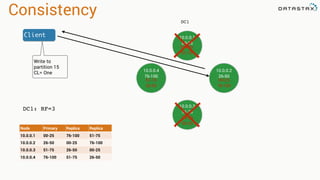
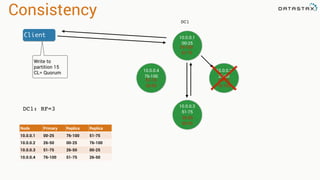
Consistency level
Consistency Level Number of Nodes Acknowledged
One One - Read repair triggered
Local One One - Read repair in local DC
Quorum 51%
Local Quorum 51% in local DC
Consistency
DC1
DC1: RF=3
Node Primary Replica Replica
10.0.0.1 00-25 76-100 51-75
10.0.0.2 26-50 00-25 76-100
10.0.0.3 51-75 26-50 00-25
10.0.0.4 76-100 51-75 26-50
10.0.0.1
00-25
10.0.0.4
76-100
10.0.0.2
26-50
10.0.0.3
51-75
76-100
51-75
00-25
76-100
26-50
00-25
51-75
26-50
Client
Write to
partition 15
CL= One
Consistency
DC1
DC1: RF=3
Node Primary Replica Replica
10.0.0.1 00-25 76-100 51-75
10.0.0.2 26-50 00-25 76-100
10.0.0.3 51-75 26-50 00-25
10.0.0.4 76-100 51-75 26-50
10.0.0.1
00-25
10.0.0.4
76-100
10.0.0.2
26-50
10.0.0.3
51-75
76-100
51-75
00-25
76-100
26-50
00-25
51-75
26-50
Client
Write to
partition 15
CL= One
Consistency
DC1
DC1: RF=3
Node Primary Replica Replica
10.0.0.1 00-25 76-100 51-75
10.0.0.2 26-50 00-25 76-100
10.0.0.3 51-75 26-50 00-25
10.0.0.4 76-100 51-75 26-50
10.0.0.1
00-25
10.0.0.4
76-100
10.0.0.2
26-50
10.0.0.3
51-75
76-100
51-75
00-25
76-100
26-50
00-25
51-75
26-50
Client
Write to
partition 15
CL= Quorum
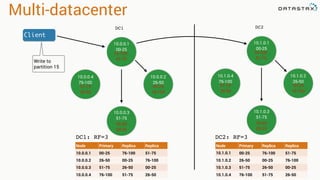
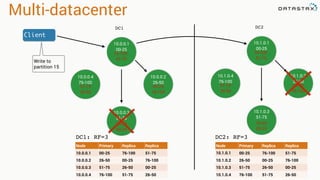
Multi-datacenter
DC1
DC1: RF=3
Node Primary Replica Replica
10.0.0.1 00-25 76-100 51-75
10.0.0.2 26-50 00-25 76-100
10.0.0.3 51-75 26-50 00-25
10.0.0.4 76-100 51-75 26-50
10.0.0.1
00-25
10.0.0.4
76-100
10.0.0.2
26-50
10.0.0.3
51-75
76-100
51-75
00-25
76-100
26-50
00-25
51-75
26-50
Client
Write to
partition 15
DC2
10.1.0.1
00-25
10.1.0.4
76-100
10.1.0.2
26-50
10.1.0.3
51-75
76-100
51-75
00-25
76-100
26-50
00-25
51-75
26-50
Node Primary Replica Replica
10.1.0.1 00-25 76-100 51-75
10.1.0.2 26-50 00-25 76-100
10.1.0.3 51-75 26-50 00-25
10.1.0.4 76-100 51-75 26-50
DC2: RF=3
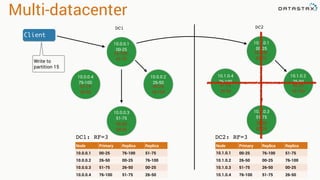
Multi-datacenter
DC1
DC1: RF=3
Node Primary Replica Replica
10.0.0.1 00-25 76-100 51-75
10.0.0.2 26-50 00-25 76-100
10.0.0.3 51-75 26-50 00-25
10.0.0.4 76-100 51-75 26-50
10.0.0.1
00-25
10.0.0.4
76-100
10.0.0.2
26-50
10.0.0.3
51-75
76-100
51-75
00-25
76-100
26-50
00-25
51-75
26-50
Client
Write to
partition 15
DC2
10.1.0.1
00-25
10.1.0.4
76-100
10.1.0.2
26-50
10.1.0.3
51-75
76-100
51-75
00-25
76-100
26-50
00-25
51-75
26-50
DC2: RF=3
Node Primary Replica Replica
10.1.0.1 00-25 76-100 51-75
10.1.0.2 26-50 00-25 76-100
10.1.0.3 51-75 26-50 00-25
10.1.0.4 76-100 51-75 26-50
Multi-datacenter
DC1
DC1: RF=3
Node Primary Replica Replica
10.0.0.1 00-25 76-100 51-75
10.0.0.2 26-50 00-25 76-100
10.0.0.3 51-75 26-50 00-25
10.0.0.4 76-100 51-75 26-50
10.0.0.1
00-25
10.0.0.4
76-100
10.0.0.2
26-50
10.0.0.3
51-75
76-100
51-75
00-25
76-100
26-50
00-25
51-75
26-50
Client
Write to
partition 15
DC2
10.1.0.1
00-25
10.1.0.4
76-100
10.1.0.2
26-50
10.1.0.3
51-75
76-100
51-75
00-25
76-100
26-50
00-25
51-75
26-50
DC2: RF=3
Node Primary Replica Replica
10.1.0.1 00-25 76-100 51-75
10.1.0.2 26-50 00-25 76-100
10.1.0.3 51-75 26-50 00-25
10.1.0.4 76-100 51-75 26-50
4.2.1 Cassandra - Weather Website Example
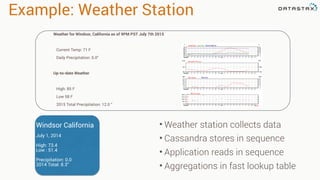
Example: Weather Station
• Weather station collects data
• Cassandra stores in sequence
• Application reads in sequence
• Aggregations in fast lookup table
Windsor California
July 1, 2014
High: 73.4
Low : 51.4
Precipitation: 0.0
2014 Total: 8.3”
Weather for Windsor, California as of 9PM PST July 7th 2015
Current Temp: 71 F
Daily Precipitation: 0.0”
Up-to-date Weather
High: 85 F
Low 58 F
2015 Total Precipitation: 12.0 “
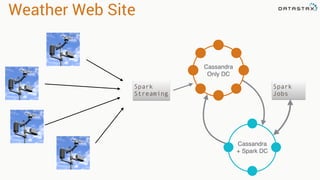
Weather Web Site
Cassandra
Only DC
Cassandra
+ Spark DC
Spark
Jobs
Spark
Streaming
Success starts with…
The data model!
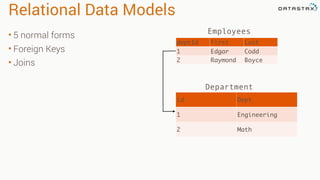
Relational Data Models
• 5 normal forms
• Foreign Keys
• Joins
deptId First Last
1 Edgar Codd
2 Raymond Boyce
id Dept
1 Engineering
2 Math
Employees
Department
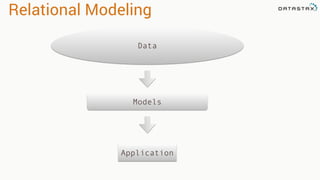
Relational Modeling
Data
Models
Application
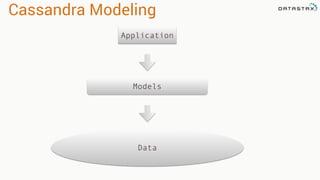
Cassandra Modeling
Data
Models
Application
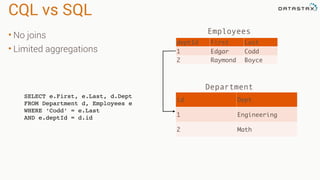
CQL vs SQL
• No joins
• Limited aggregations
deptId First Last
1 Edgar Codd
2 Raymond Boyce
id Dept
1 Engineering
2 Math
Employees
Department
SELECT e.First, e.Last, d.Dept
FROM Department d, Employees e
WHERE ‘Codd’ = e.Last
AND e.deptId = d.id
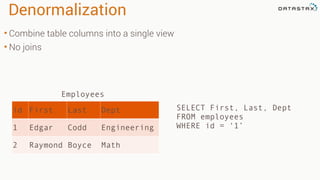
Denormalization
• Combine table columns into a single view
• No joins
SELECT First, Last, Dept
FROM employees
WHERE id = ‘1’
id First Last Dept
1 Edgar Codd Engineering
2 Raymond Boyce Math
Employees
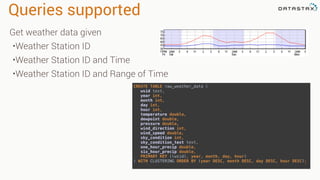
Queries supported
CREATE TABLE raw_weather_data (

wsid text,

year int,

month int,

day int,

hour int,

temperature double,

dewpoint double,

pressure double,

wind_direction int,

wind_speed double,

sky_condition int,

sky_condition_text text,

one_hour_precip double,

six_hour_precip double,

PRIMARY KEY ((wsid), year, month, day, hour)

) WITH CLUSTERING ORDER BY (year DESC, month DESC, day DESC, hour DESC);
Get weather data given
•Weather Station ID
•Weather Station ID and Time
•Weather Station ID and Range of Time
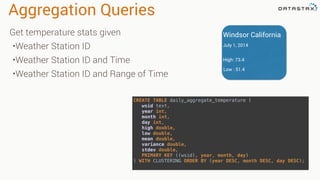
Aggregation Queries
CREATE TABLE daily_aggregate_temperature (

wsid text,

year int,

month int,

day int,

high double,

low double,

mean double,

variance double,

stdev double,

PRIMARY KEY ((wsid), year, month, day)

) WITH CLUSTERING ORDER BY (year DESC, month DESC, day DESC);
Get temperature stats given
•Weather Station ID
•Weather Station ID and Time
•Weather Station ID and Range of Time
Windsor California
July 1, 2014
High: 73.4
Low : 51.4
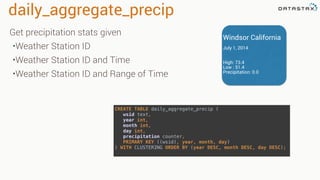
daily_aggregate_precip
CREATE TABLE daily_aggregate_precip (

wsid text,

year int,

month int,

day int,

precipitation counter,

PRIMARY KEY ((wsid), year, month, day)

) WITH CLUSTERING ORDER BY (year DESC, month DESC, day DESC);
Get precipitation stats given
•Weather Station ID
•Weather Station ID and Time
•Weather Station ID and Range of Time
Windsor California
July 1, 2014
High: 73.4
Low : 51.4
Precipitation: 0.0
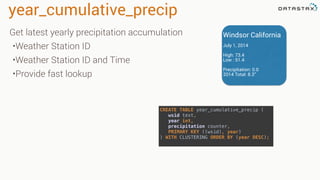
year_cumulative_precip
CREATE TABLE year_cumulative_precip (

wsid text,

year int,

precipitation counter,

PRIMARY KEY ((wsid), year)

) WITH CLUSTERING ORDER BY (year DESC);
Get latest yearly precipitation accumulation
•Weather Station ID
•Weather Station ID and Time
•Provide fast lookup
Windsor California
July 1, 2014
High: 73.4
Low : 51.4
Precipitation: 0.0
2014 Total: 8.3”
4.2.1.1.1 Cassandra - CQL
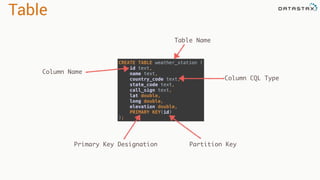
Table
CREATE TABLE weather_station (

id text,

name text,

country_code text,

state_code text,

call_sign text,

lat double,

long double,

elevation double,

PRIMARY KEY(id)

);
Table Name
Column Name
Column CQL Type
Primary Key Designation Partition Key
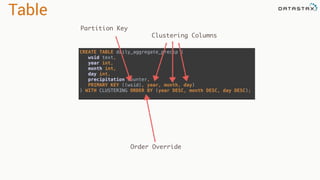
Table
CREATE TABLE daily_aggregate_precip (

wsid text,

year int,

month int,

day int,

precipitation counter,

PRIMARY KEY ((wsid), year, month, day)

) WITH CLUSTERING ORDER BY (year DESC, month DESC, day DESC);
Partition Key
Clustering Columns
Order Override
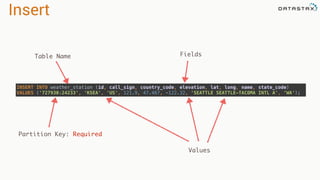
Insert
INSERT INTO weather_station (id, call_sign, country_code, elevation, lat, long, name, state_code)

VALUES ('727930:24233', 'KSEA', 'US', 121.9, 47.467, -122.32, 'SEATTLE SEATTLE-TACOMA INTL A', ‘WA');
Table Name Fields
Values
Partition Key: Required
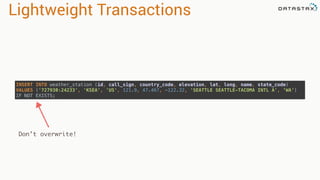
Lightweight Transactions
INSERT INTO weather_station (id, call_sign, country_code, elevation, lat, long, name, state_code)

VALUES ('727930:24233', 'KSEA', 'US', 121.9, 47.467, -122.32, 'SEATTLE SEATTLE-TACOMA INTL A', ‘WA’)
IF NOT EXISTS;
Don’t overwrite!
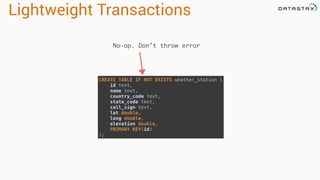
Lightweight Transactions
CREATE TABLE IF NOT EXISTS weather_station (

id text,

name text,

country_code text,

state_code text,

call_sign text,

lat double,

long double,

elevation double,

PRIMARY KEY(id)

);
No-op. Don’t throw error
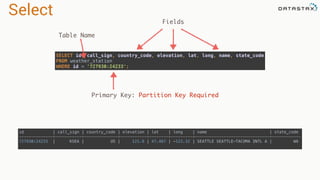
Select
id | call_sign | country_code | elevation | lat | long | name | state_code

--------------+-----------+--------------+-----------+--------+---------+-------------------------------+------------

727930:24233 | KSEA | US | 121.9 | 47.467 | -122.32 | SEATTLE SEATTLE-TACOMA INTL A | WA
SELECT id, call_sign, country_code, elevation, lat, long, name, state_code

FROM weather_station

WHERE id = '727930:24233';
Fields
Table Name
Primary Key: Partition Key Required
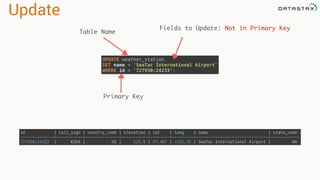
Update
UPDATE weather_station

SET name = 'SeaTac International Airport'

WHERE id = '727930:24233';
id | call_sign | country_code | elevation | lat | long | name | state_code

--------------+-----------+--------------+-----------+--------+---------+------------------------------+------------

727930:24233 | KSEA | US | 121.9 | 47.467 | -122.32 | SeaTac International Airport | WA
Table Name
Fields to Update: Not in Primary Key
Primary Key
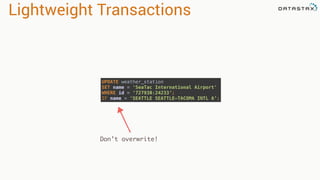
Lightweight Transactions
UPDATE weather_station

SET name = 'SeaTac International Airport'

WHERE id = ‘727930:24233’;
IF name = 'SEATTLE SEATTLE-TACOMA INTL A’;
Don’t overwrite!
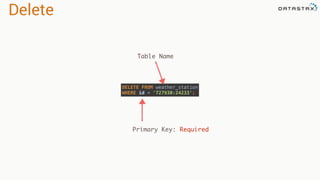
Delete
DELETE FROM weather_station

WHERE id = '727930:24233';
Table Name
Primary Key: Required
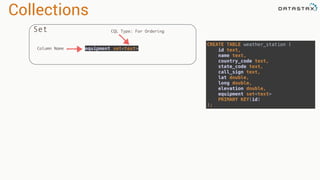
Collections
Set
CREATE TABLE weather_station (

id text,

name text,

country_code text,

state_code text,

call_sign text,

lat double,

long double,

elevation double,

equipment set<text>

PRIMARY KEY(id)

);
equipment set<text>
CQL Type: For Ordering
Column Name
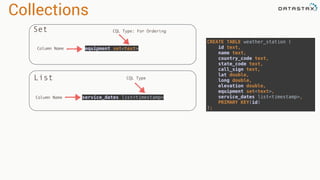
Collections
Set
List
CREATE TABLE weather_station (

id text,

name text,

country_code text,

state_code text,

call_sign text,

lat double,

long double,

elevation double,

equipment set<text>,

service_dates list<timestamp>,

PRIMARY KEY(id)

);
equipment set<text>
service_dates list<timestamp>Column Name
CQL Type: For Ordering
Column Name
CQL Type
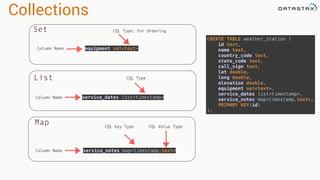
Collections
Set
List
Map
CREATE TABLE weather_station (

id text,

name text,

country_code text,

state_code text,

call_sign text,

lat double,

long double,

elevation double,

equipment set<text>,

service_dates list<timestamp>,

service_notes map<timestamp,text>,

PRIMARY KEY(id)

);
equipment set<text>
service_dates list<timestamp>
service_notes map<timestamp,text>
Column Name
Column Name
CQL Key Type CQL Value Type
CQL Type: For Ordering
Column Name
CQL Type
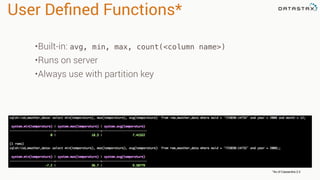
User Defined Functions*
*As of Cassandra 2.2
•Built-in: avg, min, max, count(<column name>)
•Runs on server
•Always use with partition key
User Defined Functions
CREATE FUNCTION maxI(current int, candidate int)

CALLED ON NULL INPUT

RETURNS int LANGUAGE java AS

'if (current == null) return candidate; else return Math.max(current, candidate);' ;


CREATE AGGREGATE maxAgg(int)

SFUNC maxI

STYPE int

INITCOND null;
CQL Type
Pure Function
SELECT maxAgg(temperature)

FROM raw_weather_data

WHERE wsid='10010:99999' 

AND year = 2005 AND month = 12 AND day = 1
Aggregate using
function over
partition
4.2.1.1.2 Cassandra - Partitions and clustering
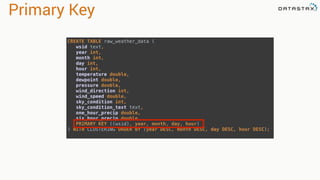
Primary Key
CREATE TABLE raw_weather_data (

wsid text,

year int,

month int,

day int,

hour int,

temperature double,

dewpoint double,

pressure double,

wind_direction int,

wind_speed double,

sky_condition int,

sky_condition_text text,

one_hour_precip double,

six_hour_precip double,

PRIMARY KEY ((wsid), year, month, day, hour)

) WITH CLUSTERING ORDER BY (year DESC, month DESC, day DESC, hour DESC);
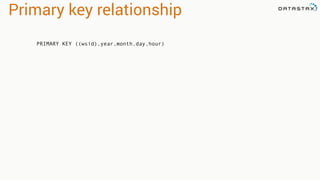
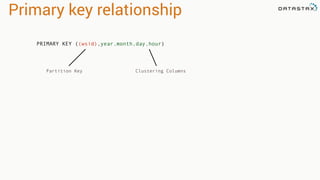
Primary key relationship
PRIMARY KEY ((wsid),year,month,day,hour)
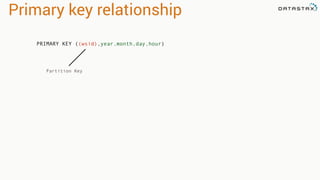
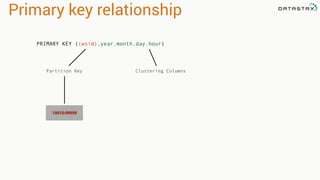
Primary key relationship
Partition Key
PRIMARY KEY ((wsid),year,month,day,hour)
Primary key relationship
PRIMARY KEY ((wsid),year,month,day,hour)
Partition Key Clustering Columns
Primary key relationship
Partition Key Clustering Columns
10010:99999
PRIMARY KEY ((wsid),year,month,day,hour)
2005:12:1:10
-5.6
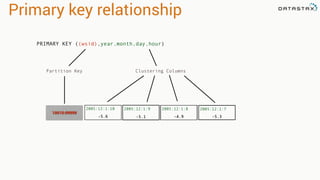
Primary key relationship
Partition Key Clustering Columns
10010:99999
-5.3-4.9-5.1
2005:12:1:9 2005:12:1:8 2005:12:1:7
PRIMARY KEY ((wsid),year,month,day,hour)
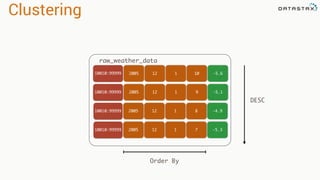
Clustering
200510010:99999 12 1 10
200510010:99999 12 1 9
raw_weather_data
-5.6
-5.1
200510010:99999 12 1 8
200510010:99999 12 1 7
-4.9
-5.3
Order By
DESC
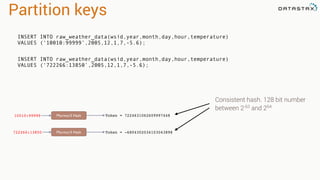
Partition keys
10010:99999 Murmur3 Hash Token = 7224631062609997448
722266:13850 Murmur3 Hash Token = -6804302034103043898
INSERT INTO raw_weather_data(wsid,year,month,day,hour,temperature)
VALUES (‘10010:99999’,2005,12,1,7,-5.6);
INSERT INTO raw_weather_data(wsid,year,month,day,hour,temperature)
VALUES (‘722266:13850’,2005,12,1,7,-5.6);
Consistent hash. 128 bit number
between 2-63
and 264
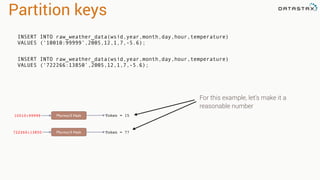
Partition keys
10010:99999 Murmur3 Hash Token = 15
722266:13850 Murmur3 Hash Token = 77
For this example, let’s make it a
reasonable number
INSERT INTO raw_weather_data(wsid,year,month,day,hour,temperature)
VALUES (‘10010:99999’,2005,12,1,7,-5.6);
INSERT INTO raw_weather_data(wsid,year,month,day,hour,temperature)
VALUES (‘722266:13850’,2005,12,1,7,-5.6);
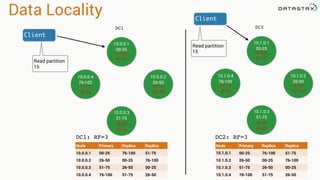
Data Locality
DC1
DC1: RF=3
Node Primary Replica Replica
10.0.0.1 00-25 76-100 51-75
10.0.0.2 26-50 00-25 76-100
10.0.0.3 51-75 26-50 00-25
10.0.0.4 76-100 51-75 26-50
10.0.0.1
00-25
10.0.0.4
76-100
10.0.0.2
26-50
10.0.0.3
51-75
76-100
51-75
00-25
76-100
26-50
00-25
51-75
26-50
Client
Read partition
15
DC2
10.1.0.1
00-25
10.1.0.4
76-100
10.1.0.2
26-50
10.1.0.3
51-75
76-100
51-75
00-25
76-100
26-50
00-25
51-75
26-50
DC2: RF=3
Client
Read partition
15
Node Primary Replica Replica
10.1.0.1 00-25 76-100 51-75
10.1.0.2 26-50 00-25 76-100
10.1.0.3 51-75 26-50 00-25
10.1.0.4 76-100 51-75 26-50
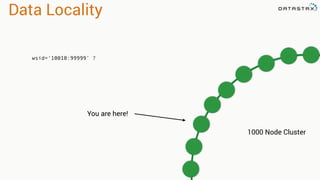
Data Locality
wsid=‘10010:99999’ ?
1000 Node Cluster
You are here!
4.2.1.1.3 Cassandra - Read and Write Path
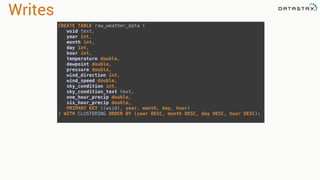
Writes
CREATE TABLE raw_weather_data (

wsid text,

year int,

month int,

day int,

hour int,

temperature double,

dewpoint double,

pressure double,

wind_direction int,

wind_speed double,

sky_condition int,

sky_condition_text text,

one_hour_precip double,

six_hour_precip double,

PRIMARY KEY ((wsid), year, month, day, hour)

) WITH CLUSTERING ORDER BY (year DESC, month DESC, day DESC, hour DESC);
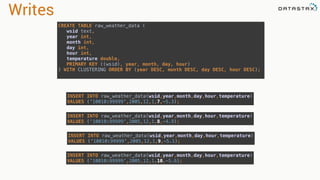
Writes
CREATE TABLE raw_weather_data (

wsid text,

year int,

month int,

day int,

hour int,

temperature double,

PRIMARY KEY ((wsid), year, month, day, hour)

) WITH CLUSTERING ORDER BY (year DESC, month DESC, day DESC, hour DESC);
INSERT INTO raw_weather_data(wsid,year,month,day,hour,temperature)

VALUES (‘10010:99999’,2005,12,1,10,-5.6);
INSERT INTO raw_weather_data(wsid,year,month,day,hour,temperature)

VALUES (‘10010:99999’,2005,12,1,9,-5.1);
INSERT INTO raw_weather_data(wsid,year,month,day,hour,temperature)

VALUES (‘10010:99999’,2005,12,1,8,-4.9);
INSERT INTO raw_weather_data(wsid,year,month,day,hour,temperature)

VALUES (‘10010:99999’,2005,12,1,7,-5.3);
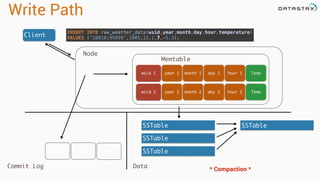
Write Path
Client
INSERT INTO raw_weather_data(wsid,year,month,day,hour,temperature)

VALUES (‘10010:99999’,2005,12,1,7,-5.3);
year 1wsid 1 month 1 day 1 hour 1
year 2wsid 2 month 2 day 2 hour 2
Memtable
SSTable
SSTable
SSTable
SSTable
Node
Commit Log Data
* Compaction *
Temp
Temp
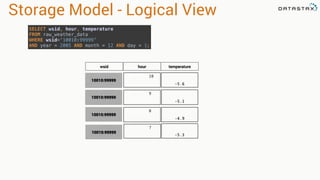
Storage Model - Logical View
2005:12:1:10
-5.6
2005:12:1:9
-5.1
2005:12:1:8
-4.9
10010:99999
10010:99999
10010:99999
wsid hour temperature
2005:12:1:7
-5.3
10010:99999
SELECT wsid, hour, temperature

FROM raw_weather_data

WHERE wsid=‘10010:99999’

AND year = 2005 AND month = 12 AND day = 1;
2005:12:1:10
-5.6 -5.3-4.9-5.1
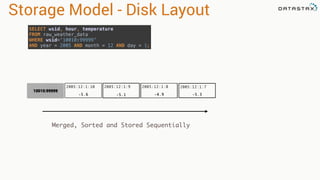
Storage Model - Disk Layout
2005:12:1:9 2005:12:1:8
10010:99999
2005:12:1:7
Merged, Sorted and Stored Sequentially
SELECT wsid, hour, temperature

FROM raw_weather_data

WHERE wsid=‘10010:99999’

AND year = 2005 AND month = 12 AND day = 1;
2005:12:1:10
-5.6
2005:12:1:11
-4.9 -5.3-4.9-5.1
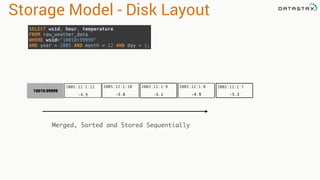
Storage Model - Disk Layout
2005:12:1:9 2005:12:1:8
10010:99999
2005:12:1:7
Merged, Sorted and Stored Sequentially
SELECT wsid, hour, temperature

FROM raw_weather_data

WHERE wsid=‘10010:99999’

AND year = 2005 AND month = 12 AND day = 1;
2005:12:1:10
-5.6
2005:12:1:11
-4.9 -5.3-4.9-5.1
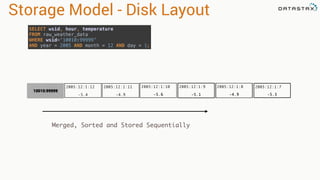
Storage Model - Disk Layout
2005:12:1:9 2005:12:1:8
10010:99999
2005:12:1:7
Merged, Sorted and Stored Sequentially
SELECT wsid, hour, temperature

FROM raw_weather_data

WHERE wsid=‘10010:99999’

AND year = 2005 AND month = 12 AND day = 1;
2005:12:1:12
-5.4
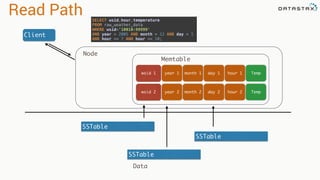
Read Path
Client
SSTable
SSTable
SSTable
Node
Data
SELECT wsid,hour,temperature

FROM raw_weather_data

WHERE wsid='10010:99999'

AND year = 2005 AND month = 12 AND day = 1 

AND hour >= 7 AND hour <= 10;
year 1wsid 1 month 1 day 1 hour 1
year 2wsid 2 month 2 day 2 hour 2
Memtable
Temp
Temp
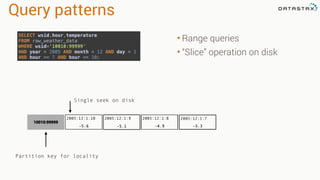
Query patterns
• Range queries
• “Slice” operation on disk
Single seek on disk
10010:99999
Partition key for locality
SELECT wsid,hour,temperature

FROM raw_weather_data

WHERE wsid='10010:99999'

AND year = 2005 AND month = 12 AND day = 1 

AND hour >= 7 AND hour <= 10;
2005:12:1:10
-5.6 -5.3-4.9-5.1
2005:12:1:9 2005:12:1:8 2005:12:1:7
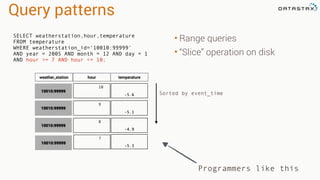
Query patterns
• Range queries
• “Slice” operation on disk
Programmers like this
Sorted by event_time
2005:12:1:10
-5.6
2005:12:1:9
-5.1
2005:12:1:8
-4.9
10010:99999
10010:99999
10010:99999
weather_station hour temperature
2005:12:1:7
-5.3
10010:99999
SELECT weatherstation,hour,temperature
FROM temperature
WHERE weatherstation_id=‘10010:99999'
AND year = 2005 AND month = 12 AND day = 1
AND hour >= 7 AND hour <= 10;
5.1 Spark and Cassandra - Architecture
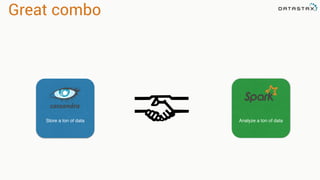
Great combo
Store a ton of data Analyze a ton of data
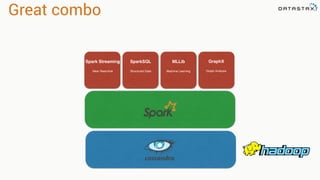
Great combo
Spark Streaming
Near Real-time
SparkSQL
Structured Data
MLLib
Machine Learning
GraphX
Graph Analysis
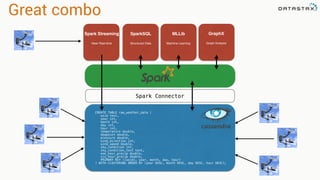
Great combo
Spark Streaming
Near Real-time
SparkSQL
Structured Data
MLLib
Machine Learning
GraphX
Graph Analysis
CREATE TABLE raw_weather_data (
wsid text,
year int,
month int,
day int,
hour int,
temperature double,
dewpoint double,
pressure double,
wind_direction int,
wind_speed double,
sky_condition int,
sky_condition_text text,
one_hour_precip double,
six_hour_precip double,
PRIMARY KEY ((wsid), year, month, day, hour)
) WITH CLUSTERING ORDER BY (year DESC, month DESC, day DESC, hour DESC);
Spark Connector
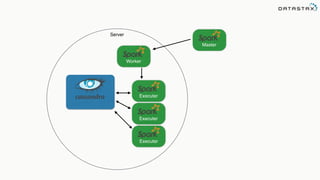
Executer
Master
Worker
Executer
Executer
Server
Master
Worker
Worker
Worker Worker
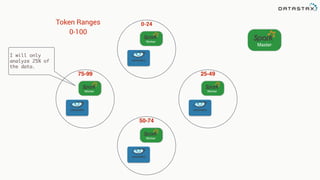
0-24Token Ranges
0-100
25-49
50-74
75-99
I will only
analyze 25% of
the data.
Master
Worker
Worker
Worker Worker
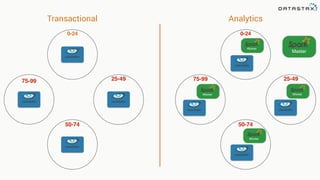
0-24
25-49
50-74
75-9975-99
0-24
25-49
50-74
AnalyticsTransactional
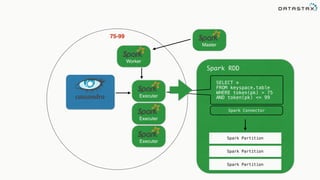
Executer
Master
Worker
Executer
Executer
75-99
SELECT *
FROM keyspace.table
WHERE token(pk) > 75
AND token(pk) <= 99
Spark RDD
Spark Partition
Spark Partition
Spark Partition
Spark Connector
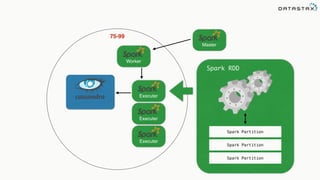
Executer
Master
Worker
Executer
Executer
75-99
Spark RDD
Spark Partition
Spark Partition
Spark Partition
Spark Connector
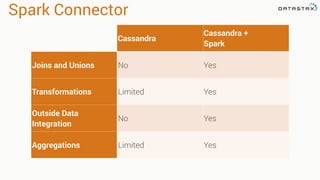
Cassandra
Cassandra +
Spark
Joins and Unions No Yes
Transformations Limited Yes
Outside Data
Integration
No Yes
Aggregations Limited Yes
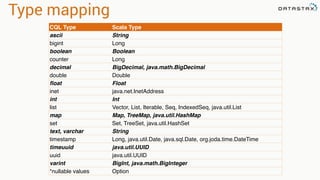
Type mapping
CQL Type Scala Type
ascii String
bigint Long
boolean Boolean
counter Long
decimal BigDecimal, java.math.BigDecimal
double Double
float Float
inet java.net.InetAddress
int Int
list Vector, List, Iterable, Seq, IndexedSeq, java.util.List
map Map, TreeMap, java.util.HashMap
set Set, TreeSet, java.util.HashSet
text, varchar String
timestamp Long, java.util.Date, java.sql.Date, org.joda.time.DateTime
timeuuid java.util.UUID
uuid java.util.UUID
varint BigInt, java.math.BigInteger
*nullable values Option
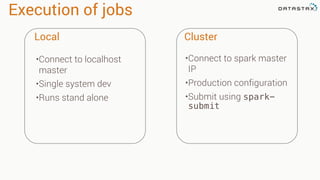
Execution of jobs
Local Cluster
•Connect to localhost
master
•Single system dev
•Runs stand alone
•Connect to spark master
IP
•Production configuration
•Submit using spark-
submit
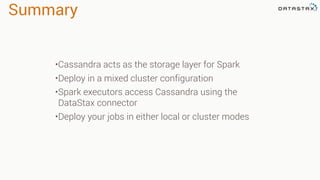
Summary
•Cassandra acts as the storage layer for Spark
•Deploy in a mixed cluster configuration
•Spark executors access Cassandra using the
DataStax connector
•Deploy your jobs in either local or cluster modes
5.2 Spark and Cassandra - Analyzing Cassandra Data
Attaching to Spark and Cassandra
// Import Cassandra-specific functions on SparkContext and RDD objects
import org.apache.spark.{SparkContext, SparkConf}

import com.datastax.spark.connector._
/** The setMaster("local") lets us run & test the job right in our IDE */

val conf = new SparkConf(true)
.set("spark.cassandra.connection.host", "127.0.0.1")
.setMaster(“local[*]")
.setAppName(getClass.getName)
// Optionally

.set("cassandra.username", "cassandra")

.set("cassandra.password", “cassandra")


val sc = new SparkContext(conf)
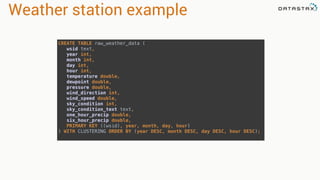
Weather station example
CREATE TABLE raw_weather_data (

wsid text, 

year int, 

month int, 

day int, 

hour int, 

temperature double, 

dewpoint double, 

pressure double, 

wind_direction int, 

wind_speed double, 

sky_condition int, 

sky_condition_text text, 

one_hour_precip double, 

six_hour_precip double, 

PRIMARY KEY ((wsid), year, month, day, hour)

) WITH CLUSTERING ORDER BY (year DESC, month DESC, day DESC, hour DESC);
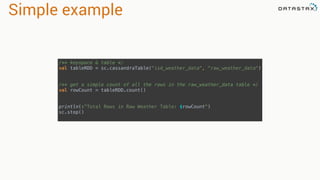
Simple example
/** keyspace & table */

val tableRDD = sc.cassandraTable("isd_weather_data", "raw_weather_data")


/** get a simple count of all the rows in the raw_weather_data table */

val rowCount = tableRDD.count()


println(s"Total Rows in Raw Weather Table: $rowCount")

sc.stop()
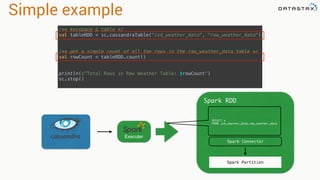
Simple example
/** keyspace & table */

val tableRDD = sc.cassandraTable("isd_weather_data", "raw_weather_data")


/** get a simple count of all the rows in the raw_weather_data table */

val rowCount = tableRDD.count()


println(s"Total Rows in Raw Weather Table: $rowCount")

sc.stop()
Executer
SELECT *
FROM isd_weather_data.raw_weather_data
Spark RDD
Spark Partition
Spark Connector
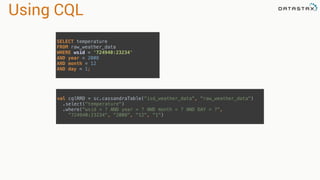
Using CQL
SELECT temperature

FROM raw_weather_data

WHERE wsid = '724940:23234'

AND year = 2008

AND month = 12

AND day = 1;
val cqlRRD = sc.cassandraTable("isd_weather_data", "raw_weather_data")

.select("temperature")

.where("wsid = ? AND year = ? AND month = ? AND DAY = ?",

"724940:23234", "2008", "12", “1")
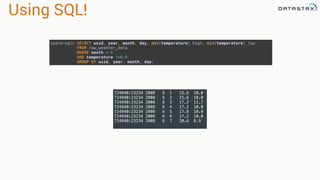
Using SQL!
spark-sql> SELECT wsid, year, month, day, max(temperature) high, min(temperature) low

FROM raw_weather_data

WHERE month = 6

AND temperature !=0.0

GROUP BY wsid, year, month, day;
724940:23234 2008 6 1 15.6 10.0
724940:23234 2008 6 2 15.6 10.0
724940:23234 2008 6 3 17.2 11.7
724940:23234 2008 6 4 17.2 10.0
724940:23234 2008 6 5 17.8 10.0
724940:23234 2008 6 6 17.2 10.0
724940:23234 2008 6 7 20.6 8.9
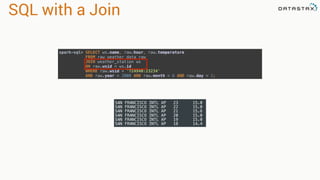
SQL with a Join
spark-sql> SELECT ws.name, raw.hour, raw.temperature

FROM raw_weather_data raw

JOIN weather_station ws

ON raw.wsid = ws.id

WHERE raw.wsid = '724940:23234'

AND raw.year = 2008 AND raw.month = 6 AND raw.day = 1;
SAN FRANCISCO INTL AP 23 15.0
SAN FRANCISCO INTL AP 22 15.0
SAN FRANCISCO INTL AP 21 15.6
SAN FRANCISCO INTL AP 20 15.0
SAN FRANCISCO INTL AP 19 15.0
SAN FRANCISCO INTL AP 18 14.4
Analyzing large data sets
val spanRDD = sc.cassandraTable[Double]("isd_weather_data", "raw_weather_data")

.select("temperature")

.where("wsid = ? AND year = ? AND month = ? AND DAY = ?",

"724940:23234", "2008", "12", "1").spanBy(row => (row.getString("wsid")))
•Specify partition grouping
•Use with large partitions
•Perfect for time series
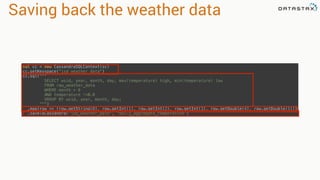
Saving back the weather data
val cc = new CassandraSQLContext(sc)

cc.setKeyspace("isd_weather_data")

cc.sql("""

SELECT wsid, year, month, day, max(temperature) high, min(temperature) low

FROM raw_weather_data

WHERE month = 6

AND temperature !=0.0

GROUP BY wsid, year, month, day;

""")

.map{row => (row.getString(0), row.getInt(1), row.getInt(2), row.getInt(3), row.getDouble(4), row.getDouble(5))}

.saveToCassandra("isd_weather_data", "daily_aggregate_temperature")
Guest speaker!
Chief Data Scientist Jon Haddad - Jon Haddad
In the beginning… there was RDD
sc = SparkContext(appName="PythonPi")
partitions = int(sys.argv[1]) if len(sys.argv) > 1 else 2
n = 100000 * partitions
def f(_):
x = random() * 2 - 1
y = random() * 2 - 1
return 1 if x ** 2 + y ** 2 < 1 else 0
count = sc.parallelize(range(1, n + 1), partitions).
map(f).reduce(add)
print("Pi is roughly %f" % (4.0 * count / n))
sc.stop()
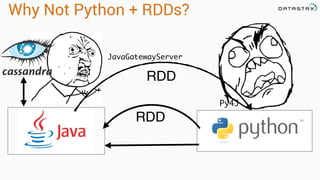
Why Not Python + RDDs?
RDD
JavaGatewayServer
Py4J
RDD
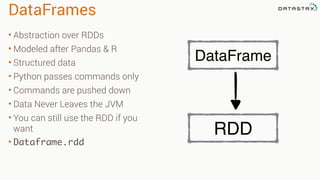
DataFrames
• Abstraction over RDDs
• Modeled after Pandas & R
• Structured data
• Python passes commands only
• Commands are pushed down
• Data Never Leaves the JVM
• You can still use the RDD if you
want
• Dataframe.rdd
RDD
DataFrame
Let's play with code
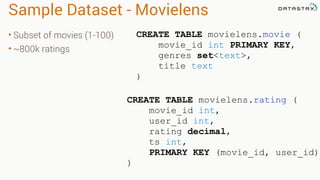
Sample Dataset - Movielens
• Subset of movies (1-100)
• ~800k ratings
CREATE TABLE movielens.movie (
movie_id int PRIMARY KEY,
genres set<text>,
title text
)
CREATE TABLE movielens.rating (
movie_id int,
user_id int,
rating decimal,
ts int,
PRIMARY KEY (movie_id, user_id)
)
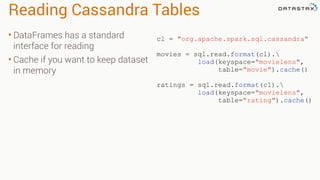
Reading Cassandra Tables
• DataFrames has a standard
interface for reading
• Cache if you want to keep dataset
in memory
cl = "org.apache.spark.sql.cassandra"
movies = sql.read.format(cl).
load(keyspace="movielens",
table="movie").cache()
ratings = sql.read.format(cl).
load(keyspace="movielens",
table="rating").cache()
Filtering
• Select specific rows matching
various patterns
• Fields do not require indexes
• Filtering occurs in memory
• You can use DSE Solr Search
Queries
• Filtering returns a DataFrame
movies.filter(movies.movie_id == 1)
movies[movies.movie_id == 1]
movies.filter("movie_id=1")
movie_id title genres
44 Mortal Kombat (1995)
['Action',
'Adventure',
'Fantasy']
movies.filter("title like '%Kombat%'")
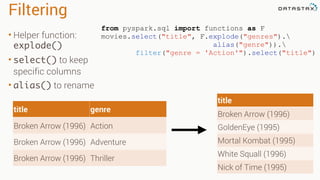
Filtering
• Helper function:
explode()
• select() to keep
specific columns
• alias() to rename
title
Broken Arrow (1996)
GoldenEye (1995)
Mortal Kombat (1995)
White Squall (1996)
Nick of Time (1995)
from pyspark.sql import functions as F
movies.select("title", F.explode("genres").
alias("genre")).
filter("genre = 'Action'").select("title")
title genre
Broken Arrow (1996) Action
Broken Arrow (1996) Adventure
Broken Arrow (1996) Thriller
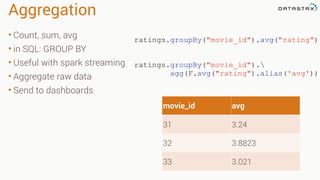
Aggregation
• Count, sum, avg
• in SQL: GROUP BY
• Useful with spark streaming
• Aggregate raw data
• Send to dashboards
ratings.groupBy("movie_id").
agg(F.avg("rating").alias('avg'))
ratings.groupBy("movie_id").avg("rating")
movie_id avg
31 3.24
32 3.8823
33 3.021
Joins
• Inner join by default
• Can do various outer joins
as well
• Returns a new DF with all
the columns
ratings.join(movies, "movie_id")
DataFrame[movie_id: int,
user_id: int,
rating: decimal(10,0),
ts: int,
genres: array<string>,
title: string]
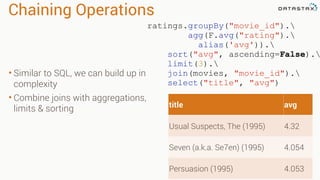
Chaining Operations
• Similar to SQL, we can build up in
complexity
• Combine joins with aggregations,
limits & sorting
ratings.groupBy("movie_id").
agg(F.avg("rating").
alias('avg')).
sort("avg", ascending=False).
limit(3).
join(movies, "movie_id").
select("title", "avg")
title avg
Usual Suspects, The (1995) 4.32
Seven (a.k.a. Se7en) (1995) 4.054
Persuasion (1995) 4.053
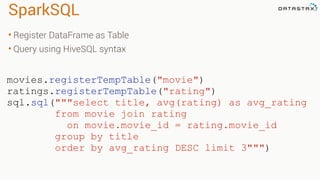
SparkSQL
• Register DataFrame as Table
• Query using HiveSQL syntax
movies.registerTempTable("movie")
ratings.registerTempTable("rating")
sql.sql("""select title, avg(rating) as avg_rating

from movie join rating
on movie.movie_id = rating.movie_id
group by title
order by avg_rating DESC limit 3""")

Database Migrations
• DataFrame reader supports JDBC
• JOIN operations can be cross DB
• Read dataframe from JDBC, write
to Cassandra
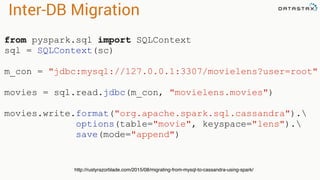
Inter-DB Migration
from pyspark.sql import SQLContext
sql = SQLContext(sc)
m_con = "jdbc:mysql://127.0.0.1:3307/movielens?user=root"
movies = sql.read.jdbc(m_con, "movielens.movies")
movies.write.format("org.apache.spark.sql.cassandra").
options(table="movie", keyspace="lens").
save(mode="append")
http://rustyrazorblade.com/2015/08/migrating-from-mysql-to-cassandra-using-spark/
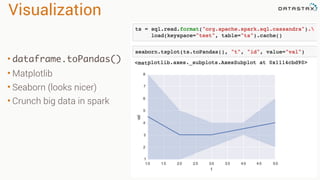
Visualization
• dataframe.toPandas()
• Matplotlib
• Seaborn (looks nicer)
• Crunch big data in spark
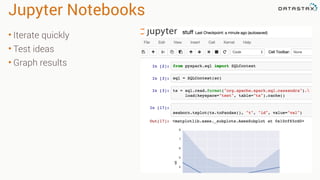
Jupyter Notebooks
• Iterate quickly
• Test ideas
• Graph results
Hands On!
https://github.com/killrweather/killrweather/wiki/7.-Spark-and-Cassandra-Exercises-for-KillrWeather-data
KillrWeather Wiki

An Introduction to time series with Team Apache

  • 1.
    @PatrickMcFadin Patrick McFadin
 Chief Evangelistfor Apache Cassandra, DataStax Process, store, and analyze like a boss with Team Apache: Kafka, Spark, and Cassandra 1
  • 2.
    Agenda • Lecture • Kafka •Spark • Cassandra • Hands on • Verify Cassandra up and running • Load data into Cassandra • Break 3:00 - 3:30 • Lecture • Cassandra (continued) • Spark and Cassandra • PySpark • Hands On • Spark Shell • Spark SQL Section 1 Section 2
  • 3.
    About me • ChiefEvangelist for Apache Cassandra • Senior Solution Architect at DataStax • Chief Architect, Hobsons • Web applications and performance since 1996
  • 4.
    What is timeseries data? A sequence of data points, typically consisting of successive measurements made over a time interval. Source: https://en.wikipedia.org/wiki/Time_series
  • 5.
  • 6.
    6 Underpants Gnomes Step 1 DataGnomes Step 2 Step 3 Collect Data ? Profit!
  • 7.
    What is timeseries analysis? Methods for analyzing time series data in order to extract meaningful statistics and other characteristics of the data. Source: https://en.wikipedia.org/wiki/Time_series
  • 8.
  • 9.
  • 10.
  • 11.
  • 12.
  • 13.
  • 14.
  • 15.
    2.1 Kafka -Architecture and Deployment
  • 16.
  • 17.
  • 18.
  • 19.
  • 20.
    The problem Kitchen Order Queue Meatdisk on bread please You mean a Hamburger? Uh yeah. That. Order
  • 21.
  • 22.
    Order from chaos Producer Topic= Food Order 1 Consumer
  • 23.
    Order from chaos Producer Topic= Food Order 1 Order Consumer
  • 24.
    Order from chaos Producer Topic= Food Order 1 Order 2 Consumer
  • 25.
    Order from chaos Producer Topic= Food Order 1 Order 2 Consumer Order
  • 26.
    Order from chaos Producer Topic= Food Order 1 Order 2 Consumer Order 3
  • 27.
    Order from chaos Producer Topic= Food Order 1 Order 2 Consumer Order 3
  • 28.
    Order from chaos Producer Topic= Food Order 1 Order 2 Consumer Order 3
  • 29.
    Order from chaos Producer Topic= Food Order 1 Order 2 Consumer Order 3 Order
  • 30.
    Order from chaos Producer Topic= Food Order 1 Order 2 Consumer Order 3 Order 4
  • 31.
    Order from chaos Producer Topic= Food Order 1 Order 2 Consumer Order 3 Order 4 Order
  • 32.
    Order from chaos Producer Topic= Food Order 1 Order 2 Consumer Order 3 Order 4 Order 5
  • 33.
    Order from chaos Producer Topic= Food Order 1 Order 2 Consumer Order 3 Order 4 Order 5
  • 34.
    Order from chaos Producer Topic= Food Order 1 Order 2 Consumer Order 3 Order 4 Order 5
  • 35.
    Order from chaos Producer Topic= Food Order 1 Order 2 Consumer Order 3 Order 4 Order 5
  • 36.
    Scale Producer Topic = Hamburgers Order 1 Order 2 Consumer Order 3 Order 4 Order 5 Topic= Pizza Order 1 Order 2 Order 3 Order 4 Order 5 Topic = Food
  • 37.
    Kafka Producer Topic = Temperature Temp 1 Temp 2 Consumer Temp 3 Temp 4 Temp 5 Collection API Temperature Processor Topic= Precipitation Precip 1 Precip 2 Precip 3 Precip 4 Precip 5 Precipitation Processor Broker
  • 38.
    Kafka Producer Topic = Temperature Temp 1 Temp 2 Consumer Temp 3 Temp 4 Temp 5 Collection API Temperature Processor Topic= Precipitation Precip 1 Precip 2 Precip 3 Precip 4 Precip 5 Precipitation Processor Broker Partition 0 Partition 0
  • 39.
    Kafka Producer Consumer Collection API Temperature Processor Precipitation Processor Topic =Temperature Tem 1 Temp 2 Tem 3 Temp 4 Temp 5 Topic = Precipitation Precip 1 Precip 2 Precip 3 Precip 4 Precip 5 Broker Partition 0 Partition 0 Tem 1 Temp 2 Tem 3 Temp 4 Temp 5 Partition 1 Temperature Processor
  • 40.
    Kafka Producer Consumer Collection API Temperature Processor Precipitation Processor Topic =Temperature Tem 1 Temp 2 Tem 3 Temp 4 Temp 5 Topic = Precipitation Precip 1 Precip 2 Precip 3 Precip 4 Precip 5 Broker Partition 0 Partition 0 Tem 1 Temp 2 Tem 3 Temp 4 Temp 5 Partition 1 Temperature Processor Topic = Temperature Tem 1 Temp 2 Tem 3 Temp 4 Temp 5 Topic = Precipitation Precip 1 Precip 2 Precip 3 Precip 4 Precip 5 Broker Partition 0 Partition 0 Tem 1 Temp 2 Tem 3 Temp 4 Temp 5 Partition 1 Topic Temperature Replication Factor = 2 Topic Precipitation Replication Factor = 2
  • 41.
    Kafka Producer Consumer Collection API Temperature Processor Precipitation Processor Topic = Temperature Tem 1 Temp 2 Tem 3 Temp 4 Temp 5 Topic= Precipitation Precip 1 Precip 2 Precip 3 Precip 4 Precip 5 Broker Partition 0 Partition 0 Tem 1 Temp 2 Tem 3 Temp 4 Temp 5 Partition 1 Temperature Processor Topic = Temperature Tem 1 Temp 2 Tem 3 Temp 4 Temp 5 Topic = Precipitation Precip 1 Precip 2 Precip 3 Precip 4 Precip 5 Broker Partition 0 Partition 0 Tem 1 Temp 2 Tem 3 Temp 4 Temp 5 Partition 1 Temperature Processor Temperature Processor Precipitation Processor Topic Temperature Replication Factor = 2 Topic Precipitation Replication Factor = 2
  • 42.
    Guarantees Order •Messages are orderedas they are sent by the producer •Consumers see messages in the order they were inserted by the producer Durability •Messages are delivered at least once •With a Replication Factor N up to N-1 server failures can be tolerated without losing committed messages
  • 43.
    3.1 Spark -Introduction to Spark
  • 44.
  • 45.
    Data Science atScale 2009
  • 46.
  • 47.
    In memory Input Data SparkIntermediate Data Output Data Disk Memory
  • 48.
  • 49.
    RDD Tranformations •Produces new RDD •Calls:filter, flatmap, map, distinct, groupBy, union, zip, reduceByKey, subtract Are •Immutable •Partitioned •Reusable Actions •Start cluster computing operations •Calls: collect: Array[T], count, fold, reduce.. and Have
  • 50.
  • 51.
    Spark Streaming Near Real-time SparkSQL StructuredData MLLib Machine Learning GraphX Graph Analysis
  • 52.
  • 53.
    3.1.1 Spark -Architecture
  • 54.
  • 55.
  • 56.
    DAG Stage 1 Stage 2 Stage3 Stage 4 Stage 5
  • 57.
    RDD RDD Data Input Source • File •Database • Stream • Collection
  • 58.
  • 59.
    Partitions RDD Data Partition 0 Partition 1 Partition2 Partition 3 Partition 4 Partition 5 Partition 6 Partition 7 Partition 8 Partition 9 Server 1 Server 2 Server 3 Server 4 Server 5
  • 60.
    Partitions RDD Data Partition 0 Partition 1 Partition2 Partition 3 Partition 4 Partition 5 Partition 6 Partition 7 Partition 8 Partition 9 Server 2 Server 3 Server 4 Server 5
  • 61.
    Partitions RDD Data Partition 0 Partition 1 Partition2 Partition 3 Partition 4 Partition 5 Partition 6 Partition 7 Partition 8 Partition 9 Server 2 Server 3 Server 4 Server 5
  • 62.
  • 63.
  • 64.
    Master Worker Worker Worker Worker Storage Storage Storage Storage Stageone - Count words P0 P1 P2 DAG Scheduler Executer Narrow Transformation • filter • map • sample • flatMap
  • 65.
    Master Worker Worker Worker Worker Storage Storage Storage Storage WideTransformation P0 Stage two - Collect counts Shuffle! •join •reduceByKey •union •groupByKey
  • 66.
    3.2 Spark -Spark Streaming
  • 67.
    The problem domain Petabytesof data Gigabytes Per Second
  • 68.
  • 69.
  • 70.
    Receiver Based Approach Producer Topic= Temperature Temp 1 Temp 2 Consumer Temp 3 Temp 4 Temp 5 Collection API Topic = Precipitation Precip 1 Precip 2 Precip 3 Precip 4 Precip 5 Broker Partition 0 Partition 0 Streaming Streaming
  • 71.
    Receiver Based Approach Producer Topic= Temperature Temp 1 Temp 2 Consumer Temp 3 Temp 4 Temp 5 Collection API Topic = Precipitation Precip 1 Precip 2 Precip 3 Precip 4 Precip 5 Broker Partition 0 Partition 0 Streaming Streaming Streaming Lost Data
  • 72.
    Receiver Based Approach Producer Topic= Temperature Temp 1 Temp 2 Consumer Temp 3 Temp 4 Temp 5 Collection API Topic = Precipitation Precip 1 Precip 2 Precip 3 Precip 4 Precip 5 Broker Partition 0 Partition 0 Streaming Streaming Streaming Write Ahead Log
  • 73.
    val kafkaStream =KafkaUtils.createStream(streamingContext,
 [ZK quorum], [consumer group id], [per-topic number of Kafka partitions to consume]) Zookeeper Server IP Consumer Group Created In Kafka List of Kafka topics and number of threads per topic Receiver Based Approach
  • 74.
    Producer Topic = Temperature Temp 1 Temp 2 Consumer Temp 3 Temp 4 Temp 5 Collection API Topic= Precipitation Precip 1 Precip 2 Precip 3 Precip 4 Precip 5 Broker Partition 0 Partition 0 Streaming Streaming Direct Based Approach
  • 75.
    Producer Topic = Temperature Temp 1 Temp 2 Consumer Temp 3 Temp 4 Temp 5 Collection API Topic= Precipitation Precip 1 Precip 2 Precip 3 Precip 4 Precip 5 Broker Partition 0 Partition 0 Streaming Streaming Direct Based Approach
  • 76.
    Producer Topic = Temperature Temp 1 Temp 2 Consumer Temp 3 Temp 4 Temp 5 Collection API Topic= Precipitation Precip 1 Precip 2 Precip 3 Precip 4 Precip 5 Broker Partition 0 Partition 0 Streaming Streaming Direct Based Approach Streaming
  • 77.
    Producer Topic = Temperature Temp 1 Temp 2 Consumer Temp 3 Temp 4 Temp 5 Collection API Topic= Precipitation Precip 1 Precip 2 Precip 3 Precip 4 Precip 5 Broker Partition 0 Partition 0 Streaming Streaming Direct Based Approach Streaming
  • 78.
    Direct Based Approach valdirectKafkaStream = KafkaUtils.createDirectStream[
 [key class], [value class], [key decoder class], [value decoder class] ](
 streamingContext, [map of Kafka parameters], [set of topics to consume]) List of Kafka brokers (and any other params) Kafka topics
  • 79.
    3.2.2 Spark -Streaming Windows and Slides
  • 80.
  • 81.
  • 82.
  • 83.
  • 84.
  • 85.
  • 86.
  • 87.
  • 88.
  • 89.
  • 90.
  • 91.
  • 92.
  • 93.
  • 94.
  • 95.
  • 96.
  • 97.
  • 98.
    T0 1 23 4 5 6 7 8 9 10 11 1 SecWindow
  • 99.
    T0 1 23 4 5 6 7 8 9 10 11 Event DStream Transform DStream Transform
  • 100.
    T0 1 23 4 5 6 7 8 9 10 11 Event DStream Transform DStream Transform
  • 101.
    T0 1 23 4 5 6 7 8 9 10 11 Event DStream Transform DStream Transform
  • 102.
    T0 1 23 4 5 6 7 8 9 10 11 Event DStream Transform DStream
  • 103.
    T0 1 23 4 5 6 7 8 9 10 11 Event DStream Transform DStream Slide Transform
  • 104.
    T0 1 23 4 5 6 7 8 9 10 11 Event DStream Transform DStream Slide Transform
  • 105.
    T0 1 23 4 5 6 7 8 9 10 11 Event DStream Transform DStream Transform
  • 106.
    Window •Amount of timein seconds to sample data •Larger size creates memory pressure Slide •Amount of time in seconds to advance window DStream •Window of data as a set •Same operations as an RDD
  • 107.
    4.1 Cassandra -Introduction
  • 108.
  • 109.
    How did weget here? 1960s and 70s
  • 110.
    How did weget here? 1960s and 70s 1980s and 90s
  • 111.
    How did weget here? 1960s and 70s 1980s and 90s 2000s
  • 112.
    How did weget here? 1960s and 70s 1980s and 90s 2000s 2010
  • 113.
    Gave it mybest shot shard 1 shard 2 shard 3 shard 4 router client Patrick, All your wildest dreams will come true.
  • 114.
  • 115.
  • 116.
    Dynamo Paper(2007) • Howdo we build a data store that is: • Reliable • Performant • “Always On” • Nothing new and shiny Evolutionary. Real. Computer Science Also the basis for Riak and Voldemort
  • 117.
    BigTable(2006) • Richer datamodel • 1 key. Lots of values • Fast sequential access • 38 Papers cited
  • 118.
    Cassandra(2008) • Distributed featuresof Dynamo • Data Model and storage from BigTable • February 17, 2010 it graduated to a top-level Apache project
  • 119.
    Cassandra - Morethan one server • All nodes participate in a cluster • Shared nothing • Add or remove as needed • More capacity? Add a server
 119
  • 120.
    120 Cassandra HBase RedisMySQL THROUGHPUTOPS/SEC) VLDB benchmark (RWS)
  • 121.
    Cassandra - FullyReplicated • Client writes local • Data syncs across WAN • Replication per Data Center 121
  • 122.
    A Data Oceanor Pond., Lake An In-Memory Database A Key-Value Store A magical database unicorn that farts rainbows
  • 123.
  • 124.
  • 125.
    4.1.2 Cassandra -Basic Architecture
  • 126.
  • 127.
  • 128.
    Partition with Clustering Cluster 1 Partition Key1 Column 1 Column 2 Column 3 Cluster 2 Partition Key 1 Column 1 Column 2 Column 3 Cluster 3 Partition Key 1 Column 1 Column 2 Column 3 Cluster 4 Partition Key 1 Column 1 Column 2 Column 3
  • 129.
    Table Column 1 Partition Key 1 Column 2 Column 3 Column 4 Column 1 Partition Key1 Column 2 Column 3 Column 4 Column 1 Partition Key 1 Column 2 Column 3 Column 4 Column 1 Partition Key 1 Column 2 Column 3 Column 4 Column 1 Partition Key 2 Column 2 Column 3 Column 4 Column 1 Column 2 Column 3 Column 4 Column 1 Column 2 Column 3 Column 4 Column 1 Column 2 Column 3 Column 4 Partition Key 2 Partition Key 2 Partition Key 2
  • 130.
    Keyspace Column 1 Partition Key 1 Column 2 Column 3 Column 4 Column 1 Partition Key 2 Column 2 Column 3 Column 4 Column 1 Partition Key1 Column 2 Column 3 Column 4 Column 1 Partition Key 1 Column 2 Column 3 Column 4 Column 1 Partition Key 1 Column 2 Column 3 Column 4 Column 1 Partition Key 2 Column 2 Column 3 Column 4 Column 1 Partition Key 2 Column 2 Column 3 Column 4 Column 1 Partition Key 2 Column 2 Column 3 Column 4 Column 1 Partition Key 1 Column 2 Column 3 Column 4 Column 1 Partition Key 2 Column 2 Column 3 Column 4 Column 1 Partition Key 1 Column 2 Column 3 Column 4 Column 1 Partition Key 1 Column 2 Column 3 Column 4 Column 1 Partition Key 1 Column 2 Column 3 Column 4 Column 1 Partition Key 2 Column 2 Column 3 Column 4 Column 1 Partition Key 2 Column 2 Column 3 Column 4 Column 1 Partition Key 2 Column 2 Column 3 Column 4 Table 1 Table 2 Keyspace 1
  • 131.
  • 132.
    Token Server •Each partition isa 128 bit value •Consistent hash between 2-63 and 264 •Each node owns a range of those values •The token is the beginning of that range to the next node’s token value •Virtual Nodes break these down further Data Token Range 0 …
  • 133.
    The cluster Server TokenRange 0 0-100 0-100
  • 134.
    The cluster Server TokenRange 0 0-50 51 51-100 Server 0-50 51-100
  • 135.
    The cluster Server TokenRange 0 0-25 26 26-50 51 51-75 76 76-100 Server ServerServer 0-25 76-100 26-5051-75
  • 136.
    4.1.3 Cassandra -Replication, High Availability and Multi-datacenter
  • 137.
    Replication 10.0.0.1 00-25 DC1 DC1: RF=1 Node Primary 10.0.0.100-25 10.0.0.2 26-50 10.0.0.3 51-75 10.0.0.4 76-100 10.0.0.1 00-25 10.0.0.4 76-100 10.0.0.2 26-50 10.0.0.3 51-75
  • 138.
    Replication 10.0.0.1 00-25 10.0.0.4 76-100 10.0.0.2 26-50 10.0.0.3 51-75 DC1 DC1: RF=2 Node PrimaryReplica 10.0.0.1 00-25 76-100 10.0.0.2 26-50 00-25 10.0.0.3 51-75 26-50 10.0.0.4 76-100 51-75 76-100 00-25 26-50 51-75
  • 139.
    Replication DC1 DC1: RF=3 Node PrimaryReplica Replica 10.0.0.1 00-25 76-100 51-75 10.0.0.2 26-50 00-25 76-100 10.0.0.3 51-75 26-50 00-25 10.0.0.4 76-100 51-75 26-50 10.0.0.1 00-25 10.0.0.4 76-100 10.0.0.2 26-50 10.0.0.3 51-75 76-100 51-75 00-25 76-100 26-50 00-25 51-75 26-50
  • 140.
    Consistency DC1 DC1: RF=3 Node PrimaryReplica Replica 10.0.0.1 00-25 76-100 51-75 10.0.0.2 26-50 00-25 76-100 10.0.0.3 51-75 26-50 00-25 10.0.0.4 76-100 51-75 26-50 10.0.0.1 00-25 10.0.0.4 76-100 10.0.0.2 26-50 10.0.0.3 51-75 76-100 51-75 00-25 76-100 26-50 00-25 51-75 26-50 Client Write to partition 15
  • 141.
    Repair DC1: RF=3 Node PrimaryReplica Replica 10.0.0.1 00-25 76-100 51-75 10.0.0.2 26-50 00-25 76-100 10.0.0.3 51-75 26-50 00-25 10.0.0.4 76-100 51-75 26-50 10.0.0.1 00-25 10.0.0.4 76-100 10.0.0.2 26-50 10.0.0.3 51-75 76-100 51-75 00-25 76-100 26-50 00-25 51-75 26-50 Client Repair = Am I consistent? You are missing some data. Here. Have some of mine.
  • 142.
    Consistency level Consistency LevelNumber of Nodes Acknowledged One One - Read repair triggered Local One One - Read repair in local DC Quorum 51% Local Quorum 51% in local DC
  • 143.
    Consistency DC1 DC1: RF=3 Node PrimaryReplica Replica 10.0.0.1 00-25 76-100 51-75 10.0.0.2 26-50 00-25 76-100 10.0.0.3 51-75 26-50 00-25 10.0.0.4 76-100 51-75 26-50 10.0.0.1 00-25 10.0.0.4 76-100 10.0.0.2 26-50 10.0.0.3 51-75 76-100 51-75 00-25 76-100 26-50 00-25 51-75 26-50 Client Write to partition 15 CL= One
  • 144.
    Consistency DC1 DC1: RF=3 Node PrimaryReplica Replica 10.0.0.1 00-25 76-100 51-75 10.0.0.2 26-50 00-25 76-100 10.0.0.3 51-75 26-50 00-25 10.0.0.4 76-100 51-75 26-50 10.0.0.1 00-25 10.0.0.4 76-100 10.0.0.2 26-50 10.0.0.3 51-75 76-100 51-75 00-25 76-100 26-50 00-25 51-75 26-50 Client Write to partition 15 CL= One
  • 145.
    Consistency DC1 DC1: RF=3 Node PrimaryReplica Replica 10.0.0.1 00-25 76-100 51-75 10.0.0.2 26-50 00-25 76-100 10.0.0.3 51-75 26-50 00-25 10.0.0.4 76-100 51-75 26-50 10.0.0.1 00-25 10.0.0.4 76-100 10.0.0.2 26-50 10.0.0.3 51-75 76-100 51-75 00-25 76-100 26-50 00-25 51-75 26-50 Client Write to partition 15 CL= Quorum
  • 146.
    Multi-datacenter DC1 DC1: RF=3 Node PrimaryReplica Replica 10.0.0.1 00-25 76-100 51-75 10.0.0.2 26-50 00-25 76-100 10.0.0.3 51-75 26-50 00-25 10.0.0.4 76-100 51-75 26-50 10.0.0.1 00-25 10.0.0.4 76-100 10.0.0.2 26-50 10.0.0.3 51-75 76-100 51-75 00-25 76-100 26-50 00-25 51-75 26-50 Client Write to partition 15 DC2 10.1.0.1 00-25 10.1.0.4 76-100 10.1.0.2 26-50 10.1.0.3 51-75 76-100 51-75 00-25 76-100 26-50 00-25 51-75 26-50 Node Primary Replica Replica 10.1.0.1 00-25 76-100 51-75 10.1.0.2 26-50 00-25 76-100 10.1.0.3 51-75 26-50 00-25 10.1.0.4 76-100 51-75 26-50 DC2: RF=3
  • 147.
    Multi-datacenter DC1 DC1: RF=3 Node PrimaryReplica Replica 10.0.0.1 00-25 76-100 51-75 10.0.0.2 26-50 00-25 76-100 10.0.0.3 51-75 26-50 00-25 10.0.0.4 76-100 51-75 26-50 10.0.0.1 00-25 10.0.0.4 76-100 10.0.0.2 26-50 10.0.0.3 51-75 76-100 51-75 00-25 76-100 26-50 00-25 51-75 26-50 Client Write to partition 15 DC2 10.1.0.1 00-25 10.1.0.4 76-100 10.1.0.2 26-50 10.1.0.3 51-75 76-100 51-75 00-25 76-100 26-50 00-25 51-75 26-50 DC2: RF=3 Node Primary Replica Replica 10.1.0.1 00-25 76-100 51-75 10.1.0.2 26-50 00-25 76-100 10.1.0.3 51-75 26-50 00-25 10.1.0.4 76-100 51-75 26-50
  • 148.
    Multi-datacenter DC1 DC1: RF=3 Node PrimaryReplica Replica 10.0.0.1 00-25 76-100 51-75 10.0.0.2 26-50 00-25 76-100 10.0.0.3 51-75 26-50 00-25 10.0.0.4 76-100 51-75 26-50 10.0.0.1 00-25 10.0.0.4 76-100 10.0.0.2 26-50 10.0.0.3 51-75 76-100 51-75 00-25 76-100 26-50 00-25 51-75 26-50 Client Write to partition 15 DC2 10.1.0.1 00-25 10.1.0.4 76-100 10.1.0.2 26-50 10.1.0.3 51-75 76-100 51-75 00-25 76-100 26-50 00-25 51-75 26-50 DC2: RF=3 Node Primary Replica Replica 10.1.0.1 00-25 76-100 51-75 10.1.0.2 26-50 00-25 76-100 10.1.0.3 51-75 26-50 00-25 10.1.0.4 76-100 51-75 26-50
  • 149.
    4.2.1 Cassandra -Weather Website Example
  • 150.
    Example: Weather Station •Weather station collects data • Cassandra stores in sequence • Application reads in sequence • Aggregations in fast lookup table Windsor California July 1, 2014 High: 73.4 Low : 51.4 Precipitation: 0.0 2014 Total: 8.3” Weather for Windsor, California as of 9PM PST July 7th 2015 Current Temp: 71 F Daily Precipitation: 0.0” Up-to-date Weather High: 85 F Low 58 F 2015 Total Precipitation: 12.0 “
  • 151.
    Weather Web Site Cassandra OnlyDC Cassandra + Spark DC Spark Jobs Spark Streaming
  • 152.
  • 153.
    Relational Data Models •5 normal forms • Foreign Keys • Joins deptId First Last 1 Edgar Codd 2 Raymond Boyce id Dept 1 Engineering 2 Math Employees Department
  • 154.
  • 155.
  • 156.
    CQL vs SQL •No joins • Limited aggregations deptId First Last 1 Edgar Codd 2 Raymond Boyce id Dept 1 Engineering 2 Math Employees Department SELECT e.First, e.Last, d.Dept FROM Department d, Employees e WHERE ‘Codd’ = e.Last AND e.deptId = d.id
  • 157.
    Denormalization • Combine tablecolumns into a single view • No joins SELECT First, Last, Dept FROM employees WHERE id = ‘1’ id First Last Dept 1 Edgar Codd Engineering 2 Raymond Boyce Math Employees
  • 158.
    Queries supported CREATE TABLEraw_weather_data (
 wsid text,
 year int,
 month int,
 day int,
 hour int,
 temperature double,
 dewpoint double,
 pressure double,
 wind_direction int,
 wind_speed double,
 sky_condition int,
 sky_condition_text text,
 one_hour_precip double,
 six_hour_precip double,
 PRIMARY KEY ((wsid), year, month, day, hour)
 ) WITH CLUSTERING ORDER BY (year DESC, month DESC, day DESC, hour DESC); Get weather data given •Weather Station ID •Weather Station ID and Time •Weather Station ID and Range of Time
  • 159.
    Aggregation Queries CREATE TABLEdaily_aggregate_temperature (
 wsid text,
 year int,
 month int,
 day int,
 high double,
 low double,
 mean double,
 variance double,
 stdev double,
 PRIMARY KEY ((wsid), year, month, day)
 ) WITH CLUSTERING ORDER BY (year DESC, month DESC, day DESC); Get temperature stats given •Weather Station ID •Weather Station ID and Time •Weather Station ID and Range of Time Windsor California July 1, 2014 High: 73.4 Low : 51.4
  • 160.
    daily_aggregate_precip CREATE TABLE daily_aggregate_precip(
 wsid text,
 year int,
 month int,
 day int,
 precipitation counter,
 PRIMARY KEY ((wsid), year, month, day)
 ) WITH CLUSTERING ORDER BY (year DESC, month DESC, day DESC); Get precipitation stats given •Weather Station ID •Weather Station ID and Time •Weather Station ID and Range of Time Windsor California July 1, 2014 High: 73.4 Low : 51.4 Precipitation: 0.0
  • 161.
    year_cumulative_precip CREATE TABLE year_cumulative_precip(
 wsid text,
 year int,
 precipitation counter,
 PRIMARY KEY ((wsid), year)
 ) WITH CLUSTERING ORDER BY (year DESC); Get latest yearly precipitation accumulation •Weather Station ID •Weather Station ID and Time •Provide fast lookup Windsor California July 1, 2014 High: 73.4 Low : 51.4 Precipitation: 0.0 2014 Total: 8.3”
  • 162.
  • 163.
    Table CREATE TABLE weather_station(
 id text,
 name text,
 country_code text,
 state_code text,
 call_sign text,
 lat double,
 long double,
 elevation double,
 PRIMARY KEY(id)
 ); Table Name Column Name Column CQL Type Primary Key Designation Partition Key
  • 164.
    Table CREATE TABLE daily_aggregate_precip(
 wsid text,
 year int,
 month int,
 day int,
 precipitation counter,
 PRIMARY KEY ((wsid), year, month, day)
 ) WITH CLUSTERING ORDER BY (year DESC, month DESC, day DESC); Partition Key Clustering Columns Order Override
  • 165.
    Insert INSERT INTO weather_station(id, call_sign, country_code, elevation, lat, long, name, state_code)
 VALUES ('727930:24233', 'KSEA', 'US', 121.9, 47.467, -122.32, 'SEATTLE SEATTLE-TACOMA INTL A', ‘WA'); Table Name Fields Values Partition Key: Required
  • 166.
    Lightweight Transactions INSERT INTOweather_station (id, call_sign, country_code, elevation, lat, long, name, state_code)
 VALUES ('727930:24233', 'KSEA', 'US', 121.9, 47.467, -122.32, 'SEATTLE SEATTLE-TACOMA INTL A', ‘WA’) IF NOT EXISTS; Don’t overwrite!
  • 167.
    Lightweight Transactions CREATE TABLEIF NOT EXISTS weather_station (
 id text,
 name text,
 country_code text,
 state_code text,
 call_sign text,
 lat double,
 long double,
 elevation double,
 PRIMARY KEY(id)
 ); No-op. Don’t throw error
  • 168.
    Select id | call_sign| country_code | elevation | lat | long | name | state_code
 --------------+-----------+--------------+-----------+--------+---------+-------------------------------+------------
 727930:24233 | KSEA | US | 121.9 | 47.467 | -122.32 | SEATTLE SEATTLE-TACOMA INTL A | WA SELECT id, call_sign, country_code, elevation, lat, long, name, state_code
 FROM weather_station
 WHERE id = '727930:24233'; Fields Table Name Primary Key: Partition Key Required
  • 169.
    Update UPDATE weather_station
 SET name= 'SeaTac International Airport'
 WHERE id = '727930:24233'; id | call_sign | country_code | elevation | lat | long | name | state_code
 --------------+-----------+--------------+-----------+--------+---------+------------------------------+------------
 727930:24233 | KSEA | US | 121.9 | 47.467 | -122.32 | SeaTac International Airport | WA Table Name Fields to Update: Not in Primary Key Primary Key
  • 170.
    Lightweight Transactions UPDATE weather_station
 SETname = 'SeaTac International Airport'
 WHERE id = ‘727930:24233’; IF name = 'SEATTLE SEATTLE-TACOMA INTL A’; Don’t overwrite!
  • 171.
    Delete DELETE FROM weather_station
 WHEREid = '727930:24233'; Table Name Primary Key: Required
  • 172.
    Collections Set CREATE TABLE weather_station(
 id text,
 name text,
 country_code text,
 state_code text,
 call_sign text,
 lat double,
 long double,
 elevation double,
 equipment set<text>
 PRIMARY KEY(id)
 ); equipment set<text> CQL Type: For Ordering Column Name
  • 173.
    Collections Set List CREATE TABLE weather_station(
 id text,
 name text,
 country_code text,
 state_code text,
 call_sign text,
 lat double,
 long double,
 elevation double,
 equipment set<text>,
 service_dates list<timestamp>,
 PRIMARY KEY(id)
 ); equipment set<text> service_dates list<timestamp>Column Name CQL Type: For Ordering Column Name CQL Type
  • 174.
    Collections Set List Map CREATE TABLE weather_station(
 id text,
 name text,
 country_code text,
 state_code text,
 call_sign text,
 lat double,
 long double,
 elevation double,
 equipment set<text>,
 service_dates list<timestamp>,
 service_notes map<timestamp,text>,
 PRIMARY KEY(id)
 ); equipment set<text> service_dates list<timestamp> service_notes map<timestamp,text> Column Name Column Name CQL Key Type CQL Value Type CQL Type: For Ordering Column Name CQL Type
  • 175.
    User Defined Functions* *Asof Cassandra 2.2 •Built-in: avg, min, max, count(<column name>) •Runs on server •Always use with partition key
  • 176.
    User Defined Functions CREATEFUNCTION maxI(current int, candidate int)
 CALLED ON NULL INPUT
 RETURNS int LANGUAGE java AS
 'if (current == null) return candidate; else return Math.max(current, candidate);' ;
 
 CREATE AGGREGATE maxAgg(int)
 SFUNC maxI
 STYPE int
 INITCOND null; CQL Type Pure Function SELECT maxAgg(temperature)
 FROM raw_weather_data
 WHERE wsid='10010:99999' 
 AND year = 2005 AND month = 12 AND day = 1 Aggregate using function over partition
  • 177.
    4.2.1.1.2 Cassandra -Partitions and clustering
  • 178.
    Primary Key CREATE TABLEraw_weather_data (
 wsid text,
 year int,
 month int,
 day int,
 hour int,
 temperature double,
 dewpoint double,
 pressure double,
 wind_direction int,
 wind_speed double,
 sky_condition int,
 sky_condition_text text,
 one_hour_precip double,
 six_hour_precip double,
 PRIMARY KEY ((wsid), year, month, day, hour)
 ) WITH CLUSTERING ORDER BY (year DESC, month DESC, day DESC, hour DESC);
  • 179.
    Primary key relationship PRIMARYKEY ((wsid),year,month,day,hour)
  • 180.
    Primary key relationship PartitionKey PRIMARY KEY ((wsid),year,month,day,hour)
  • 181.
    Primary key relationship PRIMARYKEY ((wsid),year,month,day,hour) Partition Key Clustering Columns
  • 182.
    Primary key relationship PartitionKey Clustering Columns 10010:99999 PRIMARY KEY ((wsid),year,month,day,hour)
  • 183.
    2005:12:1:10 -5.6 Primary key relationship PartitionKey Clustering Columns 10010:99999 -5.3-4.9-5.1 2005:12:1:9 2005:12:1:8 2005:12:1:7 PRIMARY KEY ((wsid),year,month,day,hour)
  • 184.
    Clustering 200510010:99999 12 110 200510010:99999 12 1 9 raw_weather_data -5.6 -5.1 200510010:99999 12 1 8 200510010:99999 12 1 7 -4.9 -5.3 Order By DESC
  • 185.
    Partition keys 10010:99999 Murmur3Hash Token = 7224631062609997448 722266:13850 Murmur3 Hash Token = -6804302034103043898 INSERT INTO raw_weather_data(wsid,year,month,day,hour,temperature) VALUES (‘10010:99999’,2005,12,1,7,-5.6); INSERT INTO raw_weather_data(wsid,year,month,day,hour,temperature) VALUES (‘722266:13850’,2005,12,1,7,-5.6); Consistent hash. 128 bit number between 2-63 and 264
  • 186.
    Partition keys 10010:99999 Murmur3Hash Token = 15 722266:13850 Murmur3 Hash Token = 77 For this example, let’s make it a reasonable number INSERT INTO raw_weather_data(wsid,year,month,day,hour,temperature) VALUES (‘10010:99999’,2005,12,1,7,-5.6); INSERT INTO raw_weather_data(wsid,year,month,day,hour,temperature) VALUES (‘722266:13850’,2005,12,1,7,-5.6);
  • 187.
    Data Locality DC1 DC1: RF=3 NodePrimary Replica Replica 10.0.0.1 00-25 76-100 51-75 10.0.0.2 26-50 00-25 76-100 10.0.0.3 51-75 26-50 00-25 10.0.0.4 76-100 51-75 26-50 10.0.0.1 00-25 10.0.0.4 76-100 10.0.0.2 26-50 10.0.0.3 51-75 76-100 51-75 00-25 76-100 26-50 00-25 51-75 26-50 Client Read partition 15 DC2 10.1.0.1 00-25 10.1.0.4 76-100 10.1.0.2 26-50 10.1.0.3 51-75 76-100 51-75 00-25 76-100 26-50 00-25 51-75 26-50 DC2: RF=3 Client Read partition 15 Node Primary Replica Replica 10.1.0.1 00-25 76-100 51-75 10.1.0.2 26-50 00-25 76-100 10.1.0.3 51-75 26-50 00-25 10.1.0.4 76-100 51-75 26-50
  • 188.
  • 189.
    4.2.1.1.3 Cassandra -Read and Write Path
  • 190.
    Writes CREATE TABLE raw_weather_data(
 wsid text,
 year int,
 month int,
 day int,
 hour int,
 temperature double,
 dewpoint double,
 pressure double,
 wind_direction int,
 wind_speed double,
 sky_condition int,
 sky_condition_text text,
 one_hour_precip double,
 six_hour_precip double,
 PRIMARY KEY ((wsid), year, month, day, hour)
 ) WITH CLUSTERING ORDER BY (year DESC, month DESC, day DESC, hour DESC);
  • 191.
    Writes CREATE TABLE raw_weather_data(
 wsid text,
 year int,
 month int,
 day int,
 hour int,
 temperature double,
 PRIMARY KEY ((wsid), year, month, day, hour)
 ) WITH CLUSTERING ORDER BY (year DESC, month DESC, day DESC, hour DESC); INSERT INTO raw_weather_data(wsid,year,month,day,hour,temperature)
 VALUES (‘10010:99999’,2005,12,1,10,-5.6); INSERT INTO raw_weather_data(wsid,year,month,day,hour,temperature)
 VALUES (‘10010:99999’,2005,12,1,9,-5.1); INSERT INTO raw_weather_data(wsid,year,month,day,hour,temperature)
 VALUES (‘10010:99999’,2005,12,1,8,-4.9); INSERT INTO raw_weather_data(wsid,year,month,day,hour,temperature)
 VALUES (‘10010:99999’,2005,12,1,7,-5.3);
  • 192.
    Write Path Client INSERT INTOraw_weather_data(wsid,year,month,day,hour,temperature)
 VALUES (‘10010:99999’,2005,12,1,7,-5.3); year 1wsid 1 month 1 day 1 hour 1 year 2wsid 2 month 2 day 2 hour 2 Memtable SSTable SSTable SSTable SSTable Node Commit Log Data * Compaction * Temp Temp
  • 193.
    Storage Model -Logical View 2005:12:1:10 -5.6 2005:12:1:9 -5.1 2005:12:1:8 -4.9 10010:99999 10010:99999 10010:99999 wsid hour temperature 2005:12:1:7 -5.3 10010:99999 SELECT wsid, hour, temperature
 FROM raw_weather_data
 WHERE wsid=‘10010:99999’
 AND year = 2005 AND month = 12 AND day = 1;
  • 194.
    2005:12:1:10 -5.6 -5.3-4.9-5.1 Storage Model- Disk Layout 2005:12:1:9 2005:12:1:8 10010:99999 2005:12:1:7 Merged, Sorted and Stored Sequentially SELECT wsid, hour, temperature
 FROM raw_weather_data
 WHERE wsid=‘10010:99999’
 AND year = 2005 AND month = 12 AND day = 1;
  • 195.
    2005:12:1:10 -5.6 2005:12:1:11 -4.9 -5.3-4.9-5.1 Storage Model- Disk Layout 2005:12:1:9 2005:12:1:8 10010:99999 2005:12:1:7 Merged, Sorted and Stored Sequentially SELECT wsid, hour, temperature
 FROM raw_weather_data
 WHERE wsid=‘10010:99999’
 AND year = 2005 AND month = 12 AND day = 1;
  • 196.
    2005:12:1:10 -5.6 2005:12:1:11 -4.9 -5.3-4.9-5.1 Storage Model- Disk Layout 2005:12:1:9 2005:12:1:8 10010:99999 2005:12:1:7 Merged, Sorted and Stored Sequentially SELECT wsid, hour, temperature
 FROM raw_weather_data
 WHERE wsid=‘10010:99999’
 AND year = 2005 AND month = 12 AND day = 1; 2005:12:1:12 -5.4
  • 197.
    Read Path Client SSTable SSTable SSTable Node Data SELECT wsid,hour,temperature
 FROMraw_weather_data
 WHERE wsid='10010:99999'
 AND year = 2005 AND month = 12 AND day = 1 
 AND hour >= 7 AND hour <= 10; year 1wsid 1 month 1 day 1 hour 1 year 2wsid 2 month 2 day 2 hour 2 Memtable Temp Temp
  • 198.
    Query patterns • Rangequeries • “Slice” operation on disk Single seek on disk 10010:99999 Partition key for locality SELECT wsid,hour,temperature
 FROM raw_weather_data
 WHERE wsid='10010:99999'
 AND year = 2005 AND month = 12 AND day = 1 
 AND hour >= 7 AND hour <= 10; 2005:12:1:10 -5.6 -5.3-4.9-5.1 2005:12:1:9 2005:12:1:8 2005:12:1:7
  • 199.
    Query patterns • Rangequeries • “Slice” operation on disk Programmers like this Sorted by event_time 2005:12:1:10 -5.6 2005:12:1:9 -5.1 2005:12:1:8 -4.9 10010:99999 10010:99999 10010:99999 weather_station hour temperature 2005:12:1:7 -5.3 10010:99999 SELECT weatherstation,hour,temperature FROM temperature WHERE weatherstation_id=‘10010:99999' AND year = 2005 AND month = 12 AND day = 1 AND hour >= 7 AND hour <= 10;
  • 200.
    5.1 Spark andCassandra - Architecture
  • 201.
    Great combo Store aton of data Analyze a ton of data
  • 202.
    Great combo Spark Streaming NearReal-time SparkSQL Structured Data MLLib Machine Learning GraphX Graph Analysis
  • 203.
    Great combo Spark Streaming NearReal-time SparkSQL Structured Data MLLib Machine Learning GraphX Graph Analysis CREATE TABLE raw_weather_data ( wsid text, year int, month int, day int, hour int, temperature double, dewpoint double, pressure double, wind_direction int, wind_speed double, sky_condition int, sky_condition_text text, one_hour_precip double, six_hour_precip double, PRIMARY KEY ((wsid), year, month, day, hour) ) WITH CLUSTERING ORDER BY (year DESC, month DESC, day DESC, hour DESC); Spark Connector
  • 204.
  • 205.
  • 206.
  • 207.
    Executer Master Worker Executer Executer 75-99 SELECT * FROM keyspace.table WHEREtoken(pk) > 75 AND token(pk) <= 99 Spark RDD Spark Partition Spark Partition Spark Partition Spark Connector
  • 208.
  • 209.
    Spark Connector Cassandra Cassandra + Spark Joinsand Unions No Yes Transformations Limited Yes Outside Data Integration No Yes Aggregations Limited Yes
  • 210.
    Type mapping CQL TypeScala Type ascii String bigint Long boolean Boolean counter Long decimal BigDecimal, java.math.BigDecimal double Double float Float inet java.net.InetAddress int Int list Vector, List, Iterable, Seq, IndexedSeq, java.util.List map Map, TreeMap, java.util.HashMap set Set, TreeSet, java.util.HashSet text, varchar String timestamp Long, java.util.Date, java.sql.Date, org.joda.time.DateTime timeuuid java.util.UUID uuid java.util.UUID varint BigInt, java.math.BigInteger *nullable values Option
  • 211.
    Execution of jobs LocalCluster •Connect to localhost master •Single system dev •Runs stand alone •Connect to spark master IP •Production configuration •Submit using spark- submit
  • 212.
    Summary •Cassandra acts asthe storage layer for Spark •Deploy in a mixed cluster configuration •Spark executors access Cassandra using the DataStax connector •Deploy your jobs in either local or cluster modes
  • 213.
    5.2 Spark andCassandra - Analyzing Cassandra Data
  • 214.
    Attaching to Sparkand Cassandra // Import Cassandra-specific functions on SparkContext and RDD objects import org.apache.spark.{SparkContext, SparkConf}
 import com.datastax.spark.connector._ /** The setMaster("local") lets us run & test the job right in our IDE */
 val conf = new SparkConf(true) .set("spark.cassandra.connection.host", "127.0.0.1") .setMaster(“local[*]") .setAppName(getClass.getName) // Optionally
 .set("cassandra.username", "cassandra")
 .set("cassandra.password", “cassandra") 
 val sc = new SparkContext(conf)
  • 215.
    Weather station example CREATETABLE raw_weather_data (
 wsid text, 
 year int, 
 month int, 
 day int, 
 hour int, 
 temperature double, 
 dewpoint double, 
 pressure double, 
 wind_direction int, 
 wind_speed double, 
 sky_condition int, 
 sky_condition_text text, 
 one_hour_precip double, 
 six_hour_precip double, 
 PRIMARY KEY ((wsid), year, month, day, hour)
 ) WITH CLUSTERING ORDER BY (year DESC, month DESC, day DESC, hour DESC);
  • 216.
    Simple example /** keyspace& table */
 val tableRDD = sc.cassandraTable("isd_weather_data", "raw_weather_data")
 
 
 /** get a simple count of all the rows in the raw_weather_data table */
 val rowCount = tableRDD.count()
 
 
 println(s"Total Rows in Raw Weather Table: $rowCount")
 sc.stop()
  • 217.
    Simple example /** keyspace& table */
 val tableRDD = sc.cassandraTable("isd_weather_data", "raw_weather_data")
 
 
 /** get a simple count of all the rows in the raw_weather_data table */
 val rowCount = tableRDD.count()
 
 
 println(s"Total Rows in Raw Weather Table: $rowCount")
 sc.stop() Executer SELECT * FROM isd_weather_data.raw_weather_data Spark RDD Spark Partition Spark Connector
  • 218.
    Using CQL SELECT temperature
 FROMraw_weather_data
 WHERE wsid = '724940:23234'
 AND year = 2008
 AND month = 12
 AND day = 1; val cqlRRD = sc.cassandraTable("isd_weather_data", "raw_weather_data")
 .select("temperature")
 .where("wsid = ? AND year = ? AND month = ? AND DAY = ?",
 "724940:23234", "2008", "12", “1")
  • 219.
    Using SQL! spark-sql> SELECTwsid, year, month, day, max(temperature) high, min(temperature) low
 FROM raw_weather_data
 WHERE month = 6
 AND temperature !=0.0
 GROUP BY wsid, year, month, day; 724940:23234 2008 6 1 15.6 10.0 724940:23234 2008 6 2 15.6 10.0 724940:23234 2008 6 3 17.2 11.7 724940:23234 2008 6 4 17.2 10.0 724940:23234 2008 6 5 17.8 10.0 724940:23234 2008 6 6 17.2 10.0 724940:23234 2008 6 7 20.6 8.9
  • 220.
    SQL with aJoin spark-sql> SELECT ws.name, raw.hour, raw.temperature
 FROM raw_weather_data raw
 JOIN weather_station ws
 ON raw.wsid = ws.id
 WHERE raw.wsid = '724940:23234'
 AND raw.year = 2008 AND raw.month = 6 AND raw.day = 1; SAN FRANCISCO INTL AP 23 15.0 SAN FRANCISCO INTL AP 22 15.0 SAN FRANCISCO INTL AP 21 15.6 SAN FRANCISCO INTL AP 20 15.0 SAN FRANCISCO INTL AP 19 15.0 SAN FRANCISCO INTL AP 18 14.4
  • 221.
    Analyzing large datasets val spanRDD = sc.cassandraTable[Double]("isd_weather_data", "raw_weather_data")
 .select("temperature")
 .where("wsid = ? AND year = ? AND month = ? AND DAY = ?",
 "724940:23234", "2008", "12", "1").spanBy(row => (row.getString("wsid"))) •Specify partition grouping •Use with large partitions •Perfect for time series
  • 222.
    Saving back theweather data val cc = new CassandraSQLContext(sc)
 cc.setKeyspace("isd_weather_data")
 cc.sql("""
 SELECT wsid, year, month, day, max(temperature) high, min(temperature) low
 FROM raw_weather_data
 WHERE month = 6
 AND temperature !=0.0
 GROUP BY wsid, year, month, day;
 """)
 .map{row => (row.getString(0), row.getInt(1), row.getInt(2), row.getInt(3), row.getDouble(4), row.getDouble(5))}
 .saveToCassandra("isd_weather_data", "daily_aggregate_temperature")
  • 223.
    Guest speaker! Chief DataScientist Jon Haddad - Jon Haddad
  • 224.
    In the beginning…there was RDD sc = SparkContext(appName="PythonPi") partitions = int(sys.argv[1]) if len(sys.argv) > 1 else 2 n = 100000 * partitions def f(_): x = random() * 2 - 1 y = random() * 2 - 1 return 1 if x ** 2 + y ** 2 < 1 else 0 count = sc.parallelize(range(1, n + 1), partitions). map(f).reduce(add) print("Pi is roughly %f" % (4.0 * count / n)) sc.stop()
  • 225.
    Why Not Python+ RDDs? RDD JavaGatewayServer Py4J RDD
  • 226.
    DataFrames • Abstraction overRDDs • Modeled after Pandas & R • Structured data • Python passes commands only • Commands are pushed down • Data Never Leaves the JVM • You can still use the RDD if you want • Dataframe.rdd RDD DataFrame
  • 227.
  • 228.
    Sample Dataset -Movielens • Subset of movies (1-100) • ~800k ratings CREATE TABLE movielens.movie ( movie_id int PRIMARY KEY, genres set<text>, title text ) CREATE TABLE movielens.rating ( movie_id int, user_id int, rating decimal, ts int, PRIMARY KEY (movie_id, user_id) )
  • 229.
    Reading Cassandra Tables •DataFrames has a standard interface for reading • Cache if you want to keep dataset in memory cl = "org.apache.spark.sql.cassandra" movies = sql.read.format(cl). load(keyspace="movielens", table="movie").cache() ratings = sql.read.format(cl). load(keyspace="movielens", table="rating").cache()
  • 230.
    Filtering • Select specificrows matching various patterns • Fields do not require indexes • Filtering occurs in memory • You can use DSE Solr Search Queries • Filtering returns a DataFrame movies.filter(movies.movie_id == 1) movies[movies.movie_id == 1] movies.filter("movie_id=1") movie_id title genres 44 Mortal Kombat (1995) ['Action', 'Adventure', 'Fantasy'] movies.filter("title like '%Kombat%'")
  • 231.
    Filtering • Helper function: explode() •select() to keep specific columns • alias() to rename title Broken Arrow (1996) GoldenEye (1995) Mortal Kombat (1995) White Squall (1996) Nick of Time (1995) from pyspark.sql import functions as F movies.select("title", F.explode("genres"). alias("genre")). filter("genre = 'Action'").select("title") title genre Broken Arrow (1996) Action Broken Arrow (1996) Adventure Broken Arrow (1996) Thriller
  • 232.
    Aggregation • Count, sum,avg • in SQL: GROUP BY • Useful with spark streaming • Aggregate raw data • Send to dashboards ratings.groupBy("movie_id"). agg(F.avg("rating").alias('avg')) ratings.groupBy("movie_id").avg("rating") movie_id avg 31 3.24 32 3.8823 33 3.021
  • 233.
    Joins • Inner joinby default • Can do various outer joins as well • Returns a new DF with all the columns ratings.join(movies, "movie_id") DataFrame[movie_id: int, user_id: int, rating: decimal(10,0), ts: int, genres: array<string>, title: string]
  • 234.
    Chaining Operations • Similarto SQL, we can build up in complexity • Combine joins with aggregations, limits & sorting ratings.groupBy("movie_id"). agg(F.avg("rating"). alias('avg')). sort("avg", ascending=False). limit(3). join(movies, "movie_id"). select("title", "avg") title avg Usual Suspects, The (1995) 4.32 Seven (a.k.a. Se7en) (1995) 4.054 Persuasion (1995) 4.053
  • 235.
    SparkSQL • Register DataFrameas Table • Query using HiveSQL syntax movies.registerTempTable("movie") ratings.registerTempTable("rating") sql.sql("""select title, avg(rating) as avg_rating from movie join rating on movie.movie_id = rating.movie_id group by title order by avg_rating DESC limit 3""")
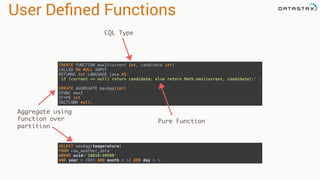
  • 236.
    Database Migrations • DataFramereader supports JDBC • JOIN operations can be cross DB • Read dataframe from JDBC, write to Cassandra
  • 237.
    Inter-DB Migration from pyspark.sqlimport SQLContext sql = SQLContext(sc) m_con = "jdbc:mysql://127.0.0.1:3307/movielens?user=root" movies = sql.read.jdbc(m_con, "movielens.movies") movies.write.format("org.apache.spark.sql.cassandra"). options(table="movie", keyspace="lens"). save(mode="append") http://rustyrazorblade.com/2015/08/migrating-from-mysql-to-cassandra-using-spark/
  • 238.
    Visualization • dataframe.toPandas() • Matplotlib •Seaborn (looks nicer) • Crunch big data in spark
  • 239.
    Jupyter Notebooks • Iteratequickly • Test ideas • Graph results
  • 240.