




# 
Scott Stanford
# 
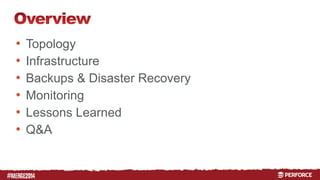
• Topology 
• Infrastructure 
• Backups & Disaster Recovery 
• Monitoring 
• Lessons Learned 
• Q&A
#
# 
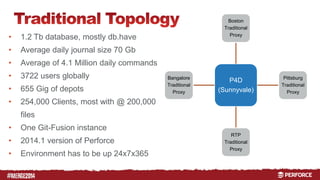
Boston 
Traditional 
Proxy 
P4D 
(Sunnyvale) 
Pittsburg 
Traditional 
Proxy 
RTP 
Traditional 
Proxy 
Bangalore 
Traditional 
Proxy 
• 1.2 Tb database, mostly db.have 
• Average daily journal size 70 Gb 
• Average of 4.1 Million daily commands 
• 3722 users globally 
• 655 Gig of depots 
• 254,000 Clients, most with @ 200,000 
files 
• One Git-Fusion instance 
• 2014.1 version of Perforce 
• Environment has to be up 24x7x365
# 
RTP 
Edge 
Pittsburg 
Proxy 
Boston 
Proxy 
Commit 
(Sunnyvale) 
Sunnyvale 
Edge 
Bangalore 
Edge 
Boston 
Traditional 
Proxy 
Pittsburg 
Traditional 
Proxy 
RTP 
Bangalore 
Traditional 
Traditional 
Proxy 
Proxy 
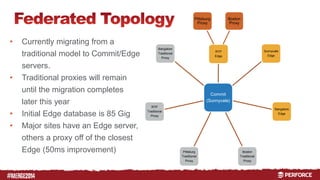
• Currently migrating from a 
traditional model to Commit/Edge 
servers. 
• Traditional proxies will remain 
until the migration completes 
later this year 
• Initial Edge database is 85 Gig 
• Major sites have an Edge server, 
others a proxy off of the closest 
Edge (50ms improvement)
#
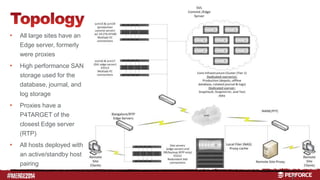
• All large sites have an 
# 
Edge server, formerly 
were proxies 
• High performance SAN 
storage used for the 
database, journal, and 
log storage 
• Proxies have a 
P4TARGET of the 
closest Edge server 
(RTP) 
• All hosts deployed with 
an active/standby host 
pairing 
7
# 
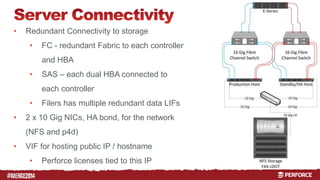
• Redundant Connectivity to storage 
• FC - redundant Fabric to each controller 
and HBA 
• SAS – each dual HBA connected to 
each controller 
• Filers has multiple redundant data LIFs 
• 2 x 10 Gig NICs, HA bond, for the network 
(NFS and p4d) 
• VIF for hosting public IP / hostname 
• Perforce licenses tied to this IP
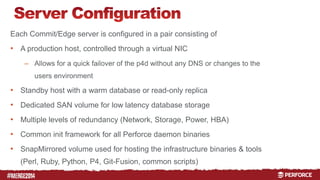
Each Commit/Edge server is configured in a pair consisting of 
• A production host, controlled through a virtual NIC 
# 
– Allows for a quick failover of the p4d without any DNS or changes to the 
users environment 
• Standby host with a warm database or read-only replica 
• Dedicated SAN volume for low latency database storage 
• Multiple levels of redundancy (Network, Storage, Power, HBA) 
• Common init framework for all Perforce daemon binaries 
• SnapMirrored volume used for hosting the infrastructure binaries & tools 
(Perl, Ruby, Python, P4, Git-Fusion, common scripts)
# 
• Storage devices used 
– NetApp EF540 w/ FC for the Commit server 
• 24 x 800 Gig SSD 
– NetApp E5512 w/ FC or SAS for each Edge server 
• 24 x 600 Gig 15k SAS 
– All RAID 10 with multiple spare disks, XFS, dual controllers, and dual power supplies 
• Used for: 
– Warm database or read-only replica on stand-by host 
– Production journal 
• Hourly journal truncations, then copied to the filer 
– Production p4d log 
• Nightly log rotations, compressed and copied to the filer
# 
• NetApp cDOT clusters used at each site with FAS6290 or better 
• 10 Gig data LIF 
• Dedicated vserver for Perforce 
• Shared NFS volumes between production/standby pairs for longer term 
storage, snapshots, and offsite 
• Used for: 
– Depot storage 
– Rotated journals & p4d logs 
– Checkpoints 
– Warm database 
• used for creating checkpoints and if both hosts are down to run the daemon 
– Git-Fusion homedir & cache, dedicated volume per instance
#
# 
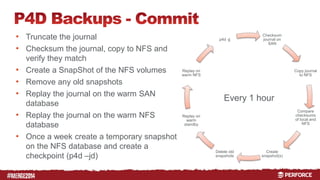
• Truncate the journal 
• Checksum the journal, copy to NFS and 
verify they match 
• Create a SnapShot of the NFS volumes 
• Remove any old snapshots 
• Replay the journal on the warm SAN 
database 
• Replay the journal on the warm NFS 
database 
• Once a week create a temporary snapshot 
on the NFS database and create a 
checkpoint (p4d –jd) 
Checksum 
journal on 
SAN 
Copy journal 
to NFS 
Compare 
checksums 
of local and 
NFS 
Create 
snapshot(s) 
Delete old 
snapshots 
Replay on 
warm NFS 
Replay on 
warm 
standby 
p4d -jj 
Every 1 hour
# 
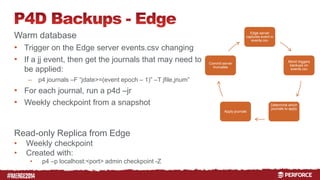
Warm database 
• Trigger on the Edge server events.csv changing 
• If a jj event, then get the journals that may need to 
be applied: 
– p4 journals –F “jdate>=(event epoch – 1)” –T jfile,jnum” 
• For each journal, run a p4d –jr 
• Weekly checkpoint from a snapshot 
Read-only Replica from Edge 
• Weekly checkpoint 
• Created with: 
• p4 –p localhost:<port> admin checkpoint -Z 
Edge server 
captures event in 
events.csv 
Monit triggers 
backups on 
events.csv 
Determine which 
journals to apply 
Commit server 
truncates 
Apply journals
# 
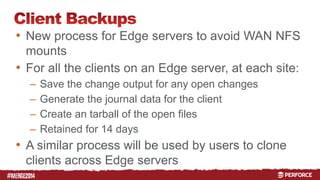
• New process for Edge servers to avoid WAN NFS 
mounts 
• For all the clients on an Edge server, at each site: 
– Save the change output for any open changes 
– Generate the journal data for the client 
– Create an tarball of the open files 
– Retained for 14 days 
• A similar process will be used by users to clone 
clients across Edge servers
# 
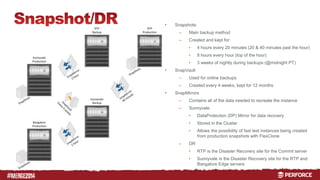
• Snapshots: 
– Main backup method 
– Created and kept for: 
• 4 hours every 20 minutes (20 & 40 minutes past the hour) 
• 8 hours every hour (top of the hour) 
• 3 weeks of nightly during backups (@midnight PT) 
• SnapVault 
– Used for online backups 
– Created every 4 weeks, kept for 12 months 
• SnapMirrors 
– Contains all of the data needed to recreate the instance 
– Sunnyvale 
• DataProtection (DP) Mirror for data recovery 
• Stored in the Cluster 
• Allows the possibility of fast test instances being created 
from production snapshots with FlexClone 
– DR 
• RTP is the Disaster Recovery site for the Commit server 
• Sunnyvale is the Disaster Recovery site for the RTP and 
Bangalore Edge servers
#
# 
• Monit & M/Monit 
– Monitors and alerts 
• Filesystem thresholds, space and inodes 
• On specific processes, and file changes (timestamp/md5) 
• OS thresholds 
• Ganglia 
– Used for identifying host or performance issues 
• NetApp OnCommand 
– Storage monitoring 
• Internal Tools 
– Monitor both infrastructure and the end-user experience
# 
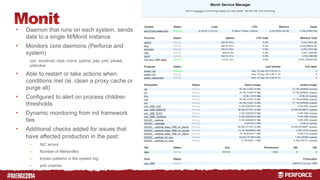
• Daemon that runs on each system, sends 
data to a single M/Monit instance 
• Monitors core daemons (Perforce and 
system) 
ssh, sendmail, ntpd, crond, ypbind, p4p, p4d, p4web, 
p4broker 
• Able to restart or take actions when 
conditions met (ie. clean a proxy cache or 
purge all) 
• Configured to alert on process children 
thresholds 
• Dynamic monitoring from init framework 
ties 
• Additional checks added for issues that 
have affected production in the past: 
– NIC errors 
– Number of filehandles 
– known patterns in the system log 
– p4d crashes
# 
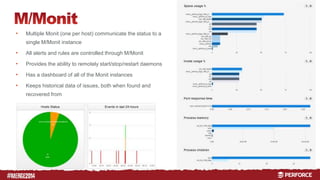
• Multiple Monit (one per host) communicate the status to a 
single M/Monit instance 
• All alerts and rules are controlled through M/Monit 
• Provides the ability to remotely start/stop/restart daemons 
• Has a dashboard of all of the Monit instances 
• Keeps historical data of issues, both when found and 
recovered from
# 
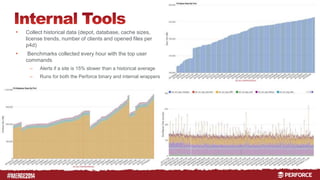
• Collect historical data (depot, database, cache sizes, 
license trends, number of clients and opened files per 
p4d) 
• Benchmarks collected every hour with the top user 
commands 
– Alerts if a site is 15% slower than a historical average 
– Runs for both the Perforce binary and internal wrappers
#
# 
• Faster performance for end-users 
– Most noticeable for sites with higher latency WAN connections 
• Higher uptime for services since an Edge can service some 
commands when the WAN or Commit site are inaccessible 
• Much smaller databases, from 1.2Tb to 82G on a new Edge 
server 
• Automatic “backup” of the Commit server data through Edge 
servers 
• Easily move users to new instances 
• Can partially isolate some groups from affecting all users
# 
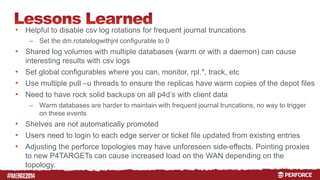
• Helpful to disable csv log rotations for frequent journal truncations 
– Set the dm.rotatelogwithjnl configurable to 0 
• Shared log volumes with multiple databases (warm or with a daemon) can cause 
interesting results with csv logs 
• Set global configurables where you can, monitor, rpl.*, track, etc 
• Use multiple pull –u threads to ensure the replicas have warm copies of the depot files 
• Need to have rock solid backups on all p4d’s with client data 
– Warm databases are harder to maintain with frequent journal truncations, no way to trigger 
on these events 
• Shelves are not automatically promoted 
• Users need to login to each edge server or ticket file updated from existing entries 
• Adjusting the perforce topologies may have unforeseen side-effects. Pointing proxies 
to new P4TARGETs can cause increased load on the WAN depending on the 
topology.
# 
Scott Stanford 
sstanfor@netapp.com
# 
Scott Stanford is the SCM Lead for NetApp where he also 
functions as a worldwide Perforce Administrator and tool 
developer. Scott has twenty years experience in software 
development, with thirteen years specializing in configuration 
management. Prior to joining NetApp, Scott was a Senior IT 
Architect at Synopsys.
# 
RESOURCES 
SnapShot: 
http://www.netapp.com/us/technology/storage-efficiency/se-technologies.aspx 
SnapVault & SnapMirror: 
http://www.netapp.com/us/products/protection-software/index.aspx 
Backup & Recovery of Perforce on NetApp: 
http://www.netapp.com/us/system/pdf-reader.aspx?pdfuri=tcm:10-107938-16&m=tr-4142.pdf 
Monit: 
http://mmonit.com/

Multi-Site Perforce at NetApp

  • 1.
  • 2.
    # • Topology • Infrastructure • Backups & Disaster Recovery • Monitoring • Lessons Learned • Q&A
  • 3.
  • 4.
    # Boston Traditional Proxy P4D (Sunnyvale) Pittsburg Traditional Proxy RTP Traditional Proxy Bangalore Traditional Proxy • 1.2 Tb database, mostly db.have • Average daily journal size 70 Gb • Average of 4.1 Million daily commands • 3722 users globally • 655 Gig of depots • 254,000 Clients, most with @ 200,000 files • One Git-Fusion instance • 2014.1 version of Perforce • Environment has to be up 24x7x365
  • 5.
    # RTP Edge Pittsburg Proxy Boston Proxy Commit (Sunnyvale) Sunnyvale Edge Bangalore Edge Boston Traditional Proxy Pittsburg Traditional Proxy RTP Bangalore Traditional Traditional Proxy Proxy • Currently migrating from a traditional model to Commit/Edge servers. • Traditional proxies will remain until the migration completes later this year • Initial Edge database is 85 Gig • Major sites have an Edge server, others a proxy off of the closest Edge (50ms improvement)
  • 6.
  • 7.
    • All largesites have an # Edge server, formerly were proxies • High performance SAN storage used for the database, journal, and log storage • Proxies have a P4TARGET of the closest Edge server (RTP) • All hosts deployed with an active/standby host pairing 7
  • 8.
    # • RedundantConnectivity to storage • FC - redundant Fabric to each controller and HBA • SAS – each dual HBA connected to each controller • Filers has multiple redundant data LIFs • 2 x 10 Gig NICs, HA bond, for the network (NFS and p4d) • VIF for hosting public IP / hostname • Perforce licenses tied to this IP
  • 9.
    Each Commit/Edge serveris configured in a pair consisting of • A production host, controlled through a virtual NIC # – Allows for a quick failover of the p4d without any DNS or changes to the users environment • Standby host with a warm database or read-only replica • Dedicated SAN volume for low latency database storage • Multiple levels of redundancy (Network, Storage, Power, HBA) • Common init framework for all Perforce daemon binaries • SnapMirrored volume used for hosting the infrastructure binaries & tools (Perl, Ruby, Python, P4, Git-Fusion, common scripts)
  • 10.
    # • Storagedevices used – NetApp EF540 w/ FC for the Commit server • 24 x 800 Gig SSD – NetApp E5512 w/ FC or SAS for each Edge server • 24 x 600 Gig 15k SAS – All RAID 10 with multiple spare disks, XFS, dual controllers, and dual power supplies • Used for: – Warm database or read-only replica on stand-by host – Production journal • Hourly journal truncations, then copied to the filer – Production p4d log • Nightly log rotations, compressed and copied to the filer
  • 11.
    # • NetAppcDOT clusters used at each site with FAS6290 or better • 10 Gig data LIF • Dedicated vserver for Perforce • Shared NFS volumes between production/standby pairs for longer term storage, snapshots, and offsite • Used for: – Depot storage – Rotated journals & p4d logs – Checkpoints – Warm database • used for creating checkpoints and if both hosts are down to run the daemon – Git-Fusion homedir & cache, dedicated volume per instance
  • 12.
  • 13.
    # • Truncatethe journal • Checksum the journal, copy to NFS and verify they match • Create a SnapShot of the NFS volumes • Remove any old snapshots • Replay the journal on the warm SAN database • Replay the journal on the warm NFS database • Once a week create a temporary snapshot on the NFS database and create a checkpoint (p4d –jd) Checksum journal on SAN Copy journal to NFS Compare checksums of local and NFS Create snapshot(s) Delete old snapshots Replay on warm NFS Replay on warm standby p4d -jj Every 1 hour
  • 14.
    # Warm database • Trigger on the Edge server events.csv changing • If a jj event, then get the journals that may need to be applied: – p4 journals –F “jdate>=(event epoch – 1)” –T jfile,jnum” • For each journal, run a p4d –jr • Weekly checkpoint from a snapshot Read-only Replica from Edge • Weekly checkpoint • Created with: • p4 –p localhost:<port> admin checkpoint -Z Edge server captures event in events.csv Monit triggers backups on events.csv Determine which journals to apply Commit server truncates Apply journals
  • 15.
    # • Newprocess for Edge servers to avoid WAN NFS mounts • For all the clients on an Edge server, at each site: – Save the change output for any open changes – Generate the journal data for the client – Create an tarball of the open files – Retained for 14 days • A similar process will be used by users to clone clients across Edge servers
  • 16.
    # • Snapshots: – Main backup method – Created and kept for: • 4 hours every 20 minutes (20 & 40 minutes past the hour) • 8 hours every hour (top of the hour) • 3 weeks of nightly during backups (@midnight PT) • SnapVault – Used for online backups – Created every 4 weeks, kept for 12 months • SnapMirrors – Contains all of the data needed to recreate the instance – Sunnyvale • DataProtection (DP) Mirror for data recovery • Stored in the Cluster • Allows the possibility of fast test instances being created from production snapshots with FlexClone – DR • RTP is the Disaster Recovery site for the Commit server • Sunnyvale is the Disaster Recovery site for the RTP and Bangalore Edge servers
  • 17.
  • 18.
    # • Monit& M/Monit – Monitors and alerts • Filesystem thresholds, space and inodes • On specific processes, and file changes (timestamp/md5) • OS thresholds • Ganglia – Used for identifying host or performance issues • NetApp OnCommand – Storage monitoring • Internal Tools – Monitor both infrastructure and the end-user experience
  • 19.
    # • Daemonthat runs on each system, sends data to a single M/Monit instance • Monitors core daemons (Perforce and system) ssh, sendmail, ntpd, crond, ypbind, p4p, p4d, p4web, p4broker • Able to restart or take actions when conditions met (ie. clean a proxy cache or purge all) • Configured to alert on process children thresholds • Dynamic monitoring from init framework ties • Additional checks added for issues that have affected production in the past: – NIC errors – Number of filehandles – known patterns in the system log – p4d crashes
  • 20.
    # • MultipleMonit (one per host) communicate the status to a single M/Monit instance • All alerts and rules are controlled through M/Monit • Provides the ability to remotely start/stop/restart daemons • Has a dashboard of all of the Monit instances • Keeps historical data of issues, both when found and recovered from
  • 21.
    # • Collecthistorical data (depot, database, cache sizes, license trends, number of clients and opened files per p4d) • Benchmarks collected every hour with the top user commands – Alerts if a site is 15% slower than a historical average – Runs for both the Perforce binary and internal wrappers
  • 22.
  • 23.
    # • Fasterperformance for end-users – Most noticeable for sites with higher latency WAN connections • Higher uptime for services since an Edge can service some commands when the WAN or Commit site are inaccessible • Much smaller databases, from 1.2Tb to 82G on a new Edge server • Automatic “backup” of the Commit server data through Edge servers • Easily move users to new instances • Can partially isolate some groups from affecting all users
  • 24.
    # • Helpfulto disable csv log rotations for frequent journal truncations – Set the dm.rotatelogwithjnl configurable to 0 • Shared log volumes with multiple databases (warm or with a daemon) can cause interesting results with csv logs • Set global configurables where you can, monitor, rpl.*, track, etc • Use multiple pull –u threads to ensure the replicas have warm copies of the depot files • Need to have rock solid backups on all p4d’s with client data – Warm databases are harder to maintain with frequent journal truncations, no way to trigger on these events • Shelves are not automatically promoted • Users need to login to each edge server or ticket file updated from existing entries • Adjusting the perforce topologies may have unforeseen side-effects. Pointing proxies to new P4TARGETs can cause increased load on the WAN depending on the topology.
  • 25.
    # Scott Stanford sstanfor@netapp.com
  • 26.
    # Scott Stanfordis the SCM Lead for NetApp where he also functions as a worldwide Perforce Administrator and tool developer. Scott has twenty years experience in software development, with thirteen years specializing in configuration management. Prior to joining NetApp, Scott was a Senior IT Architect at Synopsys.
  • 27.
    # RESOURCES SnapShot: http://www.netapp.com/us/technology/storage-efficiency/se-technologies.aspx SnapVault & SnapMirror: http://www.netapp.com/us/products/protection-software/index.aspx Backup & Recovery of Perforce on NetApp: http://www.netapp.com/us/system/pdf-reader.aspx?pdfuri=tcm:10-107938-16&m=tr-4142.pdf Monit: http://mmonit.com/