BILL BURNS, SR. DIR OF PRODUCT DEVELOPMENT & PRODUCT MANAGER, TOTALVIEW
STUART FOSTER, PRODUCT MANAGER, PERFORCE STATIC APPLICATION SECURITY TESTING (SAST)
Efficient Security
Development and
Testing Using
Dynamic and Static
Code Analysis
perforce.com2 | © Perforce Software, Inc.
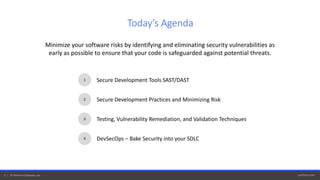
Minimize your software risks by identifying and eliminating security vulnerabilities as
early as possible to ensure that your code is safeguarded against potential threats.
1
2
3
Secure Development Tools SAST/DAST
Secure Development Practices and Minimizing Risk
Testing, Vulnerability Remediation, and Validation Techniques
4 DevSecOps – Bake Security into your SDLC
Today’s Agenda
Secure Development Tools SAST/DAST
perforce.com4 | © Perforce Software, Inc.
Known as white box testing, SAST allows developers to find security vulnerabilities in application source
code early in the SDLC. The tool also helps enforce coding guidelines and standards throughout the
development life-cycle.
What do SAST tools test?
• The tools tools test the source code, byte code, and binaries line-by-line, to expose weaknesses in the
software before it is deployed.
• By detecting coding violations early in development weaknesses can be fixed before attackers detect them
and they become true vulnerabilities in production software.
What is Static Application Security Testing (SAST)?
perforce.com5 | © Perforce Software, Inc.
• Finds issues by looking for known vulnerability patterns for industry coding standards
for security, safety, and quality
• Speed & cost of remediation is faster/cheaper because of early detection
• Shift-Left approach – analysis available everywhere; on desktop, within CI/CD pipelines,
and during integration builds
• Easy to automate, scalable and provides highest levels of code coverage
• Feedback is fast and provides exact location of vulnerabilities, help and reports
Advantages of Static Application Security Testing (SAST)
perforce.com6 | © Perforce Software, Inc.
Known as black box testing, DAST allows developers to find security vulnerabilities and weaknesses in
a running application. The tool allows developers to find and validate issues present in pre-and-post-
production code.
What do DAST tools test?
• The tool tests running code to detect issues with interfaces, APIs, scripting, data injection,
authentication, and more by using a variety of dynamic analysis capabilities and techniques
including: live memory usage and error checking, live and test application recording, and fuzzing
techniques to throw invalid and unexpected test cases at the application.
• DAST can find runtime problems that can't be identified by Static Analysis – issues outside of the
code within third-party interfaces, environment, or configuration issues.
What is Dynamic Application Security Testing? (DAST)
perforce.com7 | © Perforce Software, Inc.
Advantages of Dynamic Application Security Testing (DAST)
• Analyze the whole application while it
is running
• “Look inside” the application and dynamically
analyze execution logic and live data
• Highlights authentication and server
configuration issues
• Language and Source Code independent
• Checks memory consumption and resource use
• Attempts to break encryption algorithms
from outside
• Verifies permissions to ensure isolation of
privilege levels
• Checks for cross-site scripting, SQL injection,
and cookie manipulation
• Tests for vulnerabilities in third-party interfaces
• Understands arguments and function calls
• Record application execution for post-mortem
test failure analysis
• Catch hard application failures
• Unattended script based dynamic analysis
Secure Development Practices and Risk Reduction
perforce.com9 | © Perforce Software, Inc.
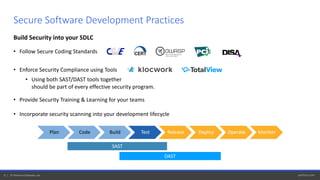
Build Security into your SDLC
• Follow Secure Coding Standards
• Enforce Security Compliance using Tools
• Using both SAST/DAST tools together
should be part of every effective security program.
• Provide Security Training & Learning for your teams
• Incorporate security scanning into your development lifecycle
Secure Software Development Practices
Plan Code Build Test Release Deploy Operate Monitor
SAST
DAST
perforce.com10 | © Perforce Software, Inc.
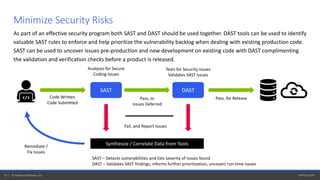
Minimize Security Risks
DASTSAST
Code Written
Code Submitted
Analyses for Secure
Coding Issues
Tests for Security Issues
Validates SAST Issues
Pass, or
Issues Deferred
Pass, for Release
Fail, and Report Issues
Remediate /
Fix Issues
Synthesize / Correlate Data from Tools
SAST – Detects vulnerabilities and lists severity of issues found
DAST – Validates SAST findings, informs further prioritization, uncovers run-time issues
As part of an effective security program both SAST and DAST should be used together. DAST tools can be used to identify
valuable SAST rules to enforce and help prioritize the vulnerability backlog when dealing with existing production code.
SAST can be used to uncover issues pre-production and new development on existing code with DAST complimenting
the validation and verification checks before a product is released.
Testing, Vulnerability Remediation,
and Validation Techniques
perforce.com12 | © Perforce Software, Inc.
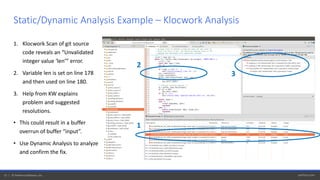
1. Klocwork Scan of git source
code reveals an “Unvalidated
integer value ‘len’” error.
2. Variable len is set on line 178
and then used on line 180.
3. Help from KW explains
problem and suggested
resolutions.
• This could result in a buffer
overrun of buffer “input”.
• Use Dynamic Analysis to analyze
and confirm the fix.
Static/Dynamic Analysis Example – Klocwork Analysis
2
3
1
perforce.com13 | © Perforce Software, Inc.
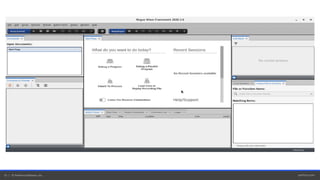
Static/Dynamic Analysis Example – TotalView Analysis
perforce.com14 | © Perforce Software, Inc.
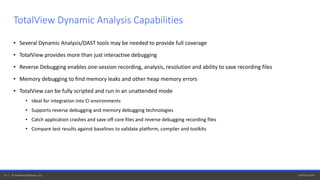
• Several Dynamic Analysis/DAST tools may be needed to provide full coverage
• TotalView provides more than just interactive debugging
• Reverse Debugging enables one-session recording, analysis, resolution and ability to save recording files
• Memory debugging to find memory leaks and other heap memory errors
• TotalView can be fully scripted and run in an unattended mode
• Ideal for integration into CI environments
• Supports reverse debugging and memory debugging technologies
• Catch application crashes and save off core files and reverse debugging recording files
• Compare test results against baselines to validate platform, compiler and toolkits
TotalView Dynamic Analysis Capabilities
DevSecOps
Bake Security into Your SDLC
perforce.com16 | © Perforce Software, Inc.
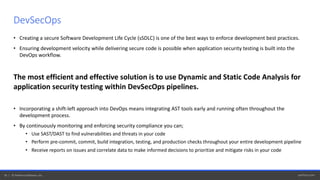
• Creating a secure Software Development Life Cycle (sSDLC) is one of the best ways to enforce development best practices.
• Ensuring development velocity while delivering secure code is possible when application security testing is built into the
DevOps workflow.
The most efficient and effective solution is to use Dynamic and Static Code Analysis for
application security testing within DevSecOps pipelines.
• Incorporating a shift-left approach into DevOps means integrating AST tools early and running often throughout the
development process.
• By continuously monitoring and enforcing security compliance you can;
• Use SAST/DAST to find vulnerabilities and threats in your code
• Perform pre-commit, commit, build integration, testing, and production checks throughout your entire development pipeline
• Receive reports on issues and correlate data to make informed decisions to prioritize and mitigate risks in your code
DevSecOps
perforce.com17 | © Perforce Software, Inc.
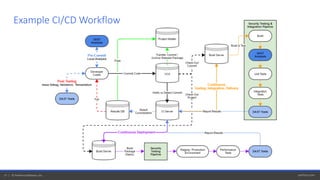
Example CI/CD Workflow
Application Security Testing
S E E A L I V E D E M O AT
perforce.com/products/klocwork/live-demo
S E E A D E M O AT
totalview.io/demo
perforce.com19 | © Perforce Software, Inc.
• Find Security, Quality and Reliability defects early in the SDLC – Reduce costs and limiting production defects
• Enforce security, quality or safety standards
• Shift-Left Defect Analysis – Desktop, CI/CD, Server
• Provide detailed defect information and remediation help & best practices
• Recommendation engine that helps identify and prioritize issues based on severity of risk
• Command, Control and Collaboration – Monitor Projects, Manage Defects, Report and Track Project Status
• DevOps/DevSecOps – Supports Containers, CI/CD, Cloud Services, Provisioned instances, REST APIs
• Accelerate development velocity and delivery cycles
• Certified tool for compliance and functional safety development
• Enterprise at scale – Large Code bases, Multi-Language Support, Support for Thousands of developers, Broad Toolset Integrations
How Klocwork Can Help
Learn more at perforce.com/klocwork
perforce.com20 | © Perforce Software, Inc.
• Dynamically analyze your code to understand how it actually runs and generates data
• Use reverse debugging to go backwards and forwards in your code during one
analysis and debugging session
• Leverage evaluation points to add hot-patches to your code and validate a fix
without having to recompile to test
• Utilize unattended dynamic analysis and batch scripting to test applications under
the control of TotalView in CI/CD
• Find memory leaks and errors during execution
• Analyze how your application is using the heap
• Analysis and debugging capabilities that enable collaboration with team members
• Part of an overall DAST solution
How TotalView Can Help
Learn more at totalview.io
Questions?

Efficient Security Development and Testing Using Dynamic and Static Code Analysis

  • 1.
    BILL BURNS, SR.DIR OF PRODUCT DEVELOPMENT & PRODUCT MANAGER, TOTALVIEW STUART FOSTER, PRODUCT MANAGER, PERFORCE STATIC APPLICATION SECURITY TESTING (SAST) Efficient Security Development and Testing Using Dynamic and Static Code Analysis
  • 2.
    perforce.com2 | ©Perforce Software, Inc. Minimize your software risks by identifying and eliminating security vulnerabilities as early as possible to ensure that your code is safeguarded against potential threats. 1 2 3 Secure Development Tools SAST/DAST Secure Development Practices and Minimizing Risk Testing, Vulnerability Remediation, and Validation Techniques 4 DevSecOps – Bake Security into your SDLC Today’s Agenda
  • 3.
  • 4.
    perforce.com4 | ©Perforce Software, Inc. Known as white box testing, SAST allows developers to find security vulnerabilities in application source code early in the SDLC. The tool also helps enforce coding guidelines and standards throughout the development life-cycle. What do SAST tools test? • The tools tools test the source code, byte code, and binaries line-by-line, to expose weaknesses in the software before it is deployed. • By detecting coding violations early in development weaknesses can be fixed before attackers detect them and they become true vulnerabilities in production software. What is Static Application Security Testing (SAST)?
  • 5.
    perforce.com5 | ©Perforce Software, Inc. • Finds issues by looking for known vulnerability patterns for industry coding standards for security, safety, and quality • Speed & cost of remediation is faster/cheaper because of early detection • Shift-Left approach – analysis available everywhere; on desktop, within CI/CD pipelines, and during integration builds • Easy to automate, scalable and provides highest levels of code coverage • Feedback is fast and provides exact location of vulnerabilities, help and reports Advantages of Static Application Security Testing (SAST)
  • 6.
    perforce.com6 | ©Perforce Software, Inc. Known as black box testing, DAST allows developers to find security vulnerabilities and weaknesses in a running application. The tool allows developers to find and validate issues present in pre-and-post- production code. What do DAST tools test? • The tool tests running code to detect issues with interfaces, APIs, scripting, data injection, authentication, and more by using a variety of dynamic analysis capabilities and techniques including: live memory usage and error checking, live and test application recording, and fuzzing techniques to throw invalid and unexpected test cases at the application. • DAST can find runtime problems that can't be identified by Static Analysis – issues outside of the code within third-party interfaces, environment, or configuration issues. What is Dynamic Application Security Testing? (DAST)
  • 7.
    perforce.com7 | ©Perforce Software, Inc. Advantages of Dynamic Application Security Testing (DAST) • Analyze the whole application while it is running • “Look inside” the application and dynamically analyze execution logic and live data • Highlights authentication and server configuration issues • Language and Source Code independent • Checks memory consumption and resource use • Attempts to break encryption algorithms from outside • Verifies permissions to ensure isolation of privilege levels • Checks for cross-site scripting, SQL injection, and cookie manipulation • Tests for vulnerabilities in third-party interfaces • Understands arguments and function calls • Record application execution for post-mortem test failure analysis • Catch hard application failures • Unattended script based dynamic analysis
  • 8.
    Secure Development Practicesand Risk Reduction
  • 9.
    perforce.com9 | ©Perforce Software, Inc. Build Security into your SDLC • Follow Secure Coding Standards • Enforce Security Compliance using Tools • Using both SAST/DAST tools together should be part of every effective security program. • Provide Security Training & Learning for your teams • Incorporate security scanning into your development lifecycle Secure Software Development Practices Plan Code Build Test Release Deploy Operate Monitor SAST DAST
  • 10.
    perforce.com10 | ©Perforce Software, Inc. Minimize Security Risks DASTSAST Code Written Code Submitted Analyses for Secure Coding Issues Tests for Security Issues Validates SAST Issues Pass, or Issues Deferred Pass, for Release Fail, and Report Issues Remediate / Fix Issues Synthesize / Correlate Data from Tools SAST – Detects vulnerabilities and lists severity of issues found DAST – Validates SAST findings, informs further prioritization, uncovers run-time issues As part of an effective security program both SAST and DAST should be used together. DAST tools can be used to identify valuable SAST rules to enforce and help prioritize the vulnerability backlog when dealing with existing production code. SAST can be used to uncover issues pre-production and new development on existing code with DAST complimenting the validation and verification checks before a product is released.
  • 11.
  • 12.
    perforce.com12 | ©Perforce Software, Inc. 1. Klocwork Scan of git source code reveals an “Unvalidated integer value ‘len’” error. 2. Variable len is set on line 178 and then used on line 180. 3. Help from KW explains problem and suggested resolutions. • This could result in a buffer overrun of buffer “input”. • Use Dynamic Analysis to analyze and confirm the fix. Static/Dynamic Analysis Example – Klocwork Analysis 2 3 1
  • 13.
    perforce.com13 | ©Perforce Software, Inc. Static/Dynamic Analysis Example – TotalView Analysis
  • 14.
    perforce.com14 | ©Perforce Software, Inc. • Several Dynamic Analysis/DAST tools may be needed to provide full coverage • TotalView provides more than just interactive debugging • Reverse Debugging enables one-session recording, analysis, resolution and ability to save recording files • Memory debugging to find memory leaks and other heap memory errors • TotalView can be fully scripted and run in an unattended mode • Ideal for integration into CI environments • Supports reverse debugging and memory debugging technologies • Catch application crashes and save off core files and reverse debugging recording files • Compare test results against baselines to validate platform, compiler and toolkits TotalView Dynamic Analysis Capabilities
  • 15.
  • 16.
    perforce.com16 | ©Perforce Software, Inc. • Creating a secure Software Development Life Cycle (sSDLC) is one of the best ways to enforce development best practices. • Ensuring development velocity while delivering secure code is possible when application security testing is built into the DevOps workflow. The most efficient and effective solution is to use Dynamic and Static Code Analysis for application security testing within DevSecOps pipelines. • Incorporating a shift-left approach into DevOps means integrating AST tools early and running often throughout the development process. • By continuously monitoring and enforcing security compliance you can; • Use SAST/DAST to find vulnerabilities and threats in your code • Perform pre-commit, commit, build integration, testing, and production checks throughout your entire development pipeline • Receive reports on issues and correlate data to make informed decisions to prioritize and mitigate risks in your code DevSecOps
  • 17.
    perforce.com17 | ©Perforce Software, Inc. Example CI/CD Workflow
  • 18.
    Application Security Testing SE E A L I V E D E M O AT perforce.com/products/klocwork/live-demo S E E A D E M O AT totalview.io/demo
  • 19.
    perforce.com19 | ©Perforce Software, Inc. • Find Security, Quality and Reliability defects early in the SDLC – Reduce costs and limiting production defects • Enforce security, quality or safety standards • Shift-Left Defect Analysis – Desktop, CI/CD, Server • Provide detailed defect information and remediation help & best practices • Recommendation engine that helps identify and prioritize issues based on severity of risk • Command, Control and Collaboration – Monitor Projects, Manage Defects, Report and Track Project Status • DevOps/DevSecOps – Supports Containers, CI/CD, Cloud Services, Provisioned instances, REST APIs • Accelerate development velocity and delivery cycles • Certified tool for compliance and functional safety development • Enterprise at scale – Large Code bases, Multi-Language Support, Support for Thousands of developers, Broad Toolset Integrations How Klocwork Can Help Learn more at perforce.com/klocwork
  • 20.
    perforce.com20 | ©Perforce Software, Inc. • Dynamically analyze your code to understand how it actually runs and generates data • Use reverse debugging to go backwards and forwards in your code during one analysis and debugging session • Leverage evaluation points to add hot-patches to your code and validate a fix without having to recompile to test • Utilize unattended dynamic analysis and batch scripting to test applications under the control of TotalView in CI/CD • Find memory leaks and errors during execution • Analyze how your application is using the heap • Analysis and debugging capabilities that enable collaboration with team members • Part of an overall DAST solution How TotalView Can Help Learn more at totalview.io
  • 21.