MERGE	
  2013	
  THE	
  PERFORCE	
  CONFERENCE	


  SAN	
  FRANCISCO	
  •	
  APRIL	
  24−26	
  
Perforce White Paper
The	
  Perforce	
  Software	
  Configuration	
  Management	
  
system	
  is	
  powerful	
  and	
  flexible.	


Managing	
  a	
  powerful	
  SCM	
  requires	
  certain	
  
infrastructure.	


Changes	
  to	
  the	
  infrastructure	
  itself	
  can	
  become	
  
challenging	
  and	
  destabilize	
  the	
  whole	
  system.	


Using	
  the	
  flexibility	
  of	
  Perforce	
  can	
  help	
  manage	
  and	
  
monitor	
  a	
  complex	
  infrastructure.	


We	
  hope	
  our	
  experience	
  will	
  help	
  other	
  Perforce	
  
administrators	
  plan	
  their	
  growing	
  systems.	
  
Versioning Infrastructure
Automation and Scalability.
Administration Tips and Tricks.
Michael Mirman, MathWorks, Inc.)
Versioning Infrastructure
	
  
2	
  
Perforce at MathWorks
The company’s source code is the company’s treasure. Perforce is the system that protects it.
As of this writing, MathWorks has one main production server, about 700 users, and several
million archive files.
We deploy almost all possible triggers and several daemons and partially mirror our own bug
database into Perforce.
In addition to P4, P4V, P4Perl, P4Java, Emacs, and P4Eclipse interfaces, we support a
modified version of P4DB.1


1
	
  There	
  are	
  several	
  versions	
  of	
  P4DB	
  publicly	
  available.	
  
Our	
  version	
  is	
  close	
  to	
  the	
  version	
  at	
  http://www.releng.com/downloads3/index.html	
  
Versioning Infrastructure
	
  
3	
  
Architecture Overview
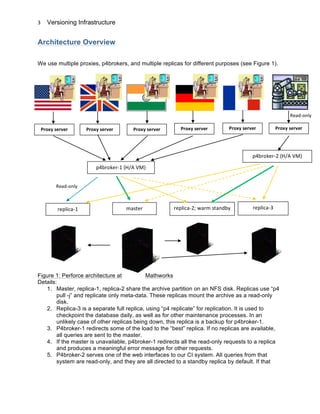
We use multiple proxies, p4brokers, and multiple replicas for different purposes (see Figure 1).
Figure 1: Perforce architecture at Mathworks
Details:
1. Master, replica-1, replica-2 share the archive partition on an NFS disk. Replicas use “p4
pull -j” and replicate only meta-data. These replicas mount the archive as a read-only
disk.
2. Replica-3 is a separate full replica, using “p4 replicate” for replication. It is used to
checkpoint the database daily, as well as for other maintenance processes. In an
unlikely case of other replicas being down, this replica is a backup for p4broker-1.
3. P4broker-1 redirects some of the load to the “best” replica. If no replicas are available,
all queries are sent to the master.
4. If the master is unavailable, p4broker-1 redirects all the read-only requests to a replica
and produces a meaningful error message for other requests.
5. P4broker-2 serves one of the web interfaces to our CI system. All queries from that
system are read-only, and they are all directed to a standby replica by default. If that
Read-­‐only	
  
Proxy	
  server	
  
p4broker-­‐1	
  (H/A	
  VM)	
  
master	
  replica-­‐1	
   replica-­‐2;	
  warm	
  standby	
   replica-­‐3	
  
p4broker-­‐2	
  (H/A	
  VM)	
  
Proxy	
  server	
   Proxy	
  server	
   Proxy	
  server	
   Proxy	
  server	
   Proxy	
  server	
  
Read-­‐only	
  
Versioning Infrastructure
	
  
4	
  
replica is unavailable, another one is used. The master is used only if no replicas are
available.
How We Describe Our Infrastructure
Our infrastructure is described by an xml configuration file, where every server has certain
characteristics. In addition, we describe all “services” that must be started during the boot
process. For example, we may have this description in the file:
<variables>
<set>brokerhost=p4brokertest</set>
</variables>
<server>
<type>Primary</type>
<hostname>$brokerhost</hostname>
<port>1666</port>
<top>/local</top>
<start>
[/local/perforce/bin/p4broker -d -c
/local/perforce/config/broker.testconf]
</start>
<init_script>
/etc/init.d/p4broker.test -> /local/perforce/scripts/p4d.test
</init_script>
</server>
We have two files describing the infrastructure: one for the production stack and the other for
the test stack.
Both files are handled by a special and separate server. These files are the only files on that
server, so we don’t need a license for it.
The server has one trigger installed: change-commit. Every time one of those two files gets
updated, the trigger “pushes” the new file to all essential hosts of the infrastructure. (We will say
more about how we push files to different hosts later.)
Examples of How We Use Configuration Files Describing
Infrastructure
Example 1: Boot scripts and controlled failover.
We keep in /etc/init.d links to actual scripts. For example:
/etc/init.d/p4broker.prod -> /local/perforce/scripts/p4broker.prod*
Versioning Infrastructure
	
  
5	
  
Actual scripts read the configuration file, determine what they need to start on the current host,
and proceed accordingly.
Every Perforce host has a single boot script, and there are very few different scripts, which we
use as boot scripts (code used on p4d servers is slightly different from the code on p4p or
p4broker servers).
Say we are performing a controlled failover: the server that was a master will become a standby
and vice versa.
The old configuration may say:
<variables>
<set>master=p4test-00</set>
<set>standby=p4test-01</set>
</variables>
<server>
<type>Primary</type>
<hostname>$master</hostname>
<port>1666</port>
<top>/export</top>
<start>
[$bin/p4d -d -p 1666 -In MasterTest -r $dbroot/1666 -L
$logroot/1666/p4d.log –J $jnlroot/1666/journal]
</start>
<init_script>
/etc/init.d/p4d.current -> $dbroot/scripts/p4d.test
</init_script>
</server>
<server>
<type>Secondary</type>
<hostname>$standby</hostname>
<port>1666</port>
<top>/export</top>
<start>
[$bin/p4d -d -p 1666 -In StandbyTest -r $dbroot/1666 -L
$logroot/1666/p4d.log -J $jnlroot/1666/journal]
[$bin/p4 -p $production:1666 replicate -s $jnlroot/1666/replica.state
-J $jnlroot/1666/journal $dbroot/1666/scripts/p4admin_replicate -v -
port 1666 -srchost $production -srctop /export/data/perforce/1666]
</start>
<init_script>
/etc/init.d/p4d.current -> $dbroot/scripts/p4d.test
</init_script>
</server>
Versioning Infrastructure
	
  
6	
  
To perform the failover, all we have to do is flip the settings of master and standby:
<set>master=p4test-01</set>
<set>standby=p4test-00</set>
and then restart both servers.2
Example 2: Cron jobs.
Because some of our hosts change roles periodically, it is convenient to keep the crontabs
identical, so we do not have to change them every time the roles of the hosts change.
So some of our cron jobs read the configuration file, determine the role of the current host, and
can perform different functions depending on the role.
For example, production hosts have these cron lines:
perforce-03:17 01 * * * /local/perforce/scripts/cronjobs/p0X.cron
perforce-04:23 22 * * * /local/perforce/scripts/cronjobs/p0X.cron
perforce-05:25 22 * * * /local/perforce/scripts/cronjobs/p0X.cron
perforce-06:05 22 * * * /local/perforce/scripts/cronjobs/p0X.cron
This script performs all daily maintenance on all the hosts, but replicas run verifications, which
we don’t run on the master for performance reasons.
Updating Workspaces Around the World
Once in awhile, we get a request to publish automatically a certain area of a Perforce repository
to make it available for users. Typical example: a small group of users update certain
documentation, which is read by a larger number of users from a shared location.
This is a very familiar task for Perforce administrators, and it can be easily accomplished by a
change-commit trigger.
Our First Implementation
We define a Perforce client with the directory to be updated as its root.
Our change-commit trigger changes the current working directory to the workspace and syncs
the workspace.
The immediate first problem with this solution is that most of the shared locations to be updated
are on the network, and the Perforce server does not mount network locations.


2
	
  In	
  reality,	
  the	
  failover	
  has	
  several	
  steps.	
  In	
  particular,	
  first,	
  we	
  check	
  that	
  the	
  replica	
  is	
  in	
  sync	
  with	
  the	
  master.	
  
Only	
  then	
  do	
  we	
  reconfigure	
  and	
  restart	
  the	
  broker	
  so	
  queries	
  will	
  be	
  correctly	
  directed.	
  
Versioning Infrastructure
	
  
7	
  
A solution to this problem is to dedicate a machine that will mount network locations and will
allow SSH connection from the Perforce server.
For example, we have this line in the triggers table:
doc01 change-commit //team/one/main/documentation/...
"triggers/updateRefTree -p perforce:1666 -c one.internal"
This trigger runs an ssh to one of our hosts, where the workspace is mounted, and syncs the
workspace.
The user’s “p4 submit” command does not finish until the trigger exits, so the user knows that
the update succeeded before getting the command prompt back.
This procedure worked well until we received a request to update an area with the same path,
but local to every location around the world. It involved more than 20 locations, each with a
dedicated host ready for an ssh connection to update a local area. We had to solve several
problems:
• An ssh to a remote location can take a noticeably long time. Even if we run all ssh’s in
parallel (which may create a spike in processes on the server), they will still take more
time than an average user is willing to tolerate while waiting for “p4 submit” to complete.
• It’s not unusual for a remote location not to respond and hang or time out. Hung ssh’s on
the server will be accumulating and require periodic cleaning. Unfulfilled requests to
sync will cause remote workspaces to be out of sync.
Our Second Implementation: Pull, Don’t Push
Our alternative solution used counters as semaphores to indicate the need to sync.
The change-commit trigger sets one counter per client to be synced. The name of the counter is
mwsync.hostname.workspace_name
The value is the time when the trigger ran.
Every infrastructure host that is used to update some workspaces runs a cron job every five
minutes. The cron job checks with the master whether there is any pending work for the local
host. If so, it updates the set workspace and removes the counter.
If a remote host is temporarily down, it will eventually be brought back up, run that cron, and
update the workspace.
It is easy to monitor, too: we check all the mwsync.* counters, and if the counter value is
sufficiently old, we send email to Perforce administrators that a particular host requires
attention.
A simpler implementation is to run a cron job every N minutes on every client machine and sync
all necessary workspaces. However, monitoring in that case becomes more complicated. Using
Versioning Infrastructure
	
  
8	
  
counters with time stamps as the value makes monitoring (and alerting administrators) a trivial
task.
This implementation has been working very well with many different workspaces.
Interestingly enough, the need to maintain many crontabs was also a task worth mentioning.
Maintenance of Crontabs
Before receiving a request to update workspaces around the world, our Perforce infrastructure
contained about 20 hosts. Almost all of them had some cron jobs running regularly by the
special “service” user.
When we had to change a crontab, we would do what any UNIX administrator would do: rsh or
ssh as the service user to the machine, run “crontab –e”, and modify the crontab. A number of
people could log in as that service user, and we had no history of who modified the crontab,
when, and why. All we could do was to save daily the version we had. The result was
something like this:
00 05 * * * cd somedir; crontab -l > `hostname`; ci -l `hostname` >
/dev/null 2>&1
Now we had to approximately double the number of the Perforce hosts by adding new hosts
around the world. The thought that we would sometimes have to ssh to 40+ machines to modify
crontabs was not appealing.
Our Solution: Put Crontabs Under Perforce Control and Set a Change-
commit Trigger to Update the Crontab
Here is an example of a trigger line:
cron change-commit //depot/crontabs/... "triggers/install.crontab -p
%serverport% -c %changelist%"
The essence of the trigger is to run
p4 print -q //depot/crontabs/somefile | ssh host crontab -
We currently use the “push” method to install crontabs on our Perforce infrastructure hosts. If it
becomes too slow, we’ll switch to the “pull” method described earlier.
For a push method, a single network glitch may prevent us from updating the crontab. We
wanted to ensure that we eventually get the right one. So we have one cron job on each of
those hosts that runs once a day and updates the crontab this way:
01 00 * * * export HOST=`hostname`; /local/perforce/bin/p4 -p perforce:1666 print -q
//depot/crontabs/batscm/$HOST > /tmp/crontab.$$; [ -s /tmp/crontab.$$ ] && crontab
/tmp/crontab.$$; rm /tmp/crontab.$$
Versioning Infrastructure
	
  
9	
  
After all this was set up, if we need to change many crontabs at the same time (say, moving
maintenance tasks from 1 a.m. to 3 a.m.), it might be a simple sequence of commands like this:
p4 edit *
perl –pi.bak –e ‘s/^00 01/00 03/’ *
p4 submit –d “moving crons from 1am to 3am”
Conclusion
• The more stable your infrastructure is, the better you sleep at night. Use Perforce power
to increase stability of the infrastructure.
• Use a meta language to describe the infrastructure, so changes to the infrastructure are
as simple as changing the files that define it.
• If your servers change roles periodically (as in the failover scenario), keeping crontabs
on your servers nearly identical simplifies maintenance.
• Keep files describing the main infrastructure on a separate server to avoid bootstrapping
issues.
• Use change-commit triggers to update different pieces of the infrastructure (crontabs, for
example).
• Monitor whether change-commit scripts work and notify administrators in case of a long
pending update.

[MathWorks] Versioning Infrastructure

  • 1.
      MERGE  2013  THE  PERFORCE  CONFERENCE                                                      SAN  FRANCISCO  •  APRIL  24−26   Perforce White Paper The  Perforce  Software  Configuration  Management   system  is  powerful  and  flexible.       Managing  a  powerful  SCM  requires  certain   infrastructure.       Changes  to  the  infrastructure  itself  can  become   challenging  and  destabilize  the  whole  system.       Using  the  flexibility  of  Perforce  can  help  manage  and   monitor  a  complex  infrastructure.     We  hope  our  experience  will  help  other  Perforce   administrators  plan  their  growing  systems.   Versioning Infrastructure Automation and Scalability. Administration Tips and Tricks. Michael Mirman, MathWorks, Inc.)
  • 2.
    Versioning Infrastructure   2   Perforce at MathWorks The company’s source code is the company’s treasure. Perforce is the system that protects it. As of this writing, MathWorks has one main production server, about 700 users, and several million archive files. We deploy almost all possible triggers and several daemons and partially mirror our own bug database into Perforce. In addition to P4, P4V, P4Perl, P4Java, Emacs, and P4Eclipse interfaces, we support a modified version of P4DB.1                                                                                                                           1  There  are  several  versions  of  P4DB  publicly  available.   Our  version  is  close  to  the  version  at  http://www.releng.com/downloads3/index.html  
  • 3.
    Versioning Infrastructure   3   Architecture Overview We use multiple proxies, p4brokers, and multiple replicas for different purposes (see Figure 1). Figure 1: Perforce architecture at Mathworks Details: 1. Master, replica-1, replica-2 share the archive partition on an NFS disk. Replicas use “p4 pull -j” and replicate only meta-data. These replicas mount the archive as a read-only disk. 2. Replica-3 is a separate full replica, using “p4 replicate” for replication. It is used to checkpoint the database daily, as well as for other maintenance processes. In an unlikely case of other replicas being down, this replica is a backup for p4broker-1. 3. P4broker-1 redirects some of the load to the “best” replica. If no replicas are available, all queries are sent to the master. 4. If the master is unavailable, p4broker-1 redirects all the read-only requests to a replica and produces a meaningful error message for other requests. 5. P4broker-2 serves one of the web interfaces to our CI system. All queries from that system are read-only, and they are all directed to a standby replica by default. If that Read-­‐only   Proxy  server   p4broker-­‐1  (H/A  VM)   master  replica-­‐1   replica-­‐2;  warm  standby   replica-­‐3   p4broker-­‐2  (H/A  VM)   Proxy  server   Proxy  server   Proxy  server   Proxy  server   Proxy  server   Read-­‐only  
  • 4.
    Versioning Infrastructure   4   replica is unavailable, another one is used. The master is used only if no replicas are available. How We Describe Our Infrastructure Our infrastructure is described by an xml configuration file, where every server has certain characteristics. In addition, we describe all “services” that must be started during the boot process. For example, we may have this description in the file: <variables> <set>brokerhost=p4brokertest</set> </variables> <server> <type>Primary</type> <hostname>$brokerhost</hostname> <port>1666</port> <top>/local</top> <start> [/local/perforce/bin/p4broker -d -c /local/perforce/config/broker.testconf] </start> <init_script> /etc/init.d/p4broker.test -> /local/perforce/scripts/p4d.test </init_script> </server> We have two files describing the infrastructure: one for the production stack and the other for the test stack. Both files are handled by a special and separate server. These files are the only files on that server, so we don’t need a license for it. The server has one trigger installed: change-commit. Every time one of those two files gets updated, the trigger “pushes” the new file to all essential hosts of the infrastructure. (We will say more about how we push files to different hosts later.) Examples of How We Use Configuration Files Describing Infrastructure Example 1: Boot scripts and controlled failover. We keep in /etc/init.d links to actual scripts. For example: /etc/init.d/p4broker.prod -> /local/perforce/scripts/p4broker.prod*
  • 5.
    Versioning Infrastructure   5   Actual scripts read the configuration file, determine what they need to start on the current host, and proceed accordingly. Every Perforce host has a single boot script, and there are very few different scripts, which we use as boot scripts (code used on p4d servers is slightly different from the code on p4p or p4broker servers). Say we are performing a controlled failover: the server that was a master will become a standby and vice versa. The old configuration may say: <variables> <set>master=p4test-00</set> <set>standby=p4test-01</set> </variables> <server> <type>Primary</type> <hostname>$master</hostname> <port>1666</port> <top>/export</top> <start> [$bin/p4d -d -p 1666 -In MasterTest -r $dbroot/1666 -L $logroot/1666/p4d.log –J $jnlroot/1666/journal] </start> <init_script> /etc/init.d/p4d.current -> $dbroot/scripts/p4d.test </init_script> </server> <server> <type>Secondary</type> <hostname>$standby</hostname> <port>1666</port> <top>/export</top> <start> [$bin/p4d -d -p 1666 -In StandbyTest -r $dbroot/1666 -L $logroot/1666/p4d.log -J $jnlroot/1666/journal] [$bin/p4 -p $production:1666 replicate -s $jnlroot/1666/replica.state -J $jnlroot/1666/journal $dbroot/1666/scripts/p4admin_replicate -v - port 1666 -srchost $production -srctop /export/data/perforce/1666] </start> <init_script> /etc/init.d/p4d.current -> $dbroot/scripts/p4d.test </init_script> </server>
  • 6.
    Versioning Infrastructure   6   To perform the failover, all we have to do is flip the settings of master and standby: <set>master=p4test-01</set> <set>standby=p4test-00</set> and then restart both servers.2 Example 2: Cron jobs. Because some of our hosts change roles periodically, it is convenient to keep the crontabs identical, so we do not have to change them every time the roles of the hosts change. So some of our cron jobs read the configuration file, determine the role of the current host, and can perform different functions depending on the role. For example, production hosts have these cron lines: perforce-03:17 01 * * * /local/perforce/scripts/cronjobs/p0X.cron perforce-04:23 22 * * * /local/perforce/scripts/cronjobs/p0X.cron perforce-05:25 22 * * * /local/perforce/scripts/cronjobs/p0X.cron perforce-06:05 22 * * * /local/perforce/scripts/cronjobs/p0X.cron This script performs all daily maintenance on all the hosts, but replicas run verifications, which we don’t run on the master for performance reasons. Updating Workspaces Around the World Once in awhile, we get a request to publish automatically a certain area of a Perforce repository to make it available for users. Typical example: a small group of users update certain documentation, which is read by a larger number of users from a shared location. This is a very familiar task for Perforce administrators, and it can be easily accomplished by a change-commit trigger. Our First Implementation We define a Perforce client with the directory to be updated as its root. Our change-commit trigger changes the current working directory to the workspace and syncs the workspace. The immediate first problem with this solution is that most of the shared locations to be updated are on the network, and the Perforce server does not mount network locations.                                                                                                                           2  In  reality,  the  failover  has  several  steps.  In  particular,  first,  we  check  that  the  replica  is  in  sync  with  the  master.   Only  then  do  we  reconfigure  and  restart  the  broker  so  queries  will  be  correctly  directed.  
  • 7.
    Versioning Infrastructure   7   A solution to this problem is to dedicate a machine that will mount network locations and will allow SSH connection from the Perforce server. For example, we have this line in the triggers table: doc01 change-commit //team/one/main/documentation/... "triggers/updateRefTree -p perforce:1666 -c one.internal" This trigger runs an ssh to one of our hosts, where the workspace is mounted, and syncs the workspace. The user’s “p4 submit” command does not finish until the trigger exits, so the user knows that the update succeeded before getting the command prompt back. This procedure worked well until we received a request to update an area with the same path, but local to every location around the world. It involved more than 20 locations, each with a dedicated host ready for an ssh connection to update a local area. We had to solve several problems: • An ssh to a remote location can take a noticeably long time. Even if we run all ssh’s in parallel (which may create a spike in processes on the server), they will still take more time than an average user is willing to tolerate while waiting for “p4 submit” to complete. • It’s not unusual for a remote location not to respond and hang or time out. Hung ssh’s on the server will be accumulating and require periodic cleaning. Unfulfilled requests to sync will cause remote workspaces to be out of sync. Our Second Implementation: Pull, Don’t Push Our alternative solution used counters as semaphores to indicate the need to sync. The change-commit trigger sets one counter per client to be synced. The name of the counter is mwsync.hostname.workspace_name The value is the time when the trigger ran. Every infrastructure host that is used to update some workspaces runs a cron job every five minutes. The cron job checks with the master whether there is any pending work for the local host. If so, it updates the set workspace and removes the counter. If a remote host is temporarily down, it will eventually be brought back up, run that cron, and update the workspace. It is easy to monitor, too: we check all the mwsync.* counters, and if the counter value is sufficiently old, we send email to Perforce administrators that a particular host requires attention. A simpler implementation is to run a cron job every N minutes on every client machine and sync all necessary workspaces. However, monitoring in that case becomes more complicated. Using
  • 8.
    Versioning Infrastructure   8   counters with time stamps as the value makes monitoring (and alerting administrators) a trivial task. This implementation has been working very well with many different workspaces. Interestingly enough, the need to maintain many crontabs was also a task worth mentioning. Maintenance of Crontabs Before receiving a request to update workspaces around the world, our Perforce infrastructure contained about 20 hosts. Almost all of them had some cron jobs running regularly by the special “service” user. When we had to change a crontab, we would do what any UNIX administrator would do: rsh or ssh as the service user to the machine, run “crontab –e”, and modify the crontab. A number of people could log in as that service user, and we had no history of who modified the crontab, when, and why. All we could do was to save daily the version we had. The result was something like this: 00 05 * * * cd somedir; crontab -l > `hostname`; ci -l `hostname` > /dev/null 2>&1 Now we had to approximately double the number of the Perforce hosts by adding new hosts around the world. The thought that we would sometimes have to ssh to 40+ machines to modify crontabs was not appealing. Our Solution: Put Crontabs Under Perforce Control and Set a Change- commit Trigger to Update the Crontab Here is an example of a trigger line: cron change-commit //depot/crontabs/... "triggers/install.crontab -p %serverport% -c %changelist%" The essence of the trigger is to run p4 print -q //depot/crontabs/somefile | ssh host crontab - We currently use the “push” method to install crontabs on our Perforce infrastructure hosts. If it becomes too slow, we’ll switch to the “pull” method described earlier. For a push method, a single network glitch may prevent us from updating the crontab. We wanted to ensure that we eventually get the right one. So we have one cron job on each of those hosts that runs once a day and updates the crontab this way: 01 00 * * * export HOST=`hostname`; /local/perforce/bin/p4 -p perforce:1666 print -q //depot/crontabs/batscm/$HOST > /tmp/crontab.$$; [ -s /tmp/crontab.$$ ] && crontab /tmp/crontab.$$; rm /tmp/crontab.$$
  • 9.
    Versioning Infrastructure   9   After all this was set up, if we need to change many crontabs at the same time (say, moving maintenance tasks from 1 a.m. to 3 a.m.), it might be a simple sequence of commands like this: p4 edit * perl –pi.bak –e ‘s/^00 01/00 03/’ * p4 submit –d “moving crons from 1am to 3am” Conclusion • The more stable your infrastructure is, the better you sleep at night. Use Perforce power to increase stability of the infrastructure. • Use a meta language to describe the infrastructure, so changes to the infrastructure are as simple as changing the files that define it. • If your servers change roles periodically (as in the failover scenario), keeping crontabs on your servers nearly identical simplifies maintenance. • Keep files describing the main infrastructure on a separate server to avoid bootstrapping issues. • Use change-commit triggers to update different pieces of the infrastructure (crontabs, for example). • Monitor whether change-commit scripts work and notify administrators in case of a long pending update.