Perforce Administration:
Optimization, Scalability,
Availability, and Reliability
Michael Mirman
Perforce Administrator
MathWorks, Inc.

2011
INTRODUCTION
ARCHITECTURE OVERVIEW


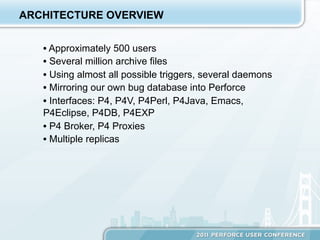
   •  Approximately 500 users
   •  Several million archive files
   •  Using almost all possible triggers, several daemons
   •  Mirroring our own bug database into Perforce
   •  Interfaces: P4, P4V, P4Perl, P4Java, Emacs,
   P4Eclipse, P4DB, P4EXP
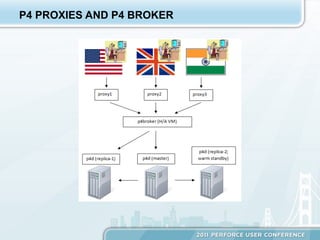
   •  P4 Broker, P4 Proxies
   •  Multiple replicas
P4 PROXIES AND P4 BROKER
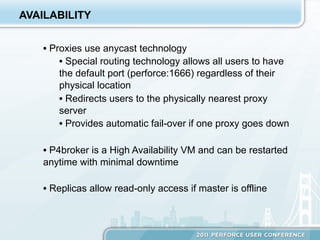
AVAILABILITY


    •  Proxies use anycast technology
         •  Special routing technology allows all users to have
         the default port (perforce:1666) regardless of their
         physical location
         •  Redirects users to the physically nearest proxy
         server
         •  Provides automatic fail-over if one proxy goes down

    •  P4broker is a High Availability VM and can be restarted
    anytime with minimal downtime

    •  Replicas allow read-only access if master is offline
REPLICATION
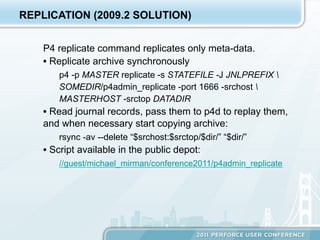
REPLICATION (2009.2 SOLUTION)


    P4 replicate command replicates only meta-data.
    •  Replicate archive synchronously
        p4 -p MASTER replicate -s STATEFILE -J JNLPREFIX 
        SOMEDIR/p4admin_replicate -port 1666 -srchost 
        MASTERHOST -srctop DATADIR
    •  Read journal records, pass them to p4d to replay them,
    and when necessary start copying archive:
        rsync -av --delete “$srchost:$srctop/$dir/” “$dir/”
    •  Script available in the public depot:
        //guest/michael_mirman/conference2011/p4admin_replicate
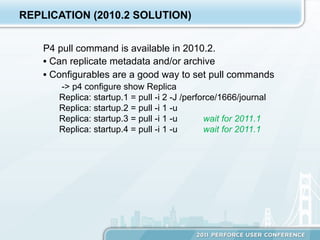
REPLICATION (2010.2 SOLUTION)


    P4 pull command is available in 2010.2.
    •  Can replicate metadata and/or archive
    •  Configurables are a good way to set pull commands
       -> p4 configure show Replica
       Replica: startup.1 = pull -i 2 -J /perforce/1666/journal
       Replica: startup.2 = pull -i 1 -u
       Replica: startup.3 = pull -i 1 -u       wait for 2011.1
       Replica: startup.4 = pull -i 1 -u       wait for 2011.1
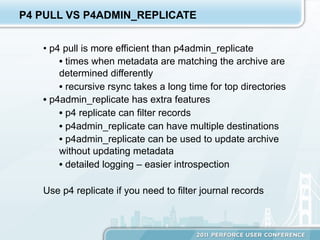
P4 PULL VS P4ADMIN_REPLICATE


   •  p4 pull is more efficient than p4admin_replicate
        •  times when metadata are matching the archive are
        determined differently
        •  recursive rsync takes a long time for top directories
   •  p4admin_replicate has extra features
        •  p4 replicate can filter records
        •  p4admin_replicate can have multiple destinations
        •  p4admin_replicate can be used to update archive
        without updating metadata
        •  detailed logging – easier introspection

   Use p4 replicate if you need to filter journal records
LOAD BALANCE
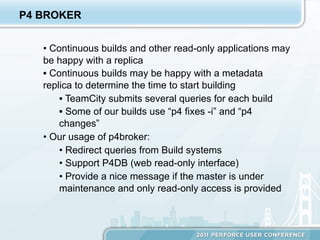
P4 BROKER


   •  Continuous builds and other read-only applications may
   be happy with a replica
   •  Continuous builds may be happy with a metadata
   replica to determine the time to start building
        •  TeamCity submits several queries for each build
        •  Some of our builds use “p4 fixes -i” and “p4
        changes”
   •  Our usage of p4broker:
        •  Redirect queries from Build systems
        •  Support P4DB (web read-only interface)
        •  Provide a nice message if the master is under
        maintenance and only read-only access is provided
STALE REPLICAS


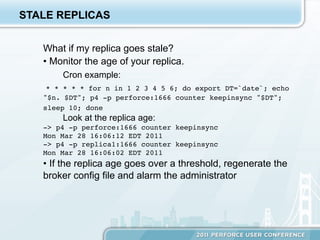
   What if my replica goes stale?
   •  Monitor the age of your replica.
       Cron example:
    * * * * * for n in 1 2 3 4 5 6; do export DT=`date`; echo
   "$n. $DT"; p4 -p perforce:1666 counter keepinsync "$DT";
   sleep 10; done
       Look at the replica age:
   -> p4 -p perforce:1666 counter keepinsync!
   Mon Mar 28 16:06:12 EDT 2011!
   -> p4 -p replica1:1666 counter keepinsync!
   Mon Mar 28 16:06:02 EDT 2011
   •  If the replica age goes over a threshold, regenerate the
   broker config file and alarm the administrator
SERVER UNDER MAINTENANCE


   Additional benefits of p4broker

   •  If the master server is unavailable, the broker config is
   regenerated to provide the appropriate message for non-
   read-only commands

   •  If no servers are available, the broker config is
   regenerated to provide a different message (“No servers
   are available”) instead of not user-friendly “Connection
   refused”
OUR EXPERIENCE WITH LOAD BALANCE


   What we find useful:

   •  Monitor the load and collect data even if we don’t need
   these data right now

   •  Use replicas to distribute the load

   •  Maintain the broker config file according to server
   availability and replica age

   •  Broker provides transparency and increases the
   availability of the server
OFFLINE CHECKPOINTING
CHECKPOINTING


   Checkpointing causes users to wait

   •  It’s always too long

   •  Different ways of creating checkpoints offline
        •  our old way (using NetApp snapshots):
       //guest/michael_mirman/snap_checkpoint/snap_checkpoint
       •  our new way: using metadata replica
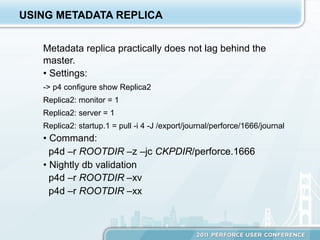
USING METADATA REPLICA


   Metadata replica practically does not lag behind the
   master.
   •  Settings:
   -> p4 configure show Replica2
   Replica2: monitor = 1
   Replica2: server = 1
   Replica2: startup.1 = pull -i 4 -J /export/journal/perforce/1666/journal
   •  Command:
     p4d –r ROOTDIR –z –jc CKPDIR/perforce.1666
   •  Nightly db validation
     p4d –r ROOTDIR –xv
     p4d –r ROOTDIR –xx
MINIMIZE DOWNTIME
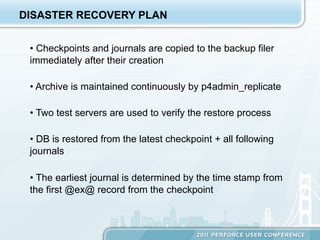
DISASTER RECOVERY PLAN


 •  Checkpoints and journals are copied to the backup filer
 immediately after their creation

 •  Archive is maintained continuously by p4admin_replicate

 •  Two test servers are used to verify the restore process

 •  DB is restored from the latest checkpoint + all following
 journals

 •  The earliest journal is determined by the time stamp from
 the first @ex@ record from the checkpoint
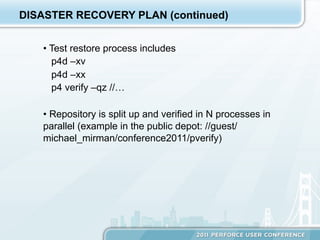
DISASTER RECOVERY PLAN (continued)


   •  Test restore process includes
      p4d –xv
      p4d –xx
      p4 verify –qz //…

   •  Repository is split up and verified in N processes in
   parallel (example in the public depot: //guest/
   michael_mirman/conference2011/pverify)
FAIL-OVER PLAN


   •  No automatic fail-over (conscious decision: assess the
   situation)

   •  Use it after rebuilding database on a replica

   •  Fail-over is accomplished by changing the broker
   config file
        •  block write access
        •  wait for the replication to get the standby to be in
        sync with the master
        •  allow write access to the new master
MAJOR UPGRADE


   •  Place all binaries in the right locations and update
   licenses if necessary
   •  Reconfigure p4broker to block write access and
   redirect all read-only requests to a replica
   •  Wait until the replica is in sync with the master
   •  Stop the master and all replication processes
   •  Upgrade the master (p4d -xu) and restart it
   •  Reconfigure p4broker not to use any replica
   •  Upgrade and restart every replica
   •  Restart replication processes
   •  Reconfigure p4broker to use replicas as usual
   •  Restarting p4broker and proxies cause short service
   interruptions, but we don’t always have to do this
SUMMARY
WHAT WORKED WELL FOR US


   To increase availability:
       •  Anycast with multiple proxies – no need to
       reconfigure clients when infrastructure changes
       •  High-Availability VM for p4broker
       •  Maintaining a warm standby replica.
   To improve load balancing:
       •  Moving some maintenance procedures to
       replica servers (our VMs are adequate);
       •  Creating checkpoints on a replica server and
       testing them regularly;
       •  Using p4broker to redirect some load to a
       replica server.
WHAT ELSE WORKED WELL


   Having test servers with identical or very similar
   architecture.

   Replicating data synchronously on replicas and
   continuously on archive.

   “Set it and forget it” - Administration is easy when
   you have automated most functions.
THANK YOU!


   ANY QUESTIONS?

Perforce Administration: Optimization, Scalability, Availability and Reliability

  • 1.
    Perforce Administration: Optimization, Scalability, Availability,and Reliability Michael Mirman Perforce Administrator MathWorks, Inc. 2011
  • 2.
  • 3.
    ARCHITECTURE OVERVIEW •  Approximately 500 users •  Several million archive files •  Using almost all possible triggers, several daemons •  Mirroring our own bug database into Perforce •  Interfaces: P4, P4V, P4Perl, P4Java, Emacs, P4Eclipse, P4DB, P4EXP •  P4 Broker, P4 Proxies •  Multiple replicas
  • 4.
    P4 PROXIES ANDP4 BROKER
  • 5.
    AVAILABILITY •  Proxies use anycast technology •  Special routing technology allows all users to have the default port (perforce:1666) regardless of their physical location •  Redirects users to the physically nearest proxy server •  Provides automatic fail-over if one proxy goes down •  P4broker is a High Availability VM and can be restarted anytime with minimal downtime •  Replicas allow read-only access if master is offline
  • 6.
  • 7.
    REPLICATION (2009.2 SOLUTION) P4 replicate command replicates only meta-data. •  Replicate archive synchronously p4 -p MASTER replicate -s STATEFILE -J JNLPREFIX SOMEDIR/p4admin_replicate -port 1666 -srchost MASTERHOST -srctop DATADIR •  Read journal records, pass them to p4d to replay them, and when necessary start copying archive: rsync -av --delete “$srchost:$srctop/$dir/” “$dir/” •  Script available in the public depot: //guest/michael_mirman/conference2011/p4admin_replicate
  • 8.
    REPLICATION (2010.2 SOLUTION) P4 pull command is available in 2010.2. •  Can replicate metadata and/or archive •  Configurables are a good way to set pull commands -> p4 configure show Replica Replica: startup.1 = pull -i 2 -J /perforce/1666/journal Replica: startup.2 = pull -i 1 -u Replica: startup.3 = pull -i 1 -u wait for 2011.1 Replica: startup.4 = pull -i 1 -u wait for 2011.1
  • 9.
    P4 PULL VSP4ADMIN_REPLICATE •  p4 pull is more efficient than p4admin_replicate •  times when metadata are matching the archive are determined differently •  recursive rsync takes a long time for top directories •  p4admin_replicate has extra features •  p4 replicate can filter records •  p4admin_replicate can have multiple destinations •  p4admin_replicate can be used to update archive without updating metadata •  detailed logging – easier introspection Use p4 replicate if you need to filter journal records
  • 10.
  • 11.
    P4 BROKER •  Continuous builds and other read-only applications may be happy with a replica •  Continuous builds may be happy with a metadata replica to determine the time to start building •  TeamCity submits several queries for each build •  Some of our builds use “p4 fixes -i” and “p4 changes” •  Our usage of p4broker: •  Redirect queries from Build systems •  Support P4DB (web read-only interface) •  Provide a nice message if the master is under maintenance and only read-only access is provided
  • 12.
    STALE REPLICAS What if my replica goes stale? •  Monitor the age of your replica. Cron example: * * * * * for n in 1 2 3 4 5 6; do export DT=`date`; echo "$n. $DT"; p4 -p perforce:1666 counter keepinsync "$DT"; sleep 10; done Look at the replica age: -> p4 -p perforce:1666 counter keepinsync! Mon Mar 28 16:06:12 EDT 2011! -> p4 -p replica1:1666 counter keepinsync! Mon Mar 28 16:06:02 EDT 2011 •  If the replica age goes over a threshold, regenerate the broker config file and alarm the administrator
  • 13.
    SERVER UNDER MAINTENANCE Additional benefits of p4broker •  If the master server is unavailable, the broker config is regenerated to provide the appropriate message for non- read-only commands •  If no servers are available, the broker config is regenerated to provide a different message (“No servers are available”) instead of not user-friendly “Connection refused”
  • 14.
    OUR EXPERIENCE WITHLOAD BALANCE What we find useful: •  Monitor the load and collect data even if we don’t need these data right now •  Use replicas to distribute the load •  Maintain the broker config file according to server availability and replica age •  Broker provides transparency and increases the availability of the server
  • 15.
  • 16.
    CHECKPOINTING Checkpointing causes users to wait •  It’s always too long •  Different ways of creating checkpoints offline •  our old way (using NetApp snapshots): //guest/michael_mirman/snap_checkpoint/snap_checkpoint •  our new way: using metadata replica
  • 17.
    USING METADATA REPLICA Metadata replica practically does not lag behind the master. •  Settings: -> p4 configure show Replica2 Replica2: monitor = 1 Replica2: server = 1 Replica2: startup.1 = pull -i 4 -J /export/journal/perforce/1666/journal •  Command: p4d –r ROOTDIR –z –jc CKPDIR/perforce.1666 •  Nightly db validation p4d –r ROOTDIR –xv p4d –r ROOTDIR –xx
  • 18.
  • 19.
    DISASTER RECOVERY PLAN •  Checkpoints and journals are copied to the backup filer immediately after their creation •  Archive is maintained continuously by p4admin_replicate •  Two test servers are used to verify the restore process •  DB is restored from the latest checkpoint + all following journals •  The earliest journal is determined by the time stamp from the first @ex@ record from the checkpoint
  • 20.
    DISASTER RECOVERY PLAN(continued) •  Test restore process includes p4d –xv p4d –xx p4 verify –qz //… •  Repository is split up and verified in N processes in parallel (example in the public depot: //guest/ michael_mirman/conference2011/pverify)
  • 21.
    FAIL-OVER PLAN •  No automatic fail-over (conscious decision: assess the situation) •  Use it after rebuilding database on a replica •  Fail-over is accomplished by changing the broker config file •  block write access •  wait for the replication to get the standby to be in sync with the master •  allow write access to the new master
  • 22.
    MAJOR UPGRADE •  Place all binaries in the right locations and update licenses if necessary •  Reconfigure p4broker to block write access and redirect all read-only requests to a replica •  Wait until the replica is in sync with the master •  Stop the master and all replication processes •  Upgrade the master (p4d -xu) and restart it •  Reconfigure p4broker not to use any replica •  Upgrade and restart every replica •  Restart replication processes •  Reconfigure p4broker to use replicas as usual •  Restarting p4broker and proxies cause short service interruptions, but we don’t always have to do this
  • 23.
  • 24.
    WHAT WORKED WELLFOR US To increase availability: •  Anycast with multiple proxies – no need to reconfigure clients when infrastructure changes •  High-Availability VM for p4broker •  Maintaining a warm standby replica. To improve load balancing: •  Moving some maintenance procedures to replica servers (our VMs are adequate); •  Creating checkpoints on a replica server and testing them regularly; •  Using p4broker to redirect some load to a replica server.
  • 25.
    WHAT ELSE WORKEDWELL Having test servers with identical or very similar architecture. Replicating data synchronously on replicas and continuously on archive. “Set it and forget it” - Administration is easy when you have automated most functions.
  • 26.
    THANK YOU! ANY QUESTIONS?