B Y – K A R T H I K
MULE HDFS CONNECTOR
What is HDFS Connector?
 The Anypoint Connector for the Hadoop Distributed File System
(HDFS) is used as a bi-directional gateway between applications. Its
source is stored at the HDFS Connector GitHub site.
Pre-Requisites
 To use the HDFS connector, you must have the following:
 A working Apache Hadoop Server.
 Anypoint Studio Community edition.
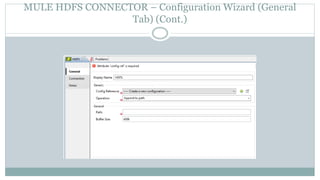
MULE HDFS CONNECTOR – Configuration Wizard (General
Tab) (Cont.)
MULE HDFS CONNECTOR – Configuration Wizard (General
Tab)
 Following are the options on general tab –
 Display Name – The name of the component to be displayed in Mule flow.
 Config Reference – Reference to the global configuration.
 Operation – The operation to be performed on server.
 Path – The path of the file to write to.
 Buffer Size – The buffer size to use for appending content in file.
MULE HDFS CONNECTOR – Configuration Wizard (Connection
Tab) (Cont.)
MULE HDFS CONNECTOR – Configuration Wizard (Connection
Tab)
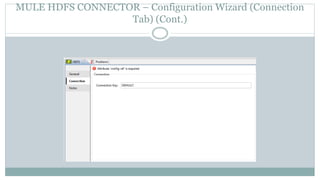
 This tab is used to add a connection key.
 By default the connection key is ‘DEFAULT’.
MULE HDFS CONNECTOR – Config Reference Configuration
Wizard (General Tab) (Cont.)
MULE HDFS CONNECTOR – Config Reference
Configuration Wizard (General Tab)
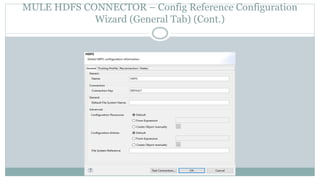
 Following are the options in general tab –
 Name – The name of the configuration.
 Connection Key – The key used in connection.
 Default File System Name – The name of the file system to connect to.
 Configuration Resources – Use this radio button to configure various resources.
 Configuration Enteries – Use this radio button to configure various enteries.
 File System Reference – A readily configured to used to connect to HDFS.
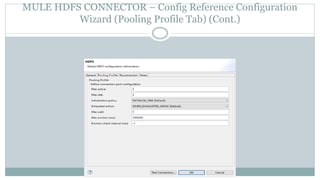
MULE HDFS CONNECTOR – Config Reference Configuration
Wizard (Pooling Profile Tab) (Cont.)
MULE HDFS CONNECTOR – Config Reference
Configuration Wizard (Pooling Profile Tab)
 Mule HDFS connector configuration’s pooling profile tab
contains following properties –
 Max active – Property which define how many connections can be
there in connection pool.
 Max idle – Defines maximum number of connections that can be idle.
 Initialization policy – Defines how to initialize new connections.
 Exhausted action – Defines how to release a connection after usage.
 Max wait – Maximum time to wait for a new connection to be available.
 Min eviction time – Minimum amount of time a connection can sit idle
for.
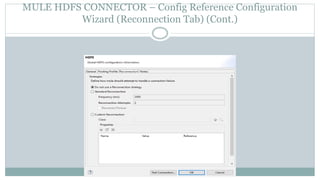
MULE HDFS CONNECTOR – Config Reference Configuration
Wizard (Reconnection Tab) (Cont.)
MULE HDFS CONNECTOR – Config Reference
Configuration Wizard (Reconnection Tab)
 The Reconnection tab contains following properties –
 Do not use a Reconnection Strategy – This is the default radio button which
specifies do not try to reconnect if there is error connecting to the web address
URL.
 Standard Reconnection – Use this radio button to enable a standard
reconnection strategy.
 Frequency (ms) – The frequency time in milliseconds after which the HDFS
connector will try to access the web address URL.
 Reconnect Attempts – This tells how many times the HDFS connector will try to
connect to web address URL.
 Reconnector Forever – Check this box if there is need to make HDFS connector
connect to web address URL until there is a successful connection with it.
 Custom Reconnection – Use this radio button to create a custom Reconnection
strategy.
 Class – The java class which will come in action after a failed connection attempt.
 Run the connection in a separated thread – Check this box if there is need to use
this custom reconnection operation in separate thread.
MULE HDFS CONNECTOR – Configuration Wizard (Notes
Tab)
 Notes Tab is used to add special notes for Mule HDFS Connector.
Thank You!

Mulehdfsconnector 160810122655

  • 1.
    B Y –K A R T H I K MULE HDFS CONNECTOR
  • 2.
    What is HDFSConnector?  The Anypoint Connector for the Hadoop Distributed File System (HDFS) is used as a bi-directional gateway between applications. Its source is stored at the HDFS Connector GitHub site.
  • 3.
    Pre-Requisites  To usethe HDFS connector, you must have the following:  A working Apache Hadoop Server.  Anypoint Studio Community edition.
  • 4.
    MULE HDFS CONNECTOR– Configuration Wizard (General Tab) (Cont.)
  • 5.
    MULE HDFS CONNECTOR– Configuration Wizard (General Tab)  Following are the options on general tab –  Display Name – The name of the component to be displayed in Mule flow.  Config Reference – Reference to the global configuration.  Operation – The operation to be performed on server.  Path – The path of the file to write to.  Buffer Size – The buffer size to use for appending content in file.
  • 6.
    MULE HDFS CONNECTOR– Configuration Wizard (Connection Tab) (Cont.)
  • 7.
    MULE HDFS CONNECTOR– Configuration Wizard (Connection Tab)  This tab is used to add a connection key.  By default the connection key is ‘DEFAULT’.
  • 8.
    MULE HDFS CONNECTOR– Config Reference Configuration Wizard (General Tab) (Cont.)
  • 9.
    MULE HDFS CONNECTOR– Config Reference Configuration Wizard (General Tab)  Following are the options in general tab –  Name – The name of the configuration.  Connection Key – The key used in connection.  Default File System Name – The name of the file system to connect to.  Configuration Resources – Use this radio button to configure various resources.  Configuration Enteries – Use this radio button to configure various enteries.  File System Reference – A readily configured to used to connect to HDFS.
  • 10.
    MULE HDFS CONNECTOR– Config Reference Configuration Wizard (Pooling Profile Tab) (Cont.)
  • 11.
    MULE HDFS CONNECTOR– Config Reference Configuration Wizard (Pooling Profile Tab)  Mule HDFS connector configuration’s pooling profile tab contains following properties –  Max active – Property which define how many connections can be there in connection pool.  Max idle – Defines maximum number of connections that can be idle.  Initialization policy – Defines how to initialize new connections.  Exhausted action – Defines how to release a connection after usage.  Max wait – Maximum time to wait for a new connection to be available.  Min eviction time – Minimum amount of time a connection can sit idle for.
  • 12.
    MULE HDFS CONNECTOR– Config Reference Configuration Wizard (Reconnection Tab) (Cont.)
  • 13.
    MULE HDFS CONNECTOR– Config Reference Configuration Wizard (Reconnection Tab)  The Reconnection tab contains following properties –  Do not use a Reconnection Strategy – This is the default radio button which specifies do not try to reconnect if there is error connecting to the web address URL.  Standard Reconnection – Use this radio button to enable a standard reconnection strategy.  Frequency (ms) – The frequency time in milliseconds after which the HDFS connector will try to access the web address URL.  Reconnect Attempts – This tells how many times the HDFS connector will try to connect to web address URL.  Reconnector Forever – Check this box if there is need to make HDFS connector connect to web address URL until there is a successful connection with it.  Custom Reconnection – Use this radio button to create a custom Reconnection strategy.  Class – The java class which will come in action after a failed connection attempt.  Run the connection in a separated thread – Check this box if there is need to use this custom reconnection operation in separate thread.
  • 14.
    MULE HDFS CONNECTOR– Configuration Wizard (Notes Tab)  Notes Tab is used to add special notes for Mule HDFS Connector.
  • 15.