


MULE: JAVA TRANSFORMER
ENABLES THE DEVELOPER TO PACKAGE CUSTOM JAVA
CODE
BASIC CONSIDERATIONS
• Anypoint Studio provides a set of transformers to
handle the most common data transformation
scenarios
• Developer can chain transformers if a transformer did
not exist for specific needs
• The DataWeave Transform Message component can be
used in place of most other transformers
SPECIAL CASES
• Transforming complex data structures
• Applying complex business rules
• The available transformers cannot meet the
requirement
• Simply throw the old lines of code into a component
instead of having to reengineer the code’s behavior
through a series of different Mule components
POSSIBLE SOLUTIONS
• Building custom components and/or transformers
• Turning to the most favorite Programming Languages:
o Java
o .NET
o Scripting languages: Groovy, Javascript, Python or Ruby
JAVA
• Java is the native language in which Mule is coded
• The Java component enables the developer to package
custom Java code that executes when the component
receives a message
• The Java component can be used to enhance the
functionality and capability of your web-based
applications written in Java
JAVA TRANSFORMER (1/2)
• Transforms a message from its original
format to a new, modified format.
• If rather than just changing the
message/payload, trigger a more complex
set of processes coded in Java, use a Java
Component.
JAVA TRANSFORMER (2/2)
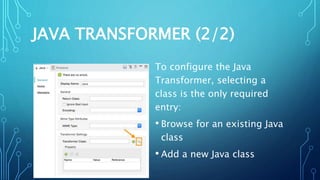
To configure the Java
Transformer, selecting a
class is the only required
entry:
• Browse for an existing Java
class
• Add a new Java class
BASIC JAVA CLASS
• A class must extends:
o org.mule.transformer.AbstractMessageTransformer
Modifies the message and returns it as the output
message of the transformer.
o org.mule.transformer.AbstractTransformer
Modifies the payload and returns it as the output
payload.
• A class must be referenced in a fully-qualified name
JAVA CLASS: MESSAGE (1/3)
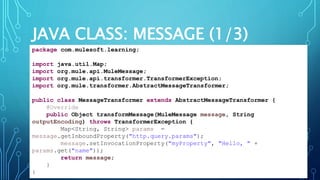
package com.mulesoft.learning;
import java.util.Map;
import org.mule.api.MuleMessage;
import org.mule.api.transformer.TransformerException;
import org.mule.transformer.AbstractMessageTransformer;
public class MessageTransformer extends AbstractMessageTransformer {
@Override
public Object transformMessage(MuleMessage message, String
outputEncoding) throws TransformerException {
Map<String, String> params =
message.getInboundProperty("http.query.params");
message.setInvocationProperty("myProperty", "Hello, " +
params.get("name"));
return message;
}
}
JAVA CLASS: MESSAGE (2/3)
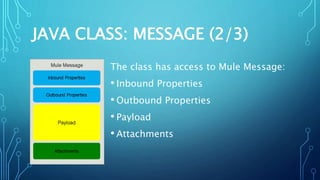
The class has access to Mule Message:
• Inbound Properties
• Outbound Properties
• Payload
• Attachments
JAVA CLASS: MESSAGE (3/3)
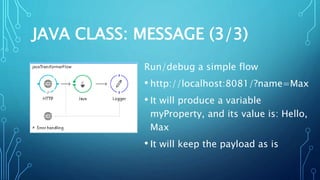
Run/debug a simple flow
• http://localhost:8081/?name=Max
• It will produce a variable
myProperty, and its value is: Hello,
Max
• It will keep the payload as is
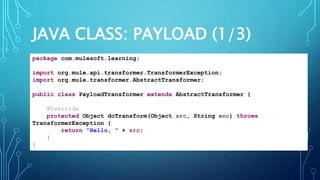
JAVA CLASS: PAYLOAD (1/3)
package com.mulesoft.learning;
import org.mule.api.transformer.TransformerException;
import org.mule.transformer.AbstractTransformer;
public class PayloadTransformer extends AbstractTransformer {
@Override
protected Object doTransform(Object src, String enc) throws
TransformerException {
return "Hello, " + src;
}
}
JAVA CLASS: PAYLOAD (2/3)
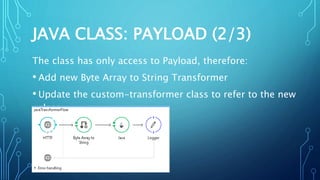
The class has only access to Payload, therefore:
• Add new Byte Array to String Transformer
• Update the custom-transformer class to refer to the new
class
JAVA CLASS: PAYLOAD (3/3)
Run/debug the new flow
• Post a raw message: Max
• Send it to http://localhost:8081
• It will produce a new payload: Hello, Max
SUMMARY
Mule allows developers to:
• Build their own component and/or transformer
• Simply write their favorite programming language
• Choose the transformation scope
RESOURCES:
• https://docs.mulesoft.com/mule-user-guide/v/3.8/java-
transformer-reference

Mule: Java Transformer

  • 1.
    MULE: JAVA TRANSFORMER ENABLESTHE DEVELOPER TO PACKAGE CUSTOM JAVA CODE
  • 2.
    BASIC CONSIDERATIONS • AnypointStudio provides a set of transformers to handle the most common data transformation scenarios • Developer can chain transformers if a transformer did not exist for specific needs • The DataWeave Transform Message component can be used in place of most other transformers
  • 3.
    SPECIAL CASES • Transformingcomplex data structures • Applying complex business rules • The available transformers cannot meet the requirement • Simply throw the old lines of code into a component instead of having to reengineer the code’s behavior through a series of different Mule components
  • 4.
    POSSIBLE SOLUTIONS • Buildingcustom components and/or transformers • Turning to the most favorite Programming Languages: o Java o .NET o Scripting languages: Groovy, Javascript, Python or Ruby
  • 5.
    JAVA • Java isthe native language in which Mule is coded • The Java component enables the developer to package custom Java code that executes when the component receives a message • The Java component can be used to enhance the functionality and capability of your web-based applications written in Java
  • 6.
    JAVA TRANSFORMER (1/2) •Transforms a message from its original format to a new, modified format. • If rather than just changing the message/payload, trigger a more complex set of processes coded in Java, use a Java Component.
  • 7.
    JAVA TRANSFORMER (2/2) Toconfigure the Java Transformer, selecting a class is the only required entry: • Browse for an existing Java class • Add a new Java class
  • 8.
    BASIC JAVA CLASS •A class must extends: o org.mule.transformer.AbstractMessageTransformer Modifies the message and returns it as the output message of the transformer. o org.mule.transformer.AbstractTransformer Modifies the payload and returns it as the output payload. • A class must be referenced in a fully-qualified name
  • 9.
    JAVA CLASS: MESSAGE(1/3) package com.mulesoft.learning; import java.util.Map; import org.mule.api.MuleMessage; import org.mule.api.transformer.TransformerException; import org.mule.transformer.AbstractMessageTransformer; public class MessageTransformer extends AbstractMessageTransformer { @Override public Object transformMessage(MuleMessage message, String outputEncoding) throws TransformerException { Map<String, String> params = message.getInboundProperty("http.query.params"); message.setInvocationProperty("myProperty", "Hello, " + params.get("name")); return message; } }
  • 10.
    JAVA CLASS: MESSAGE(2/3) The class has access to Mule Message: • Inbound Properties • Outbound Properties • Payload • Attachments
  • 11.
    JAVA CLASS: MESSAGE(3/3) Run/debug a simple flow • http://localhost:8081/?name=Max • It will produce a variable myProperty, and its value is: Hello, Max • It will keep the payload as is
  • 12.
    JAVA CLASS: PAYLOAD(1/3) package com.mulesoft.learning; import org.mule.api.transformer.TransformerException; import org.mule.transformer.AbstractTransformer; public class PayloadTransformer extends AbstractTransformer { @Override protected Object doTransform(Object src, String enc) throws TransformerException { return "Hello, " + src; } }
  • 13.
    JAVA CLASS: PAYLOAD(2/3) The class has only access to Payload, therefore: • Add new Byte Array to String Transformer • Update the custom-transformer class to refer to the new class
  • 14.
    JAVA CLASS: PAYLOAD(3/3) Run/debug the new flow • Post a raw message: Max • Send it to http://localhost:8081 • It will produce a new payload: Hello, Max
  • 15.
    SUMMARY Mule allows developersto: • Build their own component and/or transformer • Simply write their favorite programming language • Choose the transformation scope
  • 16.