MULE COLLECTION
SPLITTER
BY – ANKUSH SHARMA
WHAT IS A SPLITTER?
• The Splitter is a component whose role is to partition a message in several parts,
and send the resulting messages to be processed independently. Very often, they
are upstream producers in a pipeline that includes an Aggregator.
MULE COLLECTION SPLITTER
• The Splitter Flow Control splits a message into separate fragments, then sends
these fragments one at a time to the next message processor in the flow.
Segments are identified based on an expression parameter, usually written
in Mule Expression Language (MEL), but other formats can be employed also. You
can then use a Collection Aggregator Flow Control to reassemble the parts of the
original message. You can also include a Resequencer Flow Control to put the
parts back into the original sequence in case they are shuffled out of order.
• Splitting and aggregating the message is especially useful when you intend to
process the split parts in asynchronous flows running on separate servers.
Together, the splitter and aggregator flow controls allow you to share the
workload among several servers and still be able to reassemble the message after
it’s processed.
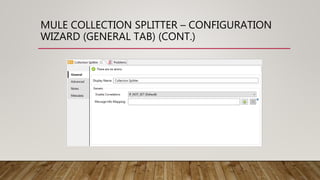
MULE COLLECTION SPLITTER – CONFIGURATION
WIZARD (GENERAL TAB) (CONT.)
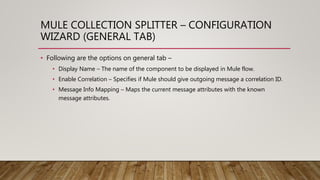
MULE COLLECTION SPLITTER – CONFIGURATION
WIZARD (GENERAL TAB)
• Following are the options on general tab –
• Display Name – The name of the component to be displayed in Mule flow.
• Enable Correlation – Specifies if Mule should give outgoing message a correlation ID.
• Message Info Mapping – Maps the current message attributes with the known
message attributes.
MULE COLLECTION SPLITTER – CONFIGURATION
WIZARD (ADVANCED TAB) (CONT.)
MULE COLLECTION SPLITTER – CONFIGURATION
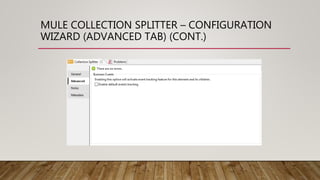
WIZARD (ADVANCED TAB)
• This tab is used to add business events tracking for the whole process of
aggregator.
MULE COLLECTION SPLITTER – MESSAGE INFO MAPPING
CONFIGURATION WIZARD (GENERAL TAB) (CONT.)
MULE COLLECTION SPLITTER – MESSAGE INFO MAPPING
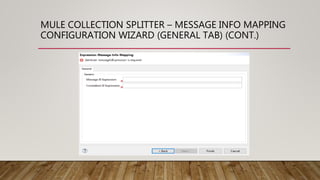
CONFIGURATION WIZARD (GENERAL TAB)
• Following are the options on general tab –
• Message ID Expression – Expression for mapping message attributes to
messageIdExpression.
• Correlation ID Expression – Expression for mapping message attributes to
correlationIdExpression.
MULE COLLECTION SPLITTER – CONFIGURATION
WIZARD (NOTES AND META-DATA TABS)
• Notes Tab, is used to add special notes for this filter component.
• META-DATA Tab, is used to add meta-data for this filter component.
THANK YOU!

Mule Collection Splitter

  • 1.
  • 2.
    WHAT IS ASPLITTER? • The Splitter is a component whose role is to partition a message in several parts, and send the resulting messages to be processed independently. Very often, they are upstream producers in a pipeline that includes an Aggregator.
  • 3.
    MULE COLLECTION SPLITTER •The Splitter Flow Control splits a message into separate fragments, then sends these fragments one at a time to the next message processor in the flow. Segments are identified based on an expression parameter, usually written in Mule Expression Language (MEL), but other formats can be employed also. You can then use a Collection Aggregator Flow Control to reassemble the parts of the original message. You can also include a Resequencer Flow Control to put the parts back into the original sequence in case they are shuffled out of order. • Splitting and aggregating the message is especially useful when you intend to process the split parts in asynchronous flows running on separate servers. Together, the splitter and aggregator flow controls allow you to share the workload among several servers and still be able to reassemble the message after it’s processed.
  • 4.
    MULE COLLECTION SPLITTER– CONFIGURATION WIZARD (GENERAL TAB) (CONT.)
  • 5.
    MULE COLLECTION SPLITTER– CONFIGURATION WIZARD (GENERAL TAB) • Following are the options on general tab – • Display Name – The name of the component to be displayed in Mule flow. • Enable Correlation – Specifies if Mule should give outgoing message a correlation ID. • Message Info Mapping – Maps the current message attributes with the known message attributes.
  • 6.
    MULE COLLECTION SPLITTER– CONFIGURATION WIZARD (ADVANCED TAB) (CONT.)
  • 7.
    MULE COLLECTION SPLITTER– CONFIGURATION WIZARD (ADVANCED TAB) • This tab is used to add business events tracking for the whole process of aggregator.
  • 8.
    MULE COLLECTION SPLITTER– MESSAGE INFO MAPPING CONFIGURATION WIZARD (GENERAL TAB) (CONT.)
  • 9.
    MULE COLLECTION SPLITTER– MESSAGE INFO MAPPING CONFIGURATION WIZARD (GENERAL TAB) • Following are the options on general tab – • Message ID Expression – Expression for mapping message attributes to messageIdExpression. • Correlation ID Expression – Expression for mapping message attributes to correlationIdExpression.
  • 10.
    MULE COLLECTION SPLITTER– CONFIGURATION WIZARD (NOTES AND META-DATA TABS) • Notes Tab, is used to add special notes for this filter component. • META-DATA Tab, is used to add meta-data for this filter component.
  • 11.