MULE AMAZON SNS
CONNECTOR
BY – ANKUSH SHARMA
WHAT IS MULE AMAZON SNS CONNECTOR
• The Anypoint Connector for Amazon SNS provides connectivity to the Amazon
Simple Notification Service (Amazon SNS) API, enabling you to build distributed
web-enabled applications. Mule applications can use the Amazon SNS Connector
to easily push real-time notification messages to interested subscribers over
multiple delivery protocols. MuleSoft maintains this connector under the
Select support policy.
PREREQUISITIES
• To be able to use the Amazon SNS Connector, you must have the following:
• Access to Amazon Web Services - SNS.
• To access AWS with the connector, you will need the credentials in the form of IAM.
• Anypoint Studio - Enterprise Edition.
MULE AMAZON SNS CONNECTOR – CONFIGURATION
WIZARD (GENERAL TAB) (CONT.)
MULE AMAZON SNS CONNECTOR –
CONFIGURATION WIZARD (GENERAL TAB)
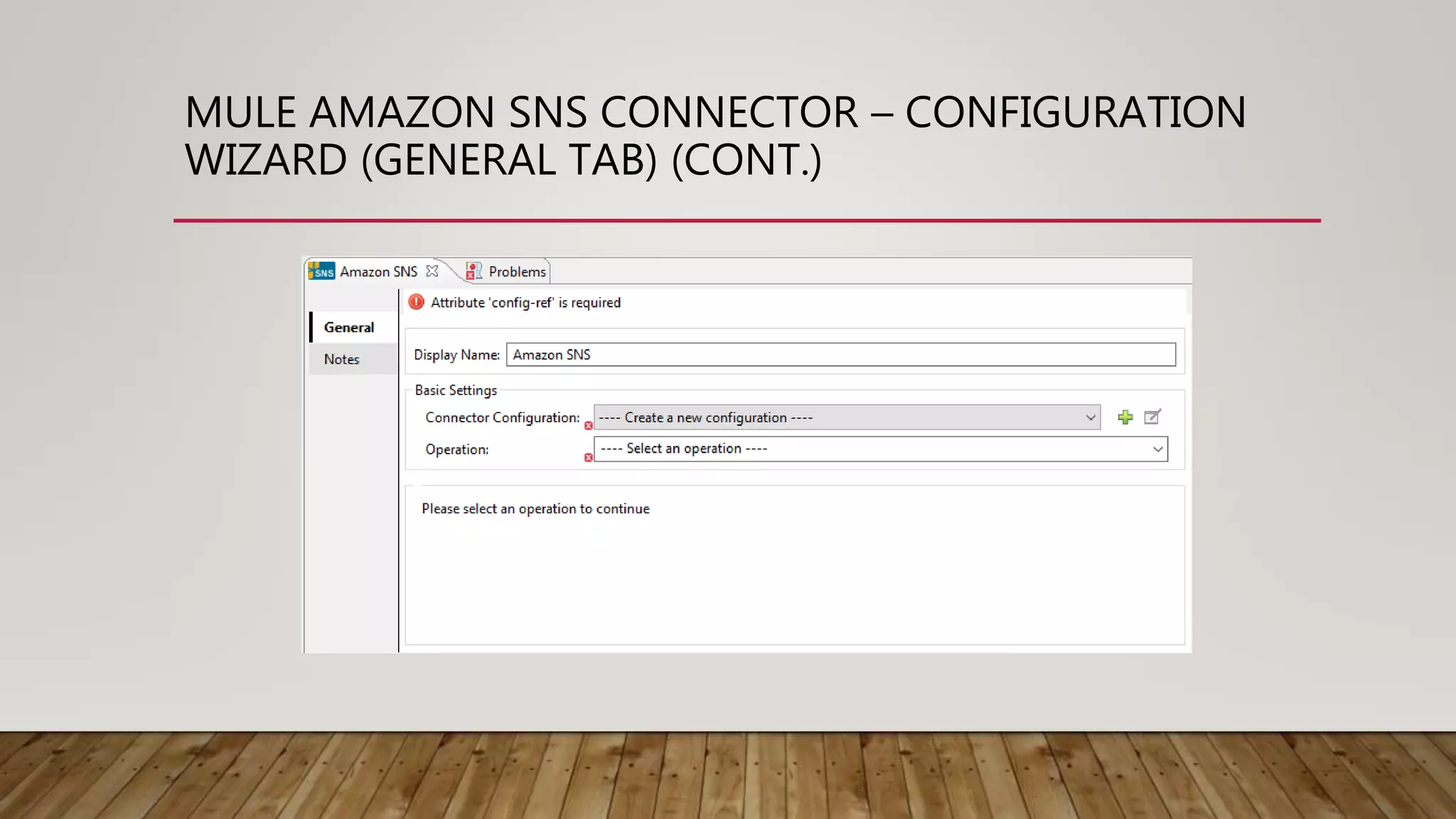
• Following are the options on general tab –
• Display Name – The name of the connector to be displayed in Mule flow.
• Connector Configuration – The reference to the global connector configuration.
• Operation – The operation that is to be executed on Amazon server.
MULE AMAZON SNS CONNECTOR – CONNECTOR
CONFIGURATION WIZARD(GENERAL TAB) (CONT.)
MULE AMAZON SNS CONNECTOR – CONNECTOR
CONFIGURATION WIZARD(GENERAL TAB) (CONT.)
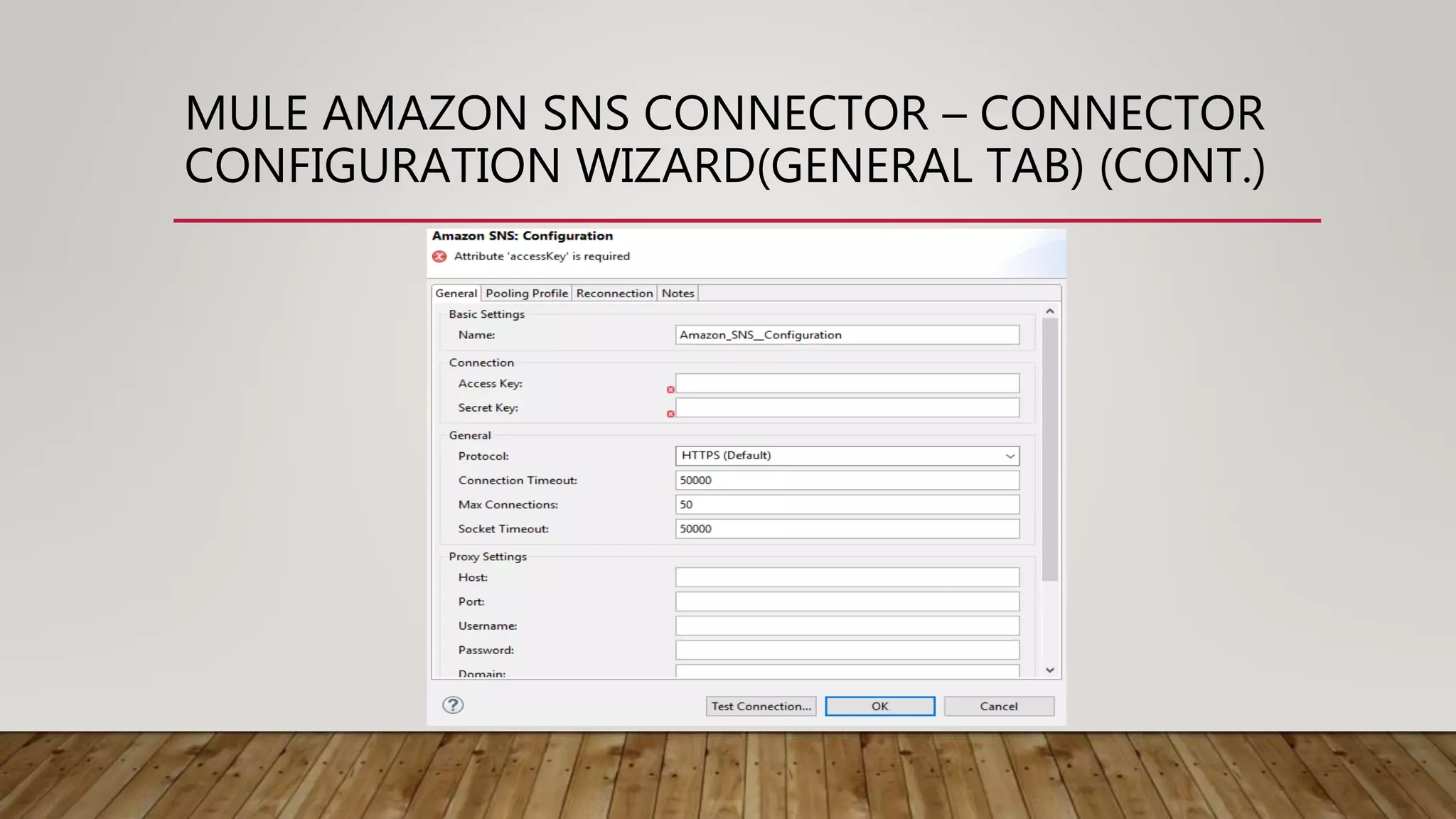
• Following are the options in general tab –
• Name – The name of the global connector configuration.
• Access Key – The access key provided by Amazon.
• Secret Key – The secret key provided by Amazon.
• Protocol – HTTP protocol to be used for connection.
• Connection Timeout – The timeout time in milliseconds.
• Max Connections – Maximum number of connections allowed on HTTP connection.
• Socket Timeout – Time in milliseconds for socket timeout.
• Host – Host name for proxy settings.
MULE AMAZON SNS CONNECTOR – CONNECTOR
CONFIGURATION WIZARD(GENERAL TAB)
• Following are the options in general tab –
• Port – The port for proxy settings.
• Username – Username for proxy settings.
• Password – Password for proxy settings.
• Domain – Domain for proxy settings.
• Workstation – The optional proxy workstation.
• Region Endpoint – Set the topic region endpoint.
• Topic Arn – Arn of the topic to test.
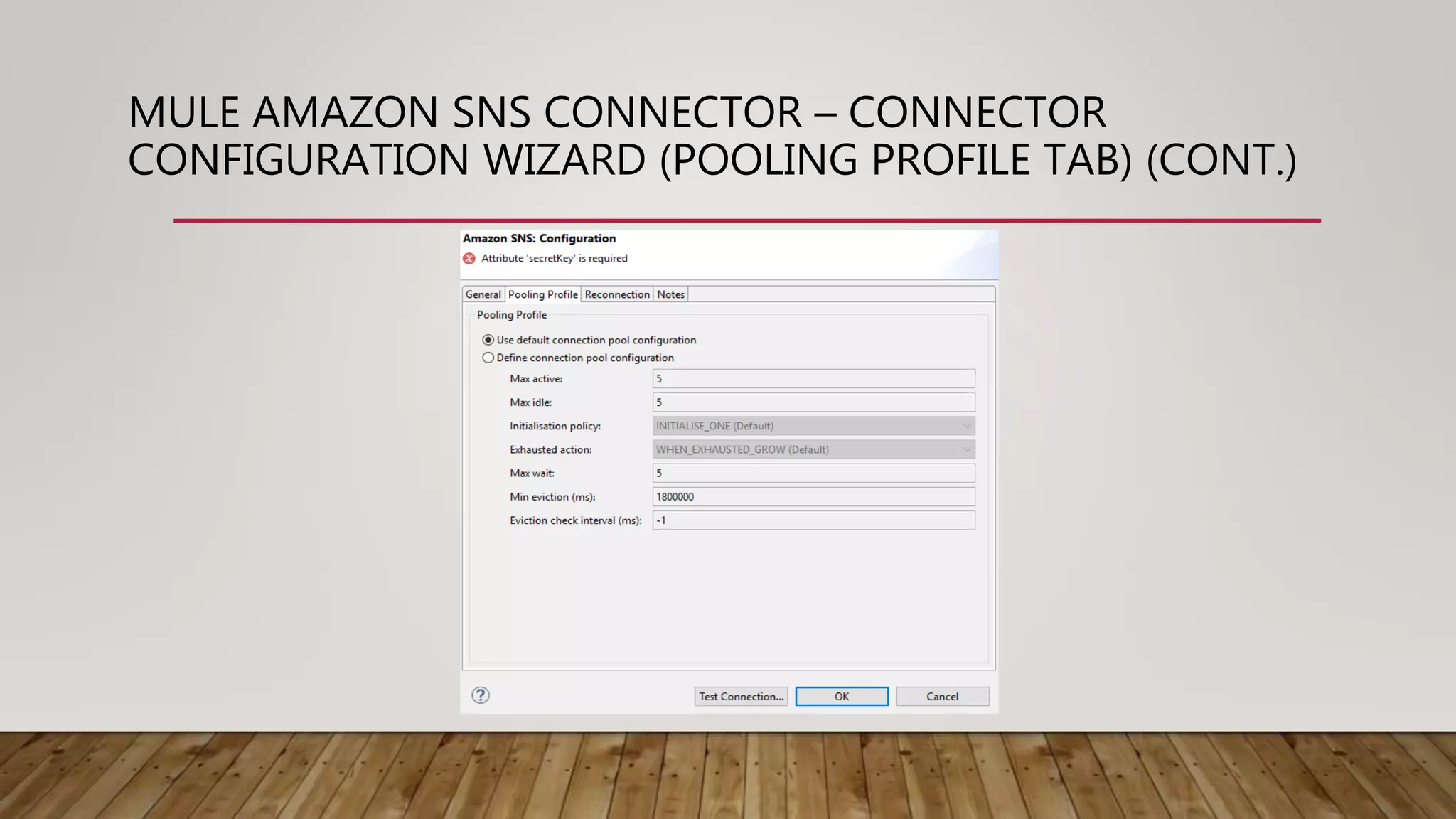
MULE AMAZON SNS CONNECTOR – CONNECTOR
CONFIGURATION WIZARD (POOLING PROFILE TAB) (CONT.)
MULE AMAZON SNS CONNECTOR – CONNECTOR
CONFIGURATION WIZARD (POOLING PROFILE TAB)
• Following are the options on pooling profile tab –
• Use default connection pool config – This radio button is used
enable default connection pooling setting of this connector.
• Define connection pool config – Radio button used to create
custom connection pooling settings.
• Max active – Property which define how many connections can be
there in connection pool.
• Max idle – Defines maximum number of connections that can be idle.
• Initialization policy – Defines how to initialize new connections.
• Exhausted action – Defines how to release a connection after usage.
• Max wait – Maximum time to wait for a new connection to be available.
• Min eviction time – Minimum amount of time a connection can sit idle for.
MULE AMAZON SNS CONNECTOR – CONNECTOR
CONFIGURATION WIZARD (RECONNECTION TAB) (CONT.)
MULE AMAZON SNS CONNECTOR – CONNECTOR
CONFIGURATION WIZARD (RECONNECTION TAB)
• The Reconnection tab contains following properties –
• Do not use a Reconnection Strategy – This is the default radio
button which specifies do not try to reconnect if there is error
connecting to the web address URL.
• Standard Reconnection – Use this radio button to enable a standard reconnection strategy.
• Frequency (ms) – The frequency time in milliseconds after which the AJAX connector will try to access the
web address URL.
• Reconnect Attempts – This tells how many times the AJAX connector will try to connect to web address
URL.
• Reconnector Forever – Check this box if there is need to make AJAX connector connect to web address
URL until there is a successful connection with it.
• Custom Reconnection – Use this radio button to create a custom Reconnection strategy.
• Class – The java class which will come in action after a failed connection attempt.
• Run the connection in a separated thread – Check this box if there is need to use this custom
reconnection operation in separate thread.
MULE AMAZON SNS CONNECTOR – CONNECTOR
CONFIGURATION WIZARD (NOTES AND META-DATA
TABS)
• Notes tab - This tab is used to add special notes for the Amazon SNS connector.
• Metadata tab – This tab is used to add any metadata entry for Amazon SNS
connector.
THANK YOU!

Mule Amazon SNS Connector

  • 1.
  • 2.
    WHAT IS MULEAMAZON SNS CONNECTOR • The Anypoint Connector for Amazon SNS provides connectivity to the Amazon Simple Notification Service (Amazon SNS) API, enabling you to build distributed web-enabled applications. Mule applications can use the Amazon SNS Connector to easily push real-time notification messages to interested subscribers over multiple delivery protocols. MuleSoft maintains this connector under the Select support policy.
  • 3.
    PREREQUISITIES • To beable to use the Amazon SNS Connector, you must have the following: • Access to Amazon Web Services - SNS. • To access AWS with the connector, you will need the credentials in the form of IAM. • Anypoint Studio - Enterprise Edition.
  • 4.
    MULE AMAZON SNSCONNECTOR – CONFIGURATION WIZARD (GENERAL TAB) (CONT.)
  • 5.
    MULE AMAZON SNSCONNECTOR – CONFIGURATION WIZARD (GENERAL TAB) • Following are the options on general tab – • Display Name – The name of the connector to be displayed in Mule flow. • Connector Configuration – The reference to the global connector configuration. • Operation – The operation that is to be executed on Amazon server.
  • 6.
    MULE AMAZON SNSCONNECTOR – CONNECTOR CONFIGURATION WIZARD(GENERAL TAB) (CONT.)
  • 7.
    MULE AMAZON SNSCONNECTOR – CONNECTOR CONFIGURATION WIZARD(GENERAL TAB) (CONT.) • Following are the options in general tab – • Name – The name of the global connector configuration. • Access Key – The access key provided by Amazon. • Secret Key – The secret key provided by Amazon. • Protocol – HTTP protocol to be used for connection. • Connection Timeout – The timeout time in milliseconds. • Max Connections – Maximum number of connections allowed on HTTP connection. • Socket Timeout – Time in milliseconds for socket timeout. • Host – Host name for proxy settings.
  • 8.
    MULE AMAZON SNSCONNECTOR – CONNECTOR CONFIGURATION WIZARD(GENERAL TAB) • Following are the options in general tab – • Port – The port for proxy settings. • Username – Username for proxy settings. • Password – Password for proxy settings. • Domain – Domain for proxy settings. • Workstation – The optional proxy workstation. • Region Endpoint – Set the topic region endpoint. • Topic Arn – Arn of the topic to test.
  • 9.
    MULE AMAZON SNSCONNECTOR – CONNECTOR CONFIGURATION WIZARD (POOLING PROFILE TAB) (CONT.)
  • 10.
    MULE AMAZON SNSCONNECTOR – CONNECTOR CONFIGURATION WIZARD (POOLING PROFILE TAB) • Following are the options on pooling profile tab – • Use default connection pool config – This radio button is used enable default connection pooling setting of this connector. • Define connection pool config – Radio button used to create custom connection pooling settings. • Max active – Property which define how many connections can be there in connection pool. • Max idle – Defines maximum number of connections that can be idle. • Initialization policy – Defines how to initialize new connections. • Exhausted action – Defines how to release a connection after usage. • Max wait – Maximum time to wait for a new connection to be available. • Min eviction time – Minimum amount of time a connection can sit idle for.
  • 11.
    MULE AMAZON SNSCONNECTOR – CONNECTOR CONFIGURATION WIZARD (RECONNECTION TAB) (CONT.)
  • 12.
    MULE AMAZON SNSCONNECTOR – CONNECTOR CONFIGURATION WIZARD (RECONNECTION TAB) • The Reconnection tab contains following properties – • Do not use a Reconnection Strategy – This is the default radio button which specifies do not try to reconnect if there is error connecting to the web address URL. • Standard Reconnection – Use this radio button to enable a standard reconnection strategy. • Frequency (ms) – The frequency time in milliseconds after which the AJAX connector will try to access the web address URL. • Reconnect Attempts – This tells how many times the AJAX connector will try to connect to web address URL. • Reconnector Forever – Check this box if there is need to make AJAX connector connect to web address URL until there is a successful connection with it. • Custom Reconnection – Use this radio button to create a custom Reconnection strategy. • Class – The java class which will come in action after a failed connection attempt. • Run the connection in a separated thread – Check this box if there is need to use this custom reconnection operation in separate thread.
  • 13.
    MULE AMAZON SNSCONNECTOR – CONNECTOR CONFIGURATION WIZARD (NOTES AND META-DATA TABS) • Notes tab - This tab is used to add special notes for the Amazon SNS connector. • Metadata tab – This tab is used to add any metadata entry for Amazon SNS connector.
  • 14.