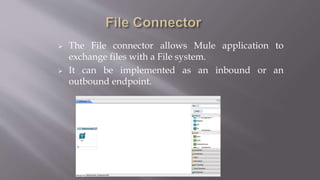
 The File connector allows Mule application to
exchange files with a File system.
 It can be implemented as an inbound or an
outbound endpoint.
 If the File component is placed at the beginning
of the flow, then it acts as an inbound endpoint,
which triggers the flow whenever it receives an
incoming file.
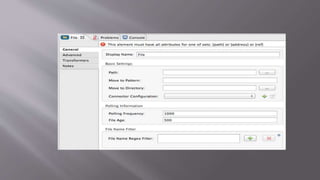
 File endpoint can be configured by providing
the values on the fields of the General tab of
Properties editor.
Some of the important fields used for inbound endpoint configuration are :-
 Display Name – It is the general endpoint name.
 Path – This is the location of the file which is transferred into the flow.
 Move to Pattern – This is the pattern to be used when moving the file
according to the Move to Directory property
 Move to Directory – This is used to save a copy of the file on the Host
machine when the file is being dispatched to the next element.
 Polling Frequency – It checks how often the endpoint should check for the
incoming messages.
 File Age – Sets a minimum period a file must wait before it is processed.
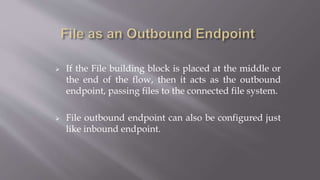
 If the File building block is placed at the middle or
the end of the flow, then it acts as the outbound
endpoint, passing files to the connected file system.
 File outbound endpoint can also be configured just
like inbound endpoint.
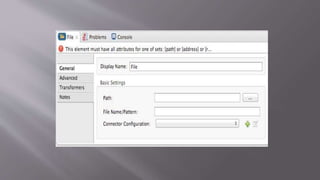
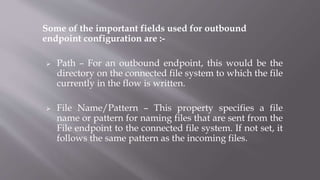
Some of the important fields used for outbound
endpoint configuration are :-
 Path – For an outbound endpoint, this would be the
directory on the connected file system to which the file
currently in the flow is written.
 File Name/Pattern – This property specifies a file
name or pattern for naming files that are sent from the
File endpoint to the connected file system. If not set, it
follows the same pattern as the incoming files.
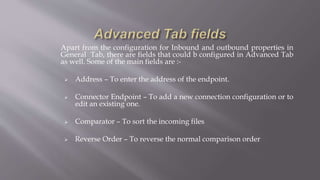
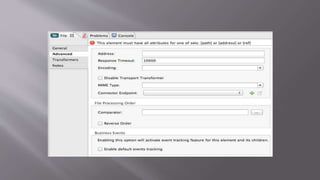
Apart from the configuration for Inbound and outbound properties in
General Tab, there are fields that could b configured in Advanced Tab
as well. Some of the main fields are :-
 Address – To enter the address of the endpoint.
 Connector Endpoint – To add a new connection configuration or to
edit an existing one.
 Comparator – To sort the incoming files
 Reverse Order – To reverse the normal comparison order
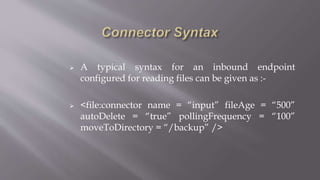
 A typical syntax for an inbound endpoint
configured for reading files can be given as :-
 <file:connector name = “input” fileAge = “500”
autoDelete = “true” pollingFrequency = “100”
moveToDirectory = “/backup” />
File Component includes several transformers for
transforming the content of the file :-
 File to Byte Array Transformer – This element
configures a transformer that reads the content of a
java.io.File into a byte array
 File to String Transformer - This element configures a
transformer that reads the content of a java.io.File into a
String
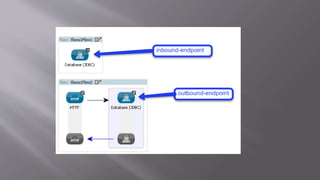
 The Database connector allows to connect with almost
any JDBC relational database.
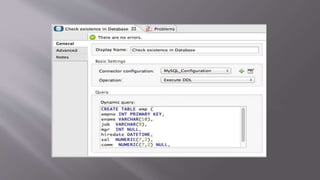
 Using Database connector, we can run diverse SQL
operations on our database like Select, Insert, Update,
Delete, and even stored procedures.
 Database connector helps us perform pre defined as
well as parametrized queries and even DDL requests.
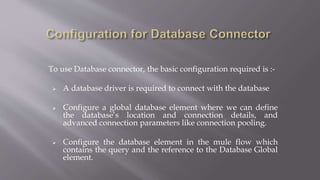
To use Database connector, the basic configuration required is :-
 A database driver is required to connect with the database
 Configure a global database element where we can define
the database’s location and connection details, and
advanced connection parameters like connection pooling.
 Configure the database element in the mule flow which
contains the query and the reference to the Database Global
element.
The Database connector provides out of the box
support for 3 databases :
 MySQL
 Oracle
 Derby
For those databases, where Out of the box support is
not provided, a Generic DB Configuration is
provided, and the driver can be added to the project.
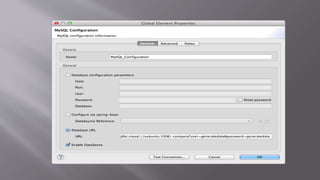
Some of the important fields which should be configured are :-
 Database URL – To define the details of the Database to be
connected with.
 Required Dependencies – To add the driver required.
 Enable Datasense(Optional) – It enables Mule to make use of
message metadata at run time.
 Connection Timeout – To define the amount of time the
connection should remain active.
 Config Reference – To identify any Global element if present
 Operation – To instruct the application for the type of
operation to be performed on the database.
 Type – To define the type of SQL statement we wish to use to
submit queries to a database :
 Parametrized – Mule replaces all MEL expressions inside the
query with “?” to create a prepared statement, then evaluates
the MEL expressions.
E.g:- insert into employees where name =
#[message.payload.name]
 Dynamic – Mule replaces all MEL expressions in the query
with the result of the expression evaluation, then sends the
results to the database.
E.g:- select * from #[tablename]
 From Template- It enables to define a query once globally and
then reuse the query multiple times in the same application.
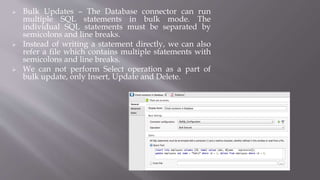
 Bulk Updates – The Database connector can run
multiple SQL statements in bulk mode. The
individual SQL statements must be separated by
semicolons and line breaks.
 Instead of writing a statement directly, we can also
refer a file which contains multiple statements with
semicolons and line breaks.
 We can not perform Select operation as a part of
bulk update, only Insert, Update and Delete.
Mule ESB allows different integration scenarios using
web services :-
 Consuming existing web services.
 Building web services and exposing them to other
applications.
 Creating a proxy/gateway to existing web services.
 While developing our applications, whenever we need
to consume some external SOAP services to acquire
data, we can use a Web Service consumer.
 Using the information contained in service’s WSDL,
this connector enables us to configure a few details in
order to establish the connection.
 The Web service consumer interfaces only with the
SOAP services and not with the REST.
To use the Web service consumer, we need to carry out
the following 3 tasks :-
 Add the WSDL file of the service we need to
consume.
 Embed a web service consumer in our Mule Flow.
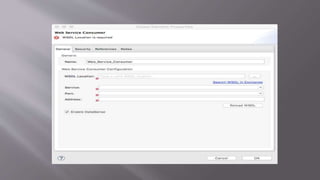
 Configure the Global web service consumer element
in which we reference the service’s WSDL, enable
Datasense and apply any security settings that the
service provider demands.
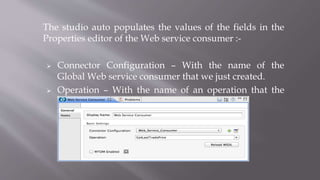
The studio auto populates the values of the fields in the
Properties editor of the Web service consumer :-
 Connector Configuration – With the name of the
Global Web service consumer that we just created.
 Operation – With the name of an operation that the
Web service supports for its consumers.
Mule provides 3 ways to create web services :-
 Use the JAX WS front end to build a code first web
service.
 Use the JAX WS front end to build a WSDL first web
service.
 Creating a web service from simple POJOs.
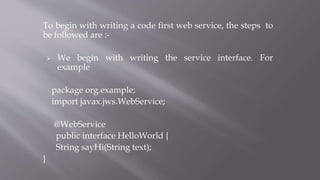
To begin with writing a code first web service, the steps to
be followed are :-
 We begin with writing the service interface. For
example
package org.example;
import javax.jws.WebService;
@WebService
public interface HelloWorld {
String sayHi(String text);
}
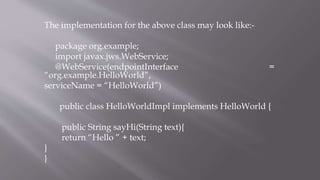
The implementation for the above class may look like:-
package org.example;
import javax.jws.WebService;
@WebService(endpointInterface =
“org.example.HelloWorld”,
serviceName = “HelloWorld”)
public class HelloWorldImpl implements HelloWorld {
public String sayHi(String text){
return “Hello ” + text;
}
}
Once the application is deployed, we can generate the
WSDL by appending ?wsdl at the end of the end point
URL.
 For e.g. http://localhost:8081/hello?wsdl
 This displays the WSDL generated by CXF
 REST relies on HTTP for transport and uses HTTP
methods to perform operations on remote services.
 Mule ESB can be configured as a RESTful service
endpoint. It provides a built-in REST component based
on the Jersey project.
 Mule ESB can be used as a publisher as well as
consumer of RESTful Web Services.
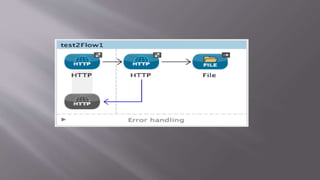
 We can consume a REST API from within a Mule
application, by configuring an HTTP Request Connector.
 A basic Mule application setup to consume a REST API
contains :-
• One or more message processors configured to build the
request.
• An HTTP request connector configured to call the REST API.
• One or more processors configured to accept and process the
response.
 If a RAML file exists that describes the API we want to
consume, then we can simply reference it in the HTTP
connector and it will expose the structure of the API at
design time.
 If we don’t have a RAML file, then we need to be aware of
the structure of the API, including any authentication
requirements, the name of the resources we want to access,
and the methods supported for each resource.
 Some of the important information required are :-
• Authentication
• Base URL
• The type of input API expects (JSON, XML . . . . . etc)
• The type of output API produces.
• Error codes if any
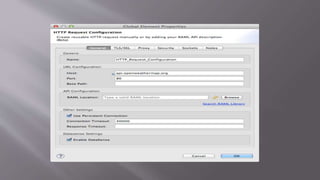
The first thing to be configured is the Global Connector
element by providing the basic information like
• Connector name
• Host
• Port
• Base Path
• API Configuration (if RAML is available)
Mule connectors-session1

Mule connectors-session1

  • 2.
     The Fileconnector allows Mule application to exchange files with a File system.  It can be implemented as an inbound or an outbound endpoint.
  • 3.
     If theFile component is placed at the beginning of the flow, then it acts as an inbound endpoint, which triggers the flow whenever it receives an incoming file.  File endpoint can be configured by providing the values on the fields of the General tab of Properties editor.
  • 5.
    Some of theimportant fields used for inbound endpoint configuration are :-  Display Name – It is the general endpoint name.  Path – This is the location of the file which is transferred into the flow.  Move to Pattern – This is the pattern to be used when moving the file according to the Move to Directory property  Move to Directory – This is used to save a copy of the file on the Host machine when the file is being dispatched to the next element.  Polling Frequency – It checks how often the endpoint should check for the incoming messages.  File Age – Sets a minimum period a file must wait before it is processed.
  • 6.
     If theFile building block is placed at the middle or the end of the flow, then it acts as the outbound endpoint, passing files to the connected file system.  File outbound endpoint can also be configured just like inbound endpoint.
  • 8.
    Some of theimportant fields used for outbound endpoint configuration are :-  Path – For an outbound endpoint, this would be the directory on the connected file system to which the file currently in the flow is written.  File Name/Pattern – This property specifies a file name or pattern for naming files that are sent from the File endpoint to the connected file system. If not set, it follows the same pattern as the incoming files.
  • 9.
    Apart from theconfiguration for Inbound and outbound properties in General Tab, there are fields that could b configured in Advanced Tab as well. Some of the main fields are :-  Address – To enter the address of the endpoint.  Connector Endpoint – To add a new connection configuration or to edit an existing one.  Comparator – To sort the incoming files  Reverse Order – To reverse the normal comparison order
  • 11.
     A typicalsyntax for an inbound endpoint configured for reading files can be given as :-  <file:connector name = “input” fileAge = “500” autoDelete = “true” pollingFrequency = “100” moveToDirectory = “/backup” />
  • 12.
    File Component includesseveral transformers for transforming the content of the file :-  File to Byte Array Transformer – This element configures a transformer that reads the content of a java.io.File into a byte array  File to String Transformer - This element configures a transformer that reads the content of a java.io.File into a String
  • 13.
     The Databaseconnector allows to connect with almost any JDBC relational database.  Using Database connector, we can run diverse SQL operations on our database like Select, Insert, Update, Delete, and even stored procedures.  Database connector helps us perform pre defined as well as parametrized queries and even DDL requests.
  • 15.
    To use Databaseconnector, the basic configuration required is :-  A database driver is required to connect with the database  Configure a global database element where we can define the database’s location and connection details, and advanced connection parameters like connection pooling.  Configure the database element in the mule flow which contains the query and the reference to the Database Global element.
  • 17.
    The Database connectorprovides out of the box support for 3 databases :  MySQL  Oracle  Derby For those databases, where Out of the box support is not provided, a Generic DB Configuration is provided, and the driver can be added to the project.
  • 18.
    Some of theimportant fields which should be configured are :-  Database URL – To define the details of the Database to be connected with.  Required Dependencies – To add the driver required.  Enable Datasense(Optional) – It enables Mule to make use of message metadata at run time.  Connection Timeout – To define the amount of time the connection should remain active.  Config Reference – To identify any Global element if present  Operation – To instruct the application for the type of operation to be performed on the database.
  • 19.
     Type –To define the type of SQL statement we wish to use to submit queries to a database :  Parametrized – Mule replaces all MEL expressions inside the query with “?” to create a prepared statement, then evaluates the MEL expressions. E.g:- insert into employees where name = #[message.payload.name]  Dynamic – Mule replaces all MEL expressions in the query with the result of the expression evaluation, then sends the results to the database. E.g:- select * from #[tablename]  From Template- It enables to define a query once globally and then reuse the query multiple times in the same application.
  • 21.
     Bulk Updates– The Database connector can run multiple SQL statements in bulk mode. The individual SQL statements must be separated by semicolons and line breaks.  Instead of writing a statement directly, we can also refer a file which contains multiple statements with semicolons and line breaks.  We can not perform Select operation as a part of bulk update, only Insert, Update and Delete.
  • 22.
    Mule ESB allowsdifferent integration scenarios using web services :-  Consuming existing web services.  Building web services and exposing them to other applications.  Creating a proxy/gateway to existing web services.
  • 23.
     While developingour applications, whenever we need to consume some external SOAP services to acquire data, we can use a Web Service consumer.  Using the information contained in service’s WSDL, this connector enables us to configure a few details in order to establish the connection.  The Web service consumer interfaces only with the SOAP services and not with the REST.
  • 24.
    To use theWeb service consumer, we need to carry out the following 3 tasks :-  Add the WSDL file of the service we need to consume.  Embed a web service consumer in our Mule Flow.  Configure the Global web service consumer element in which we reference the service’s WSDL, enable Datasense and apply any security settings that the service provider demands.
  • 26.
    The studio autopopulates the values of the fields in the Properties editor of the Web service consumer :-  Connector Configuration – With the name of the Global Web service consumer that we just created.  Operation – With the name of an operation that the Web service supports for its consumers.
  • 27.
    Mule provides 3ways to create web services :-  Use the JAX WS front end to build a code first web service.  Use the JAX WS front end to build a WSDL first web service.  Creating a web service from simple POJOs.
  • 28.
    To begin withwriting a code first web service, the steps to be followed are :-  We begin with writing the service interface. For example package org.example; import javax.jws.WebService; @WebService public interface HelloWorld { String sayHi(String text); }
  • 29.
    The implementation forthe above class may look like:- package org.example; import javax.jws.WebService; @WebService(endpointInterface = “org.example.HelloWorld”, serviceName = “HelloWorld”) public class HelloWorldImpl implements HelloWorld { public String sayHi(String text){ return “Hello ” + text; } }
  • 31.
    Once the applicationis deployed, we can generate the WSDL by appending ?wsdl at the end of the end point URL.  For e.g. http://localhost:8081/hello?wsdl  This displays the WSDL generated by CXF
  • 32.
     REST relieson HTTP for transport and uses HTTP methods to perform operations on remote services.  Mule ESB can be configured as a RESTful service endpoint. It provides a built-in REST component based on the Jersey project.  Mule ESB can be used as a publisher as well as consumer of RESTful Web Services.
  • 33.
     We canconsume a REST API from within a Mule application, by configuring an HTTP Request Connector.  A basic Mule application setup to consume a REST API contains :- • One or more message processors configured to build the request. • An HTTP request connector configured to call the REST API. • One or more processors configured to accept and process the response.
  • 35.
     If aRAML file exists that describes the API we want to consume, then we can simply reference it in the HTTP connector and it will expose the structure of the API at design time.  If we don’t have a RAML file, then we need to be aware of the structure of the API, including any authentication requirements, the name of the resources we want to access, and the methods supported for each resource.  Some of the important information required are :- • Authentication • Base URL • The type of input API expects (JSON, XML . . . . . etc) • The type of output API produces. • Error codes if any
  • 36.
    The first thingto be configured is the Global Connector element by providing the basic information like • Connector name • Host • Port • Base Path • API Configuration (if RAML is available)