HDFS Connector
HDFS Connector
 The Anypoint Connector for the Hadoop Distributed File System (HDFS) uses as a
bi-directional gateway between Mule applications and your Apache Hadoop
instance.
PRUDHVI
Compatibility
PRUDHVI
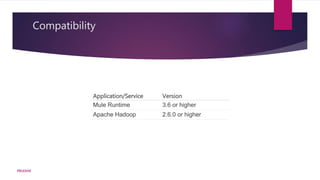
Application/Service Version
Mule Runtime 3.6 or higher
Apache Hadoop 2.6.0 or higher
Configuring a Global Element
 To use the HDFS connector in your Mule application, you must configure a global
HDFS element that can be used by all the HDFS connectors in the application
PRUDHVI
XML
PRUDHVI
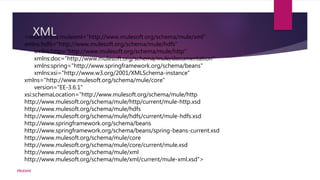
<mule xmlns:mulexml="http://www.mulesoft.org/schema/mule/xml"
xmlns:hdfs="http://www.mulesoft.org/schema/mule/hdfs"
xmlns:http="http://www.mulesoft.org/schema/mule/http"
xmlns:doc="http://www.mulesoft.org/schema/mule/documentation"
xmlns:spring="http://www.springframework.org/schema/beans"
xmlns:xsi="http://www.w3.org/2001/XMLSchema-instance"
xmlns="http://www.mulesoft.org/schema/mule/core"
version="EE-3.6.1"
xsi:schemaLocation="http://www.mulesoft.org/schema/mule/http
http://www.mulesoft.org/schema/mule/http/current/mule-http.xsd
http://www.mulesoft.org/schema/mule/hdfs
http://www.mulesoft.org/schema/mule/hdfs/current/mule-hdfs.xsd
http://www.springframework.org/schema/beans
http://www.springframework.org/schema/beans/spring-beans-current.xsd
http://www.mulesoft.org/schema/mule/core
http://www.mulesoft.org/schema/mule/core/current/mule.xsd
http://www.mulesoft.org/schema/mule/xml
http://www.mulesoft.org/schema/mule/xml/current/mule-xml.xsd">
These steps to configure a HDFS
connector in your application
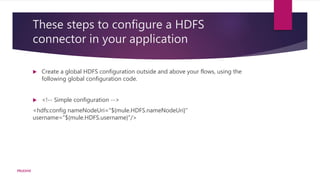
 Create a global HDFS configuration outside and above your flows, using the
following global configuration code.
 <!-- Simple configuration -->
<hdfs:config nameNodeUri="${mule.HDFS.nameNodeUri}"
username="${mule.HDFS.username}"/>
PRUDHVI
Using the Connector
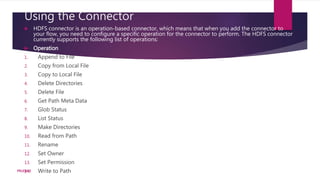
 HDFS connector is an operation-based connector, which means that when you add the connector to
your flow, you need to configure a specific operation for the connector to perform. The HDFS connector
currently supports the following list of operations:
 Operation
1. Append to File
2. Copy from Local File
3. Copy to Local File
4. Delete Directories
5. Delete File
6. Get Path Meta Data
7. Glob Status
8. List Status
9. Make Directories
10. Read from Path
11. Rename
12. Set Owner
13. Set Permission
14. Write to PathPRUDHVI
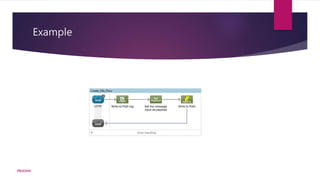
Example
PRUDHVI
1.Drag an HTTP connector into the canvas, then select it to open the properties editor console.
2.Add a new HTTP Listener Configuration global element:
3.Configure the following HTTP parameters:
4.Add a Logger scope to print the name of the file that needs to be created in the Mule Console. Configure the
Logger according to the table below.
5.Add a Set Payload transformer to set the message input as payload, configuring it according to the table
below.
6.Drag the HDFS connector onto the canvas, and select it to open the properties editor console.
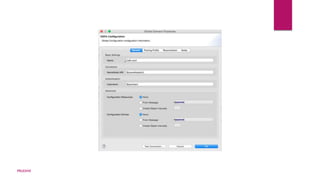
7.Click the plus sign next to the Connector Configuration field to add a new global connector configuration.
8.Configure the global element according to the table below.
PRUDHVI
PRUDHVI
Back in the properties editor of the HDFS connector in your application, configure the remaining parameters
according to the table below.
Run the project as a Mule Application (right-click the project name and clickRun As > Mule Application).
From a browser, navigate to http://localhost:8090/path=filecreate
PRUDHVI
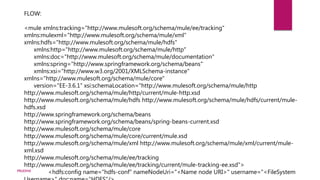
FLOW:
<mule xmlns:tracking="http://www.mulesoft.org/schema/mule/ee/tracking"
xmlns:mulexml="http://www.mulesoft.org/schema/mule/xml"
xmlns:hdfs="http://www.mulesoft.org/schema/mule/hdfs"
xmlns:http="http://www.mulesoft.org/schema/mule/http"
xmlns:doc="http://www.mulesoft.org/schema/mule/documentation"
xmlns:spring="http://www.springframework.org/schema/beans"
xmlns:xsi="http://www.w3.org/2001/XMLSchema-instance"
xmlns="http://www.mulesoft.org/schema/mule/core"
version="EE-3.6.1" xsi:schemaLocation="http://www.mulesoft.org/schema/mule/http
http://www.mulesoft.org/schema/mule/http/current/mule-http.xsd
http://www.mulesoft.org/schema/mule/hdfs http://www.mulesoft.org/schema/mule/hdfs/current/mule-
hdfs.xsd
http://www.springframework.org/schema/beans
http://www.springframework.org/schema/beans/spring-beans-current.xsd
http://www.mulesoft.org/schema/mule/core
http://www.mulesoft.org/schema/mule/core/current/mule.xsd
http://www.mulesoft.org/schema/mule/xml http://www.mulesoft.org/schema/mule/xml/current/mule-
xml.xsd
http://www.mulesoft.org/schema/mule/ee/tracking
http://www.mulesoft.org/schema/mule/ee/tracking/current/mule-tracking-ee.xsd">
<hdfs:config name="hdfs-conf" nameNodeUri="<Name node URI>" username="<FileSystemPRUDHVI
<http:listener-config
name="HTTP_Listener_Configuration" host="localhost" port="8090" basePath="filecreate"
doc:name="HTTP Listener Configuration"/>
<http:connector name="HTTP_HTTPS"
cookieSpec="netscape" validateConnections="true" sendBufferSize="0" receiveBufferSize="0"
receiveBacklog="0" clientSoTimeout="10000" serverSoTimeout="10000" socketSoLinger="0"
doc:name="HTTP-HTTPS"/>
<flow name="Create_File_Flow"
doc:name="Create_File_Flow">
<http:listener config-
ref="HTTP_Listener_Configuration" path="/" doc:name="HTTP"/>
<logger message="Creating file:
#[message.inboundProperties['http.query.params'].path] with message:
#[message.inboundProperties['http.query.params'].msg]" level="INFO" doc:name="Write to Path
Log"/>
<set-payload
value="#[message.inboundProperties['http.query.params'].msg]" doc:name="Set the message input
as payload"/>
<hdfs:write config-ref="hdfs-conf"
path="#[message.inboundProperties['http.query.params'].path]" doc:name="Write to Path"/>
</flow>
</mule>PRUDHVI
Thank you
PRUDHVI

Hdfs connector