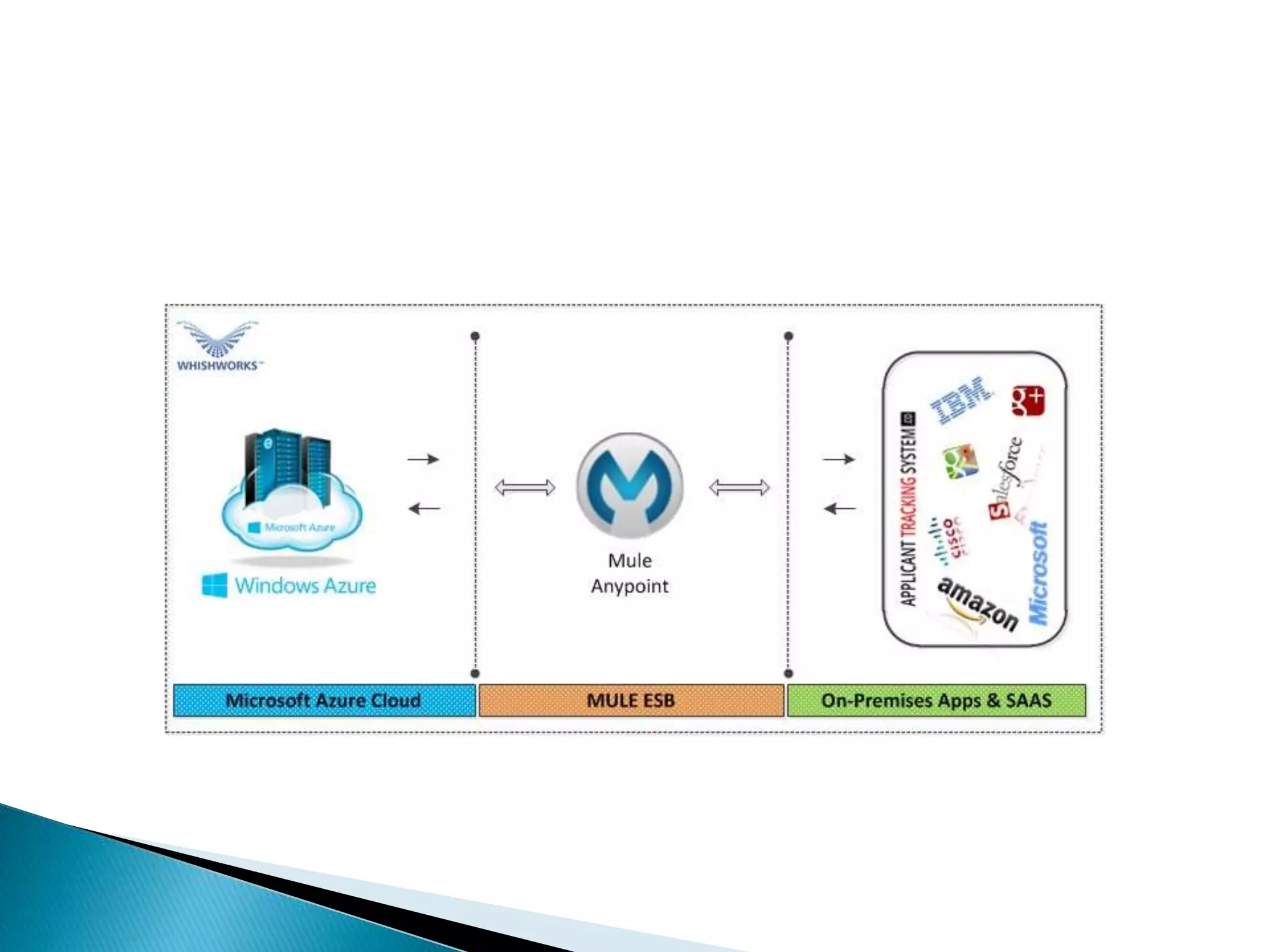
 MuleSoft provides the most widely used integration
platform to connect any application, data service or an API,
across the cloud and on-premise continuum. Microsoft
Azure is a cloud-based data-storage infrastructure that is
accessible to the user programmatically via a MuleSoft
‘Microsoft Service Bus’ connector. The Microsoft Service
Bus Mule connector allows developers to access any
amount of data, at any time and from anywhere on the
web. With connectivity to the Microsoft Azure API, users
can interface Azure to store objects, download and use
data with other Azure services. Applications can also be
built for which internet storage is required – all from
within MuleSoft Anypoint Platform.
 Instant access to the Microsoft Azure API enables
businesses to create seamless integration between Azure
and other databases, CMS applications such as Drupal, and
CRM applications such as Salesforce.
 Microsoft Azure Account
 Microsoft Azure Namespace, Shared Access
Key Name and Shared Access Key
 Mule Anypoint Microsoft Service Bus
Connector
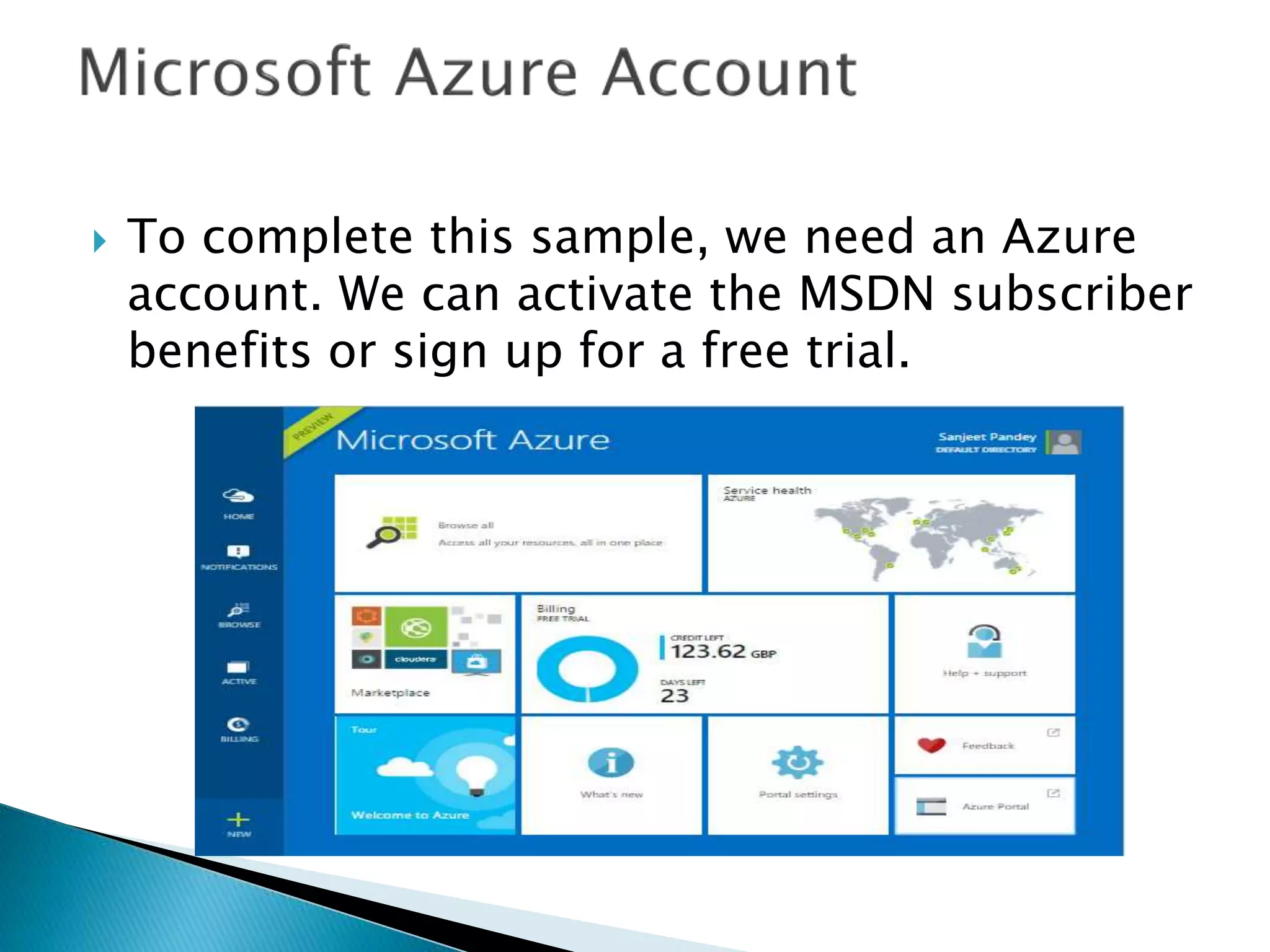
 To complete this sample, we need an Azure
account. We can activate the MSDN subscriber
benefits or sign up for a free trial.
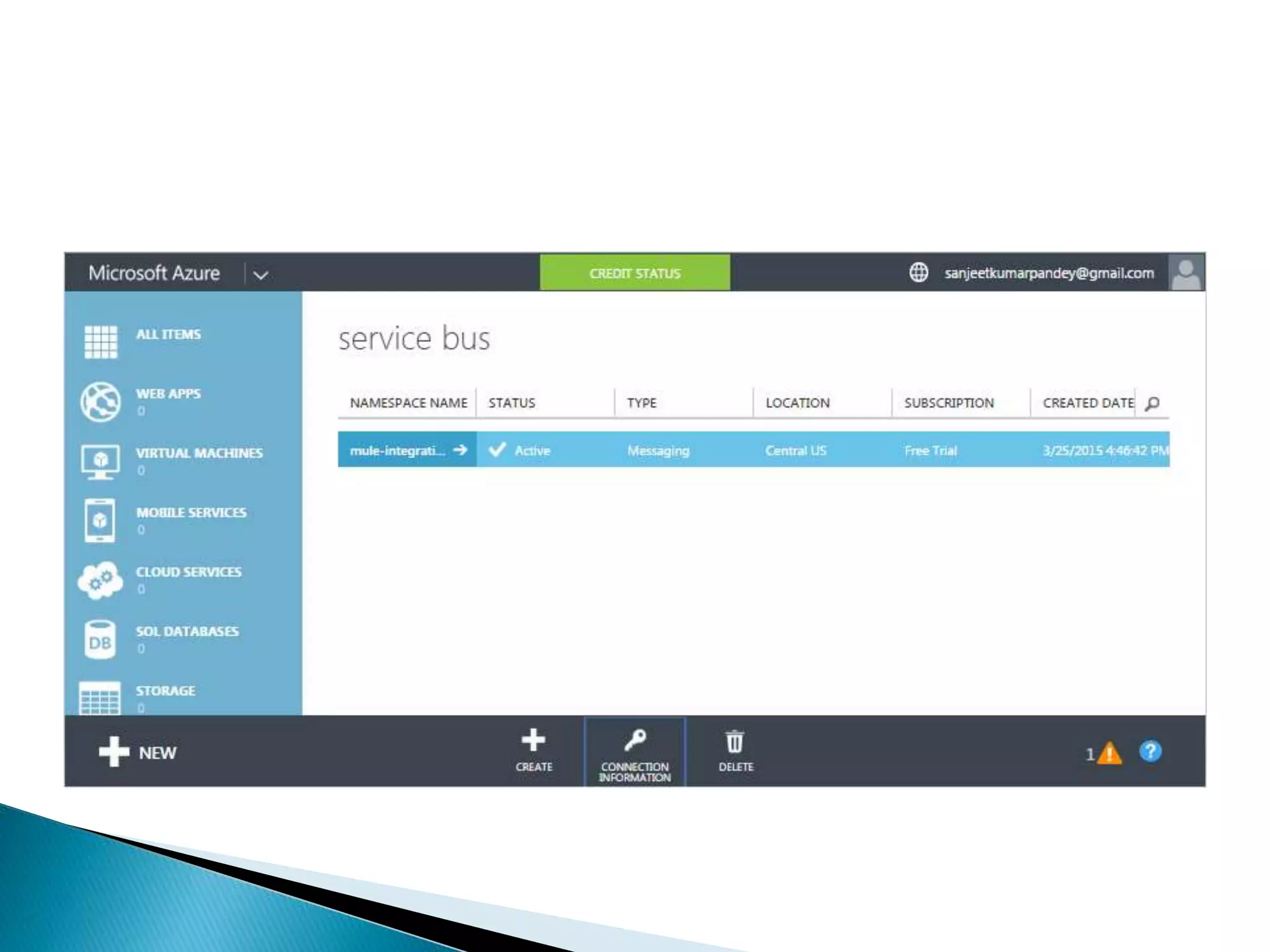
 To begin using Service Bus topics and subscriptions
in Azure, firstly we must create a service namespace.
A service namespace provides a scoping container for
addressing Service Bus resources within the
application.
 To create a service namespace:
 Log on to the Azure Management Portal
 In the left navigation pane of the Management Portal,
click Service Bus
 In the lower pane of the Management Portal,
click Create
 In the Add a new namespacedialog, enter a
namespace name. The system immediately checks to
see if the name is available.
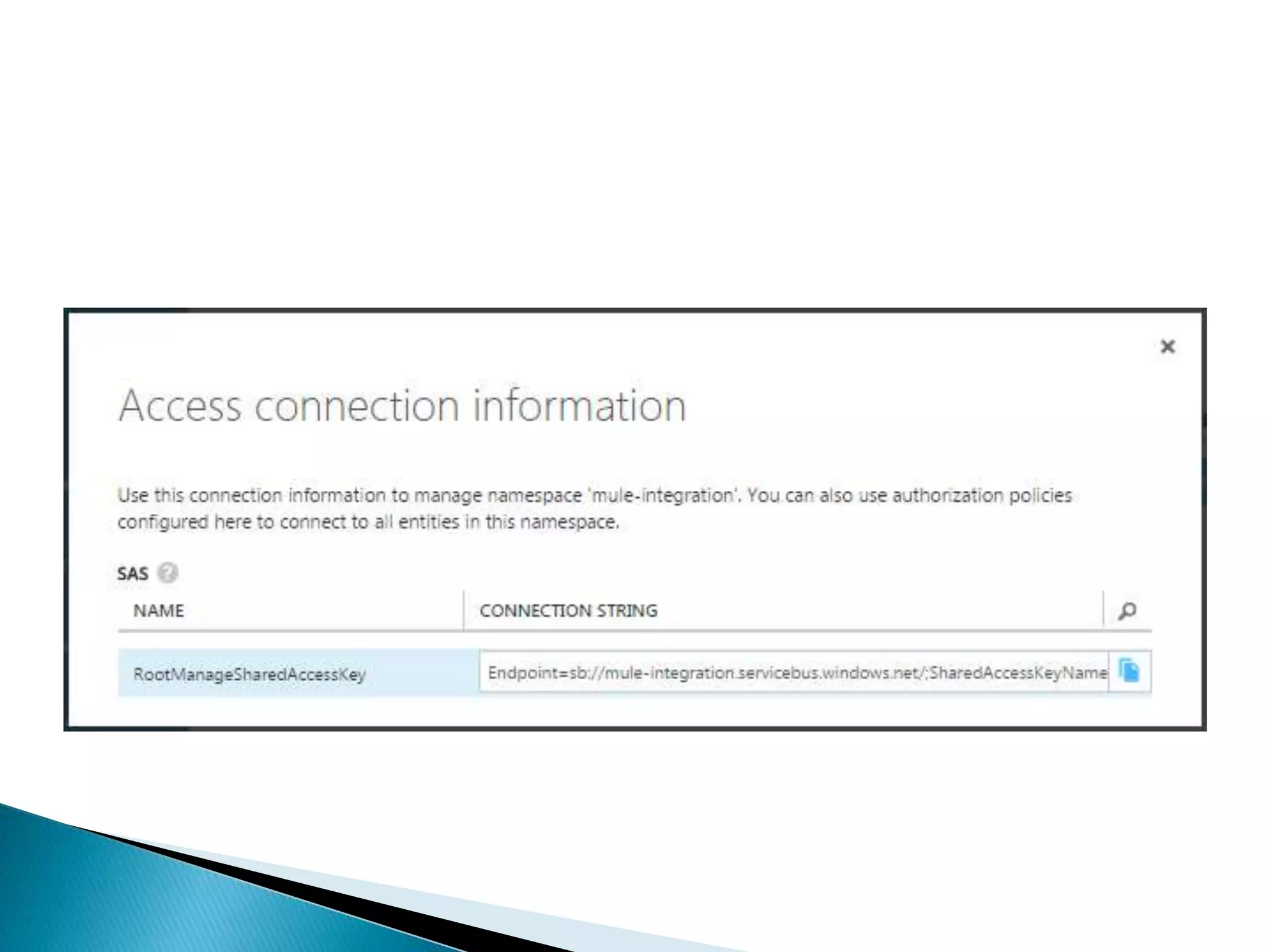
 Click Connection Information. In the Access
connection information dialog, find the
connection string that contains the SAS key
and key name. Make a note of these values,
as we will use this information later to
perform operations with the namespace
 Send to Queues, Topics and Event Hubs with support of AMQP message properties
and header, including custom properties.
 Receive from Queues and Topics asynchronously
 Rest Management API
◦ CRUD for Queues
◦ CRUD for Topics
◦ CRUD for Subscriptions
◦ CRUD for Rules
 The connector supports the following Service Bus versions:
 Microsoft Azure Service Bus (Cloud)
 Microsoft Windows Service Bus (on-premises)

 Configure Mule Anypoint Microsoft Service Bus connector with the following
settings –
 Configuration:(Azure connector configured using the config element) This element
must be placed out of flow and at the root of the Mule application. We can create
as many configurations deemed necessary as long as each carries its own name.
 Connection Pool: Azure connector offers automatic connection management via
the use of a connection pool. This pool will act a storage mechanism for all the
connections that are in-use by the user of this connector.
 Prior to the execution of a processor, the
connector will attempt to lookup for an
already established connection and if one
doesn’t exist, it will create one. This lookup
mechanism is done in the connection pool via
the use of connection variables declared as
keys.

 Reconnection Strategies specify on how a connector
behaves when the connection fails. We can control the
attempts by Mule to reconnect using several criteria –
 Type of exception
 Number and frequency of reconnection attempts
 Notifications generated
 With a reconnection strategy, the behaviour of a failed
connection can be controlled in a much better way by
configuring it, for example, to re-attempt the connection
only once every 15 minutes, and to give up after 30
attempts. An automatic notification can be sent to the IT
administrator whenever this reconnection strategy goes
into effect. A strategy can also be defined which attempts
to reconnect only during business hours. Such a setting
can prove useful if the server is frequently shut down for
maintenance.
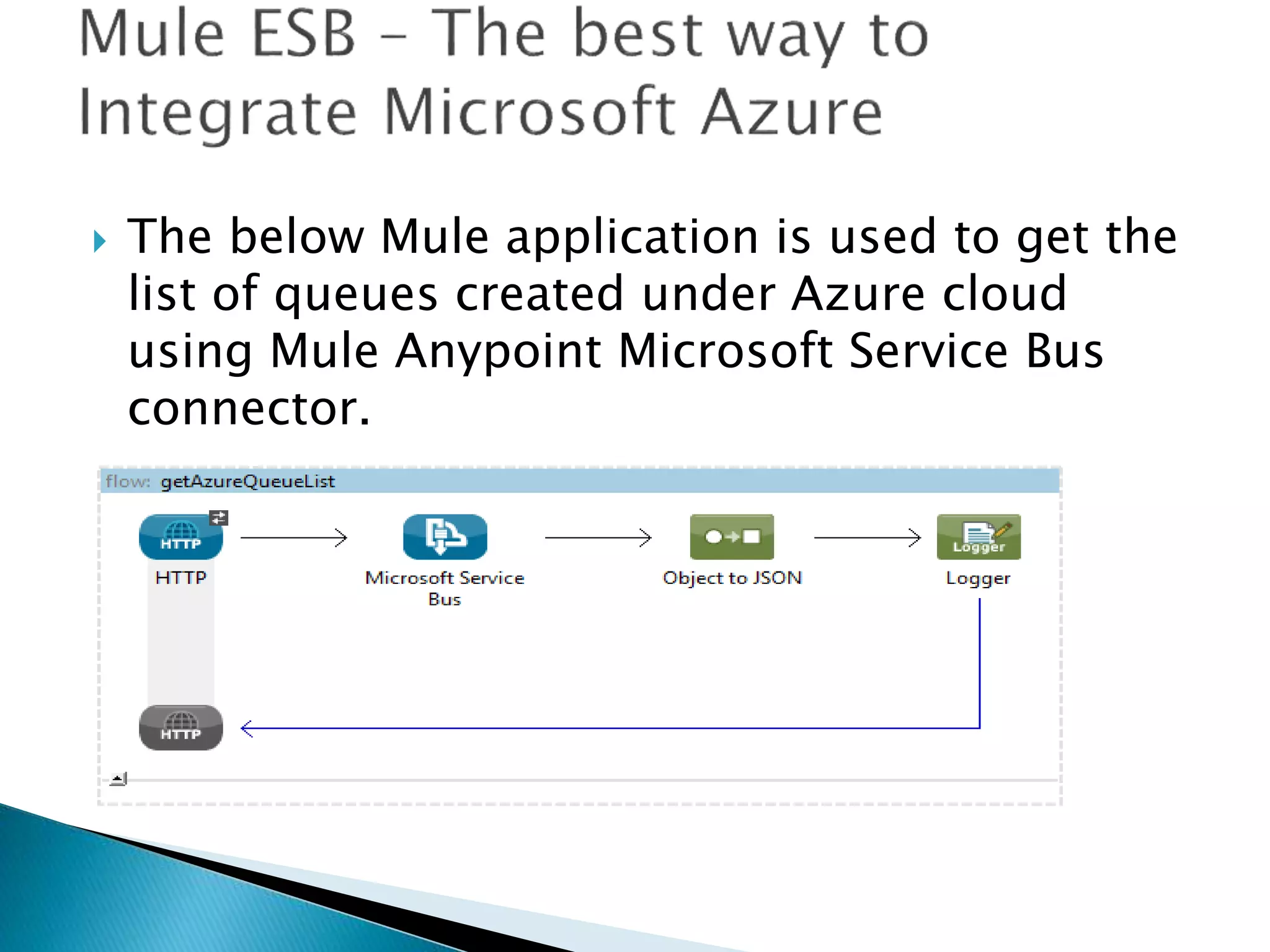
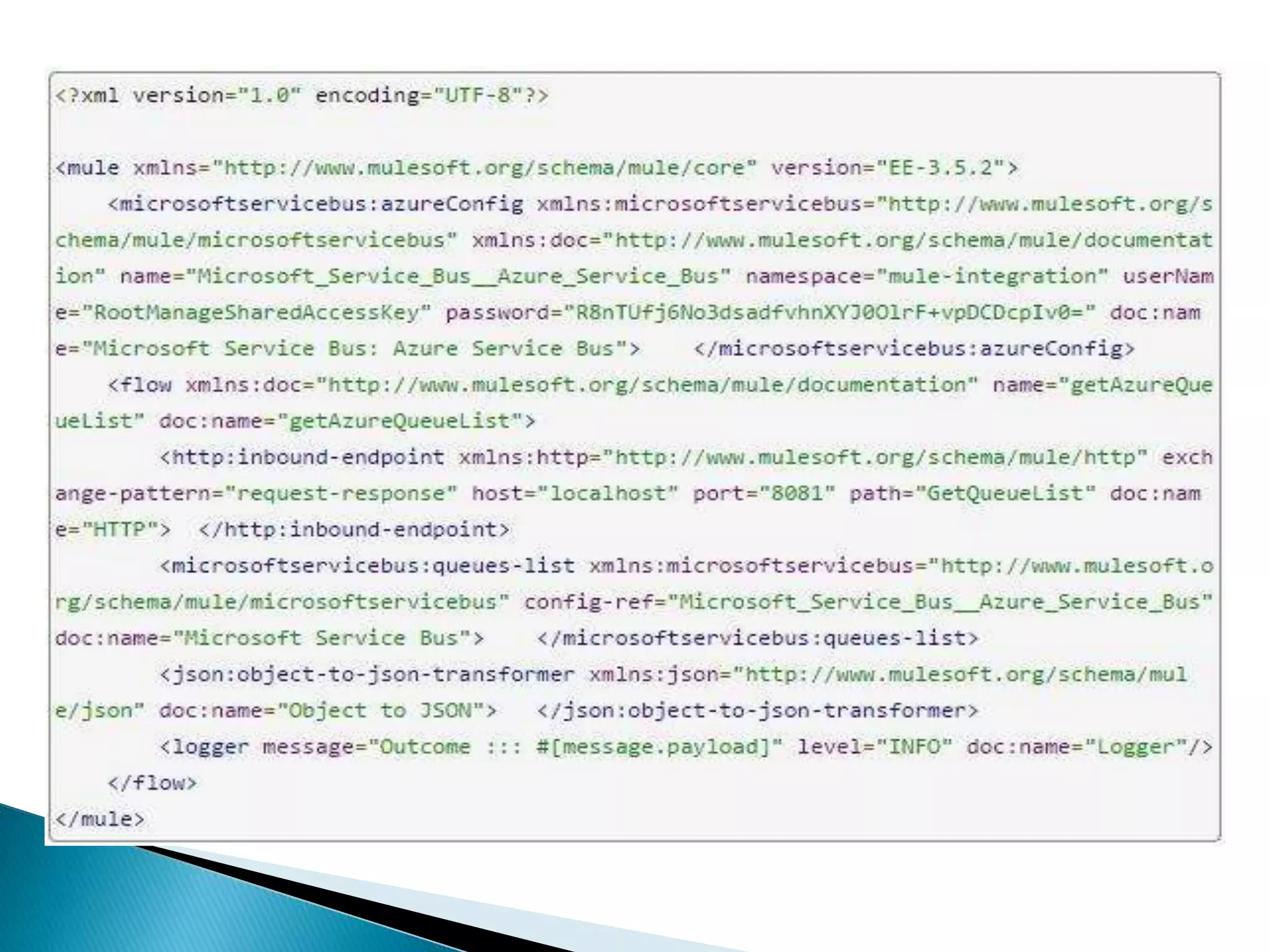
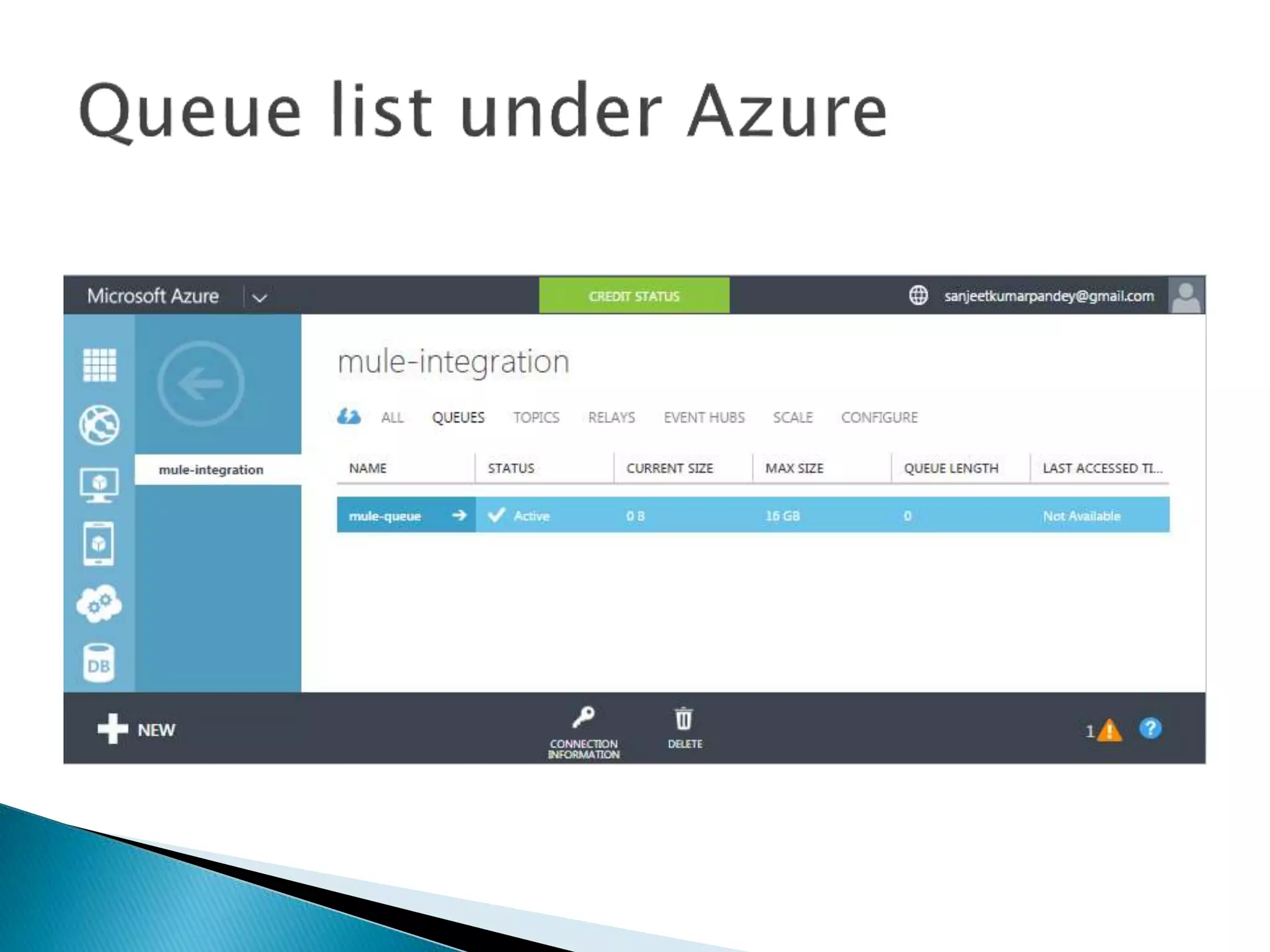
 The below Mule application is used to get the
list of queues created under Azure cloud
using Mule Anypoint Microsoft Service Bus
connector.
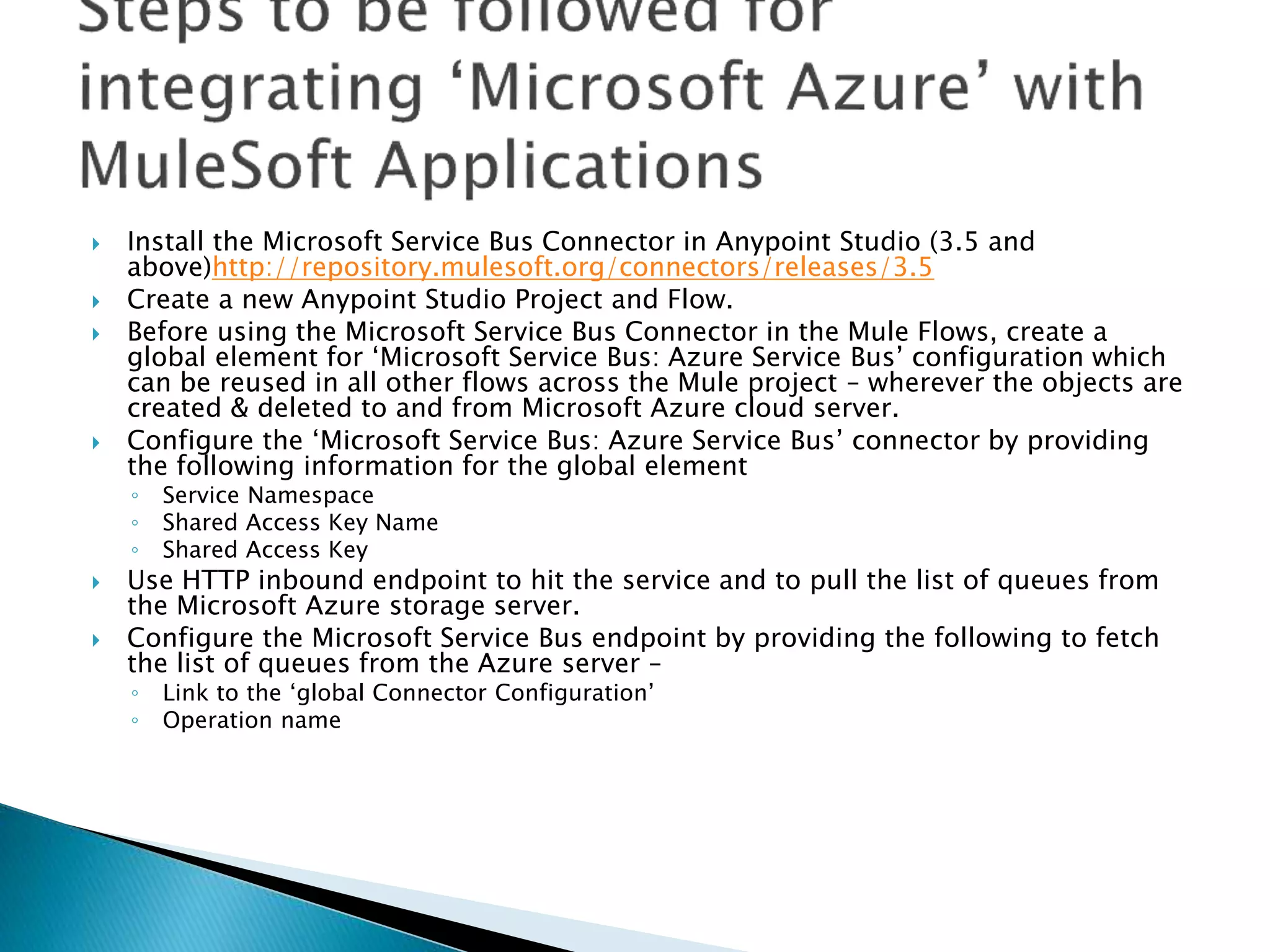
 Install the Microsoft Service Bus Connector in Anypoint Studio (3.5 and
above)http://repository.mulesoft.org/connectors/releases/3.5
 Create a new Anypoint Studio Project and Flow.
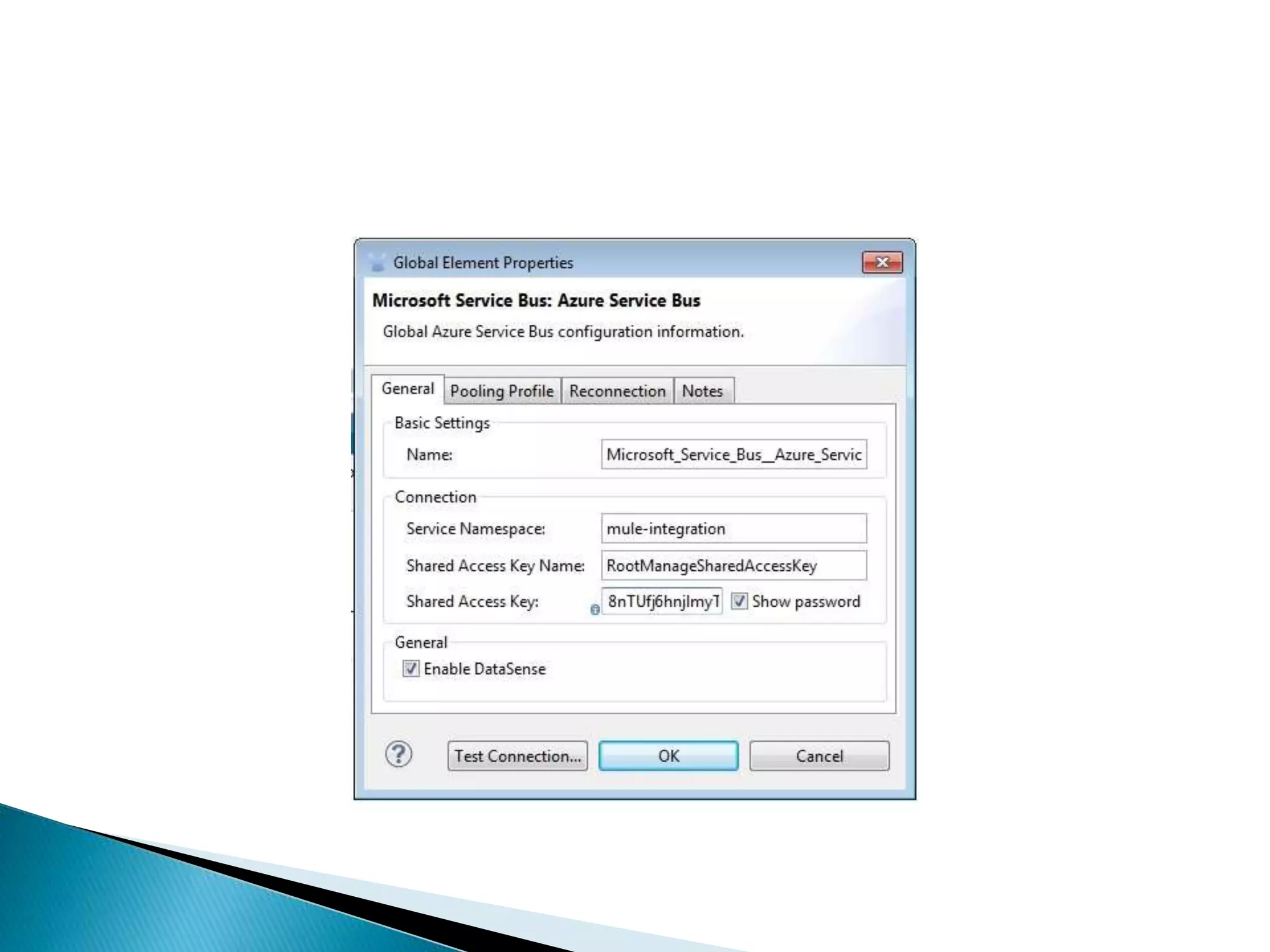
 Before using the Microsoft Service Bus Connector in the Mule Flows, create a
global element for ‘Microsoft Service Bus: Azure Service Bus’ configuration which
can be reused in all other flows across the Mule project – wherever the objects are
created & deleted to and from Microsoft Azure cloud server.
 Configure the ‘Microsoft Service Bus: Azure Service Bus’ connector by providing
the following information for the global element
◦ Service Namespace
◦ Shared Access Key Name
◦ Shared Access Key
 Use HTTP inbound endpoint to hit the service and to pull the list of queues from
the Microsoft Azure storage server.
 Configure the Microsoft Service Bus endpoint by providing the following to fetch
the list of queues from the Azure server –
◦ Link to the ‘global Connector Configuration’
◦ Operation name
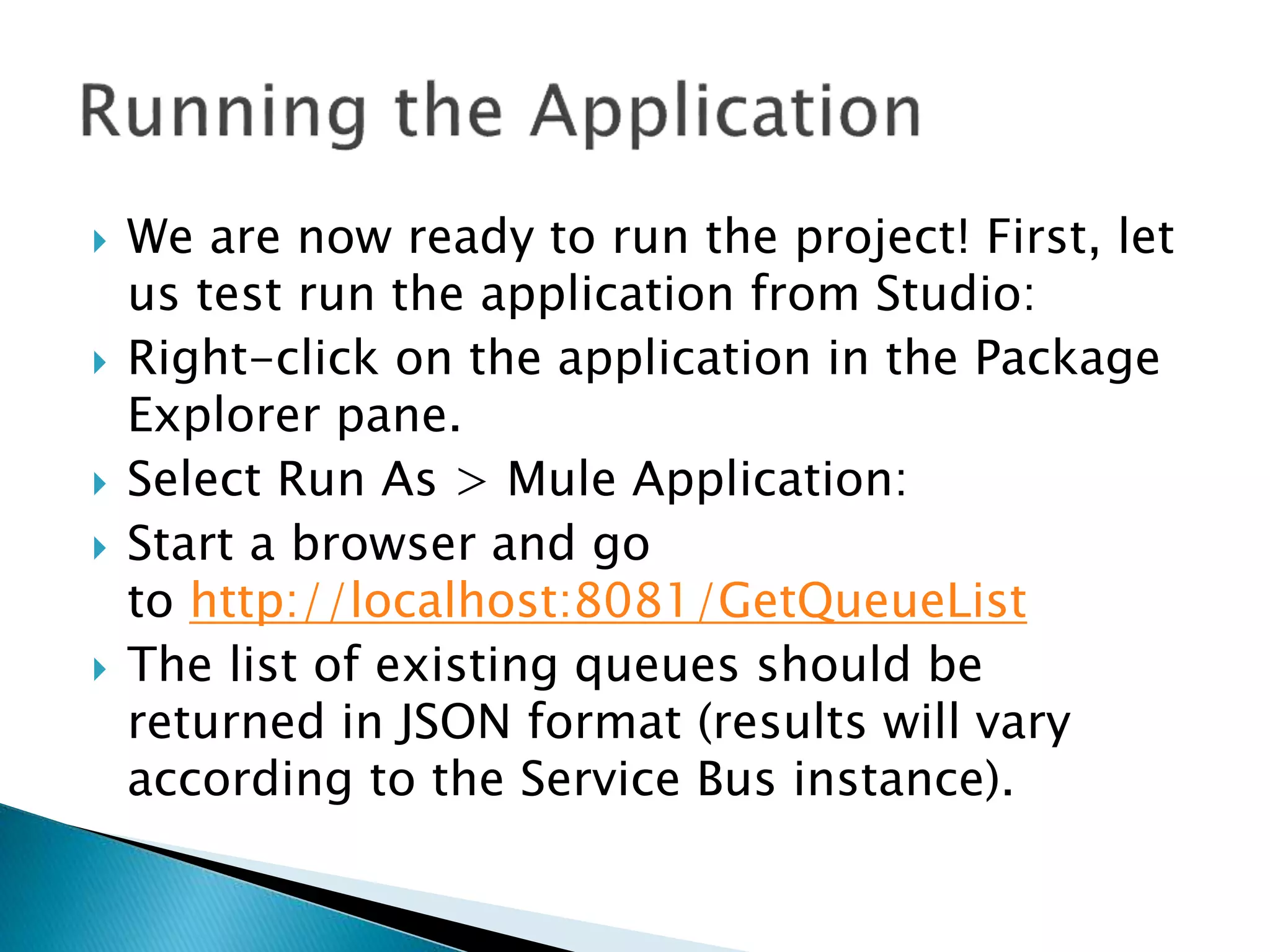
 We are now ready to run the project! First, let
us test run the application from Studio:
 Right-click on the application in the Package
Explorer pane.
 Select Run As > Mule Application:
 Start a browser and go
to http://localhost:8081/GetQueueList
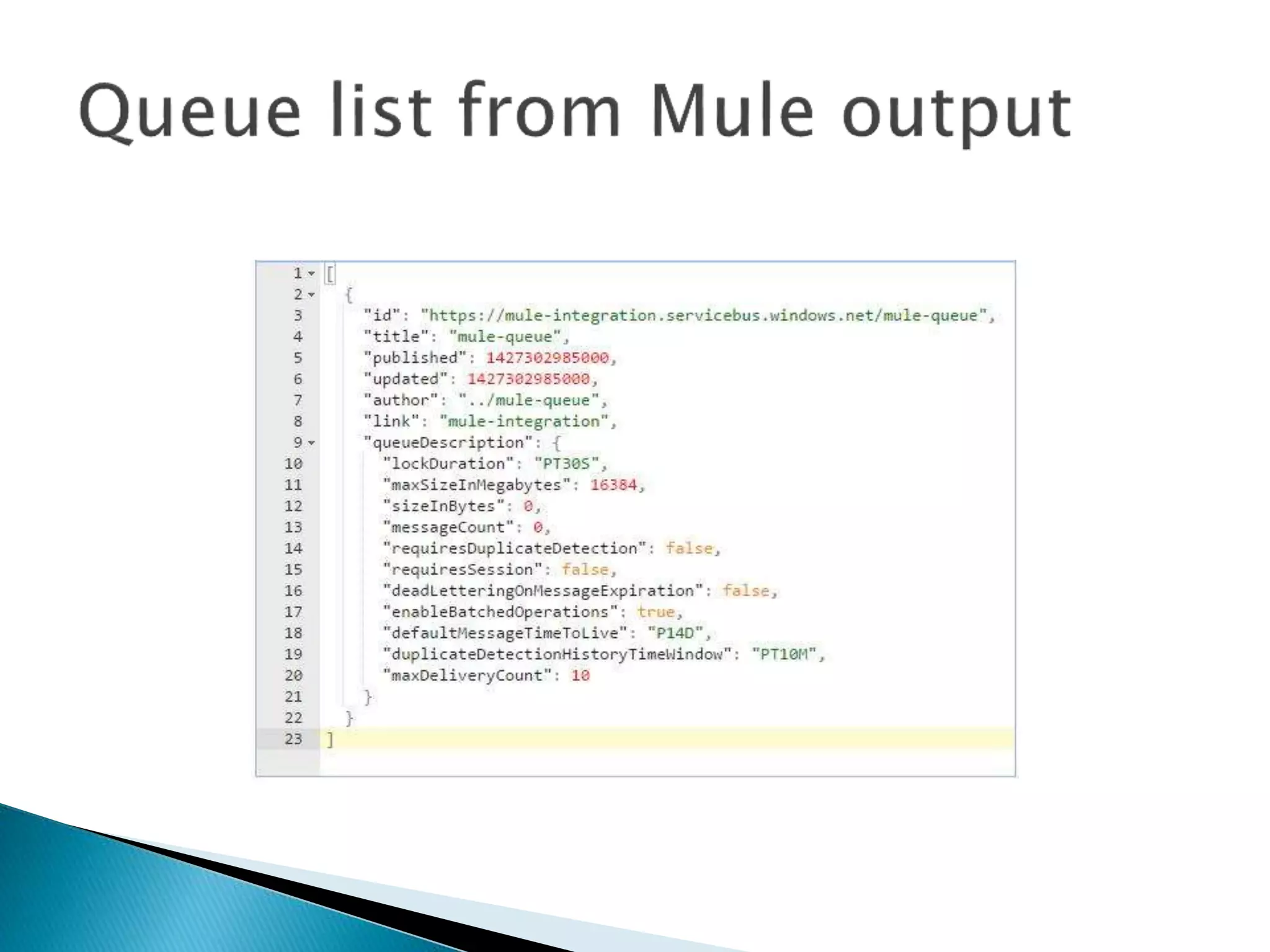
 The list of existing queues should be
returned in JSON format (results will vary
according to the Service Bus instance).
 No point-to-point integration required
 Seamless integration running in the background
 Quick data synchronization between Microsoft Azure with an on-
premise and cloud based applications
 Facilitate applications with Microsoft Azure capacities for large
volume data storage
 Store applications data and can be rolled back during disaster
recovery
 Bi-directional data communication between applications and
Microsoft Azure
 Highly scalable, it secures a solution for backing up and
archiving your critical data
 Send event notifications when objects are uploaded to Microsoft
Azure
 Access any amount of data, at any time, from anywhere on the
web

Integration of mule esb with microsoft azure

  • 2.
     MuleSoft providesthe most widely used integration platform to connect any application, data service or an API, across the cloud and on-premise continuum. Microsoft Azure is a cloud-based data-storage infrastructure that is accessible to the user programmatically via a MuleSoft ‘Microsoft Service Bus’ connector. The Microsoft Service Bus Mule connector allows developers to access any amount of data, at any time and from anywhere on the web. With connectivity to the Microsoft Azure API, users can interface Azure to store objects, download and use data with other Azure services. Applications can also be built for which internet storage is required – all from within MuleSoft Anypoint Platform.  Instant access to the Microsoft Azure API enables businesses to create seamless integration between Azure and other databases, CMS applications such as Drupal, and CRM applications such as Salesforce.
  • 4.
     Microsoft AzureAccount  Microsoft Azure Namespace, Shared Access Key Name and Shared Access Key  Mule Anypoint Microsoft Service Bus Connector
  • 5.
     To completethis sample, we need an Azure account. We can activate the MSDN subscriber benefits or sign up for a free trial.
  • 6.
     To beginusing Service Bus topics and subscriptions in Azure, firstly we must create a service namespace. A service namespace provides a scoping container for addressing Service Bus resources within the application.  To create a service namespace:  Log on to the Azure Management Portal  In the left navigation pane of the Management Portal, click Service Bus  In the lower pane of the Management Portal, click Create  In the Add a new namespacedialog, enter a namespace name. The system immediately checks to see if the name is available.
  • 8.
     Click ConnectionInformation. In the Access connection information dialog, find the connection string that contains the SAS key and key name. Make a note of these values, as we will use this information later to perform operations with the namespace
  • 10.
     Send toQueues, Topics and Event Hubs with support of AMQP message properties and header, including custom properties.  Receive from Queues and Topics asynchronously  Rest Management API ◦ CRUD for Queues ◦ CRUD for Topics ◦ CRUD for Subscriptions ◦ CRUD for Rules  The connector supports the following Service Bus versions:  Microsoft Azure Service Bus (Cloud)  Microsoft Windows Service Bus (on-premises)   Configure Mule Anypoint Microsoft Service Bus connector with the following settings –  Configuration:(Azure connector configured using the config element) This element must be placed out of flow and at the root of the Mule application. We can create as many configurations deemed necessary as long as each carries its own name.  Connection Pool: Azure connector offers automatic connection management via the use of a connection pool. This pool will act a storage mechanism for all the connections that are in-use by the user of this connector.
  • 11.
     Prior tothe execution of a processor, the connector will attempt to lookup for an already established connection and if one doesn’t exist, it will create one. This lookup mechanism is done in the connection pool via the use of connection variables declared as keys. 
  • 13.
     Reconnection Strategiesspecify on how a connector behaves when the connection fails. We can control the attempts by Mule to reconnect using several criteria –  Type of exception  Number and frequency of reconnection attempts  Notifications generated  With a reconnection strategy, the behaviour of a failed connection can be controlled in a much better way by configuring it, for example, to re-attempt the connection only once every 15 minutes, and to give up after 30 attempts. An automatic notification can be sent to the IT administrator whenever this reconnection strategy goes into effect. A strategy can also be defined which attempts to reconnect only during business hours. Such a setting can prove useful if the server is frequently shut down for maintenance.
  • 14.
     The belowMule application is used to get the list of queues created under Azure cloud using Mule Anypoint Microsoft Service Bus connector.
  • 15.
     Install theMicrosoft Service Bus Connector in Anypoint Studio (3.5 and above)http://repository.mulesoft.org/connectors/releases/3.5  Create a new Anypoint Studio Project and Flow.  Before using the Microsoft Service Bus Connector in the Mule Flows, create a global element for ‘Microsoft Service Bus: Azure Service Bus’ configuration which can be reused in all other flows across the Mule project – wherever the objects are created & deleted to and from Microsoft Azure cloud server.  Configure the ‘Microsoft Service Bus: Azure Service Bus’ connector by providing the following information for the global element ◦ Service Namespace ◦ Shared Access Key Name ◦ Shared Access Key  Use HTTP inbound endpoint to hit the service and to pull the list of queues from the Microsoft Azure storage server.  Configure the Microsoft Service Bus endpoint by providing the following to fetch the list of queues from the Azure server – ◦ Link to the ‘global Connector Configuration’ ◦ Operation name
  • 17.
     We arenow ready to run the project! First, let us test run the application from Studio:  Right-click on the application in the Package Explorer pane.  Select Run As > Mule Application:  Start a browser and go to http://localhost:8081/GetQueueList  The list of existing queues should be returned in JSON format (results will vary according to the Service Bus instance).
  • 20.
     No point-to-pointintegration required  Seamless integration running in the background  Quick data synchronization between Microsoft Azure with an on- premise and cloud based applications  Facilitate applications with Microsoft Azure capacities for large volume data storage  Store applications data and can be rolled back during disaster recovery  Bi-directional data communication between applications and Microsoft Azure  Highly scalable, it secures a solution for backing up and archiving your critical data  Send event notifications when objects are uploaded to Microsoft Azure  Access any amount of data, at any time, from anywhere on the web