MULE SAP CONNECTOR
By – Ankush Sharma
MULE SAP CONNECTOR?
• Mule ESB supports SAP integration through our Anypoint Connector for SAP, which
is an SAP-certified Java connector that leverages the SAP Java Connector (JCo)
libraries, thus enabling Mule applications to:
• Execute BAPI functions over the RFC protocol, supporting the following types:
• Synchronous RFC (sRFC)
• Transactional RFC (tRFC)
• Queued RFC (qRFC)
• Act as a JCo Server to be called as a BAPI over sRFC, tRFC and qRFC.
• Send IDocs over tRFC and qRFC.
• Receive IDocs over tRFC and qRFC.
• Transform SAP objects (JCo Function/BAPI & IDocs) to and from XML.
PREREQUISITES
• A working knowledge of the SAP business context and in particular, the SAP R/3
Business Suite.
• A basic understanding of the SAP NetWeaver Platform from an administration point
of view.
• It is also recommended to have some fundamental knowledge of
the ABAP language.
MULE SAP CONNECTOR – CONFIGURATION
WIZARD (GENERAL TAB)(CONT.)
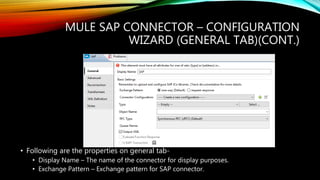
• Following are the properties on general tab-
• Display Name – The name of the connector for display purposes.
• Exchange Pattern – Exchange pattern for SAP connector.
MULE SAP CONNECTOR – CONFIGURATION
WIZARD (GENERAL TAB)
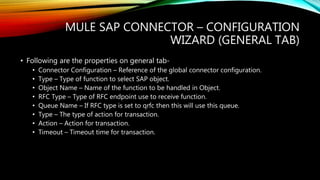
• Following are the properties on general tab-
• Connector Configuration – Reference of the global connector configuration.
• Type – Type of function to select SAP object.
• Object Name – Name of the function to be handled in Object.
• RFC Type – Type of RFC endpoint use to receive function.
• Queue Name – If RFC type is set to qrfc then this will use this queue.
• Type – The type of action for transaction.
• Action – Action for transaction.
• Timeout – Timeout time for transaction.
MULE SAP CONNECTOR – CONFIGURATION
WIZARD (ADVANCED TAB)(CONT.)
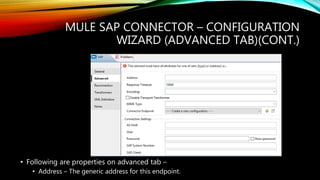
• Following are properties on advanced tab –
• Address – The generic address for this endpoint.
MULE SAP CONNECTOR – CONFIGURATION
WIZARD (ADVANCED TAB)
• Following are properties on advanced tab –
• Response Timeout – Response timeout for SAP connector call.
• Encoding – Standard encoding applied on message.
• MIME Type – MIME type of the message e.g. application/json.
• Connector Endpoint – Reference of the connector endpoint for SAP connector.
• AS Host – Identifies the SAP application server.
• User – Username for SAP connector authentication.
• Password – Password for username used for authentication.
• SAP System Number – Unique SAP system number.
• SAP Client – Three digit client number that specified the type of client.
• Login Language – Specifies the login language.
• Pool capacity – Maximum number of connections to be idle.
• Peak Limit – Maximum number of connections can be made for destination.
MULE SAP CONNECTOR – CONFIGURATION
WIZARD (RECONNECTION TAB)(CONT.)
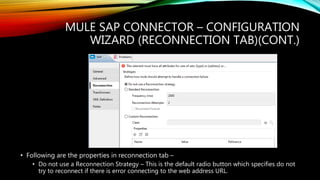
• Following are the properties in reconnection tab –
• Do not use a Reconnection Strategy – This is the default radio button which specifies do not
try to reconnect if there is error connecting to the web address URL.
MULE SAP CONNECTOR – CONFIGURATION
WIZARD (RECONNECTION TAB)
• Following are properties on reconnection tab –
• Standard Reconnection – Use this radio button to enable a standard reconnection
strategy.
• Frequency (ms) – The frequency time in milliseconds after which the File connector will try to
access the web address URL.
• Reconnect Attempts – This tells how many times the File connector will try to connect to web
address URL.
• Reconnector Forever – Check this box if there is need to make File connector connect to web
address URL until there is a successful connection with it.
• Custom Reconnection – Use this radio button to create a custom Reconnection strategy.
• Class – The java class which will come in action after a failed connection attempt.
• Run the connection in a separated thread – Check this box if there is need to use this custom
reconnection operation in separate thread.
SAP CONNECTOR – NOTES AND META-
DATA TABS
• Notes tab - This tab is used to add special notes for the SAP connector.
• Metadata tab – This tab is used to add any metadata entry for SAP connector.
THANK YOU!

Mule SAP connector

  • 1.
    MULE SAP CONNECTOR By– Ankush Sharma
  • 2.
    MULE SAP CONNECTOR? •Mule ESB supports SAP integration through our Anypoint Connector for SAP, which is an SAP-certified Java connector that leverages the SAP Java Connector (JCo) libraries, thus enabling Mule applications to: • Execute BAPI functions over the RFC protocol, supporting the following types: • Synchronous RFC (sRFC) • Transactional RFC (tRFC) • Queued RFC (qRFC) • Act as a JCo Server to be called as a BAPI over sRFC, tRFC and qRFC. • Send IDocs over tRFC and qRFC. • Receive IDocs over tRFC and qRFC. • Transform SAP objects (JCo Function/BAPI & IDocs) to and from XML.
  • 3.
    PREREQUISITES • A workingknowledge of the SAP business context and in particular, the SAP R/3 Business Suite. • A basic understanding of the SAP NetWeaver Platform from an administration point of view. • It is also recommended to have some fundamental knowledge of the ABAP language.
  • 4.
    MULE SAP CONNECTOR– CONFIGURATION WIZARD (GENERAL TAB)(CONT.) • Following are the properties on general tab- • Display Name – The name of the connector for display purposes. • Exchange Pattern – Exchange pattern for SAP connector.
  • 5.
    MULE SAP CONNECTOR– CONFIGURATION WIZARD (GENERAL TAB) • Following are the properties on general tab- • Connector Configuration – Reference of the global connector configuration. • Type – Type of function to select SAP object. • Object Name – Name of the function to be handled in Object. • RFC Type – Type of RFC endpoint use to receive function. • Queue Name – If RFC type is set to qrfc then this will use this queue. • Type – The type of action for transaction. • Action – Action for transaction. • Timeout – Timeout time for transaction.
  • 6.
    MULE SAP CONNECTOR– CONFIGURATION WIZARD (ADVANCED TAB)(CONT.) • Following are properties on advanced tab – • Address – The generic address for this endpoint.
  • 7.
    MULE SAP CONNECTOR– CONFIGURATION WIZARD (ADVANCED TAB) • Following are properties on advanced tab – • Response Timeout – Response timeout for SAP connector call. • Encoding – Standard encoding applied on message. • MIME Type – MIME type of the message e.g. application/json. • Connector Endpoint – Reference of the connector endpoint for SAP connector. • AS Host – Identifies the SAP application server. • User – Username for SAP connector authentication. • Password – Password for username used for authentication. • SAP System Number – Unique SAP system number. • SAP Client – Three digit client number that specified the type of client. • Login Language – Specifies the login language. • Pool capacity – Maximum number of connections to be idle. • Peak Limit – Maximum number of connections can be made for destination.
  • 8.
    MULE SAP CONNECTOR– CONFIGURATION WIZARD (RECONNECTION TAB)(CONT.) • Following are the properties in reconnection tab – • Do not use a Reconnection Strategy – This is the default radio button which specifies do not try to reconnect if there is error connecting to the web address URL.
  • 9.
    MULE SAP CONNECTOR– CONFIGURATION WIZARD (RECONNECTION TAB) • Following are properties on reconnection tab – • Standard Reconnection – Use this radio button to enable a standard reconnection strategy. • Frequency (ms) – The frequency time in milliseconds after which the File connector will try to access the web address URL. • Reconnect Attempts – This tells how many times the File connector will try to connect to web address URL. • Reconnector Forever – Check this box if there is need to make File connector connect to web address URL until there is a successful connection with it. • Custom Reconnection – Use this radio button to create a custom Reconnection strategy. • Class – The java class which will come in action after a failed connection attempt. • Run the connection in a separated thread – Check this box if there is need to use this custom reconnection operation in separate thread.
  • 10.
    SAP CONNECTOR –NOTES AND META- DATA TABS • Notes tab - This tab is used to add special notes for the SAP connector. • Metadata tab – This tab is used to add any metadata entry for SAP connector.
  • 11.