Mule File connector
By – Ankush Sharma
What is File connector?
 The File connector allows Mule application to exchange files with a file system.
Developer can implement the File connector as an inbound endpoint (such as, a
message source), or as an outbound endpoint.
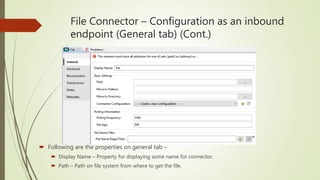
File Connector – Configuration as an inbound
endpoint (General tab) (Cont.)
 Following are the properties on general tab –
 Display Name – Property for displaying some name for connector.
 Path – Path on file system from where to get the file.
File Connector – Configuration as an
inbound endpoint (General tab)
 Following are the properties on general tab –
 Move to pattern – A pattern to be used while moving a file to new directory.
 Move to directory – The path of the directory where to move the file.
 Connector Configuration – It must be defined if more than one connector is associated
with this transport.
 Polling frequency – The time in milliseconds after which file connector will try to retrieve
the file from given path.
 File Age – Minimum time period for a file to be processed.
 File name regex filter – Regex expression for selecting a specific file from multiple files in
a directory.
File Connector – Configuration as an inbound
endpoint (Advanced tab)(Cont.)
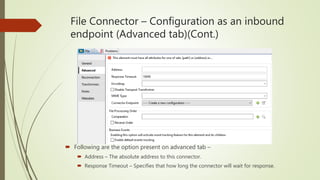
 Following are the option present on advanced tab –
 Address – The absolute address to this connector.
 Response Timeout – Specifies that how long the connector will wait for response.
File Connector – Configuration as an
inbound endpoint (Advanced tab)
 Following are the option present on advanced tab –
 Encoding – Encoding standard for encoding message content.
 MIME type – The mime type of the message content e.g. application/json.
 Connector Endpoint – A reference to the global connector configuration.
 Comparator – Define a comparator for sorting incoming files.
File Connector – Configuration as an inbound
endpoint (Reconnection tab)(Cont.)
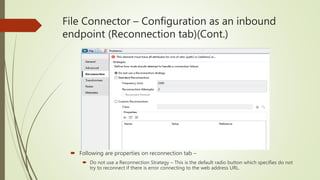
 Following are properties on reconnection tab –
 Do not use a Reconnection Strategy – This is the default radio button which specifies do not
try to reconnect if there is error connecting to the web address URL.
File Connector – Configuration as an
inbound endpoint (Reconnection tab)
 Following are properties on reconnection tab –
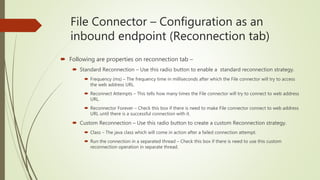
 Standard Reconnection – Use this radio button to enable a standard reconnection strategy.
 Frequency (ms) – The frequency time in milliseconds after which the File connector will try to access
the web address URL.
 Reconnect Attempts – This tells how many times the File connector will try to connect to web address
URL.
 Reconnector Forever – Check this box if there is need to make File connector connect to web address
URL until there is a successful connection with it.
 Custom Reconnection – Use this radio button to create a custom Reconnection strategy.
 Class – The java class which will come in action after a failed connection attempt.
 Run the connection in a separated thread – Check this box if there is need to use this custom
reconnection operation in separate thread.
File Connector – Configuration as an
outbound endpoint (General tab)
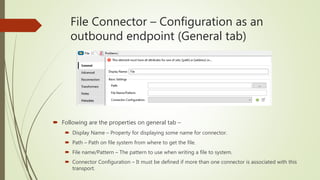
 Following are the properties on general tab –
 Display Name – Property for displaying some name for connector.
 Path – Path on file system from where to get the file.
 File name/Pattern – The pattern to use when writing a file to system.
 Connector Configuration – It must be defined if more than one connector is associated with this
transport.
File Connector – Configuration as an
outbound endpoint (Advanced tab)
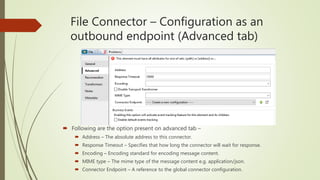
 Following are the option present on advanced tab –
 Address – The absolute address to this connector.
 Response Timeout – Specifies that how long the connector will wait for response.
 Encoding – Encoding standard for encoding message content.
 MIME type – The mime type of the message content e.g. application/json.
 Connector Endpoint – A reference to the global connector configuration.
File Connector – Configuration as an outbound
endpoint (Reconnection tab)(Cont.)
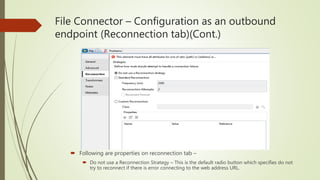
 Following are properties on reconnection tab –
 Do not use a Reconnection Strategy – This is the default radio button which specifies do not
try to reconnect if there is error connecting to the web address URL.
File Connector – Configuration as an outbound
endpoint (Reconnection tab)
 Following are properties on reconnection tab –
 Standard Reconnection – Use this radio button to enable a standard reconnection strategy.
 Frequency (ms) – The frequency time in milliseconds after which the File connector will try to access the
web address URL.
 Reconnect Attempts – This tells how many times the File connector will try to connect to web address
URL.
 Reconnector Forever – Check this box if there is need to make File connector connect to web address
URL until there is a successful connection with it.
 Custom Reconnection – Use this radio button to create a custom Reconnection strategy.
 Class – The java class which will come in action after a failed connection attempt.
 Run the connection in a separated thread – Check this box if there is need to use this custom
reconnection operation in separate thread.
File Connector – Notes and Meta-Data
tabs
 Notes tab - This tab is used to add special notes for the File connector.
 Metadata tab – This tab is used to add any metadata entry for File connector.
Thank You!

Mule file connector

  • 1.
    Mule File connector By– Ankush Sharma
  • 2.
    What is Fileconnector?  The File connector allows Mule application to exchange files with a file system. Developer can implement the File connector as an inbound endpoint (such as, a message source), or as an outbound endpoint.
  • 3.
    File Connector –Configuration as an inbound endpoint (General tab) (Cont.)  Following are the properties on general tab –  Display Name – Property for displaying some name for connector.  Path – Path on file system from where to get the file.
  • 4.
    File Connector –Configuration as an inbound endpoint (General tab)  Following are the properties on general tab –  Move to pattern – A pattern to be used while moving a file to new directory.  Move to directory – The path of the directory where to move the file.  Connector Configuration – It must be defined if more than one connector is associated with this transport.  Polling frequency – The time in milliseconds after which file connector will try to retrieve the file from given path.  File Age – Minimum time period for a file to be processed.  File name regex filter – Regex expression for selecting a specific file from multiple files in a directory.
  • 5.
    File Connector –Configuration as an inbound endpoint (Advanced tab)(Cont.)  Following are the option present on advanced tab –  Address – The absolute address to this connector.  Response Timeout – Specifies that how long the connector will wait for response.
  • 6.
    File Connector –Configuration as an inbound endpoint (Advanced tab)  Following are the option present on advanced tab –  Encoding – Encoding standard for encoding message content.  MIME type – The mime type of the message content e.g. application/json.  Connector Endpoint – A reference to the global connector configuration.  Comparator – Define a comparator for sorting incoming files.
  • 7.
    File Connector –Configuration as an inbound endpoint (Reconnection tab)(Cont.)  Following are properties on reconnection tab –  Do not use a Reconnection Strategy – This is the default radio button which specifies do not try to reconnect if there is error connecting to the web address URL.
  • 8.
    File Connector –Configuration as an inbound endpoint (Reconnection tab)  Following are properties on reconnection tab –  Standard Reconnection – Use this radio button to enable a standard reconnection strategy.  Frequency (ms) – The frequency time in milliseconds after which the File connector will try to access the web address URL.  Reconnect Attempts – This tells how many times the File connector will try to connect to web address URL.  Reconnector Forever – Check this box if there is need to make File connector connect to web address URL until there is a successful connection with it.  Custom Reconnection – Use this radio button to create a custom Reconnection strategy.  Class – The java class which will come in action after a failed connection attempt.  Run the connection in a separated thread – Check this box if there is need to use this custom reconnection operation in separate thread.
  • 9.
    File Connector –Configuration as an outbound endpoint (General tab)  Following are the properties on general tab –  Display Name – Property for displaying some name for connector.  Path – Path on file system from where to get the file.  File name/Pattern – The pattern to use when writing a file to system.  Connector Configuration – It must be defined if more than one connector is associated with this transport.
  • 10.
    File Connector –Configuration as an outbound endpoint (Advanced tab)  Following are the option present on advanced tab –  Address – The absolute address to this connector.  Response Timeout – Specifies that how long the connector will wait for response.  Encoding – Encoding standard for encoding message content.  MIME type – The mime type of the message content e.g. application/json.  Connector Endpoint – A reference to the global connector configuration.
  • 11.
    File Connector –Configuration as an outbound endpoint (Reconnection tab)(Cont.)  Following are properties on reconnection tab –  Do not use a Reconnection Strategy – This is the default radio button which specifies do not try to reconnect if there is error connecting to the web address URL.
  • 12.
    File Connector –Configuration as an outbound endpoint (Reconnection tab)  Following are properties on reconnection tab –  Standard Reconnection – Use this radio button to enable a standard reconnection strategy.  Frequency (ms) – The frequency time in milliseconds after which the File connector will try to access the web address URL.  Reconnect Attempts – This tells how many times the File connector will try to connect to web address URL.  Reconnector Forever – Check this box if there is need to make File connector connect to web address URL until there is a successful connection with it.  Custom Reconnection – Use this radio button to create a custom Reconnection strategy.  Class – The java class which will come in action after a failed connection attempt.  Run the connection in a separated thread – Check this box if there is need to use this custom reconnection operation in separate thread.
  • 13.
    File Connector –Notes and Meta-Data tabs  Notes tab - This tab is used to add special notes for the File connector.  Metadata tab – This tab is used to add any metadata entry for File connector.
  • 14.