

Mule SFTP connector
By – Ankush Sharma
What is SFTP?
 SFTP, which stands for SSH File Transfer Protocol, or Secure File Transfer Protocol, is a separate
protocol packaged with SSH that works in a similar way over a secure connection.
What does Mule SFTP connector do?
 The SFTP Connector implements a secure file transport channel so that your Mule application can
exchange files with external resources. SFTP uses the SSH security protocol to transfer messages.
You can implement the SFTP endpoint as an inbound endpoint with a one-way exchange pattern,
or as an outbound endpoint configured for either a one-way or request-response exchange
pattern. Mule uses the JCraft library for SFTP SSH.
Mule SFTP connector – Configuration Wizard
(General tab)
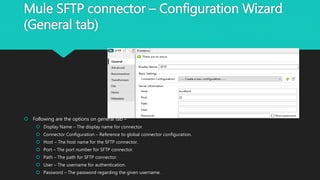
 Following are the options on general tab –
 Display Name – The display name for connector.
 Connector Configuration – Reference to global connector configuration.
 Host – The host name for the SFTP connector.
 Port – The port number for SFTP connector.
 Path – The path for SFTP connector.
 User – The username for authentication.
 Password – The password regarding the given username.
Mule SFTP connector – Configuration Wizard
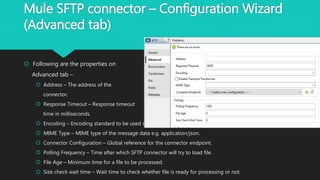
(Advanced tab)
 Following are the properties on
Advanced tab –
 Address – The address of the
connector.
 Response Timeout – Response timeout
time in milliseconds.
 Encoding – Encoding standard to be used on message data.
 MIME Type – MIME type of the message data e.g. application/json.
 Connector Configuration – Global reference for the connector endpoint.
 Polling Frequency – Time after which SFTP connector will try to load file.
 File Age – Minimum time for a file to be processed.
 Size check wait time – Wait time to check whether file is ready for processing or not.
Mule SFTP connector – Configuration Wizard
(Reconnection tab) (Cont.)
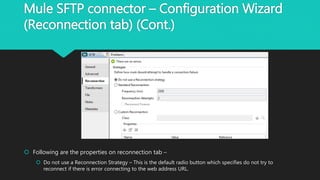
 Following are the properties on reconnection tab –
 Do not use a Reconnection Strategy – This is the default radio button which specifies do not try to
reconnect if there is error connecting to the web address URL.
Mule SFTP connector – Configuration Wizard
(Reconnection tab)
 Following are properties on reconnection tab –
 Standard Reconnection – Use this radio button to enable a standard reconnection strategy.
 Frequency (ms) – The frequency time in milliseconds after which the File connector will try to access
the web address URL.
 Reconnect Attempts – This tells how many times the File connector will try to connect to web address
URL.
 Reconnector Forever – Check this box if there is need to make File connector connect to web address
URL until there is a successful connection with it.
 Custom Reconnection – Use this radio button to create a custom Reconnection strategy.
 Class – The java class which will come in action after a failed connection attempt.
 Run the connection in a separated thread – Check this box if there is need to use this custom
reconnection operation in separate thread.
Mule SFTP connector – Configuration Wizard
(Transformers tab)
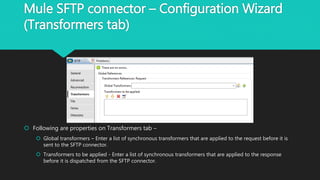
 Following are properties on Transformers tab –
 Global transformers – Enter a list of synchronous transformers that are applied to the request before it is
sent to the SFTP connector.
 Transformers to be applied - Enter a list of synchronous transformers that are applied to the response
before it is dispatched from the SFTP connector.
Mule SFTP connector – Configuration Wizard
(File tab)
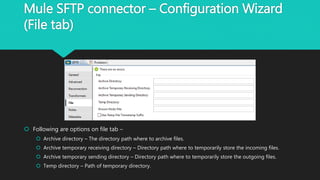
 Following are options on file tab –
 Archive directory – The directory path where to archive files.
 Archive temporary receiving directory – Directory path where to temporarily store the incoming files.
 Archive temporary sending directory – Directory path where to temporarily store the outgoing files.
 Temp directory – Path of temporary directory.
POP3 Connector – Notes and Meta-Data tabs
 Notes tab - This tab is used to add special notes for the SFTP connector.
 Metadata tab – This tab is used to add any metadata entry for SFTP connector.
Thank You!

Mule SFTP connector

  • 1.
    Mule SFTP connector By– Ankush Sharma
  • 2.
    What is SFTP? SFTP, which stands for SSH File Transfer Protocol, or Secure File Transfer Protocol, is a separate protocol packaged with SSH that works in a similar way over a secure connection.
  • 3.
    What does MuleSFTP connector do?  The SFTP Connector implements a secure file transport channel so that your Mule application can exchange files with external resources. SFTP uses the SSH security protocol to transfer messages. You can implement the SFTP endpoint as an inbound endpoint with a one-way exchange pattern, or as an outbound endpoint configured for either a one-way or request-response exchange pattern. Mule uses the JCraft library for SFTP SSH.
  • 4.
    Mule SFTP connector– Configuration Wizard (General tab)  Following are the options on general tab –  Display Name – The display name for connector.  Connector Configuration – Reference to global connector configuration.  Host – The host name for the SFTP connector.  Port – The port number for SFTP connector.  Path – The path for SFTP connector.  User – The username for authentication.  Password – The password regarding the given username.
  • 5.
    Mule SFTP connector– Configuration Wizard (Advanced tab)  Following are the properties on Advanced tab –  Address – The address of the connector.  Response Timeout – Response timeout time in milliseconds.  Encoding – Encoding standard to be used on message data.  MIME Type – MIME type of the message data e.g. application/json.  Connector Configuration – Global reference for the connector endpoint.  Polling Frequency – Time after which SFTP connector will try to load file.  File Age – Minimum time for a file to be processed.  Size check wait time – Wait time to check whether file is ready for processing or not.
  • 6.
    Mule SFTP connector– Configuration Wizard (Reconnection tab) (Cont.)  Following are the properties on reconnection tab –  Do not use a Reconnection Strategy – This is the default radio button which specifies do not try to reconnect if there is error connecting to the web address URL.
  • 7.
    Mule SFTP connector– Configuration Wizard (Reconnection tab)  Following are properties on reconnection tab –  Standard Reconnection – Use this radio button to enable a standard reconnection strategy.  Frequency (ms) – The frequency time in milliseconds after which the File connector will try to access the web address URL.  Reconnect Attempts – This tells how many times the File connector will try to connect to web address URL.  Reconnector Forever – Check this box if there is need to make File connector connect to web address URL until there is a successful connection with it.  Custom Reconnection – Use this radio button to create a custom Reconnection strategy.  Class – The java class which will come in action after a failed connection attempt.  Run the connection in a separated thread – Check this box if there is need to use this custom reconnection operation in separate thread.
  • 8.
    Mule SFTP connector– Configuration Wizard (Transformers tab)  Following are properties on Transformers tab –  Global transformers – Enter a list of synchronous transformers that are applied to the request before it is sent to the SFTP connector.  Transformers to be applied - Enter a list of synchronous transformers that are applied to the response before it is dispatched from the SFTP connector.
  • 9.
    Mule SFTP connector– Configuration Wizard (File tab)  Following are options on file tab –  Archive directory – The directory path where to archive files.  Archive temporary receiving directory – Directory path where to temporarily store the incoming files.  Archive temporary sending directory – Directory path where to temporarily store the outgoing files.  Temp directory – Path of temporary directory.
  • 10.
    POP3 Connector –Notes and Meta-Data tabs  Notes tab - This tab is used to add special notes for the SFTP connector.  Metadata tab – This tab is used to add any metadata entry for SFTP connector.
  • 11.