1
CONTENTS
 Interrupt
 Interrupts in 8086
 CPU’s ‘Fetch-Execute’ cycle
 The operation of an interrupt sequence on 8086
 Mouse features
      Pixel
      Mouse pointer
      Mickey
 Interrupt Vector Table(IVT)
 IVT Format
 Mouse functions

                                                   2
INTERRUPT
 In computing an interrupt is an asynchronous signal indicating the
  need for attention.

 Interrupts are a commonly used technique for computer multitasking,
  Such a system is said to be interrupt driven.

 An act of interrupting is referred to as an interrupt request (IRQ).

 The part of a program that deals with the interrupt is referred to as an
  service routine (ISR) or interrupt handler.


                                                                             3
Interrupts in 8086
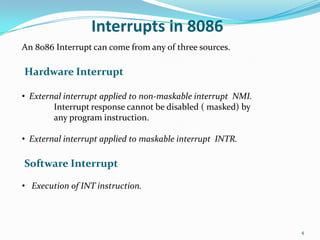
An 8086 Interrupt can come from any of three sources.

Hardware Interrupt

• External interrupt applied to non-maskable interrupt NMI.
        Interrupt response cannot be disabled ( masked) by
        any program instruction.

• External interrupt applied to maskable interrupt INTR.

Software Interrupt

• Execution of INT instruction.


                                                              4
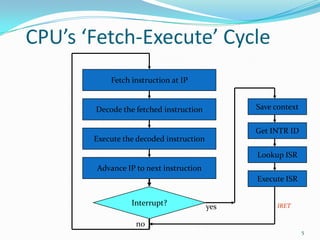
CPU’s ‘Fetch-Execute’ Cycle
           Fetch instruction at IP


       Decode the fetched instruction          Save context

                                               Get INTR ID
       Execute the decoded instruction
                                               Lookup ISR
       Advance IP to next instruction
                                               Execute ISR


                 Interrupt?              yes        IRET

                  no
                                                              5
The Operation of an Interrupt sequence on
the 8086 Microprocessor:
1. External interface sends an interrupt signal, to the Interrupt Request
   (INTR) pin, or an internal interrupt occurs.

2. The CPU finishes the present instruction (for a hardware interrupt) and

  sends Interrupt Acknowledge (INTA) to hardware interface.

3. The interrupt type N is sent to the Central Processor Unit (CPU) via the

   Data bus from the hardware interface.

4. The contents of the flag registers are pushed onto the stack.

5. Both the interrupt (IF) and (TF) flags are cleared. This disables the INTR
  pin and the trap or single-step feature.


                                                                              6
Interrupt sequence contd…
6. The contents of the code segment register (CS) are pushed onto the

    Stack.

7. The contents of the instruction pointer (IP) are pushed onto the Stack.

8. The interrupt vector contents are fetched, from (4 x N) and then placed

   into the IP and from (4 x N +2) into the CS so that the next instruction

   executes at the interrupt service procedure addressed by the interrupt

   vector.

9. While returning from the interrupt-service routine by the Interrupt
  Return(IRET) instruction, the IP, CS and Flag registers are popped from
  the Stack and return to their state prior to the interrupt.

                                                                             7
Interfacing with mouse
 Second primary input devices used is the mouse.

 It has a greater flexibility and movement.

 Mouse system consist of the mouse and the mouse driver.

 Mouse driver is the memory resident program that provides
  communication between the mouse and the computer.

 Mouse driver maintains the cursor position of the mouse and the status
  of the mouse buttons.


                                                                           8
Mouse Features
Pixel:
 A pixel or pel (picture element) is a single point in a raster image, or
  the smallest addressable screen element in a display device.

 It is the smallest unit of picture that can be represented or controlled.

 Each pixel has its own address.

 The address of a pixel corresponds to its coordinates.

 Pixels are normally arranged in a two-dimensional grid and are often
  represented using dots or squares.

 Each pixel is a sample of an original image. More samples typically
  provide more accurate representations of the original image.

                                                                              9
Mouse Features
Mouse pointer:
 A mouse pointer, or a cursor, is a visible indicator displayed on a
  computer screen.

 By moving the mouse, the computer's user can move the mouse
  pointer around the screen.

 The mouse pointer located on the screen can determine how and
  where the user can press a button on the mouse to input text or execute
  a command.


                                                                            10
Mouse Features
Mickey:

 A unit of measure for movement of the mouse, approximately 1/200 of an
  inch.

 A mickey is a unit of measurement for the speed and

  movement direction of a computer mouse.

 The speed of the mouse is the ratio between how many pixels the cursor
  moves on the screen and how many centimeters you move the mouse on
  the mouse pad.


                                                                           11
Interrupt Vector Table – IVT (in memory)

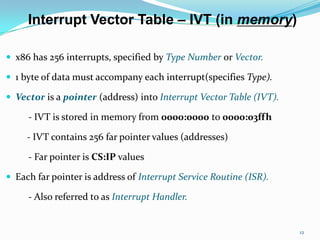
 x86 has 256 interrupts, specified by Type Number or Vector.

 1 byte of data must accompany each interrupt(specifies Type).

 Vector is a pointer (address) into Interrupt Vector Table (IVT).

     - IVT is stored in memory from 0000:0000 to 0000:03ffh

     - IVT contains 256 far pointer values (addresses)

     - Far pointer is CS:IP values

 Each far pointer is address of Interrupt Service Routine (ISR).

     - Also referred to as Interrupt Handler.


                                                                     12
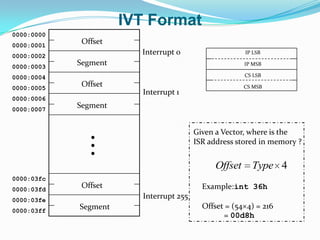
IVT Format
0000:0000
0000:0001
             Offset
0000:0002
                        Interrupt 0                    IP LSB

0000:0003
            Segment                                    IP MSB

0000:0004                                              CS LSB

0000:0005
             Offset                                    CS MSB
                        Interrupt 1
0000:0006
0000:0007
            Segment


                                        Given a Vector, where is the
                                        ISR address stored in memory ?


                                              Offset     Type 4
0000:03fc
0000:03fd
             Offset                       Example:int 36h
0000:03fe
                        Interrupt 255
            Segment                       Offset = (54 4) = 216
0000:03ff
                                                = 00d8h
Mouse functions
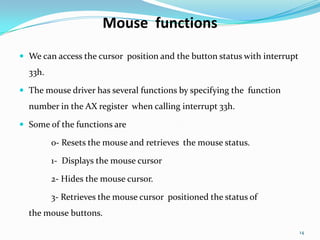
 We can access the cursor position and the button status with interrupt
  33h.

 The mouse driver has several functions by specifying the function
  number in the AX register when calling interrupt 33h.

 Some of the functions are

         0- Resets the mouse and retrieves the mouse status.

         1- Displays the mouse cursor

         2- Hides the mouse cursor.

         3- Retrieves the mouse cursor positioned the status of
  the mouse buttons.

                                                                           14
Mouse functions contd…
Initializing the mouse:

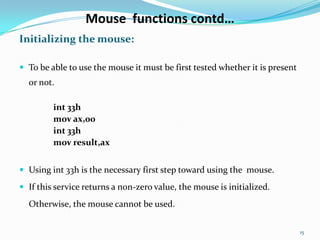
 To be able to use the mouse it must be first tested whether it is present
  or not.

         int 33h
         mov ax,00
         int 33h
         mov result,ax


 Using int 33h is the necessary first step toward using the mouse.

 If this service returns a non-zero value, the mouse is initialized.

  Otherwise, the mouse cannot be used.


                                                                              15
Mouse functions contd…
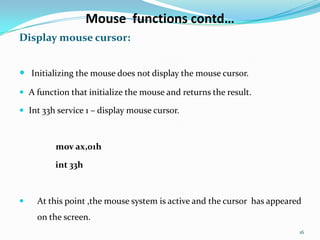
Display mouse cursor:


 Initializing the mouse does not display the mouse cursor.
 A function that initialize the mouse and returns the result.

 Int 33h service 1 – display mouse cursor.


         mov ax,01h

         int 33h


   At this point ,the mouse system is active and the cursor has appeared
    on the screen.
                                                                        16
Mouse functions contd…

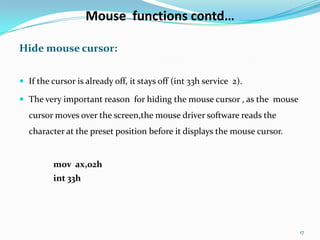
Hide mouse cursor:


 If the cursor is already off, it stays off (int 33h service 2).

 The very important reason for hiding the mouse cursor , as the mouse
  cursor moves over the screen,the mouse driver software reads the
  character at the preset position before it displays the mouse cursor.


         mov ax,02h
         int 33h


                                                                          17
Mouse functions contd…
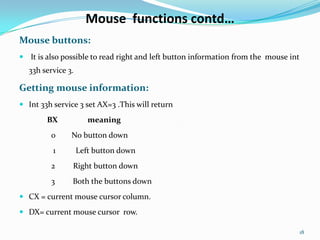
Mouse buttons:
 It is also possible to read right and left button information from the mouse int
  33h service 3.

Getting mouse information:
 Int 33h service 3 set AX=3 .This will return

        BX            meaning
         0     No button down
          1        Left button down
         2      Right button down
         3      Both the buttons down
 CX = current mouse cursor column.

 DX= current mouse cursor row.

                                                                                     18
Mouse functions contd…
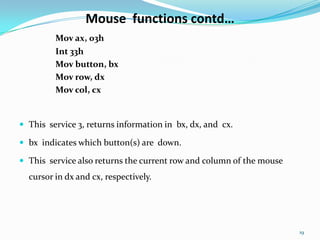
         Mov ax, 03h
         Int 33h
         Mov button, bx
         Mov row, dx
         Mov col, cx


 This service 3, returns information in bx, dx, and cx.

 bx indicates which button(s) are down.

 This service also returns the current row and column of the mouse
  cursor in dx and cx, respectively.


                                                                      19
THANK YOU


            20

Mouse interrupts (Assembly Language & C)

  • 1.
  • 2.
    CONTENTS  Interrupt  Interruptsin 8086  CPU’s ‘Fetch-Execute’ cycle  The operation of an interrupt sequence on 8086  Mouse features  Pixel  Mouse pointer  Mickey  Interrupt Vector Table(IVT)  IVT Format  Mouse functions 2
  • 3.
    INTERRUPT  In computingan interrupt is an asynchronous signal indicating the need for attention.  Interrupts are a commonly used technique for computer multitasking, Such a system is said to be interrupt driven.  An act of interrupting is referred to as an interrupt request (IRQ).  The part of a program that deals with the interrupt is referred to as an service routine (ISR) or interrupt handler. 3
  • 4.
    Interrupts in 8086 An8086 Interrupt can come from any of three sources. Hardware Interrupt • External interrupt applied to non-maskable interrupt NMI. Interrupt response cannot be disabled ( masked) by any program instruction. • External interrupt applied to maskable interrupt INTR. Software Interrupt • Execution of INT instruction. 4
  • 5.
    CPU’s ‘Fetch-Execute’ Cycle Fetch instruction at IP Decode the fetched instruction Save context Get INTR ID Execute the decoded instruction Lookup ISR Advance IP to next instruction Execute ISR Interrupt? yes IRET no 5
  • 6.
    The Operation ofan Interrupt sequence on the 8086 Microprocessor: 1. External interface sends an interrupt signal, to the Interrupt Request (INTR) pin, or an internal interrupt occurs. 2. The CPU finishes the present instruction (for a hardware interrupt) and sends Interrupt Acknowledge (INTA) to hardware interface. 3. The interrupt type N is sent to the Central Processor Unit (CPU) via the Data bus from the hardware interface. 4. The contents of the flag registers are pushed onto the stack. 5. Both the interrupt (IF) and (TF) flags are cleared. This disables the INTR pin and the trap or single-step feature. 6
  • 7.
    Interrupt sequence contd… 6.The contents of the code segment register (CS) are pushed onto the Stack. 7. The contents of the instruction pointer (IP) are pushed onto the Stack. 8. The interrupt vector contents are fetched, from (4 x N) and then placed into the IP and from (4 x N +2) into the CS so that the next instruction executes at the interrupt service procedure addressed by the interrupt vector. 9. While returning from the interrupt-service routine by the Interrupt Return(IRET) instruction, the IP, CS and Flag registers are popped from the Stack and return to their state prior to the interrupt. 7
  • 8.
    Interfacing with mouse Second primary input devices used is the mouse.  It has a greater flexibility and movement.  Mouse system consist of the mouse and the mouse driver.  Mouse driver is the memory resident program that provides communication between the mouse and the computer.  Mouse driver maintains the cursor position of the mouse and the status of the mouse buttons. 8
  • 9.
    Mouse Features Pixel:  Apixel or pel (picture element) is a single point in a raster image, or the smallest addressable screen element in a display device.  It is the smallest unit of picture that can be represented or controlled.  Each pixel has its own address.  The address of a pixel corresponds to its coordinates.  Pixels are normally arranged in a two-dimensional grid and are often represented using dots or squares.  Each pixel is a sample of an original image. More samples typically provide more accurate representations of the original image. 9
  • 10.
    Mouse Features Mouse pointer: A mouse pointer, or a cursor, is a visible indicator displayed on a computer screen.  By moving the mouse, the computer's user can move the mouse pointer around the screen.  The mouse pointer located on the screen can determine how and where the user can press a button on the mouse to input text or execute a command. 10
  • 11.
    Mouse Features Mickey:  Aunit of measure for movement of the mouse, approximately 1/200 of an inch.  A mickey is a unit of measurement for the speed and movement direction of a computer mouse.  The speed of the mouse is the ratio between how many pixels the cursor moves on the screen and how many centimeters you move the mouse on the mouse pad. 11
  • 12.
    Interrupt Vector Table– IVT (in memory)  x86 has 256 interrupts, specified by Type Number or Vector.  1 byte of data must accompany each interrupt(specifies Type).  Vector is a pointer (address) into Interrupt Vector Table (IVT). - IVT is stored in memory from 0000:0000 to 0000:03ffh - IVT contains 256 far pointer values (addresses) - Far pointer is CS:IP values  Each far pointer is address of Interrupt Service Routine (ISR). - Also referred to as Interrupt Handler. 12
  • 13.
    IVT Format 0000:0000 0000:0001 Offset 0000:0002 Interrupt 0 IP LSB 0000:0003 Segment IP MSB 0000:0004 CS LSB 0000:0005 Offset CS MSB Interrupt 1 0000:0006 0000:0007 Segment Given a Vector, where is the ISR address stored in memory ? Offset Type 4 0000:03fc 0000:03fd Offset Example:int 36h 0000:03fe Interrupt 255 Segment Offset = (54 4) = 216 0000:03ff = 00d8h
  • 14.
    Mouse functions  Wecan access the cursor position and the button status with interrupt 33h.  The mouse driver has several functions by specifying the function number in the AX register when calling interrupt 33h.  Some of the functions are 0- Resets the mouse and retrieves the mouse status. 1- Displays the mouse cursor 2- Hides the mouse cursor. 3- Retrieves the mouse cursor positioned the status of the mouse buttons. 14
  • 15.
    Mouse functions contd… Initializingthe mouse:  To be able to use the mouse it must be first tested whether it is present or not. int 33h mov ax,00 int 33h mov result,ax  Using int 33h is the necessary first step toward using the mouse.  If this service returns a non-zero value, the mouse is initialized. Otherwise, the mouse cannot be used. 15
  • 16.
    Mouse functions contd… Displaymouse cursor:  Initializing the mouse does not display the mouse cursor.  A function that initialize the mouse and returns the result.  Int 33h service 1 – display mouse cursor. mov ax,01h int 33h  At this point ,the mouse system is active and the cursor has appeared on the screen. 16
  • 17.
    Mouse functions contd… Hidemouse cursor:  If the cursor is already off, it stays off (int 33h service 2).  The very important reason for hiding the mouse cursor , as the mouse cursor moves over the screen,the mouse driver software reads the character at the preset position before it displays the mouse cursor. mov ax,02h int 33h 17
  • 18.
    Mouse functions contd… Mousebuttons:  It is also possible to read right and left button information from the mouse int 33h service 3. Getting mouse information:  Int 33h service 3 set AX=3 .This will return BX meaning 0 No button down 1 Left button down 2 Right button down 3 Both the buttons down  CX = current mouse cursor column.  DX= current mouse cursor row. 18
  • 19.
    Mouse functions contd… Mov ax, 03h Int 33h Mov button, bx Mov row, dx Mov col, cx  This service 3, returns information in bx, dx, and cx.  bx indicates which button(s) are down.  This service also returns the current row and column of the mouse cursor in dx and cx, respectively. 19
  • 20.