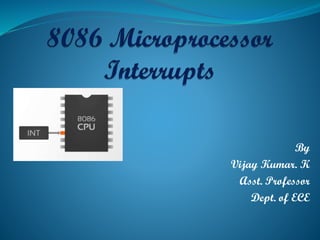
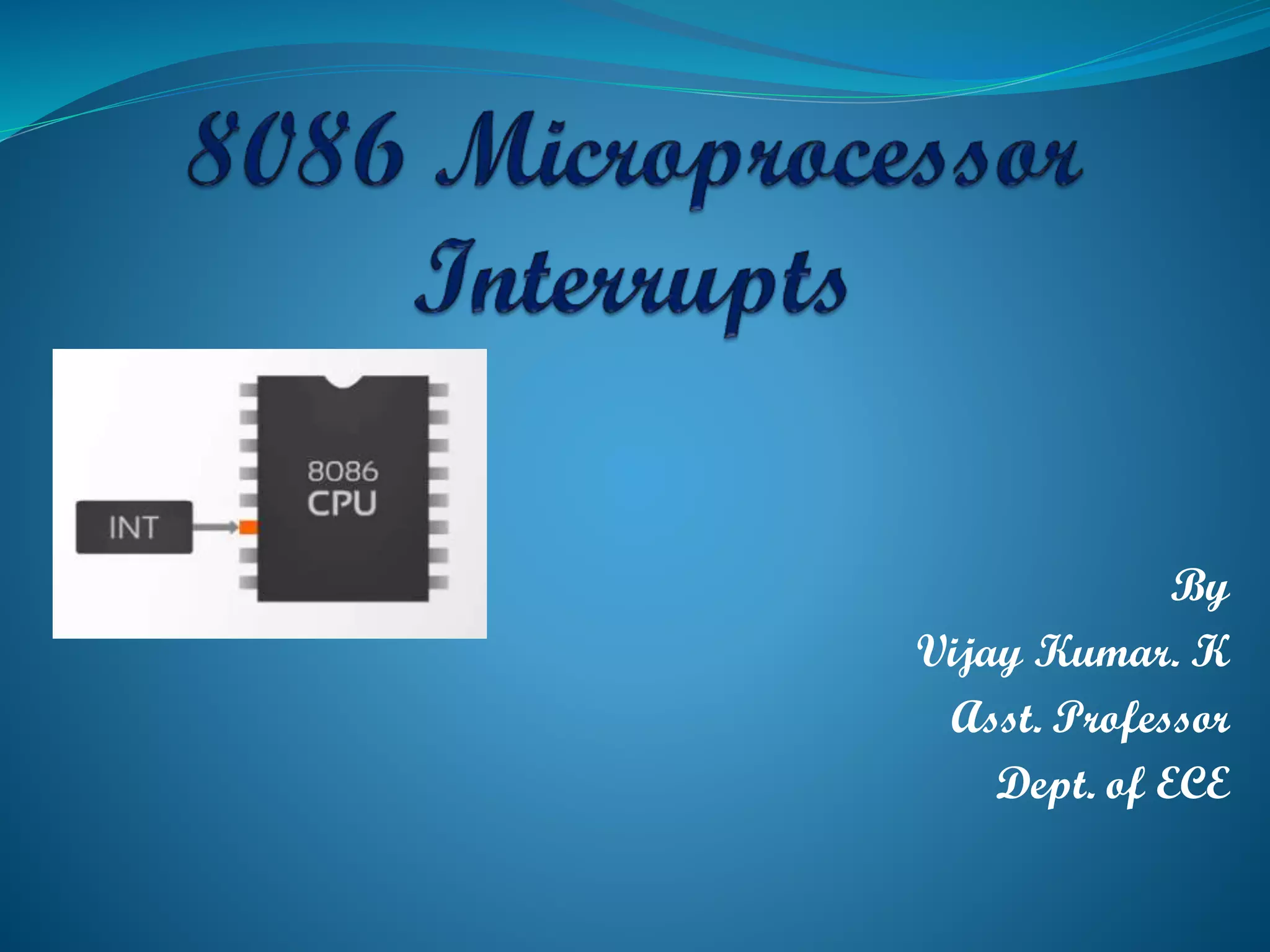
By
Vijay Kumar. K
Asst. Professor
Dept. of ECE
 When your phone rings during a lecture, what will happen?
 When you are studying then your cell phone rings – what will you do?
When you finish talking on the phone then you will continue with
your study
 Now your phone rings again and someone also knocking at your door
then what will you do?
When being interrupted, you will perform some pre-defined action
Interrupt has priority – some interrupt is more important than the
others. For example, asking your phone is more important than opening
the door
Introduction
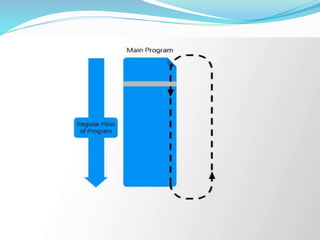
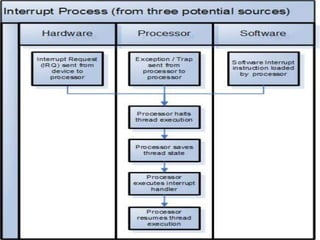
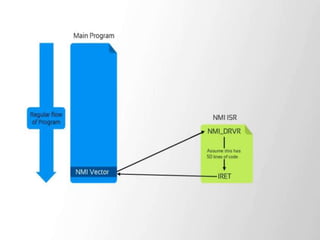
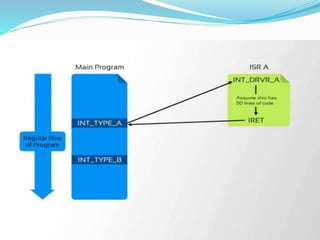
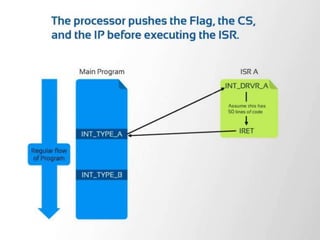
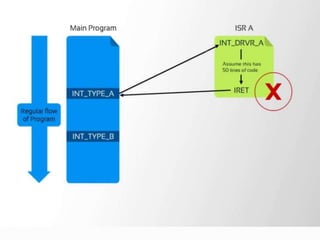
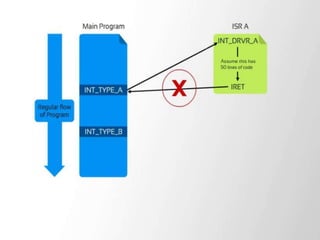
 An interrupt is used to cause a temporary halt in the execution of
program.
 The meaning of ‘interrupts’ is to break the sequence of operation.
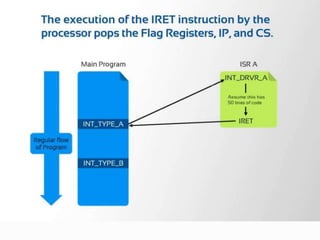
 While the Microprocessor is executing a program, an ‘interrupt’
breaks the normal sequence of execution of instructions, diverts
its execution to some other program called Interrupt Service
Routine (ISR).
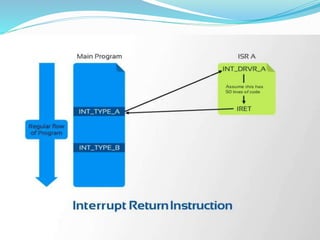
After executing ISR, IRET returns the control back again to
the main program. Interrupt processing is an alternative to
polling.
Need for Interrupt:
Interrupts are particularly useful when interfacing I/O
devices, that provide or require data at relatively low data
transfer rate.
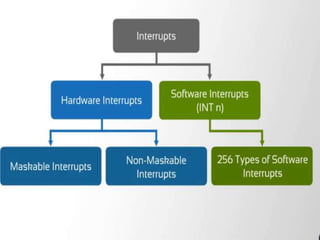
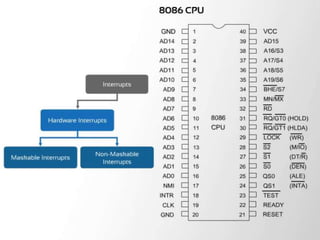
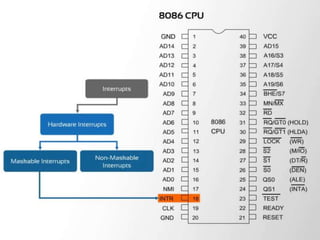
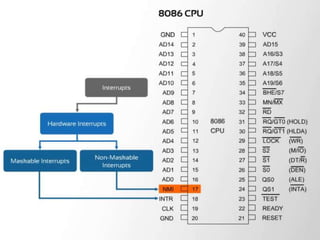
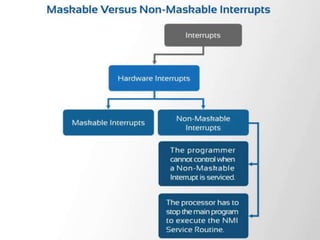
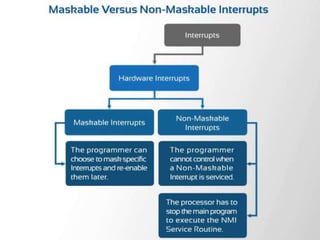
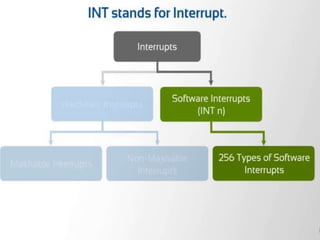
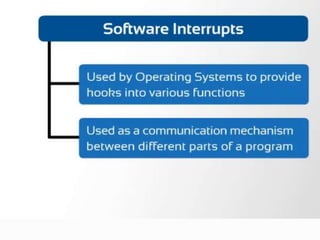
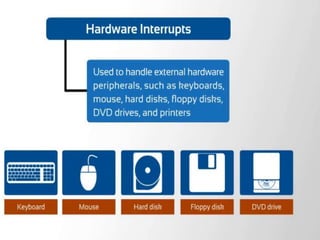
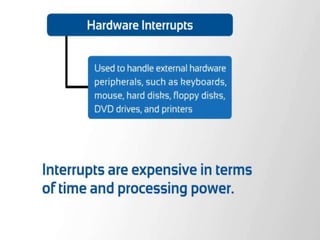
Three types of interrupts sources are there:
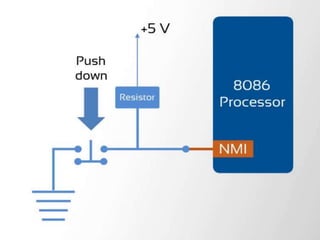
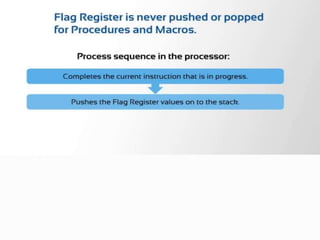
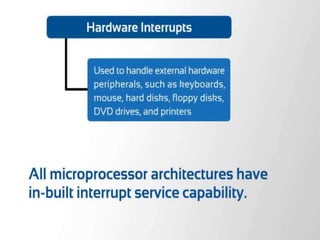
1. An external signal applied to NMI or INTR input pin( hardware
interrupt)
2. Execution of Interrupt instruction( software interrupt)
3. Interrupt raised due to some error condition produced in 8086
instruction execution process. ( divide by zero, overflow errors
etc)
Sources of Interrupts:
Use of interrupt
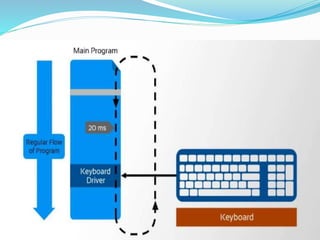
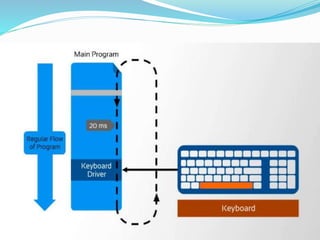
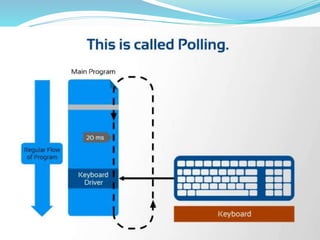
How to get key typed in the keyboard or a keypad?
 Polling :-
The CPU executes a program that check for the available of
data If a key is pressed then read the data, otherwise keep waiting
or looping!!!
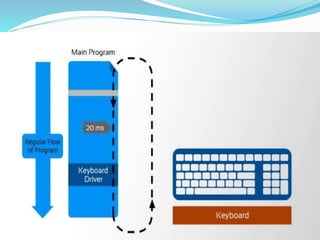
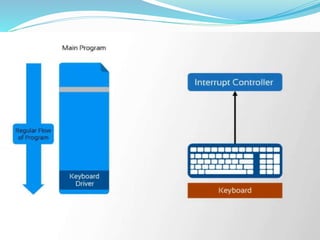
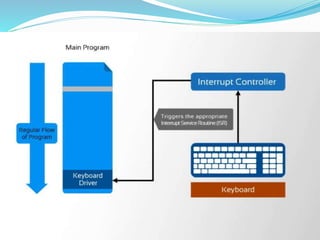
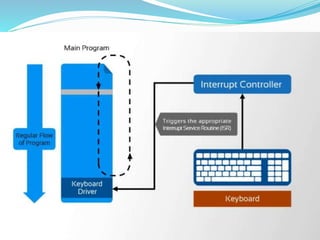
 Interrupt:-
The CPU executes other program, as soon as a key is pressed,
the Keyboard generates an interrupt. The CPU will response to the
interrupt – read the data. After that returns to the original program.
So by proper use of interrupt, the CPU can serve many devices at the
“same time”
Polling Vs Interrupt
The keyboard controller can hold only a single keystroke.
Therefore, the keyboard controller must be freed before the next
keystroke arrives.
The keystroke is passed to the CPU by putting it in the
keyboard buffer. So, the keyboard controller keeps on passing the
keystroke input to the CPU,
but how does the CPU attend to it?
The CPU is not at the disposal of the keyboard controller; it is
usually busy doing several other operations. So, we need
some mechanism to indicate to the CPU that a keystroke has
arrived. How is this done? There are two approaches to making
sure that the CPU pays attention:
Polling-based
Interrupt-based
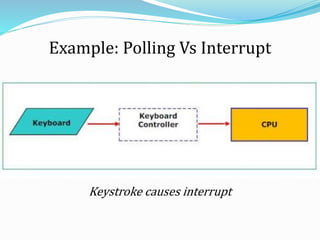
Example: Polling Vs Interrupt
Keystroke causes interrupt
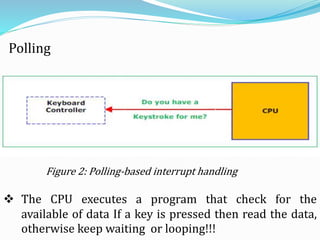
Figure 2: Polling-based interrupt handling
Polling
 The CPU executes a program that check for the
available of data If a key is pressed then read the data,
otherwise keep waiting or looping!!!
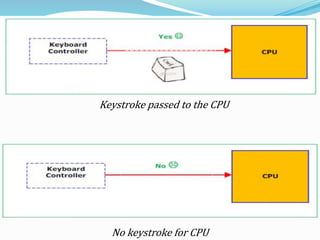
Keystroke passed to the CPU
No keystroke for CPU
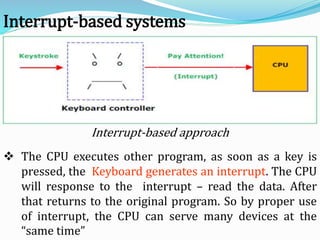
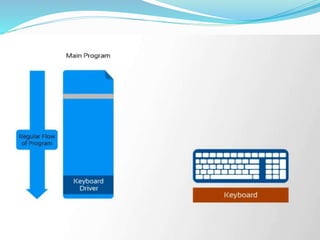
Interrupt-based approach
Interrupt-based systems
 The CPU executes other program, as soon as a key is
pressed, the Keyboard generates an interrupt. The CPU
will response to the interrupt – read the data. After
that returns to the original program. So by proper use
of interrupt, the CPU can serve many devices at the
“same time”
Example of interrupt
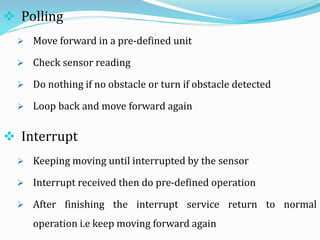
 How to control a robot that has sensors to detect
obstacles and makes a turn
Controlling a robot by using Polling & Interrupt
 Interrupt
 Keeping moving until interrupted by the sensor
 Interrupt received then do pre-defined operation
 After finishing the interrupt service return to normal
operation i.e keep moving forward again
 Polling
 Move forward in a pre-defined unit
 Check sensor reading
 Do nothing if no obstacle or turn if obstacle detected
 Loop back and move forward again
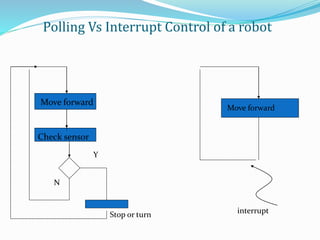
Polling Vs Interrupt Control of a robot
Move forward
Check sensor
Y
Stop or turn
Move forward
interrupt
N
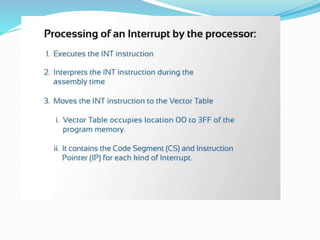
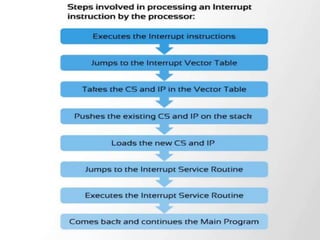
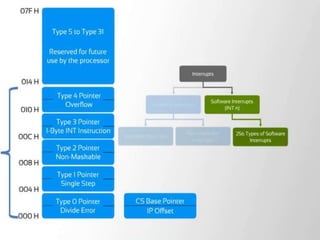
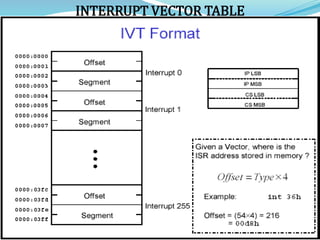
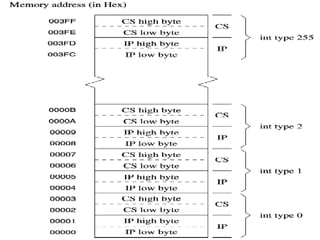
INTERRUPT VECTOR TABLE
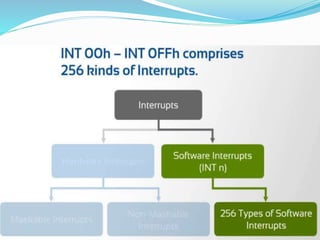
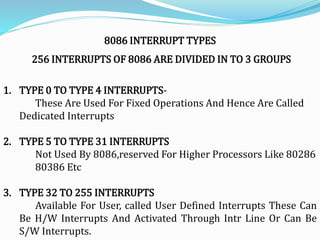
8086 INTERRUPT TYPES
256 INTERRUPTS OF 8086 ARE DIVIDED IN TO 3 GROUPS
1. TYPE 0 TO TYPE 4 INTERRUPTS-
These Are Used For Fixed Operations And Hence Are Called
Dedicated Interrupts
2. TYPE 5 TO TYPE 31 INTERRUPTS
Not Used By 8086,reserved For Higher Processors Like 80286
80386 Etc
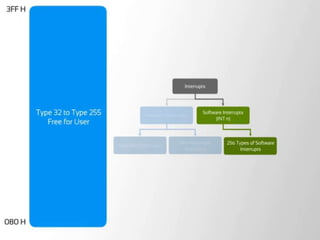
3. TYPE 32 TO 255 INTERRUPTS
Available For User, called User Defined Interrupts These Can
Be H/W Interrupts And Activated Through Intr Line Or Can Be
S/W Interrupts.
Type – 0 Divide Error Interrupt
Quotient Is Large Cant Be Fit In Al/Ax Or Divide By Zero
Type –1 Single Step Interrupt
Used For Executing The Program In Single Step Mode By Setting Trap Flag
To Set Trap Flag PUSHF
MOV BP,SP
OR [BP+0],0100H;SET BIT8
POPF
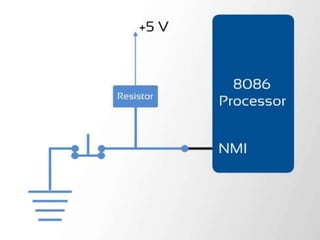
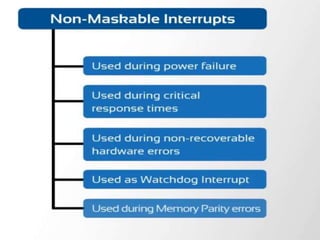
Type – 2 Non Maskable Interrupt
This Interrupt Is Used For Executing Isr Of Nmi Pin (Positive Egde Signal). Nmi
Cant Be Masked By S/W
Type – 3 Break Point Interrupt
Used For Providing Break Points In The Program
Type – 4 Over Flow Interrupt
Used To Handle Any Overflow Error After Signed Arithmetic
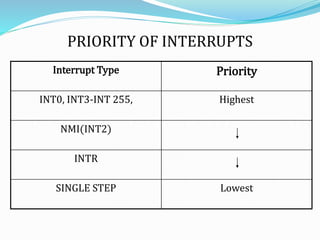
PRIORITY OF INTERRUPTS
Interrupt Type Priority
INT0, INT3-INT 255, Highest
NMI(INT2)
INTR
SINGLE STEP Lowest
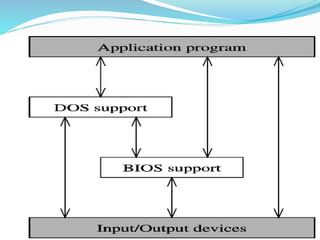
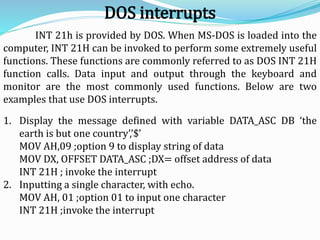
INT 21h is provided by DOS. When MS-DOS is loaded into the
computer, INT 21H can be invoked to perform some extremely useful
functions. These functions are commonly referred to as DOS INT 21H
function calls. Data input and output through the keyboard and
monitor are the most commonly used functions. Below are two
examples that use DOS interrupts.
1. Display the message defined with variable DATA_ASC DB ‘the
earth is but one country’,’$’
MOV AH,09 ;option 9 to display string of data
MOV DX, OFFSET DATA_ASC ;DX= offset address of data
INT 21H ; invoke the interrupt
2. Inputting a single character, with echo.
MOV AH, 01 ;option 01 to input one character
INT 21H ;invoke the interrupt
DOS interrupts
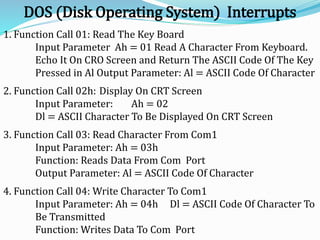
DOS (Disk Operating System) Interrupts
1. Function Call 01: Read The Key Board
Input Parameter Ah = 01 Read A Character From Keyboard.
Echo It On CRO Screen and Return The ASCII Code Of The Key
Pressed in Al Output Parameter: Al = ASCII Code Of Character
2. Function Call 02h: Display On CRT Screen
Input Parameter: Ah = 02
Dl = ASCII Character To Be Displayed On CRT Screen
3. Function Call 03: Read Character From Com1
Input Parameter: Ah = 03h
Function: Reads Data From Com Port
Output Parameter: Al = ASCII Code Of Character
4. Function Call 04: Write Character To Com1
Input Parameter: Ah = 04h Dl = ASCII Code Of Character To
Be Transmitted
Function: Writes Data To Com Port
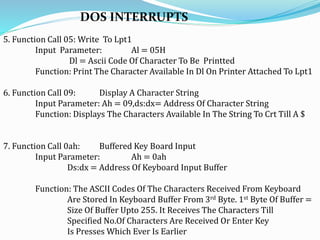
DOS INTERRUPTS
5. Function Call 05: Write To Lpt1
Input Parameter: Al = 05H
Dl = Ascii Code Of Character To Be Printted
Function: Print The Character Available In Dl On Printer Attached To Lpt1
6. Function Call 09: Display A Character String
Input Parameter: Ah = 09,ds:dx= Address Of Character String
Function: Displays The Characters Available In The String To Crt Till A $
7. Function Call 0ah: Buffered Key Board Input
Input Parameter: Ah = 0ah
Ds:dx = Address Of Keyboard Input Buffer
Function: The ASCII Codes Of The Characters Received From Keyboard
Are Stored In Keyboard Buffer From 3rd Byte. 1st Byte Of Buffer =
Size Of Buffer Upto 255. It Receives The Characters Till
Specified No.Of Characters Are Received Or Enter Key
Is Presses Which Ever Is Earlier
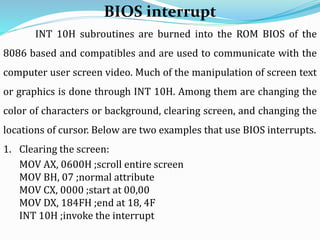
INT 10H subroutines are burned into the ROM BIOS of the
8086 based and compatibles and are used to communicate with the
computer user screen video. Much of the manipulation of screen text
or graphics is done through INT 10H. Among them are changing the
color of characters or background, clearing screen, and changing the
locations of cursor. Below are two examples that use BIOS interrupts.
1. Clearing the screen:
MOV AX, 0600H ;scroll entire screen
MOV BH, 07 ;normal attribute
MOV CX, 0000 ;start at 00,00
MOV DX, 184FH ;end at 18, 4F
INT 10H ;invoke the interrupt
BIOS interrupt
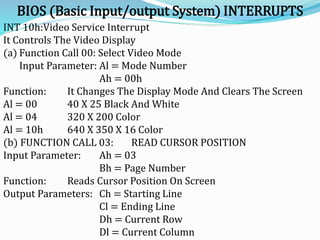
BIOS (Basic Input/output System) INTERRUPTS
INT 10h:Video Service Interrupt
It Controls The Video Display
(a) Function Call 00: Select Video Mode
Input Parameter: Al = Mode Number
Ah = 00h
Function: It Changes The Display Mode And Clears The Screen
Al = 00 40 X 25 Black And White
Al = 04 320 X 200 Color
Al = 10h 640 X 350 X 16 Color
(b) FUNCTION CALL 03: READ CURSOR POSITION
Input Parameter: Ah = 03
Bh = Page Number
Function: Reads Cursor Position On Screen
Output Parameters: Ch = Starting Line
Cl = Ending Line
Dh = Current Row
Dl = Current Column
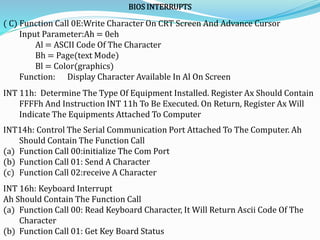
BIOS INTERRUPTS
( C) Function Call 0E:Write Character On CRT Screen And Advance Cursor
Input Parameter:Ah = 0eh
Al = ASCII Code Of The Character
Bh = Page(text Mode)
Bl = Color(graphics)
Function: Display Character Available In Al On Screen
INT 11h: Determine The Type Of Equipment Installed. Register Ax Should Contain
FFFFh And Instruction INT 11h To Be Executed. On Return, Register Ax Will
Indicate The Equipments Attached To Computer
INT14h: Control The Serial Communication Port Attached To The Computer. Ah
Should Contain The Function Call
(a) Function Call 00:initialize The Com Port
(b) Function Call 01: Send A Character
(c) Function Call 02:receive A Character
INT 16h: Keyboard Interrupt
Ah Should Contain The Function Call
(a) Function Call 00: Read Keyboard Character, It Will Return Ascii Code Of The
Character
(b) Function Call 01: Get Key Board Status
8086 Interrupts &  With DOS and BIOS  by vijay

8086 Interrupts & With DOS and BIOS by vijay

  • 1.
    By Vijay Kumar. K Asst.Professor Dept. of ECE
  • 2.
     When yourphone rings during a lecture, what will happen?  When you are studying then your cell phone rings – what will you do? When you finish talking on the phone then you will continue with your study  Now your phone rings again and someone also knocking at your door then what will you do? When being interrupted, you will perform some pre-defined action Interrupt has priority – some interrupt is more important than the others. For example, asking your phone is more important than opening the door
  • 3.
    Introduction  An interruptis used to cause a temporary halt in the execution of program.  The meaning of ‘interrupts’ is to break the sequence of operation.  While the Microprocessor is executing a program, an ‘interrupt’ breaks the normal sequence of execution of instructions, diverts its execution to some other program called Interrupt Service Routine (ISR). After executing ISR, IRET returns the control back again to the main program. Interrupt processing is an alternative to polling.
  • 4.
    Need for Interrupt: Interruptsare particularly useful when interfacing I/O devices, that provide or require data at relatively low data transfer rate. Three types of interrupts sources are there: 1. An external signal applied to NMI or INTR input pin( hardware interrupt) 2. Execution of Interrupt instruction( software interrupt) 3. Interrupt raised due to some error condition produced in 8086 instruction execution process. ( divide by zero, overflow errors etc) Sources of Interrupts:
  • 5.
    Use of interrupt Howto get key typed in the keyboard or a keypad?  Polling :- The CPU executes a program that check for the available of data If a key is pressed then read the data, otherwise keep waiting or looping!!!  Interrupt:- The CPU executes other program, as soon as a key is pressed, the Keyboard generates an interrupt. The CPU will response to the interrupt – read the data. After that returns to the original program. So by proper use of interrupt, the CPU can serve many devices at the “same time”
  • 6.
    Polling Vs Interrupt Thekeyboard controller can hold only a single keystroke. Therefore, the keyboard controller must be freed before the next keystroke arrives. The keystroke is passed to the CPU by putting it in the keyboard buffer. So, the keyboard controller keeps on passing the keystroke input to the CPU, but how does the CPU attend to it? The CPU is not at the disposal of the keyboard controller; it is usually busy doing several other operations. So, we need some mechanism to indicate to the CPU that a keystroke has arrived. How is this done? There are two approaches to making sure that the CPU pays attention: Polling-based Interrupt-based
  • 7.
    Example: Polling VsInterrupt Keystroke causes interrupt
  • 8.
    Figure 2: Polling-basedinterrupt handling Polling  The CPU executes a program that check for the available of data If a key is pressed then read the data, otherwise keep waiting or looping!!!
  • 9.
    Keystroke passed tothe CPU No keystroke for CPU
  • 10.
    Interrupt-based approach Interrupt-based systems The CPU executes other program, as soon as a key is pressed, the Keyboard generates an interrupt. The CPU will response to the interrupt – read the data. After that returns to the original program. So by proper use of interrupt, the CPU can serve many devices at the “same time”
  • 11.
    Example of interrupt How to control a robot that has sensors to detect obstacles and makes a turn Controlling a robot by using Polling & Interrupt
  • 12.
     Interrupt  Keepingmoving until interrupted by the sensor  Interrupt received then do pre-defined operation  After finishing the interrupt service return to normal operation i.e keep moving forward again  Polling  Move forward in a pre-defined unit  Check sensor reading  Do nothing if no obstacle or turn if obstacle detected  Loop back and move forward again
  • 13.
    Polling Vs InterruptControl of a robot Move forward Check sensor Y Stop or turn Move forward interrupt N
  • 55.
  • 57.
    8086 INTERRUPT TYPES 256INTERRUPTS OF 8086 ARE DIVIDED IN TO 3 GROUPS 1. TYPE 0 TO TYPE 4 INTERRUPTS- These Are Used For Fixed Operations And Hence Are Called Dedicated Interrupts 2. TYPE 5 TO TYPE 31 INTERRUPTS Not Used By 8086,reserved For Higher Processors Like 80286 80386 Etc 3. TYPE 32 TO 255 INTERRUPTS Available For User, called User Defined Interrupts These Can Be H/W Interrupts And Activated Through Intr Line Or Can Be S/W Interrupts.
  • 58.
    Type – 0Divide Error Interrupt Quotient Is Large Cant Be Fit In Al/Ax Or Divide By Zero Type –1 Single Step Interrupt Used For Executing The Program In Single Step Mode By Setting Trap Flag To Set Trap Flag PUSHF MOV BP,SP OR [BP+0],0100H;SET BIT8 POPF Type – 2 Non Maskable Interrupt This Interrupt Is Used For Executing Isr Of Nmi Pin (Positive Egde Signal). Nmi Cant Be Masked By S/W Type – 3 Break Point Interrupt Used For Providing Break Points In The Program Type – 4 Over Flow Interrupt Used To Handle Any Overflow Error After Signed Arithmetic
  • 59.
    PRIORITY OF INTERRUPTS InterruptType Priority INT0, INT3-INT 255, Highest NMI(INT2) INTR SINGLE STEP Lowest
  • 61.
    INT 21h isprovided by DOS. When MS-DOS is loaded into the computer, INT 21H can be invoked to perform some extremely useful functions. These functions are commonly referred to as DOS INT 21H function calls. Data input and output through the keyboard and monitor are the most commonly used functions. Below are two examples that use DOS interrupts. 1. Display the message defined with variable DATA_ASC DB ‘the earth is but one country’,’$’ MOV AH,09 ;option 9 to display string of data MOV DX, OFFSET DATA_ASC ;DX= offset address of data INT 21H ; invoke the interrupt 2. Inputting a single character, with echo. MOV AH, 01 ;option 01 to input one character INT 21H ;invoke the interrupt DOS interrupts
  • 62.
    DOS (Disk OperatingSystem) Interrupts 1. Function Call 01: Read The Key Board Input Parameter Ah = 01 Read A Character From Keyboard. Echo It On CRO Screen and Return The ASCII Code Of The Key Pressed in Al Output Parameter: Al = ASCII Code Of Character 2. Function Call 02h: Display On CRT Screen Input Parameter: Ah = 02 Dl = ASCII Character To Be Displayed On CRT Screen 3. Function Call 03: Read Character From Com1 Input Parameter: Ah = 03h Function: Reads Data From Com Port Output Parameter: Al = ASCII Code Of Character 4. Function Call 04: Write Character To Com1 Input Parameter: Ah = 04h Dl = ASCII Code Of Character To Be Transmitted Function: Writes Data To Com Port
  • 63.
    DOS INTERRUPTS 5. FunctionCall 05: Write To Lpt1 Input Parameter: Al = 05H Dl = Ascii Code Of Character To Be Printted Function: Print The Character Available In Dl On Printer Attached To Lpt1 6. Function Call 09: Display A Character String Input Parameter: Ah = 09,ds:dx= Address Of Character String Function: Displays The Characters Available In The String To Crt Till A $ 7. Function Call 0ah: Buffered Key Board Input Input Parameter: Ah = 0ah Ds:dx = Address Of Keyboard Input Buffer Function: The ASCII Codes Of The Characters Received From Keyboard Are Stored In Keyboard Buffer From 3rd Byte. 1st Byte Of Buffer = Size Of Buffer Upto 255. It Receives The Characters Till Specified No.Of Characters Are Received Or Enter Key Is Presses Which Ever Is Earlier
  • 64.
    INT 10H subroutinesare burned into the ROM BIOS of the 8086 based and compatibles and are used to communicate with the computer user screen video. Much of the manipulation of screen text or graphics is done through INT 10H. Among them are changing the color of characters or background, clearing screen, and changing the locations of cursor. Below are two examples that use BIOS interrupts. 1. Clearing the screen: MOV AX, 0600H ;scroll entire screen MOV BH, 07 ;normal attribute MOV CX, 0000 ;start at 00,00 MOV DX, 184FH ;end at 18, 4F INT 10H ;invoke the interrupt BIOS interrupt
  • 65.
    BIOS (Basic Input/outputSystem) INTERRUPTS INT 10h:Video Service Interrupt It Controls The Video Display (a) Function Call 00: Select Video Mode Input Parameter: Al = Mode Number Ah = 00h Function: It Changes The Display Mode And Clears The Screen Al = 00 40 X 25 Black And White Al = 04 320 X 200 Color Al = 10h 640 X 350 X 16 Color (b) FUNCTION CALL 03: READ CURSOR POSITION Input Parameter: Ah = 03 Bh = Page Number Function: Reads Cursor Position On Screen Output Parameters: Ch = Starting Line Cl = Ending Line Dh = Current Row Dl = Current Column
  • 66.
    BIOS INTERRUPTS ( C)Function Call 0E:Write Character On CRT Screen And Advance Cursor Input Parameter:Ah = 0eh Al = ASCII Code Of The Character Bh = Page(text Mode) Bl = Color(graphics) Function: Display Character Available In Al On Screen INT 11h: Determine The Type Of Equipment Installed. Register Ax Should Contain FFFFh And Instruction INT 11h To Be Executed. On Return, Register Ax Will Indicate The Equipments Attached To Computer INT14h: Control The Serial Communication Port Attached To The Computer. Ah Should Contain The Function Call (a) Function Call 00:initialize The Com Port (b) Function Call 01: Send A Character (c) Function Call 02:receive A Character INT 16h: Keyboard Interrupt Ah Should Contain The Function Call (a) Function Call 00: Read Keyboard Character, It Will Return Ascii Code Of The Character (b) Function Call 01: Get Key Board Status