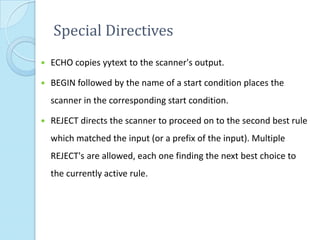
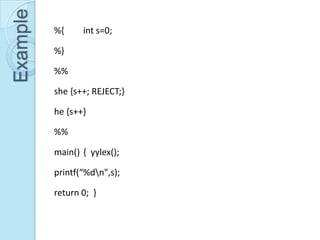
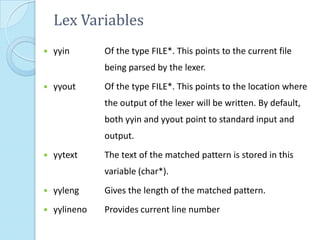
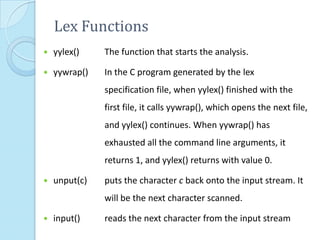
This document provides additional information about LEX and describes several LEX patterns, variables, functions, start conditions, and examples. It explains that LEX is used for text processing and scanner generation. It also describes pattern matching symbols, special directives like ECHO and REJECT, variables like yytext, and functions like yylex(), yyless(), and yywrap(). Examples are provided for multi-file scanning, counting character sequences, and generating HTML.


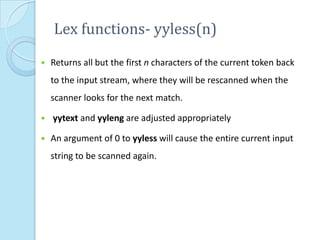
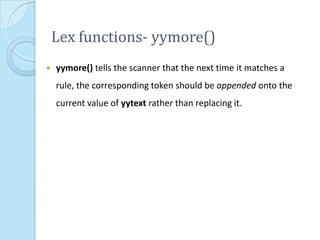
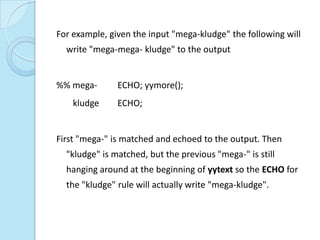
![For example, on the input "foobar" the following will write out
"foobarbar“
%% foobar ECHO; yyless(3);
[a-z]+ ECHO;](https://image.slidesharecdn.com/moreonlex-120903115248-phpapp01/85/More-on-Lex-10-320.jpg)
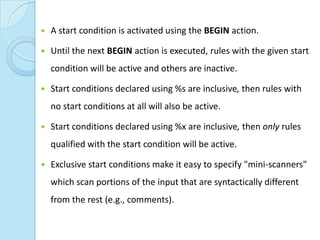
![Start Conditions
Flex provides a mechanism for conditionally activating rules.
Any rule whose pattern is prefixed with "<sc>" will only be
active when the scanner is in the start condition named "sc".
<STRING>[^"]* { /* eat up the string body ... */ ... }
will be active only when the scanner is in the "STRING" start
condition
<INITIAL,STRING,QUOTE>. { /* handle an escape ... */ ... } will
be active only when the current start condition is either
"INITIAL", "STRING", or "QUOTE".](https://image.slidesharecdn.com/moreonlex-120903115248-phpapp01/85/More-on-Lex-13-320.jpg)
![Begin
BEGIN(0) returns to the original state where only the rules with no
start conditions are active.
BEGIN(INITIAL) is equivalent to BEGIN(0).
int enter_special;
%x SPECIAL
%%
if ( enter_special )
BEGIN(SPECIAL);
<SPECIAL>[a-z] {printf(“letter”);} %%](https://image.slidesharecdn.com/moreonlex-120903115248-phpapp01/85/More-on-Lex-15-320.jpg)
![Example %s TABL REC DATA
%%
<INITIAL>"<table>" BEGIN TABL;
<TABL>"</table>" BEGIN INITIAL;
<TABL><tr> BEGIN REC;
<REC></tr> BEGIN TABL;
<REC><td> BEGIN DATA;
%%
<DATA></td> BEGIN REC; main()
<DATA>. ECHO; {
<DATA,REC,TABL>[ tn] ; yylex();
}](https://image.slidesharecdn.com/moreonlex-120903115248-phpapp01/85/More-on-Lex-16-320.jpg)
![Line no in text file
%{
/*
*/
int lineno=1;
%}
line .*n
%%
{line} { printf("%5d %s",lineno++,yytext); }
%%
main(int argc, char*argv[])
{
extern FILE *yyin;
yyin=fopen(argv[1],"r");
yylex();
return 0;
}](https://image.slidesharecdn.com/moreonlex-120903115248-phpapp01/85/More-on-Lex-17-320.jpg)
![%{ {eol} {fprintf(fr,yytext);}
#include<stdio.h> . {fprintf(fr,yytext);}
#include<string.h> %%
FILE *ff,*fr; int main(int argc,char
char p[20],q[20],r[20],fname[20]; *argv[])
%} {
word [a-zA-Z]+ strcpy(fname,argv[1]);
%% strcpy(p,argv[2]);
{word} { strcpy(q,argv[3]);
if(strcmp(p,yytext)==0) ff=fopen(fname,"r+");
fprintf(fr,q); fr=fopen("rep.txt","w+");
else fprintf(fr,yytext); yyin=ff; yylex();
} return(0);
}](https://image.slidesharecdn.com/moreonlex-120903115248-phpapp01/85/More-on-Lex-19-320.jpg)
![Replace Arabic Nos with Roman
%{
#include<stdio.h>
#include<ctype.h>
FILE *ff,*fr;
char fname[20];
int z;
%}
%%
1 {fprintf(fr,"I ");}
2|3|4 { z=atoi(yytext);
while(z!=0)
{
{fprintf(fr,"I "); z--;
}
}](https://image.slidesharecdn.com/moreonlex-120903115248-phpapp01/85/More-on-Lex-20-320.jpg)
![5 {fprintf(fr,"V ");}
6|7|8 { z=atoi(yytext);
{fprintf(fr,"V ");}
while(z!=5)
{
{fprintf(fr,"I "); z--;
}
}
9 {fprintf(fr,"IX ");}
10 {fprintf(fr,"X ");}
. {fprintf(fr,yytext);}
%%
int main(int argc,char *argv[])
{
strcpy(fname,argv[1]);
ff=fopen(fname,"r+");
fr=fopen("rep.txt","w+");
yyin=ff;
yylex();
return(0);
}](https://image.slidesharecdn.com/moreonlex-120903115248-phpapp01/85/More-on-Lex-21-320.jpg)
![Date Format Change
%{
#include<stdio.h>
#include<string.h>
FILE *ff,*fr;
char fname[20];
int z;
%}
digit [0-9]
%%
{digit}{digit}""{digit}{digit}"" {yymore();}
[5-9][1-9] {fprintf(fr,"19"); fprintf(fr,yytext);}
[0-5]{digit} {fprintf(fr,"20"); fprintf(fr,yytext);}](https://image.slidesharecdn.com/moreonlex-120903115248-phpapp01/85/More-on-Lex-22-320.jpg)
![%%
int main(int argc,char *argv[])
{
strcpy(fname,argv[1]);
ff=fopen(fname,"r+");
fr=fopen("rep.txt","w+");
yyin=ff;
yylex();
return(0);
}](https://image.slidesharecdn.com/moreonlex-120903115248-phpapp01/85/More-on-Lex-23-320.jpg)
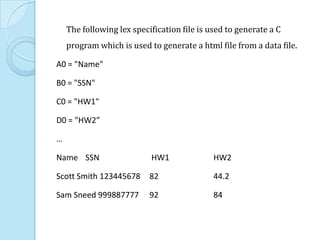
![%%
^A0 {printf("<table>n<tr>n");}
^A[09]* {printf("</tr>n<tr>n");}
^[BZ][09]* ;
[09]* {printf("<td> "); ECHO; printf("</td>n");}
[09]*"."[09]* {printf("<td> "); ECHO; printf("</td>n");}
"[^"]*" {printf("<td> "); yytext[yyleng1]= ' ';
printf("%s </td>n",yytext+1);}
= ;
[ n] ;
. ECHO;
%%
main() {
printf("<html>n");
yylex();
printf("</tr>n</table>n</html>n");
}](https://image.slidesharecdn.com/moreonlex-120903115248-phpapp01/85/More-on-Lex-25-320.jpg)
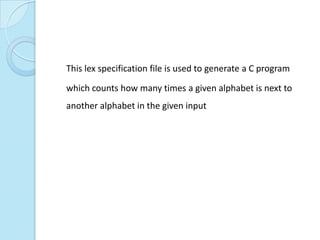
![%{
#include<stdlib.h>
int F[26][26];
%}
%%
[AZaz][AZaz]
{
F[toupper(yytext[0])65][toupper(yytext[1])65]
++;REJECT;
}
.|n ;
%%](https://image.slidesharecdn.com/moreonlex-120903115248-phpapp01/85/More-on-Lex-27-320.jpg)
![main(int argc, char*argv[])
{
extern FILE *yyin;
int i,j;
for(i=0;i<26;i++)
for(j=0;j<26;j++)F[i][j]=0;
yyin=fopen(argv[1],"r");
yylex();
for(i=0;i<26;i++){
for(j=0;j<26;j++) printf("%d", F[i][j]);
printf("n");
}
return 0;
}](https://image.slidesharecdn.com/moreonlex-120903115248-phpapp01/85/More-on-Lex-28-320.jpg)
![%{
#include <stdio.h>
#include <errno.h>
Yywrap() Example
int file_num;
int file_num_max;
char **files;
extern int errno;
%}
%%
(ftp|http)://[^ n<>"]* printf("%sn",yytext);
.|n ;
%%
int main(int argc, char *argv[]) {
file_num=1;
file_num_max = argc;
files = argv;
if ( argc > 1 ) {
if ( (yyin = fopen(argv[file_num],"r")) ==
0){
perror(argv[file_num]);
exit(1);](https://image.slidesharecdn.com/moreonlex-120903115248-phpapp01/85/More-on-Lex-29-320.jpg)
![}
}
while( yylex() )
;
return 0;
}
int yywrap() {
fclose(yyin);
if ( ++file_num < file_num_max ) {
if ( (yyin = fopen(files[file_num],"r")) ==
0){
perror(files[file_num]);
exit(1);
}
return 0;
} else {
return 1;](https://image.slidesharecdn.com/moreonlex-120903115248-phpapp01/85/More-on-Lex-30-320.jpg)
![A lex-based squid redirector
%x SKIP
%x COPY
%option always-interactive
%%
"http://www.debian.org/" |
"http://www.yahoo.com/" {
yytext[yyleng-1] = '0';
printf("%s.au/",yytext);
BEGIN COPY;
}
"http://"(www.)?"altavista.digital.com/" {
printf("http://www.altavista.yellowpages.com.au/");
BEGIN COPY;
}
"ftp://sunsite.anu.edu.au/pub/linux/" |
"ftp://sunsite.unc.edu/pub/Linux/" |](https://image.slidesharecdn.com/moreonlex-120903115248-phpapp01/85/More-on-Lex-31-320.jpg)
!["ftp://ftp.funet.fi/pub/Linux/" {
printf("ftp://ftp.monash.edu.au/pub/linux/");
BEGIN COPY;
}
"http://weather/" {
printf("http://www.bom.gov.au/");
BEGIN COPY;
}
"http://bypass." { printf("http://"); BEGIN COPY;
}
"ftp://bypass." { printf("ftp://"); BEGIN COPY; }
<COPY>[^ n] ECHO;
<COPY>" " BEGIN SKIP;
. BEGIN SKIP;
<SKIP>. ;
<*>n { putchar('n'); fflush(stdout); BEGIN 0; }
%%](https://image.slidesharecdn.com/moreonlex-120903115248-phpapp01/85/More-on-Lex-32-320.jpg)



![[OOP - Lec 18] Static Data Member](https://cdn.slidesharecdn.com/ss_thumbnails/lecture-18staticdatamember-160705095116-thumbnail.jpg?width=640&height=640&fit=bounds)


