Parts and usage
• the most important component in any personal
computer
• contains almost every important elements of the
computer
• other manufacturer refer to this as the “ Logic
Board”
• the main circuit board inside the PC which holds
the processor, memory and expansion slots and
connects directly or indirectly to every part of the
PC.
• made up of a chipset(known as the “glue logic”),
some code in ROM and the various
• Expansion slots
• CPU(Main Processor)
• Coprocessor
• Memory
• BIOS and
• Support circuits of chipset for interrupt,
DMA etc.
The expansion slots are long thin connectors
on the motherboard, near the backside of the
computer. Various expansion cards are connected
to the motherboards through data, address and
control lines/buses on these slots. One can
connect various expansion cards such as display
card, hard drive controller, sound card, network
card, modem card etc. on these slots. When an
adapter card is connected to the expansion slot, it
is actually connected to the data, address and
control bus on the motherboard.
The main component of any
motherboard is the main processor chip
which controls all the inner functions of the
system. The CENTRAL PROCESSING
UNIT(CPU) functions as the brain of every
PC. It is usually inserted into the socket
and is not soldered onto the motherboard
as many other chips are normally done,
this makes its replacement, in case of any
problem, very easy.
PowerPC Chip
Chip Fan
Pentium Chip
• a mechanical component that provides
mechanical and electrical connections
between a microprocessor and a printed
circuit board (PCB). This allows the CPU to
be replaced without soldering.
Types:
PGA – Pin Grid Array ; Protruding Pins
LGA – Land Grid Array ; Balls Grid Array
Pin Grid Array Land Grid Array
• the place where computer stores the
program and data that help the
program in carrying out its operations.
• used by computers to run its
operating system in any application
that you start and also responsible in
loading a system.
• RAM memory(Random Access
Memory)
is a read/write type of memory which
is used by the processor to keep
program, data and intermediate
results during program executions. It
is VOLATILE type of memory, which
lose its content when the power
supply is switched off.
The physical installation of RAM memory on
the motherboard can take place in various
ways.
• DIP(dual In-line Pin) memory chips were used
on initial motherboards.
• Later SIMM ( single inline memory modules)
became common.
• Currently DIMM(dual inline memory modules)
are most common memory module.
• ROM (Read Only Memory)
 as its name suggest is a read only type of
memory it cannot be written.
a Non-Volatile type of memory, meaning it
does not lose its content when the power
supply to it is switched off.
A motherboard normally contains one or
more of these ROM chips.
• BIOS -Basic Input Output System.
• A chip w/c directs the I/O operations of all the
devices in or attached to the system
• All Peripherals are instructed by BIOS
• Holds the configuration, loading the operating
system, detects also the devices, and
monitors the PC temperature.
• Communication between the processor and
memory
• Prepares the machine
so other software
programs stored on
various media (such as
hard drives, floppies,
and CD’s) can load,
execute, and assume
control of the computer.
• Alternatively referred to as a Real-
Time Clock (RTC), Non-Volatile
RAM (NVRAM) or CMOS RAM
• short for Complementary Metal-
Oxide Semiconductor.
• an on-board semiconductor chip
powered by a CMOS battery inside
computers
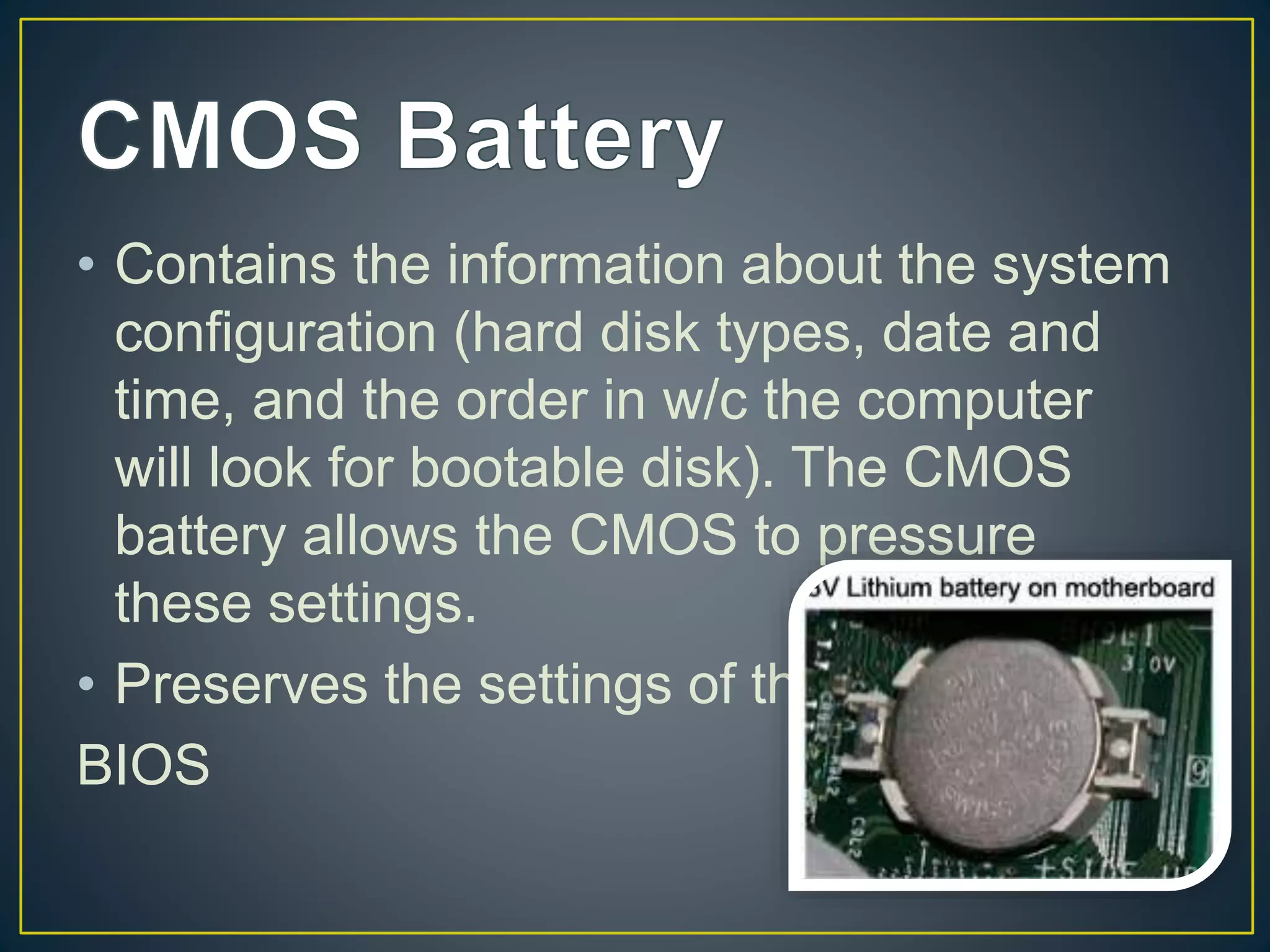
• Contains the information about the system
configuration (hard disk types, date and
time, and the order in w/c the computer
will look for bootable disk). The CMOS
battery allows the CMOS to pressure
these settings.
• Preserves the settings of the
BIOS
• This houses the CMOS battery
• a group of integrated circuits, or chips, that
are designed to work together, and are
usually marketed as a single product.
There are two Chipset in a Motherboard:
• Northbridge Chipset
• Southbridge Chipset
• Also known as the I/O controller Hub
(ICH)
• the chip that controls all of the
computers I/O functions, such as USB
, audio, serial, the system BIOS , the
ISA bus, and the IDE channels.
• Also known as “Memory Controller
hub”.
• Typically handles communications
between the CPU, RAM.
• Always closer to CPU w/ heat sink
• also one of the responsible in
processing data.
• The Northbridge connects directly to
the processor via the front side bus
(FSB). A memory controller is located
on the Northbridge, which gives the
CPU fast access to the memory. The
Northbridge also connects to the AGP
or PCI Express bus and to the
memory itself.
• a computer bus interface for connecting host bus
adapters to mass storage devices such as hard
disk drives and optical drives.
• designed to replace the older AT Attachment
standard offering several advantages over the
older interface:
• reduced cable size and cost (7 conductors
instead of 40),
• native hot swapping,
• faster data transfer through higher signalling
rates,
• More commonly known as ATA and is
a standard interface for IBM
compatible hard drives.
•Primary IDE header – Goes to hard
disk
•Secondary IDE header – Goes to
CD-ROM
Data Cable
24 PIN ATX Connector
Pin Out
• Will give a power supply of the
whole system board
• 24/20 PIN depends on the system
board
• This adds a additional 12v to your
processor
POST(Power-On-Self-Test)
• This produce audible beep indicating
an error, warning, or system ok.
• Connection where the CD drive is
plugged in
• Also transfer power to the CD drive
such as the audit of the CD ROM
• Allows the computer to recognized the
drive in order to operate correctly
• Jack for microphone, headset, speaker
• Use to connect Ethernet patch cable
Floppy Disk Drive (FDD)
headers are sockets on a
motherboard into which
floppy disk drive cables are
plugged. Some
motherboards have more
than one FDD header;
many newer motherboards
omit them entirely, as
floppy disks have become
obsolete.
• DDR – Double Data Rate
• AGP - Accelerated Graphics Port
• PCI - Peripheral Component Interconnect
• DIP-dual in-line package
• SIMM-single in-line memory module
• DIMM-dual in-line memory module
• IDE - Integrated Drive Electronics
• ISA - Industry Standard Architecture
• ATX - Advanced Technology eXtended
http://computer.howstuffworks.com/motherboard1.
htm
http://searchstorage.techtarget.com

motherboard.pptx

  • 1.
  • 2.
    • the mostimportant component in any personal computer • contains almost every important elements of the computer • other manufacturer refer to this as the “ Logic Board” • the main circuit board inside the PC which holds the processor, memory and expansion slots and connects directly or indirectly to every part of the PC. • made up of a chipset(known as the “glue logic”), some code in ROM and the various
  • 3.
    • Expansion slots •CPU(Main Processor) • Coprocessor • Memory • BIOS and • Support circuits of chipset for interrupt, DMA etc.
  • 5.
    The expansion slotsare long thin connectors on the motherboard, near the backside of the computer. Various expansion cards are connected to the motherboards through data, address and control lines/buses on these slots. One can connect various expansion cards such as display card, hard drive controller, sound card, network card, modem card etc. on these slots. When an adapter card is connected to the expansion slot, it is actually connected to the data, address and control bus on the motherboard.
  • 7.
    The main componentof any motherboard is the main processor chip which controls all the inner functions of the system. The CENTRAL PROCESSING UNIT(CPU) functions as the brain of every PC. It is usually inserted into the socket and is not soldered onto the motherboard as many other chips are normally done, this makes its replacement, in case of any problem, very easy.
  • 8.
  • 9.
    • a mechanicalcomponent that provides mechanical and electrical connections between a microprocessor and a printed circuit board (PCB). This allows the CPU to be replaced without soldering. Types: PGA – Pin Grid Array ; Protruding Pins LGA – Land Grid Array ; Balls Grid Array
  • 10.
    Pin Grid ArrayLand Grid Array
  • 11.
    • the placewhere computer stores the program and data that help the program in carrying out its operations. • used by computers to run its operating system in any application that you start and also responsible in loading a system.
  • 12.
    • RAM memory(RandomAccess Memory) is a read/write type of memory which is used by the processor to keep program, data and intermediate results during program executions. It is VOLATILE type of memory, which lose its content when the power supply is switched off.
  • 15.
    The physical installationof RAM memory on the motherboard can take place in various ways. • DIP(dual In-line Pin) memory chips were used on initial motherboards. • Later SIMM ( single inline memory modules) became common. • Currently DIMM(dual inline memory modules) are most common memory module.
  • 16.
    • ROM (ReadOnly Memory)  as its name suggest is a read only type of memory it cannot be written. a Non-Volatile type of memory, meaning it does not lose its content when the power supply to it is switched off. A motherboard normally contains one or more of these ROM chips.
  • 18.
    • BIOS -BasicInput Output System. • A chip w/c directs the I/O operations of all the devices in or attached to the system • All Peripherals are instructed by BIOS • Holds the configuration, loading the operating system, detects also the devices, and monitors the PC temperature. • Communication between the processor and memory
  • 19.
    • Prepares themachine so other software programs stored on various media (such as hard drives, floppies, and CD’s) can load, execute, and assume control of the computer.
  • 20.
    • Alternatively referredto as a Real- Time Clock (RTC), Non-Volatile RAM (NVRAM) or CMOS RAM • short for Complementary Metal- Oxide Semiconductor. • an on-board semiconductor chip powered by a CMOS battery inside computers
  • 21.
    • Contains theinformation about the system configuration (hard disk types, date and time, and the order in w/c the computer will look for bootable disk). The CMOS battery allows the CMOS to pressure these settings. • Preserves the settings of the BIOS
  • 22.
    • This housesthe CMOS battery
  • 23.
    • a groupof integrated circuits, or chips, that are designed to work together, and are usually marketed as a single product. There are two Chipset in a Motherboard: • Northbridge Chipset • Southbridge Chipset
  • 24.
    • Also knownas the I/O controller Hub (ICH) • the chip that controls all of the computers I/O functions, such as USB , audio, serial, the system BIOS , the ISA bus, and the IDE channels.
  • 25.
    • Also knownas “Memory Controller hub”. • Typically handles communications between the CPU, RAM. • Always closer to CPU w/ heat sink • also one of the responsible in processing data.
  • 27.
    • The Northbridgeconnects directly to the processor via the front side bus (FSB). A memory controller is located on the Northbridge, which gives the CPU fast access to the memory. The Northbridge also connects to the AGP or PCI Express bus and to the memory itself.
  • 28.
    • a computerbus interface for connecting host bus adapters to mass storage devices such as hard disk drives and optical drives. • designed to replace the older AT Attachment standard offering several advantages over the older interface: • reduced cable size and cost (7 conductors instead of 40), • native hot swapping, • faster data transfer through higher signalling rates,
  • 30.
    • More commonlyknown as ATA and is a standard interface for IBM compatible hard drives. •Primary IDE header – Goes to hard disk •Secondary IDE header – Goes to CD-ROM
  • 31.
  • 32.
    24 PIN ATXConnector Pin Out • Will give a power supply of the whole system board • 24/20 PIN depends on the system board
  • 33.
    • This addsa additional 12v to your processor
  • 35.
    POST(Power-On-Self-Test) • This produceaudible beep indicating an error, warning, or system ok.
  • 36.
    • Connection wherethe CD drive is plugged in • Also transfer power to the CD drive such as the audit of the CD ROM • Allows the computer to recognized the drive in order to operate correctly
  • 38.
    • Jack formicrophone, headset, speaker • Use to connect Ethernet patch cable
  • 40.
    Floppy Disk Drive(FDD) headers are sockets on a motherboard into which floppy disk drive cables are plugged. Some motherboards have more than one FDD header; many newer motherboards omit them entirely, as floppy disks have become obsolete.
  • 41.
    • DDR –Double Data Rate • AGP - Accelerated Graphics Port • PCI - Peripheral Component Interconnect • DIP-dual in-line package • SIMM-single in-line memory module • DIMM-dual in-line memory module • IDE - Integrated Drive Electronics • ISA - Industry Standard Architecture • ATX - Advanced Technology eXtended http://computer.howstuffworks.com/motherboard1. htm http://searchstorage.techtarget.com