Practical no 1
CPU is the electronic circuitry in a computer that executes
instructions that make up a program. It is also known as a
central processor or the main processor. The CPU executes
the basic logic, arithmetic, controlling as well as input/output
(I/O) operations specified by the instructions in the desktop
programs.
 CPU (Central Processing Unit) chip
 RAM (Random Access Memory) slots
 Southbridge/northbridge
 BIOS (Basic Input/Output System)
 I/O port
 USB (Universal Serial Bus)
 CPU slot
 PCI (Peripheral Component Interconnect) slot
 AGP (Accelerated Graphics Port) slot
 ISA (Industry Standard Architecture) slot
 Parallel port
 FDC (Floppy-Disk Controller)
 IDE (Integrated Drive Electronics) controller
 CMOS (Complementary Metal-oxide-semiconductor) battery
 Power supply connector
 Mouse and keyboard ports
 DIP (Dual In-line Package) switch
 Jumper
 Heat sink/heatsink (cooling system)
 Clock generator
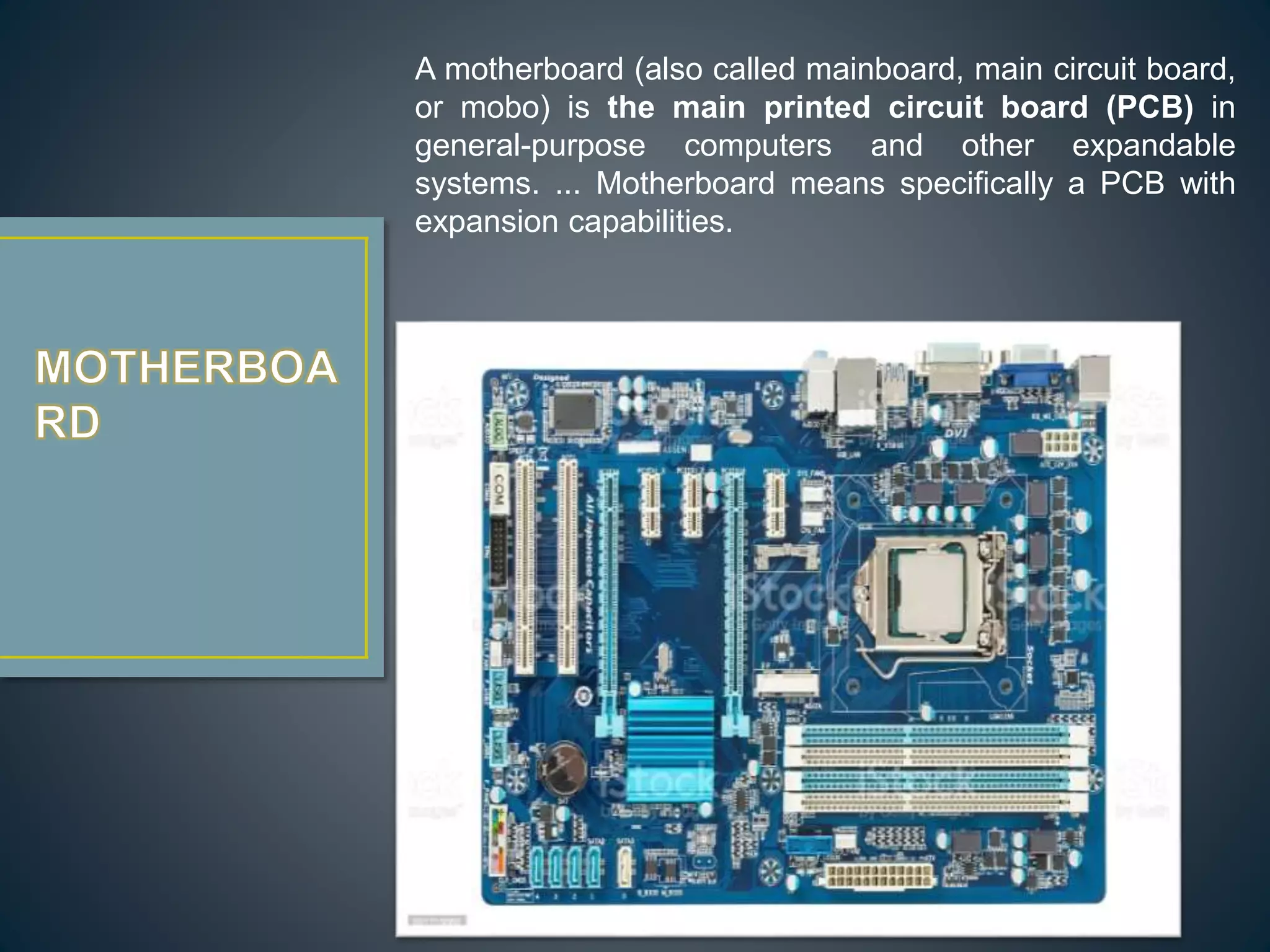
A motherboard (also called mainboard, main circuit board,
or mobo) is the main printed circuit board (PCB) in
general-purpose computers and other expandable
systems. ... Motherboard means specifically a PCB with
expansion capabilities.
RAM is a kind of computer memory that can be read and
written. It is mainly used to save data and machine code. A
RAM device permits data to be read or written in nearly the
same amount of time no matter where the data’s physical
location is in the memory. Compared to the direct-access
storage devices like hard drives, CD/DVD and magnetic tapes,
RAM media is much faster for data reading and writing.
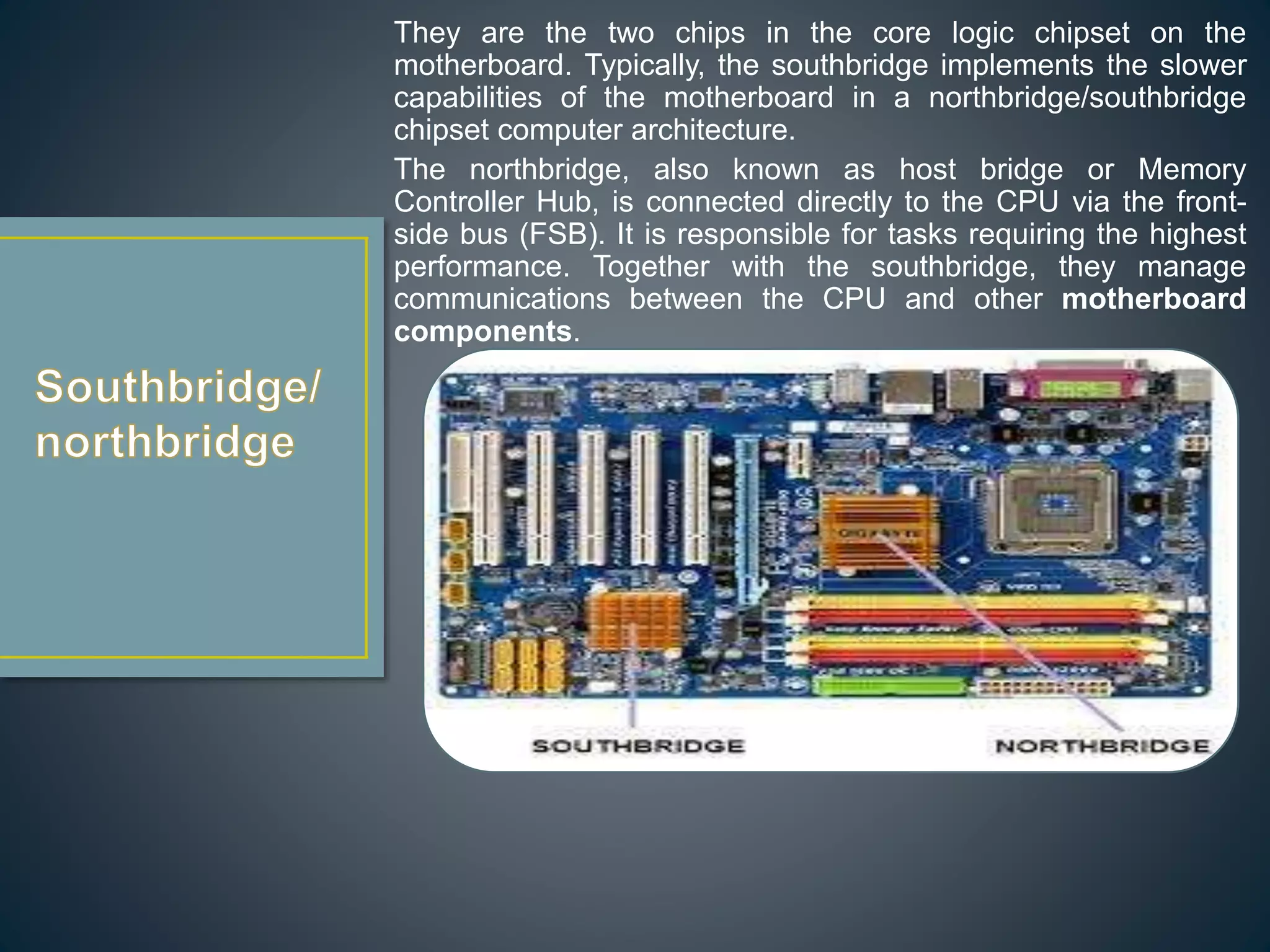
They are the two chips in the core logic chipset on the
motherboard. Typically, the southbridge implements the slower
capabilities of the motherboard in a northbridge/southbridge
chipset computer architecture.
The northbridge, also known as host bridge or Memory
Controller Hub, is connected directly to the CPU via the front-
side bus (FSB). It is responsible for tasks requiring the highest
performance. Together with the southbridge, they manage
communications between the CPU and other motherboard
components.
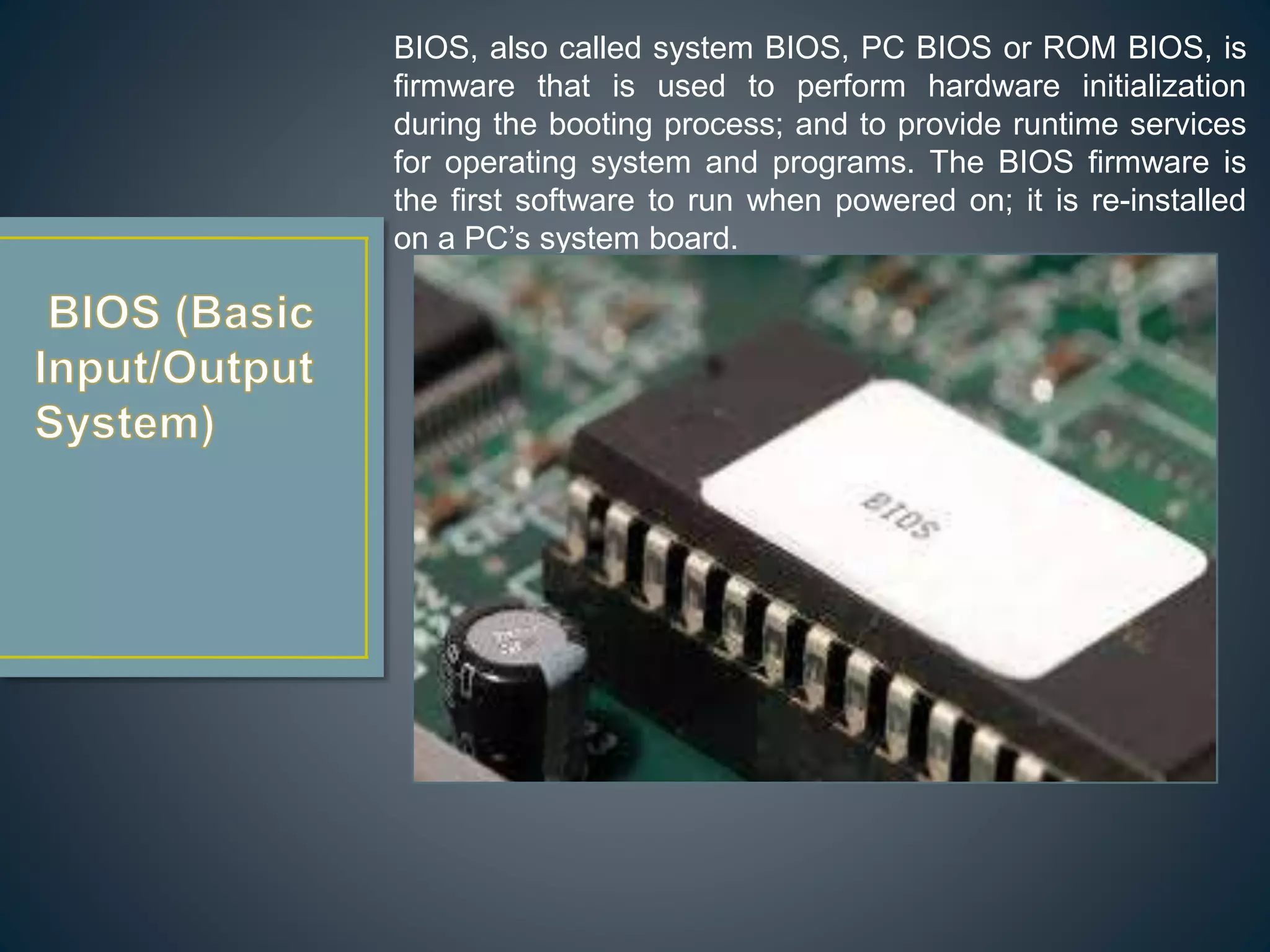
BIOS, also called system BIOS, PC BIOS or ROM BIOS, is
firmware that is used to perform hardware initialization
during the booting process; and to provide runtime services
for operating system and programs. The BIOS firmware is
the first software to run when powered on; it is re-installed
on a PC’s system board.
Input/output ports are the connections between the CPU
and peripheral devices on a motherboard. There are two
complementary methods to perform input and output
processes: memory-mapped I/O (MMIO) and port-mapped
I/O (PMIO). Alternatively, you can use dedicated I/O
processors, called channels on mainframe computers,
which execute their own instructions.
USB is an industry standard that creates specifications for
connectors, cables and protocols for connection; power
supply (interfacing) and communication among
computers, computer peripherals as well as other
desktops. There are a great many USB hardware
including several different connectors, of which USB-C is
the latest kind.
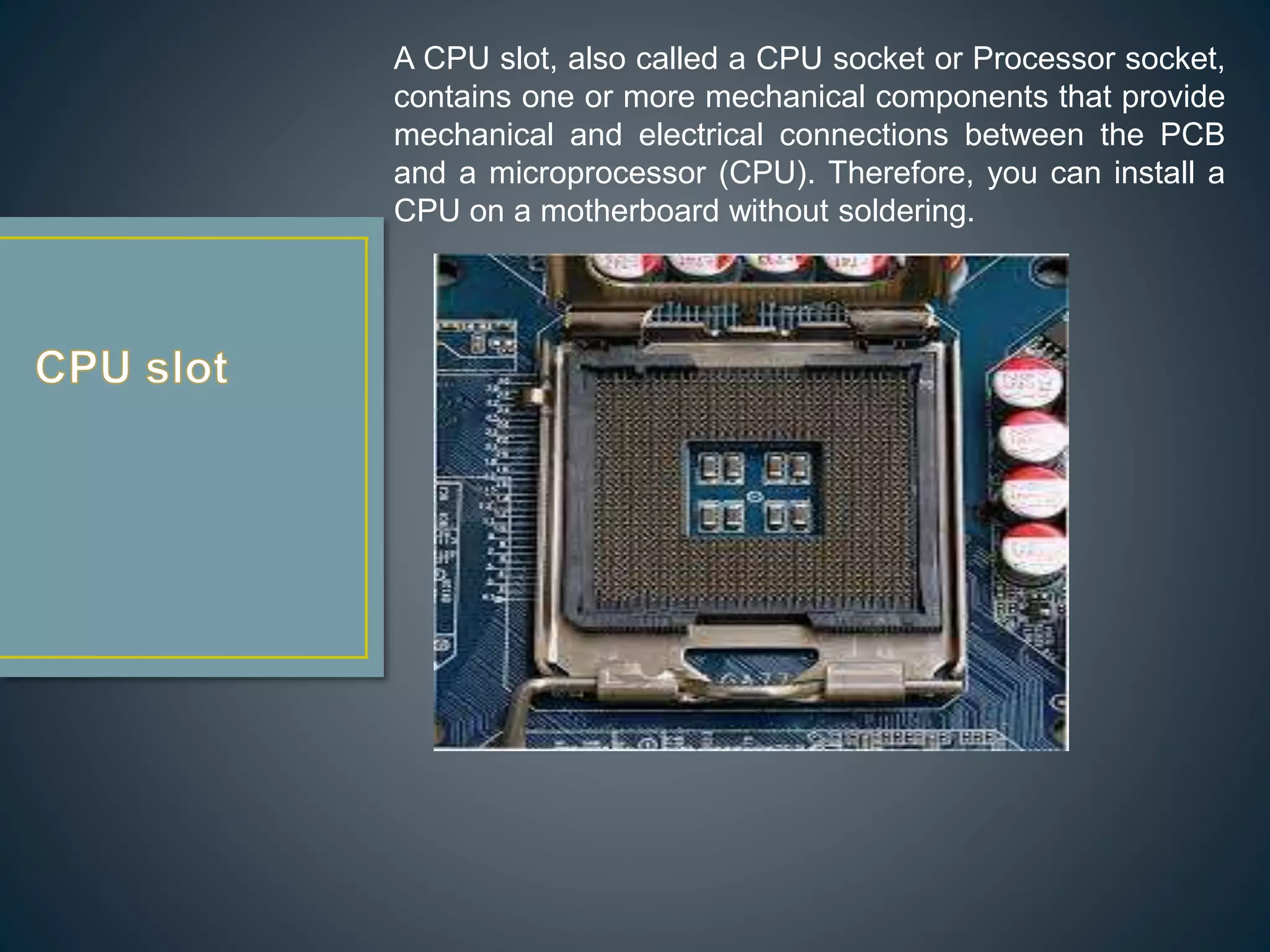
A CPU slot, also called a CPU socket or Processor socket,
contains one or more mechanical components that provide
mechanical and electrical connections between the PCB
and a microprocessor (CPU). Therefore, you can install a
CPU on a motherboard without soldering.
Peripheral Component Interconnect is a local computer
bus for connecting hardware to a computer. It supports all
the functions of a processor bus. PCI is usually been
called Conventional PCI to distinguish it from its
successor PCI Express (PCIe, PCI-e or PCI-E).
PCI Express is a high-speed serial computer expansion
bus standard designed to replace the older PCI, PCI-X
and AGP bus standard. It is a general-use motherboard
interface for the graphics card, SSDs, hard drives, Wi-Fi
as well as Ethernet hardware connections.
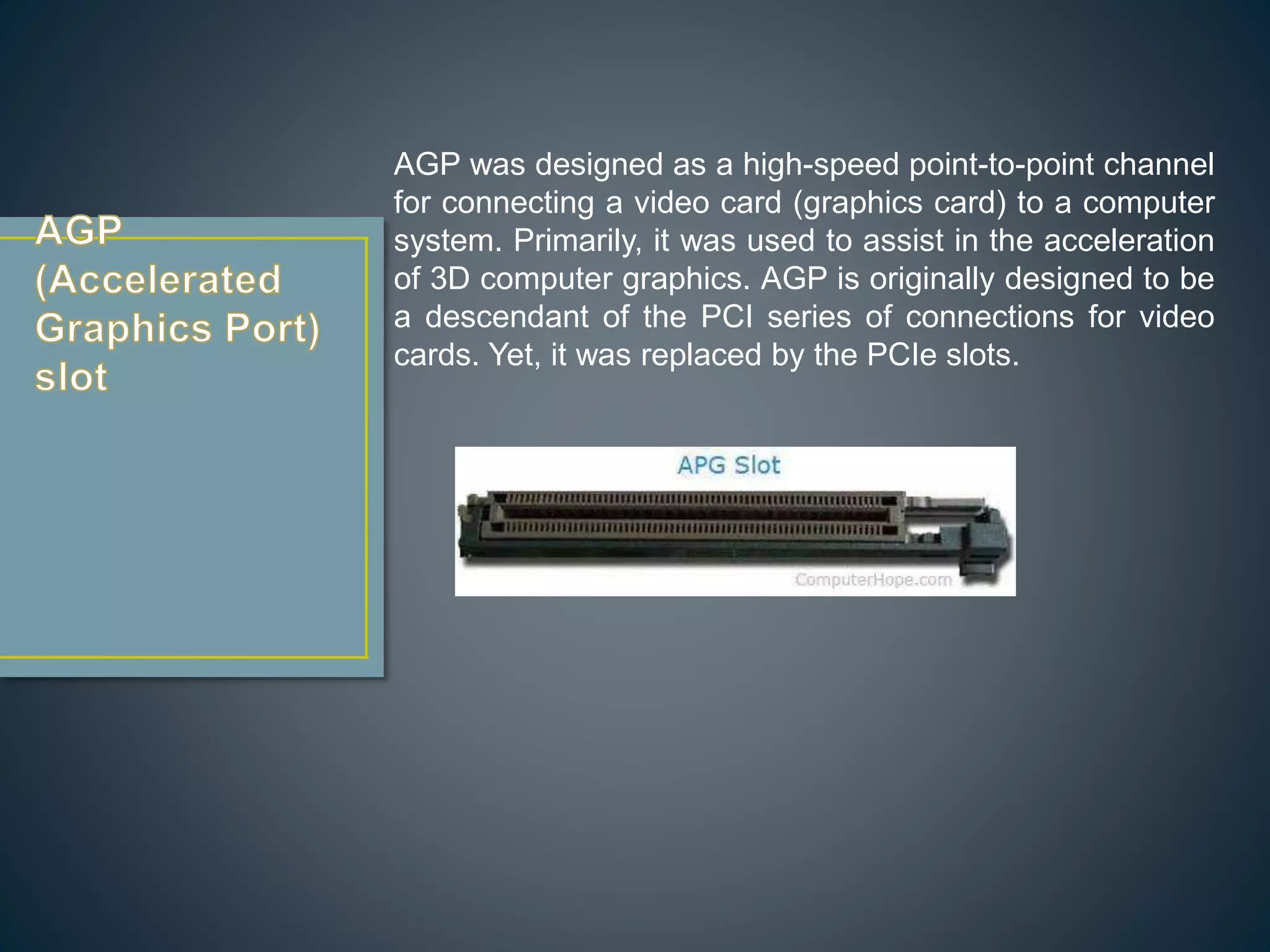
AGP was designed as a high-speed point-to-point channel
for connecting a video card (graphics card) to a computer
system. Primarily, it was used to assist in the acceleration
of 3D computer graphics. AGP is originally designed to be
a descendant of the PCI series of connections for video
cards. Yet, it was replaced by the PCIe slots.
ISA is the 16-bit internal bus of IMB PC/AT and similar
computers that are based on Intel 80286 and its immediate
successors during the 1980s. It was backward compatible
with the 8-bit bus of the 8088-based IBM PC largely.
There once was an attempt to extend ISA into a 32-bit bus,
called Extended Industry Standard Architecture (EISA). The
attempt wasn’t very successful and the EISA was largely
replaced by the later VESA Local Bus and the PCI bus.
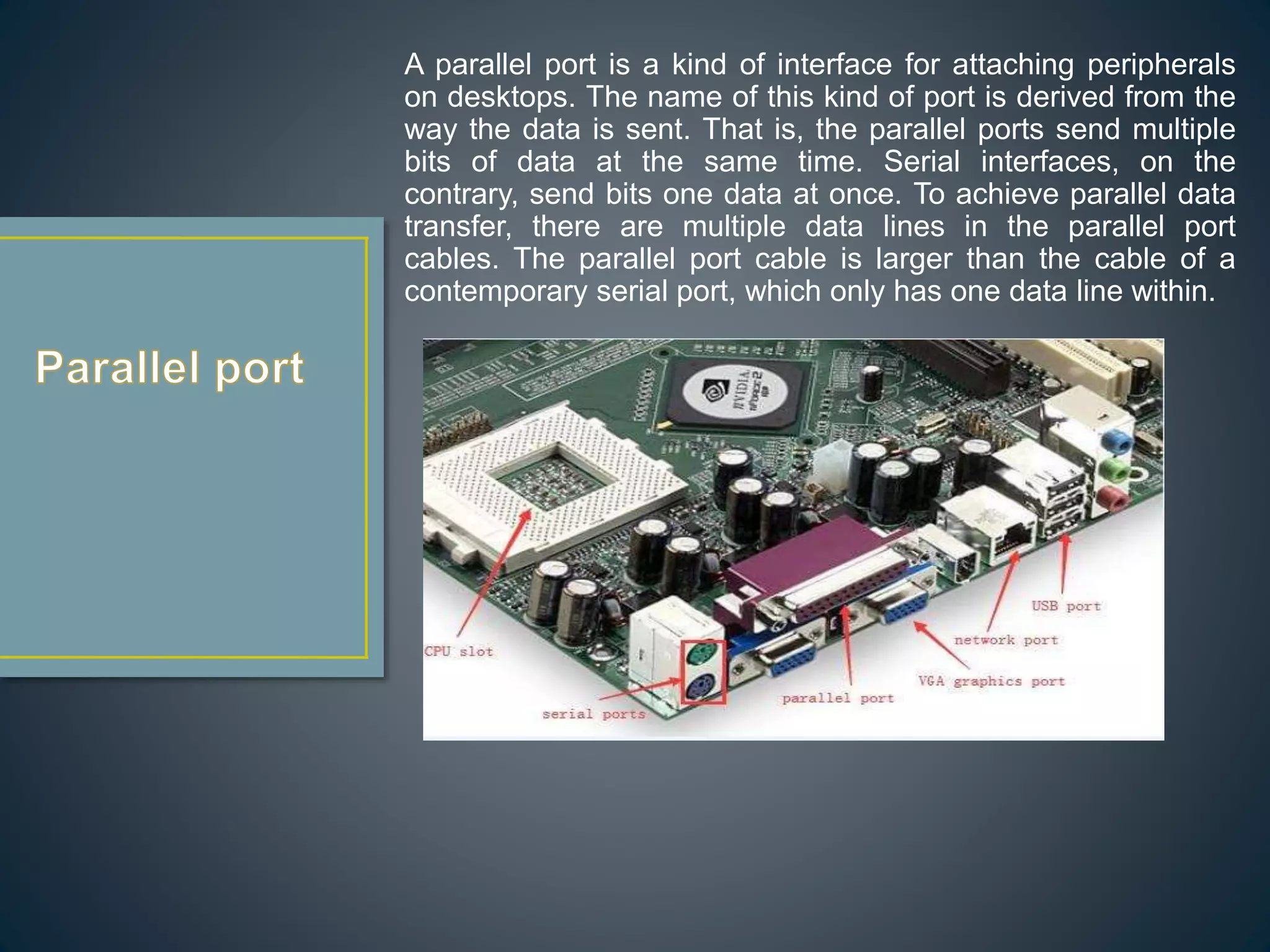
A parallel port is a kind of interface for attaching peripherals
on desktops. The name of this kind of port is derived from the
way the data is sent. That is, the parallel ports send multiple
bits of data at the same time. Serial interfaces, on the
contrary, send bits one data at once. To achieve parallel data
transfer, there are multiple data lines in the parallel port
cables. The parallel port cable is larger than the cable of a
contemporary serial port, which only has one data line within.
FDC is a special-purpose chip and associated disk
controller circuitry. It controls and directs reading from
and writing to a computer’s floppy disk drive (FDD).
The devices used for connecting IDE, Ethernet, FireWire,
USB and other systems can be called host adapter. So,
the IDE controller refers to the host adapter. A host
adapter, also called a host controller or a host bus
adapter (HBA), connects a computer (acting as the host
system) to other network and storage devices.
CMOS battery, also called memory battery,
clock battery or real-time clock (RTC), is
generally a CR2032 lithium coin cell. The
lifespan of the CMOS battery is estimated
to be three years when the power supply
unit (PSU) is unplugged or switch off.
A power supply provides the necessary
electrical power to let the computer to
work. It takes standard 110-Volt AC
(Alternative Current) power to DC (Direct
Current) power of 12 Volt, 5 Volt, 3.3 Volt,
etc.
All computers have a keyboard port
connected directly to the motherboard.
There are two types of connectors. The
oldest one is a special DIN (Deutsches
Institut für Normung) connector while the
newest one is the mini DIN PS/2-style
connector. Many PCs use the PS/2-style
connectors for both keyboard and mouse;
and the connectors are marked clearly for
different usage.
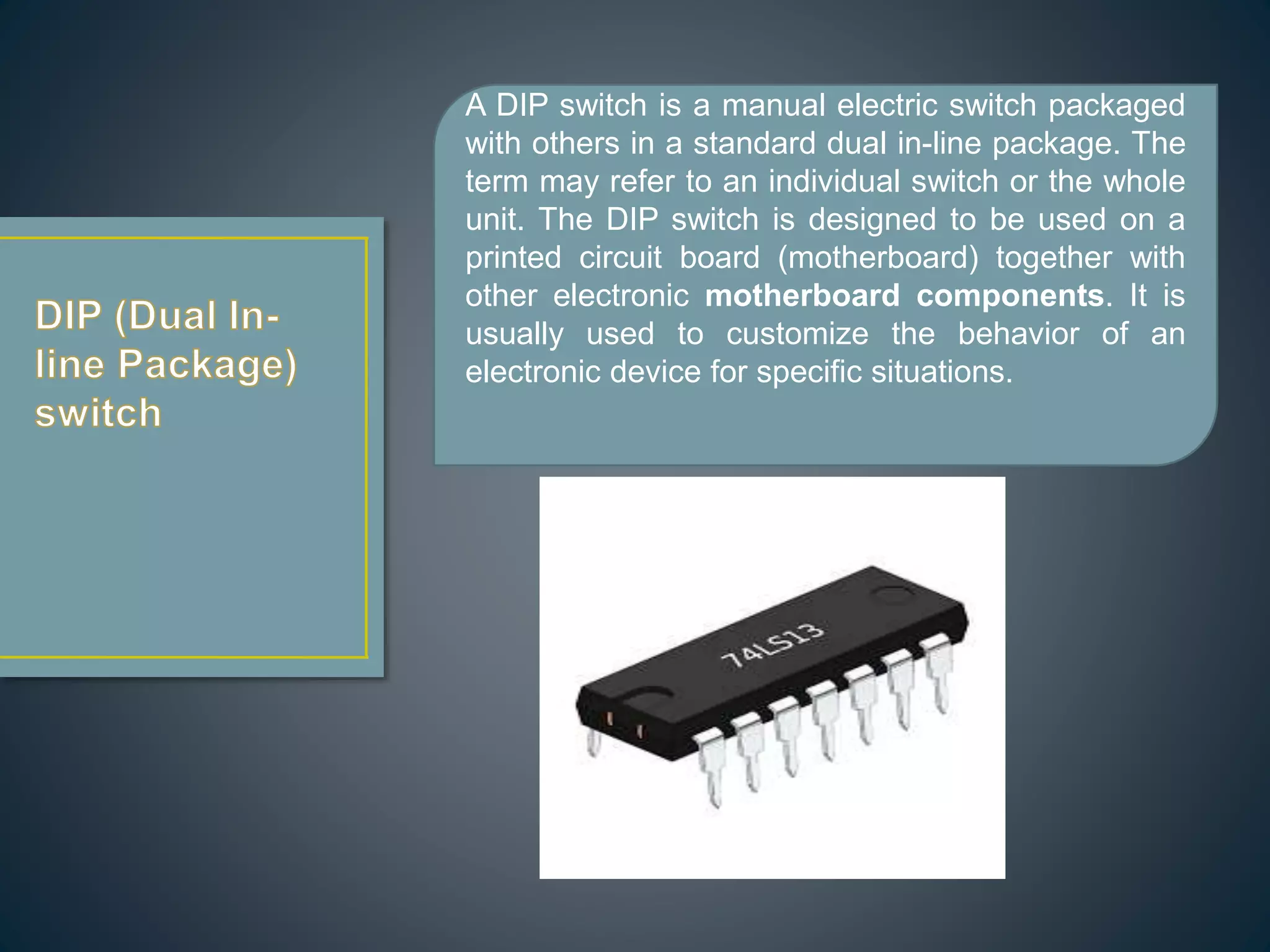
A DIP switch is a manual electric switch packaged
with others in a standard dual in-line package. The
term may refer to an individual switch or the whole
unit. The DIP switch is designed to be used on a
printed circuit board (motherboard) together with
other electronic motherboard components. It is
usually used to customize the behavior of an
electronic device for specific situations.
A jumper is a short length of conductor that is used
to close, open or bypass part of an electronic
circuit. Typically, jumpers are used to set up or
configure printed circuit boards like the
motherboard.
A heat sink is a passive heat exchanger that
transfers the heat generated by parts
of motherboard into a fluid medium like liquid or
air. The fluid medium will dissipate away from the
device. Thus, the temperature of the device is kept
within a tolerable range. On the motherboard, the
heatsink is usually used to cool CPU, GPU
(graphics processing unit), chipsets and RAM
modules.
A clock generator is an electronic oscillator (circuit)
that produces a clock signal for usage in
synchronizing a circuit’s operation. The clock signal
ranges between high and low frequencies, thus
creating a metronome for the coordination of
actions.
Identification of parts of motherboard

Identification of parts of motherboard

  • 1.
  • 2.
    CPU is theelectronic circuitry in a computer that executes instructions that make up a program. It is also known as a central processor or the main processor. The CPU executes the basic logic, arithmetic, controlling as well as input/output (I/O) operations specified by the instructions in the desktop programs.
  • 3.
     CPU (CentralProcessing Unit) chip  RAM (Random Access Memory) slots  Southbridge/northbridge  BIOS (Basic Input/Output System)  I/O port  USB (Universal Serial Bus)  CPU slot  PCI (Peripheral Component Interconnect) slot  AGP (Accelerated Graphics Port) slot  ISA (Industry Standard Architecture) slot  Parallel port  FDC (Floppy-Disk Controller)  IDE (Integrated Drive Electronics) controller  CMOS (Complementary Metal-oxide-semiconductor) battery  Power supply connector  Mouse and keyboard ports  DIP (Dual In-line Package) switch  Jumper  Heat sink/heatsink (cooling system)  Clock generator
  • 4.
    A motherboard (alsocalled mainboard, main circuit board, or mobo) is the main printed circuit board (PCB) in general-purpose computers and other expandable systems. ... Motherboard means specifically a PCB with expansion capabilities.
  • 5.
    RAM is akind of computer memory that can be read and written. It is mainly used to save data and machine code. A RAM device permits data to be read or written in nearly the same amount of time no matter where the data’s physical location is in the memory. Compared to the direct-access storage devices like hard drives, CD/DVD and magnetic tapes, RAM media is much faster for data reading and writing.
  • 6.
    They are thetwo chips in the core logic chipset on the motherboard. Typically, the southbridge implements the slower capabilities of the motherboard in a northbridge/southbridge chipset computer architecture. The northbridge, also known as host bridge or Memory Controller Hub, is connected directly to the CPU via the front- side bus (FSB). It is responsible for tasks requiring the highest performance. Together with the southbridge, they manage communications between the CPU and other motherboard components.
  • 7.
    BIOS, also calledsystem BIOS, PC BIOS or ROM BIOS, is firmware that is used to perform hardware initialization during the booting process; and to provide runtime services for operating system and programs. The BIOS firmware is the first software to run when powered on; it is re-installed on a PC’s system board.
  • 8.
    Input/output ports arethe connections between the CPU and peripheral devices on a motherboard. There are two complementary methods to perform input and output processes: memory-mapped I/O (MMIO) and port-mapped I/O (PMIO). Alternatively, you can use dedicated I/O processors, called channels on mainframe computers, which execute their own instructions.
  • 9.
    USB is anindustry standard that creates specifications for connectors, cables and protocols for connection; power supply (interfacing) and communication among computers, computer peripherals as well as other desktops. There are a great many USB hardware including several different connectors, of which USB-C is the latest kind.
  • 10.
    A CPU slot,also called a CPU socket or Processor socket, contains one or more mechanical components that provide mechanical and electrical connections between the PCB and a microprocessor (CPU). Therefore, you can install a CPU on a motherboard without soldering.
  • 11.
    Peripheral Component Interconnectis a local computer bus for connecting hardware to a computer. It supports all the functions of a processor bus. PCI is usually been called Conventional PCI to distinguish it from its successor PCI Express (PCIe, PCI-e or PCI-E). PCI Express is a high-speed serial computer expansion bus standard designed to replace the older PCI, PCI-X and AGP bus standard. It is a general-use motherboard interface for the graphics card, SSDs, hard drives, Wi-Fi as well as Ethernet hardware connections.
  • 12.
    AGP was designedas a high-speed point-to-point channel for connecting a video card (graphics card) to a computer system. Primarily, it was used to assist in the acceleration of 3D computer graphics. AGP is originally designed to be a descendant of the PCI series of connections for video cards. Yet, it was replaced by the PCIe slots.
  • 13.
    ISA is the16-bit internal bus of IMB PC/AT and similar computers that are based on Intel 80286 and its immediate successors during the 1980s. It was backward compatible with the 8-bit bus of the 8088-based IBM PC largely. There once was an attempt to extend ISA into a 32-bit bus, called Extended Industry Standard Architecture (EISA). The attempt wasn’t very successful and the EISA was largely replaced by the later VESA Local Bus and the PCI bus.
  • 14.
    A parallel portis a kind of interface for attaching peripherals on desktops. The name of this kind of port is derived from the way the data is sent. That is, the parallel ports send multiple bits of data at the same time. Serial interfaces, on the contrary, send bits one data at once. To achieve parallel data transfer, there are multiple data lines in the parallel port cables. The parallel port cable is larger than the cable of a contemporary serial port, which only has one data line within.
  • 15.
    FDC is aspecial-purpose chip and associated disk controller circuitry. It controls and directs reading from and writing to a computer’s floppy disk drive (FDD).
  • 16.
    The devices usedfor connecting IDE, Ethernet, FireWire, USB and other systems can be called host adapter. So, the IDE controller refers to the host adapter. A host adapter, also called a host controller or a host bus adapter (HBA), connects a computer (acting as the host system) to other network and storage devices.
  • 17.
    CMOS battery, alsocalled memory battery, clock battery or real-time clock (RTC), is generally a CR2032 lithium coin cell. The lifespan of the CMOS battery is estimated to be three years when the power supply unit (PSU) is unplugged or switch off.
  • 18.
    A power supplyprovides the necessary electrical power to let the computer to work. It takes standard 110-Volt AC (Alternative Current) power to DC (Direct Current) power of 12 Volt, 5 Volt, 3.3 Volt, etc.
  • 19.
    All computers havea keyboard port connected directly to the motherboard. There are two types of connectors. The oldest one is a special DIN (Deutsches Institut für Normung) connector while the newest one is the mini DIN PS/2-style connector. Many PCs use the PS/2-style connectors for both keyboard and mouse; and the connectors are marked clearly for different usage.
  • 20.
    A DIP switchis a manual electric switch packaged with others in a standard dual in-line package. The term may refer to an individual switch or the whole unit. The DIP switch is designed to be used on a printed circuit board (motherboard) together with other electronic motherboard components. It is usually used to customize the behavior of an electronic device for specific situations.
  • 21.
    A jumper isa short length of conductor that is used to close, open or bypass part of an electronic circuit. Typically, jumpers are used to set up or configure printed circuit boards like the motherboard.
  • 22.
    A heat sinkis a passive heat exchanger that transfers the heat generated by parts of motherboard into a fluid medium like liquid or air. The fluid medium will dissipate away from the device. Thus, the temperature of the device is kept within a tolerable range. On the motherboard, the heatsink is usually used to cool CPU, GPU (graphics processing unit), chipsets and RAM modules.
  • 23.
    A clock generatoris an electronic oscillator (circuit) that produces a clock signal for usage in synchronizing a circuit’s operation. The clock signal ranges between high and low frequencies, thus creating a metronome for the coordination of actions.