Motherboard
www.pskitservices.com 9975288300
What Is Motherboard ?
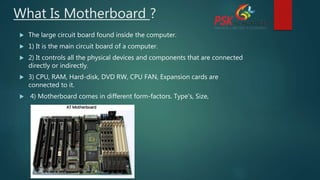
 The large circuit board found inside the computer.
 1) It is the main circuit board of a computer.
 2) It controls all the physical devices and components that are connected
directly or indirectly.
 3) CPU, RAM, Hard-disk, DVD RW, CPU FAN, Expansion cards are
connected to it.
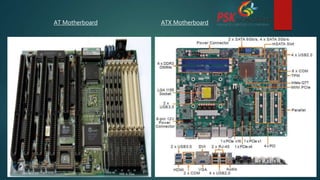
 4) Motherboard comes in different form-factors. Type’s, Size,
AT Motherboard ATX Motherboard
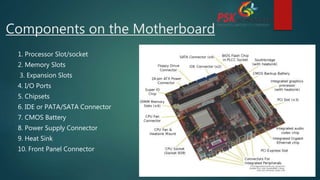
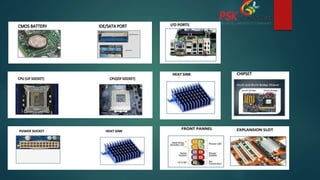
Components on the Motherboard
1. Processor Slot/socket
2. Memory Slots
3. Expansion Slots
4. I/O Ports
5. Chipsets
6. IDE or PATA/SATA Connector
7. CMOS Battery
8. Power Supply Connector
9. Heat Sink
10. Front Panel Connector
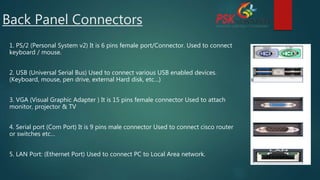
Back Panel Connectors
1. PS/2 (Personal System v2) It is 6 pins female port/Connector. Used to connect
keyboard / mouse.
2. USB (Universal Serial Bus) Used to connect various USB enabled devices.
(Keyboard, mouse, pen drive, external Hard disk, etc…)
3. VGA (Visual Graphic Adapter ) It is 15 pins female connector Used to attach
monitor, projector & TV
4. Serial port (Com Port) It is 9 pins male connector Used to connect cisco router
or switches etc…
5. LAN Port: (Ethernet Port) Used to connect PC to Local Area network.
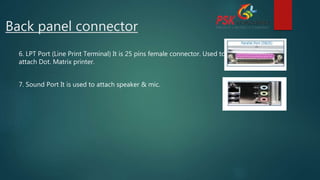
Back panel connector
6. LPT Port (Line Print Terminal) It is 25 pins female connector. Used to
attach Dot. Matrix printer.
7. Sound Port It is used to attach speaker & mic.
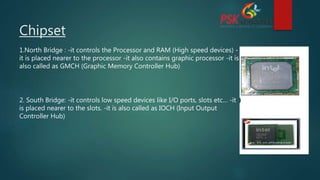
Chipset
1.North Bridge : -it controls the Processor and RAM (High speed devices) -
it is placed nearer to the processor -it also contains graphic processor -it is
also called as GMCH (Graphic Memory Controller Hub)
2. South Bridge: -it controls low speed devices like I/O ports, slots etc… -it
is placed nearer to the slots. -it is also called as IOCH (Input Output
Controller Hub)
IDE / PATA and SATA Connector
IDE (integrated drive electronics)/PATA(Parallel advance technology
attachment)
 IDE/EIDE cables are used to connect the devices the connector
 It is 40 pin’s connector used to attached or connect hard disk, dvd r/w.
SATA (Serial advanced Technology Attachment)
 SATA cables are used to connect the devices to the SATA
 It is pin less connector used to attached or connect hard disk, dvd r/w.
FDD Port(Floppy disk Drive)
 It is 34 pin connector or port used to attached floppy disk drive.
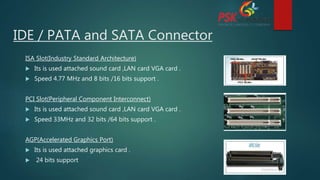
ISA Slot(Industry Standard Architecture)
 Its is used attached sound card ,LAN card VGA card .
 Speed 4.77 MHz and 8 bits /16 bits support .
PCI Slot(Peripheral Component Interconnect)
 Its is used attached sound card ,LAN card VGA card .
 Speed 33MHz and 32 bits /64 bits support .
AGP(Accelerated Graphics Port)
 Its is used attached graphics card .
 24 bits support
IDE / PATA and SATA Connector
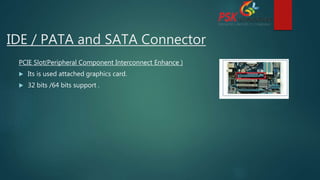
PCIE Slot(Peripheral Component Interconnect Enhance )
 Its is used attached graphics card.
 32 bits /64 bits support .
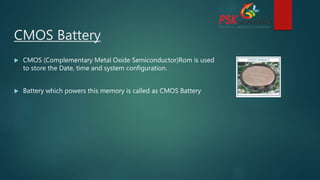
CMOS Battery
 CMOS (Complementary Metal Oxide Semiconductor)Rom is used
to store the Date, time and system configuration.
 Battery which powers this memory is called as CMOS Battery
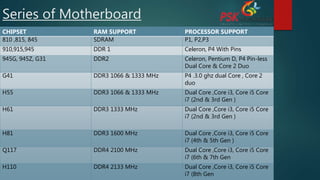
Series of Motherboard
CHIPSET RAM SUPPORT PROCESSOR SUPPORT
810 ,815, 845 SDRAM P1, P2,P3
910,915,945 DDR 1 Celeron, P4 With Pins
945G, 945Z, G31 DDR2 Celeron, Pentium D, P4 Pin-less
Dual Core & Core 2 Duo
G41 DDR3 1066 & 1333 MHz P4 .3.0 ghz dual Core , Core 2
duo
H55 DDR3 1066 & 1333 MHz Dual Core ,Core i3, Core i5 Core
i7 (2nd & 3rd Gen )
H61 DDR3 1333 MHz Dual Core ,Core i3, Core i5 Core
i7 (2nd & 3rd Gen )
H81 DDR3 1600 MHz Dual Core ,Core i3, Core i5 Core
i7 (4th & 5th Gen )
Q117 DDR4 2100 MHz Dual Core ,Core i3, Core i5 Core
i7 (6th & 7th Gen
H110 DDR4 2133 MHz Dual Core ,Core i3, Core i5 Core
i7 (8th Gen
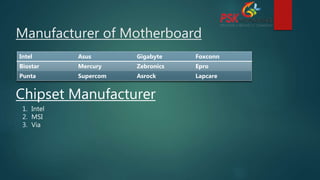
Manufacturer of Motherboard
Intel Asus Gigabyte Foxconn
Biostar Mercury Zebronics Epro
Punta Supercom Asrock Lapcare
Chipset Manufacturer
1. Intel
2. MSI
3. Via
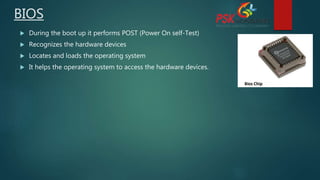
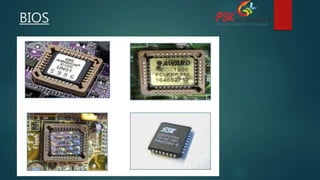
BIOS
 During the boot up it performs POST (Power On self-Test)
 Recognizes the hardware devices
 Locates and loads the operating system
 It helps the operating system to access the hardware devices.
BIOS
www.pskitservices.com 9975288300
Thank you
PSK Technologies Pvt.Ltd IT company

Motherboard.pptx

  • 1.
  • 2.
    What Is Motherboard?  The large circuit board found inside the computer.  1) It is the main circuit board of a computer.  2) It controls all the physical devices and components that are connected directly or indirectly.  3) CPU, RAM, Hard-disk, DVD RW, CPU FAN, Expansion cards are connected to it.  4) Motherboard comes in different form-factors. Type’s, Size,
  • 3.
    AT Motherboard ATXMotherboard
  • 4.
    Components on theMotherboard 1. Processor Slot/socket 2. Memory Slots 3. Expansion Slots 4. I/O Ports 5. Chipsets 6. IDE or PATA/SATA Connector 7. CMOS Battery 8. Power Supply Connector 9. Heat Sink 10. Front Panel Connector
  • 6.
    Back Panel Connectors 1.PS/2 (Personal System v2) It is 6 pins female port/Connector. Used to connect keyboard / mouse. 2. USB (Universal Serial Bus) Used to connect various USB enabled devices. (Keyboard, mouse, pen drive, external Hard disk, etc…) 3. VGA (Visual Graphic Adapter ) It is 15 pins female connector Used to attach monitor, projector & TV 4. Serial port (Com Port) It is 9 pins male connector Used to connect cisco router or switches etc… 5. LAN Port: (Ethernet Port) Used to connect PC to Local Area network.
  • 7.
    Back panel connector 6.LPT Port (Line Print Terminal) It is 25 pins female connector. Used to attach Dot. Matrix printer. 7. Sound Port It is used to attach speaker & mic.
  • 8.
    Chipset 1.North Bridge :-it controls the Processor and RAM (High speed devices) - it is placed nearer to the processor -it also contains graphic processor -it is also called as GMCH (Graphic Memory Controller Hub) 2. South Bridge: -it controls low speed devices like I/O ports, slots etc… -it is placed nearer to the slots. -it is also called as IOCH (Input Output Controller Hub)
  • 9.
    IDE / PATAand SATA Connector IDE (integrated drive electronics)/PATA(Parallel advance technology attachment)  IDE/EIDE cables are used to connect the devices the connector  It is 40 pin’s connector used to attached or connect hard disk, dvd r/w. SATA (Serial advanced Technology Attachment)  SATA cables are used to connect the devices to the SATA  It is pin less connector used to attached or connect hard disk, dvd r/w. FDD Port(Floppy disk Drive)  It is 34 pin connector or port used to attached floppy disk drive.
  • 10.
    ISA Slot(Industry StandardArchitecture)  Its is used attached sound card ,LAN card VGA card .  Speed 4.77 MHz and 8 bits /16 bits support . PCI Slot(Peripheral Component Interconnect)  Its is used attached sound card ,LAN card VGA card .  Speed 33MHz and 32 bits /64 bits support . AGP(Accelerated Graphics Port)  Its is used attached graphics card .  24 bits support IDE / PATA and SATA Connector
  • 11.
    IDE / PATAand SATA Connector PCIE Slot(Peripheral Component Interconnect Enhance )  Its is used attached graphics card.  32 bits /64 bits support .
  • 12.
    CMOS Battery  CMOS(Complementary Metal Oxide Semiconductor)Rom is used to store the Date, time and system configuration.  Battery which powers this memory is called as CMOS Battery
  • 13.
    Series of Motherboard CHIPSETRAM SUPPORT PROCESSOR SUPPORT 810 ,815, 845 SDRAM P1, P2,P3 910,915,945 DDR 1 Celeron, P4 With Pins 945G, 945Z, G31 DDR2 Celeron, Pentium D, P4 Pin-less Dual Core & Core 2 Duo G41 DDR3 1066 & 1333 MHz P4 .3.0 ghz dual Core , Core 2 duo H55 DDR3 1066 & 1333 MHz Dual Core ,Core i3, Core i5 Core i7 (2nd & 3rd Gen ) H61 DDR3 1333 MHz Dual Core ,Core i3, Core i5 Core i7 (2nd & 3rd Gen ) H81 DDR3 1600 MHz Dual Core ,Core i3, Core i5 Core i7 (4th & 5th Gen ) Q117 DDR4 2100 MHz Dual Core ,Core i3, Core i5 Core i7 (6th & 7th Gen H110 DDR4 2133 MHz Dual Core ,Core i3, Core i5 Core i7 (8th Gen
  • 14.
    Manufacturer of Motherboard IntelAsus Gigabyte Foxconn Biostar Mercury Zebronics Epro Punta Supercom Asrock Lapcare Chipset Manufacturer 1. Intel 2. MSI 3. Via
  • 15.
    BIOS  During theboot up it performs POST (Power On self-Test)  Recognizes the hardware devices  Locates and loads the operating system  It helps the operating system to access the hardware devices.
  • 16.
  • 17.
    www.pskitservices.com 9975288300 Thank you PSKTechnologies Pvt.Ltd IT company