




New York USA
London UK
Munich Germany
Zug Switzerland
Mobile Security: iOS
Yaroslav Vorontsov,
Software Architect, Tech Lead
Agenda
• Introduction: security overview
• Security whitepaper overview
• Attacking iOS applications
• Overview of Security APIs
• Ready-to-use recipes
• More materials
Y . V O R O N T S O V " S E C U R I T Y I N I O S A P P S V 2 " 2
Introduction
Theoretical base
• Probability theory: negligibility
• PRNG: Hardware vs Software
• Crypto basics: PRF/PRP
• Symmetric and asymmetric encryption
• OTP – Vernam cipher
• Hashes and MACs
• Attacks on encryption
• Network and telecommunications
• ISO/OSI stack: session level – SSL and
TLS
• Key generation/distribution schemes
• Diffie-Hellmann and Kerberos
• Trust and certificates
• Public and private keys
• Documents: PKCS, RFC
Terms
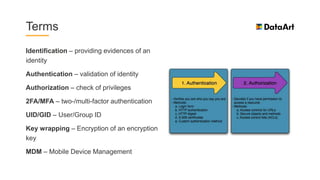
Identification – providing evidences of an
identity
Authentication – validation of identity
Authorization – check of privileges
2FA/MFA – two-/multi-factor authentication
UID/GID – User/Group ID
Key wrapping – Encryption of an encryption
key
MDM – Mobile Device Management
Security Whitepaper overview
Main document
• Boot process and System Software Authorization
• Secure Enclave
• Passcode and Touch ID policies
• AES hardware acceleration
• Data protection classes and Keychain protection
• Key bags
• Other important features
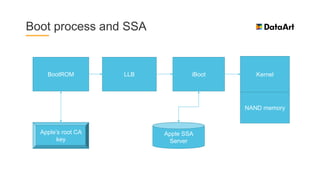
Boot process and SSA
BootROM LLB iBoot Kernel
NAND memory
Apple’s root CA
key
Apple SSA
Server
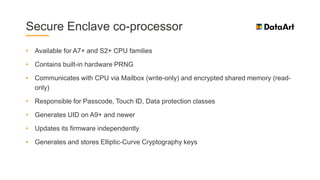
Secure Enclave co-processor
• Available for A7+ and S2+ CPU families
• Contains built-in hardware PRNG
• Communicates with CPU via Mailbox (write-only) and encrypted shared memory (read-
only)
• Responsible for Passcode, Touch ID, Data protection classes
• Generates UID on A9+ and newer
• Updates its firmware independently
• Generates and stores Elliptic-Curve Cryptography keys
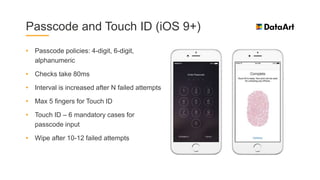
Passcode and Touch ID (iOS 9+)
• Passcode policies: 4-digit, 6-digit,
alphanumeric
• Checks take 80ms
• Interval is increased after N failed attempts
• Max 5 fingers for Touch ID
• Touch ID – 6 mandatory cases for
passcode input
• Wipe after 10-12 failed attempts
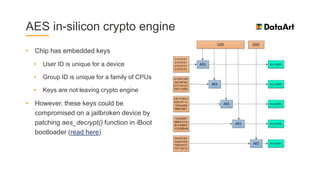
AES in-silicon crypto engine
• Chip has embedded keys
• User ID is unique for a device
• Group ID is unique for a family of CPUs
• Keys are not leaving crypto engine
• However, these keys could be
compromised on a jailbroken device by
patching aes_decrypt() function in iBoot
bootloader (read here)
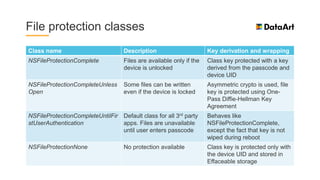
File protection classes
Class name Description Key derivation and wrapping
NSFileProtectionComplete Files are available only if the
device is unlocked
Class key protected with a key
derived from the passcode and
device UID
NSFileProtectionCompleteUnless
Open
Some files can be written
even if the device is locked
Asymmetric crypto is used, file
key is protected using One-
Pass Diffie-Hellman Key
Agreement
NSFileProtectionCompleteUntilFir
stUserAuthentication
Default class for all 3rd party
apps. Files are unavailable
until user enters passcode
Behaves like
NSFileProtectionComplete,
except the fact that key is not
wiped during reboot
NSFileProtectionNone No protection available Class key is protected only with
the device UID and stored in
Effaceable storage
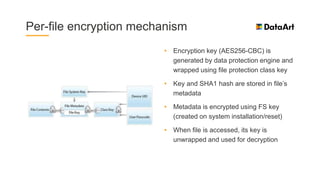
Per-file encryption mechanism
• Encryption key (AES256-CBC) is
generated by data protection engine and
wrapped using file protection class key
• Key and SHA1 hash are stored in file’s
metadata
• Metadata is encrypted using FS key
(created on system installation/reset)
• When file is accessed, its key is
unwrapped and used for decryption
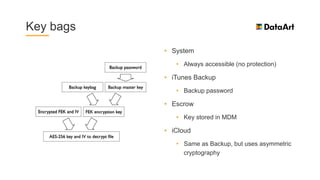
Key bags
• System
• Always accessible (no protection)
• iTunes Backup
• Backup password
• Escrow
• Key stored in MDM
• iCloud
• Same as Backup, but uses asymmetric
cryptography
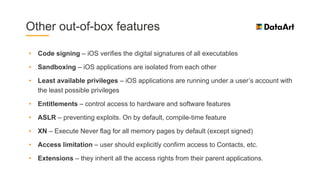
Other out-of-box features
• Code signing – iOS verifies the digital signatures of all executables
• Sandboxing – iOS applications are isolated from each other
• Least available privileges – iOS applications are running under a user’s account with
the least possible privileges
• Entitlements – control access to hardware and software features
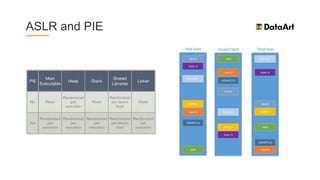
• ASLR – preventing exploits. On by default, compile-time feature
• XN – Execute Never flag for all memory pages by default (except signed)
• Access limitation – user should explicitly confirm access to Contacts, etc.
• Extensions – they inherit all the access rights from their parent applications.
ASLR and PIE
Attacking iOS apps
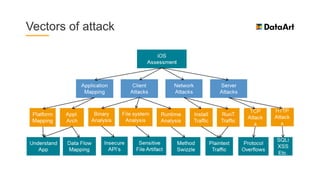
Vectors of attack
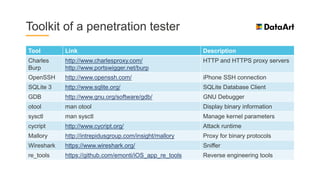
Toolkit of a penetration tester
Tool Link Description
Charles
Burp
http://www.charlesproxy.com/
http://www.portswigger.net/burp
HTTP and HTTPS proxy servers
OpenSSH http://www.openssh.com/ iPhone SSH connection
SQLite 3 http://www.sqlite.org/ SQLite Database Client
GDB http://www.gnu.org/software/gdb/ GNU Debugger
otool man otool Display binary information
sysctl man sysctl Manage kernel parameters
cycript http://www.cycript.org/ Attack runtime
Mallory http://intrepidusgroup.com/insight/mallory Proxy for binary protocols
Wireshark https://www.wireshark.org/ Sniffer
re_tools https://github.com/emonti/iOS_app_re_tools Reverse engineering tools
Overview of security APIs and mechanisms
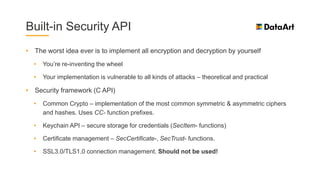
Built-in Security API
• The worst idea ever is to implement all encryption and decryption by yourself
• You’re re-inventing the wheel
• Your implementation is vulnerable to all kinds of attacks – theoretical and practical
• Security framework (C API)
• Common Crypto – implementation of the most common symmetric & asymmetric ciphers
and hashes. Uses CC- function prefixes.
• Keychain API – secure storage for credentials (SecItem- functions)
• Certificate management – SecCertificate-, SecTrust- functions.
• SSL3.0/TLS1.0 connection management. Should not be used!
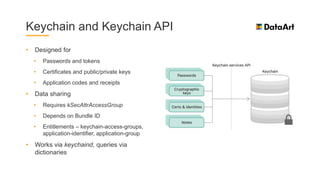
Keychain and Keychain API
• Designed for
• Passwords and tokens
• Certificates and public/private keys
• Application codes and receipts
• Data sharing
• Requires kSecAttrAccessGroup
• Depends on Bundle ID
• Entitlements – keychain-access-groups,
application-identifier, application-group
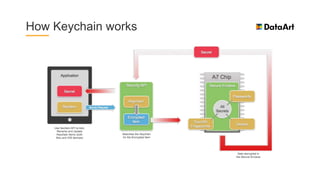
• Works via keychaind, queries via
dictionaries
How Keychain works
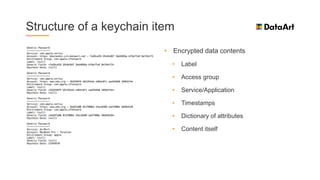
Structure of a keychain item
• Encrypted data contents
• Label
• Access group
• Service/Application
• Timestamps
• Dictionary of attributes
• Content itself
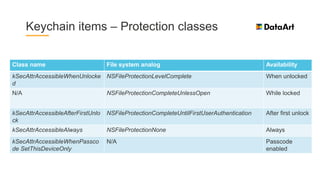
Keychain items – Protection classes
Class name File system analog Availability
kSecAttrAccessibleWhenUnlocke
d
NSFileProtectionLevelComplete When unlocked
N/A NSFileProtectionCompleteUnlessOpen While locked
kSecAttrAccessibleAfterFirstUnlo
ck
NSFileProtectionCompleteUntilFirstUserAuthentication After first unlock
kSecAttrAccessibleAlways NSFileProtectionNone Always
kSecAttrAccessibleWhenPassco
de SetThisDeviceOnly
N/A Passcode
enabled
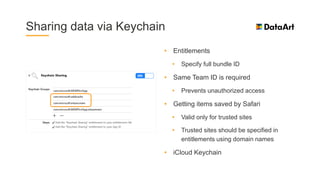
Sharing data via Keychain
• Entitlements
• Specify full bundle ID
• Same Team ID is required
• Prevents unauthorized access
• Getting items saved by Safari
• Valid only for trusted sites
• Trusted sites should be specified in
entitlements using domain names
• iCloud Keychain
Common Crypto API (plain C API)
• man CC_crypto, CC_MD5, CC_SHA, CCHmac, CCCryptor
• CCCryptor – supports DES, 3DES, AES
• CCHmac – API for using message authentication codes
• CC_MD and CC_SHA
• Access to MD2, MD4, MD5 for compatibility
• Access to SHA1 for compatibility and SHA2 modern hashes
• kCCAlgSHA1 and kCCAlgMD5 – legacy
• kCCAlgSHA2 (224, 256, 384, 512) – modern
Other Security APIs
• CCKeyDerivationPBKDF (aka PBKDF2)
• Number of rounds can be tweaked via
CCCalibratePBKDF
• SecRandomCopyBytes (proxies
/dev/random)
• Use this function to get a sequence of
pseudo-random bytes
• FORGET ABOUT RAND(), SRAND() AND
ARC4RANDOM()!!!
• SSLContextRef and manipulating functions
• Implementation of SSL 3.0 and TLS 1.0
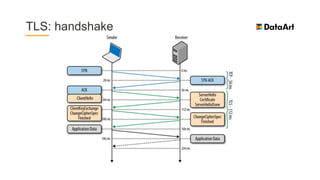
TLS: handshake
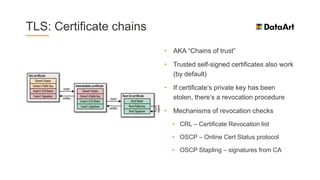
TLS: Certificate chains
• AKA “Chains of trust”
• Trusted self-signed certificates also work
(by default)
• If certificate’s private key has been
stolen, there’s a revocation procedure
• Mechanisms of revocation checks
• CRL – Certificate Revocation list
• OSCP – Online Cert Status protocol
• OSCP Stapling – signatures from CA
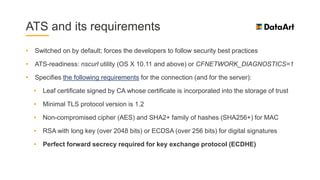
ATS and its requirements
• Switched on by default; forces the developers to follow security best practices
• ATS-readiness: nscurl utility (OS X 10.11 and above) or CFNETWORK_DIAGNOSTICS=1
• Specifies the following requirements for the connection (and for the server):
• Leaf certificate signed by CA whose certificate is incorporated into the storage of trust
• Minimal TLS protocol version is 1.2
• Non-compromised cipher (AES) and SHA2+ family of hashes (SHA256+) for MAC
• RSA with long key (over 2048 bits) or ECDSA (over 256 bits) for digital signatures
• Perfect forward secrecy required for key exchange protocol (ECDHE)
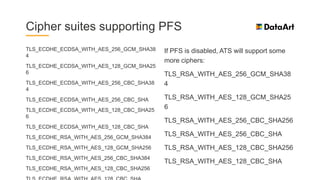
Cipher suites supporting PFS
TLS_ECDHE_ECDSA_WITH_AES_256_GCM_SHA38
4
TLS_ECDHE_ECDSA_WITH_AES_128_GCM_SHA25
6
TLS_ECDHE_ECDSA_WITH_AES_256_CBC_SHA38
4
TLS_ECDHE_ECDSA_WITH_AES_256_CBC_SHA
TLS_ECDHE_ECDSA_WITH_AES_128_CBC_SHA25
6
TLS_ECDHE_ECDSA_WITH_AES_128_CBC_SHA
TLS_ECDHE_RSA_WITH_AES_256_GCM_SHA384
TLS_ECDHE_RSA_WITH_AES_128_GCM_SHA256
TLS_ECDHE_RSA_WITH_AES_256_CBC_SHA384
TLS_ECDHE_RSA_WITH_AES_128_CBC_SHA256
If PFS is disabled, ATS will support some
more ciphers:
TLS_RSA_WITH_AES_256_GCM_SHA38
4
TLS_RSA_WITH_AES_128_GCM_SHA25
6
TLS_RSA_WITH_AES_256_CBC_SHA256
TLS_RSA_WITH_AES_256_CBC_SHA
TLS_RSA_WITH_AES_128_CBC_SHA256
TLS_RSA_WITH_AES_128_CBC_SHA
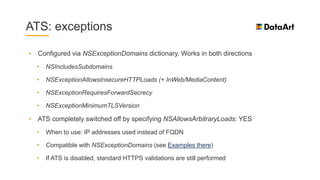
ATS: exceptions
• Configured via NSExceptionDomains dictionary. Works in both directions
• NSIncludesSubdomains
• NSExceptionAllowsInsecureHTTPLoads (+ InWeb/MediaContent)
• NSExceptionRequiresForwardSecrecy
• NSExceptionMinimumTLSVersion
• ATS completely switched off by specifying NSAllowsArbitraryLoads: YES
• When to use: IP addresses used instead of FQDN
• Compatible with NSExceptionDomains (see Examples there)
• If ATS is disabled, standard HTTPS validations are still performed
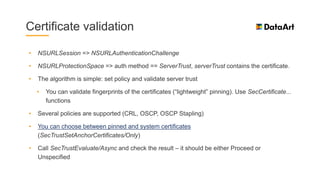
Certificate validation
• NSURLSession => NSURLAuthenticationChallenge
• NSURLProtectionSpace => auth method == ServerTrust, serverTrust contains the certificate.
• The algorithm is simple: set policy and validate server trust
• You can validate fingerprints of the certificates (“lightweight” pinning). Use SecCertificate...
functions
• Several policies are supported (CRL, OSCP, OSCP Stapling)
• You can choose between pinned and system certificates
(SecTrustSetAnchorCertificates/Only)
• Call SecTrustEvaluate/Async and check the result – it should be either Proceed or
Unspecified
Recipes
Securing your cached data
• If you use Core Data – use NSValueTransformer
• Alternative: transient properties. NO FTS!
• If you use SQLite – SQLCipher or SEE
• If you use any other kind of file
• Assign this file to a sufficient protection class
• Use AES encryption before writing to the disk
• If you want to save credentials
• Encrypted, salted and hashed in Keychain
• Use steganography, Luke 
Web views and caching web/HTTP
content
• You have a tough choice: WKWebView vs UIWebView vs SFSafariViewController
• Good old UIWebView is affected by global HTTP cache policy
• Modern WKWebView is generally safer – it’s running in an external process
• Fresh SFSafariViewController requires no ATS tweaks to support arbitrary web content
• Configure HTTP headers for cache management wisely! Use no-cache; no-store
• NSURLCache + NSHTTPCookieStorage vs. WKWebsiteDataStore
• Clean up everything which may be sensitive
• Grab/set cookies manually using JavaScript controllers for WKWebView. Yes, it’s painful

How to get a good encryption key?
• DO NOT
• Use your password or H(password) as a key
• Rely only on device-stored or device-specific information
• Cache the calculated key anywhere, even in memory
• DO (3-2-1 principle)
• Use password-based key derivation functions (PBKDF2)
• Use multiple iterations of hash/key derivation function (10k+)
• Use graphical pattern/secure PRNG to derive a part of your key
• Split the arguments of your KDF and store them in different places
• Use salt to make it harder to crack the key
Building secure authentication scheme
• Do not transfer passwords
• Unencrypted
• Weakly encrypted
• Hashed few times
• Prevent stealing session ID and fixation
attacks
• Use tokens/session IDs with limited TTL
and explicit expiration time
• Store tokens securely
• Even if a request has been intercepted
• Resistance against replay attack – digest
authentication, nonce values
• Resistance against brute-force attack –
account lockout policies
• Let users identify their “trusted” locations
- warn them via a side channel (i.e.,
SMS codes)
• Supply only generic information about
authentication failures to the users
And something more…
• Use ptrace() to catch and deny debuggers in Release mode
• Clean Pasteboard while going into background
• Forbid auto-correction for “sensitive” text fields
• Introduce password policies (complexity, expiration, leaked passwords)
• Cover views with splash screen or blur them
• Use 2FA/MFA – push messages/code generation apps/hardware tokens/API keys
• “Lock” application or perform logout after a predefined period of inactivity
• Remember: it’s better to protect against particular threats
Keep this in mind!
If you’re using non-public domain implementation of encryption algorithms, you’re
responsible for its registration in CCATS (Bureau of Industry and Security)
Read this article for more details
Fortunately, iTunes Connect allows you selecting one of predefined options during the
binary submission (personal/health data, network connections, banking transactions)
Even implicit usage of encryption (via SQLCipher or HTTPS connections) makes you
answer “YES” in iTunes Connect
Contact Apple Support DIRECTLY in case of issues with “crypto” app submission
Further reading
Other materials
• Useful web links
• PKCS – Public Key Cryptography
Standards
• iOS Encryption
• iOS Developer Cheat Sheet from
OWASP
• Books
• J. Zdziarski. Hacking and securing iOS
Applications
• Watch WWDC videos
• WWDC 2010, Session 209 – Securing your
application data
• WWDC 2011, Session 202 – Security overview
• WWDC 2011, Session 208 – Securing iOS
Applications
• WWDC 2012, Session 704 – The Security
Framework
• WWDC 2013, Session 709 – Protecting Secrets
with the Keychain
• WWDC 2014, Session 711 – Keychain and
Authentication with Touch ID
• WWDC 2015, Session 706 – Security and your
apps
Other materials
More web links
iOS App Security
Zdziarski Blog
HTTP Server trust evaluation
SSL Pinning with self-signed certificates
Penetration testing for iPhone applications
TN2232: Server Trust Evaluation
App Transport Security
…And even more web links…
iPhone Forensics: Analysis of iOS Backups
Password storage cheat sheet
How to store salt correctly (v1)?
How to store salt correctly (v2)?
Changing passwords when files are
encrypted with PBKDF2-derived key
PBKDF2 and password history
Salted password hashing – doing it right
"Mobile security: iOS", Yaroslav Vorontsov, DataArt

"Mobile security: iOS", Yaroslav Vorontsov, DataArt

  • 1.
    New York USA LondonUK Munich Germany Zug Switzerland Mobile Security: iOS Yaroslav Vorontsov, Software Architect, Tech Lead
  • 2.
    Agenda • Introduction: securityoverview • Security whitepaper overview • Attacking iOS applications • Overview of Security APIs • Ready-to-use recipes • More materials Y . V O R O N T S O V " S E C U R I T Y I N I O S A P P S V 2 " 2
  • 3.
  • 4.
    Theoretical base • Probabilitytheory: negligibility • PRNG: Hardware vs Software • Crypto basics: PRF/PRP • Symmetric and asymmetric encryption • OTP – Vernam cipher • Hashes and MACs • Attacks on encryption • Network and telecommunications • ISO/OSI stack: session level – SSL and TLS • Key generation/distribution schemes • Diffie-Hellmann and Kerberos • Trust and certificates • Public and private keys • Documents: PKCS, RFC
  • 5.
    Terms Identification – providingevidences of an identity Authentication – validation of identity Authorization – check of privileges 2FA/MFA – two-/multi-factor authentication UID/GID – User/Group ID Key wrapping – Encryption of an encryption key MDM – Mobile Device Management
  • 6.
  • 7.
    Main document • Bootprocess and System Software Authorization • Secure Enclave • Passcode and Touch ID policies • AES hardware acceleration • Data protection classes and Keychain protection • Key bags • Other important features
  • 8.
    Boot process andSSA BootROM LLB iBoot Kernel NAND memory Apple’s root CA key Apple SSA Server
  • 9.
    Secure Enclave co-processor •Available for A7+ and S2+ CPU families • Contains built-in hardware PRNG • Communicates with CPU via Mailbox (write-only) and encrypted shared memory (read- only) • Responsible for Passcode, Touch ID, Data protection classes • Generates UID on A9+ and newer • Updates its firmware independently • Generates and stores Elliptic-Curve Cryptography keys
  • 10.
    Passcode and TouchID (iOS 9+) • Passcode policies: 4-digit, 6-digit, alphanumeric • Checks take 80ms • Interval is increased after N failed attempts • Max 5 fingers for Touch ID • Touch ID – 6 mandatory cases for passcode input • Wipe after 10-12 failed attempts
  • 11.
    AES in-silicon cryptoengine • Chip has embedded keys • User ID is unique for a device • Group ID is unique for a family of CPUs • Keys are not leaving crypto engine • However, these keys could be compromised on a jailbroken device by patching aes_decrypt() function in iBoot bootloader (read here)
  • 12.
    File protection classes Classname Description Key derivation and wrapping NSFileProtectionComplete Files are available only if the device is unlocked Class key protected with a key derived from the passcode and device UID NSFileProtectionCompleteUnless Open Some files can be written even if the device is locked Asymmetric crypto is used, file key is protected using One- Pass Diffie-Hellman Key Agreement NSFileProtectionCompleteUntilFir stUserAuthentication Default class for all 3rd party apps. Files are unavailable until user enters passcode Behaves like NSFileProtectionComplete, except the fact that key is not wiped during reboot NSFileProtectionNone No protection available Class key is protected only with the device UID and stored in Effaceable storage
  • 13.
    Per-file encryption mechanism •Encryption key (AES256-CBC) is generated by data protection engine and wrapped using file protection class key • Key and SHA1 hash are stored in file’s metadata • Metadata is encrypted using FS key (created on system installation/reset) • When file is accessed, its key is unwrapped and used for decryption
  • 14.
    Key bags • System •Always accessible (no protection) • iTunes Backup • Backup password • Escrow • Key stored in MDM • iCloud • Same as Backup, but uses asymmetric cryptography
  • 15.
    Other out-of-box features •Code signing – iOS verifies the digital signatures of all executables • Sandboxing – iOS applications are isolated from each other • Least available privileges – iOS applications are running under a user’s account with the least possible privileges • Entitlements – control access to hardware and software features • ASLR – preventing exploits. On by default, compile-time feature • XN – Execute Never flag for all memory pages by default (except signed) • Access limitation – user should explicitly confirm access to Contacts, etc. • Extensions – they inherit all the access rights from their parent applications.
  • 16.
  • 17.
  • 18.
  • 19.
    Toolkit of apenetration tester Tool Link Description Charles Burp http://www.charlesproxy.com/ http://www.portswigger.net/burp HTTP and HTTPS proxy servers OpenSSH http://www.openssh.com/ iPhone SSH connection SQLite 3 http://www.sqlite.org/ SQLite Database Client GDB http://www.gnu.org/software/gdb/ GNU Debugger otool man otool Display binary information sysctl man sysctl Manage kernel parameters cycript http://www.cycript.org/ Attack runtime Mallory http://intrepidusgroup.com/insight/mallory Proxy for binary protocols Wireshark https://www.wireshark.org/ Sniffer re_tools https://github.com/emonti/iOS_app_re_tools Reverse engineering tools
  • 20.
    Overview of securityAPIs and mechanisms
  • 21.
    Built-in Security API •The worst idea ever is to implement all encryption and decryption by yourself • You’re re-inventing the wheel • Your implementation is vulnerable to all kinds of attacks – theoretical and practical • Security framework (C API) • Common Crypto – implementation of the most common symmetric & asymmetric ciphers and hashes. Uses CC- function prefixes. • Keychain API – secure storage for credentials (SecItem- functions) • Certificate management – SecCertificate-, SecTrust- functions. • SSL3.0/TLS1.0 connection management. Should not be used!
  • 22.
    Keychain and KeychainAPI • Designed for • Passwords and tokens • Certificates and public/private keys • Application codes and receipts • Data sharing • Requires kSecAttrAccessGroup • Depends on Bundle ID • Entitlements – keychain-access-groups, application-identifier, application-group • Works via keychaind, queries via dictionaries
  • 23.
  • 24.
    Structure of akeychain item • Encrypted data contents • Label • Access group • Service/Application • Timestamps • Dictionary of attributes • Content itself
  • 25.
    Keychain items –Protection classes Class name File system analog Availability kSecAttrAccessibleWhenUnlocke d NSFileProtectionLevelComplete When unlocked N/A NSFileProtectionCompleteUnlessOpen While locked kSecAttrAccessibleAfterFirstUnlo ck NSFileProtectionCompleteUntilFirstUserAuthentication After first unlock kSecAttrAccessibleAlways NSFileProtectionNone Always kSecAttrAccessibleWhenPassco de SetThisDeviceOnly N/A Passcode enabled
  • 26.
    Sharing data viaKeychain • Entitlements • Specify full bundle ID • Same Team ID is required • Prevents unauthorized access • Getting items saved by Safari • Valid only for trusted sites • Trusted sites should be specified in entitlements using domain names • iCloud Keychain
  • 27.
    Common Crypto API(plain C API) • man CC_crypto, CC_MD5, CC_SHA, CCHmac, CCCryptor • CCCryptor – supports DES, 3DES, AES • CCHmac – API for using message authentication codes • CC_MD and CC_SHA • Access to MD2, MD4, MD5 for compatibility • Access to SHA1 for compatibility and SHA2 modern hashes • kCCAlgSHA1 and kCCAlgMD5 – legacy • kCCAlgSHA2 (224, 256, 384, 512) – modern
  • 28.
    Other Security APIs •CCKeyDerivationPBKDF (aka PBKDF2) • Number of rounds can be tweaked via CCCalibratePBKDF • SecRandomCopyBytes (proxies /dev/random) • Use this function to get a sequence of pseudo-random bytes • FORGET ABOUT RAND(), SRAND() AND ARC4RANDOM()!!! • SSLContextRef and manipulating functions • Implementation of SSL 3.0 and TLS 1.0
  • 29.
  • 30.
    TLS: Certificate chains •AKA “Chains of trust” • Trusted self-signed certificates also work (by default) • If certificate’s private key has been stolen, there’s a revocation procedure • Mechanisms of revocation checks • CRL – Certificate Revocation list • OSCP – Online Cert Status protocol • OSCP Stapling – signatures from CA
  • 31.
    ATS and itsrequirements • Switched on by default; forces the developers to follow security best practices • ATS-readiness: nscurl utility (OS X 10.11 and above) or CFNETWORK_DIAGNOSTICS=1 • Specifies the following requirements for the connection (and for the server): • Leaf certificate signed by CA whose certificate is incorporated into the storage of trust • Minimal TLS protocol version is 1.2 • Non-compromised cipher (AES) and SHA2+ family of hashes (SHA256+) for MAC • RSA with long key (over 2048 bits) or ECDSA (over 256 bits) for digital signatures • Perfect forward secrecy required for key exchange protocol (ECDHE)
  • 32.
    Cipher suites supportingPFS TLS_ECDHE_ECDSA_WITH_AES_256_GCM_SHA38 4 TLS_ECDHE_ECDSA_WITH_AES_128_GCM_SHA25 6 TLS_ECDHE_ECDSA_WITH_AES_256_CBC_SHA38 4 TLS_ECDHE_ECDSA_WITH_AES_256_CBC_SHA TLS_ECDHE_ECDSA_WITH_AES_128_CBC_SHA25 6 TLS_ECDHE_ECDSA_WITH_AES_128_CBC_SHA TLS_ECDHE_RSA_WITH_AES_256_GCM_SHA384 TLS_ECDHE_RSA_WITH_AES_128_GCM_SHA256 TLS_ECDHE_RSA_WITH_AES_256_CBC_SHA384 TLS_ECDHE_RSA_WITH_AES_128_CBC_SHA256 If PFS is disabled, ATS will support some more ciphers: TLS_RSA_WITH_AES_256_GCM_SHA38 4 TLS_RSA_WITH_AES_128_GCM_SHA25 6 TLS_RSA_WITH_AES_256_CBC_SHA256 TLS_RSA_WITH_AES_256_CBC_SHA TLS_RSA_WITH_AES_128_CBC_SHA256 TLS_RSA_WITH_AES_128_CBC_SHA
  • 33.
    ATS: exceptions • Configuredvia NSExceptionDomains dictionary. Works in both directions • NSIncludesSubdomains • NSExceptionAllowsInsecureHTTPLoads (+ InWeb/MediaContent) • NSExceptionRequiresForwardSecrecy • NSExceptionMinimumTLSVersion • ATS completely switched off by specifying NSAllowsArbitraryLoads: YES • When to use: IP addresses used instead of FQDN • Compatible with NSExceptionDomains (see Examples there) • If ATS is disabled, standard HTTPS validations are still performed
  • 34.
    Certificate validation • NSURLSession=> NSURLAuthenticationChallenge • NSURLProtectionSpace => auth method == ServerTrust, serverTrust contains the certificate. • The algorithm is simple: set policy and validate server trust • You can validate fingerprints of the certificates (“lightweight” pinning). Use SecCertificate... functions • Several policies are supported (CRL, OSCP, OSCP Stapling) • You can choose between pinned and system certificates (SecTrustSetAnchorCertificates/Only) • Call SecTrustEvaluate/Async and check the result – it should be either Proceed or Unspecified
  • 35.
  • 36.
    Securing your cacheddata • If you use Core Data – use NSValueTransformer • Alternative: transient properties. NO FTS! • If you use SQLite – SQLCipher or SEE • If you use any other kind of file • Assign this file to a sufficient protection class • Use AES encryption before writing to the disk • If you want to save credentials • Encrypted, salted and hashed in Keychain • Use steganography, Luke 
  • 37.
    Web views andcaching web/HTTP content • You have a tough choice: WKWebView vs UIWebView vs SFSafariViewController • Good old UIWebView is affected by global HTTP cache policy • Modern WKWebView is generally safer – it’s running in an external process • Fresh SFSafariViewController requires no ATS tweaks to support arbitrary web content • Configure HTTP headers for cache management wisely! Use no-cache; no-store • NSURLCache + NSHTTPCookieStorage vs. WKWebsiteDataStore • Clean up everything which may be sensitive • Grab/set cookies manually using JavaScript controllers for WKWebView. Yes, it’s painful 
  • 38.
    How to geta good encryption key? • DO NOT • Use your password or H(password) as a key • Rely only on device-stored or device-specific information • Cache the calculated key anywhere, even in memory • DO (3-2-1 principle) • Use password-based key derivation functions (PBKDF2) • Use multiple iterations of hash/key derivation function (10k+) • Use graphical pattern/secure PRNG to derive a part of your key • Split the arguments of your KDF and store them in different places • Use salt to make it harder to crack the key
  • 39.
    Building secure authenticationscheme • Do not transfer passwords • Unencrypted • Weakly encrypted • Hashed few times • Prevent stealing session ID and fixation attacks • Use tokens/session IDs with limited TTL and explicit expiration time • Store tokens securely • Even if a request has been intercepted • Resistance against replay attack – digest authentication, nonce values • Resistance against brute-force attack – account lockout policies • Let users identify their “trusted” locations - warn them via a side channel (i.e., SMS codes) • Supply only generic information about authentication failures to the users
  • 40.
    And something more… •Use ptrace() to catch and deny debuggers in Release mode • Clean Pasteboard while going into background • Forbid auto-correction for “sensitive” text fields • Introduce password policies (complexity, expiration, leaked passwords) • Cover views with splash screen or blur them • Use 2FA/MFA – push messages/code generation apps/hardware tokens/API keys • “Lock” application or perform logout after a predefined period of inactivity • Remember: it’s better to protect against particular threats
  • 41.
    Keep this inmind! If you’re using non-public domain implementation of encryption algorithms, you’re responsible for its registration in CCATS (Bureau of Industry and Security) Read this article for more details Fortunately, iTunes Connect allows you selecting one of predefined options during the binary submission (personal/health data, network connections, banking transactions) Even implicit usage of encryption (via SQLCipher or HTTPS connections) makes you answer “YES” in iTunes Connect Contact Apple Support DIRECTLY in case of issues with “crypto” app submission
  • 42.
  • 43.
    Other materials • Usefulweb links • PKCS – Public Key Cryptography Standards • iOS Encryption • iOS Developer Cheat Sheet from OWASP • Books • J. Zdziarski. Hacking and securing iOS Applications • Watch WWDC videos • WWDC 2010, Session 209 – Securing your application data • WWDC 2011, Session 202 – Security overview • WWDC 2011, Session 208 – Securing iOS Applications • WWDC 2012, Session 704 – The Security Framework • WWDC 2013, Session 709 – Protecting Secrets with the Keychain • WWDC 2014, Session 711 – Keychain and Authentication with Touch ID • WWDC 2015, Session 706 – Security and your apps
  • 44.
    Other materials More weblinks iOS App Security Zdziarski Blog HTTP Server trust evaluation SSL Pinning with self-signed certificates Penetration testing for iPhone applications TN2232: Server Trust Evaluation App Transport Security …And even more web links… iPhone Forensics: Analysis of iOS Backups Password storage cheat sheet How to store salt correctly (v1)? How to store salt correctly (v2)? Changing passwords when files are encrypted with PBKDF2-derived key PBKDF2 and password history Salted password hashing – doing it right